As an Amazon Associate we earn from qualifying purchases. We may earn a commission when you buy through links on this page, at no additional cost to you. Read our affiliate disclosure.As an Amazon Associate we earn from qualifying purchases.Purchases through our links may earn us a commission, at no extra cost to you. Read our affiliate disclosure.
A good desktop monitor riser elevates your screen to eye level, reducing neck strain and creating valuable storage space underneath for keyboards and accessories.
We evaluated ten top-rated models based on stability, adjustability, material quality, and storage features to find the best options for home and office desks.
Each pick highlights key strengths and trade-offs to help you decide. Note that prices and availability change frequently, so check current listings before buying.
Top 3 Picks for Best Desktop Monitor Riser
Best Budget
Amazon Basics Height Adjustable Monitor Stand Riser with Storage Organizer, 3-Level Stackable Design, Durable ABS Plastic, Supports up to 22lbs, for Monitors & Laptops, Black
Top 10 Best Desktop Monitor Riser in 2026 Compared
Below is a side-by-side comparison of all ten desktop monitor risers we reviewed, highlighting their key specifications and unique features to help you compare at a glance.
WALI Computer Monitor Stand for Desk, Adjustable Laptop Riser, up to 44 lbs
Adjustable height options
44 lbs capacity
Vented metal platform
Spacious under storage
The WALI Computer Monitor Stand earns our top spot with its robust metal build and versatile ventilation design. It supports devices up to 44 lbs and offers three fixed height settings to improve your ergonomic posture.
Pros
Sturdy metal construction
Prevents device overheating
Large surface area
Easy to assemble
Reduces neck strain
Cons
Fixed height levels
Minimal aesthetic flair
We may earn a commission when you buy through this link, at no additional cost to you.
Its standout feature is the vented platform that actively prevents laptops or monitors from overheating during long work sessions. The large shelf provides ample room for most screens, while the open space below frees up desk real estate for keyboards and notebooks.
While the height is not infinitely adjustable, the three levels cover most user needs effectively. The metal construction ensures stability without wobbling, though the utilitarian look may not match every modern office decor style perfectly.
This riser is ideal for professionals seeking reliable performance and durability at a reasonable price point. It balances functionality and sturdiness better than many competitors, making it the best overall choice for most desks.
Superior Heat Management
The vented holes in the metal shelf allow air to circulate under your device, keeping it cool and preventing thermal throttling during intensive tasks.
Robust Load Bearing
With a maximum support weight of 44 lbs, this stand comfortably holds dual monitors or heavy all-in-one PCs without any risk of bending or damage.
TEAMIX 20 Inch Monitor Stand Riser for Desk, Wood Computer Stand, Black
MDF wood material
80 lbs capacity
20 inch width
Minimal black finish
The TEAMIX 20 Inch Monitor Stand offers a sleek wooden aesthetic that blends seamlessly with home office decor. Its high-quality MDF board supports up to 80 lbs, making it one of the sturdiest options available.
Pros
Stylish wood look
Very high weight capacity
Fits most screens
Easy assembly
Modern decor fit
Cons
Wood may scratch
Not ventilated
We may earn a commission when you buy through this link, at no additional cost to you.
Users appreciate its generous 20-inch width and minimalist design, which elevates screens without overwhelming the desk surface. The sturdy construction ensures it remains stable even with heavy monitors, and the black finish adds a touch of elegance.
However, being made of wood, it lacks ventilation holes found in metal models. This means devices might run slightly warmer during extended use, though the solid stability compensates for this minor drawback in many setups.
Choose this stand if you prioritize style and robust build quality over cooling features. It serves as a reliable and attractive solution for those wanting a monitor riser that doubles as a furniture piece.
High Weight Tolerance
Capable of holding up to 80 lbs, this riser is suitable for heavy-duty setups including multiple monitors or large all-in-one desktop computers without sagging.
Elegant Minimalism
The clean lines and black wood finish provide a modern look that complements contemporary office spaces and home desks more than generic metal options.
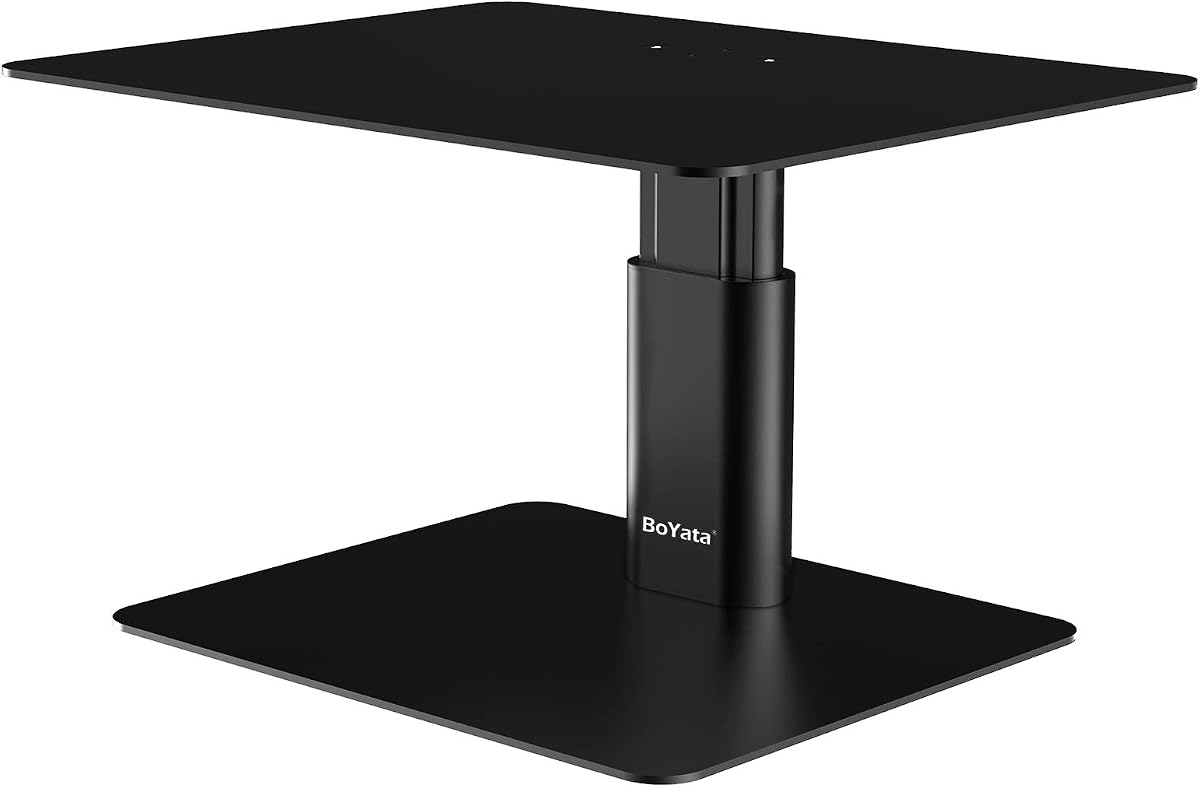
BoYata Monitor Stand, Adjustable Height Metal Desktop Riser, Black
Twist knob adjust
33 lbs capacity
Metal plate build
Includes assembly tool
The BoYata Monitor Stand stands out for its unique twist knob mechanism that allows precise height customization. Unlike fixed options, you can adjust the riser to match your exact eye level for maximum comfort.
Pros
Infinitely adjustable height
Solid metal build
Includes screwdriver
Stable base
Space saving design
Cons
Requires tool assembly
Lower weight limit
We may earn a commission when you buy through this link, at no additional cost to you.
Constructed from durable metal, it ensures a long-lasting and wobble-free surface for your devices. The included screwdriver makes assembly straightforward, and the skidproof pads keep the stand secure on any desk surface.
While the weight capacity is moderate at 33 lbs, it suffices for most standard monitors and laptops. The only trade-off is the need for manual assembly, but the effort pays off with a tailored ergonomic setup.
This model is perfect for users who need specific height adjustments to alleviate neck pain. Its combination of adjustability and metal durability makes it a strong contender for ergonomic desk setups.
Custom Ergonomic Fit
The adjustable twist knob lets you fine-tune the height to suit your personal preference, reducing strain on your neck and back during long work hours.
Durable Metal Frame
Made from high-quality metal, this riser resists bending and denting, ensuring it remains stable and functional over years of daily use.
Amazon Basics Height Adjustable Monitor Stand Riser with Storage Organizer, 3-Level Stackable Design, Durable ABS Plastic, Supports up to 22lbs, for Monitors & Laptops, Black
3-level stackable
22 lbs capacity
ABS plastic build
Tapered design
The Amazon Basics Height Adjustable Stand delivers exceptional value for those on a budget without compromising on core functionality. Its stackable design offers three distinct height levels to help you achieve a comfortable viewing angle easily.
Pros
Affordable price point
Lightweight and portable
Stackable height design
Fits small spaces
Easy to clean
Cons
Plastic material feels light
Lower weight limit
We may earn a commission when you buy through this link, at no additional cost to you.
Made from durable ABS plastic, it is lightweight and easy to move around your desk or office. The tapered design ensures it fits most standard monitors and laptops securely, while the non-skid feet keep it stable.
While the material may feel less premium than metal or wood, it handles standard devices up to 22 lbs effectively. The main trade-off is its lighter build, which might not suit extremely heavy all-in-one computers.
For students or home office users needing a simple, affordable riser, this is the ideal choice. It balances cost and utility perfectly, providing essential ergonomic benefits without a high price tag.
Stackable Flexibility
The detachable legs allow you to customize the height between three levels, giving you flexibility to find the best angle for your specific desk setup.
Portable Convenience
Thanks to its lightweight ABS construction, you can easily carry this stand between rooms or desks without struggling with heavy furniture pieces.
YAOHUOO Dual Monitor Stand Riser, 39Inch Large Monitor Stands for 2 Monitors, Computer Monitor Stand, Wooden Desktop Oraganizer Shelf for Office Desk Computer,Laptop,TV
39 inch width
100 lbs capacity
Steel leg structure
Wooden organizer style
The YAOHUOO Dual Monitor Stand is engineered for power users who need to run two screens side-by-side. At 39 inches wide, it provides ample room for multiple monitors or even a large TV setup with impressive stability.
Pros
Massive dual screen support
Extremely high stability
Wooden desk aesthetic
Quick 10 min assembly
Ergonomic height boost
Cons
Takes up desk space
Requires two monitors
We may earn a commission when you buy through this link, at no additional cost to you.
Its heavy-duty steel footing ensures it never shakes, even with significant weight. The rustic wooden finish adds a premium touch to your workspace, while the ergonomic height helps reduce neck strain during long sessions.
Assembly takes just ten minutes, and the package includes all necessary tools. The main consideration is its size, which requires a spacious desk to accommodate the wide base without overcrowding your peripheral devices.
If you rely on a dual-monitor workflow, this stand is the best premium option. It combines professional-grade stability with an attractive wooden design that elevates your entire desk aesthetic.
Dual Screen Mastery
Designed specifically for two monitors, this riser eliminates the need for multiple stands, offering a unified and stable surface for your entire display setup.
Heavy-Duty Stability
With a weight capacity up to 100 lbs, you can rest assured that your equipment will not cause the stand to collapse or wobble during daily use.
Computer Monitor Stand Riser for Desk, 3 Height Adjustable PC Laptop TV Desktop Monitor Stand Shelf, Metal Printer Table with Phone Holder, Stand Riser for Desk, Office Desk Organizers and Accessories, 2 Pack
2 pack value
3 height settings
44 lbs capacity
Phone holder included
This 2-Pack Monitor Stand Riser offers incredible value for households or offices needing multiple setups. You get two sturdy metal stands in one purchase, each featuring three adjustable heights to customize your workspace ergonomics.
Pros
Buy one get two
Metal cold-rolled steel
Includes phone holder
Heat dissipation holes
Fast 30s assembly
Cons
Simple design
No drawers
We may earn a commission when you buy through this link, at no additional cost to you.
Constructed from cold-rolled steel with an anti-rust coating, both units are durable and support up to 44 lbs. The large platform includes 150 heat dissipation holes to keep devices cool, plus a practical phone holder for easy access.
Assembly is incredibly fast, taking under 30 seconds with simple leg screwing and no extra tools. While the design is functional rather than ornate, the price-per-unit makes it an unbeatable choice for bulk needs.
Ideal for shared workspaces or families, these stands provide reliable support and organization at a fraction of the cost of single premium models. They are a smart pick for those who need quantity without sacrificing quality.
Cost Effective Bulk Buy
Purchasing a two-pack saves money compared to buying individual stands, making it perfect for outfitting multiple desks or rooms efficiently.
Active Cooling Feature
The 150 heat dissipation holes actively prevent overheating, ensuring your laptops or desktops maintain optimal performance during heavy workloads.
Monitor Stand Riser, Klearlook Foldable, Height Adjustable Computer Stand, Desk Shelf Riser with Storage Drawer &Tablet Phone Stand for Desktop, Laptop (White)
Foldable width adjust
55 lbs capacity
Storage drawer
No assembly needed
The Klearlook Foldable Stand is unique for its adjustable width mechanism, allowing it to fit full-sized mechanical keyboards underneath when folded. It comes ready out of the box, saving you from any assembly hassles.
Pros
Foldable width fits keyboards
Built-in storage drawer
Ready out of box
Non-slip legs
Phone holder included
Cons
White shows dust
Drawer is shallow
We may earn a commission when you buy through this link, at no additional cost to you.
Its white design with metal reinforcements provides a clean look that fits modern homes. The built-in drawer and phone holder help keep your desk organized, while the rubberized legs ensure a stable and wobble-free experience.
While the drawer is somewhat shallow for bulky items, it works well for small office supplies. The foldable nature makes it versatile for various desk sizes, though the white finish may show dust more than darker colors.
This is the top choice for users who value organization and convenience. Its ready-to-use design and flexible width make it an excellent addition to any clutter-free home office environment.
Adjustable Width Design
The foldable legs allow you to expand or contract the width to match your keyboard or monitor setup, maximizing desk space efficiency.
Integrated Organization
A built-in storage drawer and phone holder keep your essentials handy, reducing desktop clutter and helping you stay focused on tasks.
OPNICE Desk Organizers and Accessories, Dual Monitor Stand Riser with Drawer and 2 Pen Holders, Desk Shelf Computer Racks & Printer Stand for Office Workspace Organizers, Desktop Organization (Black)
Dual monitor support
Pen holders and drawer
Premium metal build
No installation needed
The OPNICE Dual Stand seamlessly integrates storage into a sleek riser design, featuring two pen holders and a convenient drawer for your office essentials. It supports dual monitors and arrives ready to use without any assembly required.
Pros
2 pen holders
Integrated storage drawer
Rock-solid stability
Sleek aesthetic
No assembly time
Cons
Limited height adjust
Drawer pulls only
We may earn a commission when you buy through this link, at no additional cost to you.
Built with premium metal construction, it offers rock-solid stability even with heavy equipment. The black finish blends well with modern office setups, creating a clutter-free environment that boosts productivity and focus.
While height adjustment is limited to the fixed stand height, the ergonomic lift is sufficient for most users. The main trade-off is the lack of adjustable height mechanisms, but the storage benefits often outweigh this limitation.
Choose this if you want to declutter your desk while elevating your screens. Its integrated storage solutions make it a standout choice for anyone seeking an organized and professional workspace.
Smart Storage Solutions
The combination of hanging pen holders and a drawer keeps your tools instantly accessible, helping you maintain a tidy and efficient desk.
Instant Setup
With no installation required, you can simply unbox and place the stand on your desk, saving time and avoiding the frustration of assembly instructions.
WESTREE Dual Monitor Stand Riser, Wood and Steel Monitor Stand Riser, Computer Monitor Stand for 2 Monitors, Multi-Purpose Desktop Storage Stand for Computer,Laptop,Printer,TV
Wood and steel mix
Dual monitor ready
Rustic brown finish
Pre-drilled assembly
The WESTREE Dual Monitor Stand offers a unique blend of rustic wood and sturdy steel legs, creating a one-of-a-kind look for your workspace. It is designed to handle two monitors with ease, providing a stable platform for multitasking.
Pros
Unique rustic finish
Thick steel legs
Pre-drilled easy build
Dual monitor capacity
Non-slip pad options
Cons
Requires assembly time
Heavier than plastic
We may earn a commission when you buy through this link, at no additional cost to you.
Pre-drilled holes and included tools make assembly straightforward and quick. The thick steel legs ensure it holds significant weight without sliding, and the rustic brown finish adds a warm, personalized touch to your desk setup.
While it requires assembly, the process is simple and takes just minutes. The heavier build adds stability but means it is not as portable as plastic models, though the aesthetic appeal is worth the trade-off for many users.
Ideal for home offices wanting a distinct style, this stand combines form and function effectively. Its durable construction and unique design make it a standout option for those looking beyond generic metal or plastic designs.
Distinctive Aesthetic
The rustic brown wood finish paired with black steel legs creates a unique and warm look that stands out in any professional or home environment.
Quick Installation
Pre-drilled holes and clear instructions allow anyone to assemble the stand in minutes, ensuring you can set up your ergonomic workspace immediately.
gianotter Dual Monitor Stand Riser With Drawer and 2 Pen Holders
Magnetic pen holders
Built-in storage drawer
High strength metal
No assembly required
The gianotter Dual Monitor Stand stands out for its patented design featuring magnetic pen holders and a built-in drawer. It arrives ready to use immediately, making it a hassle-free upgrade for any cluttered workspace.
Pros
Patented design
Magnetic pen holders
Drawer for supplies
Ready to use
High strength support
Cons
Basic design
Limited color options
We may earn a commission when you buy through this link, at no additional cost to you.
Constructed from high-strength metal, it provides exceptional support performance for dual monitors or large screens. The magnetic holders keep pens accessible, while the drawer offers a hidden spot for small office supplies or personal items.
While the design is straightforward, its functional utility is high. The main limitation is the lack of color variety, but the durability and convenience make it a solid choice for quick organization needs.
If you need a reliable stand that organizes as it lifts, this is a top contender. Its patented features and ease of setup offer a practical solution for maintaining a tidy and efficient desk.
Patented Organization
The unique design includes magnetic holders and a drawer, keeping your workspace tidy and ensuring your essentials are always within easy reach.
High Strength Support
Crafted with meticulous design ratios and high-strength materials, this stand meets diverse needs by supporting heavy equipment without compromising stability.
We may earn a commission when you buy through this link, at no additional cost to you.
Buying Guide – How to Choose the Best Desktop Monitor Riser
Selecting the right desktop monitor riser requires evaluating several factors to ensure it meets your ergonomic and storage needs effectively.
Material Quality and Durability
Monitor risers are commonly made from metal, wood, or plastic. Metal offers the best balance of strength and modern aesthetics, while wood provides a warm, home-friendly look. Plastic is lightweight and budget-friendly but may feel less sturdy over time.
Choose metal or solid wood for heavy devices to ensure long-term stability. Avoid cheap plastic if you plan to use the stand for extended periods or with multiple monitors.
Weight Capacity
Always check the maximum weight the riser can support. Standard monitors weigh 10 to 20 lbs, but dual setups or all-in-one PCs can exceed 40 lbs. Exceeding the limit risks damage to the stand or your equipment.
Select a stand rated for at least 20 lbs more than your heaviest device. This safety margin ensures the stand remains stable and durable under real-world conditions.
Adjustability Options
Some risers offer fixed heights, while others have adjustable legs or knobs to change the viewing angle. Adjustable models provide better ergonomic customization for different users sitting at the same desk.
Opt for adjustable options if you share your workspace. Fixed heights are fine if you have a single user who is comfortable with one setting.
Storage Features
Many modern risers include drawers, pen holders, or open space underneath for keyboards and notebooks. These features help keep your desk organized and reduce clutter significantly.
Prioritize models with storage if your desk is small. Integrated solutions save space and help you maintain a clean, professional appearance.
Dimensions and Compatibility
Measure your desk width and screen size before buying. A riser that is too wide can overcrowd your workspace, while one that is too narrow may not support larger monitors safely.
Ensure the shelf dimensions comfortably fit your devices with some margin. Check product descriptions for exact length and width measurements.
Ventilation and Cooling
Laptops and desktops generate heat, so ventilated designs help prevent overheating. Metal stands with holes or open grills promote better airflow under your device.
Choose ventilated models if you use your computer for long sessions or intensive tasks. This helps maintain device performance and longevity.
Assembly Requirements
Some stands require tools and time to assemble, while others come ready out of the box. Quick assembly is convenient but may lack the sturdiness of bolted models.
Consider how much time you have to set up the stand. If you prefer convenience, look for 'no assembly required' labels, but verify stability claims.
Aesthetic Match
The stand should complement your existing decor. Options range from minimalist black metal to rustic wood, allowing you to choose a style that fits your office theme.
Pick a color and finish that blends well with your desk and wall. A matching riser creates a cohesive and visually pleasing workspace.
How to Use and Care for Your Desktop Monitor Riser
Place the riser on a flat, stable surface and ensure all legs are firmly attached. Position your monitor or laptop securely on the shelf, making sure it does not overhang too far.
Adjust the height if your model allows it to align the top of your screen with your eye level. This reduces neck strain and improves posture during long work sessions.
Clean the stand regularly with a soft cloth and mild cleaner to remove dust. Check screws and joints occasionally to ensure stability, especially after moving the stand.
Frequently Asked Questions
What is the best height for a monitor riser?
The top of your monitor should be at or slightly below eye level so you do not tilt your head down. This reduces neck strain and keeps your eyes comfortable. Adjust the stand height to match this position based on your chair setup.
Can a monitor riser hold two screens?
Yes, many dual monitor risers are designed to support two screens side-by-side. Look for models with wide platforms and high weight capacity to ensure stability for both devices.
Are wooden monitor stands sturdy enough?
High-quality wooden stands made of solid wood or MDF are very sturdy and can support most monitors. However, they may not be as heat-resistant as metal options for laptops.
Do all risers require assembly?
Not all risers need assembly. Some come ready out of the box, while others require simple leg attachments. Check product descriptions to confirm before buying.
How do I clean my monitor riser?
Use a soft, dry cloth or one slightly dampened with water to wipe down the surface. Avoid harsh chemicals that could damage the finish or material of the stand.
Is ventilation important for a monitor stand?
Yes, ventilation helps prevent devices from overheating during use. Stands with holes or open designs allow air to circulate, keeping laptops and monitors cool.
Final Thoughts on Choosing the Best Desktop Monitor Riser
The WALI Computer Monitor Stand leads the pack with its durable metal construction and excellent ventilation features. It offers the best balance of ergonomic support and stability for most users.
When choosing a riser, prioritize weight capacity and adjustability to ensure comfort. Consider storage features if you want to declutter your workspace efficiently.
Prices and availability change frequently, so review current listings before making your final decision. Investing in a quality riser now will improve your posture and workspace organization for years.