
VIVO Premium Black Clamp-on 27 x 11 in Keyboard Tray, MOUNT-KB05HT
4.3Editor score
Nine tilt adjustment settings
Premium build quality
Independent swivel clamps
Finding the right clamp on keyboard tray can transform your workspace by freeing up valuable desk space and improving your typing ergonomics. These under-desk solutions allow you to position your keyboard and mouse at a comfortable height without damaging your existing furniture. Whether you work from home or in a busy office, the right tray reduces wrist strain and keeps your desk organized.
We evaluated ten leading models based on build quality, ease of installation, adjustability, and compatibility with different desk types. Our analysis focused on how well each tray supports standard keyboards and mice while maintaining stability during heavy use. We also considered features like tilt adjustments, swivel capabilities, and additional storage options to provide a comprehensive overview.
Each pick in this list highlights specific strengths such as budget-friendly pricing, premium adjustability, or specialized designs for corner desks. You will find detailed reviews, pros and cons, and key specifications to help you make an informed decision. Please note that prices and availability change frequently, so check the current listings before purchasing to ensure you get the best value.
4.3Editor score

4.4Editor score

4.4Editor score
As an Amazon Associate we earn from qualifying purchases.
The following comparison table outlines the key specifications and features of all ten products reviewed in this guide. By examining dimensions, weight capacity, and unique functionalities side by side, you can quickly identify which model aligns best with your specific desk setup and ergonomic needs.




The VIVO MOUNT-KB05E stands out as a top choice for those seeking a reliable clamp on keyboard tray. With a solid 4.4 rating, it offers a spacious 26.8 by 11 inch surface that comfortably holds keyboards and mice. Its sturdy construction ensures stability during use, making it a favorite among home office workers and gamers alike.
We may earn a commission when you buy through this link, at no additional cost to you.
This model excels in space efficiency by mounting below the desk, freeing up room for monitors and documents. The clamps are designed to hold tightly without damaging your furniture, provided the desk thickness does not exceed 1.25 inches. The tray extends up to 8.5 inches, allowing for easy access and comfortable typing positions that reduce wrist strain.
While it lacks advanced tilt features found in premium models, the basic design is robust and effective for standard setups. The only notable limitation is its incompatibility with beveled or lipped edges, which users should check before purchasing. Despite this, the value it provides in terms of organization and ergonomics makes it a highly recommended option.
If you need a straightforward solution that balances quality and price, this tray is an excellent fit. It is particularly suitable for users who want to reclaim desk space without complex installations. We recommend it for anyone looking to improve their workstation ergonomics with a proven, durable product.
By moving your keyboard under the desk, you gain valuable surface area for other essentials like notebooks or drinks.
The tray allows for a neutral typing position, which helps reduce strain on wrists and shoulders during long sessions.
We may earn a commission when you buy through this link, at no additional cost to you.
The VIVO MOUNT-KBST1 is designed for users who need flexibility in their setup. It features both height and width adjustments, allowing you to customize the tray to fit your specific ergonomic needs. With a higher desk thickness tolerance of up to 3.4 inches, it works on a wider variety of furniture than standard models.
We may earn a commission when you buy through this link, at no additional cost to you.
This tray comes with included accessories like a wrist pad and mouse rest, adding immediate value to your purchase. The larger surface area accommodates full-size keyboards and vertical mice without crowding. The clamps are robust and secure, ensuring the tray remains steady even when pushed or pulled frequently during work.
The main trade-off is the size; it requires a significant amount of desk width to install properly. Assembly can also be slightly more involved due to the multiple adjustment points. However, for those who need precise positioning and extra space for peripherals, the effort is well worth the improved comfort.
We suggest this model for users with thick desks or those who prioritize adjustability over simplicity. It is a great choice for professionals who spend long hours typing and need a customized typing angle. Ensure you measure your desk before buying to confirm it fits your available space.
Adjustable height and width settings let you find the perfect position to reduce shoulder and wrist fatigue.
The package includes wrist pads and mouse rests, saving you the cost of buying separate ergonomic accessories.
We may earn a commission when you buy through this link, at no additional cost to you.
The VIVO MOUNT-KB04CB offers a unique rotating design that provides exceptional flexibility. You can pivot the tray a full 360 degrees to move it out of the way when not in use. This feature is ideal for shared desks or spaces where you need to clear the area quickly for other tasks.
We may earn a commission when you buy through this link, at no additional cost to you.
Despite its smaller size, it is sufficient for standard keyboards and mice. The single clamp design makes installation straightforward without requiring multiple mounting points. It is particularly useful in compact home offices where every inch of desk real estate counts and versatility is key.
The rotation mechanism works smoothly, but you need to ensure there is enough clearance around the clamp for it to spin freely. The weight capacity is moderate, so it may not support heavy mechanical keyboards with large wrist rests. However, for typical office setups, it performs reliably and efficiently.
If you value the ability to tuck your keyboard away completely, this is a strong candidate. It is best suited for users with limited desk depth who need a temporary typing solution. Check your desk thickness and ensure you have the necessary clearance for the full rotation range.
The 360-degree rotation allows you to store the tray under the desk when it is not needed, freeing up space instantly.
Its smaller footprint makes it perfect for smaller desks where a full-size tray would be too bulky.
We may earn a commission when you buy through this link, at no additional cost to you.
The BONTEC Under Desk Tray is an excellent option for users who want a clean installation without drilling holes. It features sturdy C-clamps that secure the tray firmly, with protective pads to prevent scratches. This makes it suitable for renters or anyone concerned about preserving their desk's surface.
We may earn a commission when you buy through this link, at no additional cost to you.
The tray is designed to maximize your workspace by moving your input devices below the main surface. Its dimensions accommodate most standard keyboards and mice comfortably. The smooth slide mechanism ensures that you can pull it out and push it back easily without jerky movements.
One limitation is the requirement for a flat, unobstructed underside on your desk. If your desk has curved or beveled edges, this model will not work properly. Additionally, the maximum desk thickness is slightly lower than some competitors, so verification is necessary before purchase.
For those seeking a balance of price and functionality, this tray delivers well. It is ideal for home offices where protecting the furniture is a priority. We recommend checking your desk dimensions carefully to ensure a perfect fit before ordering.
Included protective pads prevent scratches and ensure a firm grip on your desk surface during use.
No drilling is required, making it a quick and reversible solution for temporary or shared workspaces.
We may earn a commission when you buy through this link, at no additional cost to you.
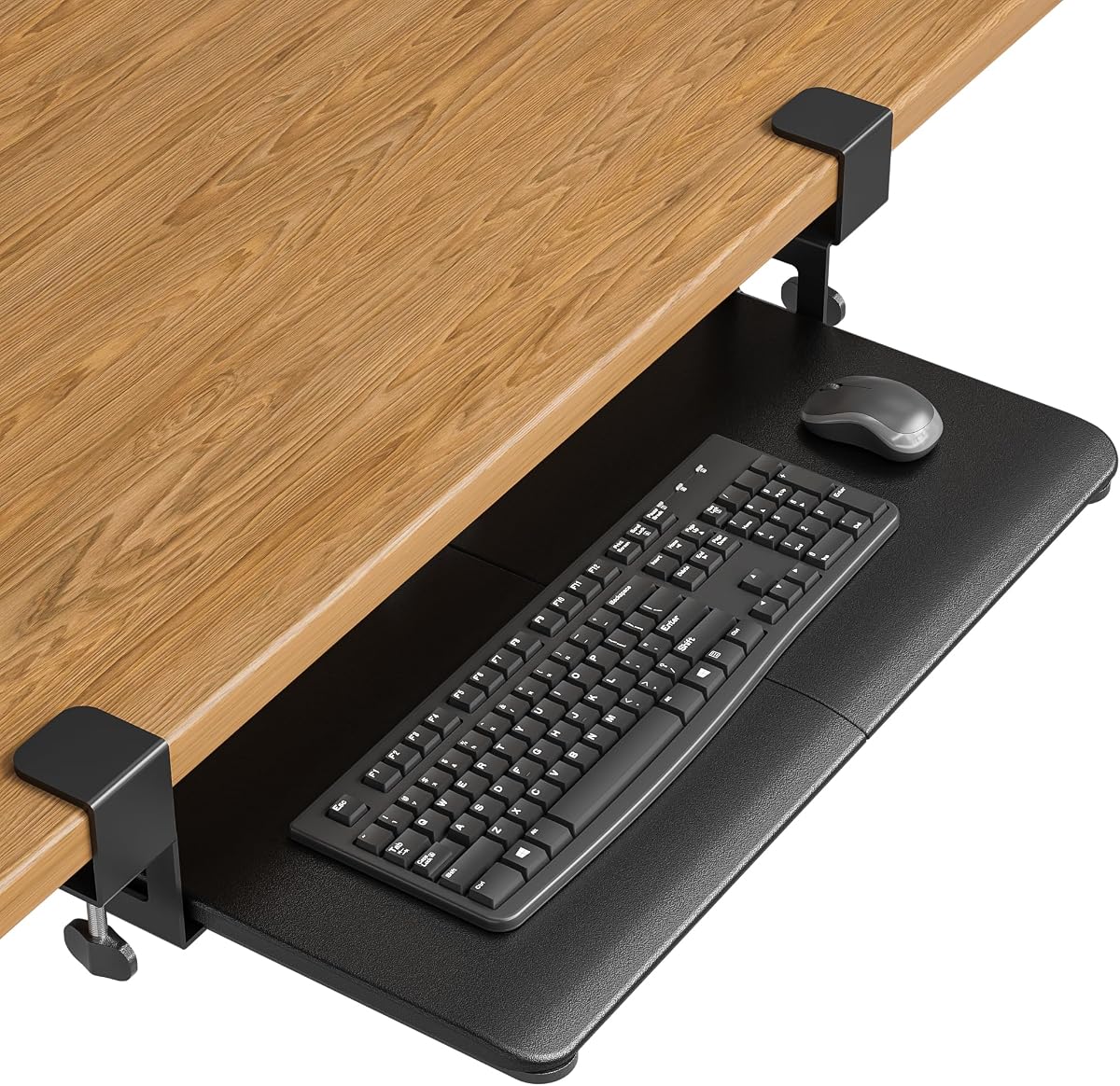
The VIVO MOUNT-KB05HT is a premium model designed for users who demand precise ergonomic control. It offers nine distinct tilt settings, allowing you to lock the tray at angles ranging from positive to negative. This level of customization helps find the exact position that minimizes wrist strain.
We may earn a commission when you buy through this link, at no additional cost to you.
In addition to tilt, the clamps can rotate 90 degrees independently, providing flexibility in placement on corner or complex desks. The build quality is robust, with solid materials that support up to 11 lbs. This durability ensures long-term reliability even in heavy daily use scenarios.
The premium nature of this tray comes with a higher price tag and a more complex installation process. You will need to assemble multiple brackets and settings to get the best results. However, for professional users who spend hours typing, the investment in ergonomics can prevent long-term discomfort.
We recommend this model for those who prioritize ergonomics above all else. If you have specific posture requirements or a corner desk setup, the adjustable features make it a standout choice. Ensure you have the necessary desk space and thickness for installation before buying.
Nine tilt settings allow you to find the exact angle that best supports your wrists and shoulders.
Independent swivel clamps make it easy to install on corner desks or desks with unique layouts.
We may earn a commission when you buy through this link, at no additional cost to you.
The VIVO MOUNT-KB10C is specifically engineered for L-shaped corner workstations. It features swiveling C-clamps that can rotate 90 degrees independently to fit the unique angles of a corner desk. This specialized design solves a common problem for users with complex furniture layouts.
We may earn a commission when you buy through this link, at no additional cost to you.
Despite its corner focus, it still offers a full 26.8 by 11 inch surface for your keyboard and mouse. The clamps are solid and secure, holding the tray tightly in place. This model is a perfect fit for those who want to optimize their corner space without sacrificing typing comfort.
One consideration is the desk thickness limit of 1.25 inches, which may not suit all thicker desks. Also, beveled edges can interfere with installation. For standard corner desks within these limits, it is a highly effective solution that blends functionality with space efficiency.
If you have an L-shaped desk, this tray is likely the best option for you. It maximizes the use of corner space that is often underutilized. We suggest verifying your desk thickness to ensure compatibility before purchasing.
Specially designed clamps accommodate L-shaped desks without damaging the corners of your workstation.
Each clamp can be adjusted separately to fit the unique angles of corner or multi-panel desks.
We may earn a commission when you buy through this link, at no additional cost to you.
The VIVO MOUNT-KB05-4D adds value with an integrated 17-inch pencil drawer for small accessories. This combination keeps your desk organized by holding pens, clips, and other essentials under the keyboard. It is an ideal choice for those who struggle with clutter on their desktop surface.
We may earn a commission when you buy through this link, at no additional cost to you.
The typing platform itself is robust and supports up to 11 lbs of weight. The drawer extends smoothly with the tray, maintaining stability even when loaded. This dual functionality reduces the need for separate organizers, streamlining your workspace significantly.
Because of the added drawer, the total extension is deeper, which may require more legroom or clearance under your desk. The weight is also slightly higher than standard trays. However, the organizational benefits often outweigh these minor physical constraints for active users.
We recommend this model for busy professionals who need a tidy workspace. It helps keep important supplies close at hand while protecting them from dust. Check your under-desk space to ensure the extended depth fits your leg area comfortably.
The integrated drawer provides convenient storage for small office supplies, keeping your desk surface clear.
Combines a keyboard tray with a pencil drawer to reduce clutter and save space in one unit.
We may earn a commission when you buy through this link, at no additional cost to you.
The Ergonomic Mouse & Keyboard Tray offers a cost-effective solution for basic ergonomic needs. It features a 20 by 11.8 inch surface that is sufficient for standard input devices. At an attractive price point, it provides excellent value for those on a tight budget.
We may earn a commission when you buy through this link, at no additional cost to you.
One of its strengths is the compatibility with a wide range of desk thicknesses up to 2.76 inches. The adjustable dual clamps ensure a secure fit on most desks. The built-in back baffle prevents your keyboard from sliding forward, ensuring a stable typing surface.
While it lacks premium features like tilt adjustments, the core functionality is solid. The slide mechanism is smooth and durable enough for daily use. For users who simply need to move their keyboard under the desk to save space, this model does the job well.
We recommend this tray for students or budget-conscious users who need basic organization. It is a practical first step into ergonomic workspace improvements without breaking the bank. Measure your desk dimensions to ensure the width fits your space before ordering.
Provides a reliable ergonomic setup at a price point that is accessible for everyone.
The built-in back baffle keeps your keyboard in place, preventing slips during intense typing sessions.
We may earn a commission when you buy through this link, at no additional cost to you.
The VIVO DESK-EXT24 is a versatile desk extender that can serve as a keyboard tray or printer platform. It features a 90-degree folding design, allowing you to fold it out of the way when not in use. This versatility makes it a great addition to multi-purpose workstations.
We may earn a commission when you buy through this link, at no additional cost to you.
With a high weight capacity of up to 44 lbs, it can support heavier equipment like speakers or small printers. The clamps can handle desks up to 3.5 inches thick, offering robust compatibility. It is also backed by a three-year manufacturer warranty for added peace of mind.
Unlike traditional pull-out trays, this model requires you to use release levers to deploy or store it. This might be slightly less convenient for constant access, but it excels in flexibility. It is best suited for users who need occasional extra surface space.
We suggest this model for shared or multi-use desks where the tray is not needed all day. It maximizes utility by acting as both a tray and a general extender. Ensure you have the space for the fully extended dimensions before purchasing.
The 90-degree folding design allows you to stow the tray away when you need maximum desk space.
Beyond keyboards, it can support printers or speakers due to its high weight capacity.
We may earn a commission when you buy through this link, at no additional cost to you.
The Mount-It! Keyboard Tray stands out for its lifetime warranty and US-based support team. It features a wide 27 by 11 inch platform that accommodates full-size keyboards comfortably. The no-drill clamp-on installation makes it a safe option for shared or rented spaces.
We may earn a commission when you buy through this link, at no additional cost to you.
Built with sturdy construction, it offers reliable daily use with smooth sliding motions. The support team is responsive and ready to assist with any setup questions, which is a significant advantage for less technical users. It represents a long-term investment in your workspace ergonomics.
The warranty coverage and support quality justify the higher price point. However, the shipping weight may be heavier than cheaper alternatives, so handle with care during installation. For those seeking a durable solution with professional backing, this model is highly reliable.
We recommend this tray for professionals who want peace of mind with their purchase. The lifetime warranty ensures that you are protected against defects for the long haul. Check your desk thickness to confirm it fits within the 2.2-inch limit.
Comes with a lifetime warranty and responsive US-based support for long-term reliability.
US-based product specialists are available to help with installation or setup questions anytime.
We may earn a commission when you buy through this link, at no additional cost to you.
Choosing the right clamp on keyboard tray requires careful consideration of your desk's dimensions, your ergonomic needs, and your budget. This guide breaks down the key factors to help you make an informed decision that will improve your workspace comfort.
Check the maximum desk thickness your tray can accommodate. Standard models work with desks up to 1.25 inches, while others support thicker surfaces up to 3.5 inches. Ensure your desk falls within this range to secure the clamps properly.
Always measure your desk before buying to avoid compatibility issues.
Consider the width and depth of the tray surface. Larger trays offer more room for keyboards and mice, while smaller ones save space. Ensure the tray fits under your desk without hitting your legs or obstructions.
Select a size that fits your specific keyboard and mouse setup.
Look for trays with tilt or height adjustments to find the most comfortable typing angle. Premium models offer multiple tilt settings, while basic ones may be fixed. Adjustability helps reduce wrist strain and improve posture over time.
Prioritize adjustable models if you spend long hours typing daily.
Decide between clamp-on or screw-in models. Clamp-on trays are easier to install and remove without damaging your desk. They are ideal for renters or shared workspaces where you may need to move the tray later.
Choose clamp-on models for a non-destructive setup.
Ensure the tray can support the weight of your keyboard and any additional accessories. Most trays support around 11 lbs, but heavy mechanical keyboards may require sturdier models. Check the maximum load to prevent sagging.
Verify the weight limit matches your device requirements.
Check if your desk has beveled or lipped edges. Many clamps require flat, square edges to mount securely. If your desk has unique edges, you may need a different mounting solution or a tray with flexible clamps.
Measure your desk edges to ensure clamp fit.
Some trays include drawers or storage compartments for accessories like pens and cables. These can help organize your desk further. Consider if you need extra storage space or just a typing surface.
Look for built-in storage if you want to minimize desktop clutter.
Check the warranty terms provided by the manufacturer. Some offer lifetime warranties and responsive support teams, while others provide limited coverage. Good support ensures you can resolve issues quickly if the tray has defects.
Prefer models with solid warranty protection for peace of mind.
To install your tray, start by loosening the clamps and positioning them on the edge of your desk. Ensure the clamps are aligned parallel to the desk edge for a stable fit. Tighten the screws until the tray is secure but not so tight that it damages the surface.
Once installed, slide the tray in and out to ensure smooth movement. If it feels stiff, adjust the clamps slightly to ensure even pressure. Place your keyboard and mouse on the surface and adjust the height or tilt if your model allows to find a comfortable position.
Regularly clean the tray and clamps with a soft, damp cloth to remove dust and debris. Avoid using harsh chemicals that might damage the finish. If the sliding mechanism becomes squeaky, apply a small amount of silicone lubricant to the tracks for smoother operation.
Most clamp on keyboard trays take between 15 to 30 minutes to install. The exact time depends on the model complexity and your experience with tools. Following the included instructions carefully ensures a faster and smoother setup.
Most models are not compatible with glass desks because the clamps require a solid surface to grip. Some manufacturers specifically warn against using trays on glass surfaces. It is best to check the product details before attempting installation on a glass desk.
You typically need at least 24 to 30 inches of width on your desk edge to install a standard tray. This allows enough room for the clamps and the tray to extend properly. Measure your available space carefully before purchasing.
Yes, many clamp on trays work with standing desks as long as the thickness matches the clamp requirements. Some models adjust to varying thicknesses found in adjustable desks. Check the maximum and minimum thickness specs for your standing desk.
Most clamp on trays are designed to be easily removed without damaging the desk. Simply loosen the clamps and slide the tray off. This makes them ideal for renters or users who want flexibility in their setup.
Most models come with all necessary hardware and often include an Allen wrench or screwdriver. In some cases, you may need a standard screwdriver for tighter adjustments. The installation process is generally tool-light and straightforward.
We reviewed ten top-rated clamp on keyboard trays that offer a range of features to suit different needs. Whether you prioritize premium adjustability, corner desk compatibility, or budget-friendly pricing, there is a model that fits your requirements.
When making your choice, focus on factors like desk thickness compatibility and ergonomic adjustments. These details ensure that the tray provides long-term comfort and durability for your workspace setup.
Remember to check current prices and availability before purchasing as they may fluctuate frequently. We hope this guide helps you find the perfect keyboard tray to transform your workspace into a more comfortable and organized environment.