
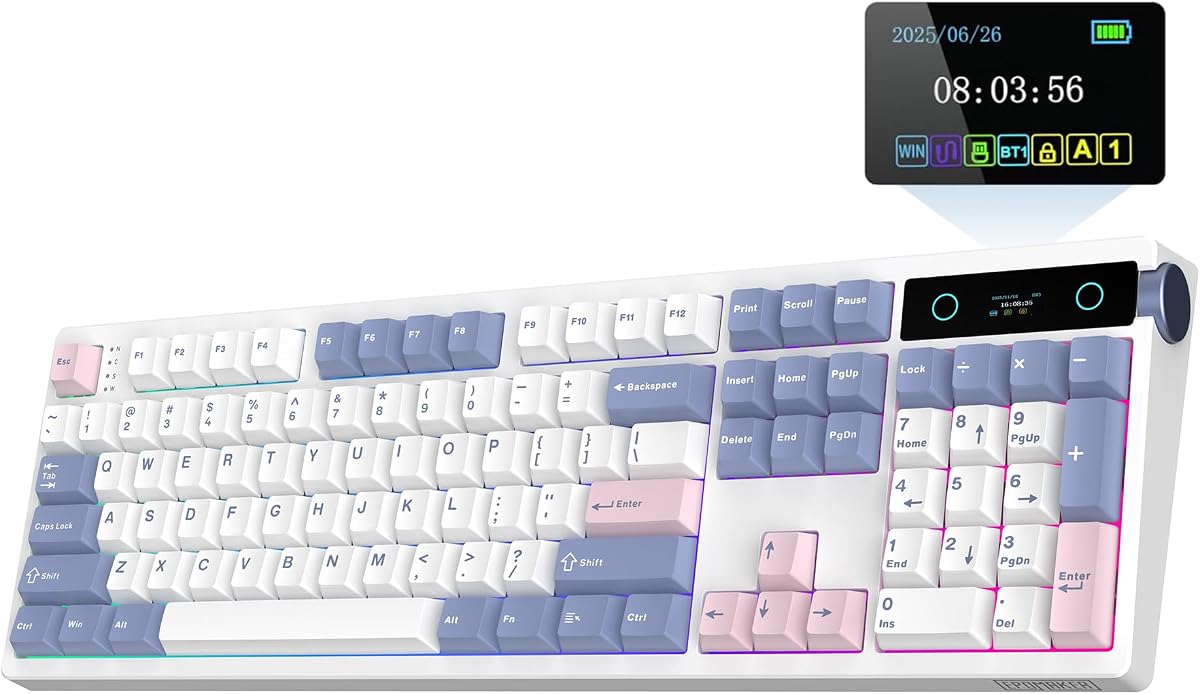
EPOMAKER Ajazz AK820 Pro Wireless Mechanical Keyboard with TFT Display&Knob
4.7Editor score
Compact 75 percent layout design
TFT screen for real time updates
Gasket mounted flex cut PCB
This guide compares the top ten Epomaker Keyboards featuring wireless connectivity hot swappable switches and premium gasket mounts for gaming and productivity
Epomaker Keyboards have revolutionized the mechanical keyboard market by offering premium features like gasket mounts and hot swappable switches at accessible price points. These devices cater to enthusiasts seeking customizable sound profiles and tactile feedback without breaking the bank for high-end custom builds.
We evaluated ten distinct models based on build quality wireless performance battery life and acoustic tuning. Our analysis focused on real world usability across gaming office tasks and creative workflows to ensure every recommendation delivers consistent value and reliability for diverse user needs.
Each pick highlights unique strengths such as integrated screens massive batteries or specialized actuation technologies. Note that prices change frequently so verify current offers before purchasing to secure the best deal available for your specific setup requirements today.
4.7Editor score
4.7Editor score

4.7Editor score
This side by side comparison highlights the key specifications and unique features of each model to help you identify the perfect fit for your desk setup and usage patterns.

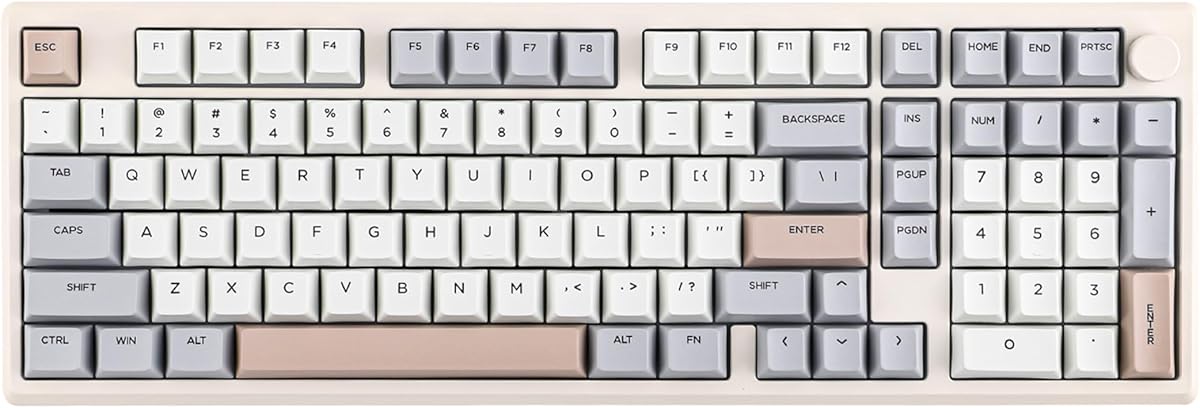


The EPOMAKER TH108 PRO stands out as a top tier choice for users seeking a full size layout with advanced customization. It features a smart screen and rotary knob that allow for dynamic GIFs and quick settings changes without leaving your game or document.
We may earn a commission when you buy through this link, at no additional cost to you.
Its 10000mAh battery ensures weeks of usage on a single charge while the gasket mount design delivers a creamy and thocky sound profile. The hot swappable PCB lets you experiment with different switches to fine tune the tactile experience to your exact preference.
While the weight makes it less ideal for travel the stability it provides during intense gaming or typing sessions is unmatched. The only minor drawback is the initial setup of the Chrome based software which requires some time to explore all macro options.
Ideal for desktop gamers and office professionals this keyboard combines productivity with personality. If you want a board that looks unique and performs reliably over long periods the TH108 PRO is the perfect investment.
The TFT screen shows battery time and even custom images enhancing both utility and visual appeal.
Multiple layers of foam and silicone dampen noise for a smooth premium typing sound.
We may earn a commission when you buy through this link, at no additional cost to you.
The EPOMAKER X Aula F75 MAX offers a perfect balance between compact design and feature richness. It retains the beloved F75 form factor while adding a TFT screen that displays battery life and time making it a practical daily driver.
We may earn a commission when you buy through this link, at no additional cost to you.
Its gasket mount structure and factory lubed switches produce a satisfying sound that appeals to enthusiasts on a budget. The rotary knob allows quick volume adjustments which is crucial during immersive gaming or focus work sessions.
While the lack of a numpad may deter data entry specialists the 75 percent layout offers a great middle ground for those who want arrow keys without the bulk. The build quality remains robust despite the smaller footprint.
This keyboard is ideal for students or professionals with limited desk space who still demand high performance. If you prioritize sound and customization in a smaller package the F75 MAX is a compelling choice.
The low front height and adjustable kickstand reduce wrist strain during long typing sessions.
Switch easily between PC Mac and Android for seamless workflow across different platforms.
We may earn a commission when you buy through this link, at no additional cost to you.
The EPOMAKER Galaxy100 QMK is built for users who want total control over their keyboard functions. Its support for QMK and VIA software means you can remap keys create layers and automate macros without relying on cloud software.
We may earn a commission when you buy through this link, at no additional cost to you.
The aluminum case provides a solid weighty feel that prevents sliding on the desk during fast typing. Combined with multiple sound dampening layers it delivers a rich thocky sound that enthusiasts crave without needing extra mods.
While the software has a learning curve once set up it offers unmatched flexibility for power users. The south facing LEDs ensure keycaps remain vivid even with translucent designs enhancing the visual experience.
If you are a programmer or power user who values customization over ease of use this board is perfect. The Galaxy100 QMK delivers a professional aesthetic with backend power that grows with your skills.
Remap keys on the fly and save layers directly to the device for consistent performance.
The metal construction adds durability and a high end look to your desk setup.
We may earn a commission when you buy through this link, at no additional cost to you.
The EPOMAKER TH108 V2 PRO updates the popular full size series with refined features and better battery performance. It retains the useful screen and knob combo which allows you to manage audio and system stats without breaking focus.
We may earn a commission when you buy through this link, at no additional cost to you.
Designed for hybrid users it includes dedicated Mac modifiers and supports switching between multiple devices seamlessly. The gasket mount structure ensures that every keystroke feels soft and cushioned reducing fatigue during extended work hours.
While it shares similarities with the original TH108 PRO the V2 version improves on stability and connection reliability. The battery life remains a standout feature allowing you to go months between charges depending on usage.
This keyboard is ideal for those who need a reliable workhorse for both office and gaming. If you want a full size board with modern features and long battery life the V2 PRO is a safe and smart choice.
Quickly toggle between Mac and Windows modes with dedicated modifier keys.
Upload custom GIFs to the screen to personalize your workspace with dynamic visuals.
We may earn a commission when you buy through this link, at no additional cost to you.
The EPOMAKER TH99 PRO merges the utility of a full keyboard with the desk space savings of a compact design. By keeping the numpad and function keys in a 96 percent layout it ensures no functionality is lost while reducing overall footprint.
We may earn a commission when you buy through this link, at no additional cost to you.
Its screen and knob provide quick access to vital info like time and battery status which is helpful during intense work sessions. The gasket mount design ensures the typing experience remains soft and satisfying despite the smaller chassis.
While the key spacing might feel tighter than a full size board users quickly adapt to the efficient layout. The battery life is excellent allowing you to maintain productivity without worrying about frequent charging interruptions.
This model is perfect for professionals who need number pad access but have limited desk space. If you want maximum utility in a minimal package the TH99 PRO is an efficient and practical solution.
Keep all essential keys close together to reduce hand movement and boost typing speed.
The 10000mAh battery supports days of use without needing a cable connection.
We may earn a commission when you buy through this link, at no additional cost to you.
The EPOMAKER TH108 is a classic full size option that focuses on pure typing performance and reliability. It strips away the extra screen tech to offer a clean interface that appeals to users who prefer simplicity and function.
We may earn a commission when you buy through this link, at no additional cost to you.
With a gasket mount and factory lubed switches it delivers a smooth and quiet experience suitable for shared office environments. The 10000mAh battery ensures you can work or game for weeks without interruption.
While it lacks the extra flair of the PRO models it makes up for it with robust build quality and stability. The PBT keycaps resist shine and grease keeping the keyboard looking new for years of daily use.
If you want a no fuss keyboard that just works the TH108 is a strong contender. It is an excellent choice for those who value acoustic quality and battery life over visual customization.
Double shot PBT keycaps ensure legends stay vivid even after extended daily use.
Internal foam layers reduce hollow sounds for a professional sounding typing experience.
We may earn a commission when you buy through this link, at no additional cost to you.
The EPOMAKER G84 HE is designed specifically for competitive gamers who need every millisecond advantage. Its Hall Effect switches detect magnetic fields instead of physical contact allowing for adjustable actuation points that traditional boards cannot match.
We may earn a commission when you buy through this link, at no additional cost to you.
The 8000Hz polling rate sends inputs to your PC nearly instantly reducing lag to virtually zero. Features like Rapid Trigger let keys reset immediately after release enabling rapid fire movements that are critical in fast paced FPS games.
While it requires some software setup to unlock these features the performance benefit is immense for serious players. The gasket mount also ensures the keyboard feels comfortable during long competitive sessions without compromising stability.
For competitive gamers looking to upgrade their peripherals this is the top choice. If you need the fastest response times and precise control the G84 HE is unmatched in the market.
Keys reset instantly upon lifting so you can execute rapid strafes without delay.
Set actuation points as shallow as 0.1mm for extreme sensitivity during gameplay.
We may earn a commission when you buy through this link, at no additional cost to you.
The EPOMAKER TH99 offers a balanced experience that fits well in home office setups. Its 96 percent layout saves space while keeping the numpad essential for data entry and accounting tasks.
We may earn a commission when you buy through this link, at no additional cost to you.
The gasket mount design ensures a comfortable typing experience that reduces finger strain. With an 8000mAh battery you can rely on consistent wireless performance without frequent charging breaks.
While it lacks the advanced features of the PRO models it provides a solid foundation for daily use. The RGB lighting adds a touch of personality to your workspace without being overly flashy.
This keyboard is great for users who need a numpad but want a modern wireless solution. If you prioritize reliability and ergonomics over advanced tech the TH99 is a dependable pick.
Cherry profile keycaps and adjustable stands help maintain a natural hand position.
Tri mode connectivity ensures stable connections across different devices and OS.
We may earn a commission when you buy through this link, at no additional cost to you.
The EPOMAKER Ajazz AK820 Pro proves you do not need to spend a lot to get premium features. It brings a TFT screen and rotary knob to a budget friendly price point making it accessible for students and casual users.
We may earn a commission when you buy through this link, at no additional cost to you.
The gasket mount design ensures that despite the lower price the typing feel remains soft and pleasant. South facing LEDs provide vibrant RGB lighting that enhances the visual appeal of any desk setup.
While the battery life and materials are not as premium as the Galaxy series it still delivers solid performance. The screen allows for easy customization without complex software making it user friendly for beginners.
This is the perfect entry level choice for those curious about mechanical keyboards. If you want a modern look with screen features without breaking the bank this model is highly recommended.
Get access to a screen and knob at a fraction of the cost of high end models.
LEDs are positioned to shine through keycaps without blocking light or clutter.
We may earn a commission when you buy through this link, at no additional cost to you.
The EPOMAKER x Aula F99 focuses on acoustic quality and layout efficiency at a competitive price. Its single slot PCB design isolates each key to produce a clean consistent sound that rivals more expensive boards.
We may earn a commission when you buy through this link, at no additional cost to you.
The 96 percent layout ensures you get a numpad without consuming too much desk space. It is an ideal choice for users who need functional efficiency but still want the comfort of a gasket mount.
While it lacks a screen the core typing experience is excellent due to the internal sound dampening layers. The hot swappable sockets let you upgrade switches later if you want to change the tactile feel.
This keyboard is perfect for those who prioritize sound quality over flashy extras. If you want a silent quiet and efficient board for daily tasks the F99 is a smart practical choice.
Independent PCB slots prevent sound transfer between keys for clearer feedback.
Five layers of foam reduce noise making it ideal for shared workspaces.
We may earn a commission when you buy through this link, at no additional cost to you.
Selecting the right keyboard depends on your specific workflow and environment needs.
Choose between full size 96 percent 75 percent or 60 percent layouts based on desk space. Full sizes are best for data entry while compact sizes offer more room for mouse movement in gaming.
Prioritize a layout that balances key availability with available desk real estate.
Opt for linear switches if you prefer smooth uninterrupted keystrokes without tactile bumps. Tactile switches provide feedback while clicky ones offer audible confirmation of each input.
Select the switch type that matches your sensitivity preferences and environment noise tolerance.
Hot swappable PCBs allow you to change switches without soldering tools or skills. This feature is vital for enthusiasts who want to experiment with different tactile feels over time.
Ensure the board supports your preferred switch pin count such as three or five pin options.
Gasket mounts suspend the internal plate on dampeners to reduce harsh vibrations and noise. This design creates a softer and more cushioned typing experience compared to rigid trays.
Look for gasket mounted boards to ensure comfort during long work or gaming sessions.
Check battery capacity and connectivity modes like Bluetooth and 2.4GHz to ensure reliability. Larger batteries reduce charging frequency while tri mode support enhances device flexibility.
Pick a model with sufficient battery life to support your typical daily usage patterns.
Software enables macros key remapping and RGB customization to suit specific workflows. Some models support QMK or VIA for deep customization while others rely on browser based tools.
Verify software compatibility with your operating system to access all advanced features.
Look for durable materials like PBT keycaps and aluminum cases that resist wear and shine. Solid construction ensures stability during rapid typing or intense gaming moments.
Prioritize materials that match your durability expectations and aesthetic preferences.
Integrated screens provide real time feedback on system stats or media controls. Knob controls offer quick volume and brightness adjustments without interrupting your workflow.
Decide if visual displays or physical knobs align with your utility needs.
Connect your keyboard via USB or wireless modes and ensure it is recognized by your system. Use the provided software to customize RGB lighting and remap keys to suit your workflow efficiently.
Keep the keyboard clean by brushing off dust regularly and avoiding food or liquids near the keys. Periodically remove keycaps to clean underneath and maintain smooth switch operation.
Store the keyboard in a dry cool place when not in use to preserve battery and internal components. Recharge the battery before it drops to zero to maintain its long term health and capacity.
Yes most Epomaker keyboards offer dedicated Mac mode support via software or physical keys. This allows seamless switching between macOS and Windows without extra hardware configuration.
Most models feature hot swappable PCBs that allow switch replacement without soldering. Check the pin compatibility such as three or five pin before purchasing new switches.
Battery life ranges from 80 to 200 hours depending on RGB usage and brightness settings. Models with larger capacities like 10000mAh generally last longer between charges.
Gasket mounts use dampeners to suspend the plate for softer typing and reduced noise. Tray mounts are rigid and secure which provides stability but less acoustic flexibility.
The G84 HE model features rapid trigger technology for immediate key reset. Other standard mechanical models typically do not offer this specific gaming feature.
Software is free and often browser based requiring no permanent installation. This ensures easy access across different devices without cluttering your system storage.
Yes their hybrid designs support gaming features like high polling rates and office ergonomics. Many models offer multiple profiles for switching between work and game modes.
Many models feature south facing LEDs to enhance shine through on translucent keycaps. However printed legends remain visible on standard PBT keycaps regardless of lighting.
The ten options reviewed provide excellent choices across various layouts and price points. From the feature rich TH108 PRO to the budget friendly AK820 Pro there is a model for every user.
Prioritize features like gasket mounts and battery life to ensure your keyboard meets long term needs. Decide which customization options like screens or hot swap sockets matter most to your specific workflow.
Check current pricing before buying to ensure you get the best deal available today. Prices change often so staying updated helps you secure the right model without overspending unnecessarily.