
TP-Link AXE5400 Tri-Band WiFi 6E Router
4.3Editor score
Tri-Band WiFi 6E support
Near-zero latency for gaming
EasyMesh-compatible for range
Discover the top gaming routers for GTA 6 Online performance. We compare speed, latency, and features to help you choose the best router for seamless multiplaye
Finding the right gaming router for GTA 6 Online is crucial for maintaining low latency and high speeds. The next generation of online gaming demands robust hardware capable of handling intense data traffic without dropping frames or causing lag spikes during critical moments.
We evaluated ten top-rated routers based on their Wi-Fi standards, processor power, and gaming-specific features. Our analysis focuses on how well each device manages multiple connections and prioritizes game traffic to ensure your experience remains smooth and uninterrupted.
Each pick in this list highlights specific strengths tailored to different needs and budgets. Please note that product availability and pricing can change frequently, so we recommend checking the latest details directly on the retailer site before making your final purchase decision today.
4.3Editor score

4.3Editor score

4.4Editor score
This side-by-side comparison outlines the key specifications of each router to help you identify the best fit for your home network setup and gaming requirements without confusion.




The TP-Link AXE5400 stands out as a robust choice for players demanding consistent performance during intense sessions. With a 4.3 rating from users, it delivers near-zero latency and high throughput essential for competitive online play.
We may earn a commission when you buy through this link, at no additional cost to you.
Its Tri-Band architecture utilizes the 6 GHz band to minimize congestion, ensuring your game traffic is prioritized effectively. The inclusion of OFDMA technology allows simultaneous transmission to multiple devices without sacrificing speed or stability.
While it offers strong performance, some users find the initial setup process requires patience to configure mesh extensions properly. However, these trade-offs are acceptable given the reliability and speed improvements over standard dual-band models.
This router is ideal for households with multiple connected devices where gaming is a priority. We recommend it for those seeking a balance of price and high-end features for next-generation gaming experiences.
The dedicated 6 GHz band provides a clear channel for gaming data, reducing lag spikes during peak hours.
EasyMesh compatibility lets you expand coverage seamlessly to ensure strong signals reach every room in your home.
We may earn a commission when you buy through this link, at no additional cost to you.
The GL.iNet GL-MT6000 offers exceptional value for gamers who prioritize security alongside raw speed. It holds a strong 4.6 rating among users who appreciate its open-source flexibility and high-speed VPN capabilities.
We may earn a commission when you buy through this link, at no additional cost to you.
With ultra-low latency Wi-Fi 6 speeds, this router ensures smooth streaming and gaming experiences. The support for OpenVPN and Wireguard provides control over your traffic, allowing you to optimize bandwidth usage effectively.
Users must remember to update the firmware immediately after setup to unlock the full potential of the device. This requirement is a minor inconvenience compared to the security benefits and customization options available out of the box.
Buyers looking for a budget-friendly router with enterprise-grade features will find this model compelling. It is perfect for those who want to filter ads and secure their network without paying a premium for branding.
Built-in AdGuard support allows you to block unwanted ads and trackers for a cleaner browsing experience.
Dual 2.5G ports ensure you can fully utilize high-speed internet plans without bandwidth bottlenecks.
We may earn a commission when you buy through this link, at no additional cost to you.
The ASUS ROG Rapture GT-BE98 Pro represents the cutting edge of networking technology for serious enthusiasts. With a 4.3 rating, it is praised for its ability to handle massive data loads without compromise or dropouts.
We may earn a commission when you buy through this link, at no additional cost to you.
It features Beyond-fast WiFi 7 with new 320MHz channels that significantly increase throughput. Multi-link Operation ensures stable internet connections by linking to multiple bands simultaneously, which is vital for uninterrupted gameplay.
The high cost and requirement for compatible clients may deter average users but this is a trade-off for top-tier performance. It is designed for those who need maximum speed for streaming 8K video while gaming concurrently.
If you are building a future-proof home network, this router is the ultimate investment. It delivers the fastest possible connectivity and robust game acceleration features to keep you competitive in any online arena.
Supporting 30 Gbps speeds means you can download large game files instantly while streaming without buffering.
Cutting-edge external antennas boost coverage significantly to ensure strong signals reach distant devices.
We may earn a commission when you buy through this link, at no additional cost to you.
The ASUS RT-AX82U brings gaming-focused features to a reliable dual-band platform at an affordable price point. It holds a 4.4 rating and is particularly noted for its Mobile Game Mode which minimizes latency for handheld devices.
We may earn a commission when you buy through this link, at no additional cost to you.
Equipped with ultrafast speeds up to 5400 Mbps, it handles modern gaming requirements efficiently. The Mobile Game Mode allows you to tap on the app to prioritize gaming traffic instantly when you need it most.
While it is a renewed product, it still offers the full feature set of the original model including lifetime security. Some users prefer a fresh unit, but the performance remains strong for casual and semi-competitive play.
This router is a great choice for mobile gamers who want seamless performance on their phones or tablets. The aesthetic RGB lighting also adds a personal touch to your setup that matches modern gaming peripherals.
AiMesh support allows you to create a flexible whole-home network without replacing your existing hardware.
Choose from various Aura RGB lighting effects to align your router with your gaming room theme.
We may earn a commission when you buy through this link, at no additional cost to you.
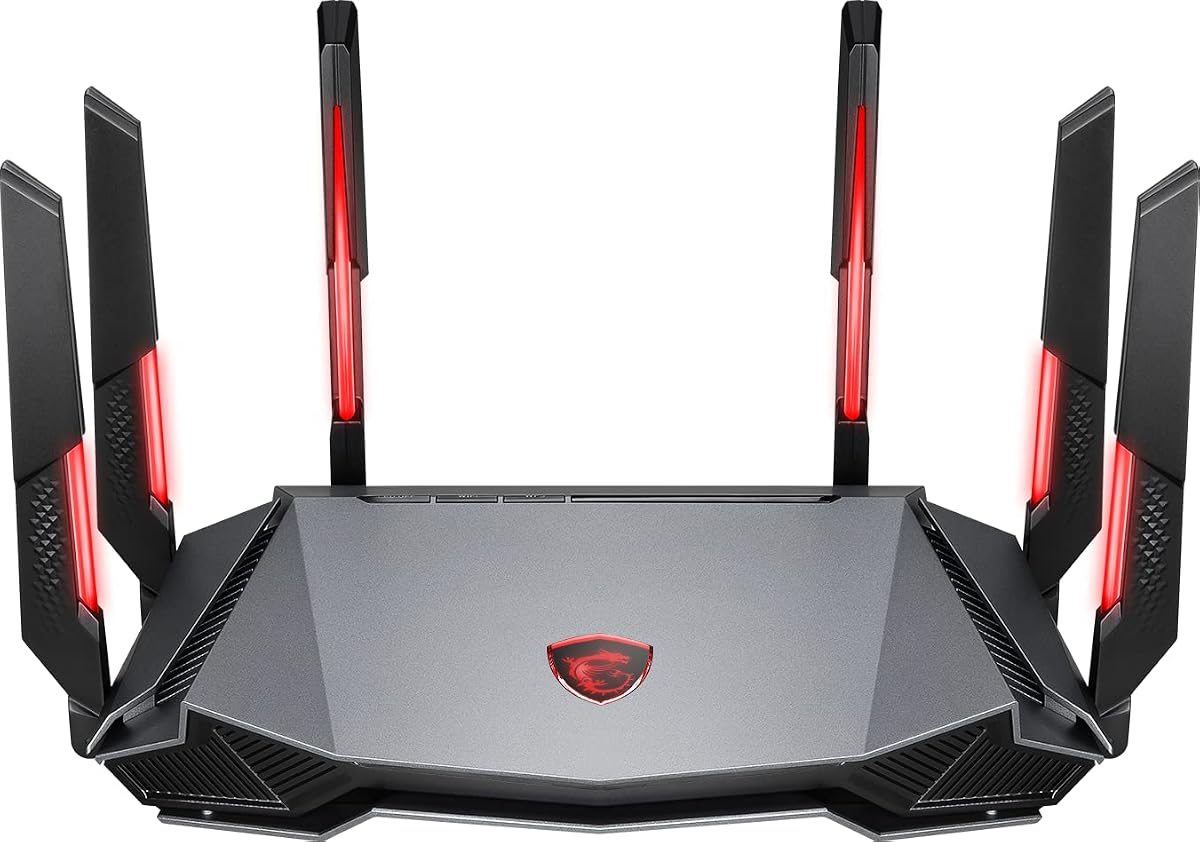
The MSI Radix AXE6600 uses advanced processing power to manage your network traffic intelligently. It has a 4.3 rating among users who appreciate its ability to handle high-speed connections across multiple devices effectively.
We may earn a commission when you buy through this link, at no additional cost to you.
Its AI QoS feature satisfies all users needs by automatically prioritizing data packets ensuring your game gets the bandwidth it requires. The powerful 1.8 GHz quad core processor delivers ultra fast and reliable connections even under heavy load.
One limitation is the basic interface which might not offer deep customization for advanced network administrators. However, for most users the automatic optimization ensures a smooth experience without manual tweaking or complex setups.
This model is ideal for households where gaming is just one of many activities. It balances speed and stability well making it a reliable choice for those who want smart network management without a steep learning curve.
AI QoS ensures your gaming session remains lag-free even when others are streaming video or downloading files.
The 8-stream design supports simultaneous connections on all bands for optimal overall network efficiency.
We may earn a commission when you buy through this link, at no additional cost to you.
The TP-Link Archer GXE75 is designed with console gamers in mind offering features tailored for platforms like PS5 and Xbox. It has a 4.4 rating and provides optimal bandwidth for high-speed multiplayer battles.
We may earn a commission when you buy through this link, at no additional cost to you.
The 2.5G WAN port allows you to upgrade your connection to handle ultra-fast speeds from modern modems. Its game panel provides real-time insights into your network status and accelerated games helping you strategize effectively.
While it offers strong performance for consoles, full HomeShield features require a subscription after a free trial. This is a common trade-off in the industry but the core gaming performance remains solid regardless of subscription status.
This router is perfect for players who want a dedicated dashboard to monitor their gaming environment. It ensures your devices are ready for the fiercest battles by minimizing jitter and ping through dedicated optimization tools.
The 6 GHz band provides exclusive channels for Wi-Fi 6E devices ensuring no interference from older gadgets.
TP-Link ensures your devices are protected by designing this router with advanced security requirements in mind.
We may earn a commission when you buy through this link, at no additional cost to you.
The TP-Link AX73 offers broad coverage and solid speeds making it a reliable option for larger homes. It holds a 4.5 rating and is praised for its ability to cover up to 2,000 square feet effectively.
We may earn a commission when you buy through this link, at no additional cost to you.
It supports MU-MIMO and OFDMA to reduce congestion and provides 4 times the average throughput for better device handling. The USB 3.0 port enables easy media sharing and private cloud storage for your files.
While it lacks the latest 6 GHz band, its HE160 technology on the 5 GHz band enables max 4.8 Gbps ultra-fast connections. Users who do not need the newest Wi-Fi 6E tech will find this router sufficient for all tasks.
This router is recommended for families needing extensive coverage and media sharing capabilities. It delivers consistent performance that supports streaming and browsing alongside gaming without needing premium advanced features.
Six high-performance antennas combine to concentrate signal strength towards your devices throughout your home.
Plug in a drive to the USB port to create a personal cloud accessible by any device on your network.
We may earn a commission when you buy through this link, at no additional cost to you.
The TP-Link BE550 is a powerful entry into WiFi 7 technology offering unmatched performance for streaming and gaming. It has a 4.0 rating and provides blazing-fast speeds of up to 9300 Mbps across its tri-band system.
We may earn a commission when you buy through this link, at no additional cost to you.
Its Full 2.5G WAN and LAN ports enable peak device performance for future-proofing your home network. Multi-Link Operation ensures stable internet connections by utilizing multiple channels simultaneously for efficient data transfers.
Because it is built for the future it may require modern devices to realize its full speed potential. Current older devices will work but might not achieve the full benefits of the advanced bandwidth capabilities available here.
This router is a strong candidate for early adopters who want the most advanced connectivity available today. It supports AR VR gaming and seamless 4K 8K streaming without compromising speed or stability on your network.
Four 2.5G LAN ports allow every wired device to enjoy peak speeds without sharing a single bottleneck port.
Set up a separate network for smart devices to protect your main network from potential security threats.
We may earn a commission when you buy through this link, at no additional cost to you.
The ASUS ROG GT-AXE16000 is the world's first quad-band WiFi 6E gaming router delivering ultrafast speeds up to 16 Gbps. It has a 4.4 rating among users who need maximum capacity for multiple high-performance devices.
We may earn a commission when you buy through this link, at no additional cost to you.
It includes dual 10G ports for faster data transfer speeds and a new 6 GHz frequency band for lower latency. The exclusive ASUS RangeBoost Plus improves signal range and overall coverage to keep your gaming smooth.
The sheer size of the router can be a concern for smaller desks or entertainment centers. However, for users with a dedicated gaming area this extra physical space is a worthy trade-off for the performance it delivers.
Buyers who want the highest possible bandwidth for their network should consider this model highly. It supports heavy data loads effortlessly ensuring your gaming experience remains uninterrupted even during peak usage times.
With dual 10G ports you can connect your gaming PC and NAS directly for maximum speed and stability.
Lifetime Internet Security and Instant Guard protect your device from threats while on public Wi-Fi networks.
We may earn a commission when you buy through this link, at no additional cost to you.
The ASUS ROG GT-AX11000 is a powerful Tri-Band router with 10 Gigabit wireless capabilities for ultimate performance. It holds a 4.5 rating and is renowned for its WTFast engine that accelerates game traffic effectively.
We may earn a commission when you buy through this link, at no additional cost to you.
Its Triple-level game acceleration prioritizes traffic with device game packet and game server optimization for the best experience. The 1.8GHz Quad-Core CPU handles high network loads without dropping connection quality or slowing down speeds.
Some users report fan noise when the router is under heavy load which might be distracting in quiet rooms. This is an acceptable trade-off given the immense speed and processing power it offers for demanding gaming setups.
This router is ideal for those who prioritize wired connections and high-speed networking features. It provides a robust foundation for a whole-home mesh network ensuring every device gets fast reliable internet access.
The built-in WTFast engine optimizes your route to game servers reducing latency for a smoother experience.
The Aura RGB lighting allows you to customize the look of your router to match your gaming setup.
We may earn a commission when you buy through this link, at no additional cost to you.
Selecting the right router involves evaluating several key factors to ensure your network supports the high demands of modern online gaming.
Current online games demand low latency and high throughput which are best achieved with Wi-Fi 6 or Wi-Fi 6E routers. Newer Wi-Fi 7 models are even better but require compatible devices to utilize their full potential. Look for routers with a dedicated 6 GHz band to avoid interference from older devices.
Prioritize routers that support the latest Wi-Fi standards for the best gaming experience and future-proofing.
A strong CPU and sufficient RAM ensure the router can handle multiple simultaneous connections without slowing down. Routers with quad-core processors and at least 512MB of memory are recommended for stable performance. These specs help prevent lag spikes when other devices are using the network heavily.
Choose a router with a powerful processor to ensure consistent speeds during intense multiplayer sessions.
Gaming consoles and PCs often benefit from wired connections for maximum stability and speed. Ensure the router has multiple Gigabit Ethernet ports or even 2.5G ports for faster data transfer. Having dedicated ports for gaming devices can significantly improve your connection quality.
Opt for a router with high-speed Ethernet ports to maintain a stable connection for your primary gaming hardware.
Many gaming routers come with specific features designed to optimize traffic for gaming applications. Look for QoS settings that allow you to prioritize game traffic over other activities like streaming or browsing. These features help reduce jitter and ping ensuring smoother gameplay.
Select a router with dedicated game acceleration tools to minimize lag and improve your competitive edge.
The size of your home and the number of walls determine the coverage you need from a router. If you have a large space consider routers that support mesh technology to extend coverage without dead zones. Mesh systems allow you to add nodes easily for a seamless whole-home network.
Evaluate your home size and choose a router with mesh capabilities if you need to cover multiple floors or rooms.
Gaming involves online interactions which can expose your network to potential security risks. Look for routers with built-in firewall features or subscription-based security services to protect your data. Parental controls are also useful for managing screen time and access to specific games.
Ensure your router has robust security features to protect your personal data while gaming online.
Gaming routers range from affordable options to high-end models with premium features. Determine your budget and identify which features are most important for your specific needs. A mid-range router often provides the best balance of performance and cost for most players.
Balance your budget with the necessary features to get the best value for your gaming setup.
Start by placing your router in a central location away from walls or large metal objects to maximize signal strength. Ensure it is elevated and not on the floor to avoid obstruction by furniture which can block Wi-Fi signals.
Update the firmware regularly through the admin panel to ensure you have the latest security patches and performance improvements. Many modern routers allow you to schedule these updates automatically so you do not have to remember to do it manually.
Periodically check the connection status of your devices to ensure they are using the optimal band. You can use the router app to see which devices are consuming the most bandwidth and adjust QoS settings if you notice lag issues.
Wi-Fi 6E adds a new 6 GHz band which provides more bandwidth and less congestion for your devices. This results in lower latency and faster speeds compared to standard Wi-Fi 6 which operates only on 2.4 GHz and 5 GHz bands.
If your router cannot reach all rooms with a strong signal a mesh system is essential for consistent performance. Mesh extenders or a dedicated mesh router ensure you have stable internet throughout your entire gaming area.
Routers can overheat if they are placed in enclosed spaces or near heat sources. Ensure there is good airflow around the device and clean the vents regularly to prevent performance throttling or hardware damage.
Yes most gaming routers are compatible with any standard modem provided by your ISP. You simply connect the modem to the WAN port on the router to get started with your new network.
It is best to check for updates at least once a month to keep your network secure and efficient. Many routers offer automatic update features which handle this process for you without requiring manual intervention.
You should prioritize game traffic in the QoS settings to ensure your game packets are sent first. This helps reduce lag and ping even when other devices are using the network for bandwidth-heavy tasks.
We have reviewed the top ten gaming routers that offer exceptional performance for next-generation online gaming experiences. Our picks range from budget-friendly options to high-end models designed for those who demand the absolute best connectivity.
When making your decision prioritize features that match your specific needs such as Wi-Fi 6E support or mesh capabilities. A router that fits your home layout and budget will provide the most consistent performance for your gaming setup.
Remember to verify current prices and availability before purchasing as product costs can fluctuate frequently. Checking the latest offers ensures you get the best deal on the hardware that will power your online adventures.