
10Gb/s SFP+ Fiber Port Ethernet Adapter
4.3Editor score
Intel 82599ES Controller
10GbE SFP+ Interface
Plug and Play Support
Discover the top fiber optic network interface cards for speed and reliability. This guide compares ten models for servers, gaming, and enterprise networking
Modern networks demand high-speed connectivity to handle data-intensive tasks without lag. A fiber optic network interface card provides the bandwidth necessary for advanced computing environments and professional setups effectively.
We evaluated ten leading models based on performance, compatibility, and features. Our analysis covers everything from budget-friendly options to enterprise-grade adapters for diverse user requirements today.
Each pick highlights specific strengths and ideal use cases for buyers. Prices and availability fluctuate frequently so always verify current listings before making your final purchasing decision online.
4.3Editor score

5.0Editor score

4.9Editor score
This side-by-side comparison highlights key specifications and performance traits across all ten selected models to help you find the right fit for your specific hardware setup.


The StarTech 2-Port GbE SFP Network Card stands out as a top-tier solution for those needing reliable gigabit connectivity with fiber flexibility. It boasts a perfect rating and is engineered around the proven Intel I350-AM2 chipset for consistent performance.
We may earn a commission when you buy through this link, at no additional cost to you.
Its dual open SFP slots allow you to choose between fiber or copper connections per port enabling versatile network design. The card supports IPv4 and IPv6 along with TCP UDP offloading and link aggregation for optimized data handling.
While it maxes out at gigabit speeds which might not suit data-center 10GbE needs the stability is unmatched. The built-in heatsink ensures sustained performance under load and the low-profile bracket expands case compatibility significantly.
This card is ideal for server administrators and IT professionals seeking a robust upgrade path. Its broad compatibility with Windows Linux and VMware makes it a safe and powerful investment for modern networking infrastructure.
Each SFP slot supports any MSA-compliant module allowing mixed mode and multimode fiber usage alongside direct attach copper for flexibility.
VLAN tagging PXE boot and SR-IOV support facilitate centralized deployment and virtualization workflows efficiently.
We may earn a commission when you buy through this link, at no additional cost to you.
This adapter delivers genuine 10GbE speeds at a budget-friendly price point making it accessible for home labs and small businesses. It leverages the trusted Intel 82599ES controller ensuring broad OS compatibility and stable throughput.
We may earn a commission when you buy through this link, at no additional cost to you.
The single SFP+ port allows connections to fiber optic modules or direct attach copper cables for versatile implementation. It supports key virtualization technologies like SR-IOV and VMDq which are essential for modern server environments.
Users should note that while Server versions work out of the box Windows 10 and 11 require manual driver installation. The passive heatsink may need case airflow to maintain optimal temperatures during extended high-load sessions.
For anyone needing a cost-effective upgrade from gigabit to ten gigabit networking this card offers excellent value. It is particularly well-suited for storage servers gaming rigs and entry-level virtualization hosts.
Full iSCSI and FCoE support allows direct storage connectivity without needing additional hardware adapters or switches.
The PCIe x4 interface works in x4 x8 and x16 slots providing installation flexibility for most desktop and server chassis.
We may earn a commission when you buy through this link, at no additional cost to you.
The Asus XG-C100F combines sleek aesthetics with raw networking performance for desktop users who want both style and speed. It supports fiber optic technology enabling high-speed transfers over long distances without signal degradation.
We may earn a commission when you buy through this link, at no additional cost to you.
A standout feature is the built-in aluminum heatsink which keeps the controller cool during intensive tasks. The SFP+ cage supports both fiber optic and direct-attach copper connections giving you flexibility in cabling choices.
While performance is robust users should ensure their operating system has the necessary drivers installed for full functionality. The QoS technology automatically prioritizes traffic which is beneficial for gaming and media streaming applications.
This card is a great choice for enthusiasts upgrading their home theater PC or workstation. Its balance of form factor cooling and speed makes it a compelling option in the mid-range market segment.
Built-in QoS technology boosts bandwidth for critical streams like gaming ensuring smooth latency-sensitive performance.
Operating from zero to forty degrees Celsius ensures reliable function in typical office and home environments.
We may earn a commission when you buy through this link, at no additional cost to you.
10Gtek offers a compelling alternative to the classic Intel X520 model with stable performance for server and NAS builds. The genuine 82599EN controller ensures robust I/O virtualization and consistent throughput for demanding workloads.
We may earn a commission when you buy through this link, at no additional cost to you.
It features a single SFP+ port which simplifies installation in compact systems needing one high-speed link. The card supports major virtualization environments making it a solid choice for ESXi Proxmox or Hyper-V hosts.
Installation on Windows 10 requires careful driver configuration to ensure full functionality on newer systems. The package includes both full height and low profile brackets allowing fit in almost any case size.
For users needing a reliable 10GbE upgrade with warranty support this card is a strong contender. Its simplicity and compatibility make it a favorite among home lab enthusiasts and small business IT admins.
I/O virtualization support keeps servers stable and efficient when running multiple virtual machines simultaneously.
The included brackets support both standard towers and low profile chassis for broad hardware compatibility.
We may earn a commission when you buy through this link, at no additional cost to you.
This card brings newer PCIe Gen4 technology to the 10GbE space offering improved bandwidth potential and compatibility with modern motherboards. The Realtek RTL8127 controller provides stable transmission with enhanced diagnostic features for troubleshooting.
We may earn a commission when you buy through this link, at no additional cost to you.
It features a single SFP+ port which is sufficient for many direct connect scenarios without needing extra slots. Support for PXE and WOL makes it useful for enterprise deployments and automated system maintenance tasks.
Linux compatibility extends to recent kernels but does not support FreeBSD or ESXi environments which limits virtualization options slightly. The QR code on the card simplifies driver downloads speeding up the setup process significantly.
Ideal for workstation upgrades needing future-proof connectivity this card balances modern specs with practical usability. Its broad Windows support and included brackets make it a straightforward upgrade choice for most users.
PCIe Gen4 x1 lane design ensures compatibility with current systems while leaving slots free for other expansions.
IEEE VLAN tagging and flow control protocols adapt to complex network environments ensuring efficient traffic management.
We may earn a commission when you buy through this link, at no additional cost to you.
This card is prized for its open SFP+ cage that accepts third-party optics without vendor locks common in branded Intel cards. It delivers sustained 10Gbit throughput making it a reliable choice for network attached storage and virtualization.
We may earn a commission when you buy through this link, at no additional cost to you.
The Intel 82599EN silicon ensures broad compatibility with modern server OSs like TrueNAS Proxmox and ESXi without extra steps. Its design includes airflow considerations though the heatsink does require case ventilation to stay cool under load.
Users will appreciate the plug and play nature on Linux and server platforms which simplifies maintenance and deployment tasks. The included brackets suit both tower PCs and rack mounts offering installation versatility.
A top pick for home labs and small server racks this card offers enterprise reliability at a consumer-friendly price. Its open standards support makes it a cost-effective solution for growing network needs.
Third-party DAC and fiber modules work seamlessly avoiding expensive branded transceiver costs.
Jumbo frames and checksum offload run in hardware to reduce CPU load during heavy data transfers.
We may earn a commission when you buy through this link, at no additional cost to you.
This adapter represents the premium tier with dual 25GbE ports and RDMA capabilities for ultra-low latency high-throughput networks. The Mellanox ConnectX-4 Lx controller is industry-renowned for performance in cloud and storage environments.
We may earn a commission when you buy through this link, at no additional cost to you.
It supports advanced overlay networks including VXLAN and NVGRE making it suitable for software defined networking setups. The PCIe Gen 3.0 x8 interface ensures enough bandwidth to handle both ports at full speed simultaneously.
While it delivers superior performance it requires compatible infrastructure like 25GbE switches to fully utilize its potential. Drivers are robust across major platforms including Windows Server and various Linux distributions.
For data centers or professionals handling massive datasets this card is unmatched in speed and reliability. Its high rating reflects consistent quality and support for demanding enterprise applications.
Remote Direct Memory Access via RoCE drastically reduces CPU load during high-speed data transfers.
I/O Virtualization and SR-IOV enable efficient resource sharing among multiple virtual machines.
We may earn a commission when you buy through this link, at no additional cost to you.
This card provides a complete kit by including a multimode optical module which saves immediate setup costs. It uses the reliable 82599EN controller to offload checksum tasks improving CPU efficiency during network operations.
We may earn a commission when you buy through this link, at no additional cost to you.
The PCIe X1 interface makes it compatible with almost any motherboard slot while still delivering full 10GbE speeds. Gold-plated connectors ensure durable contact and resistance to oxidation for long-term hardware reliability.
While it supports various systems users should verify specific OS compatibility before purchasing as driver availability can vary. The auto-adaptive transmission rate ensures flexibility when connecting to different switch speeds or media types.
An excellent entry point for users transitioning to fiber optics this kit offers convenience and performance. Its broad OS support and included accessories make it a practical choice for small office upgrades.
Including an optical module in the package allows immediate deployment without extra purchases.
Gold-plated fingers prevent oxidation and maintain reliable electrical contact over time.
We may earn a commission when you buy through this link, at no additional cost to you.
The TP-Link TX401 offers a distinct advantage by using copper cabling instead of fiber which simplifies deployment for many. It supports 10GBase-T technology enabling high speeds over standard Ethernet cables without optical modules.
We may earn a commission when you buy through this link, at no additional cost to you.
Its backward compatibility ensures it works with older network switches at lower speeds without configuration issues. The included CAT6A cable is rated for 10Gbps ensuring users have the right tools for maximum performance out of the box.
For gamers this card features QoS technology to prioritize traffic reducing congestion during online matches. The low-profile bracket and standard support allow easy installation in most desktop PC cases.
While not a fiber optic card it delivers similar networking benefits for users constrained by copper infrastructure. It is a robust and straightforward solution for upgrading desktop connectivity without replacing cabling.
Supports data rates from 100Mbps up to 10Gbps ensuring smooth transition from older network gear.
A two-year warranty with free 24/7 technical support offers peace of mind for daily users.
We may earn a commission when you buy through this link, at no additional cost to you.
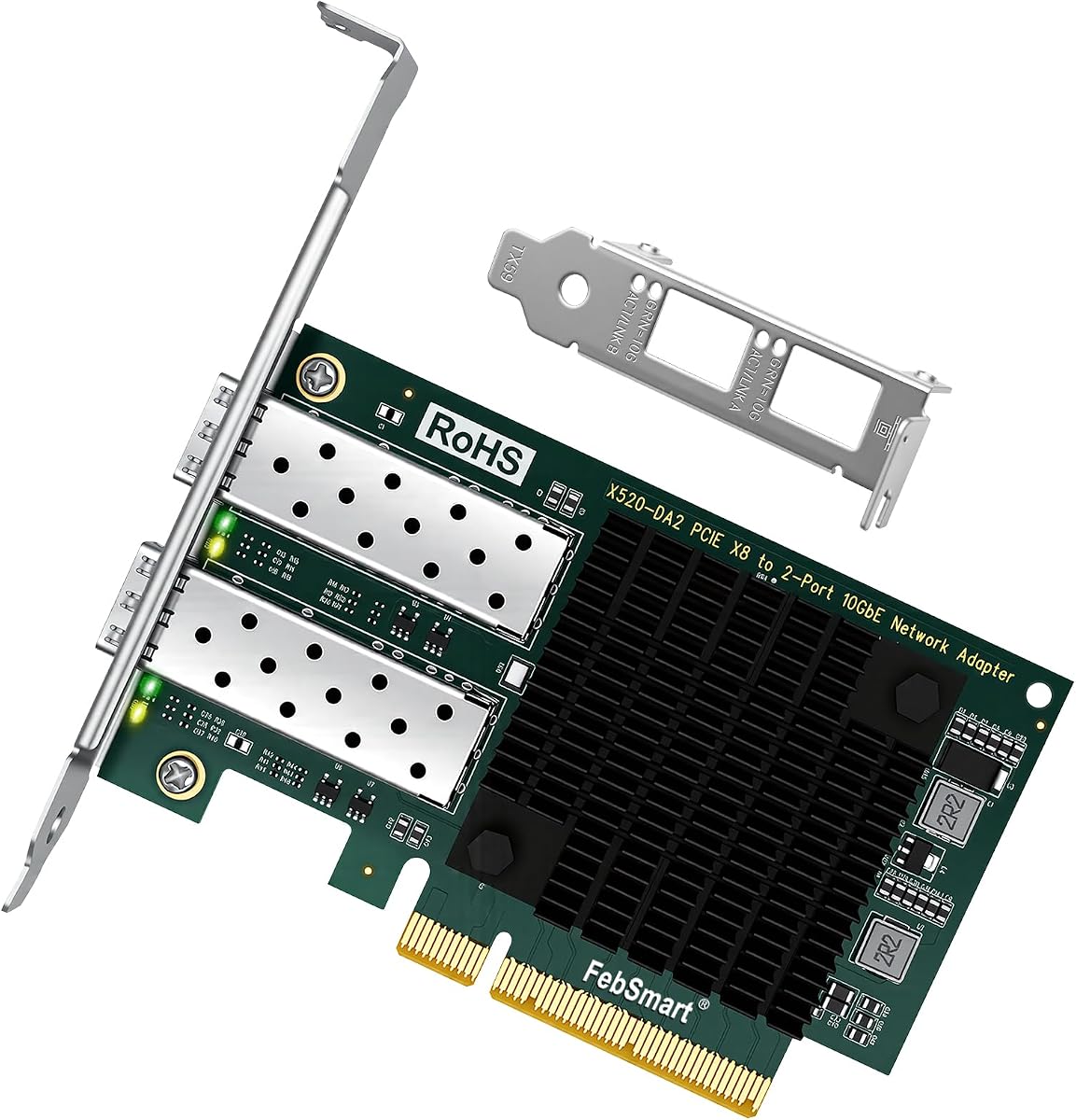
This dual-port adapter delivers substantial bandwidth with two 10GbE SFP+ slots ideal for redundancy or separate network segmentation. It is powered by the reliable 82599ES controller ensuring stable connectivity across diverse operating systems.
We may earn a commission when you buy through this link, at no additional cost to you.
The PCIe 2.0 x8 interface provides sufficient throughput for both ports running simultaneously without bottlenecks. Support for protocols like VXLAN and FCoE makes it suitable for storage and virtualization tasks in modern data centers.
Installation on Windows Server is seamless while desktop versions may need specific drivers for full functionality. The included brackets ensure compatibility with both full-size and low-profile cases for flexible deployment.
For users needing dual high-speed connections this card offers a powerful and cost-effective solution. Its high rating reflects strong performance and broad support making it a top contender for serious networking upgrades.
Two ports allow for link aggregation or failover setups improving overall network reliability and uptime.
Intel Virtualization Technology for Connectivity supports VMDq and SR-IOV for efficient VM networking.
We may earn a commission when you buy through this link, at no additional cost to you.
Selecting the right network interface card requires balancing speed compatibility and use case. This guide outlines key factors to ensure your purchase meets current and future needs.
Determine if you need gigabit 10GbE or 25GbE speeds based on your switch and data transfer requirements. Ensure your PCIe slot supports the card's interface version to avoid performance bottlenecks.
Always match card speed to your switch capacity and PCIe slot generation for optimal throughput.
Single port cards suit basic upgrades while dual port options provide redundancy or separate network segments. Check if your case has enough expansion slots for the chosen card size.
Choose single port for simplicity and dual port for redundancy or segmentation needs.
Decide between fiber optic modules and direct attach copper cables based on distance and cost. Fiber allows longer runs while DAC cables are cheaper for short rack connections.
Select connectors that match your existing cabling infrastructure to avoid extra transceiver purchases.
Verify that the card supports your specific OS version such as Windows Server Linux or ESXi. Some cards require manual driver installation on client OS while server versions are often plug and play.
Ensure drivers are available and stable for your primary operating system.
Look for SR-IOV and VMDq support if running virtual machines to improve network efficiency and reduce latency. Advanced features like RDMA are critical for high-performance storage and compute workloads.
Prioritize cards with virtualization features if you run multiple VMs or storage clusters.
Check if the card comes with low-profile brackets for small form factor cases and towers. Passive heatsinks are common but require adequate case airflow to prevent thermal throttling.
Ensure the bracket and cooling fit your case size and airflow design.
Compare prices relative to performance and included accessories like cables or modules. Premium brands may cost more but offer better warranty support and reliability for enterprise use.
Balance cost against reliability and included accessories for best overall value.
Review warranty terms and technical support options especially for business critical deployments. Longer warranties indicate manufacturer confidence and protect your investment against defects.
Choose brands with strong support and clear warranty policies.
Start by powering down your system and removing the case cover to access PCIe slots. Insert the card firmly into a compatible slot ensuring the metal bracket aligns with the rear I/O panel. Secure it with screws to prevent movement.
Connect fiber or copper cables to the SFP ports ensuring clean connectors to avoid signal issues. Power on the system and install any required drivers through official manufacturer channels. Verify link lights indicate active connections.
Maintain adequate airflow around the card to keep the heatsink cool during high usage. Periodically check firmware updates to ensure compatibility with network switches. Avoid touching optical connectors directly to prevent contamination.
Yes these cards typically require SFP modules with LC fiber connectors or direct attach copper cables. Ensure you match the module type multimode or singlemode to your fiber cable distance and speed requirements.
Most home routers lack SFP ports so these cards are best paired with managed switches or NAS devices. For direct internet use ensure your modem or router supports the fiber speeds offered by the card.
Absolutely many cards support gaming features like QoS to prioritize traffic. They are ideal for high-end PCs needing fast local file transfers or low-latency online connections.
SFP supports up to 1Gbps while SFP+ supports up to 10Gbps. Always verify your switch and modules support the same generation to achieve expected speeds.
Most cards require manual driver installation on Windows 10 and 11. Server versions usually work out of the box. Always download the latest drivers from the manufacturer for best stability.
Check that your motherboard has an available PCIe slot matching the card requirements such as x4 or x8 lanes. Also ensure BIOS and OS compatibility with the chosen network interface.
We highlighted ten top options ranging from budget-friendly gigabit upgrades to premium 25GbE solutions. Each model brings unique strengths tailored to different use cases like virtualization gaming or enterprise storage.
Prioritize compatibility with your switch and operating system to ensure smooth integration and peak performance. Consider future needs for speed and connectivity when selecting between single or dual port designs.
Prices and availability change quickly so double-check current listings before finalizing your purchase. Stay informed about your specific hardware requirements to get the most out of your network investment.