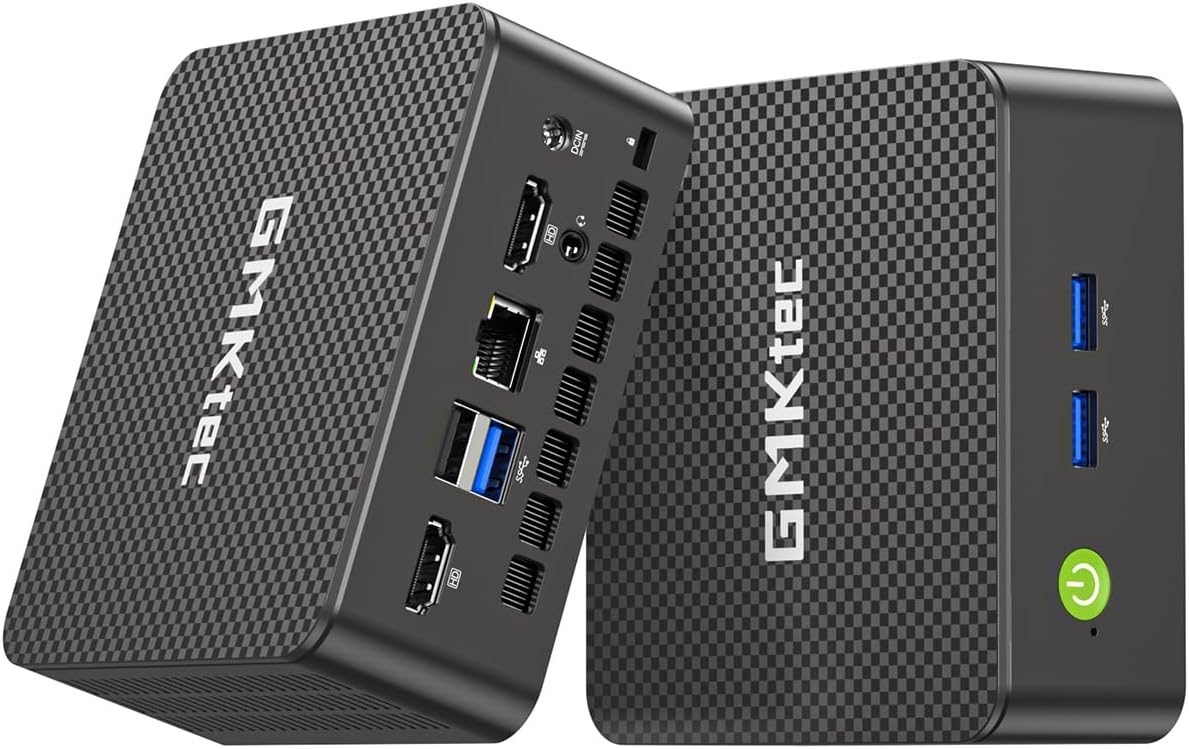
GMKtec G3S Mini PC
4.4Editor score
Intel N95 Processor
Dual 4K HDMI Output
Quiet Efficient Design
This expert guide compares the top 10 Linux Mini Pcs available in October 2026, evaluating performance, connectivity, and OS compatibility for diverse
Linux Mini Pcs offer a powerful alternative to traditional desktops, combining compact form factors with robust open-source operating systems. These devices are ideal for developers, home lab enthusiasts, and professionals seeking efficient, reliable computing without the bulk of tower systems. They deliver impressive performance for productivity, virtualization, and media tasks while maintaining energy efficiency and silent operation.
Our selection process involved analyzing ten top-rated models based on processor architecture, memory expandability, storage options, and native Linux compatibility. We prioritized devices with pre-installed distributions like Zorin OS and Linux Mint, as well as those with strong community support for custom installs. Each unit was evaluated for connectivity features, thermal management, and build quality to ensure long-term reliability in various environments.
Each recommendation highlights specific strengths, from budget-friendly entry points to high-end workstation capabilities. Readers will find detailed breakdowns of processing power, display support, and networking features to match their unique requirements. Note that product availability and configurations may vary over time, so verifying current stock and specifications before purchase is always advised for the best experience.
4.4Editor score

4.8Editor score

4.9Editor score
This comparison table outlines the key specifications and features of each top model to help you quickly identify the device that fits your technical requirements and workspace needs.


The TK Node Mini PC stands out as a top choice for Linux enthusiasts due to its pre-installed Zorin OS Core, which offers a familiar desktop experience while leveraging the stability of Ubuntu. This device is engineered for continuous operation, making it ideal for home labs, automation servers, or office productivity where reliability is key. With its robust connectivity options and flexible expansion paths, it delivers impressive versatility in a tiny footprint.
We may earn a commission when you buy through this link, at no additional cost to you.
Performance is driven by efficient AMD or Intel processors that balance power with thermal efficiency, suitable for multitasking and light virtualization tasks. The dual SO-DIMM slots allow users to upgrade RAM up to 64GB, ensuring the system remains future-proof as workloads grow. Storage is equally adaptable with dual NVMe slots supporting up to 4TB total, providing ample space for data-intensive applications or media libraries.
While the CPU choices are limited to specific models, this simplifies selection for buyers who know their performance needs without overwhelming options. The lack of an SD card slot is a minor inconvenience for some users but is offset by the rich USB and network interfaces available. Overall, the trade-offs are acceptable given the strong build quality and excellent OS integration.
This mini PC is perfect for developers, system administrators, or anyone seeking a reliable, compact Linux machine that works out of the box. Whether you are managing containers, running scripts, or handling daily productivity, the TK Node Mini PC offers a balanced combination of power, expandability, and support that justifies its top ranking.
Zorin OS Core provides a seamless interface that minimizes the learning curve for users transitioning from other systems while maintaining full compatibility with standard Linux tools and repositories.
The cooling system ensures the unit remains silent and cool even under 24/7 operational loads, making it suitable for home offices or enclosed network cabinets without noise distractions.
We may earn a commission when you buy through this link, at no additional cost to you.
The Beelink SER3 is a dependable budget-friendly option that brings AMD Ryzen performance to compact Linux setups. Equipped with 16GB of RAM and a fast M.2 SSD, it handles everyday productivity tasks efficiently. The dual HDMI ports enable multi-monitor setups, which is beneficial for users who need extended screen real estate for coding or data analysis without breaking the bank.
We may earn a commission when you buy through this link, at no additional cost to you.
Despite using an older 14nm processor, the system remains responsive for general office work, web browsing, and media consumption. The included 16GB DDR4 memory ensures smooth multitasking, reducing the need for immediate upgrades. Connectivity is solid with Gigabit Ethernet and dual-band WiFi, allowing flexible deployment in various network environments.
The single-channel memory architecture and older chip architecture are limitations for heavy computational tasks but are acceptable for the target price point. The 14nm process also means slightly higher power consumption compared to newer models, though still efficient for a mini PC. These trade-offs make sense for buyers prioritizing value over raw speed.
Ideal for students, home users, or small offices needing a quiet and affordable Linux machine, the Beelink SER3 delivers consistent performance where it counts. Its strong after-sales support and warranty add peace of mind, ensuring long-term usability even if your needs evolve over time.
With two HDMI outputs supporting 4K@60Hz, users can connect multiple displays for enhanced multitasking and workflow optimization without requiring additional adapters.
The inclusion of 16GB RAM out of the box provides headroom for browser tabs, virtual machines, or lightweight development environments without immediate upgrade costs.
We may earn a commission when you buy through this link, at no additional cost to you.
The ASUS NUC 14 Pro represents the pinnacle of performance in the mini PC category, designed for professionals who demand desktop-class power in a small form factor. With a pre-installed Linux Mint environment, it offers a streamlined experience for developers and power users. The inclusion of Thunderbolt 4 ports allows for high-speed data transfer and daisy-chaining peripherals, making it a versatile hub for complex workflows.
We may earn a commission when you buy through this link, at no additional cost to you.
Equipped with 64GB of DDR5 RAM and a 2TB PCIe Gen4 SSD, this system excels at heavy multitasking, virtualization, and AI-related tasks. The advanced cooling design maintains silence even under load, ensuring a distraction-free environment. The aluminum chassis not only looks professional but also aids in heat dissipation, contributing to stable long-term operation.
While the price is significantly higher than entry-level models, the performance and feature set justify the investment for mission-critical applications. The system may be overkill for basic tasks like browsing or email, but for demanding workloads, it remains unmatched in its class. Users should consider their specific needs to ensure they are paying for relevant capabilities.
This device is best suited for IT professionals, engineers, or creators who need a powerful, portable workstation capable of handling complex projects. The combination of cutting-edge hardware and Linux-ready software makes it a standout choice for those who refuse to compromise on performance or flexibility.
Thunderbolt 4 connectivity enables ultra-fast data transfer and supports multiple high-resolution displays, making it ideal for connecting external GPUs or docking stations.
Pre-installed Linux Mint provides a stable, privacy-focused environment that is easy to customize, ensuring users can focus on development or business tasks immediately.
We may earn a commission when you buy through this link, at no additional cost to you.
The Beelink S12 Pro is an efficient all-rounder that balances performance and power consumption effectively. Powered by the Intel N100 processor, it delivers smooth operation for daily tasks, media streaming, and basic development. The inclusion of 16GB RAM and dual HDMI ports makes it suitable for light multitasking and home theater setups where low noise and energy efficiency are priorities.
We may earn a commission when you buy through this link, at no additional cost to you.
Its ability to support both an M.2 SSD and a SATA drive offers flexible storage configurations without needing external enclosures. The upgraded cooling system ensures the fan remains quiet even during sustained workloads. WiFi 6 integration provides faster and more stable wireless connectivity, which is beneficial for users in congested network environments.
The single memory slot limits simultaneous upgrades but allows for future expansion to 16GB total. The integrated graphics are sufficient for video playback but not designed for heavy gaming or rendering. These constraints are well within expectations for an entry-level to mid-range device focused on general productivity and media consumption.
This mini PC is perfect for home offices, living room entertainment centers, or as a compact server for personal projects. The combination of robust connectivity, efficient design, and reasonable pricing makes it a reliable choice for users seeking a no-fuss Linux-compatible computer.
Support for both M.2 and SATA drives allows users to balance speed and capacity easily, creating a setup optimized for boot speed and media storage.
With a 6W TDP, the system consumes minimal power, making it suitable for 24/7 operation as a home server or digital signage display.
We may earn a commission when you buy through this link, at no additional cost to you.
The KAMRUI Pinova P2 is engineered for users who require multiple screens without sacrificing portability. With triple 4K display support via HDMI, DP, and USB-C, it is ideal for traders, data analysts, or remote workers needing extensive screen real estate. The Ryzen 7 3300U processor ensures smooth handling of multiple windows and applications simultaneously.
We may earn a commission when you buy through this link, at no additional cost to you.
Its aluminum chassis and compact dimensions make it easy to transport or mount discreetly. The inclusion of USB-C with DisplayPort Alt Mode adds versatility for connecting modern monitors or docks. The integrated cooling system keeps noise levels low, ensuring it remains unobtrusive in quiet workspaces.
While the LPDDR4X RAM is efficient, it is not user-upgradable, which may limit long-term expansion for those needing more than 16GB. The price is higher than comparable single-display models but justified by the unique triple-display capability. This trade-off is acceptable for professionals whose productivity depends on multitasking across screens.
Best suited for home offices or small business environments, the Pinova P2 offers a rare blend of display flexibility and compact performance. Its reliable connectivity and modern design make it a strong contender for users who value screen space and mobility.
Support for three 4K outputs enables users to monitor multiple data streams or applications side-by-side without clutter or performance degradation.
The sleek silver casing and small footprint allow easy transport between locations or wall mounting for dedicated kiosk setups.
We may earn a commission when you buy through this link, at no additional cost to you.
The GMKtec G11 is specifically designed for networking and industrial applications. Featuring dual 2.5GbE Ethernet ports, it serves as an ideal router, firewall, or home lab server. The R2514 processor offers significant performance gains over competing entry-level chips, ensuring smooth operation even under network load.
We may earn a commission when you buy through this link, at no additional cost to you.
With dual-channel memory support, it mitigates bottlenecks for integrated graphics, enabling better video playback and gaming performance. The triple 4K output allows for multi-monitor setups useful in control rooms or trading environments. WiFi 6E adds future-proof wireless capabilities with reduced latency and interference.
The absence of an included SSD means users must install their own storage, which may deter those seeking a fully packaged solution. However, for advanced users who prefer selecting their own drives, this offers flexibility. The build quality and networking focus make it a niche but powerful option.
This mini PC is best suited for IT professionals, network engineers, or advanced hobbyists building custom infrastructure. Its specialized networking features and robust performance make it a valuable asset for secure and efficient network management.
Dual 2.5GbE ports enable the device to function as a high-performance router or NAS, providing superior throughput for data-intensive network tasks.
Radeon GPU architecture outperforms standard Intel UHD graphics, offering smoother visuals and better support for high-resolution video decoding.
We may earn a commission when you buy through this link, at no additional cost to you.
The CyberGeek Mini PC targets users who need desktop-level performance in a compact case. Powered by an i9-11900H processor, it handles demanding tasks like coding, virtualization, and content creation with ease. Ubuntu Linux pre-installed ensures immediate readiness for development or productivity without additional setup steps.
We may earn a commission when you buy through this link, at no additional cost to you.
With 32GB of DDR4 RAM and a 1TB PCIe SSD, this system offers generous storage and memory for heavy workloads. The triple 4K display support allows for complex multi-monitor setups essential for advanced workflows. Its extensive port selection supports a wide range of peripherals without needing dongles or hubs.
Performance comes at a cost of higher heat and power consumption compared to low-power alternatives. Users may need to ensure adequate ventilation or placement in a well-ventilated area. Despite this, the system provides a solid balance of power and convenience for those needing raw processing capabilities.
Ideal for developers, engineers, or creators needing a reliable workstation that fits on a desk, the CyberGeek delivers high performance where it matters most. Its Linux compatibility and rich connectivity make it a strong choice for technical environments.
The 11th Gen i9 processor ensures that even the most demanding software and virtual machines run smoothly without throttling under normal conditions.
Support for three 4K displays allows users to manage multiple applications or data streams simultaneously without performance loss or visual lag.
We may earn a commission when you buy through this link, at no additional cost to you.
The BOSGAME E5 combines networking efficiency with modern performance in a compact package. Featuring dual 2.5GbE Ethernet ports, it serves well as a home server or network appliance. The Ryzen 3 5300U ensures smooth daily performance, while the 16GB RAM and 512GB NVMe SSD provide a solid foundation for multitasking.
We may earn a commission when you buy through this link, at no additional cost to you.
Triple 4K display support offers flexible connectivity for users needing multiple screens. The full-function USB-C port supports data transfer, video output, and power delivery, increasing its utility for peripherals. The system runs quietly, making it suitable for living rooms or offices where noise levels matter.
While the GPU is not designed for gaming, it handles video playback and basic graphics tasks effectively. The absence of an SD card slot is a minor limitation for those needing quick media transfers. Overall, the performance aligns well with the target use case of network and office applications.
This mini PC is best suited for home users, small businesses, or network enthusiasts looking for a versatile and reliable Linux machine. Its combination of fast networking, display flexibility, and efficient design makes it a practical choice for daily tasks.
Dual 2.5GbE ports allow users to separate network traffic or run multiple network services securely without additional hardware.
Optimized cooling ensures silent operation even under load, maintaining a comfortable environment for home or office use.
We may earn a commission when you buy through this link, at no additional cost to you.
The BOSGAME E4 Air is an entry-level choice ideal for basic computing needs. Powered by a Ryzen 5 3500U, it handles office applications, web browsing, and streaming efficiently. Triple 4K display support is a standout feature for this price range, allowing multi-monitor productivity without extra cost.
We may earn a commission when you buy through this link, at no additional cost to you.
With 8GB RAM and a 256GB SATA SSD, it offers decent speed for daily tasks. Dual LAN ports add versatility for networking tasks or home servers. The unit is lightweight and portable, making it easy to move or mount in various settings. The 3-year warranty provides confidence in long-term use.
The 8GB RAM may limit heavy multitasking but can be upgraded if needed. The SATA SSD is slower than NVMe alternatives but sufficient for general use. These limitations are acceptable given the budget-friendly positioning of the device.
This mini PC suits students, casual users, or small businesses needing a no-frills Linux machine. Its affordability and display flexibility make it a strong value option for those prioritizing function over cutting-edge performance.
Triple 4K output allows users to connect multiple monitors, enhancing productivity for tasks like coding, writing, or data analysis.
A 3-year parts warranty ensures long-term support and protection, giving users peace of mind when investing in this budget device.
We may earn a commission when you buy through this link, at no additional cost to you.
The GMKtec G3S delivers exceptional value as an entry-level Linux Mini PC. The Intel N95 processor provides reliable performance for web browsing, media streaming, and document editing. Its dual 4K HDMI outputs allow users to connect two monitors for improved productivity without exceeding budget constraints.
We may earn a commission when you buy through this link, at no additional cost to you.
With 8GB RAM and a fast 256GB M.2 SSD, the system boots quickly and runs common applications smoothly. The compact design fits easily into small spaces or behind monitors. WiFi and Bluetooth connectivity ensure flexibility for wireless peripherals and networks, enhancing its usability for home setups.
While the 8GB RAM and basic CPU limit heavy multitasking or high-end applications, this is expected at this price point. Users should ensure their needs align with general productivity tasks. The overall build quality and reliability make it a solid choice for beginners.
Best for students, home users, or anyone needing an affordable Linux machine, the GMKtec G3S offers performance that exceeds expectations for its price. It is a practical solution for those seeking compact computing without unnecessary cost or complexity.
Two HDMI 4K outputs provide enough screen real estate for multitasking, making it easy to split work between browsing and document editing.
The small form factor allows flexible placement in tight spaces, making it ideal for desks, entertainment centers, or wall-mounted setups.
We may earn a commission when you buy through this link, at no additional cost to you.
Selecting the right Linux Mini PC requires balancing performance, features, and budget. This section outlines key factors to consider to help you find a device that meets your specific needs.
The CPU determines how well a mini PC handles multitasking and demanding applications. For general office use, entry-level processors like Intel N95 or AMD Ryzen 3 are sufficient. For development, virtualization, or media editing, aim for Ryzen 5/7 or Intel Core i3/i5 models to ensure smooth performance.
Always match the processor power to your workload requirements to avoid under or over-specifying your purchase.
RAM affects how many applications you can run simultaneously. 16GB is recommended for multitasking and light virtualization. SSD storage provides faster boot times and application loading than HDDs. Ensure the device has expandable slots for future upgrades to extend its usable lifespan.
Prioritize systems with upgradable RAM and storage to accommodate future software needs without replacing the entire unit.
Some models come with Linux pre-installed, simplifying setup. Others require you to install your own distribution. Check hardware compatibility, especially for Wi-Fi and graphics drivers, to ensure all features work smoothly under your chosen Linux system.
Pre-installed Linux options save time but may limit distribution choices; always verify driver support if planning a custom install.
Multiple HDMI or DisplayPort outputs enable multi-monitor setups that boost productivity. USB-C with video support offers modern connectivity and can serve as a single-cable solution for docking. Verify that the device supports your desired number and resolution of displays.
Choose models with sufficient video outputs to match your workspace and screen layout requirements before purchasing.
Look for adequate USB ports, Ethernet, and wireless options like Wi-Fi 6 for future-proofing. Gigabit or 2.5GbE LAN is essential for network-heavy tasks like server hosting. Bluetooth ensures easy pairing with peripherals, keyboards, and mice.
Verify that all essential ports are available and that wireless standards match your network and peripheral needs.
A sturdy chassis with good thermal design ensures quiet operation and longevity. Mini PCs often run continuously, so efficient cooling is critical to prevent overheating. Aluminum cases dissipate heat better than plastic alternatives.
Prioritize systems with proven thermal performance to maintain consistent operation during extended usage.
Reliable customer service and warranty terms add peace of mind. Brands offering multiple years of support are preferable for business or mission-critical use. Check return policies and technical support availability in your region.
Always confirm warranty duration and coverage details before purchase to protect your investment against defects.
Consider whether you need a machine for light office work, development, media center, or home server tasks. Matching features to specific use cases ensures you do not pay for capabilities you will not use or miss out on essential ones.
Define your primary use case clearly to guide all technical decisions and avoid unnecessary spending or compromises.
To get started, connect your Mini PC to power, a display, and a keyboard or mouse. Use the included Ethernet cable or Wi-Fi to establish network access. Power on the device and complete any initial Linux setup instructions provided during first boot.
Regularly update your operating system and installed packages to maintain security and performance. Keep the unit in a well-ventilated area to prevent overheating. Avoid placing it on soft surfaces like blankets or carpets that may block intake or exhaust vents.
Perform routine backups of important data to external drives or cloud services. Periodically clean dust from ports and vents to ensure airflow remains unobstructed. By following these care practices, you extend the lifespan and reliability of your Linux Mini PC.
Yes, most models support custom Linux installations. However, ensure that Wi-Fi and graphics drivers are compatible with your chosen distribution. Pre-installed systems like Zorin or Mint may limit flexibility but simplify initial setup for beginners.
Absolutely. They offer the same performance as desktops in a compact form. With multiple display outputs and reliable networking, they are ideal for productivity, document editing, and video conferencing in professional environments.
Most models support dual or triple 4K displays via HDMI or DisplayPort. Check individual specs for specific port capabilities. Using certified cables ensures stable signal transmission at full resolution and refresh rates.
Many models feature accessible RAM and storage slots for upgrades. Some entry-level units may have soldered memory or limited expansion. Review product specifications carefully before purchasing to ensure future upgradeability meets your needs.
Yes, Mini PCs with dual Ethernet ports and low power consumption are ideal for home servers. They can run lightweight virtual machines, NAS systems, or network firewalls efficiently without the noise or cost of traditional towers.
Distributions like Ubuntu, Mint, and Zorin offer excellent hardware support and ease of use. Lightweight versions like Lubuntu are ideal for lower-end models. Choose based on your familiarity and the specific software tools you require.
This guide highlights ten versatile Linux Mini PCs tailored to different needs, from budget-friendly home offices to powerful development workstations. Each model brings unique strengths, ensuring there is a suitable option for every user and environment.
Prioritize features that align with your primary use cases, such as display support, networking, or raw processing power. Matching these factors carefully ensures you get the best value and performance for your specific workflow.
Product availability and configurations change over time, so always verify current specs and prices before purchase. By doing your due diligence, you ensure a smooth and successful experience with your new Linux Mini PC.