
4 Pack HDMI Dummy Plug 4K HDR
4.8Editor score
High Resolution Virtual Display
Industrial Grade Durability
Plug and Play Setup
Compare the best HDMI Dummy Plug options for headless PC setups, remote desktop access, and GPU acceleration across ten top models reviewed for October 2026.
An HDMI dummy plug is a small device that tricks your computer into thinking a monitor is connected. This enables your GPU to run at full speed even without a physical screen attached to your system.
We compared ten leading models based on resolution support, build quality, and compatibility. Our analysis covers devices ranging from basic 1080p emulators to advanced 4K and 8K capable adapters for demanding workflows.
Each pick shows real-world performance data and key technical specifications. Please note that product availability and pricing can change frequently on retail platforms, so always verify details before purchasing your specific needs.
4.8Editor score
4.6Editor score

4.5Editor score
This side-by-side comparison highlights the key specifications and capabilities of each top-rated dummy plug. Use this table to quickly identify which model fits your specific resolution needs and budget requirements.


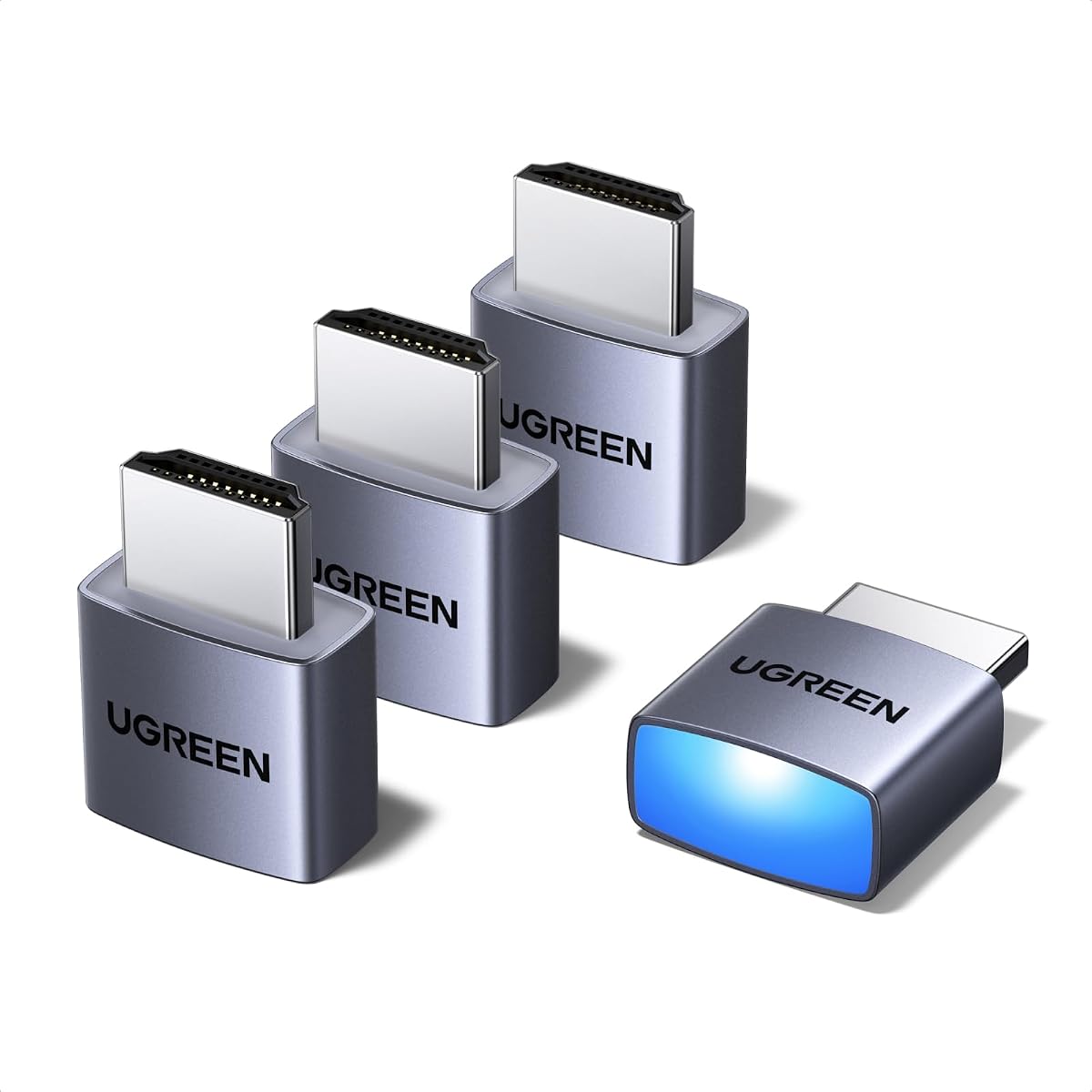
The UGREEN 4 Pack HDMI Dummy Plug stands out as a top choice for users needing reliable virtual display solutions. With a solid 4.6 rating, it offers true 4K@60Hz HDR performance that activates your GPU effectively for remote desktops and rendering tasks.
We may earn a commission when you buy through this link, at no additional cost to you.
Its aluminum shell enhances heat dissipation during intensive tasks like cryptocurrency mining or video editing. The integrated LED light provides visual confirmation of connection status, ensuring you never work blindly. It supports Windows, Mac, and Linux seamlessly without needing drivers.
While it lacks Display Port compatibility, the HDMI focus ensures broad hardware support. The pack of four offers value for managing multiple headless machines in server farms or home labs. The lack of software installation keeps it simple for all skill levels.
This model is ideal for professionals managing headless PCs who need stability and high resolution. Whether you are streaming games or running simulations, this plug keeps your GPU active. It is a highly recommended choice for balanced performance and durability.
The sturdy aluminum shell prevents overheating during long computing sessions, ensuring longevity and stable output for critical workflows.
An integrated LED light allows you to monitor connection status at a glance, combining practicality with a sleek design aesthetic.
We may earn a commission when you buy through this link, at no additional cost to you.
This 4 Pack HDMI Dummy Plug delivers exceptional value with its 4.8 rating and support for 4K@60Hz HDR. It is perfect for headless server optimization and remote desktop operations without the cost of physical monitors. The industrial grade aluminum armor ensures reliability.
We may earn a commission when you buy through this link, at no additional cost to you.
The plug supports high refresh rates up to 1080P@120Hz which is vital for smooth virtual desktops. It works flawlessly with NVIDIA, AMD, and Intel GPUs across all major operating systems. No drivers or external power are required for instant virtual display setup.
Although the packaging is generic, the device quality is robust. The built-in LED helps verify connections quickly. It is a smart choice for those needing multiple units for mining rigs or trading setups. The energy efficiency is another strong selling point.
Buyers looking for affordable, high-performance virtual displays will find this model hard to beat. It eliminates display power costs while maintaining system stability. For budget-conscious users needing reliable headless adapters, this is a top tier option.
Encased in heat-dissipating aluminum armor, this rugged emulator resists overheating during marathon computing tasks effectively.
Works flawlessly with all major GPUs across Windows, macOS, and Linux systems for diverse workflow environments.
We may earn a commission when you buy through this link, at no additional cost to you.
The DTech HDMI Dummy Plug is a classic solution for enabling GPUs in headless PC deployments. It supports up to 4K 4096×2160 display emulation to make computers run without physical screens. The gold plated dongle ensures stable digital signal transmission.
We may earn a commission when you buy through this link, at no additional cost to you.
Its compatibility with Windows, Mac, and Linux makes it versatile for various environments. It specifically solves the Apple OSX headless display issue which can be problematic with standard drivers. The compact design fits easily into tight spaces on server racks.
The value pack of three allows for expanding multiple headless setups easily. It is ideal for game streaming and VR setups where full GPU potential is needed. While older than some competitors, it remains reliable for daily tasks without extra software.
For users needing a proven, stable solution for virtual displays this model is a strong contender. It unlocks the full potential of graphics cards without requiring a monitor. It remains a popular choice for colocation farms and home servers alike.
Solves the Apple OSX headless display issue while working seamlessly on Windows and Linux systems without driver installation.
Gold plated HDMI dummy dongle ensures stable digital signal and unlocks the full potential of your graphics card.
We may earn a commission when you buy through this link, at no additional cost to you.
This basic HDMI dummy plug is designed for users who need reliable 1080p emulation without extra features. It works with any graphics card that has HDMI output and ensures high resolution GPU accelerated remote desktop performance. The ultra compact design is great for tight spaces.
We may earn a commission when you buy through this link, at no additional cost to you.
With no drivers or configuration needed, setup is instant. It acts exactly like a real monitor to keep your system stable. This is perfect for tasks like crypto currency mining or virtual desktop access where high refresh rates are less critical.
The lack of HDR support is a trade-off for its simplicity and low price. It is ideal for basic headless PC use or older systems that do not require 4K. It provides a cost-effective way to unlock GPU functionality without buying a monitor.
If you need a simple solution that just works without fuss this adapter is effective. It supports Windows, OSX, Linux and almost anything else. For standard remote desktop tasks it delivers consistent performance at a budget-friendly price point.
No drivers no configuration no power cable – just set and forget for immediate operational results.
Works with any graphics card that has HDMI output with no incompatibility problems if your regular LCD works.
We may earn a commission when you buy through this link, at no additional cost to you.
The 3 Pack HDMI Dummy Plug offers solid performance with 4K HDR support for virtual displays. It enables the PC to enable the GPU to create a virtual display for high-resolution remote control tasks. The gold-plated interface guarantees complete signal transmission.
We may earn a commission when you buy through this link, at no additional cost to you.
Hot swap support means you can connect or disconnect without restarting the system. It is energy saving and environmentally protective compared to running a real display. The two year unconditional warranty adds peace of mind for long-term server usage.
While it lacks an LED indicator, the gold-plated interface ensures signal stability. It works with discrete graphics cards and notebooks on Windows Mac and Linux. The pack of three is useful for home labs or small office setups needing redundancy.
This adapter is best for those needing reliable 4K HDR emulation without extra hardware. It reduces power consumption and eliminates the need for real displays. With a warranty included it is a secure investment for critical headless operations.
Plug and Play with hot swap capability for easy connection management without system restarts.
Gold-plated HDMI interface guarantees complete signal transmission for high-resolution performance.
We may earn a commission when you buy through this link, at no additional cost to you.
This model emphasizes high refresh rates up to 240Hz at 1080p making it suitable for gaming VR setups. It supports HDR with peak brightness simulation for color-sensitive applications. The full board copper pouring enhances signal stability and reduces electromagnetic interference.
We may earn a commission when you buy through this link, at no additional cost to you.
The aluminum shell delivers outstanding durability and electromagnetic shielding. It is designed for headless setups like mini PCs or home labs. Brand new solder is used to prevent joint failure ensuring long-term durability over time.
While the default resolution is 1080p the support for higher refresh rates is a plus. The pack of five units offers great flexibility for multi-monitor simulations. It works with Windows macOS Linux and devices like Raspberry Pi effectively.
Gamers and VR developers will appreciate the high refresh rate support here. The energy-efficient design reduces power usage while keeping the GPU active. For those needing multiple units with high performance specs this pack is valuable.
Supports resolutions up to 1080p at 240Hz perfect for high-performance gaming and VR setups.
Full board copper pouring and thick aluminum shell enhance signal stability and reduce electromagnetic interference.
We may earn a commission when you buy through this link, at no additional cost to you.
This new generation HDMI 2.1 adapter supports 4K@120Hz which is crucial for modern gaming setups. It enables the PC to enable the GPU to create a virtual display for tasks like mining and rendering. The latest technology requires extremely low power.
We may earn a commission when you buy through this link, at no additional cost to you.
It is ideal for game streaming to devices like Steam Deck or ROG Ally. The gold plated dongle ensures stable digital signal for remote desktops like AnyDesk. It tricks the GPU into thinking there is a monitor attached for HBCC activation.
Be aware that Windows 11 may limit resolution to 4K60HZ HDR on this model. For Win10 users 4K120HZ HDR is available with full performance. It also works well with VNC and TeamViewer for remote control needs.
Advanced users seeking HDMI 2.1 capabilities should consider this model despite compatibility caveats. It keeps HBCC active for mining and avoids SSH issues. For streaming high frame rate content remotely this provides a solid hardware solution.
Ideal for game streaming to devices like Steam Deck or ROG Ally with support for high refresh rates.
Tricks the GPU into thinking there is a monitor attached to allowing HBCC to stay active during mining.
We may earn a commission when you buy through this link, at no additional cost to you.
This variant defaults to 1440p resolution offering a middle ground for productivity tasks. It supports HDR for enhanced brightness and color accuracy suitable for video preview. The aluminum shell delivers outstanding durability and electromagnetic shielding for professional use.
We may earn a commission when you buy through this link, at no additional cost to you.
With eight units in the pack it is perfect for large scale deployments. It reduces power usage and eliminates the need for real displays. The full board copper pouring enhances signal stability and reduces electromagnetic interference effectively.
While the default resolution is higher it supports lower modes for compatibility. It works with Windows macOS Linux and development boards like Raspberry Pi. The energy-efficient design makes it eco-friendly for professionals and hobbyists alike.
Businesses needing many adapters for headless PCs will find this pack economical. It balances resolution with efficiency for standard office workflows. For those managing multiple remote desktops this offers a comprehensive hardware solution.
Default resolution of 1440p suits multitasking and productivity tasks well without requiring 4K hardware.
Pack of eight units makes it ideal for large scale office or server farm deployments.
We may earn a commission when you buy through this link, at no additional cost to you.
This plug defaults to 2160p resolution making it suitable for high-fidelity virtual displays. It supports HDR for enhanced brightness and color accuracy which is great for video preview. The aluminum shell delivers outstanding durability and electromagnetic shielding.
We may earn a commission when you buy through this link, at no additional cost to you.
It is designed for headless setups like mini PCs and colocation centers. Full board copper pouring enhances signal stability and reduces electromagnetic interference. The solder used is brand new to prevent solder-joint failure during long runs.
The default resolution may require tweaking on some systems. It supports resolutions up to 3840×2160@60Hz and high refresh rates for gaming. It works with Windows macOS Linux and devices like Mac Mini and Jetson Nano.
For professionals needing accurate color simulation this is a strong option. It reduces power usage while allowing systems to run headlessly. For high-resolution remote monitoring this pack provides reliable hardware.
Supports High Dynamic Range for enhanced brightness and color accuracy in video preview applications.
Default resolution of 2160p suits high-fidelity remote monitoring and rendering tasks well.
We may earn a commission when you buy through this link, at no additional cost to you.
This premium dummy plug supports up to 8K resolution at 30Hz for extreme fidelity. It is compatible with HDMI 2.1 interfaces to enable 4K@120Hz for gaming and VR. The gold plated interface ensures stable digital signal for remote desktops.
We may earn a commission when you buy through this link, at no additional cost to you.
It is ideal for game streaming to Steam Deck or ROG Ally. The latest technology requires extremely low power and emits negligible heat. It works with any discrete graphics card and supports various operating systems including Linux and Mac.
The high price reflects its advanced features for 8K and high refresh rate support. It is useful for developers needing top-tier simulation capabilities. The low power design ensures it stays cool during intensive rendering or mining tasks.
For users with high-end setups needing maximum resolution this is the ultimate choice. It keeps HBCC active and avoids SSH mining issues. If you require 8K support or HDMI 2.1 this adapter is the best premium option available.
Supports up to 8K resolution for professionals needing extreme video fidelity.
Ideal for game streaming to devices like Steam Deck or ROG Ally with high refresh rates.
We may earn a commission when you buy through this link, at no additional cost to you.
Selecting the right HDMI dummy plug depends on your specific resolution needs and system capabilities. Consider these factors to ensure compatibility and performance.
Different models support varying resolutions from 1080p to 4K and even 8K. Check if your workflow requires high fidelity or if standard 1080p is sufficient for remote desktop use.
Choose a model that matches your GPU output capabilities for optimal performance without bottlenecks.
Some adapters support high refresh rates like 120Hz or 240Hz which are essential for gaming or smooth video editing. Ensure the dummy plug aligns with your use case needs.
Higher refresh rates provide smoother virtual displays but may require specific HDMI port versions.
Most dummy plugs work with Windows Linux and macOS but some have specific quirks like OSX headless issues. Verify compatibility with your OS to avoid driver headaches.
Universal support ensures you can use the device across different machines without setup errors.
Aluminum shells and gold plated connectors improve durability and signal stability. Cheaper plastic models might overheat during mining or long rendering tasks.
Investing in a robust build prevents connection failures during critical operations.
Most devices are plug and play with no external power needed. Confirm the model consumes minimal power to save energy in server farms.
Low power consumption is vital for maintaining efficiency in 24/7 deployments.
Ensure your system has an available HDMI port since most plugs rely on this connection. Display Port options exist but are less common in dummy plug designs.
Matching the port type avoids needing extra adapters that could introduce signal loss.
Models with LED lights provide visual feedback on connection status which helps troubleshooting. Not all plugs include this feature so consider if you need quick checks.
An LED indicator saves time when managing multiple remote headless systems.
Check for warranty periods like two years offered by some manufacturers for peace of mind. Good support channels can help resolve compatibility issues quickly.
A solid warranty protects your investment against manufacturing defects over time.
Simply plug the HDMI dummy into an available HDMI port on your GPU or laptop. Ensure the system recognizes it as an active display in your settings.
Avoid bending the cable excessively and keep the connector clean to maintain signal integrity. Dust removal can help prevent connectivity issues over time.
For remote desktop setups configure your display settings to extend or duplicate to the virtual screen. This ensures your GPU runs at full speed for rendering tasks.
An HDMI dummy plug tricks your computer into thinking a monitor is connected. This allows your GPU to run at full speed even without a physical screen. It is ideal for remote desktop, mining, and rendering tasks.
Most HDMI dummy plugs are plug and play and do not require drivers or software. They emulate the EDID signal directly so your OS detects them instantly. This makes setup simple and error-free.
Yes many HDMI dummy plugs work with macOS including Apple Silicon chips. However some older models may struggle with OSX headless issues so check for specific macOS support before buying.
No a dummy plug enables the GPU to run at full performance by simulating a connected display. Without it some GPUs might throttle or disable acceleration when no monitor is detected.
Yes many models support high resolution and refresh rates required for VR development. They help simulate a connected display for tracking and rendering in virtual environments.
Not all dummy plugs support 4K so check specifications carefully before purchasing. Standard models may only support 1080p while others offer HDR and high refresh rates.
We explored ten top models ranging from basic adapters to advanced 8K capable devices. The UGREEN and 4 Pack HDMI Dummy Plug offer great balance for most users.
Consider your resolution needs and operating system compatibility when making your choice. High-end gaming or streaming tasks require specific HDMI 2.1 support.
Prices and availability can change so verify details before buying your exact needs. These devices are essential for efficient headless PC management.