
Ethernet Adapter for Fire TV Stick
4.7Editor score
Aluminum alloy construction for heat dissipation
Includes adhesive tapes for secure mounting
Supports 10/100 Mbps speeds
This comprehensive guide compares the top Fire TV Stick Ethernet Adapter options available in October 2026 to help you choose the most reliable wired networking
Streaming media players often struggle with unstable Wi-Fi connections. A dedicated Fire TV Stick Ethernet Adapter provides a stable wired connection to eliminate buffering and latency during high-definition video playback.
We evaluated ten leading adapters based on compatibility, build quality, and performance specifications. Our analysis covers both micro-USB and USB-C models to ensure you find the correct connector for your specific Fire TV device.
Each recommendation highlights key features and real-world performance benefits. Prices may fluctuate over time, so we suggest verifying current availability and deals before finalizing your purchase decision.
4.7Editor score

4.5Editor score

4.1Editor score
The following table provides a side-by-side comparison of the top-rated Fire TV Stick Ethernet Adapters. Review the specifications and compatibility details to identify the model that best suits your streaming setup.


The Micro-USB Ethernet Adapter for Amazon Fire TV Devices stands out as a reliable solution for users experiencing intermittent streaming issues. With a solid 4.5-star rating, this adapter ensures a stable internet connection by bypassing Wi-Fi limitations entirely.
We may earn a commission when you buy through this link, at no additional cost to you.
Its primary strength lies in its broad compatibility with various Fire TV generations. You can use it with the Fire TV Stick Lite, 4K, 4K Max, and the Fire TV Cube. Simply plug it into the micro-USB port and connect your router via an Ethernet cable.
While it requires an external power source which adds a slight amount of cable management, the trade-off is a much more consistent streaming experience. The adapter is designed to work with your existing power adapter for the Fire TV.
This adapter is ideal for users who prioritize stability over speed. If your goal is to eliminate lag during 4K streaming without dealing with dropped connections, this device delivers consistent performance at a reasonable price point.
The adapter integrates effortlessly into your existing setup by utilizing the USB port on your Fire TV device without requiring extra software installation.
By offloading internet traffic to a wired connection, you free up valuable WiFi bandwidth for other devices in your household.
We may earn a commission when you buy through this link, at no additional cost to you.
The Right Angle USB-C Ethernet Adapter is specifically designed for the latest Fire TV Stick HD models featuring USB-C connectivity. This specialized design ensures that users with newer hardware can still enjoy the benefits of a wired connection.
We may earn a commission when you buy through this link, at no additional cost to you.
Its right-angle form factor is a standout feature, allowing the adapter to sit flush against the side of the Fire TV Stick. This design minimizes cable clutter and prevents the adapter from obstructing other ports or surfaces.
While it supports speeds up to 480 Mbps, this may be sufficient for standard streaming needs. However, users looking for maximum gigabit speeds might want to consider other options that offer higher bandwidth capabilities.
This adapter is the best budget choice for owners of the Fire TV Stick HD 2nd Gen. It provides a direct path to your router, ensuring a stable connection without the need for additional hubs or complex setup procedures.
The right angle configuration keeps cables organized and reduces strain on the USB-C port over long periods of use.
Plug the adapter in and you are immediately connected to your network without any configuration steps or software downloads.
We may earn a commission when you buy through this link, at no additional cost to you.
The ELECTOP 1000 Mbps Ethernet Adapter offers users the ability to experience extreme network speeds on their Fire TV devices. Rated at 4.1 stars, it promises to eliminate lag by providing a fast and stable wired internet connection.
We may earn a commission when you buy through this link, at no additional cost to you.
Built from high-quality aluminum alloy, this adapter features a robust design that dissipates heat effectively during long streaming sessions. The LED indicator light provides immediate visual feedback regarding the connection status.
While the speed capabilities are impressive, users must ensure they have a compatible micro-USB port on their Fire TV stick. Additionally, providing sufficient power via a USB adapter is crucial for maintaining optimal performance levels.
This model is best suited for power users who need maximum throughput for 4K streaming or online gaming. Its durable build and high-speed potential make it a strong premium choice for demanding network environments.
With speeds reaching 1000 Mbps, this adapter ensures that your Fire TV can utilize the full potential of your internet broadband plan.
The aluminum casing protects internal components and ensures the adapter remains cool even during continuous usage.
We may earn a commission when you buy through this link, at no additional cost to you.
This Ethernet Adapter for Fire TV Stick offers a straightforward solution for wired connectivity with a high 4.7-star rating. It is designed to connect your TV stick directly to your router to avoid Wi-Fi interference.
We may earn a commission when you buy through this link, at no additional cost to you.
The sleek aluminum design helps dissipate heat effectively. It includes self-adhesive tapes to mount the adapter securely, preventing loose connections that can occur when cables are left hanging in the air.
Supporting 10/100 Mbps speeds, it is reliable for most standard streaming needs. The built-in LED indicator gives you instant confirmation that your device is connected to the internet correctly.
This adapter is ideal for users who want a no-fuss upgrade to their home network. Its simplicity and inclusion of mounting tapes make it a convenient choice for stabilizing your streaming connection.
The included self-adhesive tapes allow you to position the adapter exactly where you need it to avoid cable strain.
The LED indicator simplifies troubleshooting by showing you at a glance if the network link is active.
We may earn a commission when you buy through this link, at no additional cost to you.
The ZEXMTE Ethernet Adapter is a popular choice for Fire TV users looking to replace unreliable Wi-Fi with a solid wired link. It holds a 4.5-star rating for its ability to provide consistent streaming without dropouts.
We may earn a commission when you buy through this link, at no additional cost to you.
Its setup is remarkably quick. You simply plug the adapter into the USB port and connect the Ethernet cable. The premium aluminum casing helps keep the device cool, allowing you to binge-watch without overheating worries.
While it is limited to 10/100 Mbps speeds, this is generally sufficient for high-definition video streaming. The smart status lights provide immediate visual confirmation of your connection status.
This adapter is perfect for users seeking reliability. If your current connection is prone to buffering during live sports or high-definition movies, this adapter offers a practical and durable solution to stabilize your stream.
By using a wired connection, you significantly reduce the risk of signal loss caused by interference from other household devices.
The aluminum casing ensures that the adapter remains efficient and safe during extended viewing sessions.
We may earn a commission when you buy through this link, at no additional cost to you.
The UGREEN Ethernet Adapter is known for its included 3.3-foot power cable, which offers greater reach when connecting behind a television. It provides a stable 100 Mbps connection to help you watch videos smoothly.
We may earn a commission when you buy through this link, at no additional cost to you.
It comes with a USB-A power cord, so you do not need to buy extra cables to power the adapter and the Fire Stick simultaneously. The setup is simple: connect the micro USB to the TV stick and the ethernet to the router.
The long cable design is particularly useful if you have limited space behind your TV. This flexibility makes it easier to route cables neatly without straining the connection ports on your device.
This adapter is suitable for users who need extra cable length. It is a reliable choice for those who want to ensure their Fire TV has consistent power and internet access without complex wiring.
The 3.3-foot cable ensures you can plug into a USB power source even if your TV outlet is distant.
Having a power cord included means you have everything needed to establish a wired connection right out of the box.
We may earn a commission when you buy through this link, at no additional cost to you.
The ZEXMTE 1000 Mbps Ethernet Adapter is engineered for users who want to eliminate Wi-Fi drops and enjoy seamless 4K streaming. It claims to offer speeds up to 1000 Mbps for a faster and more stable connection.
We may earn a commission when you buy through this link, at no additional cost to you.
The durable aluminum alloy shell ensures fast heat dissipation and includes protection against over-voltage and short circuits. Visual status indicators allow you to monitor the adapter's operation at a glance with green and yellow lights.
While it has a lower user rating compared to some competitors, its high-speed potential appeals to power users. However, note that it is not compatible with the Fire TV Cube or certain other devices.
This adapter is a good choice for users who need gigabit speed capabilities. If your current connection feels slow, this high-performance adapter provides a robust upgrade path for your streaming setup.
With gigabit speeds, this adapter is designed to handle high-demand activities like gaming and ultra-high-definition streaming.
LED lights simplify the user experience by providing clear feedback about whether the connection is successfully established.
We may earn a commission when you buy through this link, at no additional cost to you.
The Cable Matters Micro USB to Ethernet Adapter provides a reliable wired network connection for Fire TV Stick and Cube devices. It supports high-speed data transmission up to 300+ Mbps, delivering almost 5x the speed of traditional fast Ethernet.
We may earn a commission when you buy through this link, at no additional cost to you.
Its convenient 3-foot USB power cable allows easy connection to a USB wall charger, reducing clutter by powering your device and network adapter simultaneously. This setup eliminates the need for additional cables.
The installation is hassle-free and requires no drivers. This adapter is compatible with various streaming devices, ensuring uninterrupted performance for your favorite shows and movies.
This adapter is ideal for users who want a reputable brand with proven performance. Its combination of speed and convenience makes it a solid option for stabilizing your home entertainment network.
By supporting speeds up to 300+ Mbps, this adapter offers a significantly faster connection than basic network standards.
The included power cable simplifies your setup by combining power and network access into one compact adapter.
We may earn a commission when you buy through this link, at no additional cost to you.
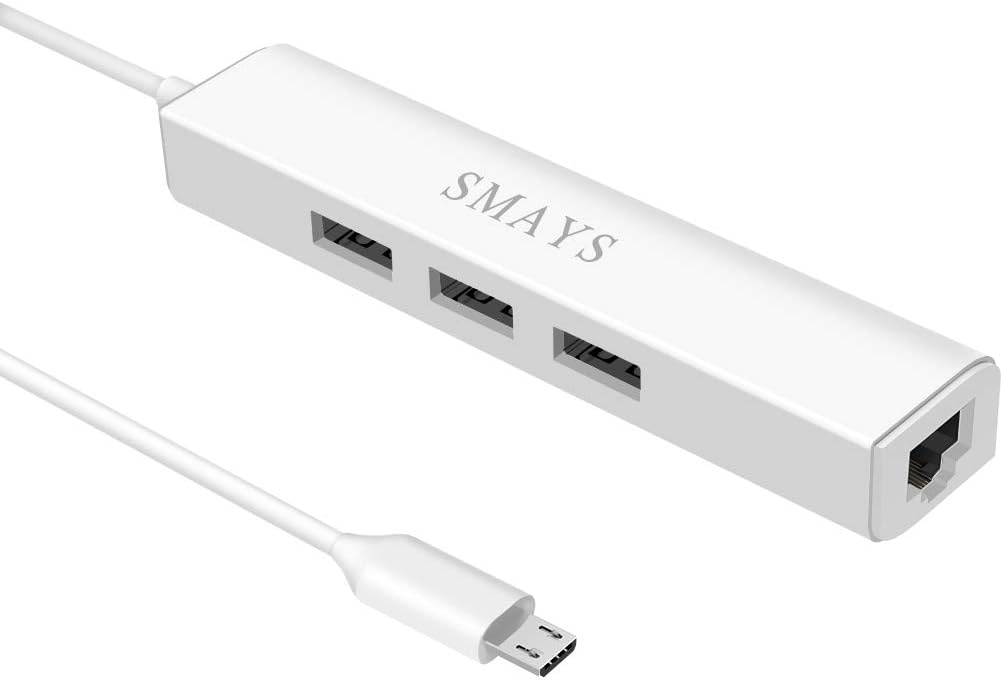
The Micro USB Hub with Ethernet Adapter is a unique option that combines networking with multiple USB ports. It supports 10/100M internet speeds while allowing you to connect external flash drives, keyboards, and mice.
We may earn a commission when you buy through this link, at no additional cost to you.
This hub is perfect for users who want to expand the functionality of their Fire TV. You can use the Ethernet port for a stable connection while utilizing the USB ports for file storage or input devices.
Note that it requires a 5V/2A wall charger for sufficient power. While it is bulkier than standard adapters, its versatility makes it a valuable tool for power users who need more than just internet connectivity.
This hub is best for users who want to transform their streaming stick into a more versatile computer-like device. It provides both stable internet access and expanded storage capabilities.
Having multiple USB ports lets you plug in peripherals like keyboards without needing a separate hub.
You can store apps and files on external flash drives, increasing the effective storage capacity of your Fire TV.
We may earn a commission when you buy through this link, at no additional cost to you.
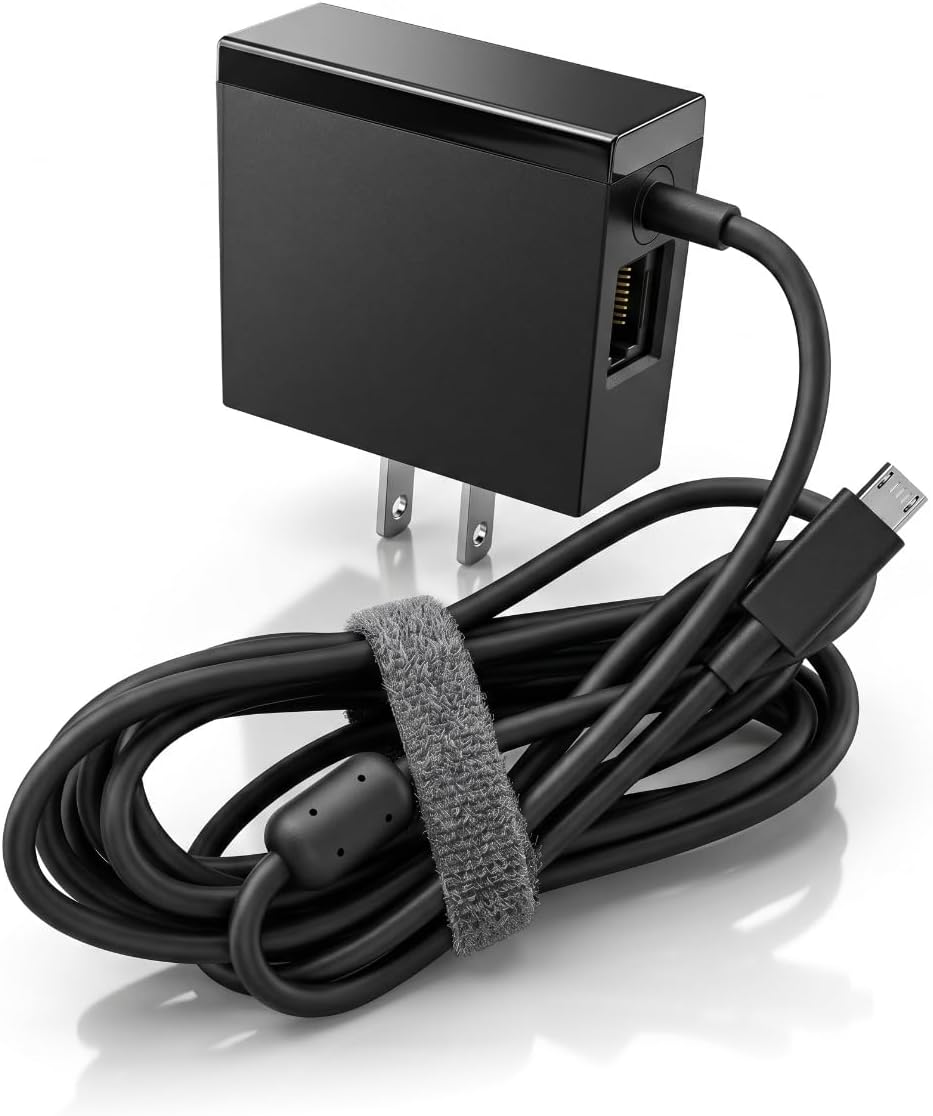
The Micro USB Port Fire Stick Ethernet Power Adapter combines power supply and networking into a single unit. It features a 100Mbps RJ45 ethernet port that enables stable 4K signal transmission without signal delay or loss.
We may earn a commission when you buy through this link, at no additional cost to you.
This adapter is designed for specific Fire TV Stick models that use a micro USB power port. It eliminates the need for a separate power brick and Ethernet adapter, streamlining your connection setup.
With a 4.6-star rating, it is well-regarded for its ability to maintain a consistent connection. The standard power adapter ensures your device receives sufficient power while connected to a wired network.
This solution is ideal for users who want a single cable to power and connect their device. If your Fire TV supports this configuration, it simplifies your setup significantly while improving stability.
Integrating the power adapter and Ethernet port into one device reduces cable clutter behind your TV.
Ensuring consistent power delivery helps prevent crashes and interruptions during long streaming sessions.
We may earn a commission when you buy through this link, at no additional cost to you.
Selecting the right Ethernet adapter requires understanding your specific Fire TV model and its connectivity options. This guide helps you evaluate key factors to ensure compatibility and optimal performance.
The most critical step is determining whether your Fire TV Stick uses a Micro-USB or USB-C port for power and data. Newer models like the Fire TV Stick HD (2nd Gen) use USB-C, whereas most previous generations use Micro-USB. Using the wrong adapter will result in a non-functional connection or potential damage.
Always verify your device model number before purchasing. If your device uses USB-C, you must buy a USB-C adapter. If it uses Micro-USB, a standard Micro-USB adapter will work.
Adapters come in different speed categories, primarily 10/100 Mbps (Fast Ethernet) and 1000 Mbps (Gigabit Ethernet). While 10/100 Mbps is sufficient for most HD and 4K streaming, gigabit adapters offer better performance for high-bandwidth tasks like online gaming or simultaneous streaming on multiple devices.
If your internet plan exceeds 100 Mbps, consider a gigabit adapter to ensure your wired connection does not become a bottleneck. However, for basic streaming, standard 100 Mbps adapters are often adequate.
Many Ethernet adapters require external power via a USB wall charger because the Fire TV Stick may not supply enough power through its USB port. Some adapters include this power cable, while others may require you to use your existing Fire TV power adapter.
Check if the adapter includes a dedicated power cord or if it relies on passthrough power. Ensuring adequate power prevents connection drops and protects your device from electrical issues.
Streaming devices can generate heat during extended use, so adapters with aluminum alloy casings are preferable. These materials dissipate heat more effectively than plastic, ensuring the adapter stays cool and maintains performance over time.
Look for models that mention heat dissipation features. A cooler adapter is less likely to overheat and fail, especially in enclosed spaces behind a television.
Not all adapters work with every Fire TV device. Some specifically exclude the Fire TV Cube or certain newer models. Always check the product description for a list of supported devices to avoid purchasing an incompatible adapter.
Confirm that the adapter supports your specific generation of Fire TV Stick. Manufacturers often list compatible models like Fire TV Stick 4K, 4K Max, or Lite explicitly.
The best adapters are plug-and-play, meaning they require no additional drivers or software installation. They should be recognized instantly by your Fire TV OS when connected, allowing you to start streaming immediately.
If an adapter requires configuration or drivers, it adds unnecessary complexity. Choose options that guarantee instant activation upon connection to your router.
Consider the physical size and shape of the adapter. A compact design prevents it from protruding too far and potentially blocking other ports or interfering with remote control signals. Some adapters have right-angle connectors to minimize bulk.
Additionally, look for adapters that include mounting tapes or clips. These help secure the adapter close to the Fire TV Stick, reducing cable strain and clutter behind your entertainment center.
A solid warranty and accessible customer support are valuable when dealing with electronic accessories. This can help resolve issues if the adapter fails or does not work as expected with your setup.
Choose reputable brands that offer clear return policies. This ensures peace of mind if you encounter any technical difficulties during installation or use.
To set up your adapter, plug the USB or USB-C connector into the corresponding port on your Fire TV Stick. Connect one end of an Ethernet cable to the adapter's RJ45 port and the other end to your router or modem.
If your adapter requires external power, connect the included USB power cable to a wall adapter rated for at least 5V/1A. This ensures stable power delivery to the adapter and your Fire TV Stick.
Keep the adapter in a well-ventilated area to prevent overheating. Avoid bending the Ethernet cable excessively or placing heavy objects on the adapter to maintain long-term reliability.
While strong WiFi is often sufficient, an Ethernet adapter provides a more stable connection with lower latency. This is particularly beneficial for 4K streaming or online gaming where consistent speeds are crucial to avoid buffering.
No, you need a specific USB-C Ethernet adapter for newer Fire TV Stick models that have USB-C ports. Standard Micro-USB adapters will not fit these devices and may cause connection issues.
Yes, any standard Ethernet cable with RJ45 connectors will work with these adapters. Cat5e or Cat6 cables are recommended for optimal speed and stability depending on your internet plan.
Yes, once connected, your Fire TV Stick should automatically detect the wired connection. You may need to navigate to Settings to switch the active network preference if WiFi is still enabled.
If your Fire TV does not supply enough power, the adapter may not function correctly. Always use a separate USB wall charger for the adapter if it requires external power to ensure stable operation.
Compatibility varies by model. Check the product specifications carefully. Some adapters support the Fire TV Cube, while others may exclude it. Ensure the adapter explicitly lists Cube support if needed.
We have reviewed ten top options ranging from budget-friendly Micro-USB adapters to high-performance USB-C models. Each product offers unique features to suit different Fire TV models and streaming requirements.
Prioritize compatibility with your specific device type and consider whether you need extra power ports or faster speeds. A reliable adapter can significantly improve your streaming experience by eliminating Wi-Fi interruptions.
Keep in mind that product prices and availability change frequently. We recommend checking current listings on trusted retail sites to confirm the latest pricing and stock before you buy.