
SABRENT 74 in 1 3.5 Inch
4.0Editor score
Supports 74 card types
Internal power connector
Includes USB 2.0 port
This guide compares the top internal media card readers for desktop PCs, evaluating speed, compatibility, and build quality to help you choose the right model.
Internal media card readers provide a convenient way to access flash memory directly from your desktop computer without relying on external peripherals or hubs that clutter your workspace.
We evaluated ten top-rated models based on compatibility, transfer speeds, build quality, and ease of installation to determine which readers offer the best value for professionals and enthusiasts.
Each selection highlights key features and trade-offs to help you find the right fit for your system while noting that product availability and pricing may vary over time.
4.0Editor score

4.5Editor score
4.3Editor score
The following table provides a side-by-side comparison of all ten models, highlighting their key specifications, supported card formats, and connectivity options for quick reference.


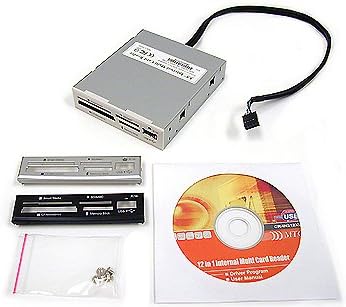
The StarTech Internal Card Reader stands out as the top choice for professionals seeking speed and reliability. With a 4.5-star rating, this model offers robust support for a wide array of flash memory types through its internal USB 3.0 connection.
We may earn a commission when you buy through this link, at no additional cost to you.
Its ability to access four different card slots simultaneously makes it ideal for workflows involving large media transfers. The TAA compliance ensures it meets specific procurement standards, while the included 20-pin IDC cable simplifies installation within standard desktop chassis.
While the price is higher than entry-level options, the performance gains and durability justify the investment for power users. The need for a specific motherboard header may require checking system compatibility before purchase.
Photographers and videographers who frequently move data between cards will appreciate the speed and versatility this reader provides. It balances professional-grade features with user-friendly setup for serious desktop users.
USB 3.0 support enables significantly faster file movements compared to older USB 2.0 interfaces.
TAA certification ensures eligibility for specific government and enterprise procurement processes.
We may earn a commission when you buy through this link, at no additional cost to you.
The SABRENT 74 in 1 offers an exceptional value for users needing broad compatibility without breaking the budget. Its extensive support for 74 card types makes it a versatile solution for diverse legacy and modern memory formats.
We may earn a commission when you buy through this link, at no additional cost to you.
The inclusion of an internal power connector ensures that external USB devices receive sufficient power, which is often a limiting factor in internal readers. Additionally, the extra USB 2.0 port provides convenient connectivity for flash drives or other peripherals.
While it lacks the speed of USB 3.0 models, its affordability and sheer versatility make it a smart choice for general use. The plastic construction is functional but may not withstand heavy daily handling as well as premium alternatives.
Home users or hobbyists with mixed card collections will find this model meets their needs effectively. It is an excellent entry point into internal card readers where budget is a primary concern.
Supporting 74 card types ensures compatibility with both older and newer flash media formats.
Internal power connector helps maintain stability when powering external USB devices.
We may earn a commission when you buy through this link, at no additional cost to you.
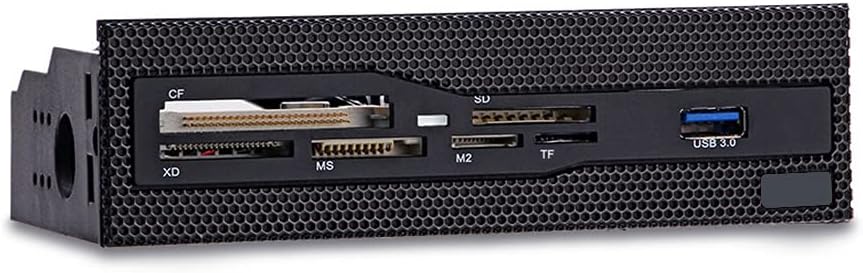
This 5.25-inch internal card reader combines premium build quality with high-speed connectivity for demanding desktop environments. The copper-plated slots ensure stable transmission and reduce wear over time compared to standard plastic connectors.
We may earn a commission when you buy through this link, at no additional cost to you.
Its grid panel design integrates seamlessly with mesh-front cases, providing both aesthetic appeal and functional access. The USB 3.0 support ensures that file transfers are efficient, which is critical for users working with large video or photo files.
The main limitation is the requirement for a 5.25-inch drive bay, which may not be present in modern compact cases. However, for full-tower builds where space is available, this reader offers a superior user experience.
Tech enthusiasts who prioritize durability and speed will appreciate the thoughtful engineering of this model. It represents a solid investment for custom PC builds focused on performance and accessibility.
Copper-plated card slots enhance stability and longevity during frequent card insertions.
Mesh panel design complements modern case aesthetics while providing easy access.
We may earn a commission when you buy through this link, at no additional cost to you.
This panel offers extensive connectivity by combining card reading with a USB hub and audio ports. The inclusion of eSATA provides a pathway for high-speed external drive connections alongside the card reader functions.
We may earn a commission when you buy through this link, at no additional cost to you.
LED indicators for power and drive activity enhance usability in low-light environments, helping users confirm operations at a glance. The multi-format card reader supports common flash types, making it a versatile front-panel solution.
The complex cabling required for full functionality might challenge less experienced builders. Additionally, the mixed reviews suggest some users may encounter setup issues or quality inconsistencies over time.
Users needing an all-in-one front panel solution for audio, USB, and card reading will find this model appealing. It is best suited for those comfortable with detailed PC assembly tasks.
Integrates USB hub audio jacks and eSATA for comprehensive front-panel access.
Mixed ratings indicate potential variability in build quality or installation ease.
We may earn a commission when you buy through this link, at no additional cost to you.
The Vantec Link USB 3.0 achieves a perfect user rating, signaling exceptional reliability and performance. Its Multi-LUN support allows simultaneous access to multiple cards, which is critical for professional workflows.
We may earn a commission when you buy through this link, at no additional cost to you.
Advanced specifications like CompactFlash v6.0 and SDXC up to 2TB ensure compatibility with high-end camera equipment. The quad data access feature for Memory Stick PRO-HG enhances transmission rates significantly.
While the features are robust, the price may be higher than necessary for casual users. The dependency on a 20-pin header also limits its use to specific desktop systems.
Professionals working with high-resolution media and large data sets will benefit most from this model. Its flawless reputation makes it a trustworthy choice for critical daily tasks.
Allows simultaneous reading of multiple cards without swapping devices manually.
Handles high-capacity cards up to 2TB for extensive storage needs.
We may earn a commission when you buy through this link, at no additional cost to you.
This multifunction dashboard consolidates many essential desktop features into one front panel. The combination of USB 3.0, eSATA, audio jacks, and a card reader makes it a comprehensive interface hub.
We may earn a commission when you buy through this link, at no additional cost to you.
LED indicators for power and disk activity provide visual feedback, helping users monitor system status easily. The six-in-one card reader supports a wide range of common formats for everyday use.
The complexity of the installation cabling may be daunting for first-time builders. Ensuring all connections are properly seated is crucial for the panel to function as intended.
Users who want a single point of access for audio, storage, and cards will find this panel valuable. It maximizes the utility of a standard 5.25-inch drive bay.
Integrates multiple connectivity types into one easy-to-access front panel.
Multiple cables require careful organization and motherboard header availability.
We may earn a commission when you buy through this link, at no additional cost to you.
Sony's internal reader offers a reliable solution for users managing diverse memory card collections. The 17-in-1 support ensures that most legacy and standard formats can be read directly from the drive bay.
We may earn a commission when you buy through this link, at no additional cost to you.
Drive letter recognition software simplifies the experience for Windows users, ensuring consistent drive assignment across different cards. The inclusion of black and ivory faceplates allows for aesthetic customization of the front panel.
While the brand reputation is strong, the lack of USB 3.0 support limits transfer speeds compared to modern alternatives. This model is better suited for archival tasks or casual file transfers.
Users who frequently handle mixed card formats in a home office setting will find this reader dependable. It bridges the gap between modern PCs and older storage media effectively.
Drive letter software ensures consistent system recognition of different card types.
Multiple faceplate colors allow the reader to match various system aesthetics.
We may earn a commission when you buy through this link, at no additional cost to you.
This compact internal card reader offers a simple and reliable way to access memory cards from a desktop. Its 2.5-inch form factor makes it suitable for smaller drive bays where space is limited.
We may earn a commission when you buy through this link, at no additional cost to you.
The inclusion of black, silver, and white bezels provides flexibility for matching the reader to the PC's visual style. High-quality materials ensure durability even with frequent card insertion and removal.
The perfect rating suggests consistent performance and user satisfaction. However, the basic feature set may not satisfy power users needing high speeds or extensive format support.
Ideal for general home users who need occasional access to SD or CF cards. It provides a tidy, permanent solution without the clutter of external readers.
2.5-inch size accommodates tighter case configurations than standard 3.5 models.
Multiple bezel options ensure the reader blends well with case aesthetics.
We may earn a commission when you buy through this link, at no additional cost to you.
Akasa's model includes an additional USB port to simplify connectivity for peripherals like flash drives. The dedicated adapter slots eliminate the need for separate microSD or M2 adapters during use.
We may earn a commission when you buy through this link, at no additional cost to you.
Activity LEDs clearly indicate when data transfer is occurring, preventing accidental removal of cards during writes. The black and white panels offer flexibility for matching different system designs.
While the price is moderate, the added utility of the USB port and dedicated slots justifies the cost. It balances essential features with good build quality for most desktop users.
Users who want an internal reader with extra USB connectivity will find this model practical. It simplifies front-panel access for multiple device types in one unit.
Additional USB port allows concurrent access to drives and memory cards.
Dedicated adapter slots streamline workflow by removing the need for external adaptors.
We may earn a commission when you buy through this link, at no additional cost to you.
This budget-friendly model offers broad format support within a metal case for improved durability. The metal construction provides better protection against wear compared to plastic alternatives.
We may earn a commission when you buy through this link, at no additional cost to you.
Supporting 22 formats ensures compatibility with most legacy and modern cards. Bus-powered operation eliminates the need for external power supplies, simplifying the installation process significantly.
The transfer speed is limited by USB 2.0 specifications, which may be a drawback for large files. However, for basic data access and occasional use, it remains a functional tool.
Entry-level users looking for a permanent card reading solution will find this model sufficient. It provides essential features at a competitive price point for casual computing needs.
Metal case improves physical protection and heat dissipation compared to plastic.
Bus-powered design removes the need for extra power connections or adapters.
We may earn a commission when you buy through this link, at no additional cost to you.
Selecting the right internal media card reader requires understanding how connectivity, card format support, and physical dimensions affect your desktop setup.
USB 3.0 interfaces offer significantly faster data transfer rates compared to USB 2.0, which is essential for users working with high-resolution video or large photo libraries.
Prioritize USB 3.0 models if you frequently move large files to ensure your workflow remains efficient and does not bottleneck with slower connection speeds.
Different models support varying sets of card types ranging from standard SD and CF to legacy formats like xD and Memory Stick.
Review the supported card list carefully to ensure the reader matches the specific formats you currently use or may encounter in professional workflows.
Internal readers are typically designed for 3.5-inch or 5.25-inch drive bays, so you must confirm your case has the necessary space available.
Modern cases often lack 5.25-inch bays, so a 3.5-inch reader might be required for newer builds or compact systems.
Some models require specific motherboard headers like 20-pin USB connections, while others plug into SATA or simple internal power connectors.
Check your motherboard documentation to confirm the availability of the required headers before purchasing to ensure a smooth installation process.
Metal cases offer greater durability and heat dissipation compared to plastic, which is crucial for devices that see frequent daily use.
Investing in a robust build ensures the slots and connectors remain secure over time, reducing the risk of mechanical failure.
Some panels integrate extra USB ports audio jacks or eSATA connectors, adding functionality beyond simple card reading.
Consider whether these bundled features are necessary for your setup or if they complicate installation without adding real value to your workflow.
Ensure the reader is compatible with your specific operating system version such as Windows Linux or macOS to avoid driver issues.
Most modern readers work without drivers, but verifying compatibility guarantees that your cards will be recognized immediately upon installation.
Professional-grade models often come with longer warranties and better customer support which can be crucial for business users.
Prioritize brands that offer clear return policies and support channels to safeguard your investment against potential hardware defects.
Begin by ensuring your computer is powered off and unplugged before installing the reader into the designated drive bay to prevent electrical shorts or hardware damage.
Secure the reader using the included screws and connect the necessary data and power cables to your motherboard ensuring all connections are fully seated.
After installation, restart your computer and insert a memory card into the appropriate slot to verify that your system recognizes the new drive letter.
Most internal readers draw power directly from your motherboard or power supply unit so they do not require external adapters. However some models include an internal power connector to ensure sufficient power for external USB devices.
Many modern internal readers support simultaneous multi-card access allowing you to read or write to multiple slots at the same time. Check the product specifications to confirm if it supports this feature.
USB 3.0 readers offer faster data transfer speeds up to 5Gbps compared to the 480Mbps limit of USB 2.0. This speed difference is significant when transferring large media files regularly.
Most internal card readers are OS independent and work with macOS without requiring additional drivers. However it is always best to verify compatibility with your specific macOS version before purchasing.
Installation involves mounting the reader in a 3.5 or 5.25 drive bay and connecting it to a motherboard USB header or SATA port. Follow the included manual to ensure correct cable routing and screw tightening.
Most modern internal readers support SDXC cards which can hold capacities up to 2TB. Ensure the model you choose explicitly lists SDXC support to avoid limitations with high-capacity cards.
The StarTech Internal Card Reader leads our list with its professional performance and simultaneous slot access making it ideal for power users.
Select your model based on whether you prioritize speed compatibility or additional connectivity features like extra USB ports or audio jacks.
Always verify current availability and pricing as these details may change frequently to ensure you get the best value for your desktop setup.