
AULA WIN68 HE
4.5Editor score
Magnetic switches
Web-based driver
Compact 60 percent
This guide compares the top keyboards for Valorant focusing on speed, precision, and value for competitive players in October 2026.
Finding the right keyboard for Valorant means prioritizing speed and precision. Players need fast actuation and responsive inputs to succeed in competitive matches where every millisecond counts.
We compared ten top models based on switch technology, polling rates, and build quality. Our list highlights options for different budgets while focusing on features that truly enhance performance.
Each pick shows key strengths and trade-offs to help you decide. Prices and availability can change quickly, so verify current details before making your final purchase decision today.
4.5Editor score

4.1Editor score

4.6Editor score
We evaluated all ten models based on speed, build, and features to give you a clear view of how they stack up against each other.

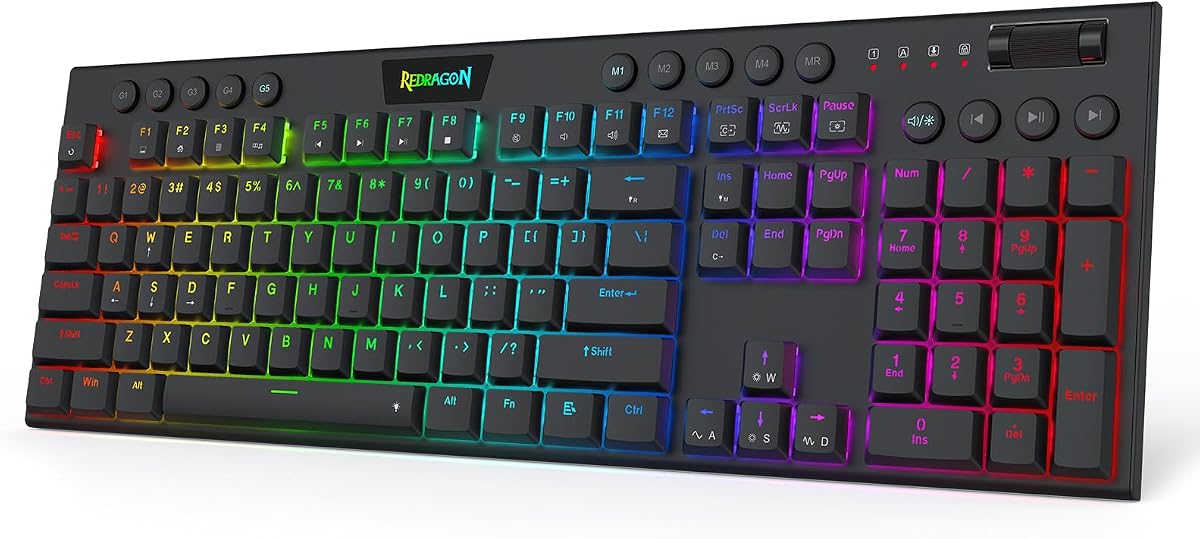





The Redragon K673 HE brings next-gen UltraMag switches that react without physical contact. Its 4.1 rating shows solid approval for fast response and reliable gaming performance.
We may earn a commission when you buy through this link, at no additional cost to you.
It features an 8,000Hz polling rate that transmits inputs eight times faster than standard boards. The Rapid Trigger and PRCS tech cut redundant keystrokes for sharper control.
Tuning requires a driver to set actuation between 0.1mm and 3.4mm. The dual-module floating structure reduces wobble but may feel different than traditional mechanical boards.
Buy this if you want precision tuning and rapid triggers for FPS titles. It balances performance and value well for players aiming to improve their timing.
These switches detect presses before contact to reduce delay and wear compared to standard mechanical options.
The 8000Hz rate ensures your actions register nearly instantly so you land shots when intended.
We may earn a commission when you buy through this link, at no additional cost to you.
The Redragon K686 HE uses UltraMag switches to deliver rapid feedback for fast-paced shooters. Its 4.4 rating reflects strong performance in speed and responsiveness.
We may earn a commission when you buy through this link, at no additional cost to you.
It offers 8,000Hz polling and dynamic key activation to reduce input lag. You can adjust actuation points between 0.1mm and 3.4mm to match your style.
Dual-module structure minimizes wobble while dampening layers soften sound. However, you must install software to unlock full tuning and trigger features.
This keyboard suits players who prioritize actuation control and polling speed. It provides a solid platform for competitive play at a competitive price.
The trigger resets instantly when you lift a key so you can repress it faster for quick strafes.
A single knob handles brightness and volume so you avoid fumbling through key combos.
We may earn a commission when you buy through this link, at no additional cost to you.
The Redragon K618 HE uses low-profile magnetic switches to cut travel time for rapid counter-strafing. Its perfect 5.0 rating highlights fast actuation and ease of use.
We may earn a commission when you buy through this link, at no additional cost to you.
It features 20 on-the-fly macro keys that work without software. The 30 percent slimmer profile shortens travel distance so keystrokes register quickly.
Software tuning allows actuation adjustment between 0.1mm and 2.8mm. The low-profile feel may take adjustment but aids speed in fast games.
Choose this if you prefer lighter keystrokes and macro flexibility. It stands out for players who value quick actuation and clean wrist ergonomics.
Shorter travel means fingers move less to register keys which helps maintain speed during intense rounds.
Dedicated macro keys let you record combos on the fly for quick access without drivers.
We may earn a commission when you buy through this link, at no additional cost to you.
The Corsair Clipper PRO MINI delivers competitive Hall Effect control in a compact 60 percent design. It scores 4.4 for precise actuation and sturdy build.
We may earn a commission when you buy through this link, at no additional cost to you.
Its MGX switches allow 0.1mm reset for rapid taps. The 8000Hz polling rate and FlashTap SOCD ensure cleaner directional inputs for counter-strafing.
It resists dust and water with an IP57 rating for long sessions. The layout sacrifices function keys but maximizes mouse space for aiming.
This model fits gamers who want a small footprint with top speed. It suits setups needing more mouse room and reliable performance under pressure.
These linear switches offer adjustable actuation from 0.2 to 3.8mm to fine-tune sensitivity.
IP57 resistance protects against spills and dust so the board stays reliable during long gaming sessions.
We may earn a commission when you buy through this link, at no additional cost to you.
The Razer Huntsman Mini uses optical beam switches to register presses at the speed of light. It earns 4.6 for fast actuation and smooth typing feel.
We may earn a commission when you buy through this link, at no additional cost to you.
Its 1.0mm actuation beats traditional linear switches for quick inputs. Razer Synapse enables Snap Tap to prioritize inputs for better in-game movement.
Full Chroma RGB syncs with games and peripherals for immersion. PBT keycaps resist wear and offer a textured finish for longevity.
Pick this if you want fast optical tech and strong RGB support. It is ideal for players who value branding and customization options.
Light beams register inputs without physical contact reducing travel time and wear on the board.
This feature prioritizes recent inputs to help you switch directions faster in tactical shooters.
We may earn a commission when you buy through this link, at no additional cost to you.
The Aula WIN60 HE delivers magnetic switches for consistent and fast actuation. It scores 4.5 for reliability and quick response in fast-paced games.
We may earn a commission when you buy through this link, at no additional cost to you.
Its 8000Hz polling rate ensures near-instant input registration. You can personalize actuation through a lightweight web-based driver without bulky software.
Hot-swappable design lets you swap switches to tailor feel. The 60 percent layout saves desk space but removes arrow keys.
Choose this if you want compact size with high-speed polling. It suits gamers who value web tools and magnetic switch speed.
Magnetic sensors detect key presses without physical contact to reduce wear and improve speed.
Customize RGB and macros via browser to avoid installing extra programs on your system.
We may earn a commission when you buy through this link, at no additional cost to you.
The AULA WIN68 HE offers rapid 8000Hz polling and magnetic switches for competitive FPS play. It rates 4.5 for speed and value in gaming setups.
We may earn a commission when you buy through this link, at no additional cost to you.
Its fast trigger mode supports adjustable actuation for precision. The web driver allows full customization without downloads on Windows systems.
South-facing LEDs improve RGB shine and brightness. The 60 percent layout keeps the board small for desk space.
Buy this for top-tier polling without a premium price. It suits budget-conscious gamers who still need high-speed inputs.
Customize RGB macros and actuation directly in your browser for easy setup.
Space-saving design frees up mouse area while retaining essential gaming keys.
We may earn a commission when you buy through this link, at no additional cost to you.
The AULA F75 Pro offers tri-mode wireless and hot-swappable switches for customization. It scores 4.6 for build quality and versatile connectivity.
We may earn a commission when you buy through this link, at no additional cost to you.
Its 2.4GHz wireless provides low latency. The 4000mAh battery supports long play without cables. PBT keycaps stay durable and soft over time.
Side-printed keys allow light shine-through and resist wear. Pre-lubed switches deliver a creamy and consistent typing feel.
Choose this for wireless freedom with strong battery life. It suits players who value ergonomics and switch customization.
Switch between Bluetooth, wireless, and USB to use multiple devices easily.
Swap switches without soldering to customize your feel and performance over time.
We may earn a commission when you buy through this link, at no additional cost to you.
The ATTACK SHARK X68 HE provides rapid trigger and adjustable magnetic switches for fast inputs. It rates 4.6 for responsiveness and gaming tuning.
We may earn a commission when you buy through this link, at no additional cost to you.
Its 8000Hz polling reduces latency for quick movement. The web driver allows remapping and customization without downloads on Windows.
Top-mount structure ensures quiet and stable operation. PBT keycaps and RGB lighting add durability and style to the board.
Buy this for rapid trigger control without extra cost. It suits gamers who value speed and straightforward setup.
This feature resets keys instantly so you can repress faster for rapid movement.
Top-mounted plate reduces wobble and enhances the feel of every keystroke.
We may earn a commission when you buy through this link, at no additional cost to you.
The ASUS ROG Strix Scope II blends wireless flexibility with full layout convenience. It scores 4.6 for build and versatility across systems.
We may earn a commission when you buy through this link, at no additional cost to you.
Its tri-mode links support Bluetooth and 2.4GHz wireless. Hot-swap switches allow customization while PBT keycaps resist wear.
It features integrated sound dampening for quieter typing. A multi-function wheel and ergonomic rest enhance comfort.
Choose this for premium features and full-size utility. It suits users who need a number pad and wireless performance.
Switch between Bluetooth and wireless easily to manage multiple devices on one desk.
Retain function and number keys while saving space compared to full keyboards.
We may earn a commission when you buy through this link, at no additional cost to you.
Choosing a keyboard for Valorant requires balancing speed, build, and cost. Here are key factors to evaluate before buying.
Hall Effect and optical switches react faster than traditional mechanical ones. They detect keystrokes before contact to reduce delay and improve consistency in fast games.
Prioritize magnetic or optical switches for low-latency inputs.
Higher polling rates like 8000Hz send data more often to the PC. This reduces lag and helps your moves register precisely during intense gameplay.
Look for boards rated at 8000Hz for competitive play.
Rapid Trigger allows instant reset when lifting a key so you can repress faster. This supports rapid strafing and directional changes needed in FPS games.
Ensure the board supports Rapid Trigger for smoother movement.
Compact layouts like 60 percent save desk space but remove arrow keys. Larger layouts retain function keys but take more room for mouse movement.
Select a size that fits your desk and movement needs.
Wired connections offer the lowest latency for gaming. Wireless options add convenience but require careful choice of low-latency technology to avoid lag.
Use wired for competitive play and wireless for flexibility.
Software or web drivers let you adjust actuation and macros. This tuning helps match the keyboard to your playstyle and improves precision over time.
Choose boards with easy software tools for full control.
Durable keycaps and sturdy frames resist wear and noise. PBT keycaps last longer and provide better grip than ABS types.
Pick models with PBT caps and strong frames.
High-end boards offer more features but cost more. Mid-range options often balance speed and affordability for most players.
Compare features to your budget before buying.
Clean your keyboard regularly with a soft cloth and compressed air. Dust buildup can affect switch performance and reduce lifespan.
Calibrate actuation points through the driver to match your typing style. Regular tuning ensures consistent performance across matches.
Update firmware periodically to fix bugs and add features. Keep your software current for best compatibility and response.
The Redragon K673 HE stands out as the best overall due to its magnetic switches and Rapid Trigger. It balances speed and value well for competitive play.
Wired connections offer the lowest latency for competitive play. Wireless options work if they support low-latency tech like 2.4GHz for fast responses.
Hall Effect switches detect key presses before contact to reduce lag. They provide faster and more consistent actuation than traditional mechanical switches.
Rapid Trigger resets keys instantly when lifted allowing faster represses. This helps with quick strafing and directional changes needed in FPS games.
An 8000Hz polling rate sends data eight times faster than standard boards. It ensures your inputs register nearly instantly during gameplay.
Compact boards save desk space for mouse movement. Choose one with arrow keys if you need navigation for maps and menus.
The Redragon K673 HE leads as the top pick with Rapid Trigger and high polling. It offers performance and tuning for serious players in competitive matches.
Focus on switch speed and actuation tuning to maximize your advantage. Balance your budget with features that truly enhance your gaming experience.
Check current prices and availability before buying since models update frequently. Choose the keyboard that fits your style and setup best.