
Wodgreat Laptop Monitor Lamp
4.3Editor score
Asymmetrical optical design
USB powered connectivity
Space-saving clip mount
A laptop monitor light bar transforms your workspace by providing focused illumination without cluttering your desk. These devices mount directly on your screen, casting light downward to reduce eye strain during long hours of work or study.
We evaluated ten top-rated models based on optical design, brightness control, and build quality. Our analysis focuses on features like asymmetrical lighting, color temperature options, and ease of installation to help you find the perfect match for your setup.
Each pick below highlights specific strengths such as budget-friendly pricing or advanced sensor technology. Note that product availability and costs may shift over time, so verify current details before making your final purchase decision.
4.3Editor score

4.6Editor score

4.7Editor score
As an Amazon Associate we earn from qualifying purchases.
The following table offers a side-by-side view of key specifications for all ten models. This comparison helps you quickly identify differences in optical design, power source, and special features like RGB lighting or auto-dimming sensors.

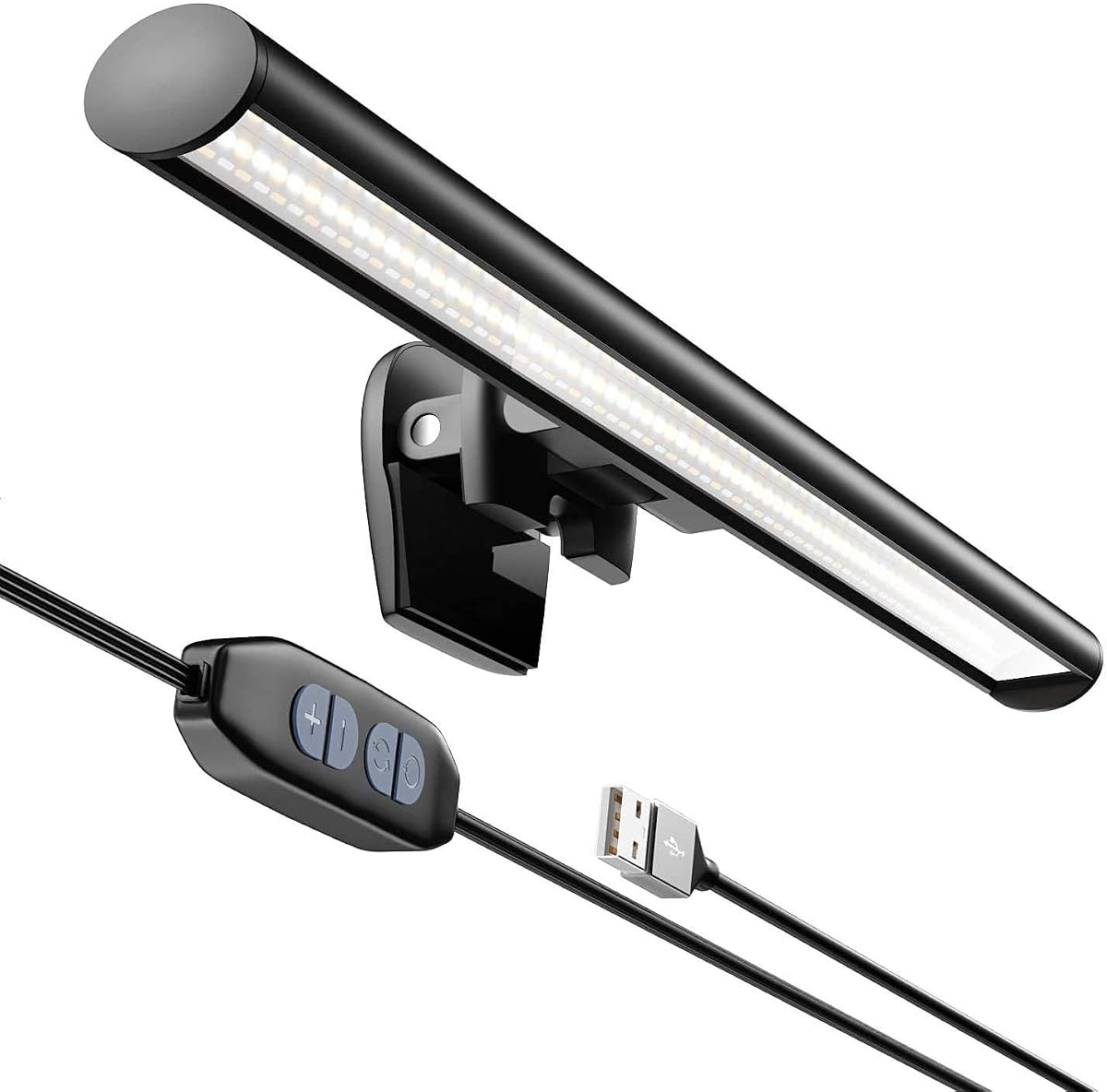





This model stands out as a top pick due to its effective asymmetrical optical design and hassle-free setup. It holds a strong rating among users seeking reliable illumination without cluttering their desk space.
We may earn a commission when you buy through this link, at no additional cost to you.
The light directs onto your desk instead of your screen to reduce reflections. You can choose from three color temperatures and ten brightness levels to create a comfortable workspace that suits your specific needs.
While it lacks advanced sensors, the memory function ensures your settings are retained after each use. This convenience factor makes daily operation smooth and intuitive for any user.
Anyone needing a simple yet effective lighting solution for a laptop or monitor should consider this option. It delivers consistent performance and eye comfort without requiring complex adjustments.
The optical design ensures light hits your workspace while keeping the screen reflection-free.
Ten brightness levels and three color modes let you tailor the light to your mood.
We may earn a commission when you buy through this link, at no additional cost to you.
Budget-conscious buyers will appreciate this lamp for its balance of cost and essential features. It protects your eyes with asymmetrical design and offers a solid two-year warranty for peace of mind.
We may earn a commission when you buy through this link, at no additional cost to you.
The sleek matte black frame fits modern setups well without obstructing your webcam. Ten brightness options and three color temperatures provide enough versatility for reading or working tasks.
Some users might find the brightness limited compared to premium models. However, for general use in home offices or bedrooms, it provides sufficient light for extended sessions.
If you need a reliable and affordable lighting solution that looks great on your desk, this is a strong choice. It delivers eye care benefits without a high price tag.
Asymmetrical optics eliminate screen glare and protect your eyes from harmful reflections.
Matte finish and robust construction ensure it looks good and lasts for years.
We may earn a commission when you buy through this link, at no additional cost to you.
This portable bar is ideal for travelers or those who switch between desks frequently. It is designed to be lightweight yet durable enough to withstand daily wear and tear.
We may earn a commission when you buy through this link, at no additional cost to you.
Flicker-free technology reduces eye strain during prolonged study sessions. You can adjust the angle and position easily to suit your specific lighting needs at any location.
The design prioritizes portability over advanced smart features. While it lacks sensors, the core functionality of providing glare-free light is handled effectively and reliably.
Perfect for students or professionals who need consistent lighting on the go. It offers a practical solution for eye care without adding bulk to your workspace or bag.
Lightweight and slim design makes it easy to pack and use in different locations.
Flicker-free LEDs ensure stable light that prevents fatigue during long reading.
We may earn a commission when you buy through this link, at no additional cost to you.
This premium option stands out with its auto-dimming sensor and high color rendering index. It is an excellent choice for professionals who demand precise and comfortable lighting.
We may earn a commission when you buy through this link, at no additional cost to you.
The sensor automatically adjusts brightness to match ambient conditions, preventing eye fatigue. The 98 CRI ensures colors appear vivid and true, which is vital for design work.
Touch controls offer a sleek way to adjust settings, but the price is higher than basic models. However, the investment pays off in superior eye care and light quality.
Recommended for designers and office workers who prioritize visual accuracy and comfort. It provides a high-end lighting experience that supports long hours of focused work.
Built-in sensor detects room light to adjust brightness automatically for comfort.
High CRI rating makes colors pop, perfect for creative professionals.
We may earn a commission when you buy through this link, at no additional cost to you.
This bar features an ultrawide design to cover larger screens effectively. It delivers high brightness levels to ensure your entire workspace is evenly lit without dark spots.
We may earn a commission when you buy through this link, at no additional cost to you.
The 11.8-inch width allows for better distribution of light across your desk. A mechanical switch and counterweight clip provide reliable operation and secure attachment to your screen.
While the design is effective, it lacks touch controls or automatic sensors. The mechanical nature means physical interaction is required to change settings each time.
Ideal for users with larger monitors who need broad, bright illumination. It is a practical tool for gaming or working sessions where visibility is key.
Extra wide bar ensures uniform light distribution across large desktop areas.
Counterweight clip keeps the light stable on the screen without falling.
We may earn a commission when you buy through this link, at no additional cost to you.
This model combines dual control modes with a sturdy build to suit modern workstations. It features physical buttons for quick access to power and brightness adjustments.
We may earn a commission when you buy through this link, at no additional cost to you.
The minimalist design blends well with tidy desks while providing ultrawide lighting. Heavy-duty components ensure consistent performance without fading or flickering over time.
Users might prefer touch controls for a more integrated look. However, physical buttons offer tactile feedback that can be easier to use without looking at the device.
Great for users who want a durable and efficient lighting solution. It offers reliable performance and a clean look for any home or office setup.
Physical buttons provide quick and easy access to brightness and color settings.
Heavy-duty parts ensure long-term reliability and consistent light output.
We may earn a commission when you buy through this link, at no additional cost to you.
Designed for laptop users, this light bar offers a practical way to add light without clutter. It uses a safe low voltage supply and a simple 4-key controller for easy operation.
We may earn a commission when you buy through this link, at no additional cost to you.
The ABS housing is textured and gentle, ensuring comfort during installation. Its portability makes it a useful gift or tool for travel and various office environments.
It lacks advanced features like touch sensors or auto-dimming. However, for basic eye protection and desk illumination, it does the job effectively and affordably.
Suitable for anyone needing a simple light bar for their laptop setup. It provides reliable eye care features in a compact and portable package.
DC5V power ensures safe operation for your devices and personal safety.
4-key controller offers easy access to brightness and color adjustments.
We may earn a commission when you buy through this link, at no additional cost to you.
This light bar features a premium full-metal body that offers durability and heat conduction. It is designed for modern workspaces with a focus on eye safety and color accuracy.
We may earn a commission when you buy through this link, at no additional cost to you.
The RG0 rating ensures minimal blue light harm, protecting your vision during long sessions. A retractable clip allows it to fit both flat and curved monitors securely.
Stepless dimming provides fine control over brightness levels. The design is camera friendly, ensuring your video calls remain unobstructed by bulky hardware.
Perfect for professionals who value build quality and eye safety. It combines advanced features with a premium aesthetic to elevate your workspace.
Full metal construction ensures durability and effective heat dissipation.
RG0 certification provides the highest standard of blue light safety for eyes.
We may earn a commission when you buy through this link, at no additional cost to you.
This model introduces a dual light system with front and backlight options. It helps reduce eye strain by lighting both your screen and the surrounding area.
We may earn a commission when you buy through this link, at no additional cost to you.
The high CRI rating ensures accurate color representation for your work. Memory dimming saves your settings, so you do not need to readjust every time.
Installation may be slightly more involved due to the dual light system. However, the unique design offers a comfortable viewing experience that standard lamps cannot match.
Ideal for readers and users sensitive to dark backgrounds. The backlight feature provides a balanced lighting environment that reduces visual fatigue.
Front and backlight work together to reduce eye strain and improve contrast.
CRI 95 rating ensures colors appear true and vibrant on your screen.
We may earn a commission when you buy through this link, at no additional cost to you.
This top-tier model is designed for ultrawide and curved monitors. It features a foldable dual light design to illuminate large workspaces without dark corners.
We may earn a commission when you buy through this link, at no additional cost to you.
15 RGB backlight modes let you customize the ambiance for gaming or movies. An auto-sensor and memory function make it a smart companion for any workflow.
The price is high due to the advanced features and size. However, for owners of large screens, it provides a lighting solution that fits the curvature perfectly.
Recommended for gamers and professionals with curved screens. It delivers immersive lighting and eye protection tailored to complex monitor setups.
15 RGB modes allow you to set the mood for any task or game.
Designed to contour curved monitors perfectly, ensuring seamless lighting.
We may earn a commission when you buy through this link, at no additional cost to you.
Selecting the right laptop monitor light bar requires considering several key factors to ensure it meets your specific needs. This section outlines what to look for when making your decision.
Look for asymmetrical optical design to ensure light hits your desk and not your screen. This prevents glare and reflections that can cause eye strain and reduce visibility.
A good optical design focuses light where it is needed without shining directly into your eyes.
Choose a model with multiple brightness settings or stepless dimming. This allows you to adjust the light intensity based on your environment and task requirements.
Adequate brightness is essential for reading and working without straining your eyes.
Select a light bar that offers adjustable color temperatures. Warm light is better for relaxing while cool light helps with focus and productivity.
Variety in color options ensures you can tailor the lighting to your current activity.
Check the thickness range your monitor light bar can support. A clip-on design should fit your specific monitor or laptop screen securely without damaging it.
Ensure the mounting mechanism is stable and does not obstruct your webcam.
USB-powered bars are versatile and easy to connect to your computer or power bank. Ensure the cable length is sufficient for your desk setup.
Reliable power connectivity is key to consistent performance without hassle.
Materials like metal or high-quality plastic affect durability and heat dissipation. A sturdy build ensures the device lasts longer and performs well over time.
Good build quality also contributes to a sleek look on your desk.
Look for features like flicker-free technology and blue light filtering. These are critical for reducing fatigue during long hours of screen time.
Prioritize models with certifications or specs that highlight eye safety.
Decide between touch controls or physical buttons. Touch interfaces offer a modern look while physical buttons provide tactile feedback and ease of use.
The control method should match your preference for quick adjustments.
To install your light bar, attach the clip to the top edge of your monitor or laptop screen. Ensure it sits securely and is centered for even light distribution across your desk.
Plug the USB cable into your computer or power bank to activate the device. Use the control buttons to adjust brightness and color temperature to your preferred settings.
Clean the light bar gently with a soft, dry cloth to remove dust. Avoid using harsh chemicals or water to prevent damage to the electronics or finish.
Yes, by providing focused light on your workspace instead of your screen, it reduces glare and contrast. This helps prevent eye fatigue during long hours of reading or working.
Most models fit standard flat monitors with specific thickness ranges. Always check the mounting specs to ensure it will work with curved or ultra-thin screens.
No, these bars are typically USB-powered. You can plug them directly into your laptop or any USB port for convenient and cable-free operation.
Most bars are designed to mount high on the monitor so they do not block the camera. Check the product details to confirm webcam compatibility before buying.
Most models offer three options: warm, neutral, and cool light. Some advanced models provide stepless adjustment to give you more precise control over color.
Yes, the clip-on design allows you to remove it quickly without tools. This is useful if you need to transport your laptop or adjust your setup frequently.
Many models remember your last brightness and color settings. This means you do not have to readjust the light every time you turn it on.
We have highlighted ten top models that cover various needs from budget-friendly options to advanced curved monitors. Each offers unique features to enhance your desk setup and eye health.
Prioritize features like glare reduction and adjustable color temperature to ensure comfort. Select the build quality and control method that best fits your personal preferences.
Remember to check current product details before purchasing. Availability and specifications may change, so verifying the latest info ensures you get the right product.