
Microsoft Surface Dock (Pd9-00003),Black
4.5Editor score
Multiple USB 3.0 ports
Magnetic Surface Connect cable
Gigabit Ethernet port
This guide compares the top docking stations for Surface Pro, evaluating connectivity, charging power, and display support to help you choose the right hub.
Finding the right docking station for your Surface Pro is essential for maximizing productivity and transforming your tablet into a powerful desktop setup. With various ports and power requirements, selecting a compatible hub can significantly enhance your workflow efficiency and cable management experience.
We have evaluated ten top-rated docking stations based on compatibility, port variety, charging capabilities, and user feedback. This comprehensive list covers official Microsoft options and third-party alternatives designed to meet diverse professional and creative needs for Surface device owners.
Each pick highlights key features, pros, and cons to help you make an informed decision for your specific setup. Please note that product availability and pricing may change frequently, so verify current details before making your purchase decision online.
4.5Editor score

4.4Editor score

4.8Editor score
The following comparison table details the specifications of each reviewed docking station to help you quickly identify the best match for your Surface Pro model and connectivity requirements.



The Microsoft Surface Thunderbolt 4 Docking Station is a premium choice for users seeking maximum performance and connectivity. With a rating of 4.4 stars, it offers reliable Thunderbolt 4 ports for rapid data transfer and media streaming.
We may earn a commission when you buy through this link, at no additional cost to you.
This dock stands out with its versatile compatibility, featuring three USB-C and three USB-A ports alongside a 3.5mm audio jack and 2.5G Ethernet. The quick charge capability allows your laptop to power up in just 2.5 hours, keeping you productive without interruption.
While the price is higher than some alternatives, the ability to connect up to two 4K monitors elevates your visual experience significantly. The eco-friendly design using recycled ocean-bound plastic also reflects a commitment to sustainability.
This station is ideal for professionals who need high-speed connectivity and multiple monitor support. It simplifies desk clutter with easy port identification and delivers top-tier performance for demanding workflows.
Multiple USB-C and USB-A ports ensure you can connect all peripherals without additional adapters.
Constructed with 20% recycled ocean-bound plastic, it combines performance with environmental responsibility.
We may earn a commission when you buy through this link, at no additional cost to you.
The Microsoft Surface Dock (Pd9-00003) is a reliable budget-friendly option that transforms your Surface into a desktop PC easily. With a 4.5-star rating, it offers essential ports for everyday productivity needs and stable connectivity.
We may earn a commission when you buy through this link, at no additional cost to you.
This dock features two Mini DisplayPorts, one Gigabit Ethernet port, and four USB 3.0 ports to handle peripherals efficiently. The magnetic Surface Connect cable simplifies setup and ensures a secure connection to your device quickly.
While it uses older Mini DisplayPort technology, it remains effective for users with compatible monitors. The high-speed data transfer capabilities ensure files move quickly between your laptop and external drives.
This dock is perfect for those seeking an affordable way to expand connectivity without compromising core functions. Its simple plug-and-play design makes it accessible for users of all technical levels.
Plug in the Surface Connect cable to instantly convert your tablet into a full workstation setup.
Compatible with multiple Surface models including Pro 3 through Pro 6 and Laptop 2.
We may earn a commission when you buy through this link, at no additional cost to you.
This Surface Docking Station offers exceptional value with triple display support and a robust 72W power supply. With a rating of 4.8 stars, it is engineered for creative professionals who need extensive screen real estate.
We may earn a commission when you buy through this link, at no additional cost to you.
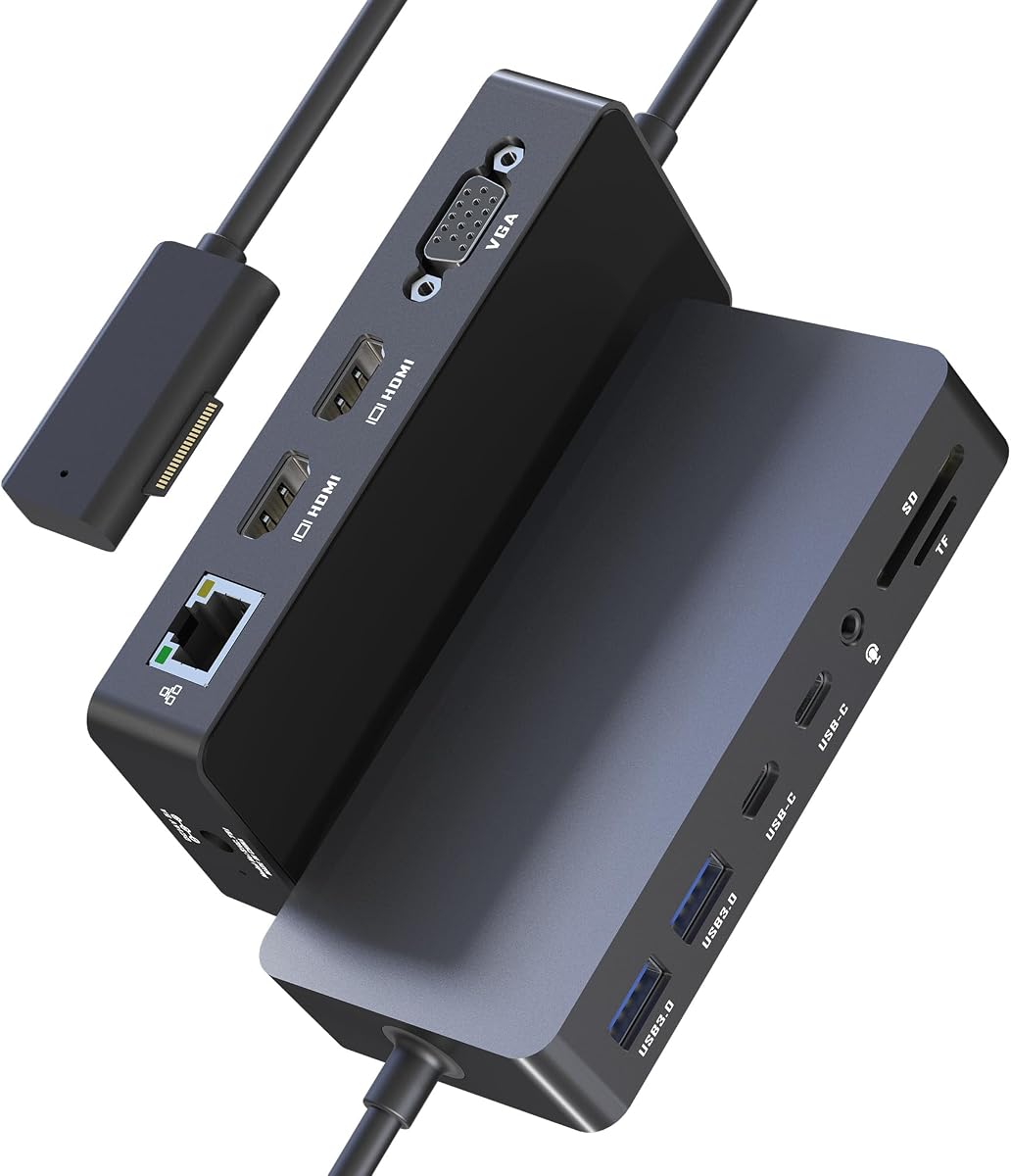
The dock features two HDMI 4K ports and one VGA port, enabling extended or mirror modes for enhanced productivity. High-speed USB 3.0 and USB-C ports allow rapid file transfers from external drives and cameras efficiently.
While you may need to turn off the Surface screen to use all three external displays, the workflow boost is significant. The 72W power supply ensures your device stays charged while peripherals run simultaneously.
This station is an excellent choice for hybrid work or classroom presentations where multiple screens are essential. Its minimalist design reduces clutter while maximizing functionality across the entire Surface ecosystem.
Expand your workspace with dual HDMI and VGA outputs for simultaneous multitasking efficiency.
The included 72W adapter meets demands of busy mobile pros without downtime.
We may earn a commission when you buy through this link, at no additional cost to you.
This Surface Docking Station provides enhanced productivity with triple display support and ample connectivity options. With a 4.1-star rating, it is equipped with Surface Connection technology for reliable peripheral integration.
We may earn a commission when you buy through this link, at no additional cost to you.
It features two HDMI 4K ports and one VGA port to boost efficiency three times through extended modes. USB-C and USB-A ports support high-speed data transfers up to 5Gbps for quick file movements.
While the Ethernet speed is limited to 100Mbps, it remains stable for most network needs. The compact design includes SD and TF slots for direct photo access without extra adapters.
This station is ideal for users needing broad Surface device compatibility without driver installation. Its simple plug-and-play connectivity makes it a reliable choice for diverse device setups.
Boost productivity three times with triple display options for simultaneous application windows.
Space-saving body design maintains a tidy desk while offering extensive connectivity options.
We may earn a commission when you buy through this link, at no additional cost to you.
This versatile 12-in-1 Surface Dock consolidates all connectivity needs into one powerful device. With a 4.2-star rating, it transforms your Surface into a workstation with dual 4K HDMI and VGA outputs.
We may earn a commission when you buy through this link, at no additional cost to you.
It features two USB-A 3.0 and two USB-C ports for 5Gbps data transfer, alongside SD/TF slots supporting up to 2TB. The included 72W DC power port ensures your device stays charged during heavy use.
While the Ethernet speed is limited to 100Mbps, it guarantees a stable low-latency connection for video calls. The universal compatibility with various Surface models ensures seamless integration without drivers.
This dock is perfect for simplifying your workspace while expanding device capabilities instantly. Its 18-month warranty provides added peace of mind for long-term usage.
Consolidate HDMI, VGA, and USB ports into one hub for a tidy desk setup.
The 72W power port keeps your Surface charged while running peripherals simultaneously.
We may earn a commission when you buy through this link, at no additional cost to you.
The NEW Microsoft Surface Dock 2 turns your Surface into a desktop PC with next-gen ports and dual 4K support. With a 4.5-star rating, it offers enhanced connectivity and longer cable reach.
We may earn a commission when you buy through this link, at no additional cost to you.
It features two front-facing and two rear-facing USB-C ports alongside two USB-A ports for versatile peripheral connections. The 199W power supply ensures sufficient power for demanding setups and charging.
While the design is bulkier than predecessors, the security lock support adds protection for public spaces. The longer Surface Connect cable improves reach across larger desks comfortably.
This dock is ideal for users seeking official Microsoft hardware with advanced features. It ensures consistent performance and thermal management for reliable daily use.
Enjoy dual 4K displays at 60Hz for smooth visuals and high-resolution content.
Kensington compatible security lock support protects your device in shared environments.
We may earn a commission when you buy through this link, at no additional cost to you.
This Microsoft Surface Dock 2 variant offers seamless connectivity with official ports for instant desktop setup. With a 4.8-star rating, it supports high-resolution visuals and broad device compatibility.
We may earn a commission when you buy through this link, at no additional cost to you.
It features two front USB-C and two rear USB-C ports alongside two USB-A ports for diverse peripherals. The 199W power supply provides ample energy for charging and device operation simultaneously.
While the power supply is separate, the longer 80 cm Surface Connect cable allows flexible placement. The Kensington-compatible security lock adds protection for public or shared office spaces.
This dock is a reliable choice for users prioritizing official Microsoft hardware and stability. It ensures consistent thermal management for reliable performance across workspaces.
Dual 4K monitors at 60Hz deliver high-resolution and immersive work environments.
Compatible with Surface Pro 4 through 7, Book, and Go for versatile use.
We may earn a commission when you buy through this link, at no additional cost to you.
This Surface Docking Station transforms your device into a desktop powerhouse with elite 12-in-1 ports. With a 4.3-star rating, it offers dual 4K@60Hz HDMI outputs and triple monitor support.
We may earn a commission when you buy through this link, at no additional cost to you.
It includes dedicated 100W DC charging to ensure your laptop stays charged while running peripherals. The 1000Mbps Gigabit Ethernet port guarantees low-latency internet for smooth conferencing and downloads.
While setup requires an external power adapter, the future-proof design ensures compatibility with latest Surface devices. Plug-and-play functionality simplifies setup without needing complex drivers or software.
This dock is perfect for traders and designers demanding superior screen real estate. It eliminates adapter clutter with one-cable connection bridging mobile and desktop setups.
Boost multitasking by 300% with crystal-clear triple display resolutions.
The 1000Mbps Gigabit port ensures a low-latency wired connection.
We may earn a commission when you buy through this link, at no additional cost to you.
This renewed Microsoft Surface Dock 2 offers official ports and high-efficiency expansion at a competitive value. With a 4.7-star rating, it supports dual 4K@60Hz display and reliable connectivity.
We may earn a commission when you buy through this link, at no additional cost to you.
It features two USB-C, two USB-A, and two video-capable USB-C ports for extensive peripheral options. The 199W power supply delivers high-speed data transfer and multi-screen video connectivity.
While it is renewed, rigorous testing ensures durability in various workspaces. The integrated thermal management maintains consistent performance for daily use and operation.
This dock is ideal for users seeking official hardware with a lower cost than new models. Its 1-year limited hardware warranty adds confidence for long-term usage.
Multiple USB ports and Ethernet ensure your peripherals stay connected efficiently.
Rigorously tested for durability and consistent performance across workspaces.
We may earn a commission when you buy through this link, at no additional cost to you.
This Surface Dock uses connection technology to keep your desktop tidy with minimal design and fast transmission. With a 4.2-star rating, it supports dual external monitors and ample USB connectivity.
We may earn a commission when you buy through this link, at no additional cost to you.
It features two MINI DP ports for external monitors alongside four USB 3.0 ports for various peripherals. The gigabit network card port ensures your internet speed stays stable for streaming.
While resolution drops to 1080P on one port for dual output, it meets daily needs for multitasking. The 90W power supply ensures stable compatibility with various Surface models efficiently.
This dock is perfect for those needing straightforward expansion without extra adapters. Its easy plug-and-play design simplifies setup for daily work and casual use.
Keep your desktop tidy with high-speed video audio and data transmission.
Connect peripherals and use the magnetic Surface Connect cable for quick setup.
We may earn a commission when you buy through this link, at no additional cost to you.
Choosing the right docking station requires balancing connectivity needs with compatibility and power requirements.
Ensure the dock has enough USB-A and USB-C ports for your peripherals. Check for video outputs like HDMI or DisplayPort depending on your monitor type.
Prioritize docks with versatile ports to avoid using extra adapters daily.
Look for docks with adequate wattage to charge your Surface while connected. Higher wattage ensures stable power for high-demand tasks.
Always verify the power supply wattage matches your device requirements.
Check the maximum supported resolution and number of monitors. Some docks support triple displays but may require specific screen configurations.
Select a dock that meets your visual workflow needs without lag.
Stable wired internet is crucial for video conferencing and large transfers. Look for Gigabit Ethernet ports for faster speeds.
Opt for Ethernet support if Wi-Fi connectivity is unreliable in your workspace.
Verify the dock works with your specific Surface model and generation. Older models may need specific connectors like Mini DisplayPort.
Ensure broad compatibility to future-proof your investment for new devices.
Consider materials like recycled plastics for sustainability and durability. Thermal management is important for long sessions.
Choose docks with sturdy construction to protect your expensive device.
Plug-and-play functionality saves time on driver installation. Magnetic cables simplify daily connection and disconnection.
Prioritize ease of setup for a smooth user experience daily.
Weigh the cost against the features you truly need. Official docks offer reliability while third-party options provide affordability.
Determine if premium features justify the higher cost for your needs.
Connect the Surface Connect or USB-C cable securely to your device and the dock. Ensure all ports are aligned properly to avoid damage.
Plug all peripherals into the dock before connecting to your Surface for stable recognition. Power on the dock before turning on your Surface laptop.
Clean the ports regularly with compressed air to prevent dust buildup. Avoid bending cables sharply to maintain the connection quality over time.
Yes, many docks support dual or triple monitor setups via HDMI or DisplayPort. However, resolution limits may apply depending on the dock and Surface model.
The Microsoft Surface Thunderbolt 4 Dock is ideal for latest models due to high-speed connectivity and charging. Third-party docks like the Triple Display option work well for broader budgets.
Most official and third-party docks listed support plug-and-play without extra drivers. This simplifies setup significantly for users needing immediate connectivity.
Yes, all listed docks include power supplies capable of charging while connected. The 199W options are best for ensuring stable power during heavy data transfers.
Most docks offer Gigabit Ethernet (1000Mbps) for faster wired speeds. Some budget options may be limited to 100Mbps which is slower for large file transfers.
Many listed docks work with Surface Laptop models via USB-C or Surface Connect. Always check specific compatibility lists for your exact Laptop model before purchasing.
Yes, docks with high-speed USB-C ports and multiple displays are great for video editing. Ensure you get a dock with SD/TF card slots for direct media access.
Yes, the Surface Connect cable supports data and video transmission to the dock. This allows a single cable connection for display and charging simultaneously.
We reviewed ten top docking stations for Surface Pro to help you transform your device into a desktop workstation. The Microsoft Surface Thunderbolt 4 Docking Station stands out for speed and eco-friendly design.
For budget-conscious users, the Microsoft Surface Dock (Pd9-00003) offers essential ports and reliable connectivity. Third-party options like the Triple Display dock provide multi-screen setups at competitive prices.
Remember to verify current prices and model compatibility before buying. These docks provide the connectivity you need to maximize productivity and efficiency on your Surface device.