
Digital Calendar 10.1" Touchscreen
4.4Editor score
No subscription fees
Interactive chore lists
Smart meal manager
Finding the right digital chore chart can transform household management into a seamless experience. These smart devices combine calendar scheduling with task tracking to keep every family member organized and motivated throughout the week.
We evaluated ten leading models based on screen quality, synchronization capabilities, ease of use, and interactive features. Our analysis focuses on how well each device handles real-world family demands without requiring complex setups or hidden costs.
Each pick highlights unique strengths such as reward systems, meal planning, or photo display modes. Prices and availability fluctuate regularly, so check current listings before purchasing to ensure you get the best value for your home setup.
4.4Editor score

4.4Editor score

4.4Editor score
As an Amazon Associate we earn from qualifying purchases.
This side-by-side comparison highlights the key specifications and capabilities of each model to help you identify the best fit for your family needs and home environment.
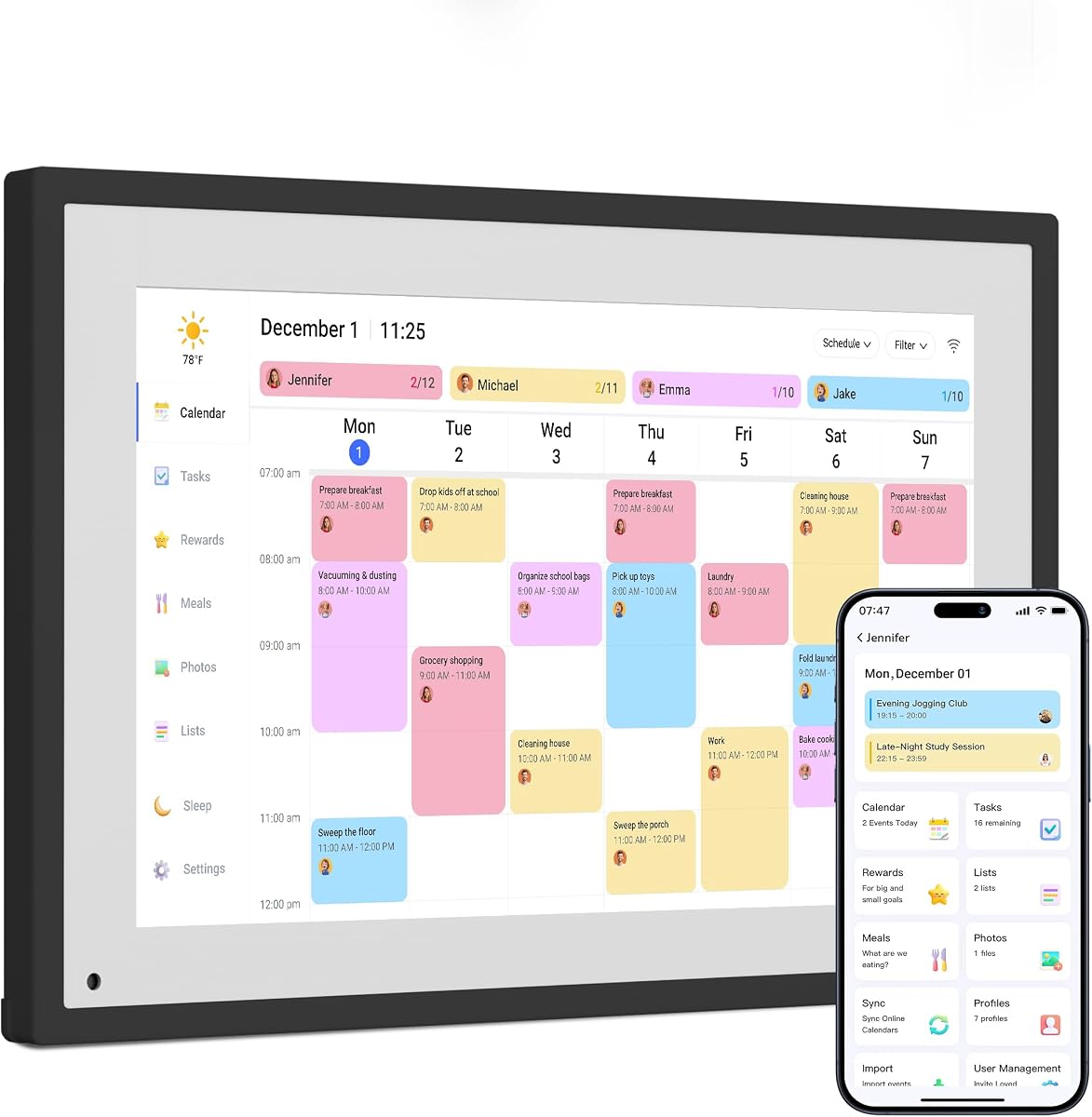




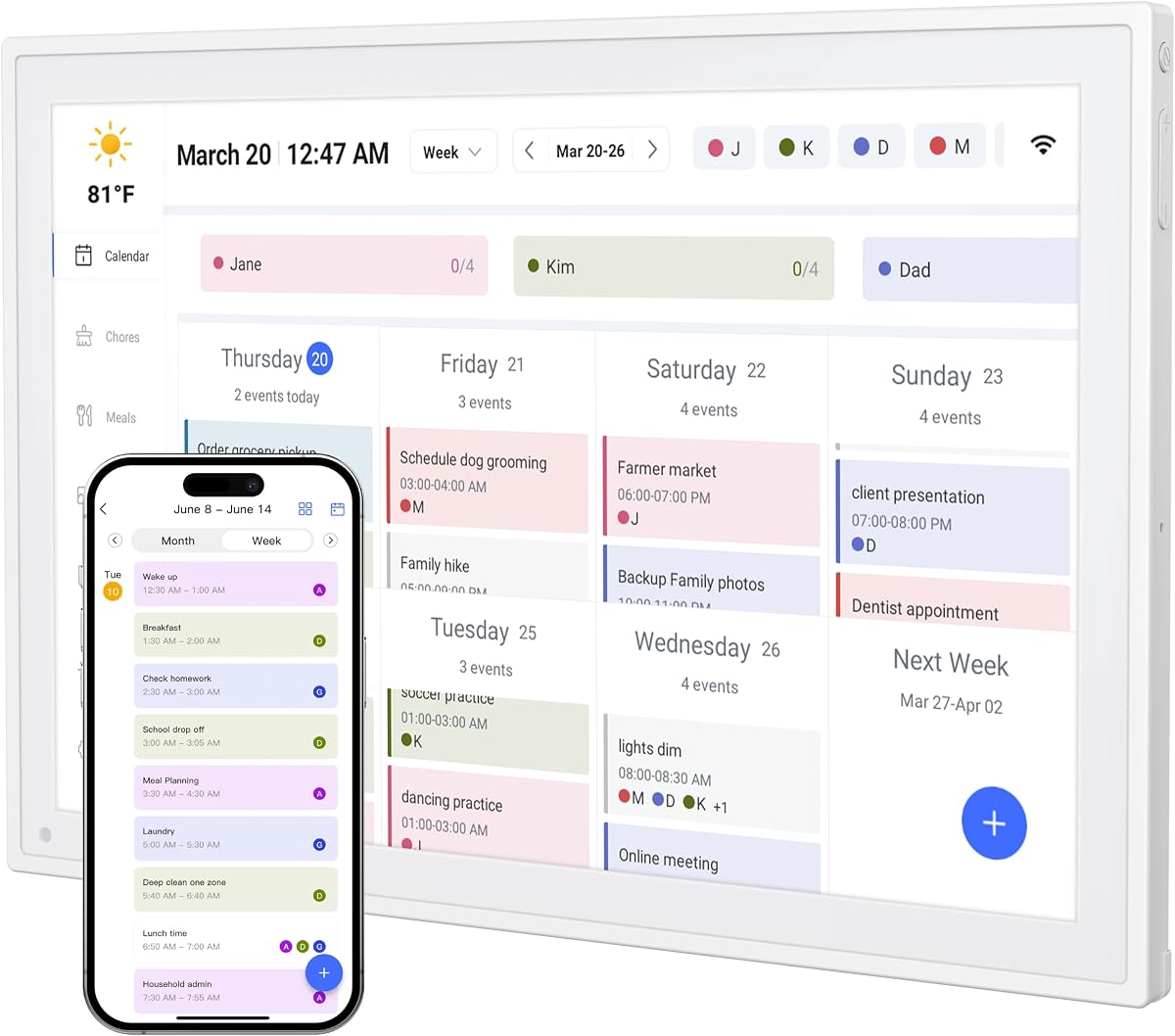

This digital chore chart stands out with its expansive 15.6-inch touchscreen that makes viewing schedules effortless for everyone. Its rating reflects high satisfaction among families seeking a central command hub for daily organization.
We may earn a commission when you buy through this link, at no additional cost to you.
The built-in motivational chore system allows parents to assign tasks while children earn points for completion. This gamified approach encourages responsibility without the clutter of paper charts or constant nagging.
While the initial investment is higher than smaller models, the lack of monthly fees offsets costs over time. The flexible mounting options ensure it fits both wall and desk setups seamlessly.
Ideal for busy households needing robust coordination, this device delivers reliability and clarity. It is the top choice for those prioritizing screen real estate and feature depth.
Real-time sync across Google and Outlook ensures everyone sees updates instantly without confusion.
Reward points for completed chores turn routine duties into engaging activities for kids.
We may earn a commission when you buy through this link, at no additional cost to you.
This model offers exceptional value by combining essential planning tools without demanding ongoing payments. Users appreciate its straightforward interface that simplifies chore assignments and family scheduling immediately.
We may earn a commission when you buy through this link, at no additional cost to you.
The interactive chore list lets parents assign tasks from the device or phone while kids earn stars for completion. This system builds self-discipline through positive reinforcement rather than traditional scolding.
Though the screen is smaller than premium options, it remains clear enough for daily use. The focus on cost efficiency makes it accessible for families starting their digital organization journey.
Perfect for budget-conscious shoppers, this calendar delivers core functionality without compromise. It is the smart choice for those who want reliability without recurring expenses.
All core features are unlocked forever ensuring no surprise bills for basic planning tools.
Children enjoy unlocking rewards and stars which fosters a positive attitude toward chores.
We may earn a commission when you buy through this link, at no additional cost to you.
As a premium option, this calendar features a sleek white design and a large display that acts as a central family hub. It is well-rated for its intuitive interface and seamless integration with major calendar services.
We may earn a commission when you buy through this link, at no additional cost to you.
The interactive chore chart supports personalized tasks and rewards to build independence. Additional features like the Disney Mode add fun animations to encourage engagement from younger children.
While the subscription unlocks advanced features like Magic Import, the base functionality remains solid for basic scheduling. Families wanting a polished look and reliable performance will find it worth the investment.
Recommended for users seeking a high-end aesthetic and advanced tools, this device excels in style and function. It is the ideal pick for modern homes wanting a sophisticated command center.
The sleek white finish fits naturally into contemporary kitchens and living spaces.
Disney Mode animations and avatars make daily planning enjoyable for the whole family.
We may earn a commission when you buy through this link, at no additional cost to you.
This Dragon Touch model combines a smart calendar with a digital frame to offer dual functionality in one device. Its high rating reflects satisfaction with its ease of use and clear interface for scheduling.
We may earn a commission when you buy through this link, at no additional cost to you.
Family members can assign different colors to tasks making it simple to distinguish responsibilities at a glance. The unit also transitions to a photo frame when idle to display cherished memories on the large screen.
While it lacks wall mounting hardware, the desk design allows for flexible placement in common areas. Users appreciate the straightforward syncing process that integrates existing digital calendars seamlessly.
Best for households needing a flexible and straightforward organizer this device simplifies daily planning. It is a strong contender for those prioritizing simplicity over complex mounting options.
The unit works as both a planner and a beautiful digital frame for family photos.
Color-coded tasks ensure everyone can quickly identify their assignments without confusion.
We may earn a commission when you buy through this link, at no additional cost to you.
Designed for quick setup this model lets you plug in and connect to Wi-Fi instantly for immediate use. The rating highlights its user-friendly design that supports various calendar types with minimal effort.
We may earn a commission when you buy through this link, at no additional cost to you.
The interactive chore chart motivates children by allowing them to check off tasks on a responsive screen. Additionally the dinner planner feature helps families eliminate daily questions about meal plans effortlessly.
While some advanced tools like Magic Import require payment the core functions remain robust and accessible. The ability to manage schedules via a mobile app adds significant convenience for busy parents.
Ideal for families looking for a responsive and interactive planning tool this calendar delivers well. It is a top choice for those valuing ease of setup and daily utility.
Displaying dinner plans directly on the screen simplifies meal preparation and reduces stress.
The eCalendar App allows parents to edit schedules from anywhere for greater flexibility.
We may earn a commission when you buy through this link, at no additional cost to you.
This compact device serves as a digital command center offering shared calendars and interactive chore charts for all members. Users appreciate the quick updates enabled by dual-band Wi-Fi technology keeping everyone informed.
We may earn a commission when you buy through this link, at no additional cost to you.
The meal planning tool helps families map out weekly menus and generate grocery lists from one spot. Kids enjoy checking off tasks on the touchscreen which fosters independence and engagement in household duties.
Though it relies on a stand for desk use the design is sleek and fits well in kitchen spaces. The ability to transition into a photo frame adds versatility to its functional daily purpose.
Best for organized households needing a centralized hub this calendar offers practical features. It is a reliable option for those wanting to reduce paper clutter effectively.
Dual-band Wi-Fi ensures instant updates across all connected devices without lag.
Mapping weekly menus on screen simplifies grocery shopping and meal prep routines.
We may earn a commission when you buy through this link, at no additional cost to you.
This smart organizer provides a visual weekly meal manager alongside a chore list that kids find engaging. The rating reflects satisfaction with its ability to keep daily routines organized without extra costs.
We may earn a commission when you buy through this link, at no additional cost to you.
Parents can assign tasks and monitor progress directly from the digital planner or their phone easily. The interactive nature encourages children to take charge of responsibilities building self-discipline habits.
Although the photo mode is functional it is straightforward compared to more elaborate premium options. This simplicity keeps the focus on core planning tools which many users find beneficial.
Ideal for families prioritizing cost-effective organization this device delivers essential features effectively. It is a solid pick for those seeking a dedicated task manager without subscriptions.
Displaying menus visually helps the whole family know what to expect each night.
Parents can track task completion remotely ensuring accountability and encouragement.
We may earn a commission when you buy through this link, at no additional cost to you.
This model features a large 15.6-inch display that enhances visibility for the entire family. The rating indicates strong user satisfaction with its clear interface and interactive chore charts that turn tasks into games.
We may earn a commission when you buy through this link, at no additional cost to you.
The built-in 64GB storage holds thousands of media files allowing for a robust digital photo frame mode. Users appreciate the ability to share photos and videos remotely to keep memories alive on the device.
While the AiMOR app controls many features it ensures seamless syncing and updates across devices. The flexible installation options allow it to fit either a desk or wall mount easily.
Best for families needing high-definition visuals and storage this calendar performs well. It is a great choice for tech-savvy households wanting detailed and clear scheduling tools.
The 1080P screen ensures sharp visibility for schedules and photos alike.
64GB storage allows for extensive photo and video collections without external drives.
We may earn a commission when you buy through this link, at no additional cost to you.
This model earns a perfect rating for its ability to integrate calendars chore charts and meal planning seamlessly. Users love the instant syncing that allows multiple family members to update events simultaneously without conflicts.
We may earn a commission when you buy through this link, at no additional cost to you.
The interactive rewards system encourages children to earn stars and build responsibility through positive reinforcement. Weather updates and smart sleep modes add practical value ensuring the device adapts to daily needs.
While it relies on consistent internet for full functionality the setup process remains plug-and-play. This simplicity reduces friction for families transitioning from paper planners to digital systems.
Ideal for households seeking a comprehensive and reliable organizer this calendar delivers excellence. It is the perfect choice for those who want every feature included without monthly costs.
Instant updates across devices prevent scheduling conflicts and keep everyone aligned.
Real-time forecasts tailored to location help families plan their day effectively.
We may earn a commission when you buy through this link, at no additional cost to you.
This planner offers a full HD touchscreen that remains readable day or night thanks to auto brightness control. Users find it helpful for managing schedules and chores without disturbing partners during quiet hours.
We may earn a commission when you buy through this link, at no additional cost to you.
The silent vibration alerts ensure reminders are felt rather than heard which is ideal for shared spaces. Additionally the recipe keeper feature helps organize ingredients and plans meals efficiently.
While the rating is slightly lower the versatility of portrait and landscape use stands out. The included stand allows flexible placement on desks or nightstands without needing wall mounts.
Best for users valuing quiet reminders and flexibility this device serves well. It is a good option for those prioritizing comfort over flashy features.
Vibration alerts keep you informed without making noise during sensitive times.
Storing recipes and ingredients on screen simplifies kitchen management routines.
We may earn a commission when you buy through this link, at no additional cost to you.
This smart display focuses on clarity offering Full HD visuals for easy reading from a distance. Users appreciate the simplicity of its interface that manages schedules and to-do lists effectively.
We may earn a commission when you buy through this link, at no additional cost to you.
Meal plans are displayed visually with main courses noted reducing confusion about daily dinners. The photo frame mode keeps memories alive when the device is idle creating a warm home decor piece.
While it lacks detailed recipe storage the core functions remain free forever ensuring no hidden costs. This approach appeals to families wanting straightforward organization tools without financial commitment.
Ideal for those seeking a simple and stylish organizer this device meets essential needs. It is a solid choice for households wanting a clutter-free command center.
Menu titles appear clearly on screen keeping everyone informed of daily meals.
All essential planning tools remain accessible without any recurring subscription fees.
We may earn a commission when you buy through this link, at no additional cost to you.
Selecting the right digital chore chart depends on several key factors including screen size, synchronization options, and extra tools like meal planning.
A larger screen ensures that schedules and chore lists are readable from anywhere in the room. Resolution matters for clarity particularly if you plan to use the device as a photo frame.
Look for at least a 10-inch display with HD or better resolution for optimal visibility and performance.
Real-time syncing with major calendar services like Google Outlook and iCloud ensures everyone stays updated without manual entry. This feature is critical for households with multiple busy schedules.
Choose models that offer instant updates across devices to avoid conflicts and missed appointments.
For families with children an interactive chore chart with gamified rewards helps build positive habits. Features like stars points and customizable tasks engage kids effectively.
Prioritize devices that let parents assign tasks and track progress remotely for maximum convenience.
A built-in meal planner reduces daily stress by letting you map out menus and grocery lists in one place. Some models even generate shopping lists automatically based on planned recipes.
Select a model with clear visual displays for meals so everyone knows what to expect each night.
Consider how you want to place the device whether it is wall mounted or sitting on a desk. Wall mounting requires included hardware while desk models usually come with stands.
Ensure the chosen model supports your preferred placement type to avoid installation issues later.
Some premium features may require ongoing subscriptions so check what is included in the base price. Many modern options offer core planning tools without any recurring fees.
Opt for models with transparent pricing to avoid unexpected costs after purchase.
If you plan to use the device as a photo frame storage capacity for photos and videos is important. Models with expandable storage or built-in hard drives support larger libraries.
Check the storage specs to ensure they meet your needs for displaying family memories.
A user-friendly setup process ensures you can start using the device quickly without technical hurdles. Look for plug-and-play options with intuitive interfaces for all age groups.
Choose models that offer clear instructions and responsive customer support for smooth onboarding.
Begin by plugging the device into a power outlet and connecting it to your home Wi-Fi network. Follow the on-screen prompts to link your preferred calendar accounts such as Google or iCloud for automatic syncing.
Set up individual profiles for each family member to assign colors and tasks specifically to them. This personalization helps everyone know their responsibilities clearly and reduces confusion during daily routines.
Keep the screen clean with a soft dry cloth to avoid scratches and maintain visibility. Regularly check for software updates to ensure all features work smoothly and efficiently.
Most models offer core planning features without any subscription fees. Some advanced tools might require a paid plan but the basic chore and calendar functions are generally included permanently.
Yes most devices support multiple user access so parents and children can update tasks at the same time. Changes sync in real-time ensuring everyone sees the latest updates immediately.
Most devices allow you to view existing schedules offline but syncing will pause until connectivity is restored. Any changes made offline will update once the connection is re-established.
Yes the companion apps and syncing capabilities work with both Android and iOS devices. You can manage schedules from smartphones and tablets regardless of the operating system.
Yes most digital chore charts include a mode that cycles through photos when not in use for planning. You can upload images via the companion app or directly from your devices.
You can create custom tasks assign colors and set reward points through the settings menu. The interface allows you to edit daily or weekly schedules easily to fit your family needs.
Wall mounting typically requires the included hardware and basic tools like a drill. If you prefer desk use most units come with stands for easy placement without permanent installation.
Some models automatically generate grocery lists based on meal plans you create. This feature simplifies shopping by organizing items needed for the week in one list.
The reviewed digital chore charts offer a range of features from simple task lists to comprehensive family command centers. Choosing the right one depends on your specific needs for screen size syncing and additional planning tools.
Prioritize models that support real-time syncing and interactive rewards to keep everyone engaged. Look for options without hidden subscription fees to ensure long-term value for your household budget.
Check current prices and availability before purchasing since deals change frequently. Investing in a quality digital planner now can streamline daily routines and build lasting organizational habits.