
APEVIA VENUS500W
3.9Editor score
500W ATX Power
120MM Fan Cooling
Full Protection Suite
Affordable Pricing
Discover the top low power PSU options for compact builds. This guide compares efficiency, connectors, and cooling for mini ITX and SFF systems in October 2026.
Choosing the right low power PSU is critical for small form factor builds where space and heat management are paramount. These units must deliver stable power while fitting into tight chassis without compromising on safety or efficiency ratings for modern components.
We evaluated ten leading power supplies based on wattage output, modular capabilities, safety protections, and user feedback. Our analysis focuses on units designed for Mini ITX, Flex ATX, and TFX cases to ensure compatibility with your specific compact hardware configuration.
Each pick highlights unique strengths like active PFC, noise levels, and connector variety to help you decide. Please note that pricing and availability change frequently, so verify current details on the product pages before making your final purchasing decision today.
3.9Editor score

4.6Editor score

5.0Editor score
This side-by-side comparison reviews all ten selected units to highlight their specific strengths for compact computing needs. We examine form factors, wattage limits, and connector options to help you match the right power supply to your unique build requirements.




The Thermaltake Smart 500W stands out as a reliable choice for budget-conscious builders needing stable power. With an 80 Plus White certification and a 4.6 rating, it offers continuous power delivery suitable for entry-level to mid-range systems without breaking the bank.
We may earn a commission when you buy through this link, at no additional cost to you.
Its active PFC design ensures efficient energy usage across a wide voltage range, while the 120mm fan provides quiet operation even under load. The powerful 12V rail supports modern components well, and industry-grade protections like OVP and SCP safeguard your hardware from electrical faults.
While it lacks modular cables which can clutter small cases, the fixed design simplifies installation for standard ATX setups. The 80 Plus efficiency is lower than bronze models, meaning slightly more heat, but the thermal management handles this well for typical usage scenarios.
This unit is ideal for users seeking a no-frills, dependable power source for office PCs or light gaming rigs. Prioritize this if you value core reliability and price over premium features like full modularity or higher efficiency ratings.
Active PFC technology helps reduce wasted energy and improves power stability across different voltage inputs.
The 120mm cooling fan operates quietly to maintain system stability without adding excessive noise to your workspace.
We may earn a commission when you buy through this link, at no additional cost to you.
This Apevia unit is a strong contender for small form factor builds requiring flexibility. Its fully modular design reduces cable clutter significantly, making it easier to install in compact Mini-ITX or Flex ATX cases where space is at a premium.
We may earn a commission when you buy through this link, at no additional cost to you.
The 500W output provides sufficient headroom for mid-range graphics cards and storage arrays. Active PFC ensures stable power delivery across global voltage ranges, while multiple PCIe and SATA connectors support various component configurations without needing adapters.
Users note the 40mm fan can be audible under load compared to larger 120mm units. Also, the unit requires all cables to be connected properly to power on, which adds a step to testing but ensures safety during operation.
Choose this PSU if you need modularity in an ITX form factor without paying premium prices. It balances connectivity and size well for custom builds where airflow and cable management are critical success factors.
Fully modular cables allow you to use only what you need, improving airflow inside tight chassis.
Full range active PFC supports 90-264V inputs, making it suitable for international travel or varied power grids.
We may earn a commission when you buy through this link, at no additional cost to you.
Designed for HTPCs and retail POS systems, this 300W unit delivers reliable performance for low-power builds. Its small dimensions fit standard Mini-ITX and Flex-ATX cases perfectly, ensuring compatibility with compact chassis designs available on the market.
We may earn a commission when you buy through this link, at no additional cost to you.
The manual voltage switch allows for precise adjustment between 115V and 230V, preventing damage from incorrect settings. Separable connectors support both modern and legacy motherboards, adding versatility to your component choices when building retro or specific systems.
The 40mm fan with thermal speed control helps maintain quiet operation during light loads. However, the 300W limit restricts high-performance GPU usage, making it best suited for integrated graphics or basic workstation needs rather than gaming rigs.
This is an excellent pick for silent media centers or network appliances where power draw is minimal. Ensure you check your case compatibility and set the voltage switch correctly before first use to avoid hardware issues.
Separable 20+4 and 4+4 pins let you adapt to older motherboard power requirements easily.
SFF dimensions ensure it fits into 1U servers and tiny desktop cases without modification.
We may earn a commission when you buy through this link, at no additional cost to you.
MSI delivers a robust 650W option that balances power and cost effectively. With 80 Plus Bronze certification, it offers better efficiency than standard models, ensuring less energy waste and heat generation during continuous operation cycles.
We may earn a commission when you buy through this link, at no additional cost to you.
The semi-modular design reduces clutter for essential cables while keeping critical connectors fixed for stability. Industrial level protections including OVP and SCP provide peace of mind against electrical faults, and the 120mm fan keeps noise levels low.
Active PFC design ensures compatibility with varying voltages without manual intervention. While the fixed main cables might be tricky in very tight cases, the rest of the modular setup simplifies installation for most standard ATX chassis configurations.
This unit suits users upgrading to higher performance GPUs who need extra headroom without spending much. Its 5 year warranty adds long-term reliability assurance for those seeking a dependable power source for daily workloads.
80 Plus Bronze certification means you save on electricity bills while reducing system heat output.
Semi-modular cables allow flexible routing for better airflow while keeping core connections stable.
We may earn a commission when you buy through this link, at no additional cost to you.
The NovaMist product offers a unique approach to cooling with its misting feature aimed at high heat scenarios. With an 80 Plus Bronze certification, it ensures energy efficiency and reliability for systems needing extra thermal management beyond standard airflow.
We may earn a commission when you buy through this link, at no additional cost to you.
Its low noise fan design keeps ambient sound levels down during operation, making it suitable for home office or media center environments. The 5-year limited warranty underscores confidence in long-term durability and consistent operational performance over time.
Built for reliable operation, this unit maintains stable output even under thermal stress conditions. While details are sparse compared to full PSUs, it serves as an effective cooling partner for compact builds struggling with heat dissipation issues.
Select this accessory if you need enhanced cooling support without sacrificing noise comfort. It complements your existing PSU setup by managing temperature effectively in confined or heat-sensitive computing environments.
The misting fan technology targets heat hotspots to prevent thermal throttling in dense chassis.
Low noise design ensures that cooling enhancements do not disrupt your workspace or media experience.
We may earn a commission when you buy through this link, at no additional cost to you.
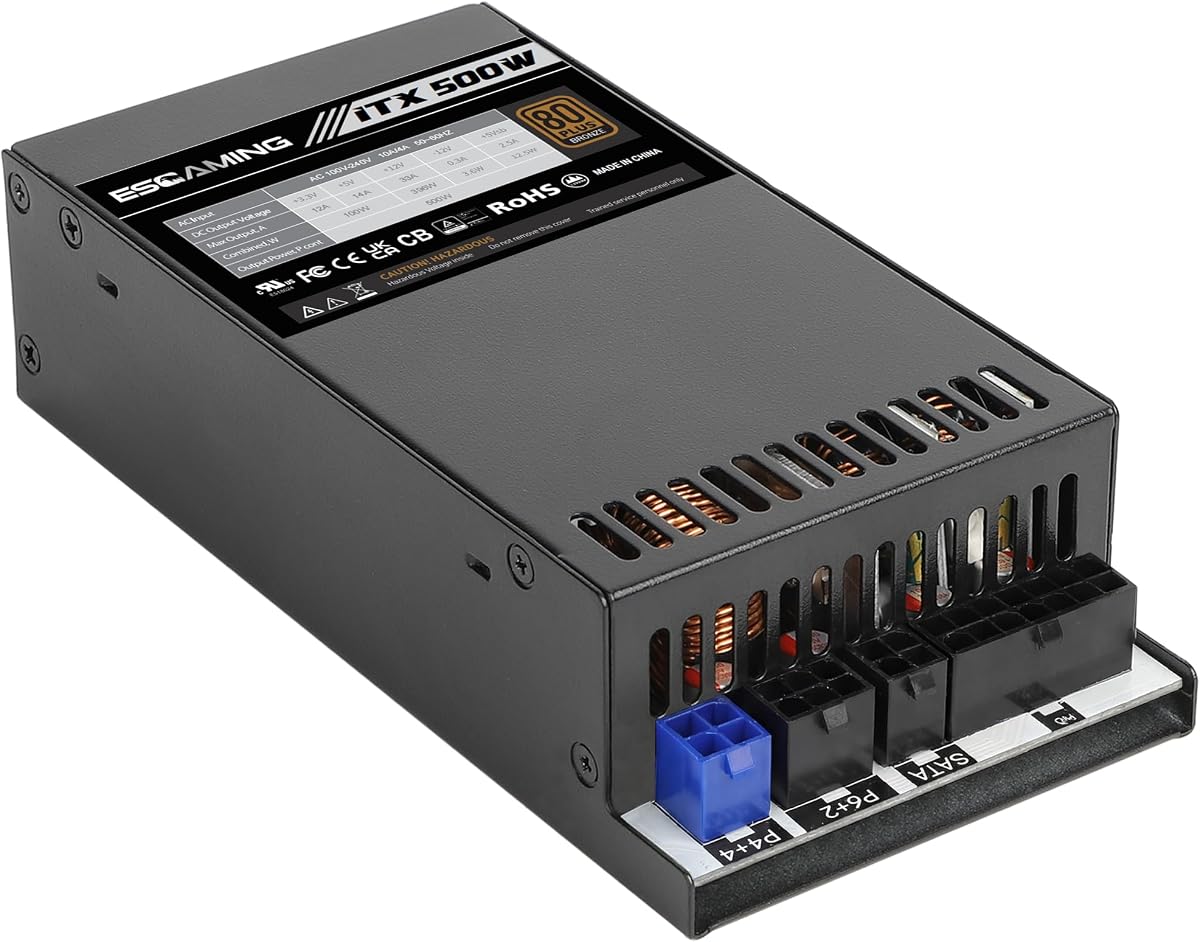
This ESGAMING unit offers gold-level efficiency in a compact ITX package. Fully modular cables simplify installation and reduce clutter, allowing for better airflow in small chassis where space is a critical constraint for component layout.
We may earn a commission when you buy through this link, at no additional cost to you.
With up to 85% efficiency at typical loads, it minimizes energy waste and heat output during server or workstation operation. Active PFC enhances stability by reducing electrical interference and delivering consistent output regardless of voltage fluctuations in the grid.
The 1U form factor fits many specialized server chassis well, supporting 24/7 operation cycles. However, like similar units, it requires full cable connections to power on, and the small fan may generate noticeable noise under heavy load conditions.
Ideal for compact servers or mini PCs needing efficient and organized cabling, this PSU balances performance and form factor. Support responsiveness adds value for users seeking quick assistance if technical issues arise after purchase.
85% efficiency reduces electricity costs and keeps system heat output lower than non certified units.
Fully modular cables mean you only connect what you need for cleaner and simpler builds.
We may earn a commission when you buy through this link, at no additional cost to you.
Designed specifically for SFF cases, this TFX PSU delivers reliable power in a compact footprint. The auto switching universal power detects voltage automatically so you avoid manual switches that can be overlooked during initial setup or relocation.
We may earn a commission when you buy through this link, at no additional cost to you.
Silent cooling technology keeps the fan off at low loads, reducing noise during idle periods. A heavy duty 33A +12V rail ensures stable performance for graphics cards and high draw components, making it suitable for gaming or workstation builds.
Fixed cables provide durability but require careful routing in tight spaces. Always verify clearance before installation. Industrial protections like OVP and SCP keep your components safe from electrical spikes that could damage sensitive hardware.
Choose this if you need a dedicated TFX unit with automatic voltage handling. It balances performance and safety well for users needing a reliable power source in mid-size small form factor chassis designs.
Auto switching eliminates manual voltage settings to prevent damage from incorrect switch configurations.
Smart cooling keeps the fan silent during low usage periods for a quieter user experience.
We may earn a commission when you buy through this link, at no additional cost to you.
This Venus model offers a straightforward 500W solution at an entry-level price. With a 120mm fan it manages heat efficiently while keeping noise levels manageable for typical desktop use cases in office or home environments.
We may earn a commission when you buy through this link, at no additional cost to you.
Precise voltage regulation ensures stable power delivery to all components within a 5% tolerance. The full protection suite including short-circuit and over-temperature safeguards helps prevent electrical damage, providing a safety net for basic systems.
It supports diverse component needs with multiple SATA and peripheral connectors. However, some users report minor fan noise at full speed. Verify your case fit and ensure the switch is set correctly for your local voltage before powering on.
This is an ideal budget pick for non-critical builds where cost is the primary driver. If you need a simple reliable power source without extra features, this unit meets standard ATX requirements effectively.
5% tolerance ensures components receive steady power, reducing risk of instability or hardware issues.
Multiple peripheral and SATA connectors support various storage and drive configurations easily.
We may earn a commission when you buy through this link, at no additional cost to you.
This premium Flex unit delivers exceptional efficiency and stability for demanding compact builds. With over 92% efficiency, it generates minimal heat and noise, making it perfect for silent systems or environments where thermal output matters.
We may earn a commission when you buy through this link, at no additional cost to you.
Japanese capacitors ensure long-term reliability and stable output during operation. Fully modular cables with black embossed PVC improve airflow and make installation easier in 1U or Mini ITX chassis where space is extremely limited.
It includes modern 12VHPWR connectors compatible with next gen GPUs, future-proofing your build. The silent 4020 ball bearing fan operates ultra quietly, though the high price reflects these premium components and advanced engineering standards.
Choose this if you prioritize silence, efficiency, and future compatibility in a small form factor. It is an excellent investment for high-performance compact PCs where thermal management and build quality are non-negotiable priorities.
Japanese capacitors deliver stable output and long-term reliability for demanding workloads.
12VHPWR support prepares your system for next-gen graphics cards requiring new power standards.
We may earn a commission when you buy through this link, at no additional cost to you.
The Smart W3 Series meets the latest ATX v3.1 specification, making it compatible with current high performance CPUs and GPUs. With 80 Plus certification, it ensures efficient power delivery while managing heat with its quiet 120mm FDB fan.
We may earn a commission when you buy through this link, at no additional cost to you.
Its DC to DC high amperage +12V rail design provides the necessary power for demanding workloads without voltage drops. Built-in industrial grade protection safeguards against electrical faults, ensuring safe operation during extended usage periods.
Low profile flat cables improve cable management and airflow within standard ATX cases. The 5-year warranty adds confidence in long-term durability, though the flat cables may require careful bending to avoid stress at connector points.
This unit is suitable for modern builds needing compliance with newer standards and reliable performance. If you want future compatibility with standard features without paying premium prices for exotic form factors, this is a solid choice.
ATX v3.1 compliance ensures compatibility with the latest hardware and power delivery standards.
A 5-year warranty reflects confidence in product quality and long-term user satisfaction guarantees.
We may earn a commission when you buy through this link, at no additional cost to you.
Selecting the right low power PSU requires balancing wattage, efficiency, and form factor to match your specific build needs.
Ensure the PSU fits your case by checking dimensions like Mini-ITX, Flex ATX, or TFX standards. Mismatched sizes can lead to installation issues or insufficient airflow.
Always verify case clearance and connector lengths before purchasing to avoid fit problems.
Calculate total power draw including CPU and GPU to choose adequate wattage. Low power PSUs range from 300W to 650W depending on system demands.
Selecting a unit with 20% headroom ensures stable performance during peak loads.
Look for 80 Plus certifications to reduce energy waste and heat. Bronze and Gold models offer better efficiency for long-term savings.
Higher efficiency means less heat generation in compact cases.
Modular or semi-modular cables simplify routing in small chassis. Fixed cables may clutter tight spaces and reduce airflow.
Modular options improve airflow and make builds easier to manage.
Industrial protections like OVP and SCP safeguard components from electrical faults. Always check the specific safety suite included.
Comprehensive protections prevent hardware damage from power surges.
Smaller fans often generate more noise than larger ones. Look for thermal controls or low-noise models for quiet builds.
Noise tolerance varies by user preference.
Auto-switching or full-range PFC supports global voltages without manual settings. Manual switches require correct adjustment to avoid damage.
Automatic detection is safer for international users.
Longer warranties indicate confidence in product durability. Check for 5-year or more coverage for peace of mind.
Verify warranty support channels before buying.
Connect all necessary cables securely to ensure the unit powers on correctly. Some models require full connection to the motherboard before they will start.
Keep vents clear of dust and debris to maintain proper airflow and prevent overheating. Regular cleaning extends the lifespan of the internal fan and components.
Use surge protectors or UPS units to shield against power spikes. Proper electrical protection ensures your PSU and hardware operate safely.
Mini ITX cases typically require SFX or Flex ATX power supplies. Measure your case dimensions to confirm fit before purchasing.
Yes, modular PSUs improve airflow and reduce clutter in tight spaces. This makes cable management much easier in compact cases.
Add the TDP of your CPU and GPU plus other components. Choose a PSU with at least 20% extra headroom for stability.
It indicates the PSU meets specific efficiency standards. Higher ratings like Gold mean less wasted energy and less heat.
Only if the case supports ATX dimensions. Most small form factor cases need smaller SFX or Flex ATX units.
Most reputable models include 3 to 5 year warranties. Always check the terms before purchase.
Yes, active PFC ensures better power factor and efficiency across voltage ranges. It helps reduce electrical interference.
Clean every six months to remove dust. Use compressed air to blow out vents without damaging the fan.
We highlighted top options including the Thermaltake Smart and ESGAMING modular units for efficiency and flexibility. These picks offer reliability for various small form factor needs.
Prioritize compatibility and efficiency ratings when selecting a power supply. Ensure it matches your case and component requirements for optimal performance.
Check current availability and prices as these details change regularly. Always verify specs on the product page before finalizing your order.