
BENFEI USB 3.0 Switch, USB Switch 2 Computers Share 4 USB
4.1Editor score
Affordable price point value
Five gigabits per second speed
18 month warranty coverage
Discover the best keyboard and mouse switch for 2 computers to share peripherals seamlessly. This guide compares top USB and KVM switches for efficiency.
Finding the right keyboard and mouse switch for 2 computers can transform your dual PC setup into a streamlined workspace. These devices allow you to share peripherals like printers and scanners without constant cable swapping.
We evaluated ten top-rated models based on data transfer speeds, port variety, build quality, and ease of use. Our analysis covers USB 3.0 switches and HDMI KVM options to help you decide.
Each pick highlights specific strengths like power supply needs or controller types. Remember that prices and availability change frequently, so check current listings before making your final purchase decision today.
4.1Editor score

4.0Editor score

4.3Editor score
This side-by-side comparison highlights the key specifications and capabilities of each model to help you choose the perfect switch for your specific workflow requirements.


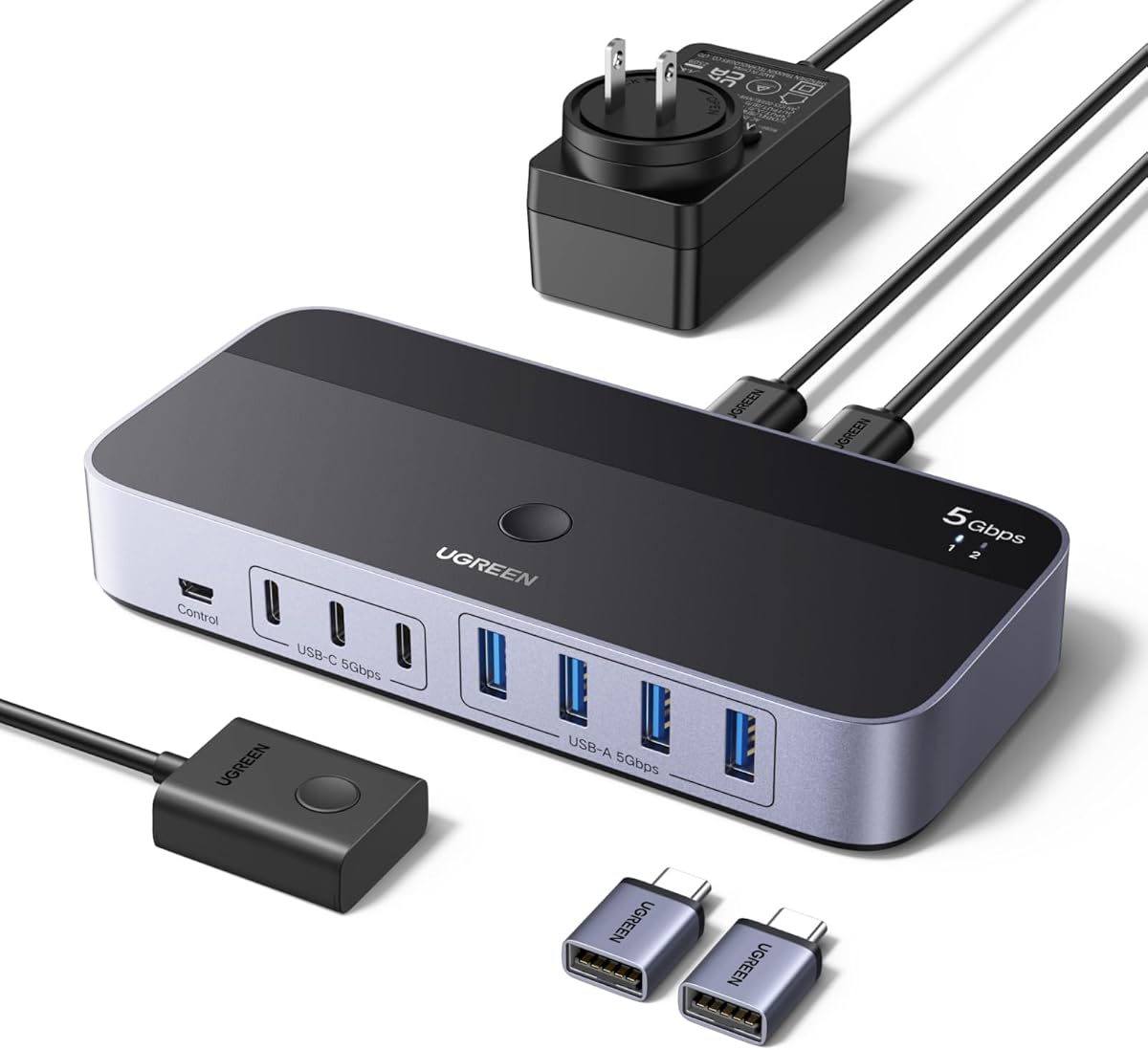

This UGREEN USB switch allows two computers to share four devices including keyboards, mice, and printers. With a 4.0 rating, it offers a reliable solution for dual PC setups without needing complex software.
We may earn a commission when you buy through this link, at no additional cost to you.
The standout feature is the mix of USB-C and USB-A ports, making it ideal for modern and legacy devices. The controller allows you to switch devices easily without reaching for the box, keeping your desk tidy.
Keep in mind this is not a KVM switch so monitors cannot be shared. Power supply is optional but recommended for high-power devices like external hard drives to avoid disconnections during use.
Choose this switch if you need to share multiple USB peripherals across two systems efficiently. It is a strong choice for home offices where printer and scanner sharing are common tasks.
The inclusion of both USB-C and USB-A ports ensures you can connect older printers alongside newer laptops without needing extra hubs.
The external controller button helps you switch between computers quickly while keeping the main unit hidden under your desk or monitor.
We may earn a commission when you buy through this link, at no additional cost to you.
The BENFEI USB switch provides a cost effective way to share four USB devices between two computers. With a 4.1 rating, it delivers solid performance for basic peripherals like keyboards and printers.
We may earn a commission when you buy through this link, at no additional cost to you.
Its 5Gbps speed ensures files transfer quickly between drives, and the LED indicator helps you see which PC is active. The build quality is sturdy enough for daily office use.
Be aware that a power adapter is not included in the box. If you connect high power devices, you may need to source a separate power supply for stable operation.
This is an excellent choice for those seeking a reliable switch without spending a lot. It is perfect for shared workspaces where budget matters but functionality remains important.
Despite the lower price point, the unit maintains high data transfer speeds and reliable switching mechanics for everyday productivity tasks.
The LED indicator clearly shows which computer is currently connected, preventing confusion when switching between multiple systems quickly.
We may earn a commission when you buy through this link, at no additional cost to you.
This high-end switch supports up to seven devices with 10Gbps transfer speeds, ideal for power users who need fast data access. With a 4.3 rating, it stands out for its robust connectivity options.
We may earn a commission when you buy through this link, at no additional cost to you.
The included power adapter and Type-C converters make setup straightforward for mixed environments. The large port count means you do not need extra hubs for printers and external drives.
The higher price reflects the premium specs and included accessories. It is worth the investment if you frequently switch between systems and need consistent high-speed data transfer.
Choose this model for professional environments where speed and capacity are critical. It handles heavy workloads well and keeps your desk free from extra cables.
With speeds up to 10Gbps, large files move quickly between computers, saving valuable time during large data migrations or backup processes.
The included power adapter ensures stable operation for high-power peripherals, eliminating the need to search for separate chargers.
We may earn a commission when you buy through this link, at no additional cost to you.
This simple switch lets two computers share two devices like a keyboard and mouse. Its 4.6 rating reflects a reliable design that avoids unnecessary complexity for basic switching needs.
We may earn a commission when you buy through this link, at no additional cost to you.
The aluminum alloy shell helps with heat dissipation, ensuring durability over time. One-button switching with an LED indicator makes it easy to see which PC is active.
The limitation is the two port count which may not suit setups needing more than two peripherals. Cables are included which adds value to the package.
This is great for users who just need to share input devices. It is plug-and-play and works well with Windows, macOS, and Linux systems.
The aluminum alloy casing ensures the device stays cool and lasts longer under constant daily use in an office environment.
One button control means you can switch inputs quickly without fumbling with remote controllers or software applications.
We may earn a commission when you buy through this link, at no additional cost to you.
UGREEN's 2 in 2 Out switch is a reliable tool for sharing keyboards and mice between two computers. The 4.1 rating indicates consistent performance for standard office peripherals.
We may earn a commission when you buy through this link, at no additional cost to you.
It supports 5Gbps data transfer which is fast enough for file sharing between USB drives. The LED light clearly shows which computer is currently active for ease of use.
While it does not support video transmission, it handles data well. The included cables make it ready to use right out of the box without extra purchases.
Ideal for shared workspaces where two users need to access the same printer or scanner. It is simple to set up and works across major operating systems.
The 5Gbps speed ensures that transferring files between USB drives connected to different computers happens quickly without lag.
The included USB cables mean you do not need to buy extra adapters or cables to start sharing devices immediately.
We may earn a commission when you buy through this link, at no additional cost to you.
This KVM switch allows you to share a monitor and peripherals between two computers. With a 4.0 rating, it offers a complete solution for reducing desk clutter and saving money on extra screens.
We may earn a commission when you buy through this link, at no additional cost to you.
Support for 4K at 60Hz ensures high-quality visuals for creative work or gaming. The included wired remote makes switching between systems easy without reaching behind the desk.
The setup is plug-and-play but requires matching HDMI connections on your PCs. The extra USB ports allow you to connect additional devices like webcams or drives.
Choose this if you want to eliminate duplicate monitors. It is perfect for dual PC setups where screen space is limited and you need high-resolution output.
Unlike simple USB switches, this device handles video output, allowing you to control two systems with one monitor seamlessly.
4K at 60Hz support ensures that your workspace looks sharp and smooth, ideal for detailed graphic design or video editing work.
We may earn a commission when you buy through this link, at no additional cost to you.
This USB 2.0 switch is a budget-friendly option for sharing four devices between two computers. The 4.4 rating suggests it is reliable for standard peripherals like printers and mice.
We may earn a commission when you buy through this link, at no additional cost to you.
The one-button swap with LED indicator simplifies switching. Cables are included and the unit supports a wide range of operating systems including Windows and macOS.
Note that USB 2.0 is slower than USB 3.0 which may matter for large data transfers. However, for keyboards and printers the speed is usually sufficient for daily tasks.
Pick this for basic needs where speed is not critical. It is a solid choice for older systems or those who do not need high-speed data access.
A single button press switches between computers instantly, reducing clutter and saving time during multitasking.
Works with Windows, Mac, and Linux without requiring any extra driver installations for seamless integration.
We may earn a commission when you buy through this link, at no additional cost to you.
This UGREEN model allows two computers to share four USB devices with 5Gbps speeds. With a 4.3 rating, it is a dependable choice for office setups needing reliable switching.
We may earn a commission when you buy through this link, at no additional cost to you.
The design is simple with a one-button switch and LED light. It supports multiple OS platforms and works well for keyboards, mice, and scanners without driver installation.
The power slot helps with high-power devices but an adapter is not included. USB-C users may need an adapter for older laptops to connect properly.
Choose this for a proven standard switch. It balances speed and simplicity well for most common home and office sharing tasks.
No software or drivers are needed to get started; just connect your devices and switch with a single button press.
5Gbps speeds ensure that file transfers between connected drives happen quickly, improving overall productivity in shared environments.
We may earn a commission when you buy through this link, at no additional cost to you.
This switch offers seven ports to share devices between two computers including USB-A and USB-C. The 4.3 rating shows users appreciate the capacity and included accessories.
We may earn a commission when you buy through this link, at no additional cost to you.
Having a power adapter and USB-C adapters makes setup very convenient for modern laptops. The controller keeps your desktop clean while allowing easy switching.
The higher price reflects the extra ports and accessories. It is worth it if you have many peripherals like drives, webcams, and printers to share.
Select this for complex setups needing multiple connections. It handles both modern and legacy devices well without needing extra hubs.
With both USB-A and USB-C ports, you can connect a wide range of devices from older printers to newer MacBooks.
Included power adapters and cables mean you have everything needed to start sharing devices immediately without extra purchases.
We may earn a commission when you buy through this link, at no additional cost to you.
This basic switch lets two computers share two devices like a keyboard and mouse. The 4.2 rating suggests it meets expectations for simple shared input needs.
We may earn a commission when you buy through this link, at no additional cost to you.
It includes an external controller which is useful for desktop setups where the switch itself is hidden. LED lights indicate which PC is active for clear status.
The two port limit means it is best for just keyboard and mouse sharing. It does not support extra devices like printers easily.
Choose this for a simple cost-effective input switch. It works well with major OS systems and needs no driver installation.
The included remote allows you to switch inputs from your desk while keeping the main switch hidden under the monitor.
No setup is required; simply connect the cables and press the button to start sharing between computers.
We may earn a commission when you buy through this link, at no additional cost to you.
Selecting the right switch requires considering port count, speed, and specific needs like video sharing.
Consider how many devices you need to share. If you only need a keyboard and mouse, a 2 port switch is enough. For printers and drives, look for 4 or 7 ports. Also check if you need USB-C ports for modern laptops.
Choose a switch with enough ports to cover all your peripherals without needing extra hubs.
USB 3.0 switches offer up to 5Gbps speeds which are faster for file transfers than USB 2.0. If you frequently move large files between computers, prioritize higher speeds. Note that keyboards and mice do not require high speeds.
Opt for USB 3.0 or USB 3.2 if file transfer efficiency is a priority for your workflow.
Most USB switches share only data devices like keyboards and mice. If you want to share a monitor as well, you need a KVM switch with HDMI or DisplayPort support. KVM switches are more expensive but save screen space.
Decide if you need video sharing or just data sharing to pick the right type of switch.
Some switches require external power when multiple high power devices are connected. Check if the unit includes a power adapter. If not, ensure you have a spare supply for stable operation with hard drives.
Look for switches with optional power input to ensure stable performance with all your devices.
Most switches offer button switching on the unit. Some include an external controller which helps keep the desktop clean. Choose one that fits your desk layout and allows easy access during work.
An external controller can help keep your workspace tidy if you hide the switch box.
Durable materials like aluminum alloy can extend the lifespan of the switch. Also check the warranty terms. A longer warranty period can protect your investment against defects.
Prioritize units with sturdy build materials and good warranty support for long term use.
Ensure the switch supports your operating systems like Windows, macOS, or Linux. Most modern switches are plug and play but check specific requirements. Also verify adapter needs for USB-C only laptops.
Confirm OS compatibility and adapter requirements to avoid connection issues after purchase.
Prices range from budget to premium based on features. Determine your needs before spending on extra ports or speed. A basic switch may suffice for simple input sharing without high costs.
Balance your budget with the features you actually need to avoid overpaying for unnecessary specs.
Connect the USB cables from your computers to the switch ports ensuring proper direction as per the manual. Then plug in your peripherals like keyboards and mice to the switch outputs.
Press the button on the switch or use the remote to toggle between computers. An LED indicator will show which PC is currently active for easy reference.
Keep the switch in a cool and dry place to avoid overheating. Clean dust periodically with a soft cloth to maintain connection quality and longevity.
No, standard USB switches share only data devices like keyboards and mice. To share a monitor you need a KVM switch that supports HDMI or DisplayPort connections.
Most modern switches are plug and play and do not require drivers. They work automatically with Windows, macOS, and Linux once connected.
If the switch loses power, connections will be interrupted until it is restored. Using the included or recommended power adapter helps prevent this issue.
Some switches support both port types but you may need adapters for pure USB-C laptops. Check product specs to confirm compatibility before buying.
Not always. Budget models often sell power adapters separately. High-end models usually include them for stability with multiple devices.
It depends on the model. Common switches support 2 to 4 devices, while advanced ones support up to 7 ports for more peripherals.
We reviewed ten top options ranging from basic 2 port models to high speed 10Gbps switches. Each serves different needs from budget sharing to premium multi device setups.
Prioritize port count and speed based on your workflow. If you share printers and drives, a 4 port model is essential. For just input devices, a basic unit works fine.
Remember to check current prices before buying as they change often. Ensure the model supports your OS and devices for a smooth transition to shared use.