
Brother HL-L2405W
4.1Editor score
Compact wireless design
Manual feed slot for envelopes
30 pages per minute speed
This guide compares the top laser printers with envelope feeders for home and office use, highlighting speed, connectivity, and paper handling features.
Finding a reliable laser printer with an envelope feeder is essential for businesses and home offices that handle mail regularly. These devices streamline document creation by allowing you to print addresses and labels directly on envelopes without manual adjustment or jams. We have evaluated ten top models to help you choose the right fit for your workflow needs and budget constraints today.
Our team compared these printers based on critical factors like print speed, connectivity options, and specialized paper handling capabilities. We looked closely at manual feed slots and tray configurations that support envelope sizes ranging from standard business to larger formats. This detailed analysis ensures you understand the strengths and limitations of each option before making a significant purchase decision for your workspace.
Each pick below showcases a specific model with its key specifications, user ratings, and unique features highlighted for clarity. We include direct links to view current availability and detailed product pages on major retailers. Please note that prices and stock levels change frequently so we recommend verifying the latest offers before finalizing your order to ensure you get the best value available right now.
4.1Editor score

4.0Editor score

4.4Editor score
The following table provides a side-by-side comparison of all ten laser printers evaluated in this guide. We highlight key specifications like print speed, connectivity types, and paper handling features to help you quickly identify which model best suits your specific office or home printing requirements for envelope tasks.


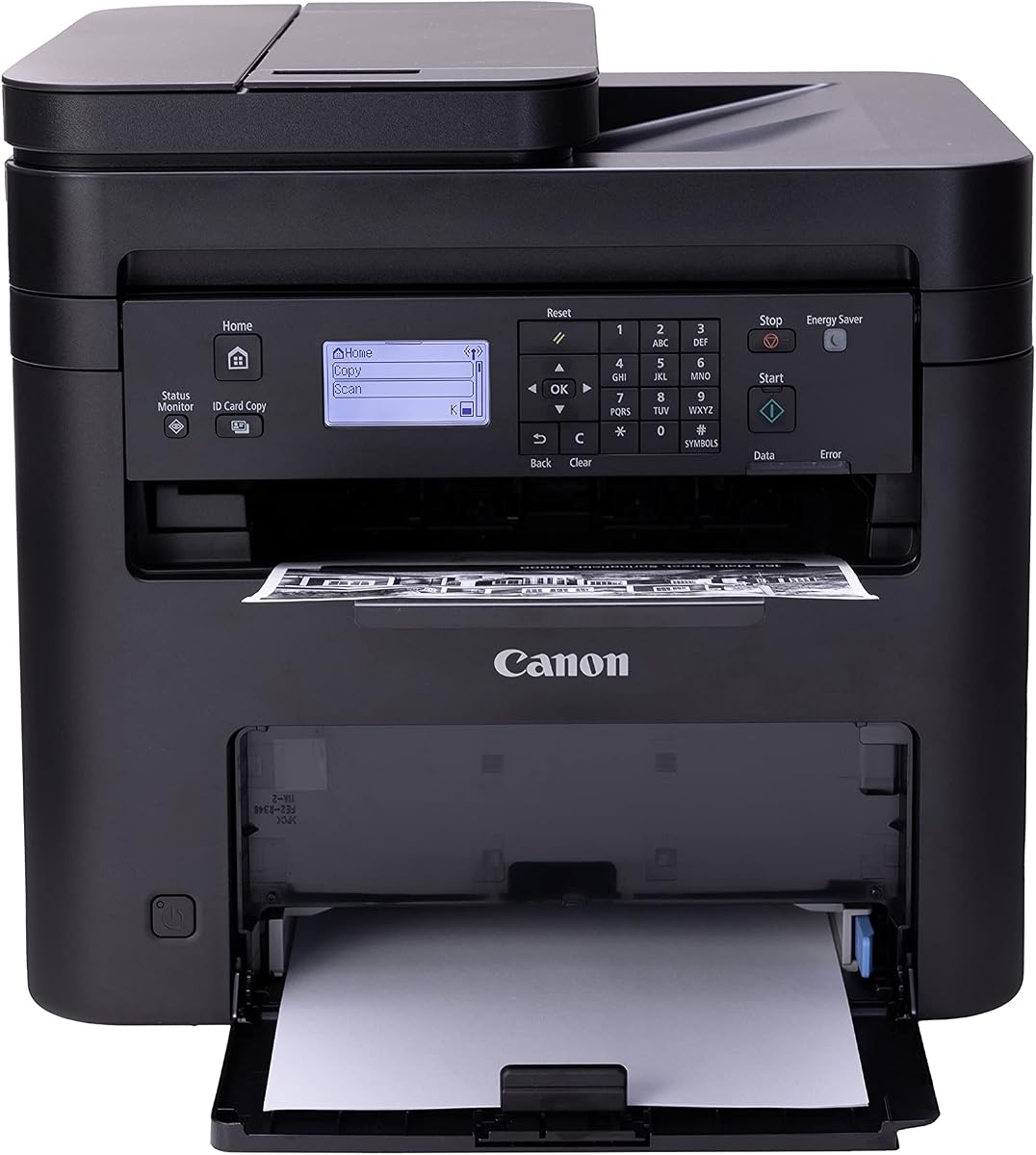


The Brother HL-L2405W stands out as a highly affordable option for home offices needing occasional envelope printing. With a solid 4.1 star rating from users it delivers consistent black and white output at speeds up to 30 pages per minute. Its compact design fits easily on small desks while the manual feed slot allows you to handle envelopes without complex setup or jams during use.
We may earn a commission when you buy through this link, at no additional cost to you.
Connectivity is a strong suit for this model as it includes built-in dual-band wireless for seamless connection to multiple devices. You can print from smartphones or tablets using the Brother Mobile Connect app which also helps track toner usage and order supplies easily. The 250-sheet paper tray reduces the frequency of refills making it practical for daily document needs alongside envelope tasks.
While this printer lacks automatic duplex printing it compensates with a straightforward manual feed slot that accepts various paper sizes including envelopes. The trade-off is minimal for budget-conscious buyers who prioritize cost efficiency over advanced paper handling features. Brother provides a 1-year limited warranty and free support ensuring peace of mind for long-term ownership and maintenance needs.
This model is ideal for individuals or small home offices that need reliable printing without breaking the bank. If you primarily handle envelopes occasionally and value a compact footprint the HL-L2405W offers excellent value. We recommend considering it for those who want a simple wireless printer that handles basic envelope needs effectively without unnecessary extra costs or features.
The manual feed slot is designed to guide envelopes smoothly through the printer reducing the risk of jams and ensuring professional-looking output for your mailings.
With dual-band wireless support you can connect to the printer from anywhere in your home office and manage print jobs remotely using your mobile device easily.
We may earn a commission when you buy through this link, at no additional cost to you.
The Brother MFC-L5915DW is a powerhouse designed for busy offices that require high-volume printing and copying capabilities. Its 50 pages per minute speed ensures documents are ready quickly while the 70-page auto document feeder handles multi-page tasks efficiently. Although it focuses on standard paper the versatility of its feeding system supports various media types including envelopes when configured correctly for specific jobs.
We may earn a commission when you buy through this link, at no additional cost to you.
This model includes advanced connectivity options like Gigabit Ethernet and dual-band wireless to ensure stable connections across large networks. It also supports high-yield toner cartridges which significantly lower the cost per page over time for frequent users. The all-in-one functionality integrates scanning and copying seamlessly making it a comprehensive solution for professional document workflows without needing separate devices.
While the initial investment is higher than basic models the productivity gains and lower operating costs justify the expense for businesses. The larger physical footprint requires dedicated desk or floor space which may not suit smaller home setups. However for teams needing reliable high-speed output and robust networking this printer delivers consistent performance under heavy demand conditions.
We recommend this unit for small to medium businesses prioritizing speed and efficiency in daily operations. If your workflow involves constant printing and scanning alongside envelope needs the MFC-L5915DW provides the reliability and features needed to keep tasks moving smoothly. Ensure you have adequate space and budget before purchasing to maximize its potential in your office environment.
With 50 pages per minute print speed and a 70-page auto document feeder this printer handles large batches quickly saving valuable time during busy work periods.
The inclusion of high-yield toner options reduces ongoing supply costs making it an economical choice for offices with significant daily printing requirements.
We may earn a commission when you buy through this link, at no additional cost to you.
The Brother HL-L2460DW strikes an excellent balance between performance and convenience for home offices needing envelope printing capabilities. Rated 4.0 stars it offers automatic duplex printing to save paper while maintaining fast speeds up to 36 pages per minute. The dedicated manual feed slot allows you to insert envelopes easily without disrupting regular paper jobs ensuring high-quality output for addresses and labels.
We may earn a commission when you buy through this link, at no additional cost to you.
Connectivity options include built-in dual-band wireless and USB for flexible setup with single or multiple devices. You can manage print jobs remotely using the Brother Mobile Connect app which also helps track supplies and order toner when needed. This compact model fits well on desks without overwhelming the workspace while still delivering professional results for daily printing tasks.
While it lacks scanning and copying features these trade-offs keep the price competitive and the footprint smaller for tighter spaces. The manual feed slot requires you to monitor envelope insertion but this ensures precise alignment for better print quality. For users who only need printing functionality this model provides the essential tools without unnecessary extra costs or bulky components.
We suggest this printer for home users who want duplex printing and envelope support in a compact package. If your workflow focuses on documents and mail rather than scanning the HL-L2460DW offers reliable performance at a reasonable cost. Verify current availability and subscription options to take advantage of any included trials that may further enhance your printing experience today.
Automatic two-sided printing helps reduce paper waste and costs while maintaining consistent quality for both sides of your documents and envelope tasks.
The manual feed slot allows you to print on envelopes and specialty paper types without changing the main tray configuration for routine document jobs.
We may earn a commission when you buy through this link, at no additional cost to you.
The HP LaserJet MFP M234sdw is designed for small teams needing reliable print scan and copy capabilities in a single device. With a 4.2 star rating it delivers up to 30 pages per minute and includes an auto document feeder for hands-free scanning tasks. While primarily focused on standard paper it can handle envelopes through its versatile input tray configurations for various printing needs.
We may earn a commission when you buy through this link, at no additional cost to you.
Its self-reset Wi-Fi feature automatically detects and resolves connectivity issues ensuring minimal downtime for your networked office environment. Built-in security features protect your printer from potential attacks which is crucial for businesses handling sensitive documents regularly. The HP Smart app simplifies repetitive tasks and allows you to scan to the cloud directly from your smartphone or tablet easily.
This model excels in ease of setup and maintenance making it ideal for businesses without dedicated IT staff. The compact design saves space while still offering robust connectivity through Ethernet and wireless options. However it is optimized for smaller workloads so larger enterprises might need higher capacity models to meet their daily printing and scanning demands effectively.
We recommend the M234sdw for small teams prioritizing security and ease of use in a shared office environment. If you need a reliable all-in-one printer that handles basic envelope printing alongside regular documents this model offers solid performance. Check current stock and app features to ensure it meets your specific workflow requirements before making a purchase decision.
The printer automatically detects and resolves network connectivity issues so you spend less time troubleshooting and more time getting work done efficiently.
Built-in security features help protect your printer and documents from potential attacks ensuring your sensitive data remains safe during transmission and storage.
We may earn a commission when you buy through this link, at no additional cost to you.
The Canon imageCLASS MF273dw combines print scan and copy functions in a compact wireless unit perfect for home offices and small teams. Rated 4.2 stars it prints up to 30 pages per minute with a first print time of approximately 5.3 seconds ensuring quick turnaround for urgent documents. It supports various paper types including envelopes through its flexible input tray settings for diverse printing needs.
We may earn a commission when you buy through this link, at no additional cost to you.
This model features automatic 2-sided printing to reduce paper usage and costs over time while maintaining professional output quality. The 1-year limited warranty provides peace of mind for new users while the use of Toner 071 ensures consistent results. Setup is straightforward and wireless connectivity allows you to print from mobile devices or computers without complex network configuration steps.
While it lacks a duplex auto document feeder the standard ADF still handles single-sided scanning efficiently for most users. The compact design saves desk space but may require frequent toner replacements for high-volume tasks. For those prioritizing speed and ease of use in a small office setting this printer offers a balanced feature set at a competitive price point.
We recommend the MF273dw for users needing essential multifunction capabilities without bulky hardware. If your work involves regular scanning and envelope printing this model delivers reliable performance. Verify current toner options and availability to ensure you can maintain optimal performance throughout your workflow requirements without interruption.
Get your first page out in about 5.3 seconds so you do not have to wait long to review or send critical documents quickly.
Automatic two-sided printing helps you save paper and reduce waste while keeping documents neat and professional for internal and external use.
We may earn a commission when you buy through this link, at no additional cost to you.
The Brother MFC-L2820DW brings print scan copy and fax functionality into a compact footprint ideal for small offices. With a 4.3 star rating it delivers up to 36 pages per minute and includes a 50-page auto document feeder for efficient multi-page tasks. The manual feed slot allows you to handle envelopes easily while the duplex feature helps save paper on regular documents.
We may earn a commission when you buy through this link, at no additional cost to you.
A 2.7-inch touchscreen provides intuitive navigation making it easy to manage tasks and connect to cloud apps like Google Drive or Dropbox. You can also print remotely using the Brother Mobile Connect app which tracks toner usage and allows supply orders on the go. Dual-band wireless ensures stable connectivity for multiple devices within your home or office network environment.
While the initial cost is higher than basic printers the added fax functionality and cloud integration justify the investment for many users. The compact design fits well on desks but may require frequent paper refills for large-volume jobs. For those who need fax capabilities alongside standard printing this model offers a convenient all-in-one solution without sacrificing speed or quality.
We suggest this printer for small businesses needing fax and envelope printing in one device. If you value touchscreen ease and cloud connectivity the MFC-L2820DW delivers reliable performance. Check current subscription offers to take advantage of any trial services that might help manage toner costs effectively for your workflow.
Integrated fax functionality lets you send and receive faxes without needing a separate machine keeping your office setup clean and efficient.
Access popular cloud services directly from the touchscreen to scan and print documents without using a computer for greater workflow flexibility.
We may earn a commission when you buy through this link, at no additional cost to you.
The Canon imageCLASS MF462dw II offers high-speed printing at up to 37 pages per minute with robust duplex features. Rated 4.2 stars it includes a 50-sheet duplex auto document feeder which scans both sides of a page in one pass saving time on multi-page tasks. The manual feed option supports envelopes and specialty paper while the expandable paper capacity handles high-volume needs easily.
We may earn a commission when you buy through this link, at no additional cost to you.
A 5-inch color touchscreen provides an intuitive interface for managing print jobs and accessing the Application Library. It supports mobile printing through the Canon PRINT app and Apple AirPrint making it easy to print from any device. High-capacity toner ensures fewer replacements and consistent quality over time for your office printing demands.
While the initial investment is higher the productivity gains from its high speed and duplex capabilities justify the cost for businesses. Setup is straightforward but may require more attention due to the expanded features compared to basic models. For users needing fast reliable printing with advanced document handling this model delivers professional results consistently.
We recommend this printer for offices prioritizing speed and efficiency in daily workflows. If your work involves heavy document processing and envelope needs the MF462dw II provides the reliability and capacity needed. Verify current pricing and capacity options to ensure it aligns with your budget and space requirements before purchasing.
The 50-sheet duplex auto document feeder scans both sides in one pass saving time and ensuring your documents stay organized during heavy use.
Optional paper cassettes allow you to expand capacity up to 550 sheets so you rarely need to refill paper during busy periods.
We may earn a commission when you buy through this link, at no additional cost to you.
The Brother MFC-L8930CDW is a premium color laser printer designed for businesses needing high-quality output and robust security. With a 4.4 star rating it delivers up to 33 pages per minute and supports duplex printing for efficient workflow management. The multipurpose tray is ideal for envelopes and specialty paper ensuring professional results for marketing materials and correspondence.
We may earn a commission when you buy through this link, at no additional cost to you.
Advanced security features including Triple Layer Security help protect your printer and documents from potential attacks. A large 7-inch color touchscreen makes navigation easy while supporting customizable shortcuts for frequently used tasks. It also includes an NFC card reader for badge authentication ensuring secure access for authorized users in shared environments.
While the cost is higher than monochrome options the ability to print in color adds significant value for branding and communication needs. The larger footprint requires dedicated space but the compact design is still optimized for desktop use. For businesses prioritizing security and color quality this model offers a comprehensive solution for professional document workflows.
We recommend this printer for businesses needing color output and advanced security in one device. If your workflow involves high-volume envelopes and secure document handling the MFC-L8930CDW delivers reliability and quality. Check current toner offers to maximize value and reduce long-term costs for your office printing needs.
Triple Layer Security protects your printer and documents from attacks ensuring sensitive information remains safe during transit and storage.
Professional color printing helps your business communicate effectively with clients and partners using vibrant and crisp document materials.
We may earn a commission when you buy through this link, at no additional cost to you.
The HP LaserJet Pro MFP 3101sdw is designed for small teams needing reliable all-in-one performance with strong wireless connectivity. Rated 4.5 stars it prints up to 35 pages per minute and includes a 50-sheet auto document feeder for hands-free scanning tasks. The 250-sheet input tray ensures you spend less time refilling paper during busy work periods.
We may earn a commission when you buy through this link, at no additional cost to you.
Its dependable Wi-Fi technology looks for the best connection to stay online minimizing disruptions to your network workflow. While it does not have specialized envelope features the input tray supports various paper types including envelopes for professional output. Toner is designed for sharp prints ensuring consistent quality for business documents and correspondence.
This model prioritizes reliability and ease of use making it ideal for businesses without dedicated IT support. The firmware updates maintain security measures ensuring cartridges remain compatible with HP chips. For those needing dependable printing and scanning in a wireless environment this model delivers consistent results without unnecessary complications.
We recommend this printer for small teams prioritizing reliability and wireless performance. If your workflow involves regular document and envelope printing the 3101sdw offers solid value. Verify current cartridge policies to ensure compliance with your office supply management before making a purchase decision today.
Advanced Wi-Fi technology ensures stable connectivity by seeking the best signal so your office printing never faces unexpected interruptions.
Built with quality components and tested for consistent performance this printer handles high demands page after page without failing.
We may earn a commission when you buy through this link, at no additional cost to you.
The Brother Premium MFC-L2690DW combines all-in-one functionality with a compact and sturdy design ideal for home offices. Rated 4.4 stars it offers up to 26 pages per minute and includes a manual feed slot specifically designed to handle envelopes and specialty paper reliably. The generous 250-sheet capacity tray minimizes refills while ensuring consistent quality for daily printing tasks.
We may earn a commission when you buy through this link, at no additional cost to you.
Wireless network interface and easy mobile printing allow you to share the printer across multiple users on your network effortlessly. The compact footprint saves space without compromising on robust construction ensuring long-term durability under busy schedules. This model focuses on reliability and ease of use making it a practical choice for small business environments.
While print speed is slower than some high-end models the manual feed slot ensures envelope jobs are handled without jamming issues. The premium price reflects the build quality and compact design suited for professional office environments. For users needing consistent performance and envelope support in one device this model offers a solid investment for daily operations.
We suggest this printer for small offices needing robust all-in-one performance. If your work involves envelope handling and regular printing the MFC-L2690DW delivers reliability. Check current pricing and warranty options to ensure you receive the best support for your office printing needs today.
Sturdy and robust construction ensures your printer keeps up with busy schedules without breaking down during regular daily office use.
This model saves valuable desk space with a compact design that fits easily in small offices without sacrificing functionality or output quality.
We may earn a commission when you buy through this link, at no additional cost to you.
Selecting the right laser printer with envelope handling requires evaluating several key factors to ensure it meets your specific printing needs and budget.
Consider how many envelopes you typically print per week and whether the printer supports a manual feed slot or dedicated tray. Manual slots allow for occasional envelope printing without changing the main paper tray while dedicated trays streamline high-volume needs effectively.
Look for a printer with sufficient speed to handle your workload without delays. Faster speeds save time but ensure the quality remains sharp for envelope addressing which often requires precise text alignment for professional presentation.
Wireless and network connectivity options allow multiple users to access the printer from different devices. Ensure the model supports your preferred connection type such as dual-band Wi-Fi or Ethernet for stable performance.
Beyond the initial purchase price consider the cost of toner cartridges and maintenance. High-yield options may cost more upfront but reduce long-term expenses significantly for frequent printing tasks.
If you also need scanning and copying features an all-in-one model can save space and simplify your workflow. Evaluate whether these features justify the additional cost for your specific business needs effectively.
For businesses handling sensitive data choose a printer with advanced security features like encryption and user authentication. These tools help protect your documents and network from unauthorized access or attacks during printing tasks.
Measure your available workspace to ensure the printer fits comfortably without obstructing movement. Compact designs are ideal for small home offices while larger models may suit dedicated print rooms better.
Check the warranty duration and availability of customer support to resolve any issues quickly. Reliable support ensures minimal downtime and helps maintain your printer in optimal condition over time.
Store toner cartridges in a cool dry place and replace them according to the printer's indicator lights or app notifications. Keep firmware updated to ensure compatibility with new features and security patches provided by the manufacturer.
Not all laser printers handle envelopes equally. Look for models with a manual feed slot or dedicated tray that specifies envelope compatibility. This feature allows you to insert envelopes one by one without disrupting regular paper printing workflows effectively.
Standard business envelopes made from smooth lightweight paper work best. Avoid glossy or metallic envelopes as they may cause jams or damage the printer. Check the printer manual for specific weight limits and recommended sizes.
Ensure envelopes are loaded correctly with the flap on the right side as instructed. Straighten any bent envelopes before loading and adjust paper guides to fit snugly. Avoid overfilling the manual feed slot to reduce jam risks.
Manual feed slots are ideal for occasional envelope printing while dedicated trays suit high-volume needs. Choose based on how frequently you print envelopes and whether you need uninterrupted paper printing during envelope tasks.
Yes but ensure they are smooth and not overly textured to avoid jams. Check the printer manual for specific material recommendations as some models may have limitations on textured surfaces.
Use a soft lint-free cloth to wipe the rollers and feed path regularly. This removes dust and debris that can cause slippage or jams during envelope printing tasks.
We have explored ten top laser printers suitable for envelope printing from budget-friendly options to premium all-in-one solutions. Each model offers distinct features to meet varying needs from home offices to larger business environments.
When choosing consider your volume requirements connectivity preferences and budget to find the right fit. Prioritize features like manual feed slots and speed that align with your daily workflow to maximize efficiency.
Prices and availability change frequently so verify current deals before making a final decision. By choosing the right printer you can streamline your envelope printing tasks and improve overall office productivity effectively.