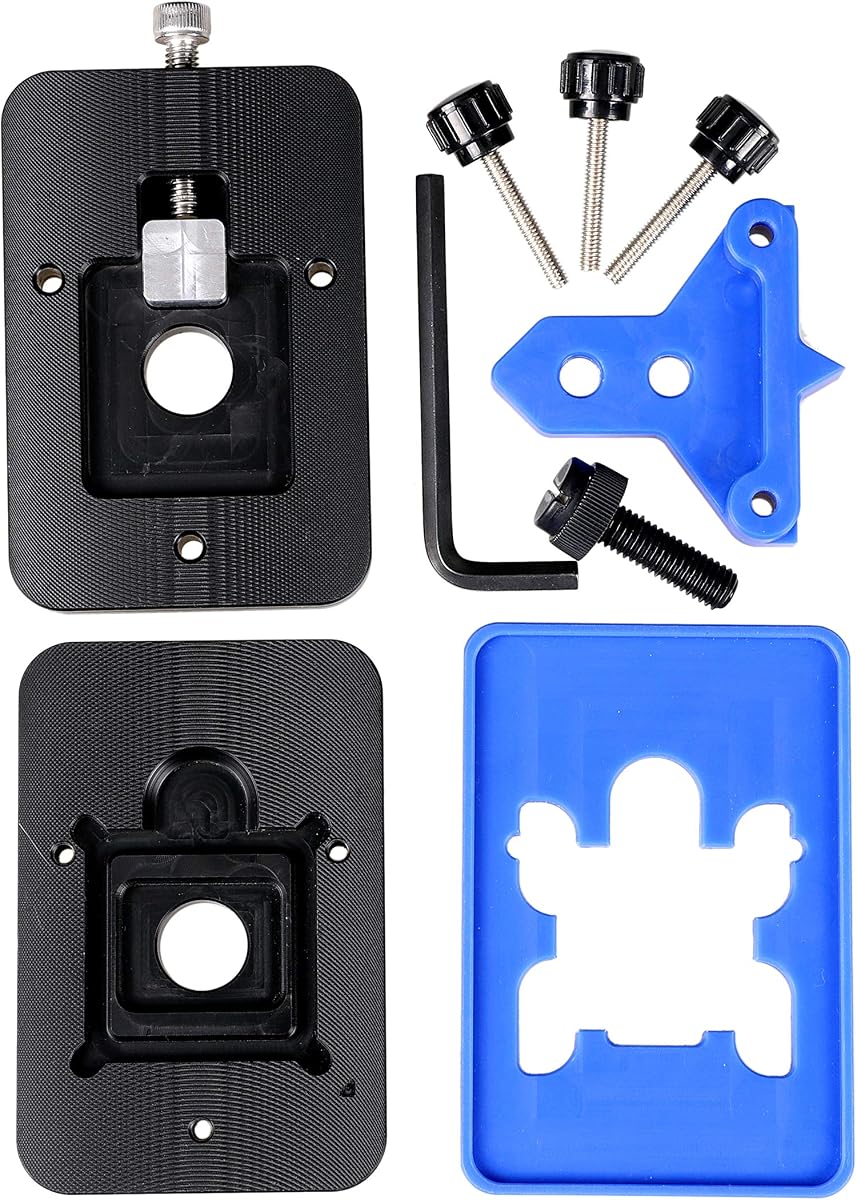
EG Starts Kaby Intel CPU Delid
4.6Editor score
Safest and easiest delidding method
100 percent compatible with Kaby Lake
Includes relid tool for maximum overclocking
This guide compares the top ten delidding kits available in October 2026 for enthusiasts and professionals seeking precision tools to remove heatspreaders
Delidding kits are essential tools for PC enthusiasts who want to unlock maximum thermal performance from their processors. These specialized devices allow users to safely remove the integrated heatspreader to expose the silicon die for direct contact cooling.
We compared ten leading kits based on build quality, blade precision, compatibility, and user feedback. Each selection balances safety with effectiveness to help you choose the right tool for your specific CPU model and repair needs.
Every pick highlights unique strengths like durability or ease of use to guide your decision. Please note that availability and pricing may change over time, so check current listings before purchasing your preferred kit.
4.6Editor score

4.5Editor score

4.1Editor score
This side-by-side comparison highlights the key specifications and unique capabilities of each kit to help you find the perfect match for your CPU maintenance needs.


This Thermal Grizzly tool stands out as a top choice for enthusiasts seeking reliable delidding performance. With a strong rating of 4.5 stars it delivers precision and safety in one compact package designed for modern CPUs.
We may earn a commission when you buy through this link, at no additional cost to you.
Its compatibility with 12th and 13th generation Intel Core processors ensures it meets the needs of current builders. The tool facilitates better heat dissipation which can lead to significant temperature drops during heavy workloads.
While the price reflects its premium quality it is worth noting that it is tailored to specific socket types. This focus on niche compatibility means older systems may require alternative solutions for similar results.
Overall this kit is recommended for users prioritizing performance and build quality in their cooling upgrades. It simplifies the delidding process making advanced thermal management accessible to skilled DIYers.
By removing the heatspreader the tool enables direct die cooling which maximizes thermal transfer.
The black and red anodized aluminum ensures longevity and resistance to wear during repeated use.
We may earn a commission when you buy through this link, at no additional cost to you.
The EG Starts tool offers an accessible entry point for those looking to delid their Intel CPUs without breaking the bank. Its 4.6 rating highlights a strong track record of reliability among users.
We may earn a commission when you buy through this link, at no additional cost to you.
It supports a wide range of sockets from 775 to 1151 covering many popular processors. The included aluminum block is designed to prevent damage to the CPU board during the opening process.
However users must ensure the block is positioned correctly to avoid board damage. While it lacks support for the newest sockets it remains a versatile option for many existing systems.
For budget conscious builders seeking a balance of safety and functionality this kit delivers excellent value. It makes the delidding process straightforward and repeatable for overclocking enthusiasts.
The design simplifies the process making it safer than improvised methods for DIY users.
It includes a relid tool to help users seal the CPU back up after maintenance.
We may earn a commission when you buy through this link, at no additional cost to you.
This tool is a premium option specifically engineered for users with high end Intel workstation processors. It focuses on protecting the CPU die from damage which is crucial when handling expensive components.
We may earn a commission when you buy through this link, at no additional cost to you.
Constructed from aluminium and stainless steel it offers robust durability for professional or frequent use. The anodised black finish adds a sleek look while providing resistance to corrosion and scratches.
The specialized nature of this tool means it is not a universal solution for all CPUs. Users with standard consumer chips may find better value in other options tailored to common sockets.
Despite its limited compatibility it remains a top choice for enthusiasts working with Skylake X or Kaby Lake X platforms. It delivers confidence and precision when performing critical CPU maintenance.
The design prioritizes protecting the silicon core from breaking during the removal of the heatspreader.
Combining aluminum and stainless steel ensures the tool withstands repeated use without deformation.
We may earn a commission when you buy through this link, at no additional cost to you.
This specialized tool targets the unique needs of PlayStation 3 repair enthusiasts aiming to fix console overheating issues. It is designed to remove the integrated heat spreader from the RSX GPU chip specifically.
We may earn a commission when you buy through this link, at no additional cost to you.
By reducing board contact during the delidding process it helps protect the mainboard from accidental damage. This feature is vital when working with delicate console components that lack the robustness of desktop hardware.
However users should note it does not support the Super Slim model which lacks the RSX lid. Additionally it is limited to the GPU and cannot be used on the main CELL processor.
For PS3 owners dealing with performance throttling this kit provides the necessary access to replace aged thermal paste. It is a niche but effective solution for extending the life of older consoles.
The tool allows users to access and replace thermal paste on the RSX GPU specifically.
Its design keeps working edges away from the main board to prevent accidental damage.
We may earn a commission when you buy through this link, at no additional cost to you.
Version 3 of this tool offers a refined approach to delidding PlayStation 3 CPUs to address common overheating concerns. Its strong rating of 4.6 suggests it performs well for its intended console repair niche.
We may earn a commission when you buy through this link, at no additional cost to you.
The blade is precision-engineered to be thin and durable which helps ensure clean and accurate removal of the heatspreader. This improves the longevity of the tool and maintains consistent performance over time.
While effective for its purpose it is important to recognize its limited compatibility with console systems. Users with desktop PCs will need a different tool designed specifically for CPU packages.
This kit is ideal for gamers and console hobbyists looking to restore performance to older hardware. The inclusion of multiple blades ensures users have spares for future repair sessions.
The Version 3 blade is sharper and more flexible for better longevity and consistent performance.
Having three blades allows for extended usability without needing to replace the entire tool.
We may earn a commission when you buy through this link, at no additional cost to you.
This repair kit is designed for intricate tasks requiring extreme precision such as removing power supply units or scraping CPU adhesive. Its ultra-thin blade measures just 0.38mm which allows for seamless movement between chips.
We may earn a commission when you buy through this link, at no additional cost to you.
The blades are made from SK5 steel which offers high heat tolerance and enhanced oxidation proof properties. This construction helps maintain sharpness through extended repair sessions without degrading quickly.
Users should exercise caution as the rating suggests mixed feedback from previous buyers. Proper technique is essential when working with such thin blades to avoid damaging sensitive board components.
Overall it is a strong option for technicians focused on board maintenance and chip restoration. The ergonomic handle ensures control which is critical for delicate electronic repairs.
The ultra-thin blade design is smaller than solder points for precise separation tasks.
SK5 steel construction provides robust heat tolerance to maintain edge sharpness over time.
We may earn a commission when you buy through this link, at no additional cost to you.
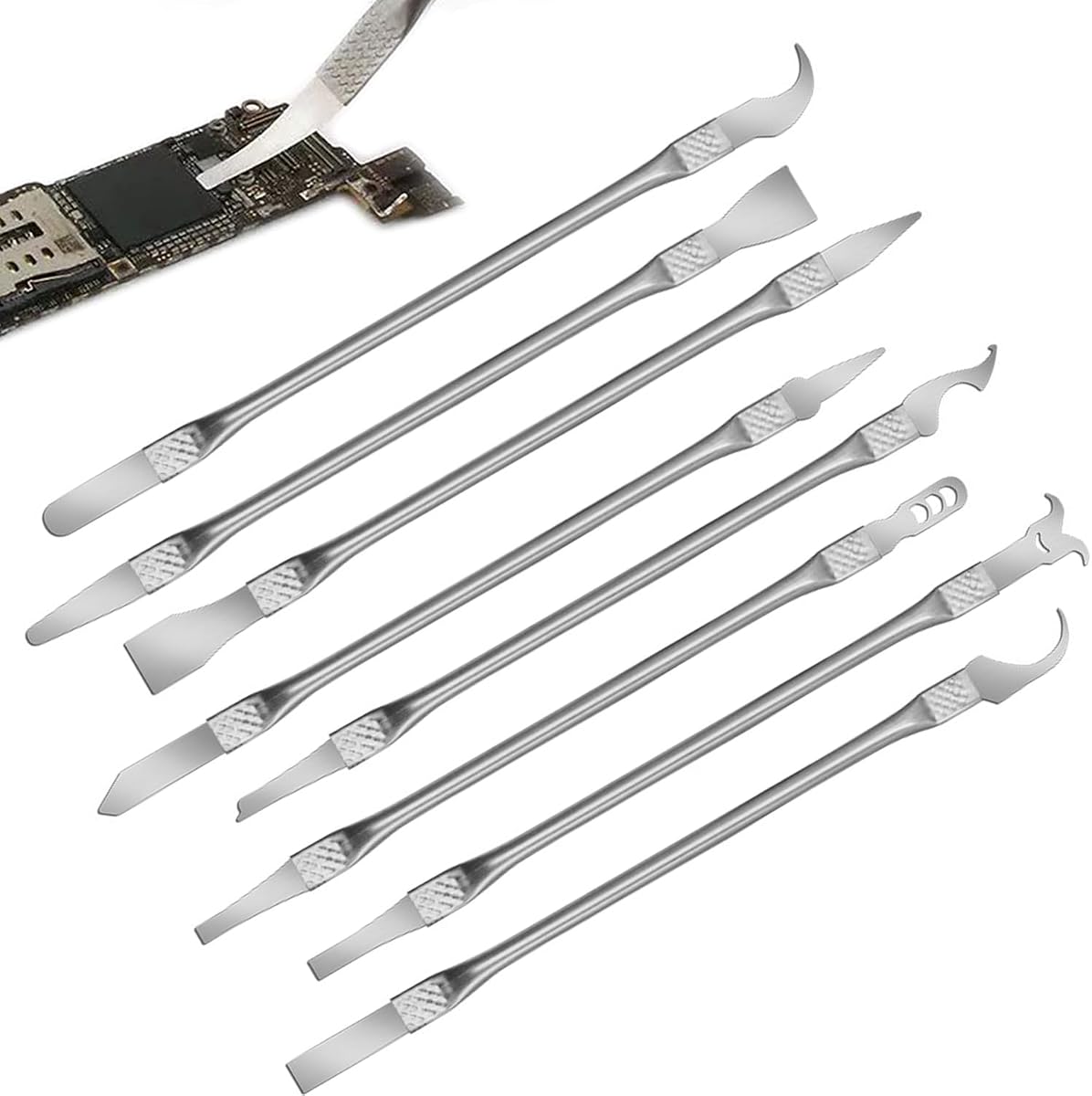
This comprehensive set provides a wide range of tools for delicate repair tasks including removing adhesive and lifting chips. It is engineered to streamline workflows for professionals working on motherboards and mobile devices.
We may earn a commission when you buy through this link, at no additional cost to you.
The blades are crafted from high-grade steel to ensure surgical precision when working with sensitive electronic components. The non-slip ergonomic handle reduces hand fatigue during extended use in repair stations.
While it is a robust solution for many tasks users should note that individual blade quality may vary. Proper maintenance and blade selection are key to maximizing the effectiveness of the set.
Ideal for technicians handling diverse repair needs this kit offers versatility and control. It allows users to tackle multiple stages of a project with a single reliable tool set.
The all-in-one design helps technicians handle different repair stages without changing tools frequently.
The metal handle provides perfect balance to reduce the risk of slips during intricate work.
We may earn a commission when you buy through this link, at no additional cost to you.
This 8-piece set offers a versatile approach to removing small components like BGA chips and CPUs from various devices. It balances simplicity with functionality to suit a broad range of repair needs.
We may earn a commission when you buy through this link, at no additional cost to you.
The tools are made from high-quality alloy that resists corrosion and bending which ensures longevity. This material choice helps maintain the integrity of the tools even after repeated use.
Users may find the basic design lacks the advanced features of specialized delidding tools. However for general repair work it provides a reliable and comfortable solution for routine tasks.
For those needing a quick and practical set for electronics maintenance this option is effective. It reduces assembly time and ensures a comfortable grip during extended repair sessions.
The high-quality alloy construction ensures resistance to corrosion and bending over time.
Integrated blade and handle design eliminates assembly steps making repairs quicker and easier.
We may earn a commission when you buy through this link, at no additional cost to you.
This 3-pack of scrapers provides a safe way to clean off adhesive and solder residue from delidded processors. Its 4.8 rating highlights high satisfaction among users who need precision during cleanup.
We may earn a commission when you buy through this link, at no additional cost to you.
The acrylic construction ensures durability while protecting delicate CPU components from damage. The narrow tip is specifically designed to remove silicone adhesive and indium solder residue efficiently.
It is meant to complement a primary delidding tool rather than replace it. Users should use it with caution to avoid scratching the package during careful cleaning processes.
For anyone who removes CPU lids this kit is an essential companion for maintaining a clean workspace. It offers control and precision when working with very small electronic components.
The acrylic material reduces the risk of scratching the CPU package during cleaning.
The narrow tip allows for detailed removal of residues without damaging surrounding components.
We may earn a commission when you buy through this link, at no additional cost to you.
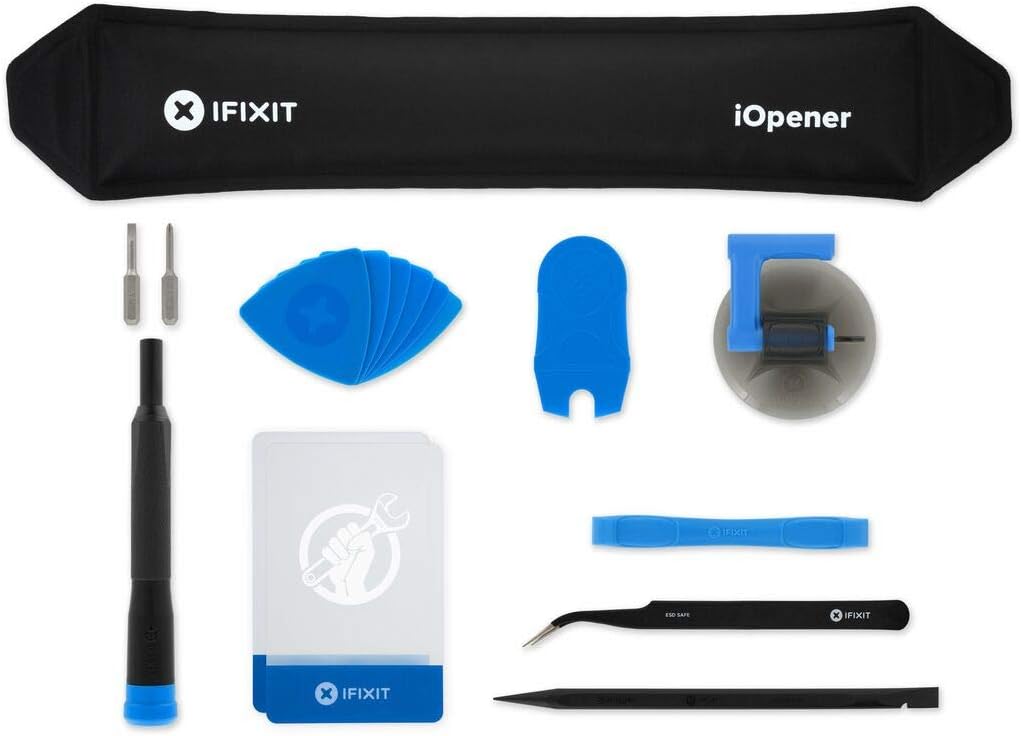
This heat pad is designed to apply heat evenly to loosen adhesive for removal during repair processes. While not a traditional delidding tool it is useful for disassembling electronics safely before accessing CPUs.
We may earn a commission when you buy through this link, at no additional cost to you.
Made from non-toxic and food-safe materials it offers peace of mind for users concerned about safety. The universal design makes it suitable for phones laptops and tablets needing heat application.
It requires an external heat source to function which adds a step to the repair workflow. Users should ensure proper temperature control to avoid damaging components during the process.
For general electronic repair this tool is reliable and easy to use. It complements other maintenance tools to create a complete solution for safe device disassembly.
It works with a wide range of electronics to loosen adhesives without damaging internal components.
The non-toxic food-safe construction ensures safe use in repair environments without harmful byproducts.
We may earn a commission when you buy through this link, at no additional cost to you.
Selecting the right delidding kit depends on your specific CPU model, technical expertise, and intended use. Here are key factors to consider before purchasing.
Ensure the tool supports your processor socket type to avoid fitment issues. Check the manufacturer's compatibility list for Intel or AMD generations before buying.
Match the tool to your specific socket for safe and effective heatspreader removal.
Look for durable materials like stainless steel or anodized aluminum that resist wear and bending. High-quality construction ensures longevity and consistent performance over many uses.
Invest in robust materials to protect your hardware and maintain tool effectiveness.
Precision-engineered thin blades allow for clean separation without damaging the CPU die. Ultra-thin options are ideal for delicate tasks requiring surgical accuracy.
Choose blades designed for thin and clean cuts to minimize risk during removal.
Tools with designs that minimize board contact reduce the risk of damaging surrounding components. Safety is paramount when working with expensive electronics and sensitive parts.
Prioritize tools with built-in safety features to prevent accidental damage to your system.
Check user ratings and reviews to gauge real-world reliability and ease of use. High ratings indicate consistent performance and customer satisfaction across many users.
Rely on verified user reviews to confirm the tool works as expected in practice.
Some kits include scrapers or relid tools that add value to the purchase. Extra accessories can save time and effort during the full maintenance cycle.
Look for kits with included accessories to simplify the entire delidding workflow.
Established brands often offer better support and quality control for specialized tools. Choosing a known manufacturer can provide confidence in product performance.
Select reputable brands to ensure reliability and access to support if needed.
Balance the cost with the features provided to find a kit that fits your budget. Higher priced tools may offer better longevity and precision for professional use.
Evaluate the value offered by the kit to ensure it meets your needs and budget.
Start by ensuring your CPU is fully removed from the motherboard and cleaned of any dust or debris. Secure the processor in a stable position to prevent movement during the opening process.
Use the tool's blade to carefully pry or slice the adhesive sealing the heatspreader to the CPU package. Apply steady pressure while following the tool's designed motion to avoid damaging the die.
Clean the blade with is after each use to remove adhesive residue and maintain sharpness. Store the tool in a dry place to prevent oxidation and ensure long-term reliability.
When used correctly and with the right tool for your CPU model they can be safe. Always follow manufacturer guidelines and exercise caution to avoid damaging the silicon die during removal.
Yes removing the heatspreader typically voids the manufacturer warranty on your processor. This process is irreversible and removes any official support coverage for the component.
High-quality stainless steel or SK5 steel blades offer the best balance of durability and precision. These materials maintain sharpness and resist bending during delicate operations.
No each tool is designed for specific socket types or console models. Verify compatibility with your specific processor before purchasing to ensure it fits correctly.
Wipe the blade with a lint-free cloth and alcohol to remove any adhesive residue. This prevents buildup that could reduce effectiveness and ensures the tool lasts longer.
Yes specialized delid tools exist for the RSX GPU in PS3 consoles. These are designed specifically for the console's chip to avoid damage during maintenance.
For overclockers and enthusiasts it can significantly lower temperatures and improve performance. However it requires technical skill and risk tolerance so it may not suit casual users.
Wear safety glasses and work in a well-lit static-free environment. Proper safety gear helps protect your eyes and electronics from accidental damage.
This guide has highlighted ten top picks ranging from specialized console tools to universal CPU solutions. Each kit offers unique benefits to suit different needs and processor types in 2026.
Prioritize compatibility and build quality when selecting a tool to ensure safety and effectiveness. The right kit can transform your ability to optimize thermal performance on high-end systems.
Always check current prices and availability before purchasing to get the best deal. With careful planning and the right tools you can safely unlock your CPU's full potential.