
BENFEI USB C to HDMI Adapter
4.4Editor score
4K at 60Hz resolution
Plug and play setup
Compact lightweight design
This guide compares the top Flash Drive to HDMI Adapter models for performance, compatibility, and ease of use to help you find the best video output solution.
Finding the right Flash Drive to HDMI Adapter can transform how you present content or extend your workspace. These compact devices allow you to connect USB ports to HDMI displays effortlessly. We evaluate reliability, resolution support, and driver needs to ensure smooth video output for any setup.
We compared ten leading models based on user feedback, technical specifications, and real-world performance. Our analysis covers compatibility with major operating systems, supported resolutions, and build quality. This list helps you choose an adapter that fits your specific workflow and device requirements without unnecessary hassle.
Each pick highlights key strengths and potential limitations to guide your decision. We focus on practical benefits like plug-and-play support, multi-monitor capabilities, and warranty coverage. Please note that availability and pricing may vary over time so check current listings before purchasing your preferred model.
4.4Editor score

4.1Editor score

4.5Editor score
The following table provides a side by side overview of all ten models evaluated. It highlights key specifications and capabilities to help you quickly identify the adapter that best matches your display and connectivity needs.


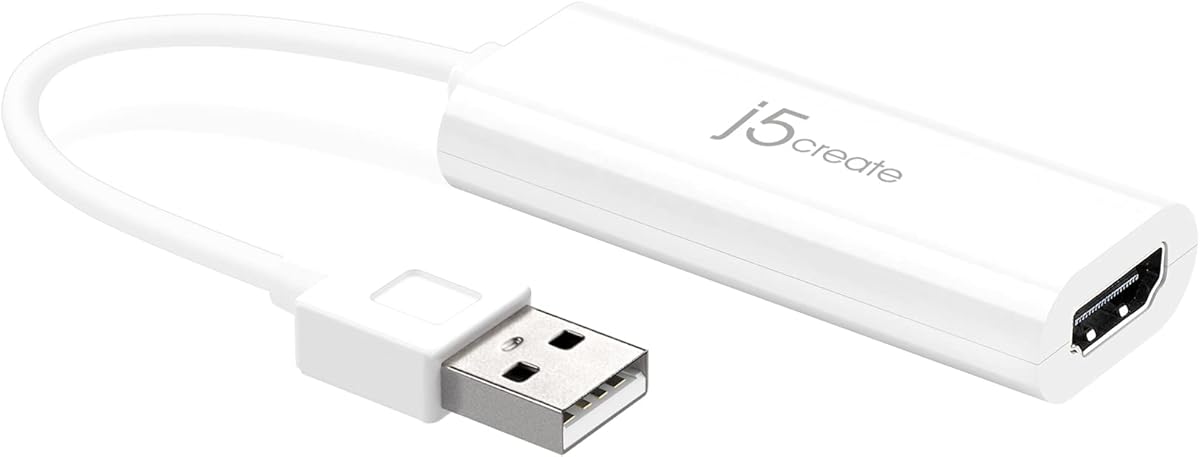
The Reborn USB to HDMI Adapter offers a reliable way to connect USB ports to HDMI displays. It supports 1080P resolution at 60Hz making it suitable for multimedia and presentations. Users appreciate its compact design which makes it easy to carry during travel or daily commutes.
We may earn a commission when you buy through this link, at no additional cost to you.
This adapter supports both mirror and extended display modes enhancing productivity for multitasking. It works with Windows and macOS systems providing flexibility across different work environments. The build quality ensures stable performance over time without frequent disconnections or signal drops.
However users must install a driver before first use which adds a step to setup. It does not function in BIOS mode limiting use cases where early boot output is needed. Despite this limitation the adapter performs well for standard desktop and laptop usage scenarios.
This product is ideal for professionals who need an affordable and portable video output solution. Its compatibility with major operating systems makes it a versatile choice for home or office use. We recommend it for anyone seeking a straightforward way to extend their display setup.
The ability to mirror or extend your screen improves workflow efficiency significantly.
Its small form factor fits easily into bags for on the go presentations.
We may earn a commission when you buy through this link, at no additional cost to you.
This StarTech adapter delivers consistent performance for Windows users needing an HDMI connection. It supports 1080p at 60Hz ensuring smooth video playback and clear visuals. The device is bus powered meaning it draws power directly from the USB port without extra adapters.
We may earn a commission when you buy through this link, at no additional cost to you.
Its lightweight design makes it convenient for travel and desk setups. Users value its TAA compliance which meets specific government procurement requirements. The adapter requires administrator rights for driver installation which adds a layer of security control on managed systems.
The lack of macOS support limits its versatility across mixed operating environments. Driver installation is mandatory and may require technical knowledge for some users. These factors make it best suited for dedicated Windows workstations rather than general consumer use.
Choose this adapter if you prioritize reliability and compliance within a Windows ecosystem. It offers a solid solution for office environments where TAA standards are necessary. The performance justifies its position as a trusted choice for enterprise deployments.
Meets Trade Agreements Act standards for government procurement projects.
Eliminates the need for external power sources during operation.
We may earn a commission when you buy through this link, at no additional cost to you.
This adapter connects PC images to TVs and monitors through USB interfaces efficiently. It supports 1080p resolution on both USB 3.0 and 2.0 ports providing flexibility in hardware choices. Hot plugging allows you to connect or disconnect the device without restarting your computer.
We may earn a commission when you buy through this link, at no additional cost to you.
Users benefit from a thirty six month warranty which offers long term peace of mind. The adapter works with both Windows and macOS systems making it suitable for diverse environments. It helps improve work efficiency by expanding the desktop with an additional display screen.
The lower rating suggests some users may experience inconsistent performance or setup issues. Driver installation is required which can be a hurdle for less technical users. These limitations should be weighed against the benefits of its wide compatibility and warranty.
This product suits those who need a budget friendly option with extended support coverage. Its hot plugging feature adds convenience for dynamic work environments. Consider this if you value warranty length and basic functionality over premium features.
Allows connecting devices without rebooting the system for immediate use.
Provides thirty six months of coverage for added product security.
We may earn a commission when you buy through this link, at no additional cost to you.
The WAVLINK adapter stands out for its ability to support up to six monitors on a single PC. It uses DisplayLink technology which enables high resolution output up to 2560×1440 at 50Hz. This makes it a powerful tool for advanced workstation setups requiring multiple screens.
We may earn a commission when you buy through this link, at no additional cost to you.
It connects via USB C or USB A offering broad hardware compatibility. The device includes built in microphone and earphone ports adding convenience for audio tasks. It works across Windows macOS and ChromeOS making it versatile for mixed environments.
Installation requires the DisplayLink driver which adds complexity to setup. The price is higher than basic adapters reflecting its advanced capabilities. These trade offs are acceptable for users who need extensive display scaling and high resolution output.
Choose this adapter for professional environments needing multi-monitor productivity. Its cross platform support ensures it fits into varied tech stacks. The performance justifies the investment for users with demanding visual workflow needs.
Enables complex workstation setups with up to six displays connected.
Built in mic and earphone outputs simplify audio connection needs.
We may earn a commission when you buy through this link, at no additional cost to you.
This adapter allows you to extend your desktop with two HDMI monitors simultaneously. It supports 4K resolution at 30Hz alongside 1080p at 60Hz providing flexibility in display choices. This dual output feature is ideal for workstations needing extended workspace without complex internal hardware.
We may earn a commission when you buy through this link, at no additional cost to you.
The product is designed for IT professionals with a three year warranty and technical support. It requires administrator rights for driver installation ensuring secure deployment on managed systems. Its performance is reliable for business and home office environments requiring stable multi-screen setups.
The lack of macOS support restricts its use to Windows based systems. The price reflects its premium capabilities and warranty coverage. Users must weigh the dual display benefit against the operating system limitation and cost.
Select this adapter for professional dual monitor configurations with high resolution needs. Its warranty and support make it a trustworthy long term investment. It is the top choice for users prioritizing multi-screen productivity within Windows.
Extends desktop with two monitors for enhanced multitasking efficiency.
Three year coverage ensures long term reliability and support access.
We may earn a commission when you buy through this link, at no additional cost to you.
This adapter is DisplayLink certified ensuring compatibility with any USB A laptop or desktop. It supports 1080p resolution and HDCP 1.4 for protected content playback. Automatic driver installation simplifies setup for Windows and ChromeOS users reducing technical overhead.
We may earn a commission when you buy through this link, at no additional cost to you.
The compact design makes it suitable for portable use without bulky add-ons. It draws power from the USB port requiring no extra supply. Users appreciate the certified compatibility which minimizes troubleshooting during deployment.
Its price is higher compared to non certified alternatives. Driver installation is still required which may be a hurdle for some. These factors make it best for users who value certified reliability over cost savings.
Choose this if you need guaranteed compatibility and easy setup in enterprise settings. The HDCP support ensures you can watch protected content without issues. It is a robust choice for professional video output needs.
Ensures broad compatibility across USB A laptops and desktop systems.
Simplifies setup with automatic driver installation on supported systems.
We may earn a commission when you buy through this link, at no additional cost to you.
This adapter connects iPhone 15 or 16 devices to TVs with 4K 60Hz output. It includes a dedicated charging port allowing device use while connected. This design supports extended viewing sessions without worrying about battery drain during presentations or streaming.
We may earn a commission when you buy through this link, at no additional cost to you.
Users enjoy a plug and play experience with no driver installation required. The aluminum casing and nylon braided cable provide durability and heat dissipation. It supports a wide range of USB C devices including MacBooks and Android smartphones.
Streaming apps with HDMI copyright protection may not work on this adapter. This limitation affects users who rely on specific streaming services. Despite this the adapter excels in providing a stable connection for supported apps and content.
Select this for mobile presentations and media sharing on large screens. Its charging port design solves a common pain point for mobile users. It is ideal for those who prioritize convenience and build quality in mobile adapters.
Allows simultaneous charging while using the adapter for extended use.
Aluminum casing ensures durability and efficient heat management.
We may earn a commission when you buy through this link, at no additional cost to you.
This adapter transforms USB A ports into high definition HDMI outputs for monitors. It delivers 1080P resolution at 60Hz ensuring lag-free video sync for media and work. The device supports 3D display providing added versatility for compatible content types.
We may earn a commission when you buy through this link, at no additional cost to you.
Users can switch between extended and mirrored display modes easily via shortcuts. Installation requires a local driver that runs without internet access for privacy. It works with Windows and macOS systems offering reasonable cross platform utility.
Driver setup is mandatory which may slow down quick deployments. The limited OS support excludes older versions and Linux environments. These factors make it best for users with current systems who value privacy focused driver design.
Choose this for reliable 1080P output with straightforward mirror and extend options. Its local driver installation enhances privacy for sensitive environments. It serves well for general office and home entertainment display needs.
Enables 3D content viewing on compatible displays for added visual depth.
Local driver installation avoids internet access for enhanced privacy.
We may earn a commission when you buy through this link, at no additional cost to you.
This adapter connects USB C devices to HDMI displays with 4K 60Hz resolution. It is compact and lightweight making it easy to carry for presentations or travel. The device supports Thunderbolt 3 and 4 compatibility ensuring wide hardware reach.
We may earn a commission when you buy through this link, at no additional cost to you.
Plug and play functionality eliminates driver installation for supported systems. An advanced IC chip ensures stable signal conversion from USB C to HDMI. Users appreciate the affordable price for high resolution output without extra software steps.
The USB C device must support DP Alt mode to function correctly. This requirement may exclude some older or non video capable devices. Users should verify device compatibility before purchasing to avoid frustration.
Select this for high resolution output on a budget. Its portability and warranty make it a safe choice for mobile professionals. It is ideal for those seeking reliable 4K performance without complex setup.
Supports 4K at 60Hz for sharp and smooth video playback.
Small footprint ensures easy portability in bags or pockets.
We may earn a commission when you buy through this link, at no additional cost to you.
This adapter allows you to add an extra monitor without installing an internal video card. It supports hot-swappable USB so you can remove monitors without rebooting. This feature is particularly useful for dynamic office environments needing frequent reconfigurations.
We may earn a commission when you buy through this link, at no additional cost to you.
It works well for multitasking in fields like design and finance where large spreadsheets span screens. The 1080P resolution ensures clear visuals for detailed work. Users benefit from seamless window management across multiple displays for higher productivity.
Driver installation is required which adds a setup step initially. It relies on USB A ports limiting compatibility with newer USB C only devices. These factors make it best for traditional desktop setups with standard USB ports.
Choose this for flexible multi-monitor configurations without rebooting. Its hot-swappable design simplifies workflow changes in active work environments. It is a solid tool for professionals needing efficient display expansion.
Allows removing monitors without rebooting for immediate workflow adjustments.
Enables efficient management of multiple screens for complex tasks.
We may earn a commission when you buy through this link, at no additional cost to you.
Selecting the right adapter requires evaluating several technical factors to ensure compatibility and performance. This guide outlines key considerations to help you make an informed decision based on your specific display needs and hardware setup.
Most adapters support 1080P at 60Hz while some offer 4K at 30Hz or 60Hz. Ensure the adapter matches your monitor capabilities to avoid blurry or stuttering video. Higher refresh rates provide smoother motion which is important for video or interactive work.
Check whether the adapter supports your operating system such as Windows or macOS. Some models are Windows only while others work across multiple platforms. Driver requirements vary so confirm support before purchasing to avoid setup issues.
Some adapters need manual driver installation while others offer automatic setup. Plug and play devices simplify deployment but may have limited features. Consider your technical comfort and the need for quick setup when choosing a model.
Identify if your device uses USB A or USB C ports. USB C adapters often support video output directly while USB A may need a dedicated converter. Ensure the connector matches your laptop or desktop port for successful connection.
Premium adapters often use aluminum casings and braided cables for better heat management and longevity. Look for materials that resist wear and tear during travel. A sturdy build ensures stable connections and reduces failure risks over time.
Advanced adapters support connecting multiple displays for extended workspaces. Check if you need one adapter per monitor or a multi-output solution. This feature is essential for professionals needing several screens for multitasking or data monitoring.
A longer warranty period indicates manufacturer confidence in product durability. Look for options offering at least one year of coverage. Access to technical support can also reduce downtime if setup issues arise during deployment.
Compact and lightweight designs are ideal for mobile professionals who travel frequently. Smaller adapters fit easily into bags without adding bulk. Prioritize portability if you need to connect displays on the go regularly.
Connect the USB end of the adapter to your computer and the HDMI end to your monitor. Ensure both devices are powered on before proceeding to the next step.
If drivers are required install them from the included disk or download the latest version from the manufacturer website. Restart your computer after installation to apply changes.
Clean the connectors with a dry soft cloth and store the adapter in a protective case when not in use. Avoid bending the cable excessively to prevent internal damage over time.
Not all adapters require manual driver installation. Some models support plug and play functionality while others need drivers for first use. Check the product details to confirm if drivers are included or downloadable.
Many adapters support macOS but some are Windows only. Ensure the product listing explicitly mentions macOS compatibility before purchasing. Driver requirements may also vary between operating systems.
Common causes include incorrect display settings missing drivers or unsupported resolutions. Check your monitor settings to ensure the input source is correct. Restarting the computer after driver install often resolves connection issues.
Most adapters support up to 60Hz at 1080P which is suitable for casual use. High refresh rates above 60Hz may not be supported on all models. Check specs for refresh rate capabilities if you prioritize gaming performance.
Many USB to HDMI adapters are bus powered drawing energy from your computer. Some models may need extra power if they support higher resolutions. Always verify power requirements in the product description.
Most standard adapters support one external display. Multi-monitor setups usually require additional adapters or a specialized hub. Check product specs for multi-monitor capabilities before purchasing.
USB 3.0 adapters typically support up to 1080P at 60Hz. Some models may reach 4K at 30Hz depending on hardware limits. Verify resolution details to match your monitor specifications.
Some models may have HDCP restrictions affecting streaming services. Others may need firmware updates for stable performance. Check reviews for specific compatibility notes before buying.
This guide highlights the top ten models offering reliable video output for various devices. Each pick provides unique benefits ranging from multi-monitor support to high resolution display capabilities.
Prioritize compatibility with your operating system and resolution needs when selecting an adapter. Consider portability and driver requirements based on how often you move between locations.
Prices and availability may change so always verify current listings before finalizing your purchase. Choose the model that best fits your specific workflow and hardware setup for optimal results.