
Printer Stand for Desk, 17.1"x12.4" Desktop Printer Stand Shelf Organzier
4.6Editor score
100 pounds max load
Rounded corners for safety
Anti-slip padding included
Finding the right desktop printer stand can transform your workspace by maximizing valuable surface area. A good stand offers stability, storage, and a clean look that suits any office decor style.
We evaluated ten highly rated models based on durability, design, and user feedback. Each product was analyzed for assembly ease, load capacity, and versatility across different environments.
Every pick includes detailed specs and real-world pros and cons to help you decide. Keep in mind that availability and pricing can change, so always check current listings before purchasing.
4.6Editor score

4.8Editor score

4.7Editor score
As an Amazon Associate we earn from qualifying purchases.
This side-by-side comparison highlights key specifications and design features across all ten selected models to help you quickly identify the best fit.


This model stands out for its balance of size, storage, and stability. Users praise its 17.3-inch depth which fits most modern printers with room to spare for accessories.
We may earn a commission when you buy through this link, at no additional cost to you.
The two-tier design allows one to store frequently used supplies like paper or ink on the lower shelf. The fabric drawer provides a neat way to hide cables or smaller items.
While the fabric drawer is convenient, it lacks a closure mechanism, meaning items are visible when the drawer is pulled out. Some users prefer a more rigid or locking storage option.
Ideal for home offices needing reliable storage without sacrificing desk space. Its compact footprint and clean lines make it a versatile addition to any workspace setup.
The open lower shelf is perfect for storing reams of paper or keeping reference books within arm's reach while printing.
MDF combined with a stable metal frame ensures the unit remains steady even under the weight of heavier laser or inkjet printers.
We may earn a commission when you buy through this link, at no additional cost to you.
This stand is built to handle heavy loads with a stated capacity of 100 pounds. It is a solid choice if you need to stack items or place a large industrial printer on top.
We may earn a commission when you buy through this link, at no additional cost to you.
Its design includes rounded corners for safety and anti-slip pads to protect your desk surface. The open shelf can also double as a plant stand or bookshelf when not holding a printer.
The build is sturdy but the finish is basic compared to more modern options. While functional, it may not blend as seamlessly into a high-end office decor setup.
Buy this if you prioritize sheer strength and versatility over premium looks. It delivers reliable performance at a budget-friendly price point that many users find hard to beat.
The steel frame and metal support bar provide exceptional stability, ensuring even heavy laser printers do not wobble or tip over.
Anti-slip pads protect furniture surfaces from scratches and keep the unit stable on wooden, glass, or laminate desktops.
We may earn a commission when you buy through this link, at no additional cost to you.
Designed for those who need significant storage, this unit offers three dedicated compartments plus a large top shelf. It fits larger printers with ease while organizing files and books below.
We may earn a commission when you buy through this link, at no additional cost to you.
The stackable feature allows you to build a taller unit if space allows, maximizing vertical storage. It is ideal for offices where organization is a top priority.
While the design is premium and functional, it requires more desk space than compact models. The price is higher than average, but the durability justifies the investment for heavy users.
Select this stand if you want a robust, long-term solution for a busy workspace. Its ample storage and premium build quality make it a standout option for professional environments.
Three compartments let you segregate office supplies, files, and accessories efficiently, keeping your desk clutter-free and organized.
Stackable capability means you can add more units vertically if needed, creating a custom storage tower tailored to your needs.
We may earn a commission when you buy through this link, at no additional cost to you.
This model is tailored for small office setups with its compact dimensions and metal mesh design. The open structure improves airflow, which can be beneficial for printers that generate heat.
We may earn a commission when you buy through this link, at no additional cost to you.
Added convenience features like pen holders and a drawer make it a complete desk organizer. It helps keep stationery and documents within reach without cluttering your workspace.
The mesh panels are stylish but can sometimes catch loose papers or cables if not careful. The drawer is functional but might not fit larger items like stacks of paper.
Choose this if you want a neat, functional stand that doubles as an organizer. Its unique mix of storage and space-saving design is perfect for compact desks.
The metal mesh design ensures air can circulate around your printer, preventing overheating during extended printing sessions.
Built-in pen holders and a drawer allow you to store small office supplies neatly, reducing the need for extra organizers on your desk.
We may earn a commission when you buy through this link, at no additional cost to you.
This stand functions as a mobile cart, allowing you to move your printer easily between locations. The locking wheels ensure stability once you find the right spot.
We may earn a commission when you buy through this link, at no additional cost to you.
It is designed to fit under desks, freeing up desktop space entirely. The adjustable height feature means you can customize the stack to fit your specific office layout.
The weight capacity is lower than rigid stands, so it is best for standard printers. Users should avoid stacking heavy items on top to maintain stability during movement.
Perfect for shared workspaces or home offices where flexibility is key. Its ability to tuck away under a desk helps maintain a clean, open workspace when not in use.
Rolling wheels with lockable casters let you reposition the stand effortlessly while keeping it secure when placed in use.
The low profile design allows the unit to slide neatly under a desk, reclaiming valuable surface area for your computer and notes.
We may earn a commission when you buy through this link, at no additional cost to you.
This stand offers a versatile design with a foldable fabric drawer that can be tucked away when not in use. The dual-rod support adds extra stability for heavier devices.
We may earn a commission when you buy through this link, at no additional cost to you.
The vintage particle board and iron pipe construction give it a unique rustic charm that blends well with various decor styles. It serves well for both home and office use.
While the drawer is convenient, it lacks a lock or zipper which may expose sensitive items. Some users might prefer a rigid drawer for better privacy and security.
Ideal for those who appreciate a blend of industrial and vintage aesthetics. Its practical features and stable build make it a strong contender for most desktop needs.
The foldable drawer provides extra space when needed but can be collapsed to save room, adapting to your changing storage requirements.
Vintage particle board and sturdy iron pipes create a rustic look that enhances the visual appeal of your workspace or living area.
We may earn a commission when you buy through this link, at no additional cost to you.
Known for its quick assembly and rustic brown finish, this stand suits home offices well. The two-tier layout provides ample room for a printer and common office supplies.
We may earn a commission when you buy through this link, at no additional cost to you.
The hidden non-woven drawer keeps small items organized while maintaining a clean look. Its metal frame adds strength to the chipboard shelves for reliable daily use.
While easy to put together, some find the instructions slightly vague. The drawer is handy but not lockable, which could be a downside if you store confidential items.
A solid, straightforward option for users who need reliable storage and style. Its practical design and ease of setup make it a favorite for home office users.
With clear instructions and pre-numbered parts, most users can complete setup in about ten minutes, getting your printer ready quickly.
The rustic brown finish blends well with wooden furniture, giving your workspace a cohesive and inviting look.
We may earn a commission when you buy through this link, at no additional cost to you.
This unique model features a built-in charging station, allowing you to charge phones and tablets alongside your printer. It is a smart choice for tech-heavy desks.
We may earn a commission when you buy through this link, at no additional cost to you.
Its compact size fits comfortably in smaller spaces, and the industrial look adds a modern touch. The storage hooks are handy for keys or headphones.
The charging ports are convenient but may not support fast charging for newer devices. Users should verify compatibility with their specific chargers before relying on it.
Perfect for users who want to centralize their power needs. This stand reduces cable clutter and keeps devices powered up without needing extra outlets.
A standard outlet and USB ports let you charge electronic devices directly from the stand, keeping your desk free from messy cables.
The rustic industrial design blends modern functionality with a sleek style that complements contemporary office or home decor.
We may earn a commission when you buy through this link, at no additional cost to you.
The Z-shaped design of this stand offers a modern twist on traditional storage units. It maximizes desktop space while providing an open shelf for supplies or books.
We may earn a commission when you buy through this link, at no additional cost to you.
Each tier can bear up to 44 pounds, ensuring stability for heavier printers. Its minimalist lines allow it to fit into various interior styles seamlessly.
Without a drawer, this unit relies on open storage which may not suit everyone. However, the open design makes it easy to access items quickly.
Select this if you prefer a contemporary look and open access to supplies. Its high capacity and unique shape make it a standout choice for stylish home offices.
The Z-shaped silhouette adds a stylish touch that enhances your workspace decor while still delivering practical storage functionality.
Smooth particleboard surfaces and metal frames can be wiped clean quickly, keeping the unit looking fresh with minimal effort.
We may earn a commission when you buy through this link, at no additional cost to you.
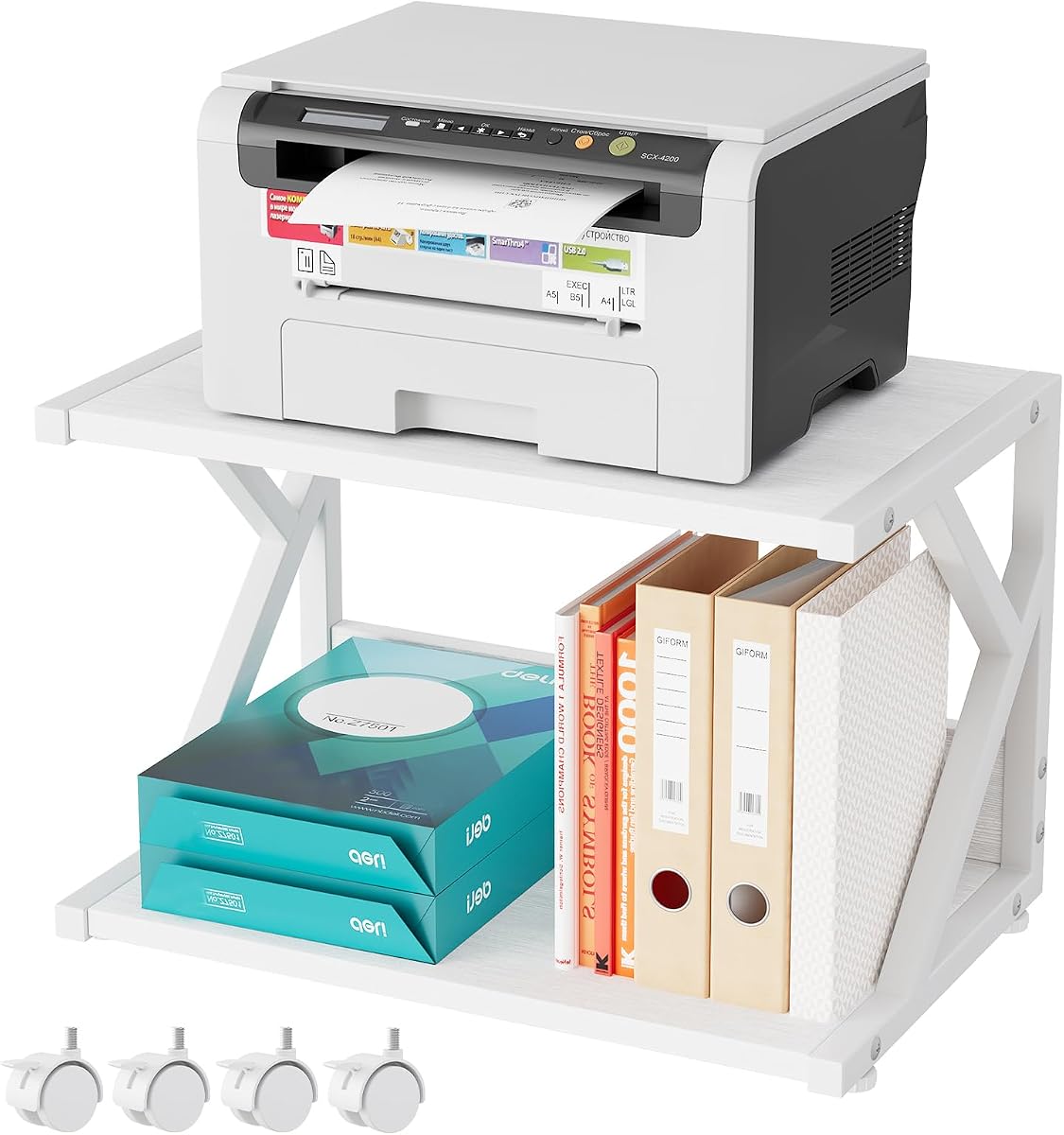
This model offers the flexibility to choose between wheels or adjustable foot pads based on your needs. Its white finish adds a clean look that suits most offices.
We may earn a commission when you buy through this link, at no additional cost to you.
The MDF surface is waterproof and scratch-resistant, making it easy to clean and maintain. It provides enough space for a printer and essential office items.
While it offers good value, it may not be the sturdiest for very heavy printers. Ensure the top tier weight limit matches your device before purchasing.
Great for users who want adaptability in their setup. The choice between mobility and stability makes it a versatile option for different office layouts.
Choose between wheels for mobility or adjustable foot pads for a solid, fixed position depending on your office space requirements.
Waterproof and scratch-resistant MDF makes cleanup simple and keeps the stand looking new even after years of daily use.
We may earn a commission when you buy through this link, at no additional cost to you.
Selecting the ideal desktop printer stand involves considering dimensions, material quality, storage needs, and aesthetic alignment with your workspace.
Measure your printer and available desk space carefully. Ensure the stand top shelf is wider and deeper than your printer to prevent overhang and instability.
Look for units with enough clearance underneath for ventilation and easy access to ports.
Check the stated weight limit to ensure it supports your printer model plus any extra supplies. Most sturdy stands handle between 38 to 100 pounds.
Choose higher capacity options if you plan to stack items or use larger heavy-duty printers.
Materials like metal frames with MDF or particleboard offer a balance of strength and affordability. Metal provides durability, while wood offers warmth and style.
Avoid cheap plastics that may warp under heat or weight.
Consider if you need shelves, drawers, or hooks for organizing cables and office supplies. Open shelves are easy to access but may look cluttered.
Drawers provide hidden storage but take up additional space.
Decide between static stands with rubber feet for stability and mobile carts with wheels for easy repositioning.
Locking casters offer the best of both worlds if you need flexibility.
Look for stands with clear instructions and pre-numbered parts. Most quality units take under 20 minutes to assemble without tools.
Check reviews for common assembly issues to avoid frustration.
Choose a finish and style that matches your office decor, whether modern metal, rustic wood, or minimalist white.
A cohesive look can make your workspace feel more professional and organized.
Some stands include charging ports or adjustable feet for uneven surfaces. These extras can add significant convenience to daily use.
Weigh these features against the base price to determine value.
Assemble the unit on a flat surface before placing any equipment on it to ensure stability and safety during use.
Clean surfaces with a damp cloth and mild detergent to prevent dust buildup and maintain a professional appearance.
Check all screws and bolts periodically to keep the stand secure and prevent wobbling over time.
Look for a capacity of at least 40 pounds to handle most printers safely. For larger models, choose options rated for 70 to 100 pounds to ensure stability and prevent wobbling or tipping.
Many under-desk models are designed to fit under 29 to 30 inch desks. Measure your desk's clearance before purchasing to ensure a proper fit.
Yes, as long as the stand's weight capacity and dimensions match your printer. Laser printers are heavier, so verify the maximum load rating before buying.
Most models include clear instructions and require no special tools. Average assembly time ranges from 10 to 20 minutes depending on the complexity of the design.
Yes, most include rubber feet or pads to protect your desk surface. This design prevents movement and protects against scratches during daily use.
Some models are stackable. Check product specifications to confirm if stacking is supported before purchasing multiple units.
Metal frames combined with MDF or particleboard offer excellent durability. These materials resist wear and tear while providing the stability needed for daily printing tasks.
From the versatile YAOHUOO model to the sturdy FITUEYES and budget-friendly options, there is a stand for every workspace. Consider your storage needs and available space to find the perfect fit.
Prioritize stability and weight capacity when selecting your unit. A good stand not only organizes your desk but also protects your equipment from potential damage.
Prices and availability may fluctuate, so check current listings before purchasing. This guide helps you make an informed decision for a clean, efficient workspace.