
1-to-3 ARGB Splitter Cable
5.0Editor score
Includes 2 splitter cables
8 pin male connectors
11.8 inches length
This guide compares the top ARGB Splitter Cables for 2026, evaluating compatibility, durability, and ease of installation to help you choose the right solution.
Building a custom PC often requires managing multiple lighting components efficiently. ARGB splitter cables allow you to connect several devices to a single motherboard header, ensuring synchronized effects without cluttering your system.
We evaluated ten popular models based on connection types, cable length, and build quality. Our analysis focuses on real-world usability, compatibility with standard 5V 3-pin headers, and user feedback regarding reliability.
Each selection highlights specific strengths for different setup needs. Prices and availability change frequently so always check current listings before purchasing to ensure you get the best value for your build requirements.
5.0Editor score

4.7Editor score

4.9Editor score
This table provides a side-by-side look at key specifications for each model. Use it to quickly identify the right length connector type, and package contents for your specific PC build needs.


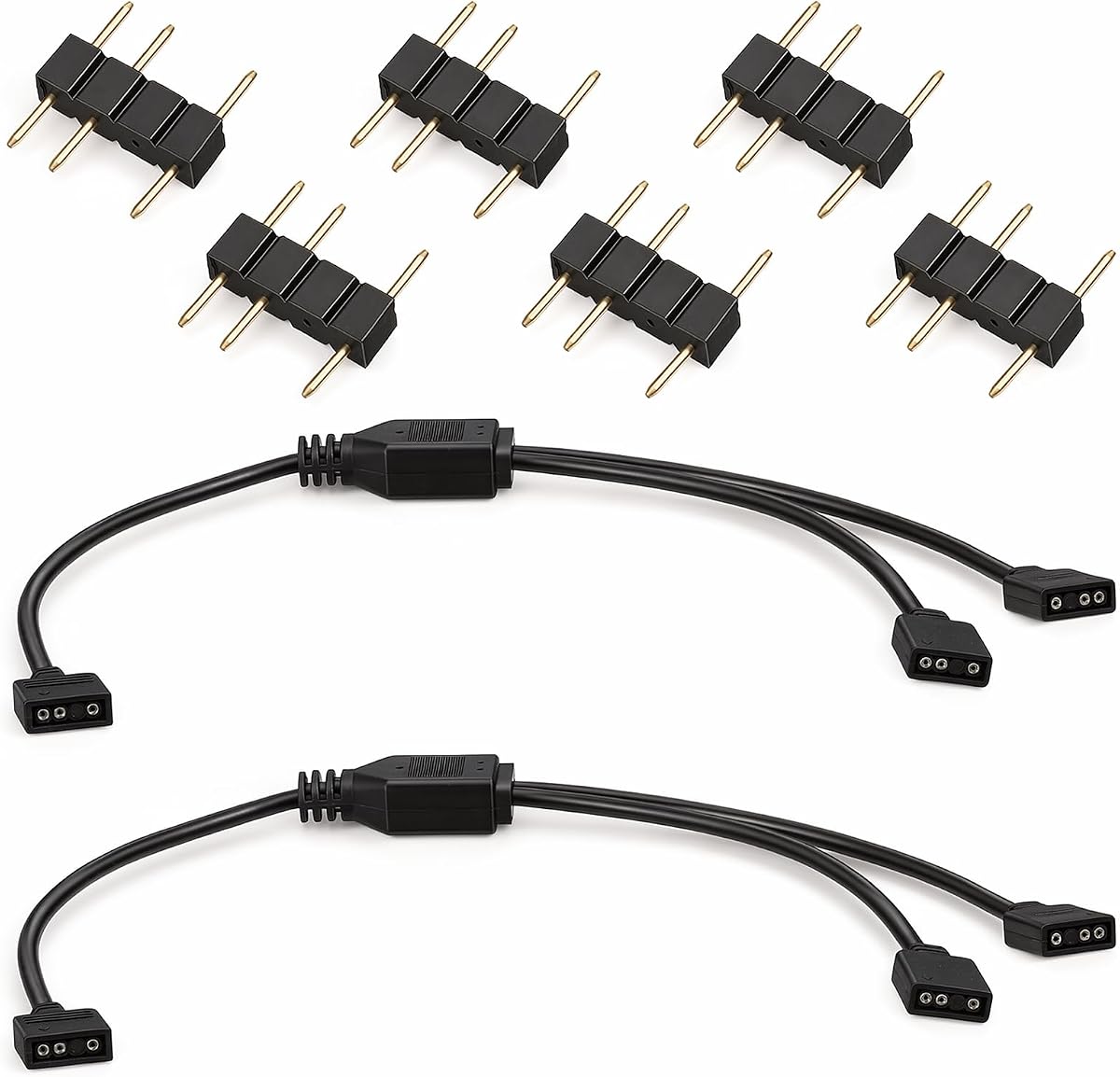


This 1-to-3 ARGB splitter cable offers a straightforward solution for expanding your lighting setup. It comes with a solid rating and includes everything needed to connect multiple fans or strips to one header.
We may earn a commission when you buy through this link, at no additional cost to you.
The package includes two splitter cables and eight male connectors, providing flexibility for various configurations. Users appreciate the simple installation process which requires no soldering or specialized tools to complete.
While the cable length is standard, some users might need additional extensions for larger cases. The lack of braided shielding means cables should be routed carefully to avoid interference with other components.
This product is ideal for builders seeking a reliable and easy-to-use extension option. It performs well for basic lighting synchronization tasks without complicating the installation process inside your PC chassis.
The 1-to-3 configuration allows you to control multiple devices from a single motherboard header efficiently.
Plug and play functionality with arrow indicators ensures correct polarity alignment every time.
We may earn a commission when you buy through this link, at no additional cost to you.
These white ARGB splitter cables are designed for users who want their cabling to match their build aesthetic. The clean look helps maintain a cohesive visual theme inside the PC chassis.
We may earn a commission when you buy through this link, at no additional cost to you.
Constructed from soft PVC material, these cables are flexible and durable. The copper cores are firmly wrapped to avoid dust and damage, extending the service life of the cables during normal use.
While the white color is appealing, it can show dirt more easily than black options. The 1-to-2 limitation means you may need multiple splitters for setups requiring more fan connections.
This option suits builders prioritizing aesthetics alongside functionality. It provides reliable connectivity for standard setups while keeping the internal look clean and organized without visible dark cables.
The white cable color blends seamlessly with light-themed builds and components.
Firmly wrapped copper cores protect against environmental damage and extend lifespan.
We may earn a commission when you buy through this link, at no additional cost to you.
This model stands out for its safety features and slightly longer cable length. The included protective caps shield unused needles from accidental contact, preventing potential short circuits during installation.
We may earn a commission when you buy through this link, at no additional cost to you.
Each needle interface has an insulating protective cap that protects the needle from bending. This feature ensures safety when cables are energized and unused pins are exposed inside the chassis.
The longer length provides more flexibility for routing cables away from hot components. However, the single unit package means you may need to buy extra if you require multiple splitters.
Ideal for cautious builders who prioritize safety during setup. The practical design helps solve insufficient interface problems while ensuring your lighting system remains secure and reliable over time.
Insulating caps prevent unused pins from causing short circuits on metal chassis parts.
The extra length allows for better cable management and component placement.
We may earn a commission when you buy through this link, at no additional cost to you.
For users with extensive cooling needs, this 1-to-5 splitter offers significant expansion power. It allows you to connect up to five devices to a single header efficiently and reliably.
We may earn a commission when you buy through this link, at no additional cost to you.
The cables are made from durable plastic and genuine copper cores ensuring reliable signal transmission. The 19.6 inch length provides ample reach to connect distant fans without tight bending.
Users should verify their motherboard header can handle the power load for five devices. Proper cooling and careful cable management are essential to avoid tangling in complex setups.
This option is best for large cases requiring many case fans. It delivers robust connectivity and durability for users who need maximum fan control and synchronization capabilities.
Supports connecting five devices to one header for extensive lighting and cooling.
Genuine copper cores ensure stable data transmission across multiple daisy-chained devices.
We may earn a commission when you buy through this link, at no additional cost to you.
This product has achieved a perfect rating reflecting high satisfaction among users. The two-pack offers excellent value for those needing multiple connection points for their lighting zones.
We may earn a commission when you buy through this link, at no additional cost to you.
Installation is straightforward with no soldering or tools required. The arrow indicators ensure correct polarity, making the plug and play experience reliable for beginners and experts alike.
While the length is standard it works well for most chassis configurations. The focus is on simplicity and reliability rather than premium materials like braided shielding or extended lengths.
Recommended for buyers wanting a hassle-free expansion solution. It delivers consistent performance for standard RGB synchronization tasks without complicating the building process or budget.
Top user ratings indicate consistent performance and few reported issues.
Buying two units in one package ensures you have spare cables for future needs.
We may earn a commission when you buy through this link, at no additional cost to you.
This extension cable is designed for simple connectivity needs where splitting is not required. It allows you to extend the reach of existing ARGB devices to a single header.
We may earn a commission when you buy through this link, at no additional cost to you.
The female-to-female design connects directly to compatible components without adapters. This simplicity makes it easy to use for basic lighting setups without complex wiring configurations.
It does not offer splitting capabilities so separate devices need separate headers or splitters. This focus makes it a specialized tool for extending reach rather than increasing fan counts.
Best for users needing to bridge a gap between components and headers. It provides a stable connection for synchronization when additional ports are available on the motherboard.
Perfect for reaching headers that are far from fan locations inside a case.
Works seamlessly with standard 5V 3-pin headers and LED strips.
We may earn a commission when you buy through this link, at no additional cost to you.
This splitter uses pure copper cores to ensure efficient power and data transmission. The friction-lock design prevents loose connections during vibration, maintaining signal stability over time.
We may earn a commission when you buy through this link, at no additional cost to you.
Users can expand lighting setups by linking additional fans or strips easily. The arrow markings guide correct installation making the process straightforward for even first-time builders.
The 1-to-2 ratio is suitable for small setups but may not suit large builds. However, the high rating indicates strong reliability for the intended scope of usage.
Ideal for compact builds needing reliable -to-2 connections. The copper quality and locking mechanism provide peace of mind regarding long-term performance and safety.
Pure copper cores support consistent color accuracy across multiple devices.
Friction-lock design keeps connectors firmly in place during transport and use.
We may earn a commission when you buy through this link, at no additional cost to you.
This pack provides three splitter cables ideal for managing multiple lighting zones independently. It allows you to group components and assign them to one header for synchronized control.
We may earn a commission when you buy through this link, at no additional cost to you.
The inclusion of twelve male connectors ensures you have enough plugs for various setups. This quantity reduces the need to purchase extra accessories separately when expanding a build.
While the cables are standard length they are sufficient for most internal routing needs. The bulk packaging makes it cost-effective for users needing several connection points simultaneously.
Recommended for extensive builds requiring multiple zones. It simplifies motherboard management by reducing the number of ports needed for complex lighting configurations.
Control separate fan groups independently using multiple splitters on one header.
Extra connectors allow for future expansion without needing to buy adapters.
We may earn a commission when you buy through this link, at no additional cost to you.
This model uses pure copper core wires with a soft PVC outer sheath for stable signal transmission. The wear-resistant outer layer ensures durability even under long-term usage conditions inside a PC.
We may earn a commission when you buy through this link, at no additional cost to you.
Anti-interference features help maintain consistent color accuracy across multiple devices. The arrow markings ensure proper alignment reducing the risk of connection errors during installation.
The design balances functionality with durability making it suitable for various setups. It handles multiple lighting devices efficiently while maintaining reliable performance over time.
Ideal for users valuing long-term reliability in their components. It provides solid performance and ease of use for standard lighting synchronization requirements.
Anti-interference design preserves color quality even when multiple devices are connected.
Wear-resistant sheath protects the cable from physical damage during routing.
We may earn a commission when you buy through this link, at no additional cost to you.
Premium features like gold-plated contacts and braided sleeves define this splitter. These elements ensure stable data transmission and reduce tangling during cable management inside a chassis.
We may earn a commission when you buy through this link, at no additional cost to you.
The oxygen-free copper wiring delivers reliable performance for complex custom configurations. Users can achieve synchronized lighting across many devices without signal loss or color mismatch.
While more expensive, the build quality justifies the cost for enthusiasts. It supports full software control and customization through motherboard utilities for dynamic lighting effects.
Best for high-end builds where signal integrity and aesthetics matter. The durable materials ensure long-term reliability for users seeking the best possible lighting experience.
Gold plating ensures low resistance and reliable electrical connections over time.
Braided sleeves protect against tangling and add a premium visual look.
We may earn a commission when you buy through this link, at no additional cost to you.
Choosing the right splitter involves understanding your motherboard headers and lighting needs. This guide breaks down the essential factors to ensure compatibility and reliability.
Verify your motherboard has a 5V 3-pin ARGB header. These splitters are incompatible with 12V 4-pin RGB headers. Always check the manual to confirm the voltage and pin configuration.
Ensure your system supports addressable RGB. Mismatched headers can damage components or fail to light up.
Count how many devices you need to connect. A 1-to-3 splitter connects three devices while a 1-to-2 connects two. Plan for future expansions to avoid buying extra adapters later.
Check how many male connectors are included in the package. Extra connectors add flexibility for complex builds.
Measure the distance from your header to the farthest fan. Standard lengths are around 11.8 inches but some options go up to 19.6 inches. Adequate length prevents tight bends.
Too short cables strain connections while too long ones clutter the build. Choose a length that fits your case layout comfortably.
Look for pure copper cores to ensure stable power delivery. This prevents signal loss and color shifting across chained devices. Durable insulation protects against physical wear.
Braided sleeves offer better protection than plain PVC. They also look better for open cases or tempered glass builds.
Opt for plug-and-play designs with arrow indicators. These ensure correct polarity without soldering. Simple installation saves time and reduces error risks.
Check for secure locking mechanisms. Friction-lock or snap-on connectors keep wires in place during transport.
Verify your header can handle the total amperage of all connected fans. Overloading can cause dimming or failure. Most headers support standard fan counts safely.
Use splitters that match the device type. Avoid connecting high-power devices that exceed the header limits.
Good splitters maintain consistent color data across all fans. Copper quality and shielding play a role here. Reliable transmission prevents flickering or mismatched effects.
Avoid cheap cables with poor wiring. They may work initially but fail over time.
Multi-packs often offer better value for larger setups. Check the total number of splitters and connectors included. Buying in bulk reduces future costs.
Consider future needs when selecting a pack. Extra splitters allow for easy upgrades without new purchases.
Before installation, ensure the PC is powered off and unplugged to avoid electrical hazards. Locate the 5V 3-pin ARGB header on your motherboard carefully. Align the arrow on the splitter connector with the arrow on the header for correct polarity.
Connect the male end of the splitter to the motherboard and plug the female ends into your fans or LED strips. Make sure each connection is firm to prevent loose contacts. Use cable ties to secure excess length and avoid blocking airflow.
Periodically check connections if you move the PC case often. Vibrations can loosen connectors over time. Ensure cables are not pinched during case reassembly to maintain signal integrity and safety.
5V 3-pin headers support addressable RGB where each LED is controlled individually. 12V 4-pin headers support standard RGB where all LEDs change color together. Using the wrong type can damage your components or prevent lighting.
Most headers can support up to five devices safely. Check your motherboard manual for specific limits. Overloading the header may cause flickering or reduce the brightness of connected lights.
No. These splitters connect directly to the motherboard ARGB header. The motherboard software controls the lighting effects. You do not need a separate controller unless you lack a compatible header.
Yes as long as they are all 5V 3-pin compatible devices. Mixing different brands may cause color calibration issues but they will synchronize generally. Ensure all devices have similar power ratings.
Look for the arrow indicator on the connector. This must match the arrow on the motherboard header or device. Incorrect alignment can prevent lighting or cause signal errors.
First check if the header is enabled in BIOS or software. Then verify the connector is fully seated. Ensure the devices receive power via their SATA or fan headers.
High-quality splitters maintain signal integrity so effects work normally. Poor cables may cause flickering or lag. Choose models with solid copper wiring to avoid these issues.
This guide highlighted top models including the ZCZQC splitter for safety and the 1-to-3 cable for value. Each offers unique strengths for different build requirements and lighting needs.
Prioritize compatibility with your motherboard header first. Then consider the number of devices and cable length needed. High-quality copper and protective caps ensure reliable long-term performance.
Always verify current prices and listings before purchasing. Availability changes often so checking latest offers helps secure the best deal for your PC upgrade.