
ASRock Motherboard Micro ATX DDR3 1066 NA D1800M
4.0Editor score
Dual Core J1800 processor
Two DDR3 memory slots
Multiple USB and video ports
This guide compares the top low power motherboards for NAS, home servers, and energy efficient builds based on performance and features.
Finding the right low power motherboard is essential for building energy efficient systems like network attached storage or home servers that run twenty four seven.
We compared ten real products based on processor type, network options, storage connectivity, and thermal design to help you choose the best fit for your needs.
Each pick highlights key strengths and trade offs while noting that prices fluctuate so check current listings before making your final purchase decision.
4.0Editor score

4.5Editor score

4.1Editor score
The table below provides a side by side overview of each motherboard key specifications including processor type memory support storage options and network connectivity to help you compare at a glance.




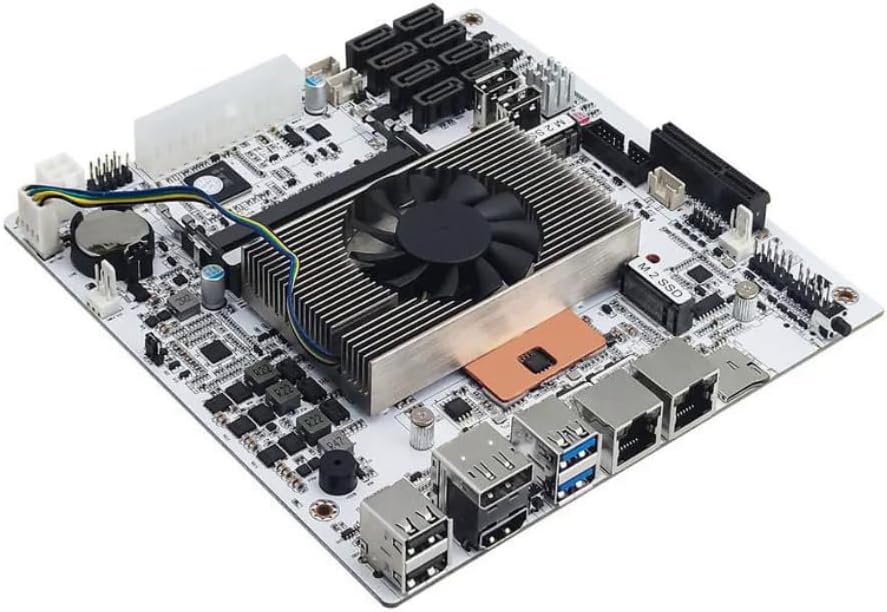
This Celeron N5105 Industrial Motherboard stands out as a top pick for NAS and firewall builds due to its powerful quad core CPU and extensive networking features.
We may earn a commission when you buy through this link, at no additional cost to you.
The four 2.5GbE i226 network ports provide massive bandwidth for routing and file serving while the six SATA and two M.2 slots ensure ample storage capacity for data arrays.
While the initial boot time may be slower when reading memory and the dual power connector requirement adds a slight complexity these are minor trade offs for such high performance and reliability.
If you need a robust low power server that handles heavy network traffic and large storage volumes this board is the ideal choice for professional or advanced home users.
The four 2.5G Ethernet ports allow for link aggregation or dedicated WAN LAN ports enabling multi gigabit throughput essential for modern high speed networks.
With six SATA 3.0 ports and two M.2 NVMe slots you can build large storage pools or use NVMe for caching or system drives without needing extra controllers.
We may earn a commission when you buy through this link, at no additional cost to you.
The ASRock Micro ATX D1800M is an excellent budget option for basic low power needs like light home servers or industrial control panels where cost is a primary concern.
We may earn a commission when you buy through this link, at no additional cost to you.
Its dual core J1800 processor delivers sufficient performance for modest workloads while the low power design keeps energy costs down over long periods of continuous operation.
The limited number of SATA ports and older DDR3 memory might restrict expansion but for simple single or dual drive setups this board offers reliable value without unnecessary features.
If you are building a cost effective appliance or need a small form factor board for legacy applications this model is a solid and economical choice.
This board delivers essential functionality at a minimal price making it accessible for hobbyists or projects with tight budgets.
Supporting DDR3 and older interface standards ensures compatibility with existing components you may already have in storage.
We may earn a commission when you buy through this link, at no additional cost to you.
This Mini-ITX motherboard offers an impressive combination of high core count and extensive storage connectivity making it ideal for complex virtualization and storage heavy environments.
We may earn a commission when you buy through this link, at no additional cost to you.
The quad core eight thread processor provides significant multithreaded performance while the eight SATA ports allow for large drive arrays without additional controllers.
Although users report occasional sleep mode bugs and longer boot times the robust feature set and low TDP make it a strong candidate for always on servers.
For those needing maximum storage flexibility and compute power in a compact chassis this board is a premium solution for advanced NAS or virtualization builds.
Eight SATA ports enable building large RAID arrays or multi drive media servers without requiring extra PCIe cards.
With VT-x and VT-d features this board supports running multiple virtual machines efficiently on a single low power host.
We may earn a commission when you buy through this link, at no additional cost to you.
The GIGABYTE B550M K offers a solid entry point for AMD Ryzen builds with support for modern processors and PCIe 4.0 at an attractive price point.
We may earn a commission when you buy through this link, at no additional cost to you.
Its basic but effective power delivery and dual M.2 slots make it suitable for everyday workloads while the lack of WiFi keeps costs down for users with wired networks.
While the VRM may not handle extreme overclocking it provides stable performance for standard TDP CPUs making it a reliable choice for general home use.
If you need a cost effective board with AMD Ryzen compatibility and modern connectivity options this model is a practical and straightforward option.
Supports a wide range of Ryzen processors from 3000 to 5000 series offering flexibility for upgrades over time.
USB 3.2 Gen 1 ports and PCIe 4.0 ensure fast data transfer and support for latest graphics or NVMe drives.
We may earn a commission when you buy through this link, at no additional cost to you.
The MSI PRO B550M-P stands out for its robust memory support and intelligent cooling features making it a great choice for users who need reliable long term performance.
We may earn a commission when you buy through this link, at no additional cost to you.
With four DDR4 slots you can upgrade to high capacity memory which is useful for virtualization or heavy multitasking while the AI cooling adjusts fans based on system load.
Although it lacks advanced network features like 2.5G Ethernet the solid M.2 support and VRM design ensure consistent performance for daily tasks and light gaming.
If you value system stability and memory expansion potential this board provides a balanced feature set for budget conscious builders seeking AMD Ryzen support.
Four DIMM slots allow up to 128GB of RAM which is beneficial for running multiple virtual machines or data processing tasks.
Frozr AI cooling optimizes fan speeds to balance noise and temperature ensuring efficient operation under varying workloads.
We may earn a commission when you buy through this link, at no additional cost to you.
The ASRock J4125M provides a low cost quad core solution for home labs or light server tasks with its energy efficient J4125 processor and DDR4 support.
We may earn a commission when you buy through this link, at no additional cost to you.
This board is ideal for lightweight applications like media transcoding or basic file sharing where power consumption is a priority over raw speed.
While user reviews reflect some mixed experiences the low cost and included WiFi options make it a viable entry point for small form factor builds.
If you are seeking an inexpensive way to start a small home server or network appliance this board delivers essential features at a minimal investment.
The J4125 processor is known for its low power draw which helps reduce electricity costs over time for always-on systems.
With standard ports and a single M.2 slot it covers the basics for most small home use cases effectively.
We may earn a commission when you buy through this link, at no additional cost to you.
The ASRock B550M-HDV is a practical choice for office or home systems needing legacy display options like VGA alongside modern PCIe 4.0 capabilities.
We may earn a commission when you buy through this link, at no additional cost to you.
Its strong power design and high memory support allow for stable performance with Ryzen CPUs while the multiple video outputs make it versatile for multi-monitor setups.
While it has limited memory slots the reliable power and protection features ensure consistent operation for daily computing or workstation tasks.
If you need a budget friendly board that supports older monitors and modern CPUs this model is a reliable and feature balanced option.
Supports HDMI DVI and VGA outputs enabling use with both new and older monitors for maximum flexibility.
A 6 phase power design ensures stable power to the CPU supporting reliable operation even under moderate loads.
We may earn a commission when you buy through this link, at no additional cost to you.
The Gigabyte A520I AC is a compact Mini-ITX board perfect for small form factor builds needing wireless connectivity without sacrificing AMD Ryzen compatibility.
We may earn a commission when you buy through this link, at no additional cost to you.
Its digital PWM power design and support for multiple displays make it suitable for tight spaces like living room PCs or industrial control panels.
While the chipset limits some expansion the included WiFi and Bluetooth reduce cable clutter while the Q-Flash Plus allows easy BIOS updates.
If you need a small reliable board with modern features for a compact PC this model delivers a great balance of size and functionality.
The Mini-ITX form factor allows installation in small cases saving space while maintaining full performance capabilities.
Built-in Intel WiFi and Bluetooth remove the need for extra cards enabling clean cable management in tight enclosures.
We may earn a commission when you buy through this link, at no additional cost to you.
The ASRock B550M WiFi offers exceptional wireless performance with Wi-Fi 6E support and a perfect rating making it a top choice for modern home networks.
We may earn a commission when you buy through this link, at no additional cost to you.
With four memory slots and premium audio it delivers versatility and quality for general use while the PCIe 4.0 ensures compatibility with latest storage and graphics.
While it costs slightly more the included high speed wireless and quality components provide a polished experience for users who value connectivity.
If you need a feature rich board with cutting edge wireless capabilities this model stands out for its reliability and comprehensive feature set.
Wi-Fi 6E offers faster speeds and lower latency which is ideal for streaming or gaming without a wired connection.
The Realtek ALC1220 codec supports high quality 7.1 channel audio for immersive sound without needing a separate sound card.
We may earn a commission when you buy through this link, at no additional cost to you.
The NAS Motherboard 8 Bay Core i5 8265U is designed specifically for high capacity storage builds with eight SATA ports and a strong eight thread processor.
We may earn a commission when you buy through this link, at no additional cost to you.
It supports modern 2.5G networking and includes virtualization passthrough features ideal for running TrueNAS or PVE systems in a compact form factor.
While sleep mode is disabled which is common for 24/7 NAS use the robust connectivity and processing power make it a great fit for home server enthusiasts.
If you are building a high capacity NAS or virtualization server this board offers the necessary hardware flexibility and performance for demanding tasks.
Eight SATA ports allow for building large RAID arrays without needing additional PCIe cards which simplifies the build.
Support for passthrough and low power TDP makes it suitable for running multiple VMs efficiently in a small chassis.
We may earn a commission when you buy through this link, at no additional cost to you.
Selecting the right low power motherboard depends on understanding your specific needs for power efficiency connectivity and expansion.
The processor determines the overall power consumption and performance capability of your system. Look for CPUs with a low Thermal Design Power (TDP) such as Intel Celeron or Core U-series and AMD Ryzen mobile variants if energy efficiency is your top priority. These chips often provide enough performance for NAS or basic server tasks while keeping electricity bills low over time.
Prioritize a CPU that matches your workload needs without exceeding power limits.
Network ports are critical for home servers and NAS devices. While most boards offer standard Gigabit Ethernet higher end models include 2.5GbE or even multiple ports for link aggregation. More bandwidth ensures faster file transfers and better performance for streaming or virtualization tasks without needing external network cards.
Check that the board supports the network speed you need without extra add-ons.
The number of SATA and M.2 slots dictates how many drives you can connect directly. For storage heavy builds look for at least four to six SATA ports or the option to add expansion cards. NVMe M.2 slots are also valuable for caching or boot drives to speed up system responsiveness.
Ensure the board has enough native ports for your drive array plan.
RAM capacity affects multitasking and virtualization performance. Boards with four slots offer more headroom than those with two. Check supported memory speeds and max capacity to future proof your build. Low power systems often benefit from efficient memory handling to keep power draw down.
Choose a board with sufficient slots for your current and future RAM needs.
Motherboard size determines which case you can use. Mini-ITX boards fit in small cases but have fewer expansion slots. Micro-ATX offers more space for ports and slots while remaining compact. Ensure your case supports the motherboard type and has adequate clearance for any coolers or connectors.
Measure your case and match the motherboard form factor accurately.
Some low power boards require standard 24pin connectors while others need additional 4pin or 6pin inputs for stability. Verify your power supply has the correct connectors to avoid compatibility issues. Proper power delivery ensures consistent performance during long running operations.
Confirm that your PSU matches the motherboard power pinout requirements.
Multiple display outputs can be useful for monitoring dashboards or managing servers. Look for HDMI DisplayPort or VGA depending on your monitor setup. Integrated graphics reduce the need for a dedicated GPU which saves power and cost.
Select a board with the video ports that suit your setup.
Quality components like chokes and capacitors improve longevity and stability. Features like BIOS flashback WiFi or robust thermal solutions add value. Industrial grade boards often offer better protection against moisture or dust for continuous operation.
Invest in quality features that support long term reliable use.
Install the motherboard in a well ventilated case to ensure airflow keeps temperatures low during long runs.
Update the BIOS to the latest version to ensure compatibility and stability with your chosen CPU.
Use a quality power supply that meets all connector requirements for the motherboard and any expansion devices.
A low power motherboard typically supports CPUs with a low Thermal Design Power (TDP) and uses efficient power delivery circuits to minimize energy consumption. These boards are designed for systems that run continuously like home servers or NAS where reducing electricity costs is important.
Generally no as they prioritize efficiency over raw performance and cooling needed for gaming workloads. However basic titles or older games might run on lower end models if paired with a capable integrated GPU or dedicated graphics card.
Yes most models include M.2 NVMe slots and SATA ports for solid state drives. Check the PCIe generation and number of slots to ensure it meets your storage capacity and speed requirements for your specific build.
Network ports determine how fast data can move between devices on your network. Multiple 2.5GbE or Gigabit ports allow for faster file transfers and better performance for media streaming or virtualization tasks on a server.
Some models support ECC (Error Correcting Code) memory which helps prevent data corruption critical for servers. Most consumer boards support standard non-ECC memory so check the product specifications for explicit ECC compatibility if needed.
Low power motherboards often run cooler which can extend component lifespan compared to high performance boards. With proper ventilation and stable power supply they can operate reliably for several years even in 24/7 scenarios.
Most low power motherboards include integrated graphics capable of basic display output which means you do not need a dedicated GPU unless you require extra video memory or higher graphics performance.
Check the motherboard form factor such as Mini-ITX or Micro-ATX against your case specifications. Ensure the case supports the board size and has enough room for ports and any expansion cards you plan to install.
We highlighted ten excellent low power motherboards ranging from budget friendly options to feature rich industrial boards suitable for various home server and NAS needs.
Prioritize processor TDP network connectivity and storage expansion to match your specific goals for performance and efficiency in a compact system.
Always check current pricing and compatibility details before buying to ensure the board fits your system and stays within your budget.