
Selore USB C Docking Station Dual Monitor
4.4Editor score
Affordable dual HDMI support
100W charging pass-through
Compact aluminum design
This guide compares the top docking station with 2 HDMI Ports for dual monitor setups, covering performance, charging, and compatibility for laptops.
Finding a reliable docking station with 2 HDMI ports is essential for modern workstations that demand dual screen productivity. These devices transform a single laptop port into a full desktop experience with video, data, and power.
We evaluated ten top-rated models based on port variety, video output quality, power delivery capabilities, and build durability. Each product was selected for its ability to support stable dual monitor configurations across different operating systems.
Every pick in this list highlights specific strengths like budget friendliness, premium features, or unique port layouts. Keep in mind that pricing and stock levels fluctuate frequently so verify current details before purchasing.
4.4Editor score

4.5Editor score

4.5Editor score
The following table provides a side-by-side overview of all ten selected models highlighting their key specifications and port configurations for easy comparison.


This Anker model stands out as a top choice for users needing a reliable dual monitor setup. It features two HDMI ports capable of 4K output and includes essential connectivity like Ethernet and SD card reading.
We may earn a commission when you buy through this link, at no additional cost to you.
The 85W power delivery ensures your laptop stays charged while you work. The build quality is solid and the brand offers a strong warranty which adds confidence to the purchase decision for office environments.
While it supports high resolutions on Windows note that macOS users will only get mirroring rather than extended desktop. This is a common limitation in non-Thunderbolt hubs but it should be considered before buying.
If you want a proven solution from a trusted manufacturer that covers most daily needs this hub is highly recommended. It balances cost and performance effectively making it a safe bet for most buyers.
The hub supports up to 85W pass-through charging which keeps most ultrabooks powered during heavy usage sessions.
Dual 4K at 30Hz output provides sharp visuals for text and media though video editing might prefer higher refresh rates.
We may earn a commission when you buy through this link, at no additional cost to you.
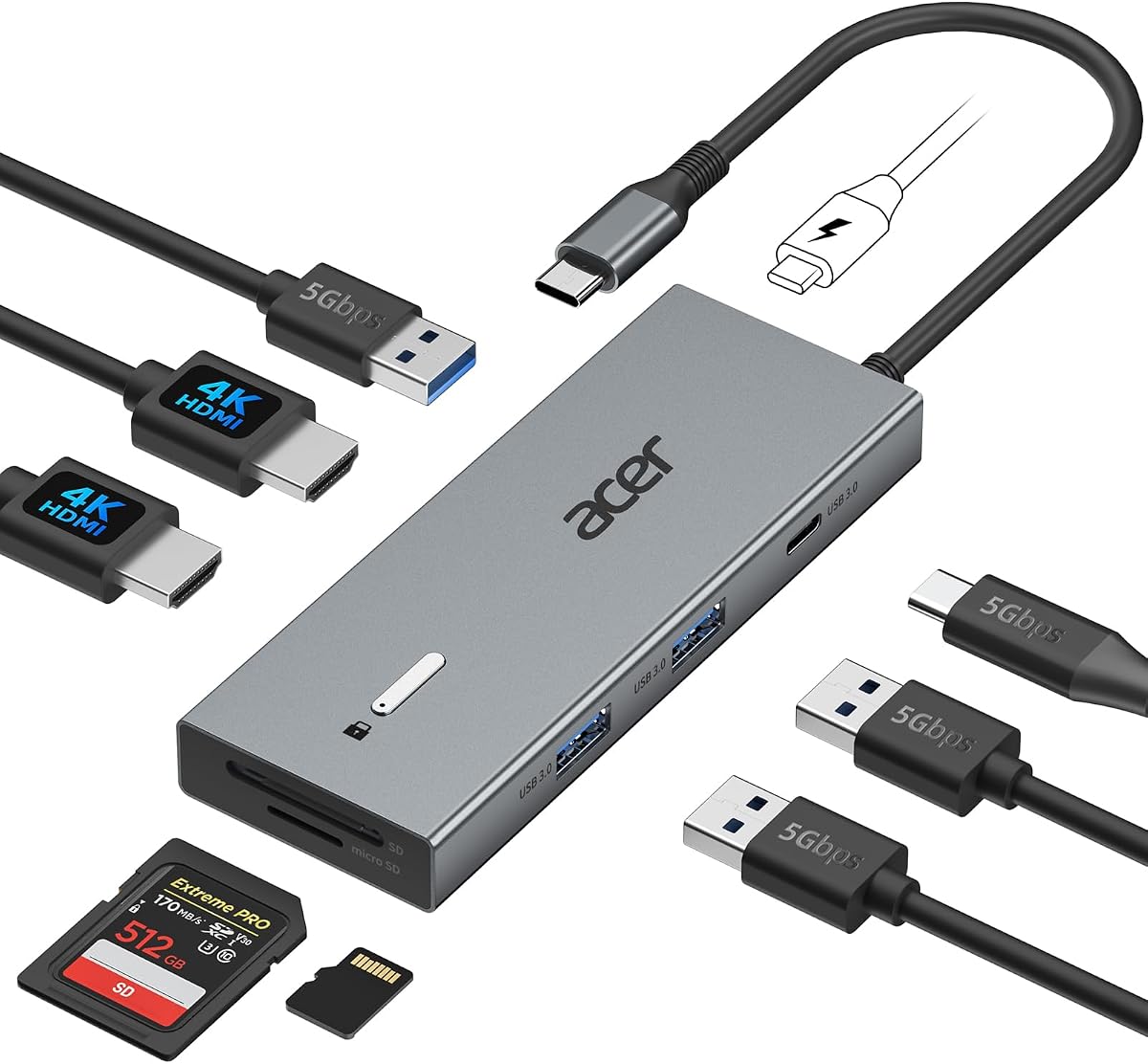
This Acer dock offers extensive connectivity including three video outputs which is rare at this price point. It includes a robust power adapter that ensures stable performance even when driving multiple high resolution displays simultaneously.
We may earn a commission when you buy through this link, at no additional cost to you.
The included 110W adapter delivers 100W to the laptop which is sufficient for demanding workloads. The aluminum chassis helps dissipate heat effectively ensuring long term stability during long work sessions in busy offices.
Physical security is addressed with a lock slot which is valuable for shared workspaces. While the price is higher than basic hubs the extra features and power capacity justify the cost for power users.
Choose this model if you need three screens or robust power delivery. It is an excellent upgrade for professionals who require a complete desktop replacement for their laptop setup.
Windows users can extend to three screens using Display Stream Compression on compatible laptops for a wide multitasking workspace.
The aluminum body provides durability and includes a Kensington lock slot to secure the device to your desk.
We may earn a commission when you buy through this link, at no additional cost to you.
Selore offers a cost effective solution for dual monitor users who need basic connectivity without extra bells and whistles. It supports dual 4K outputs and includes essential data ports for peripherals and storage access.
We may earn a commission when you buy through this link, at no additional cost to you.
The 100W input capability allows for efficient charging even while driving two external screens. The compact aluminum design makes it easy to pack for travel or carry between home and office workstations daily.
Note that the power adapter is not included so ensure you have a compatible charger ready. This keeps the price down but requires a little more preparation from the user before setup.
This is the ideal choice for budget conscious buyers who prioritize screen real estate. It delivers solid performance for the price making it a great option for students or home office users.
The slim profile fits easily into laptop bags allowing you to turn any compatible port into a dual screen station on the go.
USB 3.0 ports and an SD card slot provide quick access to external storage for file transfers and media management.
We may earn a commission when you buy through this link, at no additional cost to you.
This Acer 9-in-1 model focuses on video quality with 60Hz support which is smoother than 30Hz alternatives. It offers a clean design with a built-in cable reducing clutter and protecting the connection from physical strain.
We may earn a commission when you buy through this link, at no additional cost to you.
The 90W power delivery ensures your laptop remains powered during normal tasks. The security lock button allows quick screen locking which is useful for privacy in public or shared office spaces where you step away often.
While it lacks an external adapter it relies on your own charger for power delivery. The built-in cable is a nice touch for stability but it means the dock cannot be detached from the wall easily.
It is a solid choice if you prefer a higher refresh rate and a tidy setup. This model is well suited for users who value smooth screen performance and simple cable management solutions.
Support for 4K at 60Hz ensures fluid cursor movement and video playback compared to standard 30Hz docks.
The built-in cable keeps one connection point permanent reducing the chance of loose connections or cable wear over time.
We may earn a commission when you buy through this link, at no additional cost to you.
The Dell D3100 is a classic dock that relies on USB 3.0 rather than USB-C. It provides stable connectivity for older Dell laptops and includes a DisplayPort plus HDMI options for versatile display setups.
We may earn a commission when you buy through this link, at no additional cost to you.
It comes with a dedicated power supply which simplifies setup and ensures consistent power. The inclusion of an HDMI to DVI adapter adds flexibility for connecting older monitors that do not have HDMI inputs.
While USB 3.0 is slower than USB-C it remains reliable for many data needs. This dock is best for users who already own compatible Dell devices and want a straightforward desktop replacement option.
Choose this if you have a supported Dell laptop and need a proven solution. It is a dependable choice for legacy hardware that still needs modern dual screen capabilities.
USB 3.0 ensures compatibility with older laptops that lack USB-C ports but still need expanded functionality.
The DisplayPort and HDMI ports plus DVI adapter allow connection to a wide variety of monitor types.
We may earn a commission when you buy through this link, at no additional cost to you.
This compact Anker hub is designed for users who prioritize data speed over video resolution. It supports 10Gbps transfer which is faster than most standard USB 3.0 options and includes 85W charging.
We may earn a commission when you buy through this link, at no additional cost to you.
The dual HDMI output is limited to 1080p which is sufficient for text and office work but not ideal for high resolution content. It is a great fit for travel where speed and size matter most.
Lack of Ethernet means you rely on Wi-Fi which may be less stable for large downloads. However the USB 3.2 port offers excellent speed for external drives and storage tasks.
If you need a portable hub with fast data transfer this is a strong candidate. It works well for users who need quick file moves and decent screen quality in a small form factor.
The 10Gbps port allows rapid transfer of large files which boosts productivity for media professionals and researchers.
85W output keeps most laptops charged during use ensuring you can work longer without hunting for outlets.
We may earn a commission when you buy through this link, at no additional cost to you.
MOKiN provides an extensive range of ports including four USB-C and multiple USB-A options alongside dual HDMI. It supports 4K at 60Hz and includes an Ethernet port for reliable wired internet connection during work.
We may earn a commission when you buy through this link, at no additional cost to you.
The screen lock button is a unique privacy feature that instantly blacks out displays with a short press. This adds value for shared offices where quick privacy is necessary without digging into system settings.
Note that power adapter is not included so you must supply your own 100W charger. The many ports can be complex to manage but they offer unmatched flexibility for many peripherals.
Choose this dock if you need many connections and privacy features. It is a versatile solution for users with multiple peripherals who value the lock button for security.
The short press lock button turns off all external screens instantly protecting your work when you step away.
Four USB-C and two USB-A ports allow connection of numerous devices without needing additional hubs.
We may earn a commission when you buy through this link, at no additional cost to you.
This Selore dock stands out with an 8K DisplayPort output and a VGA port for legacy projectors. It includes a dedicated monitor control button that cycles through display modes which simplifies setup for users.
We may earn a commission when you buy through this link, at no additional cost to you.
The Ethernet port ensures stable network connectivity while the dual HDMI supports 4K. It also supports triple display on Windows providing extensive screen real estate for productivity and multitasking needs.
Power adapter is not included and you must provide a 100W charger for full performance. The control button adds convenience allowing you to wake or switch modes without touching the keyboard.
Select this if you need legacy VGA or 8K DisplayPort support. It is an excellent option for users who value flexible display options and easy mode switching.
The VGA port allows connection to older projectors or monitors that lack HDMI or DisplayPort inputs.
A single button cycles through PC screen only duplicate extend or second screen only modes instantly.
We may earn a commission when you buy through this link, at no additional cost to you.
This Anker dock is unique for its vertical design that saves desk space while offering three display outputs. It includes a 135W adapter which ensures enough power for all connected peripherals without needing extras.
We may earn a commission when you buy through this link, at no additional cost to you.
With triple display support on Windows you can arrange three separate screens for maximum productivity. The 3 USB-C ports allow high speed data transfer and charging for multiple devices simultaneously.
The included adapter is a major benefit reducing total cost. The vertical footprint is helpful for smaller desks where horizontal docks might take too much room.
Ideal for users who need three screens and compact design. It is a premium solution that balances power space saving and high performance port layouts.
The vertical orientation reduces desk footprint making it ideal for crowded workspaces and smaller home offices.
A 135W power adapter is included ensuring robust power delivery without extra purchase or setup complexity.
We may earn a commission when you buy through this link, at no additional cost to you.
The product listed here currently lacks specific details so we recommend checking the current listing for latest specs. Always verify compatibility and port counts before purchasing since models may change over time.
We may earn a commission when you buy through this link, at no additional cost to you.
When selecting a dock ensure it matches your laptop's USB-C features and power needs. Reading recent user reviews can help confirm current performance and reliability of any specific model you consider.
Consider prioritizing models with confirmed dual HDMI support and enough power for your laptop. This ensures you get a stable setup without compatibility issues or power throttling during use.
This placeholder reminds you to double check product pages before buying. Always look for the most current specifications to confirm the dock meets your specific dual HDMI requirements.
Always check the product page to confirm current ports and compatibility before placing an order.
Reading recent reviews helps identify any common issues or changes to the product that affect its suitability.
We may earn a commission when you buy through this link, at no additional cost to you.
Choosing the right dual HDMI docking station requires balancing port needs with laptop compatibility and budget constraints.
Check whether the HDMI ports support 4K at 60Hz or 30Hz. Higher refresh rates provide smoother motion for video and cursor movement.
Prioritize 60Hz support if you watch media frequently or need smooth graphics performance during daily tasks.
Ensure the dock supports enough wattage to charge your laptop while in use. Look for at least 65W for ultrabooks and 100W for gaming or performance laptops.
Verify that the charger is included if needed to avoid extra costs and compatibility issues later.
Note that macOS generally supports mirrored displays via SST while Windows supports extended desktop via MST.
If you need independent screens on macOS consider a Thunderbolt dock or accept the mirror limitation.
Beyond HDMI consider how many USB-A and USB-C ports you need for peripherals. Ethernet and SD card slots add value.
Select a dock that has all ports you use daily to avoid needing extra hubs later on.
Aluminum bodies dissipate heat better and plastic enclosures especially during long sessions with multiple monitors.
Check user feedback on overheating to ensure the dock stays stable during heavy workloads.
Built-in cables reduce clutter but limit flexibility. Detachable cables allow easier transport or replacement if needed.
Choose a length that fits your desk layout without reaching too far to the wall outlet.
Some docks include lock slots or privacy buttons which are useful in shared or public office spaces.
Consider these if you handle sensitive data or often step away from your desk during work.
Connect the dock to your laptop using a full-featured USB-C port that supports video output. Ensure you have a compatible charger plugged in for stable power during dual display use.
Configure display settings in your OS to extend or mirror screens as needed. Restart if monitors are not detected immediately after connecting all cables.
Keep vents clear from dust and avoid bending the cables excessively to ensure long term reliability. Clean the metal body with a soft cloth to prevent debris buildup over time.
Yes you can use it but macOS typically mirrors all screens rather than extending them unless you have a Thunderbolt dock. Check if your specific dock supports MST for your laptop model before purchasing.
Some docks include a power adapter while others do not. If the dock does not include one ensure you have a compatible 100W charger for full performance with multiple screens.
MST allows extended desktop mode with multiple independent screens on Windows while SST mirrors all displays which is common for macOS. Check your OS support for extended desktop.
Most modern docks support power pass-through so charging works while using HDMI. Confirm the dock wattage meets your laptop needs to avoid power throttling during heavy loads.
Some models offer a DisplayPort or VGA for a third screen. Check the specifications if you need more than two displays to ensure the dock supports triple output.
Ensure both HDMI cables are connected securely and the dock is powered. Check display settings to extend and restart your laptop if the system does not detect the screen immediately.
Your laptop must have a USB-C port that supports DisplayPort Alt Mode. Verify your laptop specs before buying to ensure full functionality for video and charging features.
Use the included lock slot if available and secure the cable to your desk. This helps prevent accidental removal and protects your setup from unauthorized access during breaks.
We have highlighted ten reliable models ranging from budget-friendly picks to premium triple screen solutions. Each offers unique strengths in port count video quality or power delivery.
Prioritize power delivery and refresh rate support that match your workflow needs. Also verify macOS or Windows compatibility to avoid display limitations after purchase.
Always check current prices and availability before buying as deals change often. Choose the model that best fits your specific port and performance requirements today.