
Power Strips with Surge Protection
4.8Editor score
16-in-1 total outlets
0.35 inch flat plug
1080 Joule protection
This guide compares the top ten desk mounted outlet towers for home and office, evaluating port counts, surge protection, and design features to help you
Desk mounted outlet towers are essential for modern workspaces that need organized power access without clutter. These vertical units combine multiple AC outlets and USB ports into a single compact structure that fits easily on desks or shelves. Choosing the right model ensures your devices charge safely while keeping your workspace tidy and efficient for daily tasks.
We evaluated ten leading models based on their total port counts, surge protection ratings, cord lengths, and overall build quality. Each product was selected for its ability to handle multiple devices simultaneously while maintaining safety standards. This list covers various designs including flat plugs, retractable cords, and clamp-on options for different desk setups.
Each pick highlights key strengths and potential limitations to help you find the best match for your specific needs. Prices and availability can change frequently so always check the current listing before making a purchase decision. Use this guide to navigate the features that matter most for your home office or dorm room setup.
4.8Editor score

4.5Editor score

4.8Editor score
This side-by-side comparison lists all ten selected models with their core specifications. Use this table to quickly identify differences in outlet counts, USB capabilities, and physical dimensions before diving into detailed reviews.


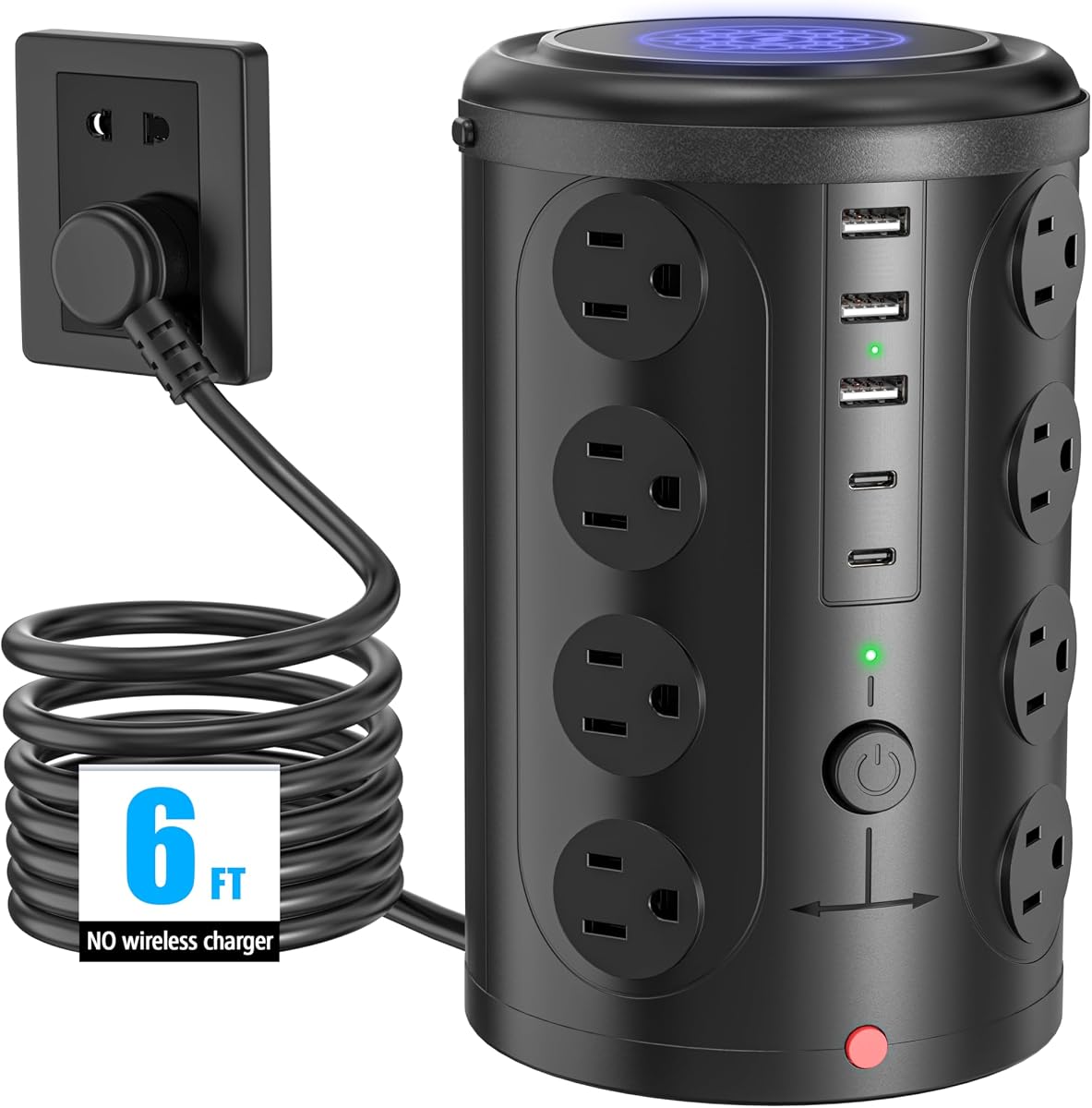


The TenTrend Power Strip Tower stands out as a top choice for users needing fast charging capabilities alongside traditional AC power. With a 230W total output and dual 65W USB-C ports, it handles laptops and phones simultaneously without sacrificing speed. This model earns its spot due to its balanced combination of power delivery and space-saving design.
We may earn a commission when you buy through this link, at no additional cost to you.
Its standout feature is the inclusion of high-wattage USB-C ports that support fast laptop charging which is rare in this price range. The tower organizes ports with color coding for easy identification and includes robust safety protections like overcurrent and overheat safeguards. The flat plug design ensures it fits snugly against walls without blocking adjacent outlets.
While the cord is a decent length it may not reach distant wall sockets in larger rooms without extension. The compact size is beneficial but may limit plug spacing for large adapters on the AC outlets. These trade-offs are acceptable given the overall value and performance it delivers for typical desk setups.
This tower is ideal for professionals and students who need reliable fast charging for multiple devices in a small footprint. If you prioritize USB-C power delivery and a clean aesthetic over extreme cord length this model is highly recommended for your workspace.
The dual 65W USB-C ports allow for rapid laptop charging alongside device charging for tablets and phones.
The vertical tower and flat plug minimize desk footprint while keeping cords organized and out of the way.
We may earn a commission when you buy through this link, at no additional cost to you.
This retractable tower offers a unique solution to cable clutter by allowing you to pull out only the length you need. The auto-rewind feature ensures the cord stays taut and organized automatically which is perfect for clean desk setups. Its stable design and mountable feet add versatility for different installation options.
We may earn a commission when you buy through this link, at no additional cost to you.
The primary strength lies in its innovative cord management system that eliminates tripping hazards and tangled wires. With four AC outlets and four USB ports it covers essential charging needs for most users. The built-in surge protection adds a layer of security for connected electronics against power spikes.
The total port count is lower than some competitors which might limit use for heavily loaded setups. The rewind mechanism requires care to ensure the cord sits flat before retraction to avoid jams. These minor issues are outweighed by the convenience of keeping your workspace completely wire-free.
Choose this tower if you value neatness and have moderate charging needs without requiring excessive outlet numbers. It is particularly well suited for desks where floor space is limited and visible cords are undesirable.
The auto-rewind base keeps the extension cord stored neatly inside the unit for a clutter free look.
Mountable feet allow the tower to be fixed to a wall or under-desk surface for extra stability.
We may earn a commission when you buy through this link, at no additional cost to you.
The Anker Nano Power Strip represents a premium approach with its secure desk clamp design that frees up valuable surface space. The 70W GaN USB-C port supports fast laptop charging while the dual-zone layout organizes plugs logically for easy access. This model is engineered for users who want maximum efficiency without compromising on build quality.
We may earn a commission when you buy through this link, at no additional cost to you.
Its clamp-on mechanism allows for stable one-handed operation making it easy to plug devices in and out without shifting the unit. The high surge protection rating provides excellent safety for expensive electronics while the compact design reduces clutter significantly. The split zones help prevent large adapters from blocking adjacent sockets.
This unit requires a suitable desk edge between specific thickness ranges which may not work with all furniture types. The price is higher than many standard towers reflecting the advanced engineering and material quality used. These limitations are minor compared to the benefits of a truly integrated desk power solution.
Invest in this strip if you have a compatible desk and want a high-performance power station that maximizes workspace. It is an excellent choice for tech enthusiasts who prioritize fast charging and organized cable management.
The adjustable clamp secures the unit to the desk edge allowing for flexible positioning without taking up desk space.
Top and bottom zones split the outlets to reduce cord crossing and improve overall organization on your desk.
We may earn a commission when you buy through this link, at no additional cost to you.
This tower distinguishes itself with a generous 6.5-foot cord that reaches further than many competitors. It provides twelve AC outlets plus four USB ports offering ample connectivity for rooms with multiple devices. The inclusion of four separated switches gives users granular control over power distribution which aids in energy conservation.
We may earn a commission when you buy through this link, at no additional cost to you.
The separate switches allow you to turn off specific sections without unplugging devices saving energy when items are idle. The build quality feels robust and the tower includes comprehensive safety protections against overloads and short circuits. Its vertical orientation saves floor space compared to traditional horizontal strips.
Having only one USB-C port might be a constraint for those needing multiple fast-charging USB-C devices. The longer cord adds some weight which might make the tower less stable on very small nightstands. Overall these are minor drawbacks considering the flexibility and outlet count provided.
Pick this model if you need extra reach and individual outlet control in shared spaces like dorms or offices. It is a practical solution for powering many devices efficiently without constant manual switching.
Four separate switches let you control different sections of outlets independently for better energy management.
The 6.5-foot cord provides flexibility to place the tower further from wall outlets without needing an extra extension.
We may earn a commission when you buy through this link, at no additional cost to you.
The VILONG dual layer design offers unique vertical stacking that increases plug density without expanding footprint. Its clamp installation secures the unit firmly to the desk edge providing stability even with heavy cables. The 45-degree flat plug ensures wall outlets remain accessible even when the cord runs straight out.
We may earn a commission when you buy through this link, at no additional cost to you.
The dual layers create two independent zones for plugging devices which helps separate work gear from personal chargers. Fire-resistant materials and a circuit breaker add safety assurances for daily use. The design supports both under-desk and desktop placements for added versatility in different office layouts.
The USB-C port supports 20W which is sufficient for phones but slower than modern laptop standards. The surge protection rating is lower than premium models which might be a concern for sensitive electronics. These factors make it a solid choice for general use but less ideal for high-end setups.
Choose this clamp if you want a secure mounting option that keeps cables off your desk surface entirely. It is a good balance of features for those who prefer clamped solutions over standing towers.
Two stacked layers of outlets maximize the number of devices you can plug in without increasing the tower width.
No tools are needed to install the clamp simply twist to secure the unit to your desk edge immediately.
We may earn a commission when you buy through this link, at no additional cost to you.
This tower delivers a robust combination of twelve AC outlets and four USB ports to handle multiple device demands. The smart USB technology detects connected devices to deliver optimal charging speeds automatically which improves efficiency. Its anti-slip base ensures stability on various surfaces while the copper cord enhances durability over time.
We may earn a commission when you buy through this link, at no additional cost to you.
The flame retardant PC shell meets safety standards and provides protection against potential overheating risks. With a 6.5-foot cord it offers flexibility in placement without requiring additional extensions. The wide spacing between outlets accommodates bulky adapters that often block neighboring sockets in compact strips.
The design prioritizes function over aesthetics so it might not fit premium minimalist desk setups perfectly. The anti-slip base is useful but does add a small footprint to the floor or desk edge. These trade-offs are standard for budget-friendly high-capacity towers in this category.
This unit is excellent for shared spaces or workstations where many people need to plug in at once. It offers reliable performance and safety features that make it a dependable choice for everyday use.
Smart technology adjusts the output to match your devices ensuring they charge quickly and safely without overheating.
The pure copper cord and flame retardant shell extend the lifespan and ensure safe operation under heavy loads.
We may earn a commission when you buy through this link, at no additional cost to you.
This tower emphasizes wide spacing across its sixteen AC outlets which prevents adapter conflicts during heavy use. The five USB ports offer a blend of USB-A and USB-C options suitable for a range of modern gadgets. With a rating of 1875W it supports high-draw appliances and electronics without performance degradation.
We may earn a commission when you buy through this link, at no additional cost to you.
The design focuses on practicality by providing ample plug space so larger chargers do not block adjacent ports. Overload protection and a short-circuit fuse guard against electrical faults protecting your valuable equipment from damage. Its compact vertical structure keeps desk clutter to a minimum while maximizing power availability.
The height might be slightly more than standard towers which could affect visibility on low desks. There is less detail on specific USB-C wattage in general specs compared to high-performance models. Still it delivers solid utility for those needing many available sockets in a confined area.
Select this model if you frequently plug in large adapters and need consistent access to all outlets. It is a pragmatic choice for offices where power distribution is a daily priority.
Outlets are positioned to allow bulky plugs to fit without obstructing neighbors for easier access.
The 1875W power rating ensures the strip can handle multiple high-power devices running simultaneously.
We may earn a commission when you buy through this link, at no additional cost to you.
The TESSAN tower is defined by its ultra-slim flat plug that fits flush against walls without causing obstructions. A 45-degree right-angle design ensures that lower outlets remain accessible even when plugged into a standard wall socket. The compact four-sided form helps organize cords and keep desks visually tidy in small rooms.
We may earn a commission when you buy through this link, at no additional cost to you.
With eleven AC outlets and three USB ports it covers most daily charging needs for multiple users. The 1050J surge protection provides reliable defense against electrical spikes ensuring your devices stay safe during storms. Reset switches allow quick power resets without unplug if issues arise.
There is only one USB-C port which may limit fast charging options for multiple modern devices. The grey finish is neutral but might not match all decor preferences in personal spaces. These points are minor considering the space-saving benefits it offers to any home setup.
Opt for this tower if wall clearance is tight and you need a low-profile power solution. It excels at maintaining a clean appearance while delivering ample power options.
The slim plug design hides behind furniture easily and prevents blocking other nearby wall outlets.
Rubber feet keep the unit stable on any surface preventing slips or falls during regular use.
We may earn a commission when you buy through this link, at no additional cost to you.
This tower combines a thin plug with a compact footprint to maximize utility in confined areas. The 1800J surge protection is among the highest in this group offering strong defense against electrical surges. Wide spacing between outlets accommodates various plug sizes and prevents blocking issues that plague many compact models.
We may earn a commission when you buy through this link, at no additional cost to you.
Its slim design allows it to slip behind furniture or into tight corners without protruding into walking space. The four USB ports include two USB-C options which add versatility for modern device charging. The rubber feet ensure it stays securely in place on smooth surfaces like desks or shelves.
The unit lacks advanced features like individual switches which might limit granular power control. The cord is standard and may require management to prevent tangling if stored loosely. These factors are acceptable for users seeking a simple high-protection power extension.
Choose this tower if you need strong surge protection in a small physical package. It is a reliable choice for those prioritizing safety and space efficiency.
The mini vertical design uses less surface area than traditional strips while offering many outlets.
An 1800J surge rating safeguards electronics against significant voltage spikes and lightning strikes.
We may earn a commission when you buy through this link, at no additional cost to you.
This model provides strong value with a slim flat plug that fits easily in tight spaces behind furniture. It offers twelve AC outlets and four USB ports with a surge protection rating of 1080J. The wide spacing between outlets allows flexible plug positioning without blocking neighbors on the tower.
We may earn a commission when you buy through this link, at no additional cost to you.
A braided cord adds a decorative touch while remaining flexible and tangle-free for better daily use. The integrated circuit breaker ensures automatic cutoffs during overloads protecting your connected devices from damage. This design balances affordability with essential safety features needed for any desk or home setup.
It does not include advanced smart charging or individual switches which might be desired by tech-heavy users. The options for color may be limited compared to premium brands. These trade-offs are minimal considering the performance and safety features provided at this price point.
Pick this option if you want reliable power expansion without breaking the budget. It is a sensible choice for general office or home use where cost efficiency matters.
Offers a competitive set of features and protection at a budget-friendly price for average consumers.
The fabric braid adds durability and a modern look while keeping cords neat and organized.
We may earn a commission when you buy through this link, at no additional cost to you.
Selecting the right tower requires understanding your specific power needs and workspace constraints. Use these factors to evaluate models effectively.
Count how many devices you typically need to charge simultaneously including laptops phones and accessories. A tower with at least twelve total ports ensures you have enough room for growth without needing multiple units.
Prioritize models that match your current device count plus a buffer for future additions to keep your desk organized.
Check the wattage rating of USB-C ports if you plan to charge laptops directly from the tower. Higher wattages like 65W or 70W provide faster charging speeds that standard 5W ports cannot match.
Ensure the tower supports the power requirements of your devices to avoid slow charging or insufficient power.
Look for a joule rating that reflects robust protection against voltage spikes and electrical surges. A rating above 1000J is recommended for sensitive electronics like computers and gaming consoles.
Higher joule ratings generally mean better protection over the lifespan of the tower for your valuable equipment.
Evaluate the cord length to ensure it reaches your wall outlet comfortably without stretching. A flat cord design can help reduce trip hazards and tangles near floor edges.
Choose a length that fits your room layout perfectly so the tower remains securely connected without slack.
Measure the available space on your desk or shelf to confirm the tower will fit without clutter. Vertical towers should have a small footprint to keep your workspace clear for daily tasks.
Consider the height and width carefully especially if you use the tower near monitors or other large items.
Decide if you prefer a freestanding unit or one that clamps to your desk edge for added stability. Clamp-on models free up surface space but require compatible desk thicknesses for secure attachment.
Select a mounting style that aligns with your workspace structure to ensure the tower remains stable.
Check the distance between AC outlets to ensure large adapters do not block adjacent sockets. Wide spacing provides better flexibility for power bricks of varying sizes and shapes.
Models with well-spaced ports prevent frustration when plugging in multiple bulky power adapters.
Look for fire-resistant materials and durable construction that can withstand daily handling and heavy use. Quality builds often include safety features like circuit breakers and overload protection for peace of mind.
Invest in a tower made from reliable materials to ensure long-term safety and durability in your office.
Place the tower on a stable flat surface to prevent tipping or slipping when devices are plugged in. Ensure the plug is fully inserted into the wall outlet to maintain a secure electrical connection.
Avoid overloading the tower by checking the total wattage limits before connecting high-power appliances. Spread out the load across AC and USB ports to keep performance optimal and prevent overheating.
Regularly inspect the cord and outlets for signs of wear or damage and unplug the tower before cleaning. Keeping the unit dust-free with a dry cloth will extend its lifespan and maintain safe operation.
Most modern towers include surge protection and safety features like overheat guards that make them safe for overnight use. However always ensure the unit is placed on a non-flammable surface and not covered to maintain proper airflow.
Yes provided you check the total wattage capacity of the tower before plugging in high-power devices. Look for models with enough AC outlets rated for at least 1250W total to handle laptops safely without tripping the breaker.
For non-clamp setups use the freestanding designs which come with anti-slip feet for stability. Ensure the base is wide enough or place the tower on a sturdy surface to prevent tipping when plugging and unplugging.
USB-C ports support faster charging speeds and reversible connectivity which is ideal for modern devices like laptops and phones. USB-A ports are more common for legacy devices and typically offer standard charging rates unless they are high-wattage models.
Yes you can plug smart plugs into the AC outlets of these towers to control devices via an app or voice commands. Just ensure the smart plug fits without blocking nearby ports for best performance.
There is no fixed schedule but inspect your tower every few years for frayed wires or loose outlets. Replace the unit if the surge protection indicator light fails or if the tower shows signs of wear.
Yes towers with insulated bases and stable feet can be used on metal surfaces safely. Ensure the base has rubber feet to prevent sliding and avoid placing it directly on any wet surface.
Flat plugs are designed to sit flush against walls to save space and prevent blocking adjacent outlets. Round plugs are standard but take up more room so choose a flat plug if your space is tight.
Our top picks highlight the TenTrend Tower for overall value the Anker Nano for premium features and the Power Strips model for budget efficiency. Each option brings unique strengths to help you organize power needs without sacrificing safety or performance.
Focus on your specific port requirements and space constraints when narrowing down choices from this list. Surge protection and USB-C power delivery are key features to prioritize for long-term satisfaction in any workspace.
Always verify current product details and availability on official retail sites as specifications may change. Use this guide to make an informed decision that fits your setup and budget perfectly.