
VIMIN 10G PCI-E Network Card
4.5Editor score
Dual RJ45 ports
Intel X540-T2 chipset
Heat sink included
Windows and Linux support
This guide compares the top 10GB Ethernet Card options for servers and PCs, evaluating speed, compatibility, heat, and value to help you choose the right
Finding a reliable 10GB Ethernet Card can transform your network performance, enabling faster data transfers and smoother streaming. Whether you need it for gaming, video editing, or server tasks, the right adapter ensures your system keeps up with modern demands.
We evaluated ten leading 10GB Ethernet Card models based on chipset quality, port speed, system compatibility, and overall build. Our analysis covers both copper and fiber options to help you match your specific hardware needs and budget without unnecessary complexity.
Each pick below highlights key strengths, trade-offs, and ideal use cases to guide your decision. Prices fluctuate often due to market demand and retailer promotions, so check current listings before buying to ensure you get the best available deal today.
4.5Editor score

4.2Editor score

4.6Editor score
This side-by-side comparison outlines key specs for all ten 10GB Ethernet Card models we reviewed. Use it to quickly identify which adapter fits your slot type, OS needs, and performance goals without digging through full manuals.




The TP-Link TX401 leads our list as the best overall 10GB Ethernet Card. With a solid 4.2 rating from users, it balances speed, ease of use, and price effectively for most desktop and server upgrades.
We may earn a commission when you buy through this link, at no additional cost to you.
Its 10GBase-T technology delivers full 10Gbps speeds and auto-negotiates down to 1Gbps or 2.5Gbps for compatibility. QoS prioritizes gaming traffic to avoid congestion, while the included CAT6A cable ensures you can hit top speeds right out of the box.
One trade-off is the lack of explicit Windows 11 support documentation, though it typically functions via existing drivers. Also, single port may limit redundant setups. Still, these are minor issues for home and small office users.
If you need a reliable upgrade for your desktop or mini tower, this card offers the best blend of performance and convenience. The included low-profile bracket makes it ideal for compact cases without extra hassle.
The included 1.5m CAT6A cable is rated for 10Gbps, saving you time and extra costs while ensuring you can reach full speeds without searching for a compatible cable.
Quality of Service (QoS) technology automatically prioritizes gaming or critical data streams, helping prevent lag and packet loss during high network load situations.
We may earn a commission when you buy through this link, at no additional cost to you.
For budget-conscious buyers needing serious speed, the VIMIN 10G PCI-E Network Card stands out. It scores a strong 4.5 rating, reflecting its value as an affordable dual-port 10Gbps solution powered by a trusted Intel chipset.
We may earn a commission when you buy through this link, at no additional cost to you.
The Intel X540-T2 controller ensures stability and performance for servers and high-end devices. Dual ports allow redundancy or link aggregation, while the heat sink maintains safe temps under load. It fits PCIe x8 or x16 slots easily.
Note that this card doesn't support intermediate 2.5G or 5G speeds, dropping to 1Gbps if needed. Also, PCIe x8 or x16 slot is required, which may limit mini PCs. These constraints fit server builds better.
Choose this if you want dual-port redundancy and Intel reliability at a lower price. It's perfect for virtualization or server setups where stability and throughput are more important than multi-gigabit negotiation.
Dual RJ45 ports enable link aggregation or failover setups, enhancing network availability and throughput for virtual machines or high-demand servers.
Powered by the Intel X540-T2, this card delivers proven performance and low latency ideal for enterprise and server workloads needing consistent reliability.
We may earn a commission when you buy through this link, at no additional cost to you.
Synology users will find the E10G30-T2 the premium choice. It carries the highest 4.6 rating, reflecting deep integration and reliability for NAS storage. This adapter turns your Synology into a dual-port 10GbE powerhouse seamlessly.
We may earn a commission when you buy through this link, at no additional cost to you.
Two 10GbE ports support high-performance storage and file transfers. It auto-negotiates between 10G and 1G for flexibility. The 5-year warranty offers long-term peace of mind. DSM 7.1.1+ ensures plug-and-play without complex driver installs.
You must ensure your Synology runs DSM 7.1.1-42962 Update 5 or newer. Also, the price is higher than generic adapters. If you already own Synology gear, these trade-offs are worth the tailored performance and support.
Invest in this adapter for your Synology NAS to unlock full potential with dual-port speeds and official support. It simplifies setup and guarantees compatibility with minimal downtime or compatibility headaches.
Designed specifically for Synology systems, this adapter installs without extra drivers when DSM is updated, simplifying setup for NAS administrators.
A 5-year warranty covers hardware defects, providing exceptional long-term value for mission-critical storage and networking environments.
We may earn a commission when you buy through this link, at no additional cost to you.
The Asus NADACA0140 offers a balanced solution for desktop users seeking 10Gbps speeds. With a 4.1 rating, it delivers solid performance and broad OS support, making it versatile for mixed environments including Linux setups.
We may earn a commission when you buy through this link, at no additional cost to you.
It supports 10/5/2.5/1Gbps and 100Mbps, ensuring seamless integration with legacy devices. Built-in QoS helps prioritize bandwidth for smoother online experiences. Linux kernel 4.4 support is strong, appealing to open-source users needing reliable networking.
At a higher price than some competitors, it doesn't offer unique features like dual ports or extra warranties. Linux 11 support isn't explicitly detailed. Still, it remains dependable for standard desktop upgrades needing flexibility.
Pick this card if you need multi-gigabit flexibility and Linux compatibility in a single-port design. It's a solid option for workstations or routers managing varied network tiers and traffic priorities.
Support for 10/5/2.5/1Gbps allows flexible connection speeds depending on switch or router capabilities, easing upgrades without replacing infrastructure.
Built-in QoS prioritizes important data packets, reducing latency for streaming or gaming applications on busy networks.
We may earn a commission when you buy through this link, at no additional cost to you.
The 10Gtek 10Gb Dual RJ45 Port Network Card targets server and virtualized workloads. Its 4.1 rating reflects reliable performance for virtualization and storage networking thanks to dual Intel X540 controller ports.
We may earn a commission when you buy through this link, at no additional cost to you.
Dual copper ports support iSCSI, FCoE, and NFS over Ethernet. The Intel X540 chip provides stable offloads. It includes a low profile bracket for small cases and offers a 3-year warranty. ESX ESXi compatibility is ideal for homelabs.
Windows 11 needs manual driver setup, adding steps. It doesn't support hot swapping, requiring shutdowns. These are expected for budget dual-port cards. Still, they suit server environments where stability matters most.
Choose this for budget-friendly dual-port server connectivity with proven Intel hardware. It's ideal for ESX setups or small offices needing redundancy without spending on enterprise adapters.
Two ports allow link aggregation or failover for increased uptime and throughput on servers.
Full support for ESX ESXi makes this a great fit for virtual machine networking and storage networks.
We may earn a commission when you buy through this link, at no additional cost to you.
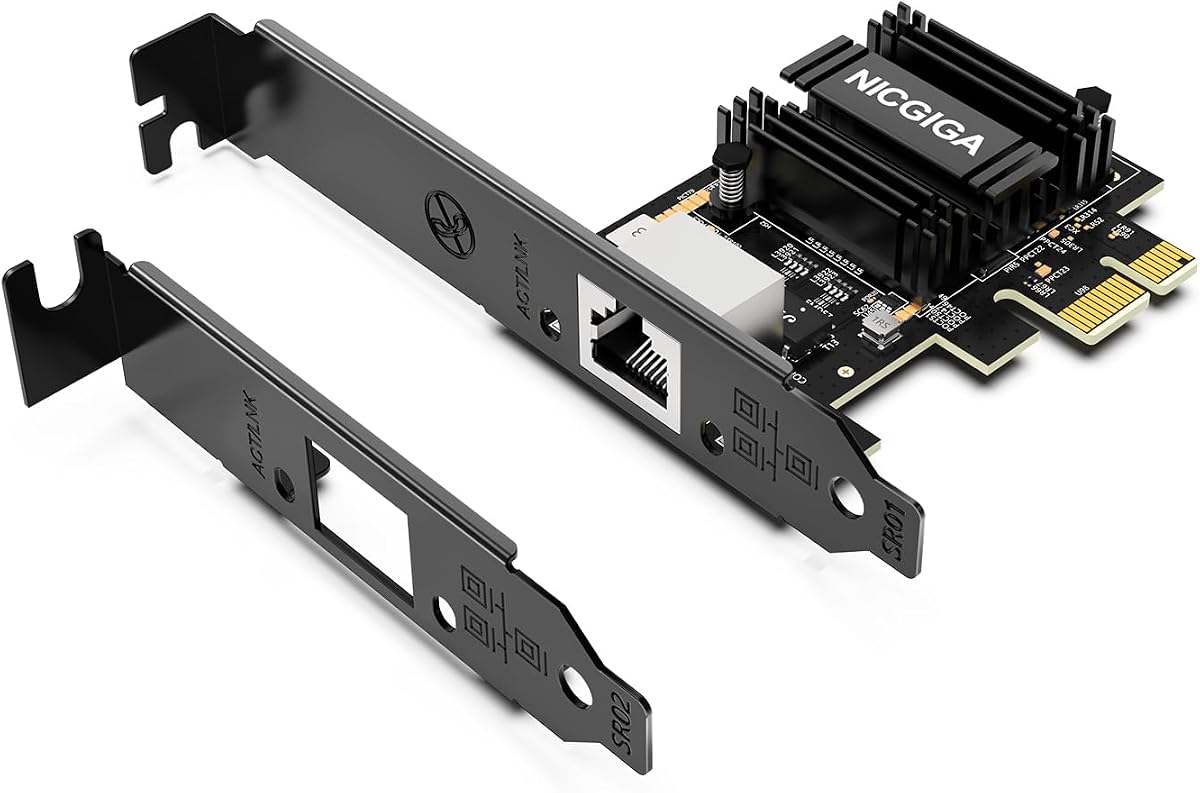
NICGIGA delivers a compact 10Gb solution with PCIe 4.0 x1, ideal for Mini PCs. Its 4.3 rating highlights success for small builds needing speed without bulky cards. The Realtek RTL8127 offers modern efficiency.
We may earn a commission when you buy through this link, at no additional cost to you.
The PCIe 4.0 x1 interface fits x1, x4, x8, x16 slots easily. Auto-negotiation handles 10/5/2.5/1Gbps seamlessly. It runs cool and supports Windows 11 out of box. Low-profile and full brackets make it versatile.
Single port limits redundancy. Linux needs Kernel 6.x for plug-and-play; older versions require source code install. These are typical for compact 10G adapters. Still, it's a strong choice for space-constrained systems.
Use this in ITX or Mini PC builds requiring fast networking without taking up GPU lanes. It's a space saver that doesn't sacrifice 10Gbps performance for small form factor systems.
Uses only one PCIe lane while delivering full 10Gbps speeds, leaving room for GPUs and storage in compact builds.
The RTL8127 consumes less power and heat than older 10G solutions, improving stability for small cases.
We may earn a commission when you buy through this link, at no additional cost to you.
VunLink offers a versatile 10GbE card with Realtek RTL8127AT chipset. It scores 4.3 by delivering reliable multi-gig speeds on a compact PCIe 4.0 x1 interface suitable for many desktop and NAS upgrades.
We may earn a commission when you buy through this link, at no additional cost to you.
Auto-negotiation handles 10/5/2.5/1Gbps to match switches. Energy-efficient design reduces heat. Compatible with x1 through x16 slots. Includes standard and low brackets. Works with Windows and Linux. Ideal for home labs and NAS.
Driver install may be needed on some OS versions. Single port means no redundancy. These are expected trade-offs. Still, it's a strong compact choice for users wanting future-proof multi-gigabit flexibility without extra cost.
Buy this if you need a compact PCIe 4.0 10G adapter that negotiates multiple speeds and fits varied slots. It's great for NAS, home labs, or workstations needing fast wired connections.
Negotiates 10/5/2.5/1Gbps to fit your current network gear while preparing for future 10G upgrades.
Built on PCIe 4.0 x1 for low power and heat, ideal for small form factor builds needing 10G.
We may earn a commission when you buy through this link, at no additional cost to you.
Asus XG-C100F stands out with SFP+ cage for fiber or direct-attach copper. It earns 4.3 for offering long-distance 10Gbps speeds and high-performance stability in demanding networking or media workflows.
We may earn a commission when you buy through this link, at no additional cost to you.
SFP+ cage allows flexible media choices. Aluminum heatsink keeps temps low. QoS boosts priority streams. Ideal where copper falls short. PCIe 2.0/3.0 x4 works well in workstations. It's perfect for fiber runs or rack setups.
Modules and cables sold separately add cost. It doesn't support native RJ45 without modules. This matters if you expect plug-and-play copper. However, fiber distances and noise immunity are unmatched for specific needs.
Choose this for long-distance or noise-sensitive networks needing SFP+ flexibility. It suits professionals requiring fiber or direct-attach copper with high performance and thermal stability.
The SFP+ cage supports fiber optics and direct-attach copper, ideal for long-distance or high-noise environments.
A stylish aluminum heatsink maintains low temperatures during heavy throughput, ensuring consistent performance.
We may earn a commission when you buy through this link, at no additional cost to you.
Synology users will find the E10G30-T2 the premium choice. It carries the highest 4.6 rating, reflecting deep integration and reliability for NAS storage. This adapter turns your Synology into a dual-port 10GbE powerhouse seamlessly.
We may earn a commission when you buy through this link, at no additional cost to you.
Two 10GbE ports support high-performance storage and file transfers. It auto-negotiates between 10G and 1G for flexibility. The 5-year warranty offers long-term peace of mind. DSM 7.1.1+ ensures plug-and-play without complex driver installs.
You must ensure your Synology runs DSM 7.1.1-42962 Update 5 or newer. Also, the price is higher than generic adapters. If you already own Synology gear, these trade-offs are worth the tailored performance and support.
Invest in this adapter for your Synology NAS to unlock full potential with dual-port speeds and official support. It simplifies setup and guarantees compatibility with minimal downtime or compatibility headaches.
Designed specifically for Synology systems, this adapter installs without extra drivers when DSM is updated, simplifying setup for NAS administrators.
A 5-year warranty covers hardware defects, providing exceptional long-term value for mission-critical storage and networking environments.
We may earn a commission when you buy through this link, at no additional cost to you.
TRENDnet offers a compliant choice for government and enterprise users with the TEG-10GECTX. It rates 4.1 for meeting strict NDAA and TAA standards, ensuring it fits regulated environments without procurement issues.
We may earn a commission when you buy through this link, at no additional cost to you.
It supports 2.5G BASE-T over standard Cat5e, easing partial upgrades. English speaking support and 3-year protection add value. PCIe 3.0 x4 design ensures reliable speeds. Ideal where compliance and support matter more than lowest price.
Single port limits redundancy. Price is higher than basic 10G cards. These are expected for compliance gear. Still, it's a strong pick for public sector or enterprise installations needing documented adherence to standards.
Choose this if NDAA TAA compliance is non-negotiable in your network. It's an enterprise-grade option that balances 10Gbps performance with documented regulatory and support requirements.
Meets US and Canadian government standards, ensuring procurement and installation compliance for regulated environments.
Supports 2.5G over Cat5e up to 100m, easing transitional upgrades without replacing existing cabling.
We may earn a commission when you buy through this link, at no additional cost to you.
Choosing the right 10GB Ethernet Card depends on several factors. This guide outlines key aspects to evaluate before buying to match your hardware and performance needs.
Check your motherboard's PCIe slots. Most 10GB cards need x4 or x8 slots, though newer models fit x1. Mini PCs may require x1 or special low-profile versions. Ensure slot availability and physical space for the card before purchasing.
Match the card's interface to your available PCIe slots and case size for a successful installation.
Single-port cards are common and affordable. Dual-port models enable redundancy or link aggregation, useful for servers and NAS. Decide if you need one link or multiple for failover or higher throughput based on your setup.
Choose dual ports if you need redundancy or aggregated speeds; otherwise single port suits most desktops.
Copper RJ45 adapters are easier to use with standard cables. Fiber SFP+ offers longer reach and immunity to interference but costs more. Pick copper for most desktops and fiber if you have long distances or EMI concerns.
Fiber suits long runs and noisy environments; copper is simpler and cheaper for typical setups.
Look for well-supported chipsets like Intel X540 or Realtek RTL8127. Check driver availability for your OS, especially Windows 11 and Linux. Reliable drivers prevent connection drops and ensure full speed performance after installation.
Prioritize chipsets with active driver support for your operating system version to avoid compatibility issues.
Some cards negotiate 10/5/2.5/1Gbps for better flexibility with mixed gear. Others lock at 10G or 1G. If your switch has multi-gig ports, ensure your adapter supports negotiation to use available bandwidth efficiently.
Verify multi-gig auto-negotiation if your network gear supports 2.5G or 5G to maximize link speeds.
10G cards can run hot under load. Models with heatsinks or low power consumption stay cooler. Ensure your case airflow supports the card. Compact systems benefit from designs that generate less heat.
Look for cards with heat sinks or low-power designs to maintain stability in tight or passive cooling cases.
Check warranty length and support options. Brands offering 2-5 years provide better protection. Availability of tech support helps with setup issues. Prioritize vendors with responsive support for troubleshooting after install.
Choose brands with strong warranties and accessible support to safeguard your investment over time.
Ensure the card works with your OS. Some cards need manual driver installs on Windows 11 or older Linux kernels. If you use virtualization, confirm ESX ESXi support. Compatibility affects setup time and long-term stability.
Confirm OS compatibility including virtualization support and required updates to avoid driver headaches.
Power off your PC, open the case, and insert the card into the correct PCIe slot. Secure it and attach the brackets properly. Close the case, connect an Ethernet cable, and power on the system.
Install the latest drivers from the manufacturer's website if needed. Configure network settings via your OS to match link speeds and ensure multi-gig negotiation. Test connectivity and throughput before putting it into full use.
Keep the card clean from dust to maintain cooling. Monitor temps if possible. Avoid bending cables sharply at ports. Periodically check drivers for updates to ensure ongoing compatibility and performance stability.
Yes, use Cat6a or higher rated cables to achieve full 10Gbps speeds reliably. Regular Cat5e may support 2.5G but not stable 10G. If the package includes a CAT6A cable, use that for best results and compatibility.
Only if your router or switch has 10G ports. Otherwise, it will negotiate to 1G or 2.5G if supported. Check your network gear specs to confirm multi-gig or 10G ports are available before upgrading.
Most support Linux but may need specific kernel versions or driver installs. Check the product page for kernel support details. Newer Realtek chips often work plug-and-play on modern distros while older ones require manual setup.
Many 10G cards need PCIe x4 or x8 for full bandwidth, though some x1 variants exist. Verify your motherboard slot before buying. x1 slots may limit performance on older models but work for compact 10G solutions.
Theoretically ten times faster at 10Gbps versus 1Gbps. Real-world speeds depend on network gear and cabling. Expect significant improvements in file transfers and streaming when both ends support 10G links.
Modern Windows versions often detect and install basic drivers automatically. For full performance and features, install the latest manufacturer drivers. Some older cards may require manual driver setup especially on Windows 11.
SFP+ uses fiber or direct-attach copper for longer distances and less interference. RJ45 uses standard Ethernet cables. SFP+ is pricier but ideal for long runs. RJ45 suits typical office or home setups.
Yes, it greatly improves NAS access speeds. Many cards offer Synology NAS compatibility or Linux support. Dual port models support redundancy for better NAS performance. Confirm NAS OS and hardware compatibility before purchase.
The 10GB Ethernet Card options reviewed offer varied features to match different needs. TP-Link leads as a balanced choice for general desktops, VIMIN and Synology offer specialized performance for budget and NAS users respectively.
Prioritize compatibility with your OS and motherboard slots, and consider whether dual ports or multi-gig negotiation matter for your workflow. Fiber adapters suit unique setups needing longer distances and noise immunity over copper convenience.
Check current pricing and warranty terms before buying as values shift frequently. With the right selection, you can unlock faster data transfers and smoother network performance for demanding applications and future-proof your system.