
VEVOR 3D Printer Enclosure
4.6Editor score
Fire retardant material
Transparent viewing window
Integrated ventilation system
Compact fit for small printers
Compare the best enclosure with ventilation for resin printing to eliminate odors and maintain safety. This guide reviews ten top models with filters and fans.
Resin printing produces fumes that need proper containment. An enclosure with ventilation for resin printing keeps your workspace safe and odor-free while protecting your prints from dust and temperature fluctuations during long jobs.
We compared ten top models based on filtration, size, and build quality. Each option offers a way to isolate your printer and manage exhaust effectively. This list helps you find the right fit for your specific setup and budget constraints today.
Each pick shows key features, ratings, and what makes it stand out. These units range from basic tents to advanced setups with monitors. Prices change frequently so check current listings before you decide on a final purchase option for your studio.
4.6Editor score

4.8Editor score

4.2Editor score
This side-by-side comparison highlights the key differences between ten top-rated enclosures. We look at ventilation systems, dimensions, and build materials to help you choose the right unit for your resin workflow needs.


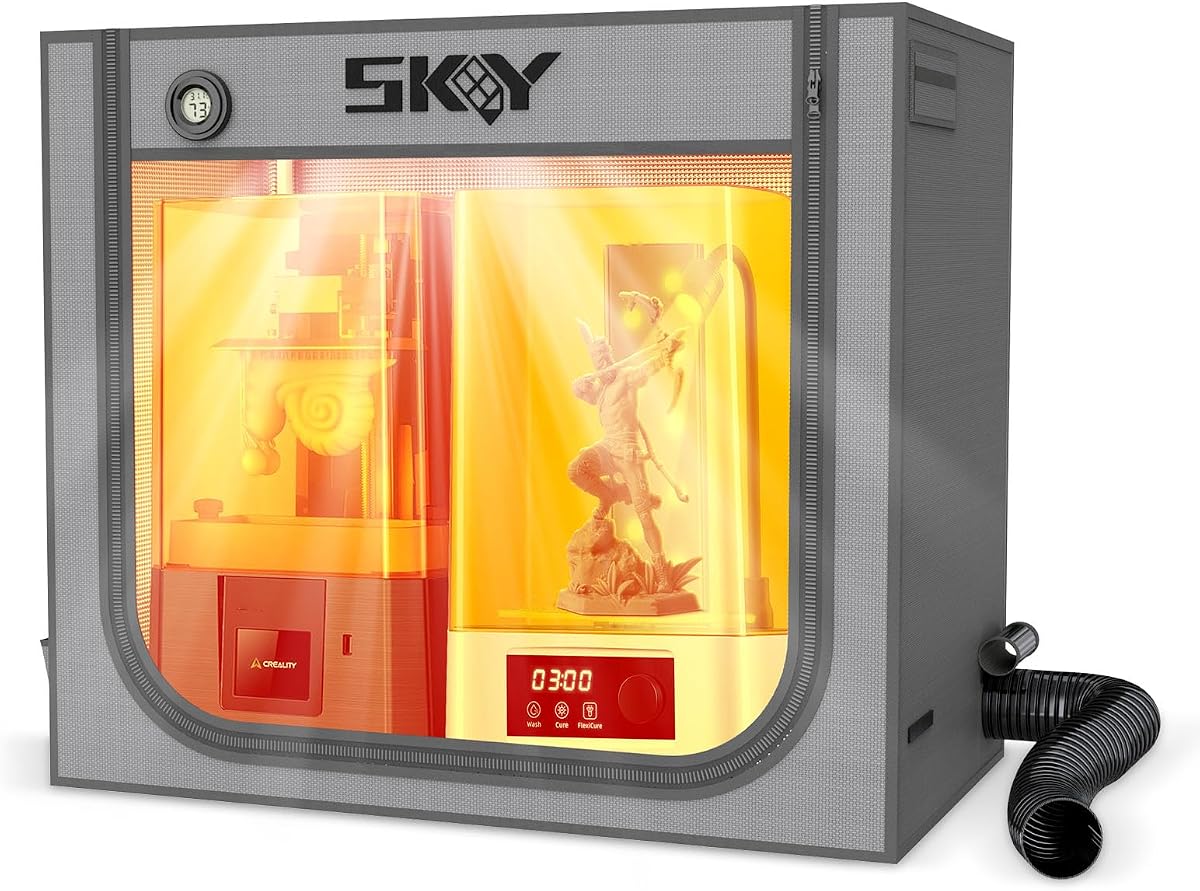


This YOOPAI Pro model stands out as a top choice for resin users needing reliable ventilation. With a rating of 4.8 stars it delivers consistent performance and safety. The adjustable ventilation system ensures fumes are managed effectively without noise issues.
We may earn a commission when you buy through this link, at no additional cost to you.
The large amber tinted window allows you to monitor prints without opening the enclosure. This feature is crucial for maintaining internal temperature and preventing resin from premature curing. The internal heat insulation design further supports stable printing conditions.
While the unit is robust, you might need to replace carbon filters periodically for optimal performance. The assembly process requires patience due to the metal frame components. However, these trade-offs are minor compared to the safety and quality it offers.
If you need a premium enclosure that balances ventilation and observation this model is ideal. It suits hobbyists and professionals alike who prioritize workspace air quality. The responsive support team adds value by resolving setup questions quickly.
The variable speed fan lets you tailor airflow to match print intensity and odor levels.
Amber tinting blocks harmful UV rays while keeping your print visible through the transparent panel.
We may earn a commission when you buy through this link, at no additional cost to you.
The VEVOR enclosure offers an affordable entry point for those new to resin printing safety. Its compact design fits most LCD printers while still providing essential dust and odor protection. Users appreciate its straightforward assembly and reliable build quality for the cost.
We may earn a commission when you buy through this link, at no additional cost to you.
Features like the flame retardant material and integrated LED strip enhance safety and usability. The constant temperature design helps prevent warping by maintaining a stable internal environment. This makes it suitable for small workshops with limited space.
One limitation is the smaller interior which may not fit larger printers or curing machines. The ventilation system is effective but lacks advanced speed control found in pricier models. Still, it provides excellent value for casual users.
If budget is your main concern this tent delivers essential protection without cutting corners on safety. It is perfect for desktop setups where space is at a premium. Check compatibility with your specific printer size before purchasing to ensure a proper fit.
Measuring 21.65 by 25.59 inches it fits snugly on most workbenches without taking up excess space.
A USB LED strip helps you monitor prints clearly even in low light conditions without opening the door.
We may earn a commission when you buy through this link, at no additional cost to you.
Creality's official enclosure provides a premium solution with its extra large 1000 by 500 by 1000mm interior. It accommodates printers and curing machines simultaneously making it ideal for complex workflows. The robust metal frame ensures stability during long printing sessions.
We may earn a commission when you buy through this link, at no additional cost to you.
Features like the aluminum foil cloth and transparent window offer excellent temperature control and visibility. The noise reduction design helps keep your workspace quiet which is a major plus for shared environments. Dustproof protection further ensures your prints remain clean.
The larger size means it takes up considerable space which may not suit smaller studios. The price is higher than basic tents but reflects the durability and capacity. It is a solid investment for those needing a professional grade setup.
Choose this if you need maximum space and premium build quality for your resin station. It handles larger printers and accessories with ease. Ensure you have the floor space and budget for this robust unit before committing to the purchase.
The metal frame and aluminum foil cloth provide superior insulation and durability for daily use.
The enclosed structure dampens fan and printer noise helping maintain a quieter home office.
We may earn a commission when you buy through this link, at no additional cost to you.
SKOUPHY designed this enclosure to fit both a resin printer and a curing box inside. This double space layout saves time by keeping your whole workflow in one safe tent. The ventilation kit with an active carbon box effectively removes chemical odors from the room.
We may earn a commission when you buy through this link, at no additional cost to you.
The thermo hygrometer lets you monitor temperature and humidity to ensure printing quality. The Oxford cloth cover is waterproof and fire resistant adding extra safety layers to your setup. Users report significant improvements in air quality after installing this unit.
Assembly can be tricky with multiple parts and duct connections to manage. The filters require periodic replacement to maintain efficiency which adds to long term costs. However, the dual space functionality makes these efforts worthwhile for many users.
If you want to centralize your printing and curing steps this model is a great pick. It balances ventilation performance with practical storage space. Make sure to measure your equipment carefully to avoid fit issues when ordering.
Accommodates both printer and curing machine so you do not need separate work zones.
Carbon box in the exhaust duct absorbs odors before they escape into your workspace.
We may earn a commission when you buy through this link, at no additional cost to you.
This YOOPAI Large model offers double the width to fit two printers or a printer with a curing machine. The high transparency PVC window makes it easy to watch progress without exposing your room to fumes. Six sided fully enclosed design ensures dust and splashes stay inside.
We may earn a commission when you buy through this link, at no additional cost to you.
Internal heat insulation helps maintain constant temperature which is vital for resin flow and print quality. The ventilation system with exhaust fans and expandable pipes effectively removes polluting gases. This unit is designed for serious hobbyists who need a clean environment.
Airflow might slow when passing through activated carbon so you may need to adjust venting. The unit is also bulky so relocating it is not easy once placed. Still these minor issues are outweighed by the capacity and quality it provides.
Choose this if you plan to scale your printing operations with multiple devices. It provides the space and air quality needed for professional results. Check the internal dimensions against your equipment to ensure a comfortable fit.
Exhaust pipes can be installed on both sides to increase airflow and reduce carbon slowdown.
Lightweight and high toughness PVC lets you monitor prints clearly without opening the lid.
We may earn a commission when you buy through this link, at no additional cost to you.
This Large Resin 3D Printer Enclosure provides a quiet and dustfree environment for your printer. Its 33 by 18.9 inch interior accommodates most LCD resin units comfortably. The ventilation kit with expandable pipes ensures fumes are vented away safely.
We may earn a commission when you buy through this link, at no additional cost to you.
Internal heat insulation helps maintain a stable temperature reducing print defects and warping issues. The high transparency front window lets you observe prints without opening the tent. Noise isolation features make it suitable for shared living spaces.
Setup might take some time to get the pipes and filters aligned correctly. Filters will need replacing over time to keep the air clean. These maintenance steps are standard for any enclosure with active ventilation though.
If you need a balance of size and silence this unit is a strong candidate. It works well for those who print in home offices or studios. Measure your workspace to confirm the dimensions fit before ordering online.
Insulation design keeps internal temperatures consistent for reliable resin flow throughout the print.
The ventilation kit effectively removes smells before they spread into your room air.
We may earn a commission when you buy through this link, at no additional cost to you.
This enclosure stands out with a 5-in-1 detector that tracks CO2 and humidity in real time. It offers a safe printing space by detecting harmful gas levels quickly. The fireproof Oxford cloth adds durability and resistance to heat and dust.
We may earn a commission when you buy through this link, at no additional cost to you.
The dual space interior can fit two resin printers or a printer and curing unit. A 6.5ft exhaust duct helps vent toxic gas outdoors effectively. The USB LED strip offers light for dark environments without external power needs.
Users note that the paper instructions can be confusing so assembly video is recommended. The rating is lower than others due to these setup complexities. Still the air monitoring feature provides a unique safety layer for health conscious users.
If tracking air quality is a top priority this model delivers detailed insights. It fits various printers but verify dimensions before purchasing. Watch the assembly video closely to avoid cracks in the plastic couplers during setup.
Tracks CO2, HCHO, and TVOC levels to ensure your workspace remains safe during operation.
A 6.5ft duct vents gases outside while keeping the system flexible for different room layouts.
We may earn a commission when you buy through this link, at no additional cost to you.
VEVOR's design focuses on safety with flame retardant materials and a stable structure. It fits most LCD resin printers while providing a constant temperature environment. The transparent window ensures you can see prints without exposing your room to fumes.
We may earn a commission when you buy through this link, at no additional cost to you.
The constant temperature feature helps consumables adhere better reducing waste and clogging risks. A ventilation system expels smoke quickly for rapid cooling. The LED strip provides illumination so you can spot issues promptly.
This unit is best for standard sized printers and may not hold oversized machines. The fan system is functional but lacks advanced controls found in other models. Still it offers reliable safety and protection for the price.
Choose this if safety and basic ventilation are your main priorities for your setup. It is easy to use and requires minimal effort to maintain. Ensure your printer fits the internal dimensions before placing an order.
Uses flame retardant materials to reduce accident risks and improve workplace safety.
Enclosed design helps maintain constant temperatures for better print quality and less waste.
We may earn a commission when you buy through this link, at no additional cost to you.
This Large Resin 3D Printer Enclosure excels at odor control with a carbon filter sheet and exhaust fan. It captures harmful odors before they spread keeping your home or garage fresh. The six sided sealed design isolates dust and splashes effectively.
We may earn a commission when you buy through this link, at no additional cost to you.
Insulated design maintains consistent temperature for smoother resin flow and reliable prints. Noise reduction features make the workspace quieter for focused work. The transparent window lets you monitor prints without opening the tent.
You will need to replace filters regularly to keep the air clean and effective. Assembly might take some time due to the ventilation and filter components. These steps ensure long term performance and safety for your printing environment.
Select this unit if you need a reliable and clean workspace for daily printing. It fits printer and curing machine combos well for a fully enclosed workflow. Check dimensions to ensure your setup fits comfortably inside.
Carbon filter sheet captures resin odors ensuring a cleaner workspace for your studio.
Six sided design isolates dust and splashes keeping your printer and workspace clean.
We may earn a commission when you buy through this link, at no additional cost to you.
This Resin 3D Printer Enclosure features a brown window shelter that blocks UV rays to protect your materials. It includes a 12V adjustable fan for flexible airflow control during printing. The stainless steel frame ensures durability and stability for long term use.
We may earn a commission when you buy through this link, at no additional cost to you.
Setup is simplified with a pre-installed fan and ventilation pipe for quick assembly. The enclosure keeps smoke and odors contained ensuring a clean workspace. Its dimensions fit most LCD printers allowing broad compatibility with popular models.
Ventilation is basic compared to high end models with advanced filters and ducts. It may not suit setups requiring complex fume management. However, for standard resin printing it provides effective protection and organization.
If you want a reliable shelter with UV protection this unit is a solid option. It is ideal for users seeking a straightforward setup with durable materials. Check compatibility with your specific printer model to ensure a snug fit.
Brown window shelter blocks UV rays preventing premature curing of resin materials.
Stainless steel frame ensures lightweight yet sturdy support for long term reliability.
We may earn a commission when you buy through this link, at no additional cost to you.
Choosing the right enclosure involves looking at ventilation, size, and build quality. This guide explains key factors to consider for a safe and efficient printing setup.
A good ventilation system includes a fan with adjustable speed and an exhaust duct. Look for models with carbon filters that capture harmful fumes and odors. Strong airflow prevents buildup inside the tent and keeps your air safe to breathe.
Prioritize units that offer expandable pipes or speed control to adapt to your printing needs. This ensures consistent air quality without unnecessary noise.
Measure your printer and any curing machines before buying to ensure a proper fit. Many enclosures advertise space for dual setups but real dimensions vary. A unit that is too small will struggle with heat dissipation and airflow circulation.
Choose a model with extra room around your devices to allow for tools and better circulation. This prevents overcrowding and makes maintenance easier over time.
Look for enclosures made from fire resistant fabrics like Oxford cloth with aluminum foil lining. This material protects against heat and helps maintain constant temperature during printing. A sturdy metal frame adds stability and prevents sagging over time.
Safety features like flame retardant cloth are critical when working with flammable resins. Always check product descriptions for fire safety certifications.
Check if carbon filters are included or need to be purchased separately. Some units use standard filters while others require custom parts. Ensure the exhaust port matches your setup so you can vent outside if needed.
Easy access to filters makes maintenance simple. You should be able to replace them without tools or complex disassembly.
A large transparent or amber tinted window lets you monitor prints without opening the door. Lighting features like integrated LEDs help you see details clearly in low light. UV blocking windows prevent premature curing while still offering visibility.
Choose a design that balances visibility with insulation. Too much exposure can lower internal temperature and affect print quality.
Constant temperature designs help resin flow smoothly and reduce defects. Some models include thermo hygrometers to monitor internal conditions. This is useful for precise prints where temperature fluctuations cause layer separation.
Insulation layers in the tent walls help maintain stable environments. Look for features that reduce heat loss during long print jobs.
Enclosures that dampen noise make your workspace more comfortable. Thick fabric and sealed designs reduce the sound of fans and motors. This is helpful if you work in shared spaces or home offices.
Quiet units let you focus on your work without distraction. Check reviews to see how well the unit reduces operational noise.
Some units take minutes to set up while others require tools and time. Look for models with snap or zip or tools for easier assembly. Consider if you need to move the enclosure around regularly.
Lightweight frames make moving easier but may sacrifice durability. Balance portability with the sturdiness needed for daily printing.
Set up the enclosure in a well ventilated room and ensure all filters are installed correctly before starting your first print. Check that exhaust pipes are sealed tight to prevent leaks that could let fumes escape.
Run the fan at a low setting to test airflow and then adjust based on odor levels. Keep the door closed as much as possible to maintain constant temperature and block dust from entering your workspace.
Replace carbon filters regularly to maintain efficiency and check for any wear on the frame or fabric. Wipe down the interior after prints to remove resin spills or dust that could affect future jobs.
Yes, filters are essential to capture odors and harmful gases produced during printing. Without them fumes can escape into your room. Carbon filters are the best choice for resin work as they absorb volatile organic compounds effectively.
Most resin enclosures work with both types but check size limits. Resin units often have smaller fans while FDM printers may generate more heat. Ensure the enclosure is rated for the temperature range of your specific printer.
Use the included exhaust duct to connect to a window vent or fan. Seal the opening with foil or tape to prevent leaks. This ensures all fumes leave your room instead of circulating back inside.
Measure your printer carefully before ordering to avoid fit issues. If it does not fit, consider a larger model or remove accessories to make space. Always check internal dimensions rather than just external ones.
Filters typically last three to six months depending on usage frequency. If you notice stronger odors it is time for a change. Replacing them regularly ensures consistent air quality and safety.
Amber or brown windows block UV rays which prevents premature curing of resin. They allow visibility while keeping your material safe from light exposure. Clear glass may work if you only print in dark conditions.
Yes, most units are designed for long print jobs. Just ensure your fans are working and filters are clean. Keep the enclosure away from flammable materials for added safety during unattended prints.
Many units come with built-in LED strips which are usually sufficient. Extra lighting can help spot issues but ensure it does not add excessive heat. USB powered lights are safe and easy to install.
The YOOPAI Pro, VEVOR, and Creality models offer top performance for ventilation and safety. Each brings unique strengths whether you need space or budget friendly protection for your resin workflow.
Prioritize airflow capacity and filter quality when choosing a unit. A well sealed environment with effective air management protects both your health and your print results.
Prices change frequently so always check current listings before buying. Ensure you have enough room for your equipment and ventilation setup for best results.