
Redragon K618 PRO Wireless
4.1Editor score
Tri-mode connectivity support
Macro keys without software
Slim low profile design
This guide compares the top 10 low profile mechanical keyboards for gaming and work, evaluating switches, connectivity, build quality, and ergonomics to help
Low profile mechanical keyboards offer a unique blend of speed and comfort for modern users. They feature shorter travel distances and streamlined designs that reduce wrist strain during long sessions.
We compared ten top models based on switch feel, connectivity options, build materials, and customization features. Our analysis highlights how each board performs in daily typing and competitive gaming scenarios.
Each pick shows specific strengths like wireless stability or hot-swap support. Note that availability and pricing can change quickly, so check current listings before making your final decision today.
4.1Editor score

4.6Editor score

4.7Editor score
This side-by-side comparison evaluates all ten models across key performance metrics. Look for differences in switch types, connectivity modes, and structural design to find your perfect match.




The Redragon K618 PRO offers an accessible entry into low profile mechanical keyboards with strong performance for the price. It boasts a 4.1 rating from users who appreciate its slim design and versatile connectivity options.
We may earn a commission when you buy through this link, at no additional cost to you.
This keyboard shines with its ability to switch between Bluetooth, 2.4GHz, and wired modes without re-pairing. The dedicated macro zone allows for quick command recording without needing additional software installation.
While the build is functional rather than premium, the low profile switches provide fast actuation. Some users may find the lighting software less robust compared to high-end alternatives.
Budget-conscious gamers and typists should consider this model for its value. It balances cost and features well, making it a smart choice for those starting with mechanical keyboards.
Tri-mode connectivity ensures you can move between PC, laptop, and tablet seamlessly without lag.
The 4×5 macro zone lets you record complex commands instantly using onboard memory.
We may earn a commission when you buy through this link, at no additional cost to you.
The Keychron K3 V2 is a compact powerhouse designed for productivity and multitasking. With a 4.3 rating, users praise its seamless integration with Mac and Windows systems via Bluetooth.
We may earn a commission when you buy through this link, at no additional cost to you.
Its QMK firmware allows extensive customization for remapping keys and creating shortcuts. The aluminum body ensures durability while keeping the profile ultra-slim for comfortable wrist positioning.
Although it lacks hot-swappable switches, the included keycaps suit most users. The main trade-off is the limited space for those who need a full numpad or function row.
Mac users and professionals seeking a travel-friendly option will love this keyboard. Its blend of wireless stability and layout flexibility makes it a standout for daily work.
QMK firmware gives you endless possibilities for key remapping and macro creation.
Connect up to three devices and switch between them instantly for better workflow.
We may earn a commission when you buy through this link, at no additional cost to you.
The Cherry MX 10.0N delivers a premium experience with genuine MX Low Profile Speed switches. It holds a 4.3 rating for its reliable performance and sleek aluminum housing design.
We may earn a commission when you buy through this link, at no additional cost to you.
Gaming benefits from the linear, quiet, and responsive nature of the switches. The customizable RGB backlighting allows for personalization that matches any setup aesthetic.
While the build is sturdy, it is fixed without hot-swap options. The price reflects the brand reputation, which might be a consideration for budget shoppers.
Gamers and enthusiasts who value brand reliability should choose this model. Its solid construction and fast actuation make it a top pick for competitive environments.
Linear switches ensure smooth, rapid keystrokes for high-speed gaming scenarios.
Aluminum housing provides long-lasting durability and a premium look on your desk.
We may earn a commission when you buy through this link, at no additional cost to you.
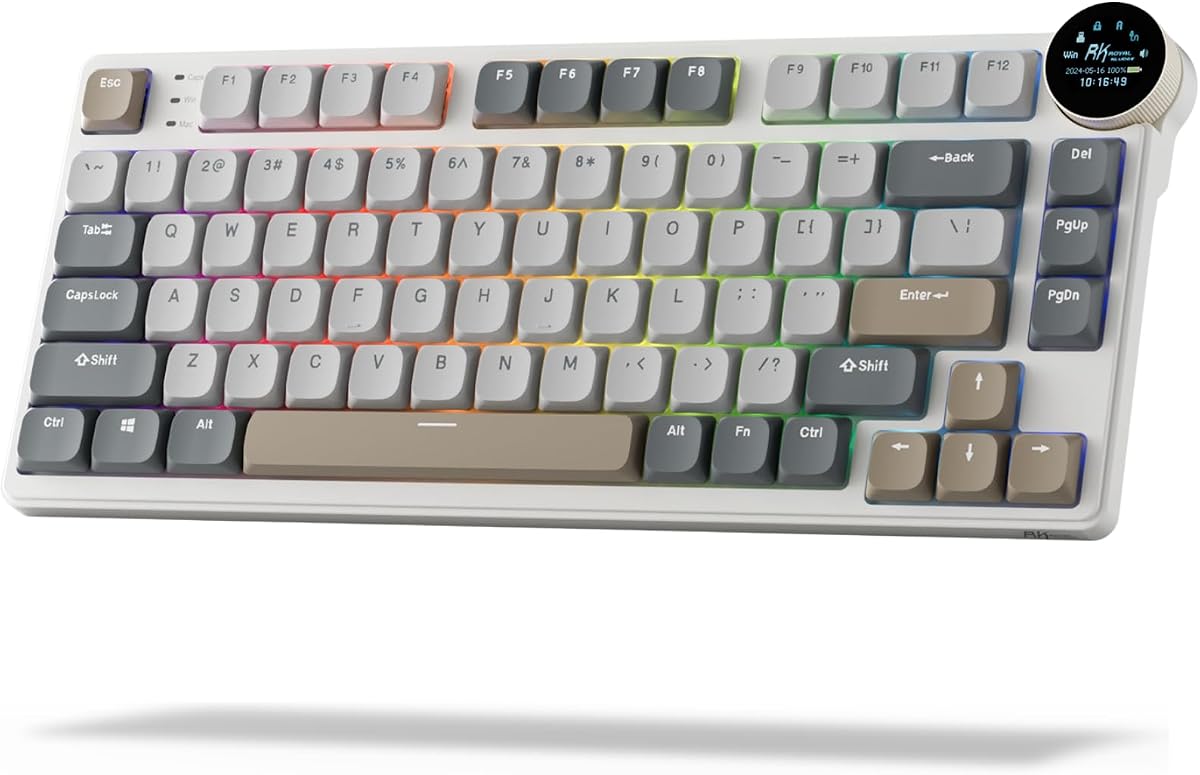
The RK N80 stands out with a smart display screen and control knob for volume and settings. It has a 4.1 rating for its innovative features and solid base stability.
We may earn a commission when you buy through this link, at no additional cost to you.
The tri-mode connectivity allows for flexible use across different devices. Sound-absorbing layers reduce hollow noise, making it suitable for quiet office environments.
The screen adds visual flair but may drain the battery faster. Users might need to charge it more frequently compared to standard keyboards without displays.
Tech enthusiasts who want customization and visual feedback will enjoy this keyboard. Its mix of style and function makes it a unique choice for modern setups.
The display shows battery status and connection modes at a glance.
Sound-absorbing layers minimize noise for a discreet typing experience.
We may earn a commission when you buy through this link, at no additional cost to you.
The Flow Lite 84 prioritizes ergonomic comfort with a lower front height and flexible switches. It earns a 4.3 rating for its soothing touch and gasket-mounted design.
We may earn a commission when you buy through this link, at no additional cost to you.
Specter linear switches reduce finger fatigue during long sessions. The PBT double-shot keycaps ensure durability and a matte texture that feels pleasant to the touch.
While the ABS body is lighter than aluminum, it maintains a sturdy feel. The battery life is impressive, offering up to 80 hours of usage on one charge.
Typists and users with wrist sensitivity will find this keyboard ideal. Its focus on comfort and quality keycaps makes it a great choice for daily tasks.
Lower front height allows for a more natural wrist position during typing.
PBT keycaps provide a non-slip texture that resists shine over time.
We may earn a commission when you buy through this link, at no additional cost to you.
The Keychron K1 Ultra is a high-performance beast with 8K polling for precision gaming. It has a strong 4.7 rating for its durability and exceptional responsiveness.
We may earn a commission when you buy through this link, at no additional cost to you.
Premium materials like hardwood side panels give it a unique look and feel. The gasket mount provides soft sound dampening layers for a richer keystroke tone.
While the price is high, the performance features justify the cost for enthusiasts. The ZMK firmware allows deep customization for power users who want full control.
Competitive gamers and premium seekers should choose this board. Its combination of speed, style, and customizability makes it a top-tier option in the market.
8K polling ensures instant response times for competitive gaming scenarios.
Hardwood side panels add a premium touch to the overall design.
We may earn a commission when you buy through this link, at no additional cost to you.
The Keychron K17 Max brings 96% layout efficiency to low-profile users. It features a 4.4 rating for its balance of compact size and full functionality.
We may earn a commission when you buy through this link, at no additional cost to you.
Gateron brown switches offer tactile feedback without being too loud. The aluminum frame is incredibly thin while maintaining durability and stability during use.
It lacks hot-swap sockets, limiting future switch changes. The high price reflects the premium build and advanced features offered to professional users.
Professionals needing a compact desktop setup will benefit from this model. It saves space without compromising on essential keys or wireless flexibility.
96% layout fits a numpad into a compact form factor for better desk management.
Brown switches provide tactile feedback for accurate typing without excess noise.
We may earn a commission when you buy through this link, at no additional cost to you.
The Flow Lite 100 offers a full-size layout with all necessary keys for work. It holds a 4.4 rating for its comfortable typing experience and high battery capacity.
We may earn a commission when you buy through this link, at no additional cost to you.
Its 3000mAh battery supports up to 100 hours of usage. The gasket design provides a cushioned feel that reduces fatigue over long periods.
While great for desktop use, its size makes it less portable. Users looking for a compact travel option might prefer a smaller layout model instead.
Office workers and home desk setups will appreciate the full functionality. Its robust build and long battery life make it a reliable companion for daily tasks.
3000mAh battery allows for weeks of use between charges even with lighting on.
Specter switches soften the touch to reduce strain on fingers and wrists.
We may earn a commission when you buy through this link, at no additional cost to you.
The Keychron K3 Max SE delivers premium features at a competitive value. With a 4.6 rating, it is praised for its QMK support and reliable wireless performance.
We may earn a commission when you buy through this link, at no additional cost to you.
Its hot-swap sockets let you change switches without soldering. Acoustic foam layers make typing quiet and smooth while maintaining tactile feedback.
Users may need to adjust stabilizers for best results. The compact layout saves space but excludes some keys found on full-size boards.
Enthusiasts and remote workers will love its versatility. The blend of customizability and stability makes it a top choice for diverse workflows.
Hot-swappable sockets allow you to experiment with different switch types easily.
Advanced foam layers reduce noise for a more pleasant sound experience.
We may earn a commission when you buy through this link, at no additional cost to you.
The Razer Ornata V3 combines membrane familiarity with mechanical-like feedback. It holds a 4.5 rating for its comfort and snappy keystroke performance.
We may earn a commission when you buy through this link, at no additional cost to you.
Mecha-membrane switches offer precision without the loud click. UV-coated keycaps ensure legends remain visible despite frequent use and wear.
True mechanical enthusiasts might miss hot-swap options. The price is moderate but reflects a hybrid design rather than pure mechanical tech.
Casual gamers and comfort-seekers will find this keyboard reliable. Its included wrist rest makes long sessions much more enjoyable.
Magnetic wrist rest snaps on easily for added support during use.
UV coating protects legends from fading and damage over time.
We may earn a commission when you buy through this link, at no additional cost to you.
Selecting the right low profile mechanical keyboard requires evaluating switch types, connectivity modes, and build materials. These factors determine how the board fits your workflow and ergonomic needs.
Low profile switches come in linear, tactile, and clicky variations. Linear switches are smooth and fast for gaming, while tactile ones offer bump feedback for typing accuracy.
Choose a switch type that matches your usage style to prevent fatigue.
Look for tri-mode options including Bluetooth, 2.4GHz wireless, and wired USB-C. This allows you to switch between devices without interrupting your workflow.
Wireless stability is crucial for competitive gaming or fast-paced work.
Aluminum housing provides better durability than plastic frames but adds weight. Premium models often include sound-dampening layers for a quieter experience.
Sturdy construction ensures the keyboard survives daily heavy use.
Compact layouts like 75% save desk space while retaining essential keys. Low profile designs reduce wrist strain by allowing a more natural hand position.
Select a layout that fits your desk size and key usage.
Open-source firmware like QMK allows advanced key remapping and macros. Hot-swap sockets enable you to change switches without soldering for future upgrades.
Customization features help tailor the board to your specific preferences.
For wireless models, battery life impacts usage frequency. Some models offer up to 100 hours on a single charge with RGB lights off.
Long battery life ensures uninterrupted use during travel or work.
PBT double-shot keycaps are more durable and resistant to shine than ABS. They provide a textured feel that improves typing accuracy over time.
Quality keycaps maintain a premium feel for years of use.
Ensure the keyboard supports both Windows and Mac layouts. Most modern models offer physical keys or software toggles to switch operating systems easily.
Cross-platform support is vital for hybrid work environments.
Start by pairing your keyboard via the correct mode. For wireless use, ensure Bluetooth or 2.4GHz connection is active before typing.
Regularly clean dust from between the keys using compressed air to maintain switch performance. Avoid liquids to protect internal electronics.
Update firmware through the manufacturer app to unlock new features. Proper maintenance ensures your keyboard lasts for years of daily use.
Yes, they offer faster actuation due to shorter travel distance. This reduces the time needed for keys to register during rapid inputs. However, gaming performance also depends on polling rate and switch stability.
Tactile switches provide feedback that reduces typing errors and strain. Linear switches are preferred for smooth, silent typing. Clicky switches offer auditory feedback but may disturb others.
Most modern models support both operating systems out of the box. Many include physical keycaps or firmware toggles to switch between OS layouts seamlessly.
With regular maintenance, a high-quality keyboard can last years of daily use. Switch durability typically exceeds 50 million keystrokes. Build material affects overall lifespan.
Only if the keyboard supports hot-swap sockets. Many premium models allow you to change switches without soldering. Fixed keyboards require tools and technical skill to swap.
Low profile keyboards reduce wrist strain and save desk space. They offer faster typing speeds and a more compact design for travel. Standard boards offer a deeper tactile feel.
QMK is open-source, allowing full customization of key mapping and macros. Standard firmware is usually fixed with limited options. QMK offers flexibility for power users.
Yes, modern 2.4GHz connections provide near-zero latency. Look for models with low polling rates to ensure responsive inputs. Wired modes are available for critical competitive play.
We reviewed ten excellent options ranging from budget-friendly to premium designs. The Redragon K618 PRO and Keychron K3 Max SE stand out for value and versatility.
Prioritize ergonomics and switch feel to ensure long-term comfort. Wireless stability and battery life are critical for seamless productivity across devices.
Check current pricing and availability before purchasing as models change often. Your ideal keyboard depends on your specific workflow and aesthetic preferences.