
ARCTIC Case Fan Hub
4.7Editor score
10 fold PWM distribution
SATA power supply
Compact black design
This guide compares the best fan control hub for PC options to help you manage airflow cable lighting and noise efficiently in any custom computer build today.
Managing multiple case fans can quickly become a wiring nightmare inside your computer chassis. A dedicated fan control hub simplifies this process by centralizing connections and ensuring stable power delivery. Without one you may struggle with limited motherboard headers or uneven fan speeds.
We evaluated ten top rated fan control hubs based on port count power capacity and ease of installation. Our analysis considers real world performance and compatibility with modern ARGB and PWM fans. This list helps you find the right solution for your specific build needs.
Each pick includes detailed specs and honest pros and cons to guide your decision. Remember that prices and availability change frequently so always check the latest listings before purchasing. These tools will keep your system cool and your cable management tidy.
4.7Editor score
4.6Editor score

4.7Editor score
The following table provides a side-by-side comparison of all ten products to help you quickly identify key specifications and features.


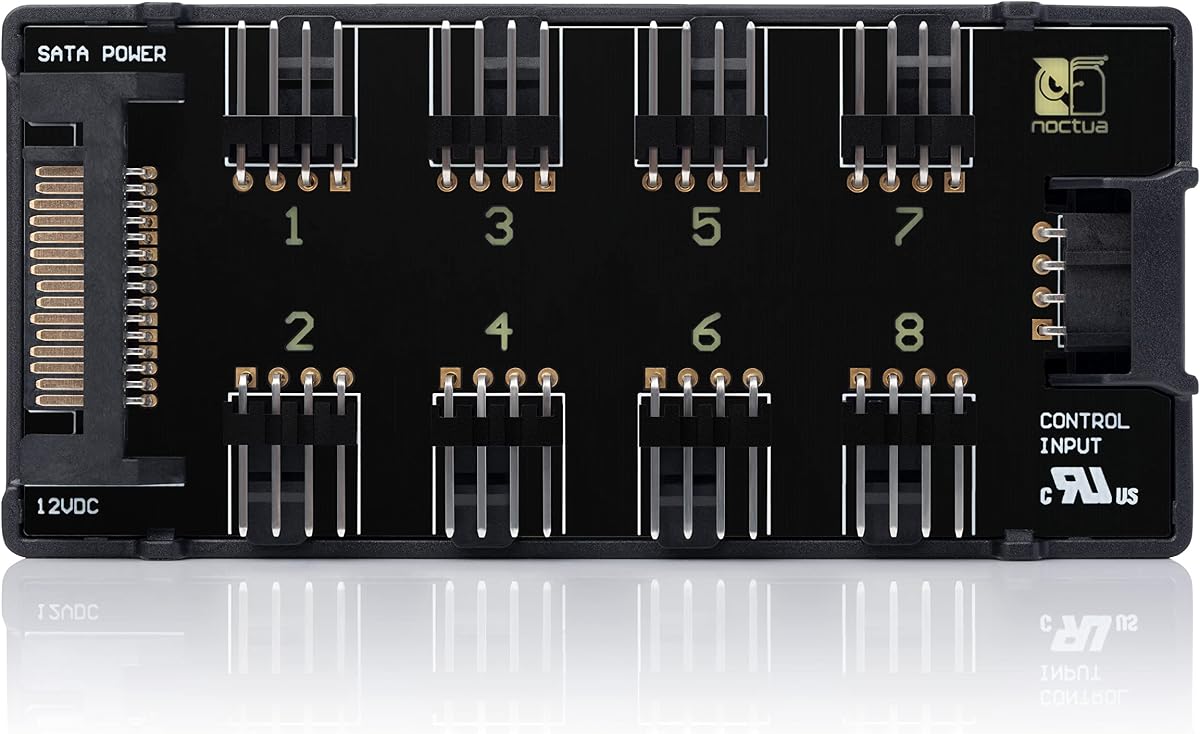
The Noctua NA-FH1 stands out as a top tier fan hub with its robust safety features and magnetic mounting system. It receives high marks for reliability and ease of use across various PC builds.
We may earn a commission when you buy through this link, at no additional cost to you.
Its 8-way splitter supports both 5V and 12V fans using S-ATA and 4-pin inputs simultaneously. Safety fuses protect against overcurrent and short circuits while ensuring stable power delivery.
While it costs more than budget options the build quality and warranty justify the expense for critical systems. Some users may wish for more than eight ports in larger cases.
This hub is ideal for enthusiasts who prioritize safety and performance over absolute lowest cost. It delivers consistent results for cooling and cable management tasks.
Short circuit protection ensures your components remain safe even during power fluctuations or wiring errors.
Simultaneous S-ATA and 4-pin inputs allow flexible configuration for mixed fan setups.
We may earn a commission when you buy through this link, at no additional cost to you.
The ARCTIC Case Fan Hub offers excellent value with ten PWM ports at a very competitive price point. It handles standard case fans well while keeping cable clutter to a minimum.
We may earn a commission when you buy through this link, at no additional cost to you.
Synchronous control ensures all fans receive the same PWM signal for uniform airflow. SATA power input prevents voltage loss and ensures smooth operation under load.
Its compact size fits easily into most chassis without taking up valuable drive bay space. Some high performance setups might need more current per port than this unit supplies.
Best suited for budget builds needing extra fan headers without breaking the bank. It remains a solid choice for general cooling needs.
All connected fans spin at the same speed for consistent airflow throughout the case.
Minimal dimensions allow placement near drives or cables without obstruction.
We may earn a commission when you buy through this link, at no additional cost to you.
This ARCTIC controller stands out with individual PWM control for every port plus extensive software support. It allows granular tuning for complex cooling setups and performance monitoring.
We may earn a commission when you buy through this link, at no additional cost to you.
With up to 2 amps per port and 4.5 total it handles powerful fans without voltage drops. Linux and Windows compatibility ensures wide adoption across different user bases.
Magnetic or adhesive mounting offers installation flexibility inside the chassis. The need for software setup might be a hurdle for those seeking plug and play simplicity.
Premium enthusiasts will appreciate the precision and flexibility this unit provides for airflow management. It is ideal for high end custom loops or server builds.
Each fan can be tuned independently for optimal noise and cooling balance.
Native drivers work with both major operating systems for easy integration.
We may earn a commission when you buy through this link, at no additional cost to you.
The Thermalright ARGB hub supports eight groups of fans with synchronized 5V lighting. It is designed to simplify wiring while keeping your build visually cohesive and professional.
We may earn a commission when you buy through this link, at no additional cost to you.
Strong paste or magnetic suction ensures it stays in place without drilling. The direct SATA power delivery maintains stability even under heavy load.
Users should note it does not support 12V 4 pin RGB which requires careful cable selection. Only one fan speed is read by the motherboard due to IC limitations.
This hub is a great choice for those prioritizing clean lighting setups over complex speed monitoring. It keeps your interior tidy and lights synced.
Choose between adhesive or magnetic mounting to fit your chassis layout.
All connected ARGB devices display the same effects for a unified look.
We may earn a commission when you buy through this link, at no additional cost to you.
Supporting up to twelve groups of fans this hub maximizes cooling potential for large cases. It blends both ARGB lighting and PWM fan control into one neat unit.
We may earn a commission when you buy through this link, at no additional cost to you.
The white color matches clean or light themed builds perfectly. Direct SATA input ensures stable operation under high loads without voltage loss.
You must purchase SATA cables separately and avoid 12V RGB connectors to prevent damage. Speed reading remains limited to a single fan for motherboard reporting.
Ideal for massive builds needing many fan headers plus lighting control. It keeps the internal wiring organized and functional.
Twelve ports allow extensive cooling solutions for large cases.
White finish complements light colored components and cases.
We may earn a commission when you buy through this link, at no additional cost to you.
This hub combines PWM fan management with ARGB lighting control plus a handy remote. It simplifies RGB customization without needing extra software or motherboard headers.
We may earn a commission when you buy through this link, at no additional cost to you.
Built in magnets allow quick placement on any steel surface inside the case. The included kit provides all necessary cables for immediate setup.
RGB effects rely on the front panel sync which is convenient but less flexible than software. Build quality is functional but primarily plastic.
Best for users who want quick lighting changes without leaving their seat. It keeps cables tidy and adds a touch of control.
Adjust colors and effects instantly using the included infrared remote.
The hub itself lights up to match your connected ARGB fans.
We may earn a commission when you buy through this link, at no additional cost to you.
Focusing purely on PWM fans this hub delivers stable power for up to ten units. It is perfect for those who prioritize cooling performance over lighting.
We may earn a commission when you buy through this link, at no additional cost to you.
Strong double sided stickers hold the hub securely in place. Direct SATA power ensures efficient transfer without voltage loss under load.
The lack of RGB interfaces means it is not for colorful builds. You will need to source the SATA cable separately if not available.
Ideal for silent cooling builds or workstation PCs needing many high RPM fans. It keeps wiring neat and fans running smoothly.
Optimized for fan control without extra lighting features.
Direct SATA connection provides reliable electricity for all fans.
We may earn a commission when you buy through this link, at no additional cost to you.
This hub supports both 8 ARGB fans and 8 PWM fans simultaneously for a clean setup. It is designed to reduce clutter and organize internal wiring effectively.
We may earn a commission when you buy through this link, at no additional cost to you.
Black color and compact design fit most cases without drawing attention. The strong stickers ensure it stays put during transport or installation.
Avoid 12V 4 pin RGB devices to prevent damage to the connectors. You must have a SATA power cable ready for the input.
Great for balancing performance and aesthetics in moderate builds. It simplifies the wiring process and maintains consistent lighting.
Handles both lighting and speed signals in one device.
Separates fan and light cables to keep the case neat.
We may earn a commission when you buy through this link, at no additional cost to you.
This hub offers ten ports plus an RF remote for convenient lighting adjustments. It is ideal for those wanting quick visual control without opening the case.
We may earn a commission when you buy through this link, at no additional cost to you.
Magnetic suction simplifies installation on metal surfaces inside the chassis. Smart PWM temperature control helps maintain consistent performance.
The single speed read limitation is standard for these hubs. Avoid 12V RGB connectors to prevent equipment damage during setup.
Perfect for builds needing extensive fan setups with flexible lighting options. It keeps cables managed and controls accessible.
Change lighting effects from anywhere in the room.
Attach easily to steel panels without tools or screws.
We may earn a commission when you buy through this link, at no additional cost to you.
Supporting eight groups of fans this hub keeps your lighting and fan wiring organized. It provides reliable power and synchronization for standard setups.
We may earn a commission when you buy through this link, at no additional cost to you.
Compact black design blends well with most case interiors. Direct SATA ensures stable output under load without voltage drop.
Remember to connect the correct ports for fan speed and lighting control. The unit does not adjust speed on its own.
This is a solid choice for maintaining a tidy system with synchronized lights. It works well for mid range builds needing extra headers.
Direct SATA power prevents flickering or slowdown under load.
Centralize cables to reduce clutter inside the case.
We may earn a commission when you buy through this link, at no additional cost to you.
Selecting the right fan control hub requires attention to port count, power delivery, and compatibility with your existing hardware.
Determine how many fans you need to connect before purchasing a hub. Most hubs offer between eight and ten ports which is sufficient for most cases. If you have a custom loop or server setup you may need higher capacity models.
Choose a hub with enough ports to cover all fans while leaving room for future expansion.
Check the maximum current per port and total hub current to avoid overload. Hubs powered by SATA connectors generally deliver stable power for multiple fans. Verify that your PSU provides a spare SATA cable for the hub.
Ensure the total current demand of your fans does not exceed the hub's rated capacity.
Verify whether your fans are standard 12V or addressable 5V ARGB to match the hub ports. Mixing wrong types can damage connectors or lights if not properly protected. Look for hubs that support both PWM and ARGB if you plan to use both.
Match your fan connectors exactly to the hub ports to prevent electrical damage.
Some hubs offer individual PWM control per port while others synchronize all fans. Individual control allows fine tuning but costs more and may need software. Most hubs read only one fan speed for reporting to the system.
Decide if you need individual fan control or if synchronized speeds are acceptable.
Look for hubs with strong adhesive or magnetic mounting to secure them inside the case. Some models include screws while others rely on double sided tape. Proper mounting prevents vibrations and ensures safe operation.
Choose a mounting method that fits your chassis interior and keeps the hub stable.
If you care about lighting choose hubs with remote control or software support for customization. Hubs with front panels often sync with connected fans for a unified look. Others may require separate RGB controllers or motherboard headers.
Select a control method that matches your workflow and desired visual effects.
Consider materials like metal casing versus plastic for durability and heat resistance. Higher quality hubs often include safety features like short circuit protection. This protects your components if a wiring issue occurs.
Prioritize robust build quality if the hub will carry high current loads.
Some hubs include remote controls or chassis buttons for quick lighting adjustments. Others support operating system specific drivers for advanced monitoring. Evaluate which extras add real value to your workflow.
Focus on features that solve your specific cabling or control pain points.
Connect the SATA power connector from your power supply directly to the hub input for stable voltage. Ensure the connection is fully seated to avoid loose contacts or power interruptions.
Plug one fan header into the motherboard for speed reading then connect all remaining fans to the hub ports. Verify the red port matches the fan header for correct RPM monitoring.
Regularly dust the hub and nearby fans to maintain cooling performance and prevent overheating. Check the adhesive or magnetic mount periodically to ensure the hub stays secure during operation.
Yes most hubs connect to your motherboard's 5V 3 pin ARGB header to control lighting. You do not need a separate controller if your board supports ARGB directly. Ensure the pin orientation matches to avoid damaging the strip.
Some hubs synchronize all fans to a single speed signal for uniform cooling. Others provide individual PWM control via software or onboard knobs. Standard hubs usually read only one fan speed and pass control signals from the motherboard.
Check your fan connector type whether it is 4 pin PWM or 5V 3 pin ARGB. Compare this to the hub ports and manual before buying. Do not plug 12V 4 pin RGB into a 5V port to prevent damage.
Many hubs require you to supply your own SATA power cable from the PSU. Always check the product details before ordering to avoid delays. If not included purchase a standard SATA power extension to connect easily.
Exceeding the hub's total current limit can cause voltage drops or overheating. This may reduce fan speeds or damage the unit over time. Stay within the rated amperage and spread loads across ports safely.
Adhesive backed hubs can mount to plastic or other materials inside the case. Ensure the surface is clean and dry for strong bonding. Magnetic options work only on steel panels but avoid plastic mounts.
The top three picks offer distinct advantages for budget and high end builds. The Noctua NA-FH1 provides premium safety and mounting while the ARCTIC budget model delivers ten ports for less.
Prioritize port count and power delivery to ensure your system stays cool under load. Consider RGB needs early to avoid switching hubs later for lighting control.
Check current pricing and availability before purchasing since deals change frequently. These hubs help you achieve cleaner builds with reliable fan management.