
Amazon Basics AC-Powered Computer Speakers
4.3Editor score
Simple front volume control
Built-in headphone jack
Direct wall outlet power
Finding the right audio solution for your workstation is essential for productivity and entertainment. AC powered speakers offer consistent power without draining your computer battery. They deliver stronger output than USB options for immersive listening experiences.
We analyzed ten top rated models based on sound clarity, build quality, and connectivity options. Our comparison covers budget friendly picks and premium systems from trusted brands like Bose and Edifier. Each entry highlights key features to simplify your decision making process.
Every pick showcases specific strengths and ideal use cases for different users. Note that availability and pricing may vary over time. Check current listings for the most up to date information before purchasing your next audio upgrade.
4.3Editor score

4.6Editor score

4.6Editor score
As an Amazon Associate we earn from qualifying purchases.
This side by side comparison evaluates all ten selected models across key performance metrics. We look at power output, connectivity options, and design features to highlight differences between budget and premium tiers.


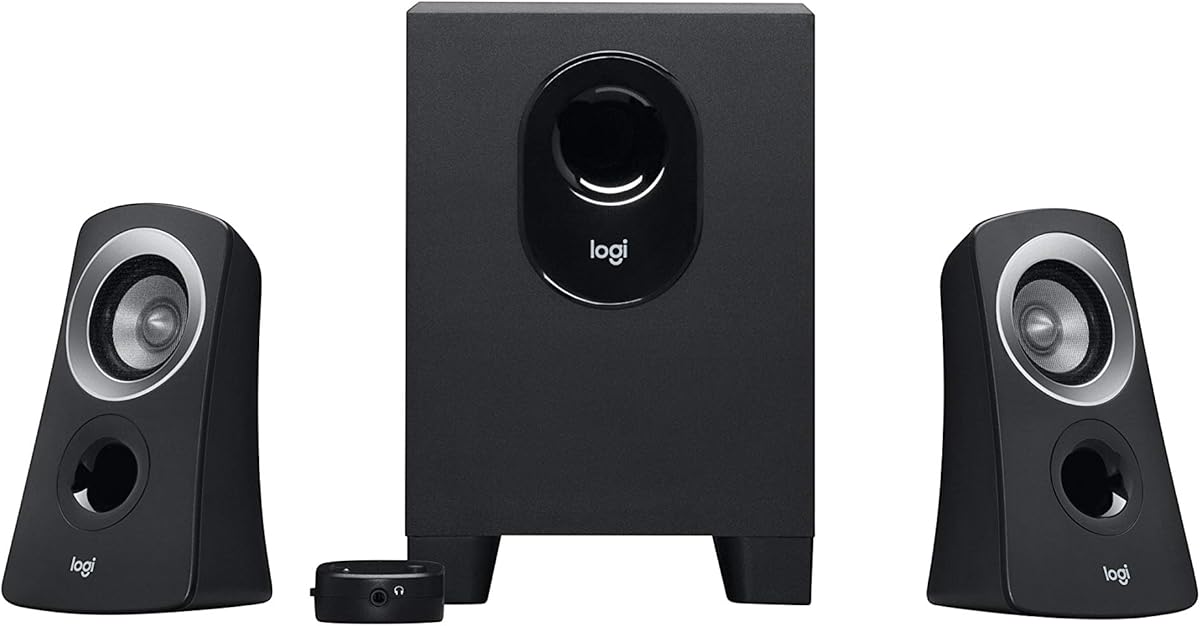


The Amazon Basics AC Powered Computer Speakers deliver a straightforward audio experience for everyday users. With a solid rating, these speakers offer a simple solution for those needing basic sound enhancement without complexity.
We may earn a commission when you buy through this link, at no additional cost to you.
Designed for ease of use, the single front control manages volume and power efficiently. The built-in headphone jack allows for private listening without unplugging speakers. This makes them ideal for shared workspaces.
Trade-offs include a limited frequency range compared to higher end models. However, for casual music and video playback, the clarity remains acceptable. The AC power ensures consistent volume levels.
Buyers seeking a cost-effective upgrade for their laptop or desktop will find these speakers suitable. They provide reliable performance for the price. We recommend them for students and home office users on a budget.
Connection requires only a power outlet and a standard audio jack. No drivers or software installation is needed for immediate use.
Drawing power from the wall ensures the speakers perform at peak output without draining your device battery.
We may earn a commission when you buy through this link, at no additional cost to you.
Bose Companion 2 Series III Multimedia Speakers bring renowned audio performance to the PC desktop. Rated highly by users, these speakers excel in delivering clear sound even at low volumes.
We may earn a commission when you buy through this link, at no additional cost to you.
The design allows for easy connection of mobile devices through the auxiliary input. This feature ensures you can stream music from phones or tablets effortlessly. The volume control is conveniently located on the right speaker.
Users may find the price higher than generic options. However, the consistent audio quality justifies the investment for critical listeners. The black finish complements most modern desk setups.
This system is ideal for professionals who value clear voice calls and music. The reliability of Bose engineering makes it a strong candidate. We suggest it for those prioritizing sound over cost.
The auxiliary input allows you to switch between PC audio and mobile sources without hassle.
Engineered to maintain clarity regardless of volume settings, ensuring a pleasant experience.
We may earn a commission when you buy through this link, at no additional cost to you.
The Bose Companion 2 Series II Speaker System focuses on providing a clear and realistic listening experience. While an earlier model, it maintains high standards for audio fidelity in home and office settings.
We may earn a commission when you buy through this link, at no additional cost to you.
Dual inputs allow connection to both a computer and another audio source simultaneously. This convenience helps users manage multiple devices without frequent cable swapping. The aesthetic is modern and elegant.
Bass performance is moderate compared to systems with subwoofers. For dialog and vocal-heavy content, this is less of an issue. It is best suited for small to medium rooms.
We recommend this for users who prioritize voice clarity and aesthetics. It is a dependable choice for general multimedia consumption. Consider this if you prefer a clean desk setup.
Connecting two audio sources at once eliminates the need to constantly switch cables.
The contemporary look fits well in professional environments and home offices.
We may earn a commission when you buy through this link, at no additional cost to you.
The Bose Companion 20 Multimedia Speaker System stands out with TrueSpace technology for wide soundstage reproduction. It offers full, natural sound without needing a separate bass module. This makes it a top choice for desktops.
We may earn a commission when you buy through this link, at no additional cost to you.
A convenient control pod allows for easy volume adjustments and headphone connections. The design is sleek and saves valuable desk space. Active electronic equalization balances frequencies for natural tone.
Although it lacks a dedicated subwoofer, the low-note performance is powerful for its size. Some users may prefer deeper bass for movies. However, the clarity and balance are exceptional for two speakers.
We recommend this system for those seeking premium sound in a compact package. It suits gamers and professionals alike. This is our top pick for overall performance and design.
This proprietary circuitry creates a wide stereo experience from just two speakers.
The pod provides easy access to all controls without reaching behind speakers.
We may earn a commission when you buy through this link, at no additional cost to you.
Edifier R1280T Powered Bookshelf Speakers offer studio-quality sound reproduction for desktop environments. With a high rating, they are praised for their natural sound and elegant wood finish build.
We may earn a commission when you buy through this link, at no additional cost to you.
The speakers feature dual AUX inputs, allowing connection to two devices without switching cables. Side panel knobs let you adjust bass and treble directly. A remote control adds convenience for volume management.
The wood finish gives a premium look but increases weight. They are larger than typical PC speakers, requiring more desk space. However, the audio quality compensates for the size.
These are ideal for audiophiles and music enthusiasts. The build quality is robust and durable. We recommend them for users who value aesthetics and detailed audio performance.
The silk dome tweeter and full range unit deliver accurate audio reproduction.
Switching between devices is effortless with the dual 3.5mm input setup.
We may earn a commission when you buy through this link, at no additional cost to you.
Edifier R980T speakers deliver 24 Watts of power output with a bass reflex port for rich sound. The wooden enclosures minimize resonance, ensuring clearer audio during movies and music.
We may earn a commission when you buy through this link, at no additional cost to you.
Cables including RCA and speaker wire are included in the box. This reduces the need for extra purchases. The universal power supply works across different voltage regions.
The size is larger than compact options, needing more desk area. Without a remote, you must reach the speakers to change volume. But the sound depth is impressive.
We recommend these for users needing powerful sound without a subwoofer. They suit larger desks well. Consider this for a balance of power and build quality.
The 24 Watt RMS output fills the room with sound effectively.
Included cables make setup immediate and hassle-free for new users.
We may earn a commission when you buy through this link, at no additional cost to you.
Cyber Acoustics CA-2014 2.0 Computer Speakers are designed for small workspaces. With a simple design, they fit on desks without taking up much room. They deliver clear stereo sound for videos and voice.
We may earn a commission when you buy through this link, at no additional cost to you.
The front panel includes power, volume, and headphone jack for easy access. The AC adapter ensures stable power supply. Cabling is straightforward for quick connection.
Power output is lower than larger speakers. It may not fill large rooms with sound. The build is functional but not premium. Best for light use.
We recommend this for students with limited desk space. The setup is intuitive and fast. It is a practical choice for basic multimedia needs.
The compact size allows placement on tight workstations and small desks.
Front panel layout provides direct access to essential functions.
We may earn a commission when you buy through this link, at no additional cost to you.
Logitech Z313 Speaker System brings 2.1 audio with a dedicated subwoofer for deep bass. The 25 Watt output ensures strong sound for gaming and movies. It is a complete package.
We may earn a commission when you buy through this link, at no additional cost to you.
A control pod provides easy access to volume and power adjustments. The subwoofer is compact enough for under desk placement. This setup offers full range sound.
The cable management requires running power and audio wires. Floor space is needed for the subwoofer unit. However, the sound quality justifies the setup effort.
We recommend this for gamers and movie enthusiasts. The bass adds realism to explosions and music. Consider this if you want a full audio experience.
The subwoofer delivers rich low-end that enhances gaming and movies.
The control pod lets you adjust audio levels without moving away.
We may earn a commission when you buy through this link, at no additional cost to you.
Nylavee Computer Speakers feature Bluetooth 5.0 connectivity and RGB lighting for a modern desk setup. With four speaker units, they produce balanced stereo sound for videos. The one-button EQ allows instant tuning.
We may earn a commission when you buy through this link, at no additional cost to you.
The RGB lights create atmosphere and can be turned off for focus. Connectivity options include both Bluetooth and AUX inputs. This flexibility suits various device types easily.
The bass performance is limited due to size. The lights might distract during professional calls. But for casual use, the ambiance is a plus.
We recommend this for gamers and tech enthusiasts. The wireless connection is convenient. Consider this for a stylish desktop upgrade.
Wireless streaming ensures stable connections with modern devices.
Ambient lighting enhances the visual appeal of any desk setup.
We may earn a commission when you buy through this link, at no additional cost to you.
LITTOAK Bluetooth PC Speakers offer high power output with customizable RGB and EQ modes. With 2*15W, they deliver robust sound for gaming setups. The front panel controls are intuitive.
We may earn a commission when you buy through this link, at no additional cost to you.
The system supports music, movie, and gaming sound profiles. RGB lighting can be adjusted to match your mood. Connectivity covers Bluetooth and AUX for universal use.
Build materials are plastic, which is lightweight but less premium. The lighting might be too much for office use. However, the performance is strong.
We recommend this for gamers seeking immersive audio. The EQ modes enhance specific content types. Consider this for a feature-rich setup.
30 Watts of power ensures loud and clear audio playback.
Tailor your audio instantly for different media types.
We may earn a commission when you buy through this link, at no additional cost to you.
Choosing the right speakers involves balancing sound, budget, and design. This guide covers key factors to help you decide.
Power output in Watts determines loudness and clarity. Higher wattage allows better performance in larger rooms without distortion. Look for RMS ratings for accurate power measurement.
Choose at least 10 Watts RMS for clear desktop audio.
Speakers may connect via 3.5mm jack, USB, or Bluetooth. AC powered models usually use AUX or RCA. Ensure your PC has compatible ports.
Opt for speakers with multiple inputs for device flexibility.
Frequency range indicates the audio spectrum covered. Wider ranges include deeper bass and clearer highs. Check specs to match your content type.
Aim for a range of 50Hz to 20kHz for full fidelity.
The size and aesthetic should fit your desk. Bookshelf designs may offer better sound but need space. Compact models save space but lack bass.
Select a design that balances space and performance needs.
Wood enclosures reduce resonance compared to plastic. High-quality materials improve sound clarity and durability. Check build reviews before buying.
Wood or MDF enclosures provide better audio than plastic.
Features like EQ knobs, remote controls, or headphone jacks add convenience. Some speakers offer Bluetooth for wireless flexibility. Consider your specific usage.
Prioritize features that match your daily workflow.
Established brands often offer better warranty and support. Research user feedback on durability and after-sales service. Trustworthy brands reduce long-term risks.
Choose a brand with positive long-term user reviews.
Price varies widely from budget to premium tiers. Determine your spending limit to narrow choices. Higher price does not always mean better fit.
Set a budget and find the best features within it.
Connect the power adapter to a wall outlet and plug the audio cable into your device. Ensure the speakers are placed on a flat surface away from interference sources.
Use the volume knob or control pod to adjust levels gradually. Avoid max volume to prevent distortion and protect your hearing.
Clean the speaker grilles with a soft dry cloth regularly. Dust accumulation can affect sound quality and cooling efficiency.
AC powered speakers draw energy directly from the wall, ensuring consistent output without draining your computer battery. They often deliver stronger bass and louder volume compared to USB options which are limited by bus power.
A subwoofer enhances bass for movies and games. If you prefer deep lows, choose a 2.1 system. For dialogue and music, 2.0 speakers often suffice and save space.
Yes, most models include a 3.5mm AUX input for phones and tablets. Some newer options also support Bluetooth for wireless connections.
RMS represents continuous power handling while peak is short bursts. Look at RMS for accurate loudness and performance expectations.
Modern AC powered speakers produce significant volume. Models with 10+ Watts RMS deliver immersive sound suitable for most gaming environments.
Check cable connections and move speakers away from monitors. Ensure the volume is set low before turning on to avoid pops.
Yes, standard 3.5mm speakers work with any device including Mac. No special drivers are needed for basic connectivity.
Place them at ear level, forming an equilateral triangle with your head. This improves stereo separation and imaging.
We reviewed ten top models offering diverse features from budget options to premium systems. The Bose Companion 20 and Edifier R1280T stand out for audio quality and design.
Prioritize sound clarity and connectivity options that match your devices. A reliable speaker system enhances both work and entertainment experiences significantly.
Check current listings for updated features and pricing. Investing in the right pair ensures lasting satisfaction for your desktop setup.