
Air Mouse Remote MX3 Pro
3.8Editor score
Compact mini keyboard on back
Five programmable IR learning keys
Plug and play setup
This guide compares the top 10 Air Mouse for Android TV Box models to help you choose the best wireless remote with keyboard and voice control features.
Navigating the world of streaming devices can be frustrating without the right control tool. An Air Mouse for Android TV Box transforms your viewing experience by adding cursor control and text entry capabilities to your couch setup.
We have analyzed ten leading models based on connectivity, motion sensing accuracy, and additional features like voice search and keyboard integration. Each product offers unique advantages depending on your specific device ecosystem and usage habits.
Below you will find detailed breakdowns of every option including pros, cons, and specific use cases. Keep in mind that availability and specifications may vary slightly over time so verify details before purchasing.
3.8Editor score

4.5Editor score
4.3Editor score
This table provides a side-by-side overview of key specifications for all ten models to help you quickly identify the right fit for your home theater needs.


The BOXPUT Android Universal Remote stands out as a top contender in the air mouse category with its robust feature set. It holds a strong rating among users who value versatility and ease of use in their streaming accessories.
We may earn a commission when you buy through this link, at no additional cost to you.
Its standout quality is the dual connectivity option allowing users to switch between Bluetooth and 2.4G RF modes for maximum compatibility. The built-in voice assistant makes searching for content significantly faster than typing manually on a screen.
While the voice function does not work across all apps it remains useful for major streaming services. The lack of a physical keyboard means users must rely on screen keyboards for text entry which might slow down some tasks.
This remote is ideal for anyone looking for a straightforward way to control their Android TV box with modern features. It balances performance and price effectively making it a reliable choice for daily entertainment.
Users can switch between Bluetooth and 2.4G modes to ensure stable connections across different devices and environments.
The six-axis gyroscope allows for natural wrist movements to control the cursor accurately without needing a flat surface.
We may earn a commission when you buy through this link, at no additional cost to you.
The BOXPUT BPR1S Plus offers a comprehensive solution for users needing to manage multiple devices with a single remote. It combines air mouse functionality with full IR learning capabilities for broader control options.
We may earn a commission when you buy through this link, at no additional cost to you.
Its voice control feature works well with supported devices like TCL Smart TVs and Shield TV. The ability to switch firmware between PC and TV modes adds versatility for those using the remote for both computing and entertainment tasks.
However users should be aware that it is not compatible with Fire Stick or Roku devices which limits its universal appeal. The voice function also depends on the host device support meaning it might not work everywhere.
This model is best suited for users with mixed setups who need one remote to handle various smart home components. It provides a good balance of features without becoming overly complex to operate.
All buttons support IR learning allowing you to control additional devices like soundbars or TVs with this single unit.
Switching between TV and PC modes allows the remote to adapt to different operating systems and usage scenarios effectively.
We may earn a commission when you buy through this link, at no additional cost to you.
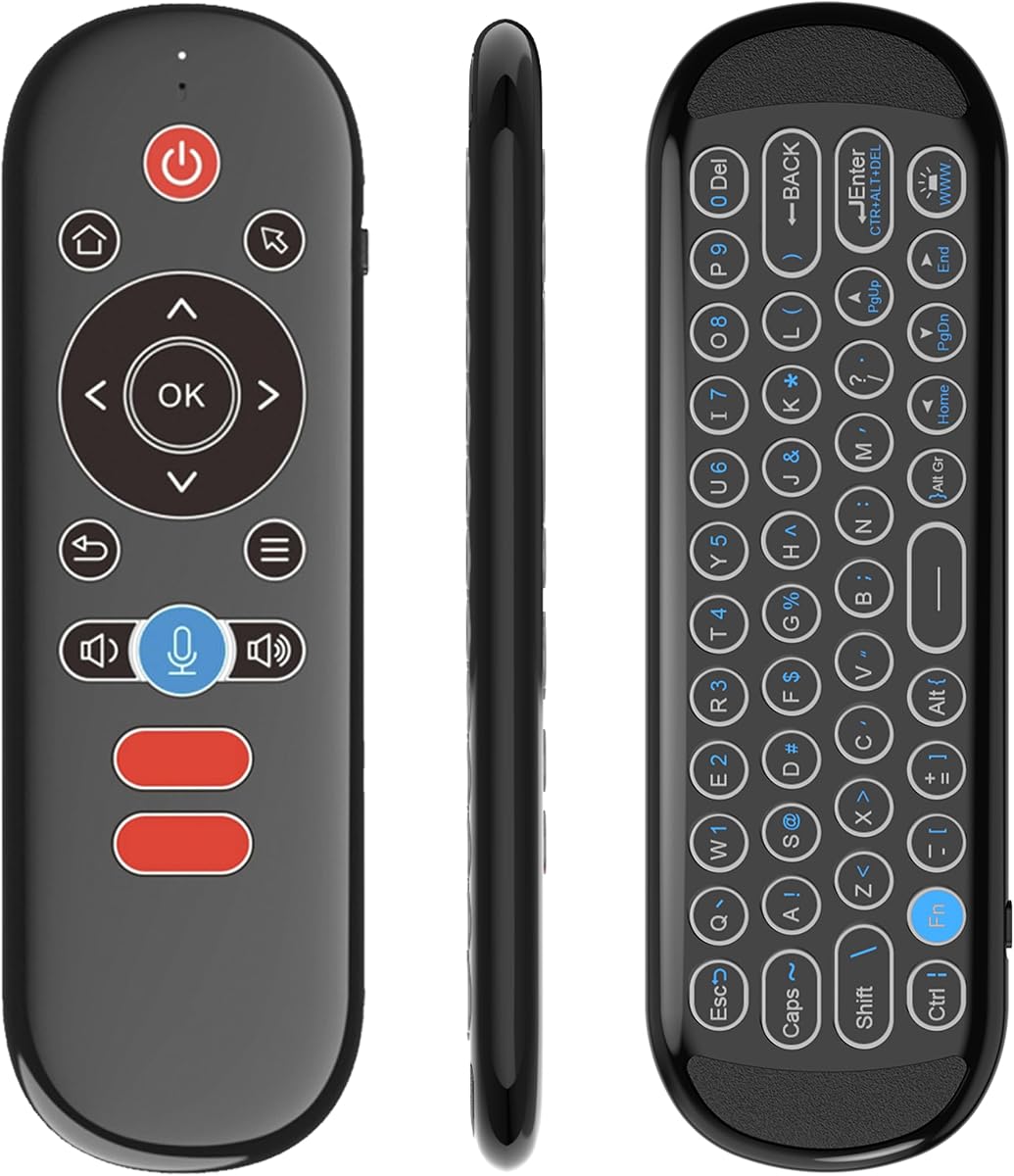
The Air Mouse Remote MX3 Pro is an excellent entry-level option for those who need basic air mouse functionality without a high price tag. It combines a remote and mini keyboard into one compact unit for convenience.
We may earn a commission when you buy through this link, at no additional cost to you.
Its mini keyboard on the back makes typing search queries significantly easier than using on-screen keyboards. The motion sensor allows for intuitive navigation which is especially helpful when sitting far from the television.
The build quality is functional but not premium which is expected at this price point. Some users may find the IR learning limited to only five keys which might not cover all TV functions.
This remote is perfect for budget-conscious shoppers who want to upgrade their TV control experience without breaking the bank. It delivers core features effectively making it a solid value for casual users.
The backside keyboard allows for quick text entry and makes searching content on your TV much faster than standard remotes.
The six-axis somatosensory sensor detects movement to control the cursor naturally without requiring a flat surface to operate.
We may earn a commission when you buy through this link, at no additional cost to you.
This dual mode air mouse distinguishes itself with premium features like a rechargeable battery and full IR learning capabilities. It is designed for users who want the most comprehensive control over their home entertainment ecosystem.
We may earn a commission when you buy through this link, at no additional cost to you.
The seven-color backlit keyboard ensures visibility in dark rooms which is ideal for movie watching sessions. The full IR learning allows it to replace multiple remotes entirely adding significant convenience to your living room setup.
The higher cost compared to basic models is justified by the added features and build quality. However users must remember to charge the device periodically which adds a maintenance step compared to battery operated remotes.
If you value convenience and advanced features this model offers the most complete experience available. It is a strong investment for anyone looking to streamline their media center control into a single premium device.
Unlike many remotes that only learn power this device can store all IR functions from your existing remotes for total control.
The dual-sided rechargeable battery reduces waste and eliminates the need to constantly replace disposable batteries.
We may earn a commission when you buy through this link, at no additional cost to you.
The EASYTONE Air Mouse Remote focuses on providing a robust voice input experience for users who prefer speaking to typing. It integrates well with various operating systems making it a versatile tool for mixed device environments.
We may earn a commission when you buy through this link, at no additional cost to you.
Its built-in high fidelity microphone captures voice commands clearly which is helpful for dictating text or searching content. The motion sensor ensures smooth navigation allowing you to point at the screen to control the cursor easily.
Voice search functionality is limited to built-in boxes which might be restrictive for some users. The remote itself has a basic design which may not appeal to those looking for extra features like backlights.
This option is suitable for users who prioritize voice commands and need a reliable remote across multiple platforms. It offers solid performance for its price point without unnecessary complications.
The integrated microphone ensures accurate voice detection making it easy to search content without typing long strings.
Compatibility with Windows Mac and Linux means you can use one remote for both entertainment and computing needs.
We may earn a commission when you buy through this link, at no additional cost to you.
The iPazzPort Mini Air Mouse combines a compact design with colorful backlights making it an attractive choice for modern setups. It pairs well with smart TVs and laptops offering dual functionality in a small package.
We may earn a commission when you buy through this link, at no additional cost to you.
The vibrant RGB backlight allows for easy typing even in a dark theater environment. Its rechargeable battery ensures you do not need to keep extra batteries on hand for the device.
Users may find the power button requires learning from another remote which adds a setup step. The IR learning capability is limited to basic functions which might not replace all your existing remotes fully.
This remote is ideal for travelers or those with limited space who still want full control capabilities. It offers a stylish and functional solution for managing smart devices efficiently.
Seven color options allow you to personalize your remote while ensuring keys are visible in low light conditions.
The compact design makes it easy to slip into a bag for travel ensuring you have control wherever you go.
We may earn a commission when you buy through this link, at no additional cost to you.
The Rii MX3 Fly Mouse is a versatile tool that doubles as a gaming controller thanks to its robust motion sensor. It is known for reliability and ease of setup for most Android and PC users.
We may earn a commission when you buy through this link, at no additional cost to you.
Its motion sensor allows for intuitive cursor movement which is essential for gaming and navigation. The wireless range is sufficient for sitting far from the screen ensuring you can control the device comfortably.
Some keys might not be applicable to every device which requires a bit of trial and error. Pairing can occasionally need a button press if the initial connection fails which is a minor inconvenience.
For gamers or those who need precise motion control this remote offers great value. It is a proven device that has maintained popularity due to its straightforward functionality.
The 3-Gyro and 3-Gsensor combination enables smooth motion control for games and navigation without extra hardware.
With a transmission distance up to 10 meters you can control your device from anywhere in the room easily.
We may earn a commission when you buy through this link, at no additional cost to you.
The MX3 Pro Backlit Mini is designed for users who frequently use their devices in low light conditions. The LED backlight makes typing and navigation significantly easier after the sun goes down.
We may earn a commission when you buy through this link, at no additional cost to you.
Its double-sided design allows for efficient text entry while the motion sensor handles cursor control seamlessly. The wide OS support ensures it works with most of your home entertainment devices without issues.
Battery reliance means you will need to keep spares on hand which can be a hassle for some users. Compatibility with major brands is strong but it does not work with all smart TV brands like Samsung or LG.
This remote is a solid choice for home theater setups where lighting is dim. It provides a comfortable typing experience and reliable control for your media center.
The integrated LED backlight ensures you can type accurately and find keys easily even in a dark room.
Works with Windows Linux Android and Mac OS allowing flexible use across multiple types of devices in your home.
We may earn a commission when you buy through this link, at no additional cost to you.
The G20S PRO BT is a specialized remote focused on Android systems with a clean and simple button layout. It emphasizes stability through gyroscope compensation to reduce jitter during use.
We may earn a commission when you buy through this link, at no additional cost to you.
Its single-sided design reduces confusion making it easier to find the right button quickly. The wear-resistant materials ensure the remote stays in good condition even with frequent handling.
Bluetooth pairing is restricted to Android systems which limits versatility for users with mixed devices. Lack of detailed user ratings means buyers should rely on specs and brand reputation when considering this model.
This remote is a great fit for Android users wanting a no-fuss control experience. It prioritizes core functionality and durability over extra features.
The gyroscope core compensation algorithm ensures precise cursor movement without shaking or tremors during navigation.
The button arrangement is designed for quick identification reducing the learning curve for new users immediately.
We may earn a commission when you buy through this link, at no additional cost to you.
The Rock&Rown MX3 Pro offers broad compatibility across different streaming devices and operating systems. It supports motion tracking and keyboard input making it a versatile tool for various home setups.
We may earn a commission when you buy through this link, at no additional cost to you.
Its key learning function allows you to control your TV power which is a convenient feature for simplifying your remote stack. The motion sensor ensures smooth cursor control which is helpful for browsing menus quickly.
The remote requires initial setup to learn the power key from your TV remote which adds a step before full functionality. The build is standard but effective for the price point provided.
This option is ideal for users with diverse device collections who need a single reliable controller. It balances features and compatibility effectively for general home entertainment needs.
Compatibility with Android Windows Linux and MacOS means this remote can work across different ecosystems easily.
The 3-Gyro and 3-Gsensor provide accurate cursor movement for intuitive control without using physical keys.
We may earn a commission when you buy through this link, at no additional cost to you.
Selecting the right air mouse involves understanding connectivity options motion tracking and additional features like keyboards or voice control.
Most air mice use 2.4G RF or Bluetooth. RF is more stable and works well with devices that do not have native Bluetooth. Bluetooth allows direct connection but might require pairing and specific driver support.
Consider which connection works best with your TV box and whether you want the convenience of a receiver or a direct link.
A six-axis gyroscope or accelerometer ensures smooth cursor movement. Poor sensors can cause jitter making navigation frustrating. Look for reviews mentioning precision if you plan to use it for detailed tasks.
High quality motion sensors make the air mouse feel like a natural extension of your hand.
If you often type search queries a remote with a mini keyboard saves time. Check if the keyboard is backlit if you use the device in dim rooms. Full QWERTY layouts are better than numeric pads for general typing.
Ensure the keyboard fits in your hand comfortably and that keys are easy to press without accidental hits.
IR learning lets you control other devices like soundbars or TVs with one remote. Some models allow all buttons to be learned while others limit this to a few keys. Check which keys are programmable.
This feature is essential if you want to reduce clutter by replacing multiple remotes with a single unit.
Voice search can make finding content faster. Verify if the microphone works with your specific Android version or apps. Some remotes only support voice in specific modes or on certain devices.
Good voice integration enhances the user experience by reducing the need for typing.
Remotes come with battery or rechargeable options. Rechargeable models save money long term but require charging. Battery operated ones are convenient but create waste and recurring costs.
Choose a power source that fits your routine and budget preferences comfortably.
Not all air mice work with every device. Some may not support Fire TV or Apple TV. Always check the manufacturer list for supported platforms to avoid issues.
Ensuring compatibility with your specific TV box is the most critical step before purchasing.
The physical feel of the remote matters for daily use. Look for durable materials and ergonomic shapes that fit your hand. Buttons should have tactile feedback for accurate presses.
A well-built remote will last longer and provide a better user experience over time.
Plug the USB receiver into your Android TV box or PC to start using the remote immediately. If it supports Bluetooth navigate to your device settings to pair it manually.
Hold the remote gently and use wrist movements to move the cursor on the screen. For typing use the keyboard buttons or voice commands as needed for efficiency.
Store the remote in a dry place and avoid dropping it to maintain sensor accuracy. Clean keys with a soft cloth and keep the battery compartment free of dust.
Most modern air mice are plug and play and work without drivers. However some specific models or PC modes may require software updates to ensure full compatibility with your system.
Yes most air mice work with Android smart TVs and streaming boxes. Just ensure your TV has a USB port for the receiver or Bluetooth support for direct connection.
Hold the remote close to the TV remote and press the key you want to learn followed by the button on the air mouse. Follow the specific steps in the manual for successful learning.
Cursor jitter can be caused by interference or a weak sensor. Try moving the receiver closer or replacing batteries. Ensure you are using the correct mode for your device.
Voice search works best on supported apps and devices. It may not function across all platforms so check compatibility details before relying on it for daily use.
Many air mice support Windows and macOS. You might need to switch the firmware mode to PC mode for full functionality depending on the model specifications.
We highlighted the top models offering a range of features from basic control to advanced voice and IR capabilities. Each pick caters to different needs and budget levels for streaming users.
Prioritize connectivity and sensor quality to ensure smooth performance. Look for extra features like keyboards or rechargeable power if they align with your daily usage habits.
Always check current prices and availability before buying as these details change frequently. Choosing the right remote can significantly enhance your home entertainment experience.