
ASUS ROG Raikiri II Pro PC Controller
4.0Editor score
Competition-level 8K Sampling Rate
Hot-swappable TMR Joysticks
Full Color Display
This guide compares the top ASUS ROG Ally Controller options for gaming, focusing on connectivity, customization, and performance to help you choose the right
Finding the right controller for your gaming setup is crucial for immersive play. The ASUS ROG Ally Controller options offer unique features designed to enhance your experience across various platforms including PC and handheld devices.
We have carefully evaluated ten top models based on connectivity, build quality, and customization capabilities. Each product brings distinct advantages whether you need low latency wireless or extensive programmable options for competitive gaming scenarios.
Each pick below highlights specific strengths and ideal use cases to guide your decision. Please note that availability and details may shift over time so always verify current specifications before making your final purchase choice today.
4.0Editor score

3.9Editor score

3.9Editor score
Explore the detailed side-by-side comparison of all ten controllers listed in this guide. Each entry highlights core specifications and unique attributes to help you distinguish between similar models effectively.


This controller stands out as a top choice for gamers needing flexibility across PC and Xbox platforms. With a solid 3.9 rating it offers reliable performance supported by advanced TMR technology and robust build quality ensuring consistent play over time.
We may earn a commission when you buy through this link, at no additional cost to you.
Its versatile tri-mode connectivity allows seamless switching between wired USB-C, Bluetooth, and low-latency 2.4GHz RF. The anti-drift TMR joysticks provide precision without excessive power consumption. Four rear buttons and dual-mode triggers enhance customization for competitive play scenarios.
While the price is high the included accessories like the protective case and charging stand justify the investment. The enhanced grip ensures comfort during extended sessions. Users should expect to use Armoury Crate for full customization which may add initial setup complexity.
This controller is ideal for serious gamers who demand reliability and low latency. It balances premium features with practical design making it a strong candidate for those upgrading their setup. We recommend it for users prioritizing long-term performance and versatile connectivity options today.
The TMR joysticks reduce drift while consuming less power than traditional Hall Effect units ensuring precise control during intense gaming sessions.
Switch seamlessly between micro-switch triggers for short travel and TMR sensor triggers for full travel allowing tailored responses per game.
We may earn a commission when you buy through this link, at no additional cost to you.
The ASUS ROG Raikiri II Pro delivers premium performance with an 8K sampling rate for ultra responsive control. Its high 4.0 rating reflects user satisfaction with its advanced features designed for competitive and enthusiast gamers seeking top-tier hardware solutions.
We may earn a commission when you buy through this link, at no additional cost to you.
Features include hot-swappable TMR joysticks and a full color display for profile management. The battery lasts up to 79 hours on a single charge ensuring long play. Additional customizable buttons and dual-mode triggers allow precise control adjustments tailored to specific game needs.
The cost is significant but justified for those needing competition-level speed. The complexity may overwhelm casual users who prefer simpler setups. Setup requires familiarity with Armoury Crate software to unlock full potential and advanced configuration features effectively.
Buyers seeking the absolute best in latency and customization will find this controller valuable. It is built for professionals or serious hobbyists willing to invest in superior hardware. Consider this if you need maximum performance and extensive control options for high-level play.
ROG SpeedNova technology delivers an 8K sampling rate ensuring extremely responsive control and low latency for improved gaming performance across all modes.
Interchangeable joystick modules allow you to swap components easily providing flexibility and longer controller life with reduced maintenance efforts.
We may earn a commission when you buy through this link, at no additional cost to you.
This model offers excellent value with a built-in OLED display for unique animations and profile switching. It holds a 3.9 rating showing consistent performance and satisfaction among users seeking a mix of visual flair and functional gaming control capabilities.
We may earn a commission when you buy through this link, at no additional cost to you.
Its tri-mode connectivity supports wired and wireless options for flexible use. Four rear buttons and selectable step triggers enhance in-game command execution. The ESS DAC ensures immersive audio quality making it a strong choice for gamers valuing sound precision and customization options.
The price point is competitive for the included features. Some users find the reliance on Armoury Crate for adjustments slightly limiting. The display adds visual appeal but drains battery slightly which should be factored into extended usage expectations and planning for travel.
This controller is great for users wanting premium features without the highest price tag. It suits both casual and semi-competitive play well. We recommend it for those seeking a balanced controller with unique visual elements and robust connectivity today.
The OLED display lets you create unique looks and view status indicators enhancing both function and style during gaming sessions.
Built-in ESS DAC delivers immersive audio ensuring clear sound during play without needing external headphones for every session.
We may earn a commission when you buy through this link, at no additional cost to you.
The Tessen is a specialized controller for Android gamers seeking console-grade experience. With a 4.1 rating it delivers high satisfaction with its compact foldable design and precise control options tailored for mobile titles and immersive gameplay.
We may earn a commission when you buy through this link, at no additional cost to you.
It features aluminum rear paddles and console-grade sticks for accuracy. A 500Hz polling rate ensures responsiveness and 18W pass-through charging allows uninterrupted power during sessions. Ergonomic handles provide comfort for extended mobile play without hand fatigue or grip issues.
Limitations include Android exclusivity and wired USB-C dependency. This restricts wireless freedom and platform versatility for broader use cases. Users with mixed ecosystems may find this less suitable but dedicated mobile gamers will appreciate its focused functionality and design approach.
This controller is perfect for Android mobile gaming enthusiasts who value precision and portability. It transforms phone gaming into a more tactile experience. We recommend it for users seeking high-quality mobile controls for popular titles on Android devices today.
Easily folds for pocket-sized portability and securely holds your phone in landscape orientation safeguarding the USB-C connector during use.
Experience lightning-fast responsiveness with a 500Hz polling rate via wired USB-C ensuring seamless gameplay without lag interruptions.
We may earn a commission when you buy through this link, at no additional cost to you.
This controller offers OLED display features and versatile connectivity options. While it has a 3.4 rating indicating mixed experiences it provides solid core functions for users needing basic customization and profile switching without major complications or overhead in setup.
We may earn a commission when you buy through this link, at no additional cost to you.
It supports wired USB-C, Bluetooth, and 2.4GHz RF for wide compatibility. Intuitive rear controls and selectable step triggers enhance gameplay flexibility. The 48-hour battery life supports long sessions ensuring extended play without constant recharging interruptions during normal daily usage cycles.
Some users report occasional connectivity inconsistencies or software glitches. The price may not justify these issues for all buyers. It remains a viable option for those prioritizing the OLED feature and acceptable performance despite some noted drawbacks or stability concerns in testing.
This controller suits gamers wanting OLED visuals and standard customization at a moderate cost. It works well for general PC or Xbox use. We recommend it for users who value visual customization over flawless connectivity or advanced performance features primarily.
Create a unique look with customizable animations view status indicators and switch profiles on the fly using the OLED screen.
Left and right triggers can be set to short or full-range modes with customizable dead zones in Armoury Crate software.
We may earn a commission when you buy through this link, at no additional cost to you.
This renewed version provides access to OLED features at a lower price point. Although no rating is available the refurbishing process ensures functionality testing and inspection for reliable operation matching original design specs closely for consistent performance standards.
We may earn a commission when you buy through this link, at no additional cost to you.
It includes all key features like tri-mode connectivity, rear controls, and premium audio. The 90-day warranty adds security for buyers seeking refurbished units. This option appeals to budget-conscious gamers needing OLED capabilities without paying full retail price for new hardware.
Refurbished products may show minimal wear and carry limited visual inspection guarantees. Some users prefer brand new items for longevity. However certified renewals often offer similar value with reduced cost for those willing to accept minor cosmetic imperfections or previous usage history.
Consider this if you want OLED functionality with cost savings. It suits gamers prioritizing budget over pristine condition or warranty length. We recommend it for users comfortable with refurbished electronics seeking essential features without high upfront expenses today.
This Renewed product is tested and certified to look and work like new with limited to no signs of wear upon delivery.
The product comes with 90-day warranty providing peace of mind and support for any functional issues that may arise.
We may earn a commission when you buy through this link, at no additional cost to you.
While not a standalone controller this handheld includes integrated controls ideal for Xbox gaming. Its 4.3 rating reflects strong user satisfaction with its powerful hardware and seamless software integration delivering an immersive console-like experience anywhere.
We may earn a commission when you buy through this link, at no additional cost to you.
It features a 120Hz touchscreen and Ryzen Z2 A processor for smooth play. The Xbox Game Pass integration offers direct access to hundreds of games. The ergonomic chassis and fast charging ensure comfort and extended sessions without frequent recharging interruptions during travel.
The device is pricey and not a replaceable controller accessory. It serves as a dedicated gaming console rather than an add-on. Users wanting a separate controller for PC or Xbox consoles should look elsewhere but this offers a complete solution for handheld enthusiasts.
This is best for those seeking a portable PC and Xbox gaming solution. It excels in performance and display quality. We recommend it for gamers wanting an all-in-one handheld experience with full Xbox ecosystem access today.
Boot straight into the Xbox experience just like a console with Xbox Game Bar integration for native title launches.
The 120Hz display with FreeSync Premium ensures smooth motion and zero tearing across fast-paced battles and exploration.
We may earn a commission when you buy through this link, at no additional cost to you.
This renewed version offers TMR joystick technology and long battery life at a lower cost. While no rating is listed certified refurbishment provides tested functionality ensuring basic performance standards are met for standard gaming without major hardware failures or issues.
We may earn a commission when you buy through this link, at no additional cost to you.
It supports 2.4GHz, Bluetooth, and USB-C connectivity for flexibility. Web-based configuration simplifies setup without heavy software dependency. The travel case ensures protection during transport. This option appeals to budget-conscious users needing core features and mobility.
As a renewed product it may have cosmetic imperfections. Warranty terms vary compared to new items. Buyers should verify refurbisher credibility. Despite this it remains a viable alternative for those prioritizing cost savings and essential features without full retail expense today.
Consider this if you want TMR technology on a budget. It suits casual gamers needing reliable wireless performance. We recommend it for users comfortable with refurbished hardware seeking essential controller functions without higher price tags today.
Enjoy up to 50 hours of play on a single charge supporting extended gaming sessions without needing frequent recharging interruptions.
Configure your controller easily via web-based tools simplifying setup without requiring heavy software installations or system changes.
We may earn a commission when you buy through this link, at no additional cost to you.
The NEO S offers collectible aesthetics with Hall Effect thumbsticks preventing drift. With a 4.3 rating users appreciate its reliability and cross-platform support for diverse gaming setups without requiring complex setup or proprietary software installations.
We may earn a commission when you buy through this link, at no additional cost to you.
It supports Nintendo Switch, PC, and mobile devices seamlessly. Rear buttons and adjustable trigger sensitivity allow quick customization. The design includes swappable stick tops and unique rarity ranks enhancing appeal. This is ideal for fans wanting style and standard performance features.
As a third-party option it lacks deep proprietary software compared to ASUS models. Trigger fine-tuning is manual via physical settings. However the broad compatibility and Hall Effect sensors ensure precision making it a strong alternative for users prioritizing style and platform flexibility.
This controller suits gamers valuing collectible design and reliable Hall Effect tech. It fits well with Switch or mobile use. We recommend it for those wanting a stylish controller with solid build quality and cross-platform versatility.
Hall Effect sensor thumbsticks mean no stick drift while guaranteeing precise and responsive control during extended use sessions.
Hall Effect sensor triggers allow you to fine tune the actuation point of your triggers to achieve your perfect feel.
We may earn a commission when you buy through this link, at no additional cost to you.
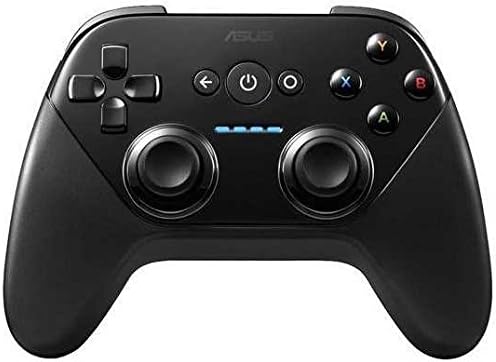
The TV500BG is a reliable wireless controller designed for Android TV and basic PC gaming. With a 4.2 rating it offers steady performance for users seeking simple control without complex modern features or advanced connectivity options for their home TV setup.
We may earn a commission when you buy through this link, at no additional cost to you.
It supports Android Lollipop and Windows systems ensuring broad legacy compatibility. Progress tracking via Google Play Games keeps achievements synced. The design prioritizes comfort for casual TV gaming without requiring advanced customization or high-frequency polling for modern mobile titles.
Advanced gaming options like OLED or programmable buttons are absent. This model fits casual users needing a basic controller for older systems or simple TV titles. It remains useful for those prioritizing functionality over cutting-edge technology or visual enhancements today.
This controller is best for casual Android TV gamers needing simplicity. It provides steady wireless connectivity without setup complexity. We recommend it for users seeking a cost-effective controller for legacy or straightforward gaming needs.
Engineered for accurate control in Android TV and PC games ensuring stunning life-like 3D visuals for your HDTV experience.
Track your progress and earn achievements across your Android phone tablet and TV with Google Play Games integration.
We may earn a commission when you buy through this link, at no additional cost to you.
Selecting the right controller depends on your platform and specific gaming needs. This section outlines critical factors to consider when evaluating options in this category.
Connectivity determines how smoothly the controller connects to your devices. Look for tri-mode setups combining Bluetooth, 2.4GHz RF, and wired USB-C. Wired connections offer zero latency for competitive play while wireless modes provide freedom. Ensure compatibility with your PC or handheld device.
Choose wired for competitive gaming and wireless for convenience. Verify Bluetooth or USB-C support to avoid connection issues.
Joystick technology impacts precision and longevity. TMR joysticks are common in ROG controllers offering anti-drift and low power use. Hall Effect sensors also prevent drift. Evaluate sensor type to ensure accurate analog movement without wear over time.
Prioritize TMR or Hall Effect sensors for longevity and precise control in demanding games.
Programmable buttons enable faster execution of commands. Rear paddles allow extra inputs without moving thumbs. Dual-mode triggers add versatility for different games. Consider how many buttons you need and if customization software is user-friendly.
Opt for models with rear buttons and customizable triggers for enhanced control in complex games.
OLED displays provide profile switching and visual customization. These features enhance personalization but use battery. Decide if visual customization outweighs battery concerns. A display helps identify modes quickly during active play sessions.
Consider OLED displays for style and quick access to profiles if battery life is secondary.
Battery life affects session length without recharging. Models range from 30 to 79 hours. Higher polling rates or displays may drain power faster. Ensure the battery capacity suits your typical play duration to minimize interruptions.
Check battery specs to match your typical session lengths and recharge schedules.
Ensure the controller supports your main platforms. Some work exclusively with Android or Xbox. Check for PC support and Xbox certification. Cross-platform controllers offer more flexibility for varied gaming environments.
Confirm your controller supports PC Xbox and mobile if needed for versatility.
Build quality ensures durability and comfort. Look for ergonomic handles and anti-slip grips. Durable materials withstand intensive use. A comfortable grip reduces fatigue during long sessions ensuring sustained performance.
Choose models with ergonomic handles and premium materials for long-term comfort.
Software allows deep customization of controls and settings. Armoury Crate is common in ASUS products. Ensure the software is user-friendly and supports your OS. Good software enhances the hardware capabilities significantly.
Prioritize controllers with robust software support for full customization potential.
Connect your controller via USB-C or pair via Bluetooth for wireless play. For low latency use 2.4GHz RF mode if available. Install Armoury Crate software on PC to access advanced settings. Follow on-screen pairing instructions for your device.
Calibrate joysticks and set trigger modes according to your game. Use the rear buttons for custom commands. Adjust lighting to save battery or enhance visibility. Ensure the device is fully charged before extended sessions.
Keep the controller clean using a soft cloth. Store it in a protective case when not in use. Avoid exposing it to moisture or extreme temperatures. Regularly update firmware via software for optimal performance.
The ASUS ROG Raikiri II Pro PC Controller provides the longest battery life at up to 79 hours of wireless play on a single charge. This makes it ideal for extended gaming sessions without needing frequent recharging interruptions.
Yes many models like the ROG Raikiri II and Pro are certified for Xbox via USB-C and 2.4GHz RF. Verify specific model compatibility with your Xbox console before purchasing for seamless integration.
TMR stands for Tunneling MagnetoResistance joysticks which provide precise control with anti-drift performance. They consume less power than Hall Effect units ensuring durability and accuracy over extended usage periods.
Most ROG controllers support Android phones via Bluetooth or wired USB-C. The Tessen is designed specifically for Android mobile use with a foldable design. Check compatibility for specific mobile games and screen sizes before buying.
You can program rear buttons using Armoury Crate software on PC. Assign specific in-game commands or profile switches to these buttons for faster access during gameplay. Ensure the software is installed and updated for best results.
The OLED display offers unique visual customization and quick profile switching enhancing user experience. It is valuable for those wanting style and convenience. If battery life and budget are priorities standard models may suffice without display features.
The ASUS ROG lineup offers controllers tailored for diverse gaming needs from premium 8K speeds to versatile mobile options. The Raikiri II series stands out for reliability and customization while mobile-focused models like the Tessen deliver portability.
Prioritize connectivity joystick tech and battery life based on your platform. Competitive players should seek low latency modes and anti-drift sensors. Casual gamers may prefer style and ease of use with OLED displays.
Always verify current specifications and availability as features evolve over time. Choosing the right controller enhances your gaming experience ensuring comfort and precision for every session.