
ASUS Vivobook Go 15
4.3Editor score
AMD Ryzen 3 Processor
8GB RAM 128GB SSD
Fast Charging Support
Finding the right laptop can be challenging with so many options available today. The ASUS Vivobook series offers a wide range of devices suitable for students, professionals, and casual users alike. Each model brings unique features designed to enhance productivity and entertainment experiences without breaking the bank.
We have carefully selected and analyzed ten distinct Vivobook models to provide you with a comprehensive overview. Our comparison looks at processor power, memory capacity, storage options, display quality, and overall build durability. This ensures you can make an informed decision based on your specific computing needs and budget constraints.
Each pick in this list highlights key strengths and potential limitations to give you a clear picture. You will see detailed breakdowns of what makes each laptop stand out in its category. Please note that availability and pricing can change frequently, so checking current listings is always recommended before purchase.
4.3Editor score

4.5Editor score

4.2Editor score
As an Amazon Associate we earn from qualifying purchases.
The following table provides a side-by-side comparison of all ten selected Vivobook models. It highlights core specifications such as processor type, memory amount, storage capacity, and screen size to help you quickly identify the best fit for your requirements.


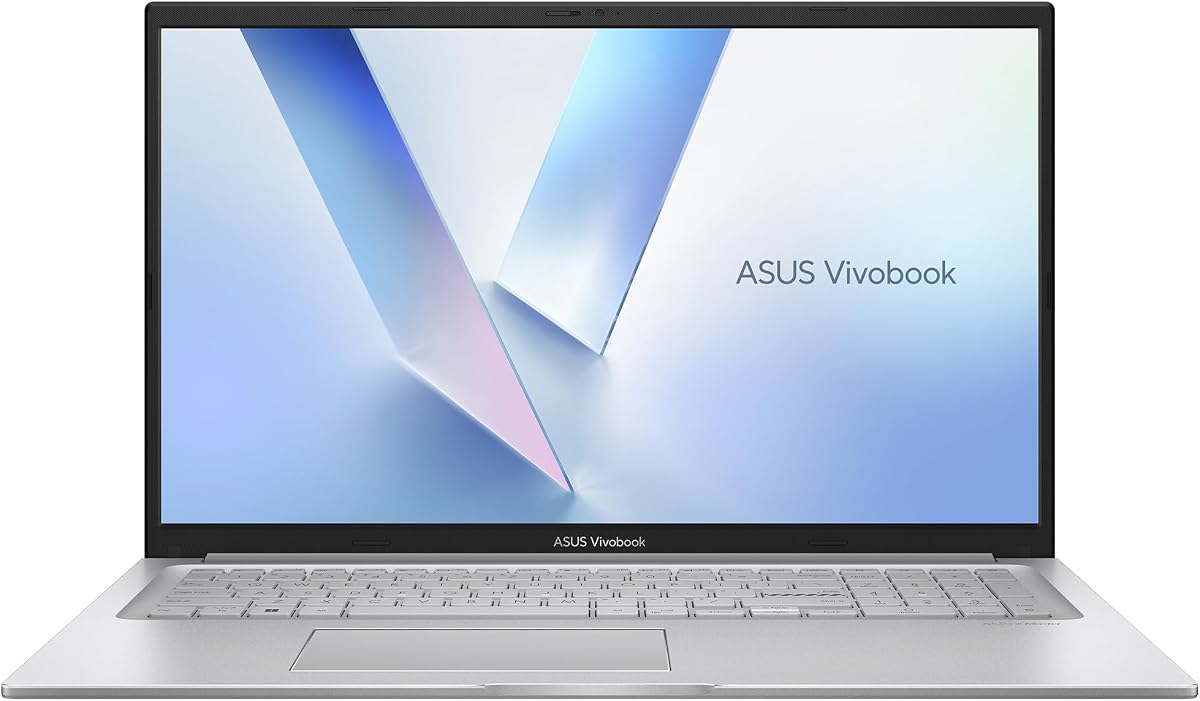




This ASUS Vivobook 15 model stands out as a top choice for users demanding high performance. With an Intel Core i9-13900H processor and 32GB of RAM, it handles complex tasks with ease. The inclusion of Next Gen AI readiness makes it future-proof for evolving software requirements.
We may earn a commission when you buy through this link, at no additional cost to you.
The thermal management system is particularly noteworthy, addressing common overheating issues in high-performance laptops. It includes a dedicated PCO Cooler in the bundle to maintain peak frequencies. This ensures sustained performance during intensive workloads like video editing or data simulation.
Security and connectivity are well-covered with a fingerprint reader and extensive I/O options. Users benefit from USB-C, multiple USB-A ports, and HDMI for external displays. The physical webcam shield adds an extra layer of privacy without relying on software toggles.
This laptop is ideal for professionals and power users who need reliability and speed. It bridges the gap between consumer and workstation-class performance. Consider this if you prioritize raw computing power and extensive multitasking capabilities.
The Intel Core i9 is optimized for Next Gen AI workloads, ensuring smooth operation with modern creative and analytical software that leverages neural processing.
An exclusive PCO Cooler bundle helps prevent thermal throttling, allowing the processor to maintain high clock speeds during long sessions of demanding tasks.
We may earn a commission when you buy through this link, at no additional cost to you.
The Vivobook 16 features the Qualcomm Snapdragon X processor, marking a shift towards AI-centric computing. This chipset includes a Hexagon NPU capable of up to 45 TOPS. It is designed to handle AI applications efficiently while conserving battery power.
We may earn a commission when you buy through this link, at no additional cost to you.
Display quality is excellent with a 16-inch WUXGA panel offering 1920 x 1200 resolution. The 16:10 aspect ratio provides more vertical space for productivity tasks like document editing and web browsing. Colors are vibrant with 300-nit brightness for indoor use.
The integrated Adreno GPU offers improved performance over previous generations but remains focused on efficiency. It supports smooth visuals for media consumption and light productivity work. Multitasking is supported by 16GB of memory and a fast 512GB SSD.
Choose this model if you value battery life and AI features over raw gaming performance. It suits mobile professionals who need a responsive system that lasts all day. The architecture may require checking software compatibility for specialized legacy applications.
The Hexagon NPU provides unparalleled power efficiency for AI tasks, evolving how users create and communicate with seamless connectivity.
The 16:10 WUXGA display offers 1200 pixels vertically, giving users more room for multitasking without needing external monitors.
We may earn a commission when you buy through this link, at no additional cost to you.
This Vivobook model balances performance and portability effectively for everyday users. The Intel Core i7-1355U processor delivers strong computing power for multitasking and productivity apps. It is designed to be lightweight, making it easy to carry between home and office.
We may earn a commission when you buy through this link, at no additional cost to you.
The 16-inch WUXGA display ensures sharp visuals with vibrant colors. This screen size offers a good compromise between portability and workspace. Combined with Intel Iris Xe graphics, it handles media streaming and light graphic work smoothly.
Connectivity is robust with Wi-Fi 6 and Bluetooth 5.1 ensuring fast wireless speeds. The port selection includes USB-C, USB-A, HDMI, and a microSD reader. This variety reduces the need for dongles when connecting peripherals or external screens.
It is a solid choice for students and office workers needing reliable daily computing. The machine runs Windows 11 securely and efficiently. If you need a dependable notebook for general tasks without excessive weight, this is a strong contender.
The 16-inch WUXGA display provides 1920 x 1200 resolution for crisp text and images, enhancing both work and entertainment experiences.
Built-in Wi-Fi 6 and Bluetooth 5.1 ensure you stay connected with fast wireless performance for file transfers and streaming.
We may earn a commission when you buy through this link, at no additional cost to you.
The Vivobook 17 prioritizes screen real estate with a spacious 17.3-inch display. This is excellent for users who prefer a desktop-like experience on a laptop. The Intel Core 7 150U processor handles everyday tasks reliably without unnecessary bulk in specs.
We may earn a commission when you buy through this link, at no additional cost to you.
Build quality is reinforced with US MIL-STD 810H military-grade durability. This means the chassis can withstand daily wear and tear better than standard laptops. The ErgoSense keyboard includes a numeric keypad, aiding data entry tasks significantly.
Battery charging is efficient, capable of reaching 60 percent in about 49 minutes. This feature minimizes downtime when you are on the move. The display also has TÜV Rheinland certification to reduce eye strain during long work sessions.
This model is best for users who prioritize screen size and durability over portability. It fits well in home offices or fixed workstations where carrying weight is less of a concern. Consider it if you often enter numbers or watch movies regularly.
The built-in numeric keys on the ErgoSense keyboard streamline data entry, making this a strong choice for accounting or spreadsheet-heavy tasks.
Meeting US MIL-STD 810H standards ensures the laptop is built to survive bumps and drops, offering confidence for rugged daily use.
We may earn a commission when you buy through this link, at no additional cost to you.
The Vivobook Go 15 delivers incredible performance for its price bracket. The AMD Ryzen 5 7520U processor provides a smooth experience for web browsing and light editing. It is designed to be ultrafast with a 512GB SSD for quick boot times.
We may earn a commission when you buy through this link, at no additional cost to you.
Fast charging technology allows the battery to recharge to 50 percent in just 30 minutes. This ensures you are rarely tethered to an outlet for long periods. The device also features AI noise-canceling technology for clear video call audio.
Durability is maintained with US military-grade standards and IceCool thermal technology. This keeps the laptop cool during operation and extends its lifespan. The 15.6-inch FHD display offers a good balance of size and clarity for general use.
This laptop is perfect for students or home users who need a reliable machine on a budget. It handles everyday computing tasks efficiently without unnecessary costs. If you need a fast-charging, sturdy device for daily web and media use, this is ideal.
The fast-charge technology allows you to gain significant battery life quickly, ensuring you can return to work or study without long waiting periods.
Built-in AI noise-canceling technology isolates background noise, ensuring your voice is clear during online meetings and calls.
We may earn a commission when you buy through this link, at no additional cost to you.
This Vivobook model serves as an entry-level option with essential features. It uses a Ryzen 3 processor and DDR5 memory for efficient daily tasks. The 128GB SSD provides fast boot speeds though users might need external storage for large files.
We may earn a commission when you buy through this link, at no additional cost to you.
Physical privacy is addressed with a webcam privacy shutter included on the device. The hinge allows for 180 degree laying flat, useful for sharing the screen easily. Military-grade durability ensures the chassis resists rough handling better than standard plastic builds.
Connectivity includes USB-C, USB-A, and HDMI ports for basic peripheral support. The slim NanoEdge display maximizes screen space within a compact footprint. It runs Windows 11 Home securely for personal computing needs.
Select this laptop for basic tasks like browsing, writing documents, and video streaming. It is well-suited for those with strict budget constraints. Just ensure you plan for storage limitations if you manage many media files locally.
The inclusion of DDR5 RAM ensures smoother application switching and better power efficiency compared to older memory technologies.
A 180 degree hinge allows you to lay the display flat, making it easier to share content with someone sitting next to you.
We may earn a commission when you buy through this link, at no additional cost to you.
This variant offers significant customization for RAM and storage to meet diverse needs. You can choose up to 48GB of RAM and 2TB of SSD storage. This flexibility makes it adaptable for various professional workflows requiring high data capacity.
We may earn a commission when you buy through this link, at no additional cost to you.
The processor is the same high-end Intel Core i9 found in other premium models. It delivers elite-level performance for simulations and complex software. Security features include a fingerprint reader and a physical webcam shield for privacy.
Connectivity is comprehensive with USB-C, USB-A, and HDMI ports to avoid dongles. The backlit keyboard includes numeric keys for easier data entry. It runs Windows 11 Pro, offering business features like BitLocker encryption and domain join.
Ideal for power users who need specific hardware configurations for their work. If you require massive RAM for virtualization or storage for media assets, this model fits well. Verify warranty terms for upgrades before finalizing your order.
Windows 11 Pro comes pre-installed, providing advanced security and management tools for business and professional use.
Custom RAM and SSD options allow you to scale the machine to your exact requirements without needing immediate upgrades.
We may earn a commission when you buy through this link, at no additional cost to you.
This compact 14-inch laptop pairs a modest processor with ample RAM. The 24GB high-bandwidth RAM allows smooth multitasking despite the i3 CPU. It is suitable for users who keep many browser tabs or applications open simultaneously.
We may earn a commission when you buy through this link, at no additional cost to you.
Storage is generous with a 1TB PCIe NVMe SSD for fast data access. The 14-inch FHD display offers a good balance between portability and viewing area. It connects to external monitors via HDMI for expanded workspace.
Build quality includes standard Vivobook reliability with a sturdy chassis. The Windows 11 Home OS provides a modern and consistent user interface. It is an excellent device for students who need storage for projects and general schoolwork.
Choose this if you value storage capacity and multitasking over raw processing speed. It is a practical machine for everyday tasks where you need space for files. Keep in mind that heavy video editing may be slower due to the CPU.
With 24GB of RAM, you can run multiple applications and browser tabs simultaneously without experiencing slowdowns or lag.
The 1TB SSD provides plenty of room for documents, media, and applications, reducing the need for external hard drives.
We may earn a commission when you buy through this link, at no additional cost to you.
This Vivobook features the Snapdragon X processor making it a Copilot+ PC. This status unlocks advanced AI features and efficient computing. It includes 16GB RAM and a 512GB SSD for smooth daily operations.
We may earn a commission when you buy through this link, at no additional cost to you.
The 14-inch FHD+ screen offers crisp visuals suitable for work and entertainment. The chassis is lightweight and designed for high mobility. It provides a unique experience with integrated AI tools for creative tasks.
Windows 11 Home comes pre-installed with the latest security features. The battery life is typically strong due to the efficiency of the chip. It suits users interested in next-gen software capabilities and portable computing.
Consider this model if you want to experience the latest AI tools on a laptop. It is an excellent choice for creative professionals who value efficiency. Ensure your specific apps support ARM architecture before purchasing.
As a Copilot+ PC, this device transforms how you create and communicate using advanced AI processing built directly into the hardware.
The 14-inch chassis keeps the device light and easy to carry, making it ideal for travel and daily commuting.
We may earn a commission when you buy through this link, at no additional cost to you.
This premium model features the AMD Ryzen AI 7 processor with XDNA NPU. It delivers up to 50 TOPS of AI performance for generative tasks. The display is a stunning 14-inch WUXGA panel with 300-nit brightness.
We may earn a commission when you buy through this link, at no additional cost to you.
It includes a 3-month Game Pass subscription for access to various PC games. The backlit keyboard ensures comfortable typing in dim environments. FastCharge technology allows full battery charge in about 1 hour 20 mins.
Connectivity includes Wi-Fi 6 and Bluetooth 5.3 for stable device connections. The AI features like Live Captions and Recall enhance productivity. This is a strong contender for users wanting high-end specs in a thin chassis.
Select this if you want a premium build with the latest AMD AI technology. It is suitable for gamers and creators who need AI efficiency. Check the recall feature status for your language before relying on it for work.
The AMD Ryzen AI 7 processor includes dedicated accelerators for AI workloads, maximizing performance for creative and analytical tasks.
A 3-month subscription to PC Game Pass lets you access a library of games, adding value to your entertainment experience.
We may earn a commission when you buy through this link, at no additional cost to you.
Choosing the right Vivobook requires understanding your specific needs regarding performance and portability. This section covers the key factors you should evaluate to find the perfect match for your workflow.
The processor is the brain of your laptop and determines how quickly it handles tasks. Vivobook models range from Intel Core i3 to powerful i9 chips. For general office work an i3 or i5 is sufficient but complex video editing demands an i7 or i9.
Choose a processor that matches your workload intensity to ensure smooth operation.
RAM controls how many applications you can run at once without slowdowns. Look for at least 16GB for future-proofing but 8GB works for light use. Storage should ideally be an SSD with 512GB minimum for adequate file space.
Prioritize 16GB RAM and 512GB SSD for balanced long-term performance.
The screen is where you spend most of your time. Vivobook screens come in FHD and WUXGA resolutions with varying aspect ratios. A higher resolution means sharper text and more vertical space for multitasking.
Opt for WUXGA displays if you often work with spreadsheets or code.
Larger screens like 17 inches offer more workspace but add weight and bulk. Smaller 14 inch models are easier to carry for travel. Consider how often you will move the laptop before deciding on screen size.
Select 14 or 15 inch sizes for high mobility and 16+ for stationary use.
Ensure the laptop has enough ports for your needs. USB-C is essential for modern charging and data. HDMI allows external monitor connection while SD card readers help photographers.
Check for USB-C and HDMI ports to avoid carrying extra dongles daily.
Battery duration varies by processor efficiency and screen size. ARM-based chips like Snapdragon often offer longer life than Intel. Look for models with fast charging support to minimize downtime.
Prioritize models with fast charging if you frequently work away from outlets.
Some Vivobook models feature military-grade durability to resist damage. This is crucial if you travel often or use the laptop in varied environments. A sturdy hinge and durable chassis extend the lifespan of the device.
Look for MIL-STD certification if you need rugged daily reliability.
Most come with Windows 11 Home but Pro versions offer more security features. AI capabilities and Copilot support are becoming standard on newer chips. Verify software compatibility especially with ARM-based processors.
Ensure your software suite supports ARM architecture if choosing Snapdragon models.
Start by connecting the charger to the laptop and wall outlet to ensure initial setup stability. Allow Windows to complete all updates before installing applications to avoid conflicts. This ensures your system runs securely and efficiently from day one.
Use the laptop on hard flat surfaces to ensure proper ventilation and avoid overheating. Avoid placing it on soft fabrics like blankets that block air vents. Keeping the area around the device clear helps maintain optimal performance.
Clean the keyboard and screen with a microfiber cloth to avoid scratches. Do not spray liquid directly on the screen use a damp cloth instead. Regular maintenance extends the aesthetic life of the device significantly.
While not built for high-end gaming, many Vivobook models handle casual games well. The integrated graphics are suitable for titles like League of Legends or Minecraft. For heavy AAA titles, you may need a dedicated gaming laptop.
Battery life varies by model ranging from 6 to 10 hours. Newer AI-optimized chips often provide longer battery life. Fast charging is available on many models to top up quickly.
Some Vivobook models allow RAM upgrades while others do not. Check the specific product page for upgradability details before buying. Customized bundles often come with higher RAM pre-installed.
Vivobook Go models are budget-friendly with lighter specifications. Standard Vivobook models usually offer higher performance and better build quality. Choose Go for basic tasks and standard for heavy workloads.
Some Vivobook models come with touch displays while others do not. Verify the display type on the product page before purchasing. Non-touch displays are more common in the lineup.
The standard manufacturer warranty is typically one year. Some bundles include extended coverage on upgrades. Check the specific listing for warranty terms before purchase.
The ASUS Vivobook lineup offers a versatile range of devices suitable for various needs. Whether you require power for work or affordability for school there is a model for you. The top picks balance performance and value effectively.
Consider your primary use cases when selecting a specific configuration. Prioritize RAM and storage if you manage large files regularly. Portability matters more if you travel frequently with your device.
Always check current pricing and availability before making your final decision. Prices fluctuate based on sales and stock levels. We hope this guide helps you find the perfect ASUS Vivobook laptop.