
PC Power Supply Diagnostic LCD
4.4Editor score
Low Cost Design
Basic Voltage Check
Compact Form Factor
This guide compares the top ten ATX Computer Power Supply Testers for 2026, evaluating voltage accuracy, connector compatibility, display clarity, alarm
Finding a reliable way to diagnose power supply issues is crucial for any PC builder or technician. ATX Computer Power Supply Testers offer a quick solution to check voltage rails without needing complex equipment. These devices simplify troubleshooting and help prevent hardware damage from faulty power delivery systems.
We evaluated ten leading models based on display accuracy, connector variety, alarm responsiveness, and overall build quality. Each product was assessed for its ability to handle modern power supply standards including ATX and PCIe configurations. Our goal is to highlight tools that balance performance with ease of use for diverse users.
Each pick below highlights key strengths and potential trade-offs to help you match a tool to your needs. Note that prices and availability change frequently on retail platforms so check current listings before purchasing. These reviews reflect the latest market options available as of November 2026 for accurate comparison.
4.4Editor score

4.5Editor score

4.6Editor score
This table provides a side-by-side overview of all ten selected testers to help you compare key specifications at a glance. We included essential details like connector support and display types so you can quickly identify which model fits your specific testing requirements.



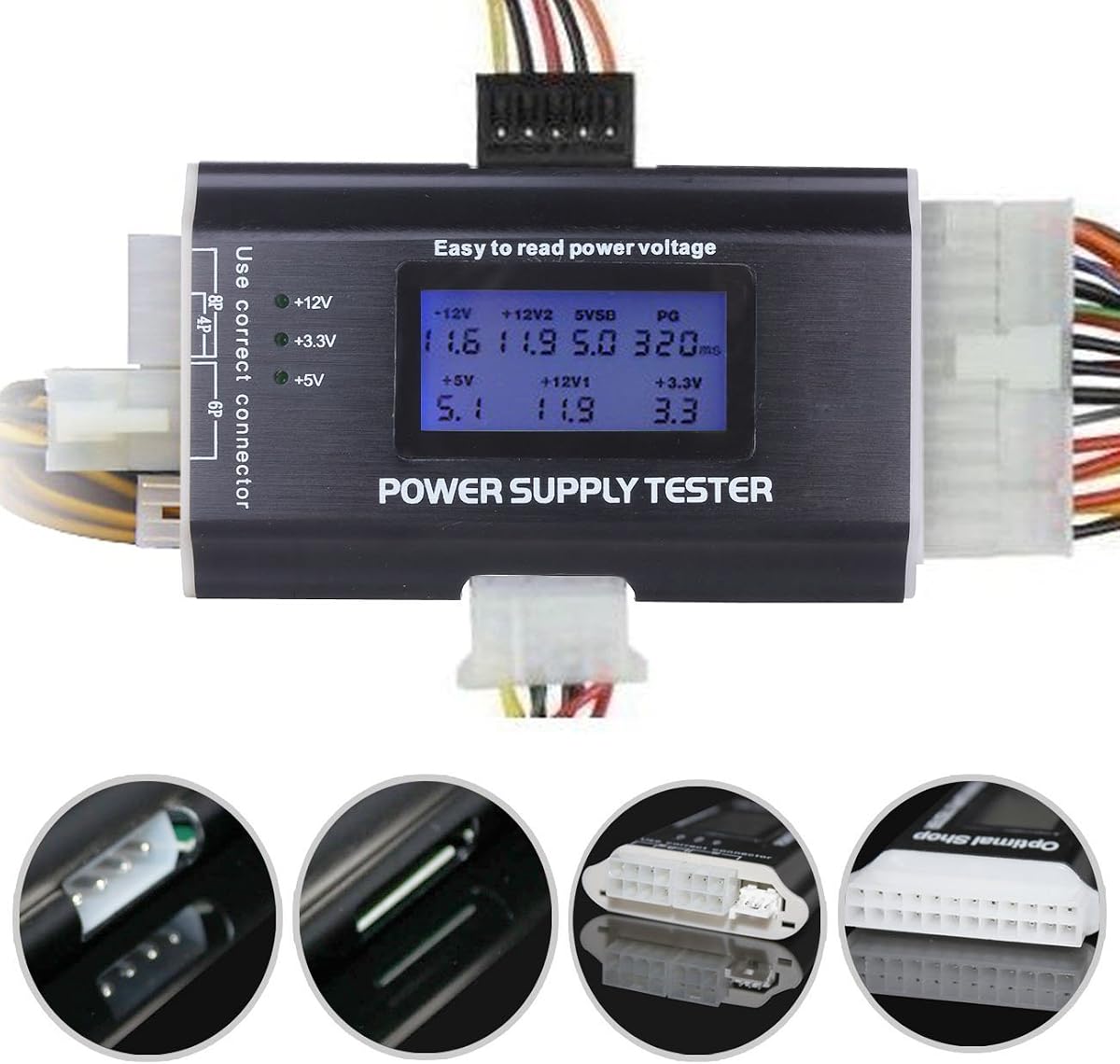
This first ranked model stands out as a reliable tool for quick power supply diagnostics. It earns a strong rating for offering an 8-in-1 design that covers most common PC connectors including ATX SATA and IDE. The LCD screen provides visual confirmation of voltage levels making it easy to spot issues without guesswork.
We may earn a commission when you buy through this link, at no additional cost to you.
The aluminum alloy enclosure adds significant durability to this tester ensuring it withstands regular use in repair kits. A beep alarm activates when values go out of range alerting you immediately to potential faults. The 1.8 inch screen is powered by the main connector which simplifies the testing process significantly.
While the screen is prone to scratches users can remove the protective film to improve clarity. Additionally it does not support the 8-pin PCIe connector which limits it for some modern high-end systems. These trade-offs are acceptable given the low cost and broad compatibility with standard desktop power supplies.
This tool is ideal for hobbyists and technicians who need a straightforward way to verify PSU health. It balances cost and functionality well making it a top choice for general maintenance tasks. We recommend it for anyone looking for a dependable entry-level diagnostic device.
The LCD screen displays voltage rails clearly so you can instantly see if any value is out of spec without needing to interpret blinking lights.
Constructed from aluminum alloy this tester resists corrosion and handles daily transport in a toolbox without cracking or breaking easily.
We may earn a commission when you buy through this link, at no additional cost to you.
This model is designed for simplicity and speed allowing users to check ATX and BTX power supplies with minimal effort. It features an automatic alarm that sounds when voltages exceed normal ranges helping to catch faults early. The display shows PG values and voltage levels in a way that is easy to understand at a glance.
We may earn a commission when you buy through this link, at no additional cost to you.
The tester supports a wide range of interfaces including SATA IDE and floppy connectors making it versatile for older and newer systems alike. When parameters go beyond limits the corresponding value on the LCD flashes to draw attention to the specific rail causing trouble. This visual cue helps pinpoint issues without manual multimeter probing.
Although it lacks advanced digital logging capabilities it performs its core function reliably for most consumer use cases. The design is compact and lightweight so it fits easily in a tool bag or drawer for quick access. It is a practical choice for users who prioritize basic functionality over complex diagnostics.
This unit is best suited for general PC users and repair shops that need a straightforward verification tool. It provides enough data to confirm a power supply is working correctly before reinstalling it in a system. Its combination of alarm and flash warnings ensures no critical error goes unnoticed during testing.
Abnormal voltage values flash on the LCD screen while a buzzer sounds providing two distinct ways to catch errors quickly during testing.
It handles BTX and ITX standards alongside standard ATX making it a versatile choice for different form factors found in desktop computers.
We may earn a commission when you buy through this link, at no additional cost to you.
Kingwin delivers a robust testing solution with this unit that emphasizes build quality and safety. It features an aluminum case that protects internal components from impact while offering a professional look. The digital LCD provides real-time voltage readouts allowing you to monitor stability accurately across all supported rails.
We may earn a commission when you buy through this link, at no additional cost to you.
Safety is a key focus with built-in safeguards against short circuits and overvoltage that protect both the tester and the power supply. This reduces the risk of damage during testing sessions making it a trusted tool for frequent users. The plug-and-play design requires no technical expertise so anyone can operate it immediately.
While it comes at a slightly higher price point the added durability and safety features justify the investment for professionals. It is portable and compact enough to carry in a service kit yet sturdy enough for heavy daily use. The clear interface ensures quick results saving time during repairs.
This tester is excellent for IT professionals and system builders who demand reliability and safety in their diagnostic workflow. It combines ease of use with high-quality construction to provide a premium experience. We recommend it for users who need a long-lasting tool that prioritizes equipment protection.
Safeguards protect against short circuits and overvoltage ensuring that testing does not accidentally damage your PC hardware or the device itself.
The high-quality aluminum materials make this unit resistant to wear and tear extending its lifespan even with frequent testing use.
We may earn a commission when you buy through this link, at no additional cost to you.
This tester focuses on providing precise voltage measurements with a high accuracy of 0.01V. The intelligent LCD displays key parameters like PG signals and voltage rails in real time which helps users spot even small deviations. This level of detail is valuable for diagnosing subtle power stability issues.
We may earn a commission when you buy through this link, at no additional cost to you.
It includes a wide range of connectors covering SATA 4-pin 8-pin and PCIe 6-pin interfaces alongside standard ATX plugs. The system automatically triggers a buzzer alarm when any voltage goes outside normal limits preventing hardware damage from faulty supplies. This combination of precision and warning systems makes it a strong diagnostic tool.
The device is lightweight and designed for portability so you can carry it to different workstations easily. It operates intuitively without needing complex setup allowing both beginners and experts to use it efficiently. The smart monitoring system ensures that faults are caught immediately during the testing process.
Ideal for repair technicians who need accurate data to make informed decisions about power supply replacement or repair. It offers reliable performance for routine maintenance tasks without overwhelming the user with unnecessary complexity. We recommend it for those who value accuracy and ease of use in equal measure.
Measures voltage with 0.01V accuracy allowing you to detect small fluctuations that might indicate early signs of power supply failure.
Supports ATX BTX ITX and TFX standards ensuring compatibility with most desktop power supply form factors on the market.
We may earn a commission when you buy through this link, at no additional cost to you.
This unit is designed to be a portable helper for those who need to check power supplies without carrying bulky gear. It offers an LCD display that shows voltage clearly and a buzzer alarm that signals defects automatically. The design is small and beautiful making it a convenient tool for everyday maintenance.
We may earn a commission when you buy through this link, at no additional cost to you.
It supports a variety of power groups including P4 P6 P8 and SATA interfaces which covers most common internal connections. The LCD readout is powered only when connected to 20-pin or 24-pin connectors ensuring efficient use of power from the PSU itself. This feature simplifies the testing experience significantly.
While it lacks some advanced features it provides reliable results for quick checks in home or office settings. The automatic alarm ensures that you are aware of any issues without needing to constantly watch the screen. It is a practical option for users who want simplicity and speed.
Best suited for casual builders and technicians who need a straightforward tool for spot checks on power supplies. Its compact size makes it easy to store in a drawer or carry to a repair site. We recommend it for those who prioritize portability and basic functionality.
The LCD only draws power from the main ATX connector when connected saving internal battery and simplifying the connection process.
Small and practical size allows you to take the tester anywhere making it ideal for on-site maintenance or quick troubleshooting.
We may earn a commission when you buy through this link, at no additional cost to you.
This tester stands out for its use of aluminum material which provides high strength and good thermal conductivity. The clear LCD screen offers real-time voltage readings that are easy to read even in low light conditions. Its compact structure makes it ideal for storage and transport in a work kit.
We may earn a commission when you buy through this link, at no additional cost to you.
Safety measures are built into the design to prevent short circuits which protects the power supply during testing. When the power PG number fails the unit sounds a buzzer alarm and flashes the corresponding value to alert you immediately. This ensures that faults are detected before they can cause hardware damage.
While it covers standard ATX BTX ITX and TFX power supplies it remains straightforward in operation for most users. The aluminum construction adds a touch of durability compared to plastic alternatives without adding significant weight. It is a solid choice for general testing needs.
It is well suited for technicians who need a reliable and sturdy tool for frequent power supply checks. The combination of safety and clarity makes it a dependable option for maintenance tasks. We recommend it for users who value material quality and basic safety features.
The aluminum material helps dissipate heat during testing ensuring the device remains cool even with frequent use.
Built-in measures prevent short circuits during testing providing an extra layer of safety for your computer components.
We may earn a commission when you buy through this link, at no additional cost to you.
This model emphasizes safety and accuracy ensuring that users can rely on the data it provides. The high accuracy data helps prevent further damage to hardware by identifying defects early. The simple connect design means you only need to plug it in to see if the output is normal.
We may earn a commission when you buy through this link, at no additional cost to you.
The LCD display is clear enough to read in dark places making it useful for testing inside cramped computer cases. It supports all 24-pin and 20-pin power supplies covering ATX BTX ITX and TFX standards broadly. The thick plastic shell adds hardness to prevent breakage during normal handling.
Although it uses plastic rather than metal it is designed for long life with high hardness to withstand drops. The company provides a satisfactory guarantee with fast service to resolve any problems quickly for customers. This support adds value to the product and ensures peace of mind for buyers.
It is a great choice for repair shops and enthusiasts who want a reliable tool backed by good customer service. The combination of accuracy and durability makes it a safe bet for regular use. We recommend it for those who prioritize safety and support when choosing a tester.
The LCD display is easy to read even in dark places helping you diagnose issues inside dark computer cases easily.
Made from quality thick plastic shell material that is hard to break ensuring the tool lasts through frequent use.
We may earn a commission when you buy through this link, at no additional cost to you.
This tester is designed for convenience offering automatic alarms when values are out of normal range. The portable design allows you to judge power supply quality quickly without a multimeter. It supports standard ATX interfaces which makes it compatible with most mainstream power supplies on the market.
We may earn a commission when you buy through this link, at no additional cost to you.
The LED display provides intuitive voltage readouts with high accuracy to ensure you get reliable data. It supports external connectors like SATA and IDE using light displays for those specific rails. This visual feedback helps you identify issues without needing to memorize complex wiring diagrams.
Its small and practical size makes it easy to store and carry around for on-the-go repairs. The automatic alarm ensures you know immediately when something is wrong without watching the screen constantly. This saves time and reduces stress during maintenance tasks.
Best suited for hobbyists and technicians who need a quick way to verify power supplies. It combines simplicity with enough detail to handle most common repair scenarios. We recommend it for users who want a hassle-free testing experience.
The buzzer automatically issues an alarm when values go out of range so you know immediately when there is a problem.
Simple connection to the ATX plug allows you to know power supply status intuitively without complex setup steps.
We may earn a commission when you buy through this link, at no additional cost to you.
This budget-friendly option delivers essential testing capabilities at a very low price point. It provides an intuitive and accurate LCD display that shows voltage levels clearly for easy diagnosis. The automatic error alarm alerts you to any voltage or PG problem instantly so you do not miss issues.
We may earn a commission when you buy through this link, at no additional cost to you.
It supports a complete test interface covering ATX BTX ITX and TFX power supplies with ease. The compact and beautiful appearance makes it a pleasant tool to use without taking up much space. It serves as a reliable helper for power sales personnel and companies alike.
While it may lack the premium build of higher-end models it performs its core function well for the price. The ability to detect issues on older low voltage testers that previous generations could not is a notable advantage. This makes it a useful tool for maintaining legacy hardware.
Best for users on a tight budget who still need reliable testing capabilities for general repairs. It offers high value for the cost and simplifies the diagnostic process effectively. We recommend it for students or hobbyists who want an affordable entry into power testing.
Offers all essential features at a low price making it an accessible choice for those watching their budget closely.
Acts as a dependable assistant for detecting power supply issues quickly ensuring you save time on repairs.
We may earn a commission when you buy through this link, at no additional cost to you.
This versatile tester supports eight different connector types making it a comprehensive tool for various internal parts. The aluminum alloy shell offers high strength and good thermal conductivity for long-lasting durability. The 1.8 inch LCD screen provides clear output voltage readings that are easy to understand at a glance.
We may earn a commission when you buy through this link, at no additional cost to you.
Indicator lights on the left side show output voltage for connectors like IDE HDD and SATA clearly. The buzzer alarm activates when power supply PG numbers fail alerting you to potential issues immediately. This dual feedback system ensures that faults are detected quickly during testing sessions.
While the screen may scratch easily the protective film helps preserve it until you decide to remove it. The design is lightweight and easy to carry so you can take it anywhere you need to test power supplies. It is a practical choice for general PC maintenance.
Ideal for tech enthusiasts who want a single tool that covers most common connector types. The combination of LED and LCD readouts provides a clear view of system health. We recommend it for users who need a broad compatibility tool for their PC work.
Supports 8-in-1 connectors including SATA IDE and PCIe making it a versatile choice for many different parts.
Uses both LCD numbers and LED lights to show voltage status providing two ways to verify output levels.
We may earn a commission when you buy through this link, at no additional cost to you.
Selecting the right power supply tester requires understanding specific features that match your usage needs. This guide covers the most important factors to consider before making your final choice.
Ensure the tester supports all the connectors you need including 20-pin 24-pin PCIe and SATA. Some models may not support newer standards like 8-pin PCIe which can limit their usefulness for modern systems.
Always check the supported list before buying to match your specific power supply type.
Look for a tester that offers clear LCD readouts with high precision like 0.01V. Accurate numbers help you identify subtle voltage drops that could cause system instability.
A clear display ensures you can trust the data you see during testing.
An automatic buzzer alarm is essential for quick fault detection without watching the screen constantly. This feature alerts you immediately when values go out of safe ranges.
Prioritize models with audible warnings to speed up your diagnostic process.
Choose a device made from durable materials like aluminum alloy or high-grade plastic to withstand drops and daily use. A sturdy case protects the internal electronics from damage over time.
A robust build ensures the tester lasts through frequent troubleshooting sessions.
Lightweight and compact designs are easier to carry in a toolbox or laptop bag for on-site repairs. Portable testers save space and allow you to test systems quickly.
Consider size and weight if you plan to move the device frequently.
Verify that the tester supports all major voltage rails such as +12V +5V +3.3V and -12V. Comprehensive coverage ensures you can check the full output of the power supply.
Full voltage coverage provides a complete picture of power supply health.
Simple plug-and-play functionality allows you to test without complex setup or manual wiring. Look for intuitive interfaces that provide clear feedback without confusing menus.
User-friendly designs save time and reduce the learning curve for new users.
Balance the cost with the features offered to get the best value for your needs. Higher prices may justify premium materials or extra connectors for professional use.
Choose a model that fits your budget while meeting your core testing requirements.
To use the tester simply connect the device to the main ATX connector on your power supply while it is off. Turn on the power supply and check the LCD display for voltage values to verify output.
If the buzzer sounds or values flash it indicates a fault in that specific rail. Compare the readings to standard voltage levels to determine if the power supply is healthy.
Store the tester in a dry place and handle it carefully to avoid damaging the LCD screen. Clean the contacts periodically to ensure reliable connections with power supply cables.
An ATX Computer Power Supply Tester is a device designed to check the voltage output of a PC power supply quickly. It helps identify faults without needing complex tools like multimeters by displaying values on a screen.
Yes most models are safe to use when instructions are followed carefully. They include built-in safeguards against short circuits to protect both the device and the power supply during testing.
Most testers support standard ATX BTX and ITX power supplies including SATA and IDE connectors. However some newer PCIe 8-pin connectors may not be supported depending on the model.
Many models offer high accuracy such as plus or minus 0.01V which is sufficient for general diagnostics. For precise measurements you may still need a dedicated multimeter.
Most ATX testers are designed for desktop power supplies not laptops. Laptop power testing requires different adapters or methods due to different connector types.
If the alarm sounds check the LCD display to see which value is flashing. This indicates a specific rail is out of range and the power supply may need replacement.
Keep the tester dry and clean the contacts periodically to ensure reliable connections. Store it in a protective case to prevent damage to the LCD screen.
No most testers are designed for easy plug-and-play use without technical skills. Clear displays and alarms make it simple for anyone to check a power supply.
Our top picks include the Computer PC Power Supply Tester for overall performance and the Kingwin Digital Tester for premium durability. These models offer a balance of accuracy and features that suit most users.
When choosing prioritize connectors and display clarity to ensure the tool meets your specific testing needs. A reliable tester helps protect your hardware by catching faults before they cause damage.
Prices and availability change frequently so check current listings for the best deal before purchasing. This guide provides a solid starting point for finding the right diagnostic tool for your setup.