
Creality Ender 3 V3 SE
3.8Editor score
CR Touch auto leveling
Sprite direct extruder
250mm/s print speed
Dual Z axis support
Discover the top auto bed leveling 3D printers for beginners in October 2026 with expert reviews comparing speed, reliability, and ease of use.
Starting your 3D printing journey can feel overwhelming when you face manual calibration and first layer issues. Auto bed leveling technology solves these common problems by ensuring a perfect bed surface before every print. This guide helps you find the right machine to turn your ideas into reality without frustration.
We evaluated ten leading models based on speed, build quality, ease of setup, and overall user experience. Each product offers unique features like direct drive extruders, high-speed cores, and smart filament systems. Our analysis focuses on what matters most for new users seeking reliable performance.
Every pick in this list highlights key strengths and honest trade-offs to help you decide. You will see detailed breakdowns of features, pros, cons, and usage tips. Note that prices and availability may fluctuate over time, so check current listings before purchasing your next machine.
3.8Editor score

4.3Editor score

4.3Editor score
This side by side comparison table shows the essential specifications for each model. Use it to quickly compare speed, bed size, and unique features across all ten options.


The FLASHFORGE Adventurer 5M stands out as a top choice for beginners due to its impressive speed and fully automatic leveling system. With a rating of 4.3, users appreciate how quickly it moves from unboxing to printing. The one-click leveling ensures the bed is always ready, reducing failed prints significantly.
We may earn a commission when you buy through this link, at no additional cost to you.
Its CoreXY motion system allows acceleration up to 20000 mm/s², making it one of the fastest printers available at this size. The direct drive extruder handles flexible materials well, while the 280°C nozzle supports a wide range of filaments including PETG and PLA. Vibration compensation helps maintain quality even at high speeds.
While the open frame design means it works best in well-ventilated areas, it simplifies maintenance and observation. The cost is higher than basic models, but the time saved on failed prints and setup justifies the investment. Power loss recovery and filament sensors add peace of mind for long jobs.
Beginners who want to learn without wrestling with calibration will find this printer ideal. Its robust design and smart features make it a reliable companion for growing skills. We recommend it for those ready to commit to a high-performance machine from day one.
Full-auto one-click leveling calibrates the bed properly before every print, guaranteeing a perfect first layer without manual tweaks.
CoreXY motion with 20000 mm/s² acceleration allows printing up to 600mm/s with minimal ghosting thanks to vibration compensation.
We may earn a commission when you buy through this link, at no additional cost to you.
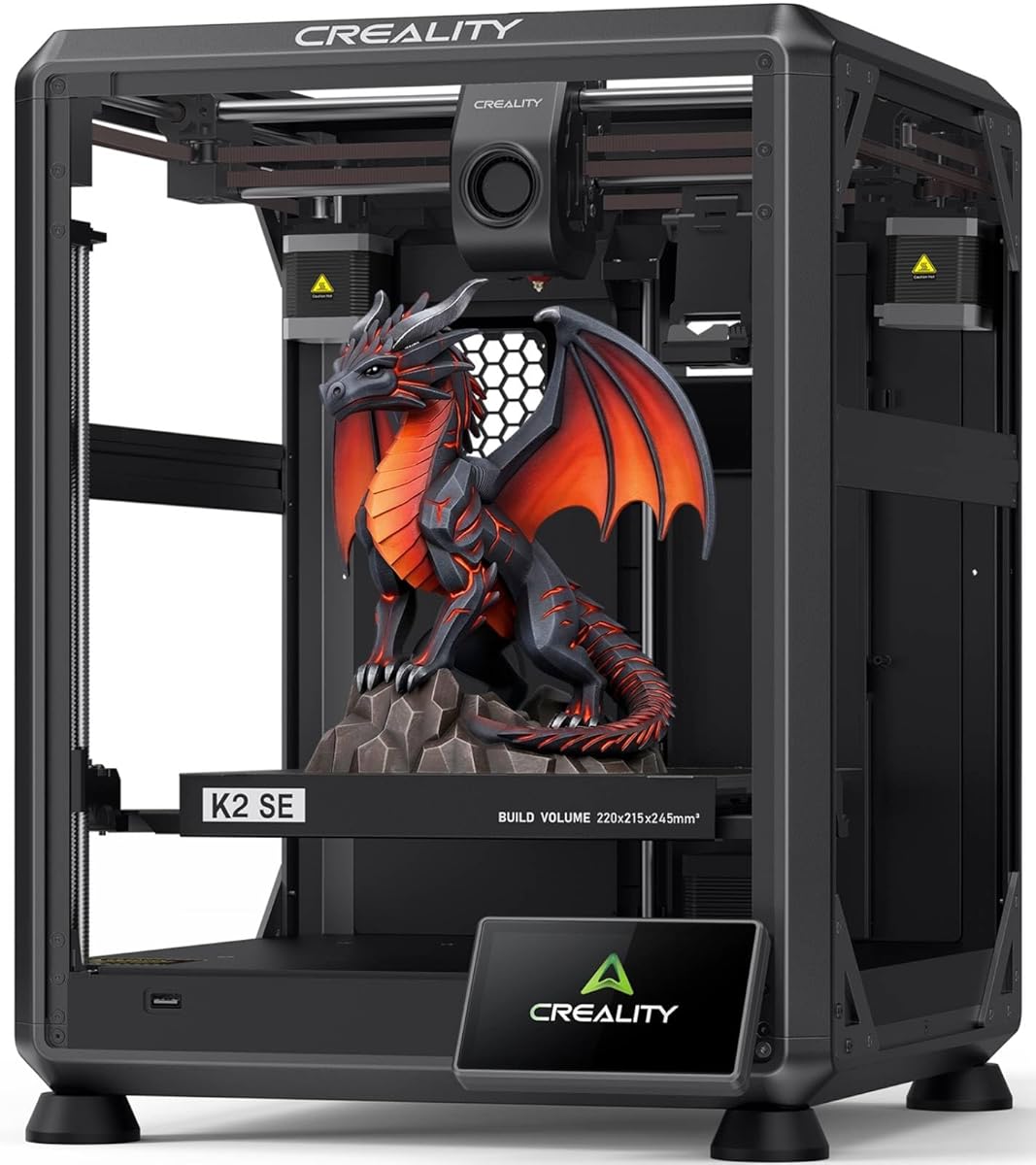
The Creality K2 SE offers a blend of high speed and expandability that appeals to those who might want multi-color printing later. Its metal build provides stability for 500mm/s printing, and the input shaping algorithm reduces ringing on fast prints. This makes it a strong contender for speed seekers.
We may earn a commission when you buy through this link, at no additional cost to you.
Direct drive extruder and quick-swap nozzles streamline maintenance and filament changes. The Creality OS and Print software offer optimized presets for various filaments, easing the learning curve. Cloud support allows remote monitoring and downloads, which is convenient for busy users.
However, the rating reflects some inconsistencies in early user experiences. While the base unit is great, the full multi-color experience requires the CFS system sold separately. This adds to the total cost, which might deter pure beginners seeking an all-in-one package.
We suggest the K2 SE for those planning to upgrade to color printing eventually. It grows with your skills and budget. If you prioritize a solid metal frame and speed over immediate color features, this printer delivers excellent value.
Compatible with Creality CFS multicolor system when upgraded, allowing automatic filament identification and seamless multi-color slicing.
Die-cast aluminum alloy frame with corner gussets minimizes flex during rapid movement ensuring reliable dimensional accuracy.
We may earn a commission when you buy through this link, at no additional cost to you.
E-Leveler 2 is not a printer itself but a specialized tool to help achieve precise bed leveling on manual machines. Its LED light provides immediate visual feedback as you adjust knobs, removing the guesswork of feeler gauges. This is incredibly helpful for beginners struggling with first layers.
We may earn a commission when you buy through this link, at no additional cost to you.
The tool features a strong battery holder and clear adjustment arrows, making it simple to use. It works with most printers that have manually adjustable beds, excluding resin and delta printers. The balancing end caps make it stable during use, ensuring accurate readings.
While it does not replace auto-leveling sensors, it bridges the gap for older machines. The cost is low compared to a new printer, making it an affordable upgrade path. However, users should know it requires manual effort rather than one-click calibration.
We recommend this for those who already own a printer but want better leveling precision. It complements existing hardware without major upgrades. If you prefer a hands-on approach to calibration, this tool simplifies the process significantly.
LED light indicator shows when the bed is level helping you adjust knobs without needing external measurement tools.
Designed for all 3D printers with manually adjustable print beds excluding resin and delta models only.
We may earn a commission when you buy through this link, at no additional cost to you.
The FLASHFORGE AD5M combines speed with ease of maintenance through its quick-release nozzle system. Users report flawless first layers thanks to the fully automatic leveling. The all-metal CoreXY structure ensures stability at high speeds, resulting in precise and consistent prints.
We may earn a commission when you buy through this link, at no additional cost to you.
Maintenance becomes trivial with a nozzle swap taking just three seconds without tools. The Flash Maker APP enables remote management and monitoring, adding convenience for those printing frequently. Resume functionality saves projects during power outages, which is vital for long jobs.
While performance is strong, the open design may not suit enclosed setups required for certain materials. Internet connectivity is needed for some features, which could limit offline use. Still, the value and speed make it a compelling option for home workshops.
We recommend the AD5M for users who value speed and low maintenance. It suits beginners who want advanced features without complex setup. The quick swap system alone makes it a favorite for those printing multiple filament types regularly.
Patent quick release nozzle can be swapped in three seconds without tools simplifying maintenance for novices and experts alike.
Flash Maker APP allows managing devices and monitoring prints remotely with real-time status adjustments from anywhere.
We may earn a commission when you buy through this link, at no additional cost to you.
QIDI Q2 redefines beginner expectations with professional features like a 65°C heated chamber and 370°C nozzle. This unlocks materials like PPS and carbon fiber that other printers cannot handle. Auto-leveling is precise, using the nozzle itself as a sensor for unmatched first layer accuracy.
We may earn a commission when you buy through this link, at no additional cost to you.
The build quality stands out with full metal CoreXY and linear rails for ultra-smooth results. Triple filtration ensures safe indoor use by capturing odors and particles. AI camera monitoring adds security against print failures, while QIDI BOX enables multi-color printing up to 16 colors.
The higher cost is justified by the versatility and safety features included. It handles everything from simple PLA to advanced engineering composites. For those willing to invest, this printer offers a complete professional experience right out of the box.
We recommend the Q2 for ambitious beginners ready to explore beyond basic materials. It grows with your skills and provides a safe, clean environment for learning. Lifetime technical support ensures you never face technical hurdles alone.
370°C nozzle and 65°C heated chamber unlock PPS, CF and advanced composites with strong layer adhesion and no warping.
Triple filtration system with HEPA and activated carbon reduces odors and particles for safe home or classroom use.
We may earn a commission when you buy through this link, at no additional cost to you.
The FLASHFORGE 5M Pro focuses on quiet operation and safety with a fully enclosed design. It maintains 50dB noise levels even at standard speeds, making it ideal for shared spaces like bedrooms. Dual filtration improves air quality, addressing safety concerns for home environments.
We may earn a commission when you buy through this link, at no additional cost to you.
Auto-leveling ensures precise first layers without manual intervention. The bundle includes multiple nozzles for flexibility in detail and speed. App control allows you to check print status remotely, adding convenience for busy schedules without needing constant physical presence.
While it shares many features with the Adventurer 5M, the enclosure and noise control differentiate it. Some users note occasional speed limitations compared to max specs. However, the reliability and air quality features are strong selling points for health-conscious users.
We recommend the 5M Pro for home users prioritizing comfort and safety. It balances performance with quiet operation well. If you value a clean and peaceful printing environment, this model stands out among similar speed options.
Low speed silent mode ensures uninterrupted focus during work or study while standard mode stays around 50dB.
Closed structure and dual filtration block 99% of particulate matter and VOCs making it safe for home or classroom.
We may earn a commission when you buy through this link, at no additional cost to you.
The Ender 3 V3 SE is perfect for budget-conscious beginners who still want auto-leveling. It requires minimal assembly and reaches first prints in 20 minutes. CR Touch sensor handles leveling automatically while the Sprite extruder ensures smooth filament feeding across various materials.
We may earn a commission when you buy through this link, at no additional cost to you.
Dual Z-axis screws reduce wobbling and improve stability. The 32-bit silent board keeps noise down during operation. Auto filament loading simplifies changes, removing the tangles often faced on older models. This ease of use makes learning 3D printing less intimidating.
While speed is lower than high-end options, it remains efficient for hobbyists. The build plate is flexible for easy removal. Support is responsive with a 12-month warranty. It offers incredible value for entry-level users seeking proven technology.
We recommend the V3 SE as the best starting point for beginners on a tight budget. It provides all essential features without complexity. If you want to learn basics before upgrading, this is a reliable choice to build confidence.
Preassembly solves assembly hassles and requires just 3 steps to complete setup in 20 minutes from unpacking to first print.
Supports automatic loading and unloading allowing easy filament changes without manual extrusion struggles.
We may earn a commission when you buy through this link, at no additional cost to you.
For owners of older Ender models, the CR Touch kit offers an effective way to add auto-leveling. It uses multi-point detection to build a virtual plane and compensate for tilt automatically. This upgrade extends the life of existing printers without replacing the whole unit.
We may earn a commission when you buy through this link, at no additional cost to you.
The sensor is durable enough for over 100,000 uses. Installation includes mounting brackets and screws for most compatible printers. You must flash specific firmware to enable the feature, which requires following detailed steps carefully. Compatibility is limited to certain mainboards like V4.2.2 or V4.2.7.
While it requires some technical effort, the results are stable and cost-effective. It brings modern convenience to legacy hardware. This solution is ideal for DIY enthusiasts who already own a printer but want leveling features.
We recommend this kit for owners of specific Ender models looking to upgrade. It provides high value for the cost. If you are comfortable with firmware updates, this allows your old machine to perform like a newer auto-leveling printer.
Records height of each detection point and calculates tilt angle for automatic compensation across the print platform.
Requires downloading and installing compatible firmware via SD card to enable the sensor functionality on supported boards.
We may earn a commission when you buy through this link, at no additional cost to you.
The AD5X offers beginners a chance to print in four colors without complex external systems. Intelligent Filament System manages detection and refills, reducing interruptions. It maintains 600mm/s speeds with the stability of an all-metal CoreXY structure, balancing creativity and performance.
We may earn a commission when you buy through this link, at no additional cost to you.
Users can create vibrant designs that stand out. The system handles various materials including flexible TPU. Maintenance remains simple due to auto-leveling and reliable extrusion. While multi-color adds complexity, the integrated IFS makes it smoother than typical retrofit kits.
The cost is higher, reflecting the added value of color capabilities. Setup may take longer to get color profiles right. However, the ability to print intricate multi-color models without pausing is a significant benefit for artistic hobbyists.
We recommend the AD5X for beginners focused on visual projects and art. It provides an accessible entry into multi-color printing. If vibrant results are a priority, this printer delivers creativity alongside technical performance.
Automatically detects and refills filament minimizing downtime and enhancing productivity for continuous color printing.
Maximum printing speed of 600mm/s with acceleration of 20,000mm/s for rapid project turnaround with high quality.
We may earn a commission when you buy through this link, at no additional cost to you.
The Creality Ender 3 V3 SE delivers a simplified experience tailored to new users. CR Touch leveling and auto Z-offset ensure reliable first layers right out of the box. The 32-bit silent board reduces noise, creating a more comfortable environment for daily use.
We may earn a commission when you buy through this link, at no additional cost to you.
Sprite direct drive extruder supports PLA, PETG, and TPU reliably. Flexible PC spring steel plates allow quick removal of prints without tools. Stability is improved by synchronized Z-axis screws. This combination of speed and simplicity makes it ideal for entry-level learning.
It may lack advanced upgrades like heated chambers or multi-color, but it covers basics perfectly. The focus on ease of use lowers the barrier to entry significantly. Users find it easy to trust for consistent results without calibration struggles.
We recommend this model for those taking their first steps in 3D printing. It offers a low-risk investment with solid reliability. If you value a straightforward setup and steady performance for learning, this printer meets your needs well.
CR Touch auto leveling and automatic Z-offset calibration help achieve a reliable first layer reducing manual adjustments.
32-bit silent mainboard helps reduce operating noise for a more comfortable printing experience in shared spaces.
We may earn a commission when you buy through this link, at no additional cost to you.
Selecting the right printer involves more than looking at speed; consider how auto-leveling works and what maintenance is required.
Auto-leveling sensors like CR Touch or probes measure bed unevenness and adjust print paths automatically. This feature eliminates manual leveling and ensures better first layers consistently. Check if the system uses a probe or nozzle as the sensor for accuracy.
Higher speeds like 600mm/s can reduce print times significantly but require stable frames to avoid artifacts. Acceleration measures how quickly the printer starts and stops. Fast acceleration improves efficiency but demands a rigid structure for quality.
Standard sizes like 220mm suit most small projects, while larger volumes allow bigger parts without splitting. Consider what projects you want to make to choose an appropriate bed size. Larger builds may increase cost and material usage.
Direct drive extruders push filament directly into the hotend, which is better for flexible materials. Bowden setups pull filament from a distance and are lighter but can struggle with TPU. Beginners benefit from direct drive versatility.
Enclosed printers often include HEPA or carbon filters to reduce emissions during printing. If you print in a bedroom or shared space, air quality matters significantly. Safety features like flame retardant materials are also valuable.
Nozzle temperature limits determine which materials you can print. Standard 280°C nozzles handle PLA and PETG while 370°C models unlock advanced composites. Check compatibility before buying to avoid restricting future projects unnecessarily.
Ease of assembly varies from fully pre-assembled to partial kits. Manufacturer support and warranty length provide confidence in reliability. Look for models with clear instructions and active communities for troubleshooting help.
Some printers support accessories like multi-color systems or camera monitoring. Consider if you might want to expand capabilities later. Compatibility with third-party software and communities can enhance the long-term value.
Perform periodic maintenance by lubricating lead screws and checking belts for tightness every month. Replace nozzles when you notice poor extrusion or visible wear signs. Keep firmware updated through the official app or software for improved performance and bug fixes.
Auto bed leveling is a feature where sensors measure the distance between the nozzle and the build plate at multiple points. The printer then creates a virtual map of the bed surface to adjust the Z-axis automatically during prints. This ensures consistent nozzle height without manual adjustments.
Not strictly, but it is highly recommended for beginners to avoid first layer failures. Manual leveling requires patience and tools that new users might lack. Most modern beginner models now include auto-leveling to simplify setup and improve success rates.
Yes, third-party kits like CR Touch allow older printers to gain auto-leveling capabilities. You will need to install the sensor, connect it to the board, and flash compatible firmware. This is a cost-effective way to upgrade existing hardware without buying a new machine.
PLA is the most common and easiest filament to print due to its low warping and ease of use. PETG offers more durability while maintaining similar ease. Avoid flexible filaments like TPU until you have mastered basic settings and leveling.
Peeling usually happens if the bed is not level or too cold. Ensure auto-leveling runs correctly and the bed is clean. Some materials benefit from adhesives like glue sticks or specialized sprays to improve initial adhesion.
Ideally, run auto-leveling before each print session to account for any shifts. Some users run it only after moving the printer or changing the bed. Frequent calibration guarantees better first layers and reduces failed prints.
Remember to check current listings for any updates before buying your selected printer. Prices and availability change frequently as new models arrive. With the right auto-leveling printer, you will start creating with fewer failures and more enjoyment.