
VEIKK VK1200 V2
4.3Editor score
Full-laminated screen technology
Two battery-free pens included
Compact frameless design
Finding an affordable pen display can transform your digital art workflow without breaking the bank. These devices combine a screen with a pressure-sensitive pen for a natural drawing feel.
We evaluated ten top models based on display quality, pressure sensitivity, connectivity options, and overall value. Each product offers unique strengths for beginners and professionals seeking cost-effective tools.
Every pick highlights key features, pros, and cons to help you choose confidently. Note that availability and pricing fluctuate, so verify current details before purchasing your next creative tool.
4.3Editor score

4.4Editor score

4.5Editor score
As an Amazon Associate we earn from qualifying purchases.
Below is a side-by-side comparison of all ten models evaluated in this guide. Each entry lists essential specifications to help you quickly identify the best fit for your artistic needs and budget constraints.




The XP-PEN Artist12 stands out as a top choice for budget-conscious creators seeking a reliable pen display. With a 4.4 rating and solid specifications, it delivers a natural drawing experience ideal for sketching and digital illustration.
We may earn a commission when you buy through this link, at no additional cost to you.
Its 11.6 inch IPS display offers vivid colors and 72% NTSC coverage, ensuring your artwork looks accurate. The battery-free P06 pen provides 8192 pressure levels for precise control, while the anti-reflective screen protector reduces glare during long sessions.
While it must connect to a computer, the Artist12 supports Windows, Mac, and Linux seamlessly. The customizable shortcut keys and touch bar streamline workflows, making it easy to zoom or switch tools without breaking your creative flow.
For students and professionals alike, this model balances performance and affordability effectively. It excels in education and remote work scenarios too, allowing you to annotate or present ideas directly on the screen with ease.
The battery-free stylus mimics traditional pencil pressure, offering a tactile response that enhances control and reduces hand fatigue during extended use.
Customizable shortcut keys and a touch bar let you map frequent actions, boosting efficiency while keeping your focus on the canvas.
We may earn a commission when you buy through this link, at no additional cost to you.
The VEIKK VK1200 V2 offers exceptional value for beginners needing a high-quality pen display. Its full-laminated design ensures cursor accuracy, while the anti-glare glass provides a paper-like feel that many artists appreciate.
We may earn a commission when you buy through this link, at no additional cost to you.
With 8192 pressure levels and 60-degree tilt recognition, the battery-free pen captures subtle strokes and shading nuances. The compact, frameless infinity display maximizes the 11.6-inch area, making it portable without sacrificing screen space.
Setup is straightforward thanks to single-cable USB-C connectivity for compatible devices. You get two pens and ample replacement nibs, plus a cleaning cloth and glove, ensuring you can start drawing immediately without extra purchases.
This model suits students and hobbyists who want professional features at an entry-level price. The sturdy metal build and customizable keys make it a reliable daily driver for sketches, designs, and online notes.
Full-lamination fuses glass and screen to minimize parallax, so your pen tip appears exactly where it touches for precise control.
Two pens, a glove, and 28 nibs ensure you have everything needed to start creating right away without hunting for accessories.
We may earn a commission when you buy through this link, at no additional cost to you.
The HUION Kamvas 13 Gen 3 delivers premium performance for creators needing color accuracy and fluid strokes. Its 4.5 rating reflects strong user satisfaction, driven by advanced tech and thoughtful design features that elevate the drawing experience.
We may earn a commission when you buy through this link, at no additional cost to you.
Featuring full-laminated Canvas Glass 2.0, the screen reduces glare and improves touch accuracy. With 16384 pressure levels and 99% sRGB coverage, it renders vibrant visuals and smooth gradients ideal for professional illustration and photo editing.
The dual dial buttons and programmable keys streamline workflows, allowing quick adjustments to brush size or zoom. USB-C single-cable connectivity simplifies setup, while compatibility extends to Android devices with specific hardware support.
Though pricier, this model justifies the cost with factory calibration reports and durable build quality. It is a standout for serious artists who want a reliable, high-performance tool that grows with their skills.
Factory calibration ensures Delta E under 1.5, meaning colors appear consistent and true to life across different projects and settings.
Advanced PenTech 4.0 and high reading rates minimize lag, so your strokes follow the pen naturally without interruption.
We may earn a commission when you buy through this link, at no additional cost to you.
The GAOMON PD1161 is a dependable choice for artists seeking a balance of features and affordability. Its 11.6-inch Full HD screen delivers vivid colors and a matte finish that reduces glare while mimicking traditional paper texture.
We may earn a commission when you buy through this link, at no additional cost to you.
With 8192 pressure levels and tilt function, the AP50 stylus supports dynamic strokes and shading. Eight customizable shortcut keys on the side help streamline tasks like layer switching or brush size adjustments, enhancing overall efficiency.
This model works seamlessly with major creative software and remote work tools. The included glove and replacement nibs add value, though you may need a power adapter if your computer lacks sufficient power delivery via USB ports.
Ideal for students and hobbyists, the PD1161 offers robust performance without unnecessary complexity. Its wide compatibility and solid build make it a great addition to any digital art setup.
The pre-installed matte film reduces glare and provides friction for a natural drawing feel that artists accustomed to paper will enjoy.
Eight programmable keys let you assign frequent commands, reducing mouse reliance and keeping your hands on the creative tools.
We may earn a commission when you buy through this link, at no additional cost to you.
The Artisul D16 offers an expansive 15.6-inch working area at a fraction of the cost, making it attractive for budget buyers. Refurbished units are inspected to ensure reliability, delivering a solid experience for illustration and design tasks.
We may earn a commission when you buy through this link, at no additional cost to you.
Featuring a full-laminated screen, it minimizes parallax for precise cursor placement. The P58B battery-free stylus provides 8192 pressure levels and fine control, while the quick dial and seven hotkeys add versatility to your creative workflow.
Adjustable stand angles and brightness controls let you customize the setup for comfort and lighting conditions. Lifetime technical support further enhances value, giving users confidence when tackling complex projects or online teaching scenarios.
While not standalone, this model excels as a secondary monitor or dedicated drawing space. It is a smart pick for those needing more screen real estate without the premium price tag of new devices.
The 15.6-inch display provides ample room for detailed work, reducing the need for constant zooming and panning during creation.
Seven hotkeys and a quick dial allow efficient access to tools, streamlining repetitive tasks and keeping your focus on art.
We may earn a commission when you buy through this link, at no additional cost to you.
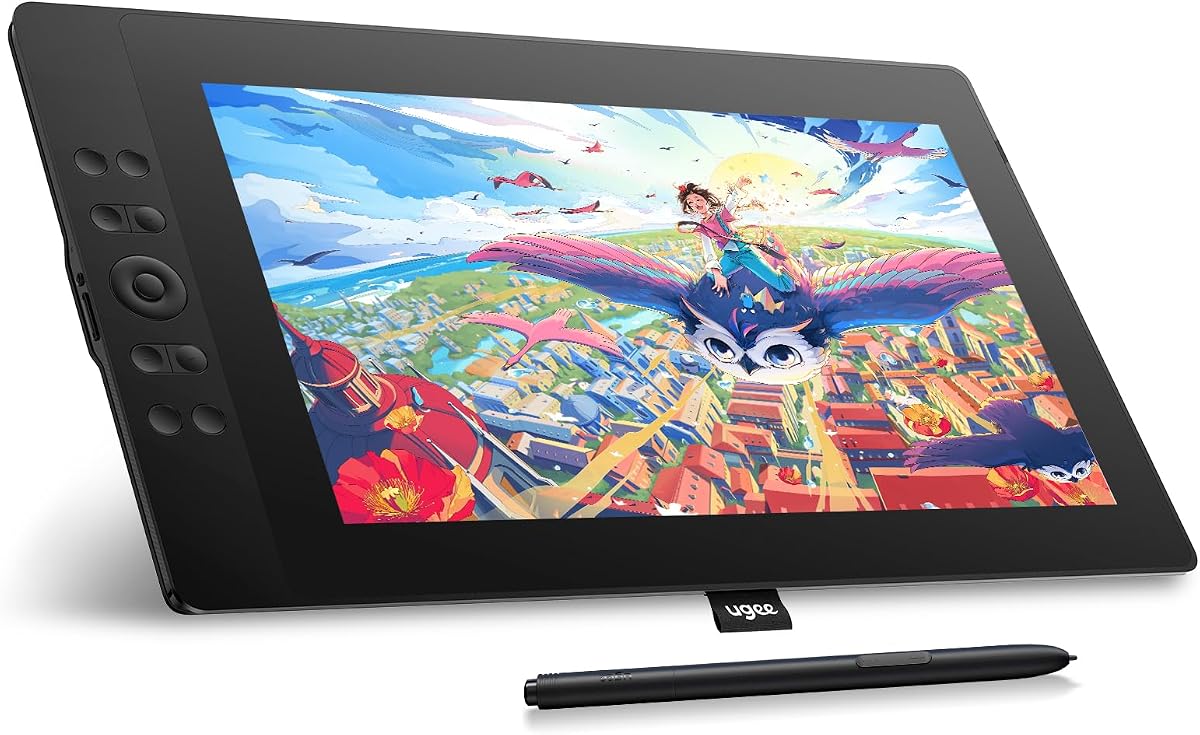
The UGEE UE16 impresses with a 143% sRGB color gamut, ensuring rich and accurate colors for design and illustration. Its 15.4-inch full-laminated screen delivers crisp visuals with 16 million colors for a premium viewing experience.
We may earn a commission when you buy through this link, at no additional cost to you.
With 16K pressure sensitivity and a pencil-like grip, the stylus captures delicate details and bold strokes. The 8 physical shortcut keys plus digital wheel allow quick access to tools and settings, enhancing workflow efficiency.
This tablet supports Windows, Mac, Android, and Linux, offering flexibility for diverse setups. The four color spaces including Adobe RGB and DCI-P3 enable seamless transitions between projects requiring different color standards.
Ideal for designers and animators, the UE16 balances large screen size with professional color performance. Check the parcel carefully for cables, but once set up, it provides a smooth and vibrant creative environment.
Multiple color spaces let you switch between sRGB, Adobe RGB, and others, ensuring accurate representation across print and digital media.
Physical keys combined with a scroll wheel offer tactile feedback and quick access to functions, speeding up repetitive editing tasks.
We may earn a commission when you buy through this link, at no additional cost to you.
The VEIKK VK1200 is designed for beginners and students needing an accessible entry into digital art. Its 11.6-inch LED screen with 8192 pressure levels provides a responsive surface for sketching and basic illustration work.
We may earn a commission when you buy through this link, at no additional cost to you.
With tilt function and two battery-free pens, it supports varied drawing styles without battery worries. Six shortcut keys allow quick access to common functions like zoom or undo, making the learning curve less steep.
Included accessories like an artist glove and extra nibs add value and convenience. The pen holder keeps tools organized, and the glove helps maintain a clean workspace by reducing smudges during long sessions.
This model is ideal for those prioritizing affordability and ease of use over advanced color specs. It serves well for hobbyists and students learning digital techniques without requiring complex setup.
Essential tools and accessories come included, allowing new users to start drawing immediately without additional purchases.
Tilt recognition adds depth to strokes, enabling shading techniques that mimic traditional pencils for a more natural feel.
We may earn a commission when you buy through this link, at no additional cost to you.
The RubensTab T11 Pro stands out as the only standalone option on this list, requiring no computer connection. With a 10.1-inch Full HD screen and 5-hour battery life, it offers portability for creators on the go.
We may earn a commission when you buy through this link, at no additional cost to you.
Pre-installed drawing apps make it easy to start creating right away. The battery-free pen provides natural strokes, while multi-touch features enable intuitive zooming and panning for a more interactive experience.
Ideal for students and professionals needing a lightweight solution for note-taking or sketching, it supports Wi-Fi for cloud access. The adjustable stand case adds versatility for different working angles and travel use.
While smaller than most pen displays, its independence makes it unique for mobile workflows. It is best suited for casual creators or those needing a secondary device without wired dependencies.
No external device or cables needed, allowing you to create anywhere with just a power source and the included stand.
Pre-loaded software means you can start drawing immediately after powering on, reducing setup time and friction.
We may earn a commission when you buy through this link, at no additional cost to you.
The VEIKK VK1200V2 improves on its predecessor with 16384 pressure levels and 120% sRGB color coverage. Its full-laminated screen ensures accurate cursor placement and reduces parallax for a smoother drawing experience.
We may earn a commission when you buy through this link, at no additional cost to you.
Two P05 passive styluses and a 290 PPS reading rate enable precise tracking without lag. The lightweight metal body and six customizable hotkeys make it easy to carry and efficient to use across various drawing tasks.
Compatible with Windows, Mac, and Linux, this display integrates well into diverse workflows. Lifetime driver updates and hardware warranty provide ongoing support, ensuring long-term reliability for daily creative use.
Best for artists seeking higher pressure precision at a budget-friendly price, this model balances performance and portability. It is a strong choice for detailed work requiring nuanced pressure sensitivity.
Double the standard pressure levels allow finer control over line weight and shading, crucial for detailed illustration work.
Lifetime driver updates and warranty ensure the device stays compatible with new software versions and remains functional long-term.
We may earn a commission when you buy through this link, at no additional cost to you.
The XPPen Artist 12 Pro Lite offers a compact 11.6-inch display with full-lamination to minimize parallax. Its 8192 pressure levels and tilt support deliver natural strokes, while the red dial and shortcut keys provide quick access to tools.
We may earn a commission when you buy through this link, at no additional cost to you.
With a 3-in-1 cable design, you avoid extra adapters and simplify connections to your computer. This versatility extends to online classes and presentations, where real-time annotation enhances engagement and communication.
Compatible with Windows, Mac, ChromeOS, and Linux, it integrates easily with popular creative software. The anti-glare screen and customizable dial improve comfort and efficiency during extended use for diverse creative needs.
This model suits creators needing a portable yet powerful tool for sketching or teaching. Its balanced features and straightforward connectivity make it a practical addition to any home studio or classroom setup.
The 3-in-1 cable eliminates the need for separate connectors, reducing clutter and simplifying setup across different computer ports.
Real-time annotation on the display makes it ideal for teaching or presentations, allowing immediate visual feedback and clarity.
We may earn a commission when you buy through this link, at no additional cost to you.
Selecting the right pen display involves considering several factors to ensure it meets your creative needs and budget. Here is what to prioritize when comparing models.
Screen size affects workspace comfort and portability. Models range from 10 to 15 inches, with Full HD resolution providing clear visuals. Larger screens suit detailed work, while smaller ones are easier to transport.
Choose a size that fits your desk and workflow needs without compromising clarity or usability.
Pressure levels determine how well the pen responds to varying force. Higher numbers like 8192 or 16384 offer more nuanced control for shading and line weight. Tilt support adds another dimension for natural strokes.
Look for models with at least 8192 pressure levels and tilt functionality if your art style benefits from varied strokes.
Color gamut coverage ensures your artwork looks vibrant and accurate on screen. Higher sRGB or Adobe RGB percentages provide better fidelity for design work. Factory calibration further enhances consistency.
For professional color work, prioritize models with wide gamut coverage and calibration reports.
Most pen displays require a computer connection via USB, HDMI, or USB-C. Check your system ports and OS compatibility to avoid adapter needs. Some newer models offer Android support for more flexibility.
Ensure the device supports your operating system and has the necessary ports for seamless setup.
A battery-free stylus reduces maintenance and offers immediate use. Additional pens, replacement nibs, and gloves improve longevity and comfort. Ergonomic design matters for long sessions.
Prioritize models that include quality pens and helpful accessories to maximize value.
Programmable keys and dials streamline workflows by assigning frequent commands. Adjustable stands and anti-slip bases improve posture and stability. These features reduce strain during prolonged use.
Select devices with customizable controls and ergonomic design to enhance productivity and comfort.
Verify support for your favorite creative apps like Photoshop or Procreate. Driver quality impacts performance and customization options. Broad software support ensures versatility across projects.
Confirm the tablet works with your essential applications before purchasing.
A reliable warranty and accessible support protect your investment. Look for lifetime driver updates and responsive customer service. Refurbished units may offer savings with certified quality.
Choose brands with strong support reputations to ensure long-term reliability and assistance.
Start by installing the latest drivers from the manufacturer's website for optimal performance and compatibility. Connect the device using the provided cables to ensure stable data and power transmission.
Customize shortcut keys and pen settings in the software to match your workflow. Adjust screen brightness and angle for comfort, and use the included glove to reduce smudges on the display.
Clean the screen gently with a soft cloth and avoid harsh chemicals. Store the pen safely when not in use and keep the device away from extreme temperatures to maintain longevity.
Most models require a computer connection to function as pen displays. The RubensTab T11 Pro is an exception with standalone capabilities. Always verify connectivity requirements before purchasing.
Full-laminated screens reduce the gap between glass and display, minimizing parallax for accurate cursor placement. Non-laminated screens have a visible gap that can affect precision. Laminated models offer a more natural drawing feel.
Yes, many models are beginner-friendly with intuitive setups and included accessories. Features like programmable keys and pressure sensitivity help learners develop skills. Look for entry-level specs if starting out.
Most tablets support macOS with appropriate drivers. Ensure the model specifies Mac compatibility in its specs. Some features might vary slightly by operating system but core functionality remains consistent.
Battery-free pens rely on electromagnetic resonance and do not require charging. They last indefinitely as long as the tablet is powered. Replace nibs when worn to maintain drawing quality and accuracy.
Some models include trial versions or specific software like ArtRage or OpenCanvas. Most rely on third-party applications like Photoshop or Krita. Check the package contents for included software details before purchase.
The XP-PEN Artist12, VEIKK VK1200 V2, and HUION Kamvas 13 Gen 3 lead this list with balanced features and performance. Each offers distinct advantages for different needs and skill levels.
Prioritize color accuracy, pressure sensitivity, and connectivity based on your workflow. For portability, consider standalone options or lighter models. Always check system requirements before buying.
Remember that product availability and pricing can change. Verify current specs and reviews to make the best informed decision for your creative journey in October 2026.