
PS5/Slim/Pro Horizontal Stand with Cooling Fan & Charger
4.3Editor score
Scalable design for all models
Horizontal placement option
EVA foam included for fit
This guide compares the top 10 cooling stands for PS5 Console to help you choose the best accessory for your setup in October 2026.
Keeping your console cool is essential for long gaming sessions. A dedicated cooling stand helps prevent overheating and extends the life of your device.
We reviewed ten top models based on fan performance, charging options, and design compatibility. Each option offers unique features for different play styles.
Read our detailed breakdowns to find the right fit. Prices and availability change frequently so verify details before purchasing your new accessory.
4.3Editor score
4.4Editor score

4.3Editor score
The following table provides a side-by-side comparison of all ten models to help you quickly identify the key specifications and features of each option.


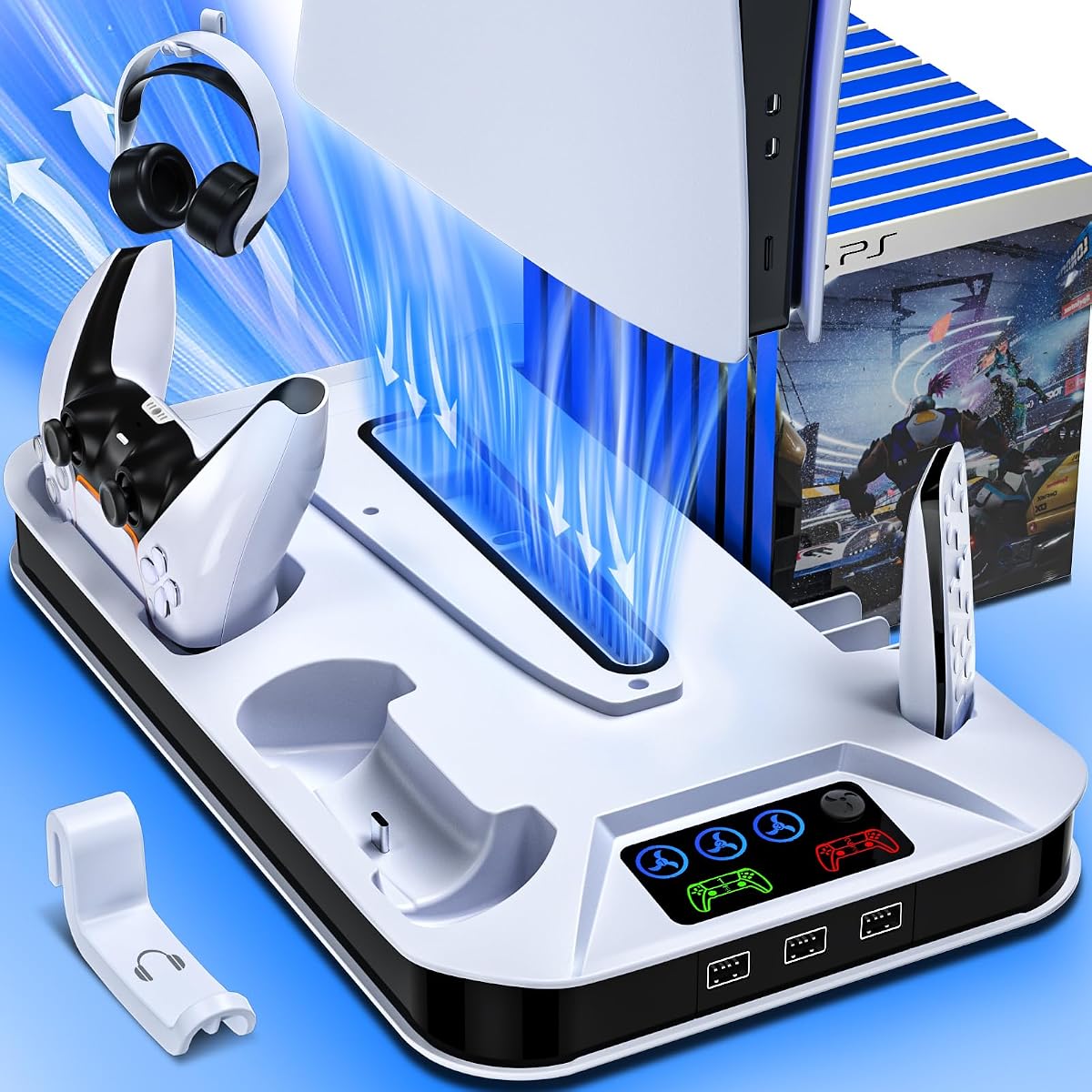
This model is a top contender for your setup. It features a turbo fan and controller charger to keep things cool. Users rate it highly for its practicality.
We may earn a commission when you buy through this link, at no additional cost to you.
The cooling fan offers three speeds to handle heat during long sessions. It charges two controllers quickly and includes USB ports for other devices. The screw lock keeps the console stable.
You must remove a panel adapter for slim digital models. Also note it does not support edge controllers. These are minor trade-offs for the value.
Buy this if you want a complete solution. It handles cooling and charging efficiently. It is a strong choice for keeping your setup tidy.
The fan moves hot air away quickly to protect the console during intense play.
Extra USB ports allow you to charge headsets and other accessories without extra cables.
We may earn a commission when you buy through this link, at no additional cost to you.
This option saves desk space with its horizontal layout. It charges two controllers and includes foam for different editions. The design scales well for all models.
We may earn a commission when you buy through this link, at no additional cost to you.
The touch switch adjusts fan speed easily. It supports Edge controllers which many others miss. The installation is simple without tools.
Foam installation may confuse first time users. The touch switch might be sensitive. These issues do not affect core cooling performance.
Choose this if you prefer horizontal storage. It is affordable and versatile. It fits well in smaller gaming areas.
Placing the console flat frees up vertical space for shelves or other gear.
Support for premium controllers ensures you get full value from your investment.
We may earn a commission when you buy through this link, at no additional cost to you.
This set is designed for convenience. It holds the console horizontally and charges controllers. The setup is quick without tools. It fits all PS5 models.
We may earn a commission when you buy through this link, at no additional cost to you.
The fan keeps temperatures low even during heavy use. Charging is fast and indicators show status. The stand acts as a storage hub for accessories.
You need to adjust rest mode settings for standby charging. This is not automatic. The cable might need management for a clean look.
Pick this if you value ease of use. It combines cooling and storage well. It is great for organized setups.
Get started immediately without needing extra tools or complicated instructions.
Keep controllers and remotes near your console for quick access.
We may earn a commission when you buy through this link, at no additional cost to you.
This stand uses a probe to manage fan speed. It saves energy by running only when needed. The RGB lights add style to your desk. It charges quickly.
We may earn a commission when you buy through this link, at no additional cost to you.
The probe sets speed based on console heat. Memory keeps settings after restart. Charging takes 2.5 hours. The LED indicators show progress clearly.
You may need to adjust the panel for Slim. The manual mode adds steps if auto fails. These are small inconveniences.
Select this for automated cooling. It handles heat without input. It adds style with RGB lights.
The probe monitors heat and adjusts fan speed to prevent waste.
RGB effects let you match the lights to your room setup.
We may earn a commission when you buy through this link, at no additional cost to you.
This model prioritizes safety and noise. The fan is quiet during use. It includes a safety chip to prevent damage. The headset holder is a bonus.
We may earn a commission when you buy through this link, at no additional cost to you.
The base has pads to prevent sliding. The fan uses a chip to avoid overcharge. It fits Slim and Pro models. Charging is fast.
Edge controllers are not supported. The panel must be removed for Slim. These are standard issues with vertical stands.
Use this for a quiet setup. It protects your hardware well. It is simple and effective.
Smart chips monitor the charge to prevent battery damage over time.
Non-slip pads keep the stand steady on any desk surface.
We may earn a commission when you buy through this link, at no additional cost to you.
This stand has a large fan for cooling. It supports Edge controllers and media remotes. A safety screw keeps the console fixed. It charges efficiently.
We may earn a commission when you buy through this link, at no additional cost to you.
The fan has three speeds you control. The slot holds the remote close to you. The chip stops charge at 80 percent. This protects battery life.
You might need to adjust the panel. Setup involves screws. These do not affect cooling. It is a strong build.
Buy this for Edge controller users. It has many features. It keeps the console safe and cool.
Designed to hold Edge and standard controllers securely during charging.
Dedicated slots keep remotes and headphones off your desk.
We may earn a commission when you buy through this link, at no additional cost to you.
This stand features honeycomb lighting. It changes speed automatically based on heat. The memory works for fans too. It charges two controllers.
We may earn a commission when you buy through this link, at no additional cost to you.
The light modes add color to your room. It fits Edge and standard models. The touch switch manages speed. The system remembers last settings.
The design is specific to some users. You use a button to toggle lights. It does not affect function.
Choose this for visual appeal. It keeps the console cool. The lights are easy to control.
Honeycomb lighting provides a unique look compared to standard LED rings.
Temperature sensors reduce manual adjustments during play.
We may earn a commission when you buy through this link, at no additional cost to you.
This horizontal model fits all editions. It uses three fan speeds to manage heat. The setup is simple. It includes a dock for two controllers.
We may earn a commission when you buy through this link, at no additional cost to you.
The design scales for different sizes. You adjust speed with a touch. It supports Edge controllers well. Setup takes minutes.
Rest mode needs manual setup for charging. It does not support vertical placement. These are normal for this type.
Pick this for horizontal setups. It works for many models. It is user friendly.
The scalable structure adapts to changes in console design.
Minimal parts mean you spend less time on assembly.
We may earn a commission when you buy through this link, at no additional cost to you.
This unit adjusts the fan automatically. It has three USB ports for devices. The chip stops charge at 70 percent. It organizes discs and remotes.
We may earn a commission when you buy through this link, at no additional cost to you.
The fan is quiet at low load. It charges two controllers fast. You use a Type-C cable. The stand holds many items.
Rest mode setup takes time. The cable type is specific. These are small issues.
Use this for auto cooling. It has many ports. It is good for organizers.
The fan uses minimal power when the console is cool.
Space for game cards keeps your collection organized.
We may earn a commission when you buy through this link, at no additional cost to you.
This stand includes two panel adapters. It charges two controllers in 3 hours. The ring light offers RGB modes. It is built from quality materials.
We may earn a commission when you buy through this link, at no additional cost to you.
It has two USB ports for other gear. The screw secures the console. It fits Slim and Pro. The light has 8 colors.
You might want faster charge times. The panel change adds steps. These are minor points.
Buy this for RGB style. It holds all accessories. It is a solid value.
Includes both disc and digital panel adapters for easy setup.
Select from eight colors to match your desk theme.
We may earn a commission when you buy through this link, at no additional cost to you.
This station hides the cables inside. It has 3 USB ports and a Type-C. The chip prevents overcharge. It includes a headset holder.
We may earn a commission when you buy through this link, at no additional cost to you.
The fan uses three stages for cooling. It fits all editions. It includes a warranty. The LED shows status.
You must change the panel for Slim. Support replies in 24 hours. These are minor trade-offs.
Pick this for clean looks. The warranty is strong. It keeps cables hidden.
Concealed wiring keeps your desk surface clear and tidy.
A long warranty period gives peace of mind for your purchase.
We may earn a commission when you buy through this link, at no additional cost to you.
Choosing the right stand requires looking at several factors. These elements ensure your console stays cool and your setup remains tidy.
Check if the stand supports your specific PS5 version. Some stands fit Standard, Slim, and Pro versions. Others might only fit certain editions. Always verify compatibility before purchasing.
Ensure the stand matches your console model.
Cooling fans often come with adjustable speeds. Look for options with multiple settings. This allows you to balance noise and performance.
Choose a fan with multiple speed settings.
Many stands include controller charging docks. Check the number of controllers supported. Some support only one while others support two.
Verify the number of controllers the dock supports.
Extra USB ports help charge other devices. Look for stands with multiple ports. This reduces the need for extra adapters.
Ensure there are enough USB ports for your needs.
Stands come in vertical or horizontal styles. Vertical saves desk space. Horizontal offers a different look. Choose the one that fits your room.
Select a design that fits your space.
Safety chips protect against overcharging. Look for smart chips in the stand. They prevent damage to batteries.
Look for a safety chip to protect your devices.
LED indicators show charging status. They also show fan speed. This makes it easy to see what is happening.
Check for LED indicators to track status.
Quality materials ensure durability. Look for sturdy construction. Non-slip pads help keep the stand stable.
Choose a stand made from durable materials.
To install the stand, place it on a flat surface. Connect the power cable to your console. Follow the instructions to secure the console.
Clean the stand regularly to remove dust. Use a dry cloth to wipe the surface. This prevents dust buildup.
Ensure the console vents are clear. Do not cover the vents with objects. This helps the fan work efficiently.
Most models fit the PS5 Slim. However, some require removing a panel adapter. Always check the product details before buying.
Charging typically takes between 2.5 to 3 hours. This depends on the battery level and the stand used. Some fast chargers are quicker.
Many stands include extra USB ports. You can use these for headsets or other accessories. Check the spec for the exact count.
Fans are usually quiet. Some offer low-speed modes for noise reduction. High speeds may be louder during intense cooling.
Most modern stands include safety chips. These protect against overcharging and overheating. They extend the life of your controller battery.
Some stands support Edge controllers. Others only support standard ones. Verify this feature if you own an Edge controller.
Use a dry cloth to wipe the fan. Do not use water on the stand. This prevents damage to the internal parts.
Most stands require the console for power. Some have independent power sources. Check the manual to see if it works alone.
This guide covered the top 10 stands. Each offers unique features. Choose the one that fits your needs.
Prioritize compatibility and cooling performance. These are the most important factors. They ensure your console stays cool.
Remember to check prices and availability. These can change frequently. Always verify details before you buy.