
Crucial P310 1TB SSD
4.7Editor score
Up to 7100MB/s read speed
Broad laptop and desktop compatibility
Includes Acronis data recovery software
Compare the top Crucial Internal NVME SSD models for speed and reliability to find the best storage upgrade for your laptop or desktop PC needs.
Finding the right internal storage drive is essential for modern computing performance. A quality NVMe SSD provides rapid boot times and smooth multitasking for daily tasks and intensive workloads.
We evaluated ten leading Crucial Internal NVME SSD models based on speed, capacity, and compatibility with various systems. Our analysis covers gaming consoles, laptops, and desktop workstations.
Each pick highlights specific strengths like thermal control or software bundles. Prices and stock levels fluctuate frequently so verify current availability before completing your purchase today.
4.7Editor score
4.8Editor score

4.6Editor score
This side-by-side comparison helps you quickly identify the model that fits your specific performance and capacity requirements without confusion.


The Crucial P310 1TB SSD stands out as a top contender in the internal NVME category. It boasts a strong 4.7 rating and delivers Gen4 performance that exceeds previous generations significantly.
We may earn a commission when you buy through this link, at no additional cost to you.
Its standout quality lies in the impressive 7100MB/s read speeds which translate to faster game load times and smoother multitasking. The drive also includes Acronis Data Recovery Software which adds significant value for data safety.
While it uses QLC NAND which might saturate under extreme sustained writes, this trade-off is acceptable for most users who need reliable daily performance. The backward compatibility with Gen3 systems ensures it fits older hardware too.
We recommend this drive for gamers and home users who want a balance of speed and capacity. Its reliable performance and bundled software make it a smart choice for upgrading laptops or desktops.
This drive is up to 2x faster than Gen3 generations helping applications like Adobe Photoshop and Microsoft Excel load faster.
It works seamlessly with laptops desktops and handheld consoles like ROG Ally X ensuring flexibility for various setups.
We may earn a commission when you buy through this link, at no additional cost to you.
This model is specifically designed for the PlayStation 5 and other modern gaming consoles. It carries a 4.7 rating and meets Sony's specific performance requirements for internal storage expansion.
We may earn a commission when you buy through this link, at no additional cost to you.
The key strength is the integrated heatsink which prevents thermal throttling during long gaming sessions. It delivers up to 7100MB/s read speeds ensuring your games load quickly without stuttering.
Users should note that while it is versatile for PCs, its primary design target is console gaming. The higher cost reflects the specialized cooling solution and PS5 certification.
Choose this drive if you need to expand your PlayStation 5 storage. The built-in cooling and compliance with Sony's standards make it a hassle-free upgrade for console gamers.
It meets all PS5 specs and installs easily in the console slot with full system compatibility.
The included heatsink ensures silent stable operation under heavy gaming loads and creative workloads.
We may earn a commission when you buy through this link, at no additional cost to you.
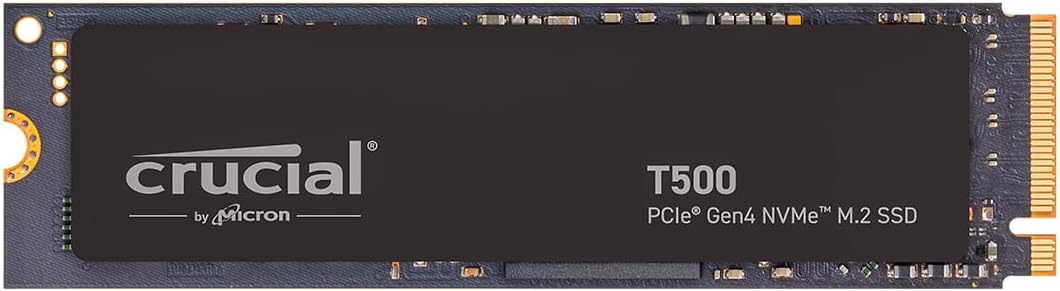
The Crucial T500 earns a high 4.8 rating for its exceptional TLC NAND performance. It pushes Gen4 NVMe speeds to their limit with read rates up to 7300MB/s.
We may earn a commission when you buy through this link, at no additional cost to you.
Its standout feature is support for Microsoft DirectStorage which boosts game loads up to 16% faster. Content creators also benefit from a 42% boost in app performance for rendering tasks.
The main trade-off is the price which is higher than standard QLC drives. However the durability and speed make it worth the investment for power users.
We recommend this drive for creatives and gamers who need maximum reliability. The included Adobe Creative Cloud bundle adds extra value for professionals starting new projects.
Creative apps see up to 42% faster rendering speeds improving your overall workflow efficiency.
Includes a one month free Adobe Creative Cloud All Apps subscription for photo video and 3D projects.
We may earn a commission when you buy through this link, at no additional cost to you.
This 2TB version of the P310 offers massive storage for users with extensive libraries. It maintains the 4.7 rating of the 1TB version while doubling the available space.
We may earn a commission when you buy through this link, at no additional cost to you.
It delivers solid Gen4 performance suitable for general desktop use and storage expansion. The larger capacity ensures you can store AAA games and media files without frequent management.
Users might find the lack of bundled software a downside compared to other models. Also the QLC NAND may slow down under extreme sustained write workloads.
This drive is ideal for users who prioritize capacity above all else. It provides a reliable upgrade path for those needing more room for files and applications.
Provides ample room for multiple AAA games media libraries and creative assets in one drive.
Uses standard M.2 2280 form factor for easy installation in most modern systems.
We may earn a commission when you buy through this link, at no additional cost to you.
The P510 brings Gen5 NVMe performance to a more accessible price point. With a 4.7 rating it offers speeds up to 11000MB/s which is nearly double Gen4 rates.
We may earn a commission when you buy through this link, at no additional cost to you.
Its standout feature is the balance of high-end Gen5 technology and affordability. It includes TLC NAND for better endurance and a month of Adobe Creative Cloud access.
Be aware that full speeds require a Gen5 compatible motherboard and sufficient cooling. Backward compatibility helps it work on Gen4 systems but speeds will be limited.
We recommend this for enthusiasts wanting to future-proof their setup. It offers exceptional value for those looking to adopt Gen5 standards early.
Delivers exceptional balance of Gen5 performance and price making it ideal for savvy buyers.
Comes with Acronis cloning software and Adobe Creative Cloud subscription for easy setup.
We may earn a commission when you buy through this link, at no additional cost to you.
This model features blazing fast Gen5 speeds reaching up to 14900MB/s read rates. It holds a solid 4.6 rating and is built for those who demand the absolute highest performance.
We may earn a commission when you buy through this link, at no additional cost to you.
Key strengths include AES-256-bit hardware encryption for data security and Micron G9 TLC NAND for durability. It is platform optimized for recent Intel and AMD processors.
The trade-off is that sustained performance often requires a dedicated heatsink to avoid throttling. The price point is also higher reflecting the extreme speed capabilities.
We recommend this for hardcore gamers and professionals who need maximum throughput. The security features and speed make it a top choice for high-end workstations.
Features AES-256-bit hardware encryption with TCG Opal to protect sensitive files securely.
Designed specifically for Intel 13th and 14th Gen and AMD Ryzen 7000 processors.
We may earn a commission when you buy through this link, at no additional cost to you.
The E100 offers an affordable entry into Gen4 storage with decent speeds for daily tasks. It holds a 4.5 rating and is perfect for upgrading older laptops or desktops.
We may earn a commission when you buy through this link, at no additional cost to you.
Its strengths include improved durability and dependability compared to traditional hard drives. The 4700MB/s speed is significantly faster than SATA alternatives for booting and loading apps.
Users should note the limited 480GB capacity which might fill up quickly with modern games. It lacks some of the high-end features found in premium models.
We recommend this for users on a tight budget needing basic NVMe speed. It provides a reliable upgrade path without breaking the bank.
Gen4 performance is 8x faster than SATA and 33x faster than hard disk drives.
Follow step-by-step instructions for easy installation and cloning to migrate existing data.
We may earn a commission when you buy through this link, at no additional cost to you.
This variant features QLC NAND technology designed for high capacity at a lower cost. It holds a 4.6 rating and fits standard M.2 slots for easy integration.
We may earn a commission when you buy through this link, at no additional cost to you.
Its main strength is the balance of storage capacity and price. It delivers standard Gen4 performance suitable for general computing and media storage.
Users should be aware that QLC NAND generally has lower endurance compared to TLC options. It is best suited for read-heavy or casual gaming workloads.
We recommend this for users prioritizing storage space over extreme write endurance. It provides a solid reliable solution for expanding PC libraries.
232L Micron QLC NAND provides high density storage at a lower manufacturing cost.
Designed as an internal M.2 2280 drive fitting most standard laptop and desktop slots.
We may earn a commission when you buy through this link, at no additional cost to you.
The T500 PS5 version brings TLC NAND performance to console storage with a 4.8 rating. It meets PlayStation 5 specifications and includes an integrated heatsink for stability.
We may earn a commission when you buy through this link, at no additional cost to you.
Key strengths include the built-in cooling solution and support for Microsoft DirectStorage on PC. The included Adobe Creative Cloud bundle adds value for creative work.
Users might find the price higher than standard P310 models but the TLC NAND offers better durability. It is a versatile choice for both console and PC upgrades.
We recommend this for users wanting premium performance and reliability. It offers the best of both worlds for gaming and creative tasks.
Meets PlayStation 5 specs and installs easily in desktops laptops and consoles.
Integrated heatsink ensures silent stable operation under heavy gaming and creative workloads.
We may earn a commission when you buy through this link, at no additional cost to you.
The T700 delivers robust Gen5 performance with speeds up to 11700MB/s. It holds a 4.6 rating and is engineered for tech enthusiasts and hardcore gamers.
We may earn a commission when you buy through this link, at no additional cost to you.
Its strengths include optimized compatibility with Intel 13th and 14th Gen and AMD Ryzen 7000 systems. It comes with Acronis cloning software to ease the transition.
Trade-offs include the need for a Gen5 slot and adequate cooling to maintain performance. The TLC NAND offers better endurance than QLC alternatives.
We recommend this for users seeking reliable Gen5 speeds without the highest price tag. It is an excellent upgrade for next generation computing platforms.
Designed specifically for Intel 13th and 14th Gen and AMD Ryzen 7000 systems.
Engineered with Micron TLC NAND and a 5 year warranty for long term reliability.
We may earn a commission when you buy through this link, at no additional cost to you.
Selecting the right drive depends on your specific needs and hardware capabilities. Consider these key factors before making a purchase.
NAND type affects speed and endurance. TLC NAND is faster and more durable than QLC NAND. It is ideal for heavy gaming and creative workloads.
Choose TLC for longevity and QLC for budget friendly storage expansion.
Check if your system supports PCIe Gen4 or Gen5. Newer systems allow faster speeds. Older systems may work but at reduced performance.
Match the drive interface to your motherboard for maximum benefit.
Games and applications require significant storage. A 1TB drive is a sweet spot for most users. 2TB options are better for extensive libraries.
Ensure you have enough space to avoid frequent file management.
High performance drives generate heat. Some models include heatsinks. Others may require aftermarket cooling solutions.
Prefer models with built-in cooling for stable performance.
Many drives include useful software. Acronis cloning helps with migration. Adobe Creative Cloud is useful for creators.
Check what software is included to add value to your purchase.
A good warranty protects your investment. Look for at least a 3 to 5 year coverage. Micron products usually have strong support.
Verify warranty length before buying to ensure peace of mind.
Install the drive securely in your motherboard M.2 slot. Ensure it is tightened properly to avoid connection issues.
Update your system drivers regularly. This ensures compatibility and stability for the storage interface.
Keep the drive cool to maintain performance. Good airflow in your case helps prevent thermal throttling.
The Crucial P310 2280 1TB with heatsink is the ideal choice for PS5. It meets all console specifications for storage expansion. The integrated heatsink ensures stable performance during gaming.
Currently Gen4 is sufficient for most gaming tasks. Gen5 offers higher speeds but often requires newer hardware. Consider your current system before upgrading to Gen5.
TLC NAND is faster and more durable than QLC NAND. QLC is more cost effective but has lower endurance. Choose TLC for heavy write loads and QLC for general storage.
It depends on your case airflow. Some models include built-in heatsinks. Others may require separate cooling for sustained performance.
Yes most of these models are M.2 2280 which fits standard laptops. Check your laptop manual to confirm slot availability before buying.
Many models include Acronis cloning software. Follow the instructions to transfer your OS and files. This simplifies the upgrade process significantly.
The Crucial P310 T500 and T710 offer excellent choices across budget and performance tiers. Each model brings unique features to suit different needs.
Prioritize TLC NAND and adequate cooling for long term reliability. Match the interface to your system to avoid bottlenecks.
Prices and availability change frequently so verify current details before purchasing. This guide helps you make an informed decision today.