
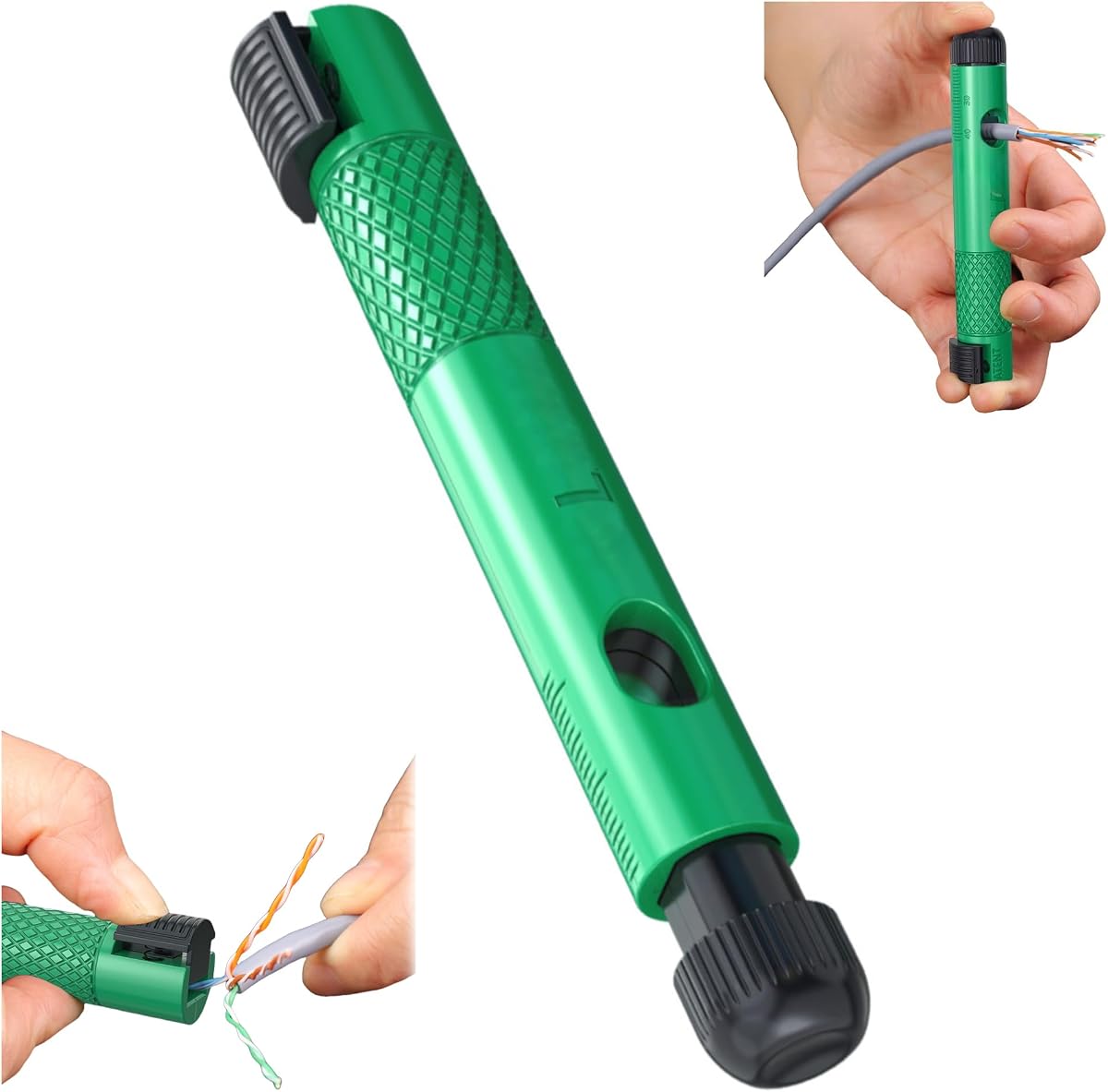
LIUJINCAN Untwist Tool
4.2Editor score
Solid brass tube construction
Heat-shrink coated grip
Reduces finger fatigue
This guide compares ten top-rated Ethernet Untwist Tool options to help you find the perfect cable separation device for your network installation tasks.
Ethernet Untwist Tools are essential devices for network professionals who need to separate twisted pair cables efficiently. These tools reduce finger fatigue and save time during cable termination and repair tasks.
We compared ten real products based on their features, compatibility, and user feedback to create this comprehensive list. Each option offers unique benefits for different installation scenarios and budget levels.
Every pick highlights specific strengths and weaknesses so you can choose wisely. Please note that prices and availability may change frequently on online retail platforms.
4.2Editor score

4.5Editor score

5.0Editor score
The following table provides a side-by-side comparison of all ten products reviewed in this guide to help you evaluate their specifications quickly.



This is a powerful automated solution with a 4.5 rating for professionals needing high volume work. It offers unmatched speed and convenience for large scale cable projects.
We may earn a commission when you buy through this link, at no additional cost to you.
The tool separates pairs quickly without manual effort and supports CAT5e through CAT7 standards. Its rechargeable design means you can work all day without replacing batteries.
While the cost is higher, the time saved justifies the investment for frequent users. You avoid finger strain and the need for disposable power sources.
IT technicians managing large data centers should consider this tool for its efficiency. It pays for itself quickly by reducing labor time on repetitive tasks.
A single charge untwists up to 2000 pairs which is ideal for long shifts. The USB-C port allows fast 40 minute recharge times for minimal downtime.
The built-in LED light ensures visibility in dark conduits or under desks. This helps you see cable colors clearly for accurate stripping and separation.
We may earn a commission when you buy through this link, at no additional cost to you.
This tool offers excellent value with a 4.2 rating for budget conscious technicians. It focuses on reducing physical strain through smart ergonomic design.
We may earn a commission when you buy through this link, at no additional cost to you.
The solid brass tube provides consistent untwisting results without bending or breaking. The heat-shrink grip ensures control even when wearing gloves on job sites.
It is not automated so you still apply some manual force to separate wires. However the reduced strain makes it comfortable for long periods of use.
DIY enthusiasts or small installers will find this tool practical and affordable. It handles CAT5 to CAT7 cables effectively for most home and office needs.
Brass construction ensures the tool does not rust or degrade over time. This is essential for tools kept in dusty or humid toolbox environments.
The grip shape and coating reduce pressure on fingers during repetitive tasks. This helps prevent cramping when preparing multiple network cables at once.
We may earn a commission when you buy through this link, at no additional cost to you.
With a perfect 5.0 rating this tool excels as a premium multi-functional device. It simplifies cable prep by combining multiple functions into one compact unit.
We may earn a commission when you buy through this link, at no additional cost to you.
The dedicated straightening slot ensures smooth plug-in and reduced signal interference. It also strips round cables cleanly to preserve wire integrity for stable transmission.
It does not work with flat cables which limits use in some modern setups. Manual straightening also requires steady hands to avoid damaging internal conductors.
Electricians and data center pros who want one tool for many jobs should buy this. It is built to withstand frequent professional use in tough environments.
This tool handles stripping cutting and straightening so you carry fewer items. It saves time by eliminating the need to switch between different tools.
The straightening slot ensures wires lie flat for better connections. This reduces interference and maintains high performance on data transmission lines.
We may earn a commission when you buy through this link, at no additional cost to you.
This set offers a practical solution for daily separation tasks with a 4.3 rating. The dual headed design allows for faster unwinding of twisted pairs.
We may earn a commission when you buy through this link, at no additional cost to you.
It fits most common network and telephone lines from CAT5 up to CAT7. The three piece kit ensures you have backup tools if one gets lost.
It is compact enough to fit in tool bags but requires manual effort to operate. The lack of lighting means you need external light in dark spaces.
School IT staff or factory maintenance crews will find this handy and affordable. It relieves burdens during repetitive installation or repair work effectively.
The tool works on network and telephone cables making it very versatile. It fits most untwisting processes so you do not need separate tools.
At 12 cm it fits easily into bags or boxes for transport. This makes it convenient for technicians who move between job sites daily.
We may earn a commission when you buy through this link, at no additional cost to you.
This 4.2 rated kit provides two tools to handle separation and stripping needs. It is ideal for those starting out in network cabling work.
We may earn a commission when you buy through this link, at no additional cost to you.
The untwister protects the core while the stripper removes outer covers cleanly. Users recommend stripping about 2 cm before using the untwister for best results.
Managing two tools might be less convenient than a combined unit. But the low cost makes it a low risk purchase for beginners.
Home users or small office managers can use this kit effectively. It offers a nice combination to meet separation requirements without high cost.
The twisted wire core separator avoids hurting internal wires during separation. This is critical for maintaining signal quality in network connections.
The mini wire stripper is designed specifically for network cable covers. It allows you to remove insulation cleanly without damaging the copper inside.
We may earn a commission when you buy through this link, at no additional cost to you.
This pen-style tool aims to combine stripping straightening and cutting in one unit. It offers a very compact design for quick cable management tasks.
We may earn a commission when you buy through this link, at no additional cost to you.
The rotating handle is designed to reduce hand fatigue during prolonged use. It is suitable for Cat5e Cat6 and Cat7 cables in various settings.
However the lower rating suggests some users face issues with performance. It may not be as durable or effective as dedicated tools for heavy work.
IT technicians needing a lightweight pocket tool might try this option. It replaces multiple gadgets but should be tested on your specific cable types.
The rotating handle enhances efficiency and comfort during use. It provides a firm grip while protecting cable integrity during separation.
Its compact design allows you to carry it everywhere easily. This is useful for troubleshooting or quick fixes on any job site.
We may earn a commission when you buy through this link, at no additional cost to you.
This tool targets 1.3mm crystal network cables specifically for system upgrades. It offers a comfortable grip for handling wires during new installations.
We may earn a commission when you buy through this link, at no additional cost to you.
The comb design allows quick easy separation of cable pairs efficiently. It reduces installation time significantly for maintenance and upgrade projects.
It is very compact fitting easily into any toolkit or pocket space. However it is limited to specific cable sizes so check compatibility first.
Engineers working with crystal cables should find this essential for upgrades. It improves efficiency and reduces the physical effort needed for separation.
Designed specifically for 1.3mm engineer wire it ensures precise separation. This specificity helps avoid damage to the small wire structures inside.
Crafted with ABS material it offers a comfortable ergonomic grip. This makes it easy to handle during extended network installation periods.
We may earn a commission when you buy through this link, at no additional cost to you.
This tool focuses on simple effective separation with a 4.1 rating. It saves time and reduces finger pressure on large installation jobs significantly.
We may earn a commission when you buy through this link, at no additional cost to you.
It is designed specifically for fingers to make separation simple and comfortable. You can avoid damage to twisted pairs during the separation process.
It lacks advanced features like lighting or stripping which limits its scope. But it excels at its core function of untwisting pairs quickly.
Anyone needing a basic portable tool should find this adequate. It is easy to carry and simple to use for quick cable prep.
Specially designed for fingers it offers comfort during use. This helps reduce strain when separating large numbers of cable pairs.
Simple design means little learning curve for new technicians. It is portable and easy to use for everyday network tasks.
We may earn a commission when you buy through this link, at no additional cost to you.
This tool combines stripping straightening and organizing in a pen shape. It is equipped with an SK5 steel blade for clean accurate cuts.
We may earn a commission when you buy through this link, at no additional cost to you.
The rotating handle reduces hand fatigue during prolonged use effectively. It fits effortlessly into pockets or toolkits due to its lightweight design.
Some users report a lower rating possibly due to blade durability. But the ergonomic design is a strong point for comfort.
Electricians looking for a lightweight utility tool might try this. It offers multiple functions but verify blade quality before buying.
SK5 steel blade delivers clean accurate cuts without damage. This ensures professional results for network setups and repair work.
ABS plastic handle provides a firm grip for control. It protects cable integrity while offering comfort during intricate cabling tasks.
We may earn a commission when you buy through this link, at no additional cost to you.
This tool features an innovative roller mechanism for quick untwisting actions. It simplifies separating and straightening wires for Category 5/6 cables.
We may earn a commission when you buy through this link, at no additional cost to you.
You simply turn the roller to untwist and press to straighten wires. This effortless operation works well for both beginners and experienced engineers.
It is built from ABS and metal for long lasting durability and reliability. However it is most ideal for telephone and Category 5/6 wires.
Anyone working with twisted wire in wide applications should consider this. It saves time and effort while providing comfortable use.
The roller mechanism allows easy untwisting with a simple turn. This makes the process smooth and efficient for daily use.
Robust construction from ABS and metal ensures it lasts. It is a valuable addition to any professional toolkit.
We may earn a commission when you buy through this link, at no additional cost to you.
Selecting the right tool depends on your cable types, budget, and volume of work.
Ensure the tool supports the specific categories you work with like CAT5e CAT6 or CAT7. Some tools are limited to round cables while others handle twisted pairs better.
Check the specifications to confirm it works with your existing network setup.
Decide between manual tools and rechargeable electric ones. Manual tools are simpler and cheaper while electric ones reduce finger fatigue.
Rechargeable options are better for high volume work where speed matters.
Look for durable materials like brass or high-strength plastic that resist wear. A sturdy tool will last longer in professional environments.
Invest in higher quality if you use it daily for critical installations.
Choose a tool with a comfortable grip to prevent hand fatigue over time. Rotating handles or coated grips improve control and comfort.
Ergonomic features are vital for reducing physical strain on job sites.
Decide if you need a multi-functional tool or just untwisting. Some combine stripping and straightening which can save carrying multiple items.
Focus on primary needs to avoid paying for unused features.
Consider the size and weight if you travel between sites often. Compact tools fit better in bags or pockets for quick access.
Lightweight designs help maintain mobility during large installation projects.
Balance the cost with the expected usage frequency. Higher priced automated tools may pay for themselves through time saved.
Budget tools are sufficient for occasional home or small office projects.
To use the tool effectively, first strip the outer insulation of the cable about 2 cm to expose the twisted pairs.
Insert the exposed cable into the tool's slot and rotate or press gently depending on the model to separate the wires.
After use, clean any debris from the tool and store it in a dry place to maintain its condition.
It separates twisted pair wires in network cables to make stripping and crimping easier. This reduces finger strain and improves accuracy during installation.
Most tools support standard CAT5e CAT6 and CAT7 round cables. Some models may not be compatible with flat cables or specialized telephone wires.
Prices vary from budget models to premium automated units. Generally higher cost means better durability or automation features for heavy use.
Yes many tools are designed to handle both network and telephone cables. Check the product description to confirm its range of support.
High capacity models can untwist thousands of pairs per charge. Recharge time is typically short around 40 minutes for most units.
It reduces finger fatigue and prevents damage to internal wire cores. This speeds up the process and ensures cleaner cable separation.
Look for durable materials and simple design that fits your needs. A basic tool with good grip and compatibility is often enough.
Yes when used correctly they protect cable cores during separation. Follow instructions to avoid bending or breaking internal conductors.
The top picks offer a range of options from automated power to affordable manual designs for various needs.
Prioritize compatibility and build quality to ensure the tool lasts and works efficiently.
Check current prices and availability online as they can change frequently.