
NexiGo N60 1080P Webcam with Microphone
4.3Editor score
Full HD 1080P Video
Built-in Noise Cancelling Mic
Privacy Cover Included Standard
Choosing the right external webcam for your Mac is essential for clear video calls streaming and content creation. With countless options available today finding a camera that integrates seamlessly with macOS can be challenging for many users seeking quality.
We have analyzed top models based on resolution image sensor quality microphone performance and privacy features. Our list covers various needs from budget friendly options to premium 4K cameras ensuring you find the perfect fit for your specific workflow.
Each pick below highlights key strengths ideal use cases and potential trade offs to help you decide quickly. Please note that product availability and pricing can change frequently so verify details before making your final purchase decision today.
4.3Editor score

4.6Editor score

4.6Editor score
As an Amazon Associate we earn from qualifying purchases.
The following table provides a side-by-side comparison of all ten selected webcams highlighting their core specifications and key differentiators to help you narrow down your choices based on resolution features and connectivity options for your Mac.




The Acer 4K Webcam stands out as the top choice for Mac users needing professional-grade video quality. With a genuine Sony 1/2 CMOS sensor this model delivers true 4K resolution without relying on digital upscaling tricks that often compromise clarity.
We may earn a commission when you buy through this link, at no additional cost to you.
Its all-metal unibody design not only looks elegant on your desk but also helps dissipate heat during long video sessions. The Phase Detection Autofocus ensures your face stays sharp even when you move around while the dual mics filter out background noise effectively.
While it lacks extensive software tweaking options the plug-and-play setup works perfectly with macOS out of the box. The magnetic privacy cover is a thoughtful addition that snaps securely to protect your lens when the camera is idle.
This webcam is ideal for content creators professionals and anyone prioritizing image fidelity and build quality. If you need a reliable 4K camera that integrates smoothly with Zoom Teams or FaceTime this is the model to buy.
The Sony 1/2 CMOS sensor captures balanced true-to-life visuals with exceptional detail even in challenging lighting conditions.
Crafted from aerospace-grade aluminum this webcam feels durable and premium while ensuring fast heat dissipation for reliable 24/7 performance.
We may earn a commission when you buy through this link, at no additional cost to you.
The Anker PowerConf C200 offers a compelling middle ground for Mac users who want better than 1080p without the full price of 4K. Its 2K resolution provides noticeably sharper details than standard HD cameras making it great for professional meetings.
We may earn a commission when you buy through this link, at no additional cost to you.
Advanced audio clarity is achieved through AI noise cancellation which keeps your voice clear even in noisy environments. The low-light correction feature ensures you remain visible and well-lit during evening calls without needing extra ring lights.
Customizable viewing angles allow you to frame your shot perfectly using the software controls. The integrated privacy cover slides smoothly over the lens giving you peace of mind when the camera is not in use.
This model suits remote workers and students who need reliable performance at a reasonable cost. While it does not reach 4K it delivers excellent quality for most conferencing and streaming needs on Mac systems.
Dual mics paired with AI noise cancellation ensure voices are crystal clear filtering out ambient sounds effectively during virtual meetings.
Superior low-light performance captures crisp images in dim settings without requiring additional lighting setup for home offices.
We may earn a commission when you buy through this link, at no additional cost to you.
The EMEET C960 delivers unmatched clarity with its true 4K CMOS sensor making it an excellent budget option for high-quality video conferencing on Mac. Unlike many models that upscale this camera provides genuine 4K detail when activated properly.
We may earn a commission when you buy through this link, at no additional cost to you.
Equipped with PDAF automatic focusing technology it ensures clear and stable focus during business meetings or educational lectures. The auto light adjustment helps avoid over-exposed or dark settings so you always look your best during calls.
Dual omnidirectional microphones capture natural audio clearly which is essential for immersive meeting experiences. The privacy cover adds a layer of security and the flexible mounting options including tripod threads make it versatile for various setups.
This webcam is perfect for users who want 4K quality without breaking the bank. Just ensure you switch the resolution via software to unlock the full potential of the sensor for your Mac video sessions.
PDAF autofocus technology delivers faster more accurate and stable focusing than standard systems to keep video crisp in any scene.
Adjustable axis and 1/4-inch tripod threads allow secure mounting on monitors or tripods for flexible positioning during use.
We may earn a commission when you buy through this link, at no additional cost to you.
The NexiGo N60 is an excellent entry-level choice for Mac users seeking reliable Full HD video without extra costs. Powered by a 1080p FHD CMOS sensor it produces sharp and clear videos ideal for standard conference calls.
We may earn a commission when you buy through this link, at no additional cost to you.
Its built-in noise-canceling microphone reduces ambient noise to enhance sound quality which helps during group meetings or online classes. The privacy cover blocks the lens when not in use providing necessary security for daily users.
Ready to use within one minute this webcam requires no drivers and works instantly via USB 2.0 or 3.0. The fixed glass lens is optimized for typical desk distances making it a practical choice for most indoor setups.
This is the perfect pick for students or remote workers on a tight budget. While it lacks advanced autofocus its simplicity and affordability make it a solid workhorse for everyday video calling needs on Mac.
Works with USB 2.0/3.0 with no additional drivers required ensuring instant plug and play functionality on any compatible Mac device.
The included privacy cover blocks the lens to provide security and peace of mind for individuals and companies alike.
We may earn a commission when you buy through this link, at no additional cost to you.
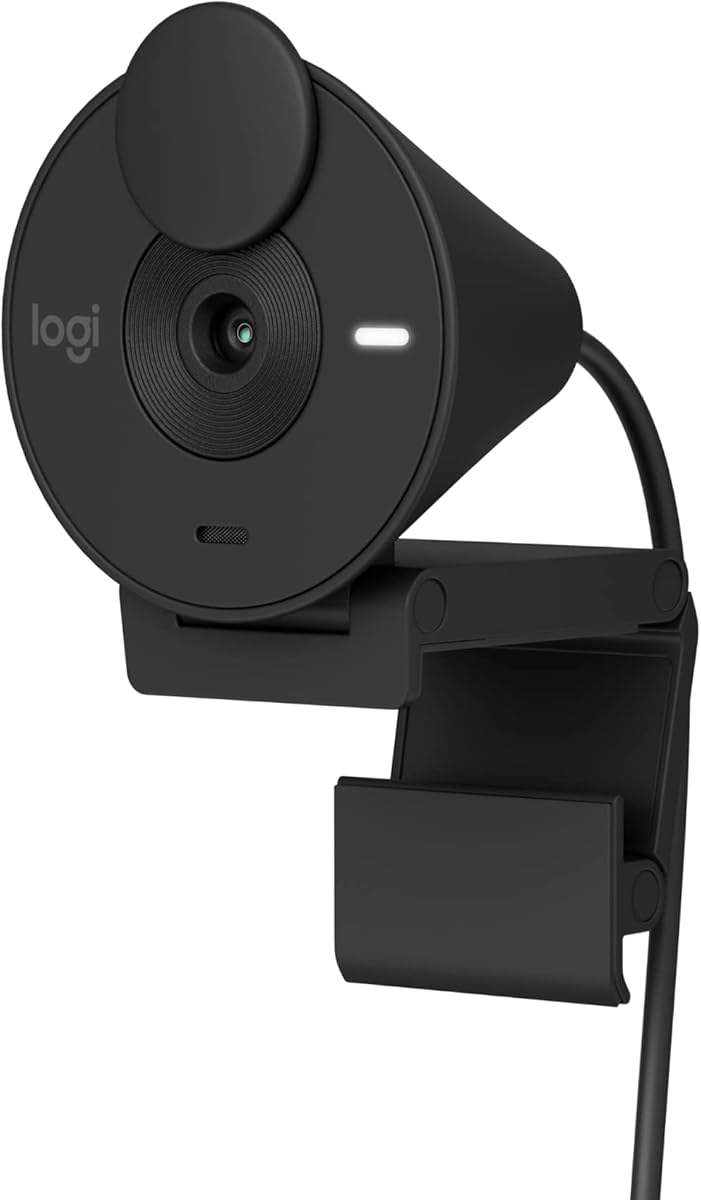
The Logitech Brio 100 offers a sleek design that complements modern Mac setups while providing reliable Full HD video quality. Its RightLight technology boosts brightness by up to 50% reducing shadows so you look your best during calls.
We may earn a commission when you buy through this link, at no additional cost to you.
Privacy is handled seamlessly with an integrated webcam cover that slides easily to protect the lens. The built-in microphone lets others hear you clearly which is sufficient for most standard video calling scenarios.
This model works effortlessly with Microsoft Teams Zoom and Google Meet without needing extra software. Made with recycled plastic it also appeals to environmentally conscious users looking for a sustainable tech accessory for their desk.
Ideal for home office users who value aesthetics and ease of use this camera is a practical upgrade from built-in laptop webcams. It delivers consistent performance for everyday meetings and streaming sessions on Mac.
RightLight boosts brightness by up to 50% reducing shadows so you look your best compared to previous-generation webcams.
The webcam is made with a minimum of 34% post-consumer plastic reducing environmental impact while maintaining durability.
We may earn a commission when you buy through this link, at no additional cost to you.
The Logitech Brio 301 presents a professional black design that fits well with most Mac monitors and workspaces. It offers Full HD 1080p resolution ensuring natural image quality so you look like the real you on meeting apps.
We may earn a commission when you buy through this link, at no additional cost to you.
RightLight 2 technology automatically compensates for poor lighting conditions so you stay visible clearly even in dim rooms. The spin privacy shutter provides instant privacy by blocking the camera lens when you do not need to be on screen.
You can customize video experiences like color and image quality using the free Logi Tune app. The noise reduction mic suppresses background sound effectively making it easier for everyone on the call to hear you.
This webcam is great for business professionals who need certified compatibility with Zoom and Microsoft Teams. Its straightforward functionality and durable build make it a reliable choice for daily work tasks on your Mac system.
RightLight 2 technology automatically compensates for poor lighting conditions so you can be seen clearly during calls.
Spin the webcam privacy shutter to block the camera lens when you do not need to be on screen for security.
We may earn a commission when you buy through this link, at no additional cost to you.
The Logitech C920e is designed specifically for business environments with certifications for Zoom and Microsoft Teams ensuring seamless integration in workplaces. Its 78 degree fixed field of view balances individual users with enough room to share projects visually.
We may earn a commission when you buy through this link, at no additional cost to you.
Two integrated omnidirectional microphones capture your audio clearly from up to one meter away keeping your voice natural and clear during meetings. Built-in HD autofocus ensures you are seen clearly throughout your video calls without manual adjustments.
An attachable privacy screen flips up and down to cover or expose the lens giving you immediate visual confirmation of your privacy status. The sturdy adjustable clip makes it easy to mount on laptops or external monitors securely.
Ideal for corporate Mac users needing reliability and compliance this webcam offers robust performance for daily business interactions. Its professional features and easy mounting options make it a top choice for hybrid work setups.
Certified for Zoom TAA compliant and works with all popular video calling applications ensuring compatibility and seamless integration.
Integrated omnidirectional microphones capture audio clearly from up to one meter away so your voice always sounds natural.
We may earn a commission when you buy through this link, at no additional cost to you.
The Logitech C922x is a premium choice for streamers and content creators needing flexible video settings on their Mac. It captures Full HD 1080p video at 30fps or 720p at 60fps allowing you to balance quality with motion smoothness.
We may earn a commission when you buy through this link, at no additional cost to you.
HD lighting adjustment and autofocus produce bright razor-sharp images even in low-light settings which is crucial for professional streaming. Stereo audio with dual mics ensures natural sound during calls and recorded videos giving you broadcast-quality output.
Advanced capture software lets you create and share content easily while a XSplit VCam license allows background replacement without a green screen. However it does not include a privacy shutter which is a drawback for security-conscious users.
This model is best suited for creators who prioritize video versatility and audio quality. Its robust feature set supports high-performance streaming and recording tasks making it a worthy investment for serious Mac-based producers.
Easily create and share video content with this Logitech camera suitable for use as a desktop computer camera or monitor webcam.
Capture natural sound during calls and recorded videos with stereo audio from dual mics for immersive audio experiences.
We may earn a commission when you buy through this link, at no additional cost to you.
The Logitech C920S brings a trusted HD experience with a privacy shutter that puts you in control of what you show. It delivers premium video quality that makes you look like a Pro during Full HD 1080P video calls on Mac.
We may earn a commission when you buy through this link, at no additional cost to you.
A glass lens ensures recorded videos are crisp and vibrantly colored preserving visual fidelity for later viewing. HD autofocus and light correction enjoy razor-sharp high Def in every environment so your image stays sharp even when lighting changes.
Stereo audio with dual mics captures natural sound on calls and recorded videos enhancing the overall communication experience. Unlike some pro versions it does not include the XSplit VCam license which limits background editing options.
This webcam is perfect for users wanting a balance of reliability and basic privacy features. Its simple yet effective performance makes it a solid daily driver for video meetings and content recording on any Mac setup.
Webcam comes with privacy shutter that puts you in control of what you show and protects the lens with a snugly fitting cover.
Full HD 1080P video Recording with a glass lens ensures your recorded videos are crisp and vibrantly colored.
We may earn a commission when you buy through this link, at no additional cost to you.
The Acer 4K Webcam offers a compact lightweight design ideal for mobile workers who need 4K quality on the go. Weighing just 57 grams this camera is ultra-portable allowing you to take HD video calls and recordings anywhere easily.
We may earn a commission when you buy through this link, at no additional cost to you.
Its all-aluminum body ensures fast heat dissipation for reliable 24/7 video performance without overheating. The Phase Detection Autofocus delivers faster and more accurate focusing than standard autofocus ensuring crisp clear 4K video without blurriness.
Dual high-sensitivity digital mics capture your voice clearly from up to 2.5 meters away while filtering out wind and keyboard clicks. The magnetic privacy cover snaps securely over the lens keeping your privacy safe during casual use.
This model is excellent for professionals who travel frequently and value performance and portability. Its simple plug-and-play functionality makes it easy to use across Mac Windows and ChromeOS without complex driver installations or WiFi issues.
At just 57 grams this 4K webcam is ultra-portable letting mobile workers take HD video calls and recordings anywhere easily.
The all-aluminum body ensures fast heat dissipation for reliable 24/7 video performance during extended streaming sessions.
We may earn a commission when you buy through this link, at no additional cost to you.
Selecting the right webcam involves balancing resolution build quality and specific features like privacy and audio performance. Here are the key factors to consider before making your purchase for Mac compatibility.
Resolution determines how sharp your video appears with 1080p being standard and 4K offering superior detail for streaming or professional work. Look for cameras with large CMOS sensors like Sony to ensure better light capture and color accuracy without relying on digital upscaling that degrades image quality over time.
Autofocus capabilities such as PDAF help keep you sharp as you move during meetings. Auto light correction features are equally vital to prevent dark or washed-out images in typical indoor office environments. Ensure the model adjusts brightness quickly so you maintain a professional look without manual tweaking.
Clear audio is just as important as video clarity during virtual calls. Dual omnidirectional microphones with noise cancellation effectively filter out background noise like keyboard clicks or wind. Check if the mic range covers your desk space well to avoid voice distortion during long meetings.
Privacy covers or shutters are essential for protecting your visual data when the camera is idle. Some models offer magnetic snap-on covers while others use sliding mechanisms depending on your preference. Always verify that the lens is fully blocked to prevent unwanted access during sensitive times.
Most modern webcams are plug-and-play with macOS but always check minimum system requirements for drivers or software. Ensure the camera works with your preferred video conferencing apps like Zoom or Teams without extra setup steps to avoid frustration.
Materials like aluminum or high-grade plastic affect durability and heat dissipation. Adjustable clips or tripod threads provide flexibility for mounting on monitors or desks securely. A sturdy build ensures longevity especially if you plan to use the camera frequently in different locations.
USB-C is becoming standard for newer Macs but adapters may be needed for older USB-A ports. Wireless models offer more placement flexibility but wired connections ensure more stable performance without signal interruptions. Check included accessories to confirm you have everything needed for immediate use.
Consider your budget against the features offered to avoid overpaying for capabilities you will not use. Entry-level models suffice for basic calls while premium options justify their cost with 4K and advanced audio. Focus on long-term reliability and performance rather than just the lowest price tag.
Clean the lens regularly with a microfiber cloth to remove dust or smudges that could degrade image quality. Store the webcam safely in a padded case or protected area when not in use to prevent damage during travel.
Most of the listed webcams are compatible with macOS versions going back to 10.7 or 10.11. Always check the specific compatibility requirements in the product details if you are using a legacy Mac to ensure drivers or software support is available for your system.
Blurry video often results from poor lighting or using the wrong resolution setting in your software. Ensure you are using a camera with autofocus and check that the software output is set to 4K rather than default 1080p for best results.
Yes many of these models like the Logitech C922x and Acer 4K webcam are designed for high-performance streaming. They offer features like background removal and noise reduction that enhance the quality of your broadcasts on platforms like Twitch or YouTube.
Yes most of these webcams include dual microphones with noise cancellation capabilities suitable for professional meetings. However if you need studio-quality audio for podcasts consider pairing the camera with a dedicated external microphone for best results.
Simply plug the USB cable into your Mac and open your video conferencing app. The system should automatically recognize the camera as an input device allowing you to start using it within seconds without any complex setup steps.
Yes models like the Acer 4K and EMEET C960 support native 4K video output. Make sure your Mac and video conferencing software support 4K resolution to fully utilize these capabilities for high-quality recording or streaming.
Remember to verify current product availability and compatibility before purchasing to avoid any issues with your specific Mac model. Investing in a quality webcam will significantly enhance your remote communication experience and productivity over the long term.