Swivel Design 16GB USB Flash Drive
4.6Editor score
Metal swivel cap design
FAT32 format ready
Keychain attachment included
This guide compares the top FAT32 USB Flash Drive options for compatibility and speed, helping you choose the right storage device for your needs.
Finding a reliable FAT32 USB Flash Drive is essential for seamless file sharing across various devices. Whether you need to store photos, documents, or media files, compatibility remains a key factor for everyday use.
We evaluated ten top-rated drives based on speed, durability, and format readiness. Each option was assessed for its ability to work out of the box with Windows, Mac, and legacy systems without extra formatting.
Each pick highlights unique strengths like USB-C adapters or compact designs. Note that prices and stock vary frequently, so check current listings before purchasing to ensure you get the best deal available today.
4.6Editor score

4.5Editor score

4.7Editor score
The following table provides a side-by-side comparison of all ten reviewed drives, highlighting key specifications and features to help you make an informed decision quickly.




This 32GB drive stands out for its versatile connectivity options and solid build quality. It arrives pre-formatted in FAT32, ensuring immediate use across most platforms without additional setup steps for users.
We may earn a commission when you buy through this link, at no additional cost to you.
Its USB 3.0 interface delivers read speeds up to 105MB/s, making file transfers notably faster than older USB 2.0 models. The included USB-C adapter extends compatibility to modern laptops and tablets without needing separate cables.
While write speeds range between 30-40MB/s, which is decent for the price tier, the metal body helps dissipate heat during prolonged use. The textured design also provides a secure grip when plugging or unplugging from tight ports.
Ideal for students and professionals needing reliable storage that works on both old and new devices. We recommend this drive for anyone prioritizing cross-platform compatibility and decent transfer performance in a compact form factor.
The included USB-C adapter ensures you can connect to modern devices without purchasing additional hardware separately.
The metal casing not only looks premium but also helps dissipate heat during extended data transfer sessions.
We may earn a commission when you buy through this link, at no additional cost to you.
This drive offers a straightforward solution for users who need basic storage without high-speed requirements. It comes formatted as FAT32, making it immediately recognizable by most computers and consumer electronics upon first connection.
We may earn a commission when you buy through this link, at no additional cost to you.
The red LED indicator provides visual feedback during data transfers, which is helpful for knowing when it is safe to remove the drive. The cap design protects the connector from oxidation and physical damage when not in use.
While USB 2.0 speeds are slower than modern standards, this drive remains suitable for transferring documents, photos, and small media files efficiently. The lightweight plastic body makes it easy to attach to lanyards or keychains.
Best suited for backup purposes or sharing files with older systems that do not support USB 3.0. Its simplicity and low cost make it a practical choice for schools or offices needing bulk storage solutions.
The LED light helps users avoid accidental removal during file transfers, reducing data corruption risks.
Works seamlessly with older TVs, cassette players, and car stereos that may not support newer protocols.
We may earn a commission when you buy through this link, at no additional cost to you.
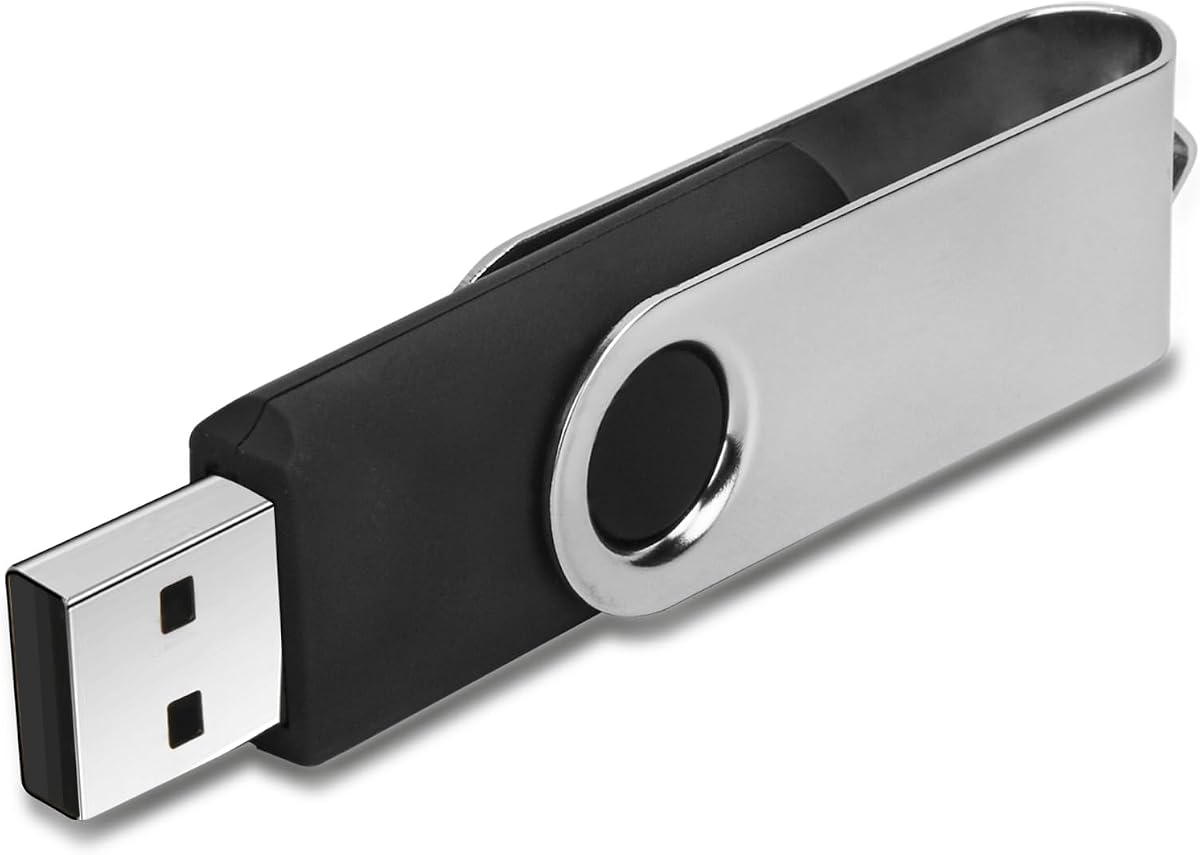
This 16GB drive features a clever swivel cap design that eliminates the risk of losing a separate cover. Its compact form factor makes it easy to carry in a pocket or bag while keeping the connector safe when not in use.
We may earn a commission when you buy through this link, at no additional cost to you.
The metal body provides a premium feel and better protection against wear compared to plastic alternatives. It is pre-formatted in FAT32, ensuring it works right away with Windows, Mac, and Linux systems without reformatting.
While 16GB is smaller than the 32GB options, it remains sufficient for storing essential documents, music playlists, and photo albums. The integrated keychain ring ensures you can attach it securely to keys or backpacks for daily access.
A solid choice for students or travelers who need a reliable drive for smaller file sets. Its design prioritizes durability and portability, making it a practical everyday tool for personal data management on the go.
The swivel cover protects the USB connector without the hassle of managing a separate plastic cap that can easily get lost.
Its slim profile and keychain attachment allow you to keep your digital files handy wherever you go without bulk.
We may earn a commission when you buy through this link, at no additional cost to you.
This 32GB drive delivers standard USB 2.0 performance with a focus on simplicity and capacity. It comes ready to use with FAT32 formatting, allowing immediate file storage and retrieval across various operating systems without delay.
We may earn a commission when you buy through this link, at no additional cost to you.
The LED indicator flashes during data transfers to keep you informed of the drive's status. A string slot at the end makes it easy to attach a lanyard or rope to prevent losing the drive in transit.
While it lacks the advanced features of USB 3.0 models, its storage size makes it suitable for bulk file transfers involving photos and documents. The plastic casing keeps costs low while maintaining enough durability for regular daily use.
Recommended for users needing a no-frills storage solution for general data management. It balances capacity and cost effectively, making it a practical option for school projects or home backups where speed is secondary to space.
At 32GB, this drive offers ample space for typical personal files without the premium cost of higher-end models.
The integrated slot for a string ensures you can secure the drive to keys or bags to avoid misplacing it.
We may earn a commission when you buy through this link, at no additional cost to you.
This pack provides two 32GB drives, offering immediate backup options or shared storage between family members. The black and blue color coding helps distinguish files or users without needing to label them manually on each device.
We may earn a commission when you buy through this link, at no additional cost to you.
The metal clip rotates 360 degrees around the ABS plastic body, protecting the connector without a separate cap to lose. LED lights indicate when data is actively being transferred, helping you avoid accidental disconnection during critical moments.
While the USB 2.0 interface limits transfer speeds, having two drives ensures you always have a spare ready. This is particularly useful for presentations or events where redundancy prevents downtime if one drive fails or gets misplaced.
Ideal for teams or households that require multiple drives for organizing different categories of data. The rotating clip design adds durability, ensuring the connector stays safe during transport in bags or pockets.
Distinct colors allow you to assign drives for different purposes like work files versus personal media efficiently.
Having two drives ensures you have an immediate backup option if the primary drive encounters hardware issues.
We may earn a commission when you buy through this link, at no additional cost to you.
This mini drive features a highly textured metal body that fits barely anywhere on your laptop without obstruction. It comes with a USB-C adapter, allowing connection to modern laptops and tablets while maintaining fast transfer capabilities.
We may earn a commission when you buy through this link, at no additional cost to you.
The USB 3.0 interface delivers read speeds up to 85MB/s, significantly outpacing standard USB 2.0 drives. Quality checks ensure stable performance, making it suitable for reliable daily use in office or school environments.
While the tiny design is great for portability, the separate adapter may feel slightly bulky compared to all-in-one solutions. However, the included lanyards help tether the adapter to the main drive, preventing loss when carrying them separately.
Perfect for users who need a discreet storage option that works with both USB-A and USB-C ports. Its compact size makes it ideal for attaching to key rings or keeping in a pocket for quick access to files.
The small dimensions ensure it does not block adjacent ports when connected to a laptop or desktop computer.
Included lanyards connect the adapter to the drive, ensuring you always have both components when needed.
We may earn a commission when you buy through this link, at no additional cost to you.
TEWENE drives feature a robust clip design that allows you to attach the drive securely to bags or belts. This practical feature ensures your data stays close at hand and reduces the risk of losing the drive during travel.
We may earn a commission when you buy through this link, at no additional cost to you.
With USB 3.1 Gen 1 technology, read speeds reach up to 85MB/s, making it efficient for transferring large files quickly. The included USB-C adapter expands its utility to devices without traditional USB-A ports like modern tablets.
While write speeds are capped at 30MB/s, the read performance is strong enough for most common tasks. The manufacturer offers solid after-sales support, which adds confidence to the purchase if any issues arise with the hardware.
Best for mobile professionals or students who need a secure way to carry their drive physically. The combination of speed and portability makes it a versatile choice for everyday data transport between multiple devices.
The clip ensures the drive stays attached to your belongings, reducing the chance of it getting lost in transit.
USB 3.1 Gen 1 support ensures faster access to stored files compared to legacy USB 2.0 standards.
We may earn a commission when you buy through this link, at no additional cost to you.
This 128GB drive offers exceptional storage for large media collections and professional files. Its sleek metal casing is built to withstand daily wear and tear, providing a premium look that matches modern laptop aesthetics.
We may earn a commission when you buy through this link, at no additional cost to you.
Transfer speeds reach up to 150MB/s, making it one of the fastest options available for moving movies and images. SanDisk SecureAccess software adds a layer of protection by encrypting private files stored on the drive securely.
While it uses a USB 3.0 interface, it remains compatible with older USB 2.0 ports though at reduced speeds. The high capacity means fewer files need to be deleted to make space for new content during routine usage.
Recommended for power users who need significant space and reliable performance without sacrificing build quality. The combination of speed, capacity, and security features makes it a top-tier choice for professionals.
The included software allows you to create a password-protected safe for sensitive documents and media files.
The metal casing offers superior durability compared to plastic drives, protecting internal components from impact.
We may earn a commission when you buy through this link, at no additional cost to you.
This pack includes three 32GB drives, ideal for sharing data across multiple devices or users. Each drive uses USB 3.2 Gen 1 technology to deliver read speeds up to 100MB/s, which is ten times faster than USB 2.0.
We may earn a commission when you buy through this link, at no additional cost to you.
The push-button retractor mechanism protects the connector without a separate cap to lose. Lexar DataShield allows you to create a password-protected safe on the drive, adding security for sensitive files stored on any of the units.
While security features require software installation on Windows, they provide peace of mind for business or personal use. The lanyard loop on each drive ensures they are easy to carry and attach to backpacks or keys safely.
Best for organizations or families that need multiple drives with security features. The retractor design ensures longevity by keeping the connector safe from physical damage during daily transport and use.
The push-button mechanism covers the USB connector automatically, preventing dirt and damage when the drive is not in use.
Password protection software creates a safe zone for critical files, keeping them hidden from unauthorized users.
We may earn a commission when you buy through this link, at no additional cost to you.
SanDisk is a trusted name in storage, offering reliable performance with this 32GB USB 3.0 drive. It delivers read speeds up to 100MB/s, making it a solid choice for general daily file transfers and backups.
We may earn a commission when you buy through this link, at no additional cost to you.
SecureAccess software allows for password protection on files, ensuring your data remains private. The five-year limited warranty provides significant assurance that the manufacturer stands behind the product's long-term durability and quality.
While the design is simple with a plastic body, it remains lightweight and functional for everyday tasks. The USB 3.0 speed ensures compatibility with both new and older devices without requiring specific ports for operation.
Ideal for users who prioritize brand reputation and warranty support over extra features like USB-C. This drive offers a balanced mix of speed, security, and reliability for those who need a dependable daily driver.
SanDisk is known for producing durable drives, and this model comes with a five-year limited warranty for peace of mind.
USB 3.0 capability ensures faster access to files compared to standard USB 2.0 drives available in the market.
We may earn a commission when you buy through this link, at no additional cost to you.
Selecting the right FAT32 USB Flash Drive requires evaluating several key factors to ensure it meets your specific storage and compatibility needs.
Capacity determines how many files you can store on the drive. Options range from 16GB to 128GB, so consider your typical file sizes like photos, videos, or documents before buying.
Choose 16GB for basic documents, 32GB for general media, and 128GB for large files to ensure sufficient space for your daily workflow.
USB 3.0 and 3.1 drives offer faster read and write speeds compared to USB 2.0. Faster speeds reduce waiting times during large file transfers and improve overall efficiency.
Prioritize USB 3.0 models if you frequently move large datasets, while USB 2.0 may suffice for occasional document storage.
Many modern laptops lack traditional USB-A ports, requiring USB-C connectivity. Some drives include adapters or dual connectors to bridge this gap effectively.
Look for drives with included USB-C adapters if you use modern devices to ensure versatility across all your hardware.
Metal casings generally offer better heat dissipation and protection against physical damage than plastic ones. Features like retractors or swivel caps protect connectors from wear.
Opt for metal or capless designs if you travel frequently to extend the lifespan of your storage device significantly.
Some drives include software for password protection and encryption to keep sensitive data secure from unauthorized access. This is critical for business or personal privacy needs.
Check if the drive supports SecureAccess or DataShield tools if you need to protect confidential files effectively.
FAT32 is the most universally compatible file system but has limitations on individual file sizes like 4GB. Ensure your drive arrives pre-formatted for immediate use.
Select drives that guarantee FAT32 out of the box to avoid formatting issues with car stereos or older TVs.
Price varies based on capacity, speed, and brand reputation. Multi-packs can offer better value if you need several drives for different users or backups.
Balance cost with essential features like speed and warranty to find the best value for your specific budget requirements.
Reputable brands often provide longer warranties, ranging from one to five years. This support protects against defects and ensures reliability over time.
Check warranty terms before purchasing to ensure you have recourse in case the drive fails unexpectedly.
To use your drive, simply plug it into a USB port on your computer. It will appear in File Explorer or Finder, allowing you to copy and paste files directly.
Always eject the drive safely before removing it to prevent data corruption. Use the operating system's eject function rather than pulling the drive out forcefully.
Store your drive in a cool, dry place away from extreme temperatures. Avoid exposing it to water or excessive dust to maintain its longevity and performance.
FAT32 is a file system compatible with almost all devices including Windows, Mac, and many consumer electronics. It matters because some devices like car stereos cannot read newer formats like exFAT or NTFS.
Yes, USB 3.0 drives are backward compatible with USB 2.0 ports. However, transfer speeds will be limited to USB 2.0 performance when connected to older ports.
Manufacturers count 1GB as 1,000MB while computers calculate 1GB as 1,024MB. This difference results in slightly less usable space than the advertised capacity.
FAT32 has a 4GB file size limit. You must reformat the drive to NTFS or exFAT using disk management tools to store larger files.
While safe for many modern systems, it is better to eject the drive to conserve power and prevent accidental disconnection. Sudden removal can lead to data loss.
Speeds depend on the USB port version, computer hardware capabilities, and file types. Small files transfer slower than large continuous streams due to overhead.
We have reviewed ten excellent FAT32 USB Flash Drives suitable for various needs. The 32GB USB 3.0 model with USB-C stands out for versatility, while the Swivel 16GB offers great budget value.
Prioritize compatibility and speed based on your primary use case. For professionals, investing in USB 3.0 drives with secure features ensures efficiency and data safety.
Prices and availability change often, so check current listings before purchasing. These selections provide reliable starting points for anyone seeking efficient portable storage solutions.