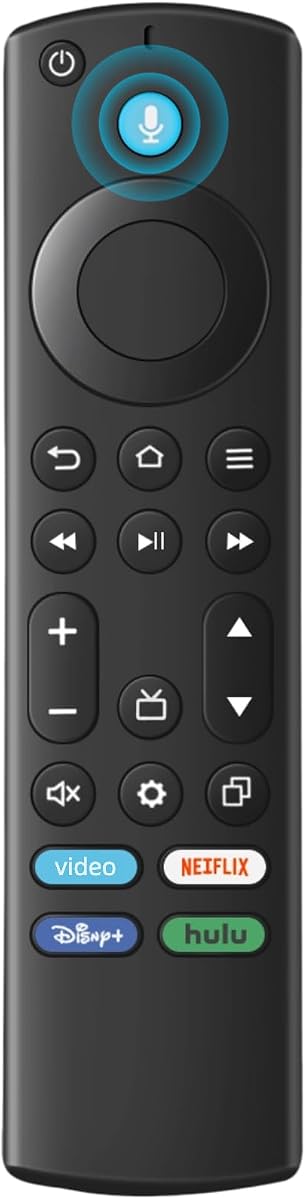
Replacement Voice Remote for Fire Stick
4.2Editor score
Compatible with Fire Stick 4K
Voice command functionality active
Includes user manual guide
This comprehensive guide compares the top Fire Stick Replacement Remote options available in October 2026, evaluating compatibility, voice features, and build
Finding the right Fire Stick Replacement Remote can transform your streaming experience completely. A reliable remote ensures seamless navigation, voice control access, and comfortable handling during long movie nights without frequent battery changes or connectivity issues.
We evaluated ten top-rated replacement remotes based on compatibility with various Fire TV generations, voice assistant integration, button customization options, and overall build durability. Our analysis focuses on real-world performance and user satisfaction ratings across different device models.
Each selection highlights key strengths and specific device compatibilities to help you choose the perfect match for your setup. Please note that product availability and pricing may fluctuate regularly, so verify current details before making your final purchase decision online.
4.2Editor score
4.5Editor score

4.5Editor score
The following table provides a side-by-side overview of all ten selected remote models, highlighting their core compatibility, voice capabilities, and unique features to streamline your decision-making process efficiently.


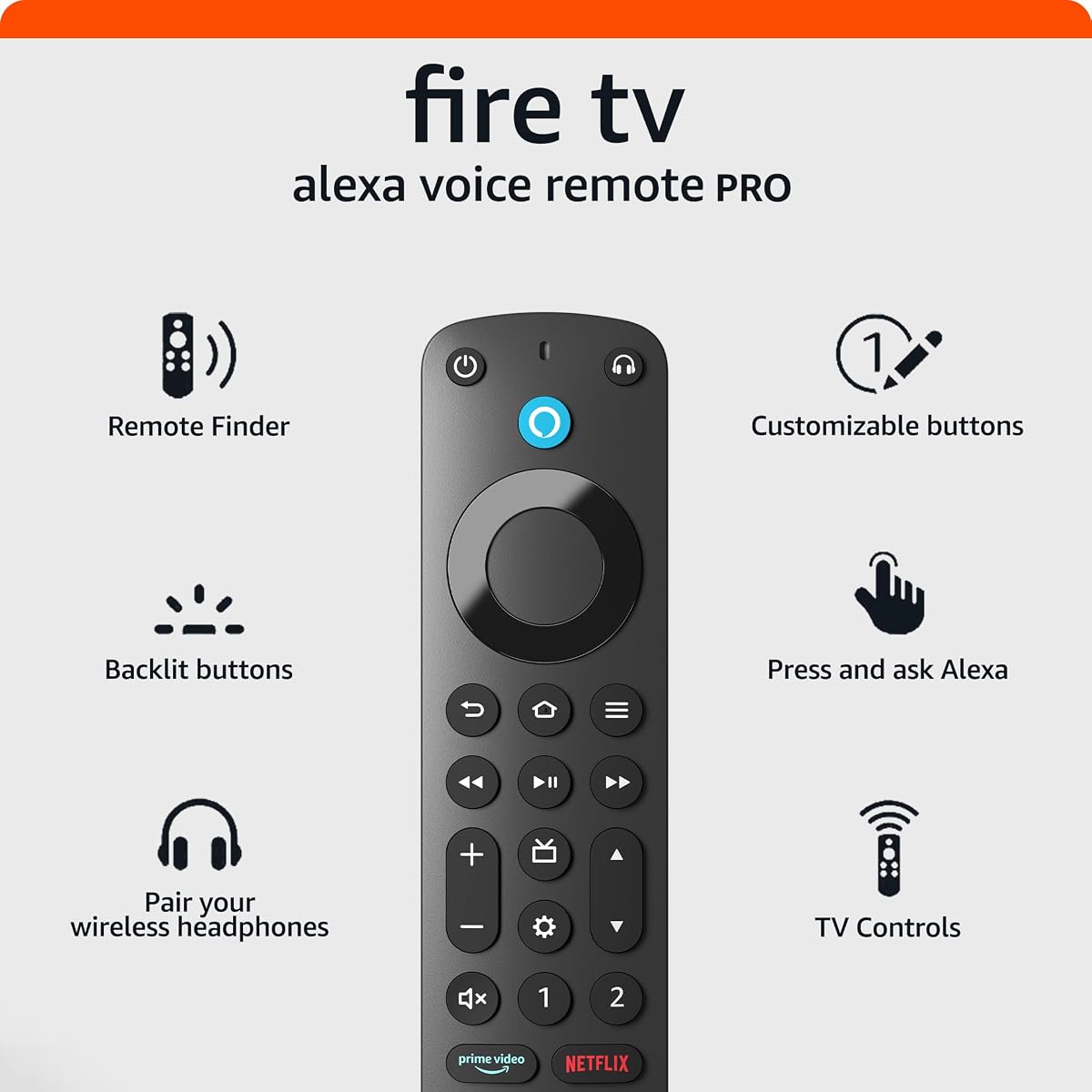
The Amazon Fire TV Alexa Voice Remote Pro stands out as the top premium choice for users seeking advanced functionality and convenience. With a strong 4.5 rating, it offers features like a remote finder that emits a ring when activated by voice or app. This premium device transforms how you interact with your entertainment setup significantly.
We may earn a commission when you buy through this link, at no additional cost to you.
Its motion-activated backlight is particularly useful for night viewing, illuminating buttons only when you pick it up. The two customizable buttons allow you to create shortcuts for favorite channels or apps, reducing menu navigation steps. Dedicated TV controls for power and volume ensure you manage your entire system from one handheld device easily.
While the price point is higher than third-party options, the added features justify the cost for frequent users. Some older Fire TV generations lack compatibility, so checking your model is essential before purchase. The headphone button offers quick Bluetooth pairing, which is a thoughtful addition for private listening experiences at home.
This remote is ideal for tech-savvy users who value convenience and seamless smart home integration. If you want the most polished experience without searching for lost devices in the dark, this pro version delivers exceptional value. It remains the best choice for those willing to invest in a high-quality accessory for their streaming setup.
Lost remotes are common but the remote finder feature allows you to locate it using Alexa voice commands or the Alexa app instantly.
The two customizable buttons can be programmed to launch specific apps or commands, streamlining your daily streaming routine significantly.
We may earn a commission when you buy through this link, at no additional cost to you.
For those seeking an affordable yet reliable alternative to official remotes, this Replacement Voice Remote offers excellent value. It maintains 4.2 user satisfaction while supporting key Fire Stick generations like the 3rd Gen and 4K Max. Voice functionality allows for hands-free searching, making content discovery faster without typing on screen.
We may earn a commission when you buy through this link, at no additional cost to you.
The remote works seamlessly with various smart TV brands including Omni, Insignia, and Toshiba, expanding its utility beyond just Fire Stick devices. Users appreciate the inclusion of a clear user manual that guides them through the pairing process. This broad compatibility makes it a versatile choice for households with mixed TV setups.
However, the package does not include batteries, requiring an extra purchase to get started immediately. The pairing process may vary between streaming devices and smart TVs, so following instructions carefully is necessary to avoid connection issues. Despite these minor drawbacks, the cost savings compared to official remotes are significant for budget-conscious shoppers.
This remote is best suited for users who need a basic replacement without needing advanced features like backlit buttons. If you prioritize functionality and price over premium add-ons, this model delivers solid performance for everyday streaming needs. It is a practical solution for restoring control to your entertainment center quickly.
Voice commands help you find favorite content faster, reducing the time spent typing or navigating through complex menus manually.
Supports various smart TVs like Toshiba and Insignia, making it a flexible option for users with non-Fire branded televisions.
We may earn a commission when you buy through this link, at no additional cost to you.
This official Amazon Alexa Voice Remote balances performance and ease of use effectively, earning a solid 4.5 rating among users. It arrives with batteries included, allowing immediate setup without extra trips to the store. The design focuses on essential controls while maintaining sleek functionality for daily media consumption and navigation tasks.
We may earn a commission when you buy through this link, at no additional cost to you.
Users benefit from dedicated TV control buttons that manage power and volume, reducing the need for multiple remotes. The guide button provides quick access to channel listings and program info, which is useful for live TV streaming. Voice commands are highly responsive, helping you find shows or launch apps with simple spoken phrases.
While it lacks the advanced features of the Pro model like backlit buttons, it covers all fundamental needs for standard users. Compatibility is restricted to newer Fire TV devices, so verifying your model generation is important before ordering. The ergonomic shape ensures comfortable handling even during extended viewing sessions without hand fatigue.
This remote is an ideal choice for those wanting an official product with guaranteed performance and support. It provides a reliable upgrade from older remotes or replaces lost ones seamlessly within the Fire ecosystem. For most households seeking balance between cost and quality, this remains the top recommendation overall.
The remote includes two AAA batteries, allowing you to start using it immediately after pairing without additional purchases or delays.
A dedicated guide button helps you browse live TV apps and channel listings quickly, enhancing navigation across different content types.
We may earn a commission when you buy through this link, at no additional cost to you.
This replacement remote is engineered specifically for Fire TV Stick and Fire Series Smart TV owners, offering robust support for various models. With a 4.5 rating, it delivers reliable performance and includes multiple customization options for tailored navigation experiences. Users appreciate the detailed compatibility list covering many specific TV model numbers.
We may earn a commission when you buy through this link, at no additional cost to you.
The remote features two customization buttons that let you program quick access to favorite services, enhancing convenience significantly. Voice activation is straightforward once paired manually as per the provided instructions, enabling hands-free search and control. This feature is particularly useful for parents or individuals who prefer speaking to typing.
While it does not support Roku devices or older Insignia models, its focus on Fire ecosystem compatibility is a strength for dedicated users. The battery exclusion is a minor inconvenience but common among third-party alternatives. Build quality is sturdy, ensuring longevity even with frequent daily use and handling.
For households with Fire Series Smart TVs, this remote offers tailored functionality that generic replacements often lack. It combines affordability with specific features that align closely with Amazon's original design philosophy. Choosing this option ensures seamless integration with your existing Fire TV hardware setup.
Two programmable buttons allow instant access to favorite apps, reducing menu navigation time and streamlining your entertainment routine.
Designed specifically for Fire TVs, this remote supports models like LF711 and PN450, ensuring optimal functionality with those specific hardware units.
We may earn a commission when you buy through this link, at no additional cost to you.
This remote model emphasizes range and reliability, allowing control from up to 12 meters or 40 feet away. It received a 4.3 rating and is compatible with newer Fire Stick Select, Plus, and Max models. The inclusion of a 60-day satisfaction guarantee adds confidence for buyers unsure about compatibility or performance beforehand.
We may earn a commission when you buy through this link, at no additional cost to you.
Voice control features include a built-in microphone for quick searches without typing, enhancing user convenience significantly. Four shortcut buttons provide direct access to popular apps, reducing navigation steps during daily use. The package includes a user manual that explains pairing and battery installation clearly for new users.
Users should note this remote does not support older generations like Fire Stick 1st Gen, so checking model numbers is essential. The lack of included batteries is standard but requires prior preparation before use. Despite these small limitations, the range and guarantee make it a reliable choice for larger living spaces.
Ideal for users with larger rooms where signal range matters, this remote offers practical features without unnecessary complexity. Its compatibility with Fire TV Cube expands its utility beyond standard sticks, making it a versatile option. A good value choice for those seeking reliability and extended control range.
Control your device from up to 12 meters away, making it perfect for large living rooms or spacious entertainment areas.
A 60-day satisfaction guarantee provides buyers peace of mind, allowing returns if the remote does not meet expectations upon arrival.
We may earn a commission when you buy through this link, at no additional cost to you.
Simplification of setup is a standout feature here, as this remote auto-syncs with compatible streaming devices and smart TVs. With a 4.2 rating, it offers solid basic functionality for users needing a quick replacement. The auto-sync capability reduces frustration typically associated with manual pairing processes for many users.
We may earn a commission when you buy through this link, at no additional cost to you.
Voice control allows searching for content and adjusting volume hands-free, making it convenient for everyday use. Four preset buttons provide instant access to major streaming apps, cutting down menu navigation time significantly. It works well with Fire Smart TVs from the 2-Series and 4-Series lines for broad compatibility.
While the auto-sync feature is convenient, it requires specific device generations to function correctly. As with many alternatives, batteries are not included, which may inconvenience some users. The remote prioritizes ease of use over premium features like backlights, fitting standard household needs well.
This remote is a practical pick for those prioritizing quick setup and standard voice functions. It balances functionality with affordability, making it accessible for various budgets. For users seeking minimal fuss during installation, this model delivers the necessary features reliably.
The remote automatically syncs with your device upon pairing, reducing the time and steps needed for initial configuration.
Adjust volume using voice commands without pressing buttons, offering a hands-free way to manage audio levels.
We may earn a commission when you buy through this link, at no additional cost to you.
This remote extends beyond media playback to include smart home device control, adding unique value to its design. Users rating it 4.3 appreciate the broad compatibility with Fire TV Cube and Stick models up to 3rd Gen. Voice commands can check weather or view live camera feeds, integrating home management seamlessly.
We may earn a commission when you buy through this link, at no additional cost to you.
Pairing is straightforward by holding the Home button for 10 to 15 seconds until the LED flashes rapidly. This simple process ensures you can start using the remote quickly without complex technical steps. The remote also handles standard navigation and playback controls effectively for daily movie watching.
The smart home integration distinguishes it from basic remotes, offering more utility for tech-savvy households. However, compatibility excludes older TV generations, so verifying your model is crucial before purchase. Batteries are not included, which is a standard trade-off for third-party replacements in this category.
For users invested in the smart home ecosystem, this remote provides a unified way to control entertainment and connected devices. Its affordable price and smart features make it an attractive option for those seeking more than just streaming navigation. A strong contender for versatile household control.
Use voice commands to control compatible smart home devices, allowing you to manage lights or cameras directly from the remote.
Hold the Home button for 10 seconds to activate pairing mode, ensuring a quick and easy setup process for most users.
We may earn a commission when you buy through this link, at no additional cost to you.
As an official Amazon product, this remote ensures high build quality and reliable performance across supported devices. It matches the previous review model but emphasizes brand assurance with its official status and high 4.5 user satisfaction. The inclusion of batteries makes it ready to use right out of the box for most users.
We may earn a commission when you buy through this link, at no additional cost to you.
Features include dedicated TV power and volume buttons, which help manage your display without needing separate remotes. The guide button allows easy access to program listings, which is helpful for live TV streaming services. Voice search integration is responsive, helping you find content efficiently without typing manually.
While the price is higher than third-party replacements, the official support and quality control often justify the cost for many buyers. Compatibility is limited to newer Fire TV devices, so checking your hardware model is necessary before ordering. The guide button feature is a specific benefit for live TV viewers.
This remote is best suited for users who prioritize brand reliability and official support over savings. It offers a seamless experience for those deep in the Amazon ecosystem. For a premium feel with standard features, this official option is a solid investment for home theater setups.
As an official Amazon product, it guarantees compatibility and quality that matches the original hardware specifications perfectly.
A dedicated guide button helps you browse live TV apps and channel listings, enhancing navigation across different content types.
We may earn a commission when you buy through this link, at no additional cost to you.
This remote is designed to support both Fire Stick Lite and Fire TV Cube devices, offering flexible options for different hardware. With a 4.4 rating, it delivers solid performance and voice control features for navigating menus and switching channels easily. Users note its compatibility with 2nd and 3rd Gen TVs as a significant plus.
We may earn a commission when you buy through this link, at no additional cost to you.
The pairing process involves holding the Home button for about 10 seconds while observing the LED light, which indicates status. This manual step requires patience but ensures a stable connection with your device. Voice commands are effective for basic tasks like turning on the TV or adjusting volume quickly.
While it supports Cube devices which many third-party remotes do not, older TV models remain incompatible. The LED indicator helps users confirm pairing success, which reduces setup confusion. The remote is compact and ergonomic, fitting comfortably in hand during extended viewing sessions at home.
For Cube owners looking for a budget alternative, this remote offers a rare compatibility match with reliable voice functions. It balances affordability with necessary features for daily media consumption needs effectively. A good choice for specific device owners seeking cost-effective replacement options.
Compatible with Fire TV Cube 2nd and 3rd Gen, which is a rare feature among affordable third-party replacements in this category.
An LED light flashes during pairing to help you confirm the status of the connection visually during setup.
We may earn a commission when you buy through this link, at no additional cost to you.
This remote offers broad support for multiple TV brands including Hisense, Insignia, and Pioneer alongside Fire Stick models. With a 4.3 rating, it appeals to mixed-technology households needing a single remote solution. The compatibility list is extensive, covering Fire Cube up to 3rd Gen for versatile usage.
We may earn a commission when you buy through this link, at no additional cost to you.
Four preset app buttons allow quick access to favorite services, cutting down on menu navigation time significantly. Voice commands enable jumping to favorite scenes, enhancing the viewing experience for movies and shows. LED indicators flash during pairing to help you confirm connection status visually and easily.
It excludes Samsung and Roku devices, so checking brand compatibility is essential before purchasing. The manual pairing process requires attention to ensure stable connection, but user guides support this step. Affordable pricing makes it a practical option for those needing a replacement without premium costs.
Ideal for households with Hisense or Insignia Fire TVs, this remote provides tailored functionality without needing separate controls. Its balance of brand support and standard features makes it a versatile choice for many users. A solid value pick for broad compatibility needs.
Works with Hisense, Insignia, and Pioneer smart TVs, making it versatile for users with mixed brand home theater setups.
Use voice commands to jump to favorite scenes, enhancing your control over content playback without manual navigation steps.
We may earn a commission when you buy through this link, at no additional cost to you.
This remote is optimized for users with QLED Fire-Series smart TVs, offering tailored functionality for high-end displays. It earns a 4.4 rating for its reliable performance and broad compatibility with various streaming models. The voice search feature makes finding content faster, reducing reliance on keyboard typing during use.
We may earn a commission when you buy through this link, at no additional cost to you.
Four dedicated app shortcuts allow instant launch of top streaming apps, simplifying daily navigation significantly. The remote works well with Omni, Insignia, and Toshiba models, providing flexible options for different TV brands. Dedicated support is available for pairing issues, ensuring you can resolve setup problems quickly if needed.
While batteries are not included, the price remains low enough to justify this minor inconvenience for most buyers. Pairing requires manual steps which may take patience but ensures a stable connection. The ergonomic design feels comfortable in hand for extended viewing periods without fatigue.
For owners of QLED Fire-Series TVs, this remote offers the specific control features needed without extra cost. It balances functionality and affordability effectively, making it a smart choice for budget-conscious consumers. A practical solution for modern smart TV setups needing reliable voice navigation.
Compatible with QLED Fire-Series smart TVs, ensuring optimal signal and control for high-end display models.
A dedicated support team assists with setup issues, helping you resolve pairing or functionality concerns quickly.
We may earn a commission when you buy through this link, at no additional cost to you.
Choosing the right replacement remote involves considering device compatibility, voice features, and build quality to ensure seamless integration with your existing setup.
Before purchasing, verify that the remote supports your specific Fire Stick or Smart TV model. Different generations like 3rd Gen or 4K Max require distinct hardware configurations for proper pairing and function.
Always check the compatibility list provided by the manufacturer to avoid buying a unit that does not match your device generation.
Voice functionality allows you to search for content using spoken commands rather than typing manually. Look for remotes with built-in microphones that support basic Alexa commands for convenience.
Ensure the voice activation is supported on your streaming device to utilize hands-free search capabilities effectively during use.
Most replacement remotes use standard AAA batteries but often do not include them in the package. Check if batteries are included to avoid immediate extra purchases after setup.
Consider remotes with energy-saving designs or easy battery access if you want to reduce long-term operational costs significantly.
Pairing methods can vary between models, often requiring specific button combinations like holding the Home button. Review the user manual to understand the steps needed to connect your remote to the device.
Remote that support auto-sync simplify setup, making it easier for users who prefer quick installation without manual steps.
Programmable or preset shortcut buttons allow you to launch favorite apps quickly without navigating menus. This feature is valuable if you frequently access the same streaming services.
Check how many buttons are customizable or preset to ensure they match your primary usage habits and preferences.
Ergonomic design and sturdy materials contribute to comfortable handling during long viewing sessions. Look for remotes with solid button feedback to prevent accidental inputs.
Durable construction ensures longevity, reducing the need for frequent replacements over time in your daily routine.
Some remotes include backlit buttons, remote finders, or smart home control capabilities. These premium features enhance usability in dark rooms or complex setups.
Evaluate whether these extra features justify the cost compared to standard replacements based on your specific needs.
Check if the seller provides a satisfaction guarantee or warranty period for the remote. Support teams can help resolve pairing issues if they arise after purchase.
A clear return policy ensures you can exchange defective units without significant financial loss if the remote fails early.
Insert fresh batteries into the remote compartment ensuring correct polarity as shown inside the cover. Most remotes require two AAA batteries for proper operation and signal strength.
Pair the remote by holding the Home button for about 10 seconds until the LED indicator flashes rapidly. Follow on-screen prompts if required by your device to complete the connection process.
Clean the remote regularly with a soft dry cloth to remove dust and fingerprints from the buttons. Avoid using liquid cleaners directly on the device to prevent damage to internal electronics.
Check your Fire TV device model number against the compatibility list provided on the product page. Most remotes support specific generations like 3rd Gen or 4K Max but exclude older 1st Gen models.
Generally, pairing is only required when the remote is new or when the device has been reset. Simply replacing batteries should not require re-pairing if the connection remains intact.
Ensure the batteries are inserted correctly and that your device model matches the remote compatibility list. Try removing batteries and reinserting them while holding the Home button to reset the connection.
No, these remotes are specifically designed for Amazon Fire TV and compatible smart TV brands. They do not support Roku streaming sticks or devices due to different software requirements.
Verify that your Fire TV device supports voice commands and that the remote pairing is active. Re-pair the remote or check the microphone hole for blockages that might interfere with voice input.
Most third-party remotes do not include batteries in the package so you will need to purchase AAA batteries separately. Official Amazon remotes sometimes include batteries but check product details before buying.
Yes, you can pair multiple compatible remotes to a single Fire TV device to allow multiple users to control playback. However, each remote must be paired individually through the standard setup process.
Warranty periods vary by seller and product model, ranging from 30 days to 60 days or more. Always check the specific seller policy for satisfaction guarantees before finalizing your purchase.
We evaluated ten top-rated options including premium choices like the Pro Remote and budget-friendly alternatives that deliver reliable performance for daily use. Each model offers distinct benefits tailored to different user needs and device generations.
When selecting a remote, prioritize compatibility with your specific Fire TV generation and consider extra features like voice control or backlit buttons. Ensure the remote fits your lifestyle and offers the convenience you need for seamless streaming.
Prices and availability fluctuate often so check current listings before making your purchase decision. With the right replacement remote, you can restore full control to your entertainment system quickly and affordably.