
Ubiquiti Unifi Security Appliance
4.5Editor score
Unifi Controller integration
VLAN support
Gigabit Ethernet
This guide compares the top ten firewall appliances for security and performance to help you choose the right network protection device for your needs.
Firewall appliances are essential devices that protect your network from external threats and unauthorized access. They filter traffic, block malware, and ensure safe connectivity for all your devices.
We compared ten top-rated firewall appliances based on performance, features, and user feedback. Each product offers unique capabilities suited for different network sizes and security requirements.
Each pick highlights key strengths and ideal use cases for various scenarios. Please note that product availability and pricing may change over time.
4.5Editor score

4.4Editor score

4.6Editor score
This table provides a side-by-side overview of each firewall appliance, highlighting key specifications and features to help you make an informed decision.


The Protectli Vault FW4B stands out as a robust choice for network security enthusiasts and small businesses seeking a reliable hardware firewall. With its Intel Quad Core processor and substantial RAM, it delivers the performance needed for modern security tasks without excessive noise or heat.
We may earn a commission when you buy through this link, at no additional cost to you.
Its versatility lies in the freedom to install your preferred firewall operating system, whether pfSense or OPNsense. The hardware is optimized for encryption tasks with AES-NI support, ensuring high throughput even when inspecting encrypted traffic. This flexibility is unmatched for custom network setups.
The main consideration is the lack of a pre-installed OS, requiring initial setup effort. Additionally, the coreboot BIOS may need user configuration. These steps are manageable for tech-savvy users seeking full control over their security stack.
Ideal for those wanting a customizable, high-performance firewall appliance, the FW4B offers excellent value. It balances power, flexibility, and quiet operation, making it a top recommendation for advanced home or small office networks.
The FW4B allows you to choose your firewall OS, enabling tailored configurations for your specific security needs.
AES-NI hardware support accelerates encryption tasks, maintaining high speeds even with heavy SSL inspection.
We may earn a commission when you buy through this link, at no additional cost to you.
The FortiGate-60F is engineered for high-demand environments requiring extensive connectivity and advanced security features. Its system-on-a-chip acceleration ensures top-tier security performance, handling large volumes of traffic efficiently.
We may earn a commission when you buy through this link, at no additional cost to you.
With ten Gigabit Ethernet ports, it offers broad flexibility for connecting various network segments. The integration of FortiGuard Labs provides continuous threat intelligence, enhancing protection against both known and emerging threats across all traffic types.
While powerful, the appliance requires a separate subscription for full security services. This initial cost can add up, though the hardware capabilities justify the investment for businesses needing robust, scalable protection.
For medium to large businesses needing enterprise-grade security and SD-WAN capabilities, the FortiGate-60F is an excellent choice. Its comprehensive features ensure reliable defense and streamlined network management.
Ten GE ports allow diverse network configurations, ensuring high-density connections for enterprise needs.
FortiGuard Labs continuously updates threat data, mitigating advanced risks with minimal manual intervention.
We may earn a commission when you buy through this link, at no additional cost to you.
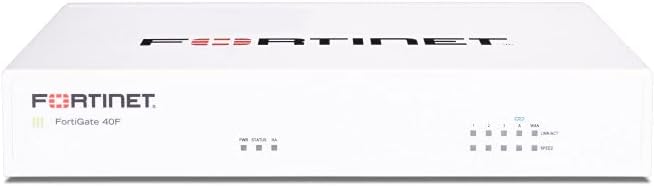
Designed for small to mid-sized businesses, the FortiGate-40F balances compact form factor with robust security capabilities. Its fanless design ensures silent operation while maintaining high performance for typical business traffic loads.
We may earn a commission when you buy through this link, at no additional cost to you.
With five Gigabit Ethernet ports, it provides essential connectivity for most small office setups. The appliance leverages Fortinet's security processor to deliver strong protection for encrypted traffic, a critical feature in modern threat landscapes.
Similar to the larger models, the hardware requires a separate subscription for full security services. However, the streamlined management console simplifies deployment and ongoing oversight for non-technical administrators.
The FortiGate-40F is ideal for businesses needing reliable security without the complexity of enterprise solutions. Its combination of performance, ease of use, and compact size makes it a practical choice.
The fanless desktop form factor minimizes space usage while ensuring quiet operation in office environments.
Zero Touch Integration with Fortinet Security Fabric enables easy and rapid network setup.
We may earn a commission when you buy through this link, at no additional cost to you.
The Ubiquiti Unifi Security Appliance offers a cost-effective entry into professional network security, particularly for those already invested in the Unifi ecosystem. It integrates seamlessly with the Unifi Controller for unified management.
We may earn a commission when you buy through this link, at no additional cost to you.
Its straightforward design includes VLAN support and QoS for VoIP, ensuring reliable traffic prioritization. While not as powerful as higher-end appliances, it provides adequate protection for home and small business networks.
Performance limitations exist compared to enterprise models, and advanced features like deep VPN support are limited. However, its ease of use and integration outweigh these drawbacks for many users.
For budget-conscious users seeking reliable security within a Unifi network, this appliance is an excellent choice. It simplifies network oversight while providing essential firewall capabilities.
Integration with the Unifi Controller allows for centralized management and simplified network configuration.
Built-in VLAN support helps segment network traffic effectively for improved security and management.
We may earn a commission when you buy through this link, at no additional cost to you.
The SonicWall TZ280 delivers impressive performance for small businesses with its 2.5 Gbps inspection speed. Its patented Reassembly-Free Deep Packet Inspection engine ensures efficient threat detection without slowing down traffic.
We may earn a commission when you buy through this link, at no additional cost to you.
Equipped with multiple Ethernet and SFP ports, it offers flexible connectivity for diverse network needs. Cloud management capabilities simplify administration, making it accessible for businesses without dedicated IT staff.
As with many appliances, the security services require a separate subscription. However, the built-in threat protection features provide a strong baseline defense even before activation.
For small businesses or branch offices needing robust security and SD-WAN capabilities, the TZ280 is a top choice. It balances performance with ease of management effectively.
The RFDPI engine enables fast packet inspection, ensuring network performance remains high during security checks.
Multiple Gigabit and SFP ports provide versatile options for connecting various network segments.
We may earn a commission when you buy through this link, at no additional cost to you.
The Netgate 1100 comes preloaded with pfSense+ software, allowing users to start configuring their firewall immediately. It includes lifetime software updates and technical support, ensuring long-term reliability.
We may earn a commission when you buy through this link, at no additional cost to you.
Its ARM Cortex-A53 processor provides sufficient routing performance for most home and small office needs. The compact design allows it to sit quietly on a desktop or rack without taking up much space.
While not as powerful as Intel-based alternatives, the inclusion of pfSense+ and ongoing support justifies its place for many users. It simplifies the transition from software to dedicated hardware.
Ideal for pfSense enthusiasts or those seeking a plug-and-play gateway, the Netgate 1100 offers ease of use. It is a solid option for those wanting dedicated hardware without complex setup.
Preloaded pfSense+ enables immediate setup and customization, reducing initial deployment time significantly.
Lifetime pfSense+ updates and expert support ensure the appliance remains secure and up-to-date.
We may earn a commission when you buy through this link, at no additional cost to you.
The FORTINET FG-100E is recognized for its strong protection against known exploits and malicious websites. It efficiently identifies thousands of applications, enabling granular control over network traffic.
We may earn a commission when you buy through this link, at no additional cost to you.
This appliance excels at detecting unknown attacks through advanced threat intelligence. Its application control features allow administrators to enforce policies based on specific app usage, enhancing security posture.
While detailed specifications are limited in the provided data, the high user rating suggests reliability and effectiveness. However, full protection typically relies on subscription-based threat services.
For organizations prioritizing robust malware and exploit prevention, the FG-100E is a strong contender. It provides the necessary tools to safeguard against a wide range of cyber threats.
The appliance effectively identifies and blocks malicious websites and exploits, protecting endpoints from harm.
Identifies thousands of applications to enable precise traffic policies and usage monitoring.
We may earn a commission when you buy through this link, at no additional cost to you.
The Palo Alto PAN-PA-220 is a next-generation firewall appliance designed to provide advanced security features. With eight ports, it offers connectivity options suitable for small networks needing robust protection.
We may earn a commission when you buy through this link, at no additional cost to you.
Next-generation firewalls typically provide deeper traffic inspection and application awareness. While the provided data offers limited specifics, the brand is known for high-performance security appliances.
However, the user rating is lower compared to other options, which may indicate mixed experiences. More detailed reviews or specifications would help assess its fit for specific needs.
For those familiar with Palo Alto's ecosystem or needing next-gen features, this appliance may suit. It is worth comparing with other models to ensure it meets your performance expectations.
Next-gen features allow deeper inspection and more control over application traffic within your network.
Eight ports provide versatile connectivity for connecting various network devices and segments.
We may earn a commission when you buy through this link, at no additional cost to you.
The Protectli Vault FW4C stands out with its 2.5 Gigabit Ethernet ports, offering faster network speeds than standard Gigabit models. The Intel J3710 processor supports this performance with AES-NI hardware acceleration.
We may earn a commission when you buy through this link, at no additional cost to you.
Despite having less RAM than the FW4B, it remains powerful enough for most firewall tasks. The compact, fanless design ensures silent operation, making it ideal for noise-sensitive environments.
As with other Protectli models, there is no pre-installed OS, requiring user setup. The lower RAM might limit heavy multitasking but suffices for most firewall and routing needs.
For users needing faster internal network speeds, the FW4C is a compelling choice. It balances speed, silent operation, and flexibility for advanced networking setups.
Four 2.5 Gigabit ports enable faster network throughput, ideal for high-speed data transfers.
The fanless design ensures silent operation, making it perfect for home offices or quiet spaces.
We may earn a commission when you buy through this link, at no additional cost to you.
This bundle combines the FortiGate-60F hardware with a year of FortiGuard Unified Threat Protection and FortiCare Premium. It offers a complete security solution out of the box for businesses.
We may earn a commission when you buy through this link, at no additional cost to you.
The Unified Threat Protection includes advanced web filtering and anti-botnet technologies, safeguarding against sophisticated threats. FortiCare Premium ensures reliable customer support and service continuity throughout the term.
While the price is higher due to included services, it simplifies procurement and ensures immediate protection. Businesses preferring all-inclusive deals will find this package convenient.
For medium-sized businesses seeking comprehensive security with minimal setup hassle, this bundle is ideal. It delivers both hardware performance and essential software services together.
Includes advanced filtering technologies to secure against sophisticated threats like botnets.
FortiCare Premium ensures high-quality support and continuous service for business reliability.
We may earn a commission when you buy through this link, at no additional cost to you.
Selecting the right firewall appliance involves evaluating several key factors to ensure it meets your security needs and budget.
Performance is critical to ensure your firewall can handle your network traffic without becoming a bottleneck. Look for appliances with high IPS and threat protection throughput ratings that match or exceed your expected bandwidth needs.
Choose a model with sufficient speed for current and future traffic demands.
The number and type of ports determine how many devices or network segments you can connect. Consider the mix of Gigabit, multi-Gigabit, or SFP ports needed for WAN, LAN, and DMZ connections.
Ensure the appliance has enough ports for your network topology.
Modern firewalls offer features like intrusion prevention, deep packet inspection, SSL decryption, and application control. Evaluate which features are essential for your threat model and how well they integrate with your environment.
Prioritize appliances with comprehensive threat detection capabilities.
Some appliances come with pre-installed software, while others require you to install your own OS. Consider the management interface, available updates, and whether you prefer a user-friendly GUI or advanced CLI.
Choose software that matches your technical expertise and management preferences.
The hardware cost is only part of the total expense, as many firewalls require subscription services for updates and threat intelligence. Calculate the ongoing costs to ensure the solution fits your budget long-term.
Factor in both hardware and recurring service fees.
Your network may grow or change, so choose an appliance that can scale with you. Look for models that support future upgrades, additional ports, or more advanced features as your needs evolve.
Select a firewall that can grow with your business.
Consider where the appliance will be placed and how much noise it generates. Fanless models are quieter and often better suited for home offices or noise-sensitive environments.
Ensure the appliance fits your space and acoustic requirements.
Reliable technical support and a solid warranty are essential for minimizing downtime. Check what support options are available, including community forums or direct vendor assistance.
Verify support availability and warranty terms before purchasing.
Proper setup involves connecting the WAN and LAN ports correctly and configuring the initial firewall rules to block unwanted traffic. Follow the manufacturer's setup guide to ensure secure defaults and prevent exposure to risks.
Regularly update your firmware and threat definitions to protect against the latest vulnerabilities. Schedule automatic updates or perform manual checks monthly to maintain optimal security posture.
Monitor your network traffic and logs to identify unusual activity. Use the appliance's reporting features to review blocked attempts and adjust rules as needed to improve performance.
Many firewall appliances require a separate subscription for full security services like threat updates and advanced filtering. Hardware-only options work for basic protection, but subscriptions ensure ongoing safety.
Firewall appliances are dedicated hardware devices optimized for performance and stability. Software firewalls run on general-purpose computers or servers, offering flexibility but potentially less hardware acceleration.
The number of ports depends on your network layout, including WAN, LAN, and DMZ connections. Ensure enough ports to connect all necessary devices without needing additional switches.
Some appliances like Protectli allow you to install your preferred OS like pfSense or OPNsense. Others come preloaded with proprietary software that cannot be replaced.
AES-NI is a CPU instruction set that accelerates encryption tasks. In firewalls, it improves performance when inspecting encrypted traffic like HTTPS.
Firmware updates are typically done through the appliance's management interface. Check for updates regularly or enable automatic updates to stay protected against new threats.
Fanless firewalls are designed to operate silently and reliably without moving parts. They are ideal for office environments where noise levels matter.
SD-WAN support allows the firewall to manage multiple internet connections efficiently. This improves reliability and performance by dynamically selecting the best path for traffic.
The top picks highlight diverse options from the versatile Protectli FW4B to the enterprise-grade FortiGate-60F. Each appliance offers unique strengths suited for different network environments.
When choosing, prioritize performance needs, port requirements, and management preferences to ensure long-term satisfaction. Consider the total cost including subscriptions and support services.
Always check current availability and pricing before purchasing to ensure you get the best deal for your network security needs.