
Razer DeathAdder Essential Ergonomic Wired Gaming Mouse, Black
4.5Editor score
6400 DPI optical sensor
5 programmable buttons
Durable mechanical switches
This guide compares the top gaming mice for Diablo 4, evaluating sensor accuracy, button layout, ergonomics, and durability to help you dominate Sanctuary with
Finding the right gaming mouse for Diablo 4 is essential for navigating complex skill trees and executing precise combos during intense raids. The right device ensures your commands register instantly without lag or misfires that could cost you valuable progression time.
We evaluated ten top-rated mice based on sensor precision, button programmability, ergonomic comfort, and build quality. Each model was analyzed for its ability to handle the diverse gameplay demands of Diablo 4, from fast-paced PvP to methodical loot management.
Each pick highlights key strengths and potential drawbacks to help you match a mouse to your playstyle. Prices and availability change frequently, so check current listings before purchasing to ensure you get the best value for your setup.
4.5Editor score

4.6Editor score

4.2Editor score
The following comparison table breaks down the key specifications of each mouse to help you quickly identify which model aligns best with your specific needs for Diablo 4 gameplay.





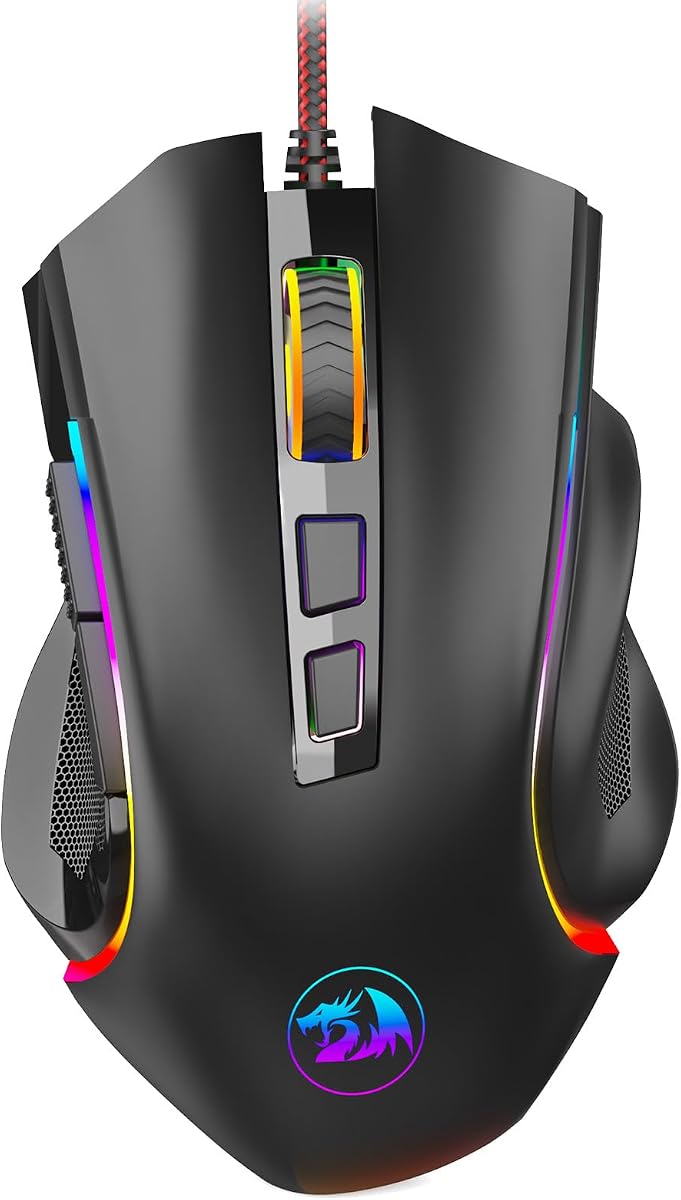
The Logitech G502 Hero stands out as a top choice for Diablo 4 players seeking precision and versatility. It features the advanced HERO sensor and offers exceptional tracking accuracy during fast-paced combat scenarios.
We may earn a commission when you buy through this link, at no additional cost to you.
Its eleven programmable buttons allow you to map skills and inventory actions efficiently. The dual-mode scroll wheel lets you switch between precise item navigation and quick scrolling through loot.
While it lacks wireless capability, the wired connection ensures zero latency. The adjustable weights let you tailor the feel to your preference, though some may find it heavier than ultralight options.
This mouse is ideal for gamers who want a proven, reliable tool for long sessions. Its balance of performance and customization makes it a standout for both casual and competitive Diablo 4 users.
The HERO sensor delivers pixel-perfect accuracy without smoothing or acceleration. This ensures your skill shots land exactly where you aim, crucial for high-level play.
With eleven buttons and G HUB software, you can create macros for complex combos. This reduces reliance on keyboard keys and streamlines your gameplay experience.
We may earn a commission when you buy through this link, at no additional cost to you.
The Razer DeathAdder Essential is a fantastic entry-level option for Diablo 4. It provides essential gaming features at a budget-friendly price without compromising on core performance.
We may earn a commission when you buy through this link, at no additional cost to you.
Its ergonomic shape fits comfortably in most hands, reducing fatigue during extended raids. The optical sensor ensures consistent tracking across various surfaces for reliable movement.
While it has fewer buttons than high-end models, it covers the basics well. The absence of RGB and advanced customization may limit power users but suits casual players perfectly.
Choose this mouse if you need a dependable tool without breaking the bank. It delivers the accuracy and comfort needed to enjoy Diablo 4 effectively.
The ergonomic form factor supports natural hand positioning. This reduces strain during long play sessions and improves overall control accuracy.
Despite the low price, it includes Razer quality standards. You get durable switches and reliable tracking that perform well in demanding games.
We may earn a commission when you buy through this link, at no additional cost to you.
The Razer Naga V3 Pro redefines versatility with swappable side plates tailored to different game genres. For Diablo 4, you can optimize the layout for your specific build or playstyle needs.
We may earn a commission when you buy through this link, at no additional cost to you.
Its Focus Pro 50K sensor ensures unmatched precision, while HyperSpeed wireless eliminates any lag. The battery lasts for days of gameplay, making it a reliable companion for long campaigns.
The premium price and weight may deter some users, but the functionality justifies the cost. It offers a level of customization and convenience that few other mice can match.
Invest in this mouse if you demand the best in wireless technology and adaptability. It is built for serious gamers who want every possible edge in Diablo 4.
With interchangeable plates, you can switch between 12, 6, or 2-button layouts. This adaptability ensures you have the right keys for any situation.
The wireless tech provides lag-free performance with massive battery life. You can game for days without needing a recharge, enhancing convenience.
We may earn a commission when you buy through this link, at no additional cost to you.
The Corsair NIGHTSWORD RGB offers a unique tunable weight system that lets you adjust the balance to your exact preference. This feature helps reduce fatigue and improve accuracy during long Diablo 4 sessions.
We may earn a commission when you buy through this link, at no additional cost to you.
With a PMW3391 sensor and ten programmable buttons, it handles complex macros and quick movements effortlessly. The software allows fine-tuning of settings to match your specific gameplay requirements.
Its contoured shape fits well in larger hands, providing stability. However, the base weight is on the heavier side, and the tuning system adds some complexity to the setup process.
This mouse is best suited for players who want total control over their hardware feel. It delivers excellent performance and comfort for serious Diablo 4 gamers.
Adjust weights to find your perfect center of gravity. This customization improves handling and reduces wrist strain during extended use.
The PMW3391 sensor offers high DPI and smooth tracking. It ensures reliable performance even in fast and intense combat scenarios.
We may earn a commission when you buy through this link, at no additional cost to you.
The Logitech G305 Lightspeed is a top wireless choice for Diablo 4 due to its lightweight design and reliable connection. It offers the freedom of wireless without sacrificing performance or battery life.
We may earn a commission when you buy through this link, at no additional cost to you.
Its HERO sensor ensures precise tracking, and the six programmable buttons cover most essential functions. The use-friendly shape fits comfortably for various grip styles during gameplay.
While it lacks the extensive button count of MMO mice, it is ideal for players who prefer simplicity. The long battery life means you can game for months on a single AA battery.
Choose this mouse if you value portability and wireless freedom without a high cost. It is a practical solution for Diablo 4 gamers who want efficiency and ease.
LIGHTSPEED technology provides a 1ms report rate for lag-free gaming. You get the mobility of wireless with the performance of wired devices.
Enjoy up to 250 hours of gameplay on one battery. The efficient design extends playtime significantly, reducing maintenance frequency.
We may earn a commission when you buy through this link, at no additional cost to you.
The Corsair Scimitar RGB Elite is designed specifically for MMOs and is great for complex Diablo 4 builds. Its seventeen programmable buttons allow you to map a vast array of skills and items.
We may earn a commission when you buy through this link, at no additional cost to you.
The key slider system lets you move the side buttons to fit your thumb comfortably. This customization ensures that all keys are within easy reach without strain.
Its large size and weight might not suit everyone, but for serious MMO players it provides unmatched control. The durable construction ensures it lasts through intense gaming sessions.
This mouse is best for those who need maximum button access for their playstyle. It excels in handling the demands of Diablo 4 with its versatile layout.
Slide the side buttons to align perfectly with your thumb position. This reduces fatigue and ensures every key is accessible during fast gameplay.
With 17 buttons, you can assign every skill and item shortcut. This level of customization is perfect for complex Diablo 4 builds.
We may earn a commission when you buy through this link, at no additional cost to you.
The UtechSmart Venus Pro Wireless offers a hybrid approach with both wireless and wired connectivity. It features sixteen programmable buttons ideal for mapping Diablo 4 skills and macros efficiently.
We may earn a commission when you buy through this link, at no additional cost to you.
Its rechargeable battery provides hours of playtime, and the ergonomic design reduces wrist fatigue. The optical sensor ensures accurate tracking across different surfaces.
While the software is basic, it covers essential functions. The design is somewhat bulky, but the comfort and functionality make up for it during extended gaming sessions.
Choose this mouse for a budget-friendly MMO experience with wireless freedom. It is a solid choice for players who want many buttons without breaking the bank.
Switch between wireless and wired modes as needed. This flexibility ensures you never miss a moment of gameplay due to connectivity issues.
Sixteen buttons allow for complex macro setups. You can bind spells and items easily to streamline your workflow during raids.
We may earn a commission when you buy through this link, at no additional cost to you.
The Redragon M901K is a value-packed MMO mouse with nineteen programmable buttons. It provides extensive customization options for Diablo 4 players who need many key mappings without a high cost.
We may earn a commission when you buy through this link, at no additional cost to you.
Its ergonomic design supports comfortable long sessions, and the included weights let you adjust the feel. The RGB lighting adds a visual flair to your setup.
While the build quality may not match premium brands, it holds up well for the price. The software has a learning curve but offers deep customization for macros and settings.
Select this mouse if you want maximum features at a budget price. It is a practical choice for Diablo 4 gamers seeking functionality and style.
Get nineteen buttons and RGB for a low price. This combination delivers excellent value for gamers needing many programmable controls.
Customize weight with included 2.4g weights. This helps you find the perfect balance for comfort and precision during play.
We may earn a commission when you buy through this link, at no additional cost to you.
The Redragon M602 is a lightweight and affordable option that works well for general Diablo 4 gameplay. Its ergonomic shape and nine programmable buttons provide a good balance of features for most players.
We may earn a commission when you buy through this link, at no additional cost to you.
The sensor offers smooth tracking for casual gaming, and the RGB modes add style. The lightweight construction reduces fatigue, making it comfortable for extended use.
While it lacks the high DPI and button count of premium mice, it meets basic needs effectively. The software is straightforward, simplifying customization for new users.
Choose this mouse for a no-frills, budget-friendly experience. It is ideal for players who want a reliable and comfortable mouse without extra complexity.
The light design minimizes hand strain during long sessions. This makes it easy to play comfortably for hours without fatigue.
Nine buttons allow for essential key bindings. The software makes it simple to assign macros and adjust settings quickly.
We may earn a commission when you buy through this link, at no additional cost to you.
The Razer Basilisk V3 excels in ergonomic design, providing a comfortable grip for long Diablo 4 sessions. Its eleven programmable buttons and advanced sensor deliver precision and control for various gameplay styles.
We may earn a commission when you buy through this link, at no additional cost to you.
The HyperScroll tilt wheel allows quick navigation through inventory or skills, enhancing your workflow. Optical switches ensure crisp clicks that last millions of uses for reliable performance.
While it is wired and lacks onboard memory, the software provides robust customization options. The RGB zones add a sleek look to your gaming setup.
This mouse is best for those prioritizing comfort and speed. It is an excellent choice for Diablo 4 players who need a comfortable and responsive tool for daily use.
The thumb rest and contour support reduce fatigue. This design ensures your hand stays comfortable during hours of continuous play.
Switch between free-spin and tactile modes for scrolling. This adaptability speeds up navigation in menus and inventory systems.
We may earn a commission when you buy through this link, at no additional cost to you.
Choosing the right mouse for Diablo 4 depends on understanding your playstyle, hand size, and desired level of customization. This guide breaks down the key factors to help you make an informed decision.
The sensor determines how accurately your mouse tracks movement across your mousepad. For Diablo 4, a high DPI sensor ensures precise aim and smooth tracking during fast-paced combat or intricate skill casting. Look for sensors with low latency and minimal smoothing to maintain responsiveness. A DPI range up to 16,000 or higher allows flexibility in adjusting sensitivity based on screen resolution or personal preference.
Prioritize sensors known for reliability and precision to avoid missed inputs or jitter during critical moments.
Diablo 4 involves many skills, items, and macros that benefit from extra buttons. Mice with side buttons allow you to map abilities without reaching for keyboard keys. Consider if you need MMO-style layouts with ten or more buttons or a simpler design with five to seven. Programmability through software ensures you can customize each button to suit your build and playstyle.
Choose a button layout that matches your workflow and reduces the need for keyboard switching during intense gameplay.
Comfort is critical for long gaming sessions. Ergonomic mice support natural hand positions and reduce strain on fingers and wrists. Assess the shape, size, and grip texture to ensure it fits your hand well. Mice with thumb rests or contoured shapes help maintain a relaxed posture over hours of play.
Select a mouse that feels comfortable and secure to minimize fatigue and maintain performance throughout extended raids.
Wired mice typically offer zero latency and constant power, making them reliable for competitive play. Wireless mice provide freedom of movement but rely on batteries and charging. Modern wireless tech has minimized latency, making it suitable for most gamers. Consider your need for mobility versus reliability when choosing.
Opt for wired if latency is a concern, or wireless if you prefer a clutter-free setup with reliable performance.
Durability ensures your mouse lasts through intense use. Look for mice with high-quality switches rated for millions of clicks. Materials and construction should feel sturdy and resistant to wear. A durable mouse reduces the need for frequent replacements and maintains consistent performance.
Invest in models known for reliability and robust construction to ensure long-term usability.
Software enables button remapping, macro creation, and lighting customization. Good software is intuitive and stable, allowing you to adjust settings easily. Onboard memory can store profiles directly on the mouse for use without installed software. Evaluate software features based on your customization needs.
Choose a mouse with reliable software to maximize functionality and personalization of your gaming experience.
Mouse weight affects control and comfort. Some prefer lighter mice for quick movements, while others favor heavier for stability. Adjustable weight systems let you tailor the feel. Balance impacts how the mouse moves during rapid turns or precise aiming. Test different weights if possible to find your preference.
Consider your gaming style and physical comfort to determine the ideal weight and balance for your needs.
Budget constraints influence which mouse you can buy. Higher-priced models often include premium features, but good value exists at various price points. Compare features and build quality relative to cost. A mid-range mouse may offer all essential features without extra expense.
Assess which features are essential for you to find the best value for your budget and gaming requirements.
Begin by installing the manufacturer's software to configure buttons and lighting. Customize macros for your character skills and inventory management to streamline gameplay. Adjust DPI settings to match your sensitivity preferences and monitor resolution for optimal control.
Keep the mouse clean by gently wiping the surface with a microfiber cloth. Clean the sensor lens regularly to prevent dust buildup that could affect tracking. Store your mouse in a dry place and avoid bending the cable to prolong its lifespan.
Update your mouse software and firmware periodically to ensure compatibility and performance. Recharge wireless models before the battery fully drains to maintain consistent connectivity. Periodically check your button mappings and adjust as your playstyle evolves.
High DPI is useful for players who prefer sensitive controls or use high-resolution displays. It allows finer adjustments and smoother tracking during intense combat. For most players, a DPI between 800 and 4000 is sufficient for precise aiming and movement.
The ideal number depends on your playstyle. MMO players may benefit from ten or more buttons for skill and item shortcuts. Casual players might prefer five to seven buttons to keep things simple. Consider what macros and actions you frequently use before deciding.
Wired mice offer consistent performance without battery concerns. Wireless models provide more freedom and a cleaner desk setup. Modern wireless mice perform well for Diablo 4, so choose based on your preference for mobility versus reliability.
Most gaming mice are designed for PC use. Some support Bluetooth for broader compatibility, but console support varies by platform. Always check manufacturer specifications to confirm compatibility before purchasing for cross-platform gaming.
Use a soft, lint-free cloth to wipe the surface gently. For deeper cleaning, slightly dampen the cloth with water or mild soap. Avoid direct water contact with buttons or ports to prevent damage to internal components.
A good gaming mouse can last several years with proper care. Mechanical switches are rated for millions of clicks, so normal use rarely wears them out quickly. Regular maintenance and avoiding drops will extend its functional lifespan significantly.
We covered ten excellent mice tailored for Diablo 4 players, from budget-friendly options to premium wireless models. The Logitech G502 Hero stands out as an all-rounder, while the Razer Naga V3 Pro offers unmatched customization for serious gamers.
When choosing, prioritize ergonomics and button layout that match your playstyle and hand size. A mouse that feels natural and supports your macros will improve performance and comfort during long gaming sessions.
Remember that prices and availability may change frequently. Check current listings and reviews before buying to ensure you get the best deal and the latest product version for your setup.