
Anker Prime Charging Station
4.6Editor score
250W High Capacity Output
Large LCD Real Time Monitor
Smart Control Dial Adjustments
This guide compares the best Gan Charger with Display options for 2026, evaluating power output, smart screens, port count, and safety features for diverse
Modern digital lifestyles demand efficient power solutions that fit seamlessly into busy routines. A GaN charger with display offers high wattage in a compact form while providing real-time status updates to ensure your devices charge safely and quickly.
We evaluated ten top-rated models based on power delivery, screen clarity, port flexibility, and build quality. Our analysis covers everything from pocket-friendly 45W units to robust 250W desktop stations to help you find the perfect match for your setup.
Each pick highlights unique strengths like AI battery care, rotatable touchscreens, or multi-device support. Remember that availability and costs vary by region and time, so check current listings before purchasing to confirm the latest offers.
4.6Editor score

4.7Editor score
4.5Editor score
The following table provides a side-by-side overview of key specifications and features for all ten selected GaN chargers with displays to streamline your decision-making process.




The UGREEN Nexode Pro Charger stands out as a top contender with its robust 160 watt output and intuitive smart display. Users rate it highly for its ability to power multiple devices simultaneously without sacrificing speed or safety features.
We may earn a commission when you buy through this link, at no additional cost to you.
Its standout feature is the rotatable touch digital display which provides detailed insights into total output wattage and per-port power distribution. This transparency allows users to monitor charging protocols and internal temperature status actively ensuring optimal performance.
While it commands a higher price, the replacement of multiple bulky chargers with a single unit justifies the cost. The main trade-off is managing five ports efficiently to avoid overloading any single device beyond its supported wattage.
Ideal for professionals with laptops phones and tablets this charger delivers versatility and precision. It is the best choice for those needing high power and clear visibility in a single reliable travel-friendly package.
The intelligent automatic power allocation system ensures each connected device receives appropriate energy safely preventing bottlenecks.
Foldable US AC plug design paired with compact exterior saves significant luggage space for frequent travelers.
We may earn a commission when you buy through this link, at no additional cost to you.
Anker Prime Charger delivers immense power in a sleek compact form factor ideal for mobile professionals. It earns strong ratings for its consistent 140 watt single-port output that keeps high-end laptops charged efficiently.
We may earn a commission when you buy through this link, at no additional cost to you.
The device features AnkerSense View which allows real-time power monitoring on the screen and custom modes via a Bluetooth app. This connectivity adds a layer of control that appeals to tech-savvy users managing multiple devices daily.
Although it has only three ports, the power distribution is optimized so users do not need to guess which port to use. The main drawback is the premium pricing which may not suit all budgets despite the advanced features.
This model is perfect for MacBook Pro users who want speed and simplicity. It balances high performance with portability making it a standout for those valuing brand reliability and app integration.
PowerIQ 5.0 technology automatically distributes wattage to keep devices charging at maximum speed without manual switching.
Advanced thermal control and consistent voltage delivery protect sensitive electronics during long charging sessions.
We may earn a commission when you buy through this link, at no additional cost to you.
The Anker 140W Max is a versatile choice for users needing to power several devices at once. It features a high-definition color display that provides detailed views of charging status and port details clearly.
We may earn a commission when you buy through this link, at no additional cost to you.
Each of the two high-speed USB-C ports can deliver up to 140 watts which is ideal for large-screen notebooks like the MacBook Pro. The inclusion of a 5-foot 240W cable adds significant value right out of the box.
Safety is enhanced by the ActiveShield 4.0 system which monitors temperatures millions of times daily. While the unit is larger than some travel options it remains compact enough for general daily use and home desks.
Best for those needing balanced power across laptops and tablets this charger offers a great mix of speed and port count. It is a reliable workhorse that supports modern high-wattage devices efficiently.
Dual USB-C ports allow rapid charging of laptops to fifty percent in just thirty minutes of usage.
Built-in thermal monitoring ensures that devices remain cool and safe during extended periods of use.
We may earn a commission when you buy through this link, at no additional cost to you.
This model prioritizes portability without compromising on essential speed or features. With a frame 330 percent smaller than older models it fits easily into coat pockets or backpacks for daily commutes.
We may earn a commission when you buy through this link, at no additional cost to you.
The high-definition smart display offers real-time details on temperature and port performance which is rare at this size. It also includes a low-current mode that safely charges small devices like earbuds without risk.
While it delivers a steady 100 watts on any port it may not be sufficient for the largest gaming laptops needing sustained high power. However for most work laptops it provides ample energy for full speed charging.
This charger is perfect for digital nomads or students who need a lightweight reliable solution. It balances visibility and performance well making it a top pick for on-the-go professionals.
Foldable plug and reduced dimensions make it easy to carry alongside daily essentials anywhere.
Automatic switch to low current mode prevents overcharging small accessories like wireless earbuds safely.
We may earn a commission when you buy through this link, at no additional cost to you.
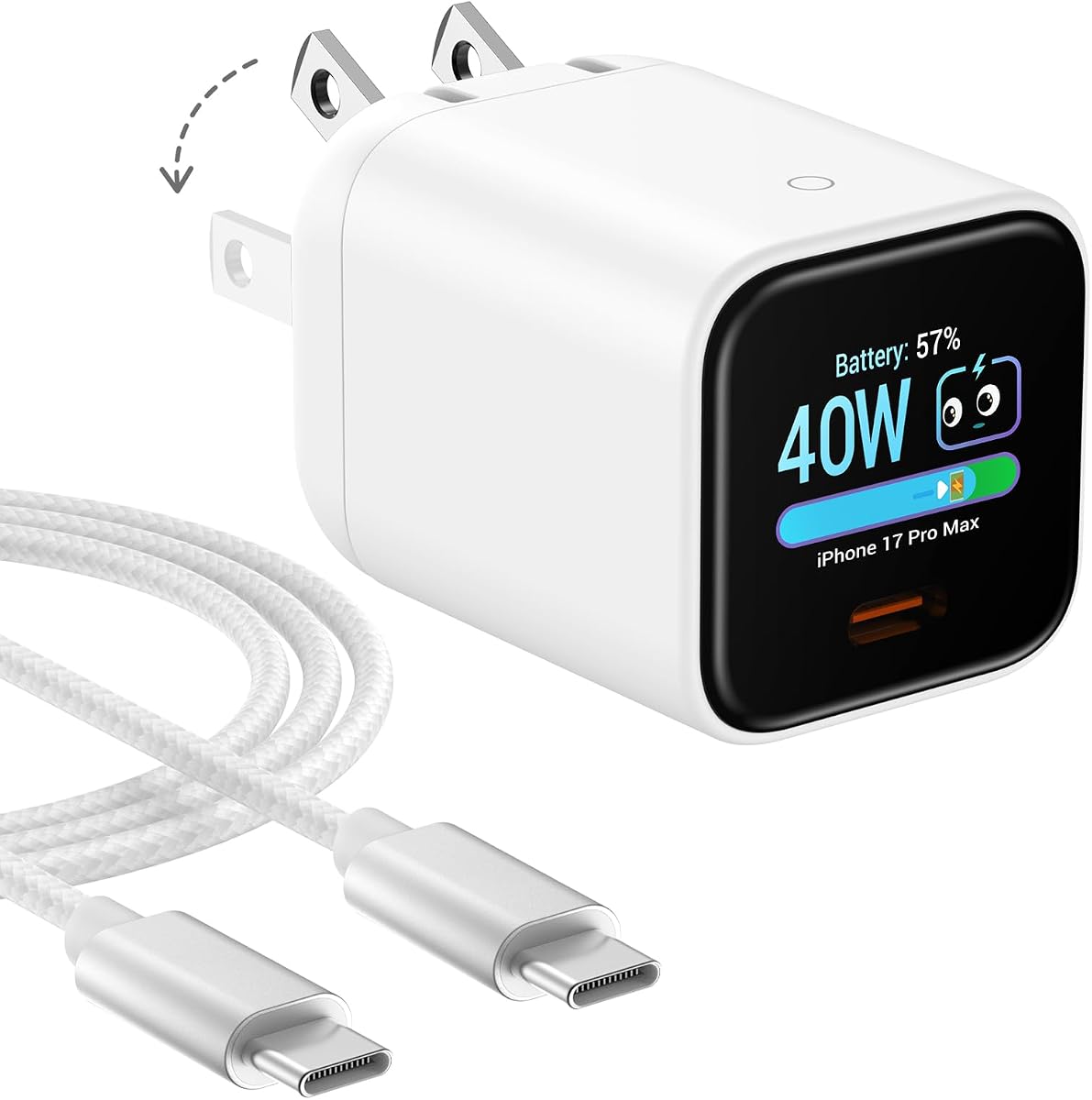
The Smart Charging Butler offers an affordable entry point into smart charging technology with AI-driven battery care. It is highly rated for its ability to extend battery lifespan by adjusting speeds based on health status.
We may earn a commission when you buy through this link, at no additional cost to you.
Users can tap or long-press to rotate the screen which makes viewing real-time charging speeds easy from any angle. This interactive display adds a layer of transparency often found only in much more expensive chargers.
With 45 watts it is best for phones and smaller tablets rather than full-size laptops. The included braided cable is a practical addition that reduces the need for separate purchases right away.
This unit is ideal for users seeking cost-effective smart features without breaking the bank. It proves that intelligent battery management can be accessible and user-friendly for everyday mobile needs.
TÜV certified AI reduces charging temperature by up to nine degrees to protect long-term health.
Single tap changes modes and screen rotation makes it effortless to view data on the go.
We may earn a commission when you buy through this link, at no additional cost to you.
The Anker Prime Charging Station is a powerhouse designed for permanent desktop setups rather than travel. With 250 watts of total output it can power entire workstation setups including laptops and monitors simultaneously.
We may earn a commission when you buy through this link, at no additional cost to you.
Its 2.26-inch LCD display provides clear real-time updates on charging status and speed. The smart control dial allows immediate adjustments to energy output giving users precise control over their power distribution.
While it is heavy and intended for stationary use the performance is unmatched. It supports IoT capabilities via the Anker app allowing for personalized charging modes and remote management for power enthusiasts.
This is the ultimate choice for home offices needing reliable high-capacity power. It replaces messy cable banks with a single elegant unit that keeps every device running at peak efficiency.
Six ports ensure that desktops laptops and phones can all charge without needing adapters.
IoT capabilities enable custom modes that adapt to your routine for maximum efficiency over time.
We may earn a commission when you buy through this link, at no additional cost to you.
MOKiN 70W is designed for travelers who prioritize compactness above all else. It measures significantly smaller than traditional chargers making it easy to slip into a pocket or small bag without bulk.
We may earn a commission when you buy through this link, at no additional cost to you.
The intelligent HD display offers rich details including total watt output and charging summary after disconnection. Users can tap the touch screen to switch views or rotate the orientation for better visibility during use.
While it lacks an included cable it delivers strong performance for most laptops and phones. The foldable prongs are a thoughtful touch that prevents snagging on other items inside luggage or bags.
This charger is perfect for light travelers needing quick power on the go. Its balance of size and screen visibility makes it a practical choice for casual users who want clarity.
The charger provides a detailed summary after five minutes of charging to help you understand usage patterns.
Foldable prongs and lightweight frame ensure this unit fits easily into any carry-on luggage space.
We may earn a commission when you buy through this link, at no additional cost to you.
This model stands out for its ability to deliver 140 watts through either of its two USB-C ports. It is an excellent choice for users who need to charge multiple high-performance laptops at full speed.
We may earn a commission when you buy through this link, at no additional cost to you.
The live screen provides a real-time view of power output details and temperature ensuring you stay informed at all times. It combines speed with transparency to give users full control over their charging setup.
Active monitoring keeps the device safe by constantly checking temperatures millions of times daily. Although it is slightly larger than travel units it remains robust and reliable for office or home use.
Ideal for developers or designers working with heavy gear this charger handles demanding loads with ease. It offers a balance of raw power and clear information for professional environments.
PD3.1 technology ensures optimal power transfer to high-wattage devices without unnecessary energy loss.
Intelligent safety systems protect both the charger and connected devices from heat and voltage spikes.
We may earn a commission when you buy through this link, at no additional cost to you.
The DJI Power 140W offers a unique advantage with its digital display cable that shows charging status instantly. This feature allows users to see the power flow directly on the cable rather than just the charger block.
We may earn a commission when you buy through this link, at no additional cost to you.
It is designed for stable cool operation with GaN tech making it ideal for devices that generate heat during long sessions. The high-current cable supports up to 7A which is excellent for fast charging heavy devices.
While optimized for DJI gear it works well with standard laptops and phones. The LED status indicator on the charger provides clear connection feedback so you know your device is safely connected.
This is a smart pick for photographers or drone pilots who need reliable portable power. The digital cable visibility makes it a standout choice for users who value real-time data anywhere.
The 7A display cable provides immediate visual feedback on charging progress without needing to look at the block.
GaN technology ensures efficient heat management so devices stay cool even during full speed charging cycles.
We may earn a commission when you buy through this link, at no additional cost to you.
This nano charger is specialized for iPhone users who want small size with smart features. It recognizes supported models automatically to adjust charging delivery for safer and more efficient power handling.
We may earn a commission when you buy through this link, at no additional cost to you.
The rotating display turns 180 degrees to let you view status from different angles. Although it lacks touch controls simple taps and presses provide all necessary information about charging health and status.
TÜV-certified Care Mode lowers charging temperature significantly which is ideal for overnight charging. It is a practical choice for anyone who wants to protect battery health without adding bulk to their setup.
Best for daily phone charging at home or in a bag this unit offers peace of mind. It delivers a focused experience that prioritizes safety and battery longevity for your mobile devices.
Automatic recognition ensures that your device gets the safest power profile possible for every charge.
Tiny footprint and folding prongs make this the ultimate travel companion for phone-only users.
We may earn a commission when you buy through this link, at no additional cost to you.
Selecting the right GaN charger involves balancing power needs port counts and display features.
Total wattage determines how much power the charger can deliver across all ports. Ensure the output matches your laptops requirements especially if you need to power large-screen devices.
Choose higher wattage like 140W or 160W for laptops and lower wattage for phones to optimize performance.
The number and type of ports dictate how many devices can be charged simultaneously. More USB-C ports are useful if you need to charge multiple laptops or tablets at once.
Look for models with at least two high-speed USB-C ports if you plan to charge a laptop and a phone together.
Displays vary from simple LED lights to detailed color screens showing real-time wattage. A high-definition display offers transparency about power distribution and temperature status.
Select a model with a screen that provides clear data relevant to your workflow for better monitoring.
GaN technology allows for smaller sizes but desktop models are larger than travel units. Consider if you need a pocket-sized block or a stationary desktop unit.
Prioritize foldable plugs and lightweight builds if you plan to carry the charger in a backpack or purse.
Some chargers offer app integration or battery care modes that adjust charging based on device health. These features can extend battery lifespan and provide extra customization.
Check if the charger supports specific apps if you want to track energy usage over time remotely.
Certified chargers include protections against overheat overvoltage and short circuits. Safety is critical for expensive devices like laptops or high-end tablets.
Ensure the unit has active thermal monitoring to prevent damage during long charging sessions.
Some packages include high-power cables which can save additional costs. A durable braided cable adds value and ensures a secure connection.
Verify whether a cable is included before buying to avoid needing to purchase one separately.
Reputable brands offer better warranties and consistent quality control. Trustworthy manufacturers often provide longer coverage periods for peace of mind.
Choose brands with strong support reputations to ensure you can get help if issues arise.
Plug the charger into a stable wall outlet and connect your devices using compatible high-speed cables. Check the display to ensure power is distributed correctly and the temperature remains within safe limits.
Avoid blocking the vents on the charger body to allow proper airflow and heat dissipation. If the display turns off automatically it is a feature to save energy so do not worry about it.
Store the unit in a cool dry place when not in use to protect the internal electronics and display. Regularly inspect the prongs and ports for debris to maintain a reliable connection over time.
Yes if you value transparency about charging speed and temperature. These displays help prevent overheating and optimize device health making them a valuable investment for high-value electronics.
Absolutely. Most models have multiple ports that share total power. Ensure the total output matches your combined device needs for optimal charging speed.
Check the display for port-specific wattage details. Usually the primary port delivers the highest speed but the smart distribution system adjusts automatically to keep devices safe.
Yes most modern GaN chargers include safety modes like Care Mode to reduce heat during long sessions. This makes them safe for overnight use.
No the display is designed to turn off automatically or consume negligible power. It is optimized to show data only when active so battery waste is minimal.
Yes many models are compact and have foldable plugs. Look for lightweight designs and check airline rules to ensure compliance for international travel.
Most reputable brands offer warranties ranging from 18 months to two years. This coverage protects your investment against manufacturing defects or unexpected issues.
No the display requires active power to show information. It will not function without being plugged into a live outlet or connected to a device.
We have reviewed ten top models ranging from budget-friendly 45W units to powerful 250W stations. Each offers unique benefits like screen transparency or specialized battery care for various user needs.
Prioritize total wattage and port count based on your daily device mix. If you use high-end laptops ensure you choose a model that delivers 140W or more to avoid slow charging.
Check current availability and deals to confirm the best price for your needs. These chargers are reliable upgrades that combine efficiency with modern visual feedback for smarter power management.