
HDMI Extender Over Single Cat5e/6/7 Ethernet
4.9Editor score
Affordable price point for basic needs
Supports 1080p resolution well
Simple plug and play setup
This comprehensive guide compares the top HDMI Extender Cat 5 6 7 Ethernet models for reliable long-distance video transmission without quality loss.
Finding the right HDMI Extender Cat 5 6 7 Ethernet solution is essential for extending high-definition video signals across large spaces without signal degradation or bulky cabling.
We evaluated ten top-rated models based on signal quality, distance capabilities, power efficiency, and ease of installation to help you choose the best fit for your setup.
Each pick highlights key features and real-world performance notes, though prices and availability may change frequently, so verify details before purchasing your preferred model.
4.9Editor score

4.6Editor score
4.2Editor score
This table compares key specifications across all ten reviewed HDMI Extender Cat 5 6 7 Ethernet models to help you quickly identify the right device for your specific distance and resolution needs.




The OREI HDMI Over Ethernet Extender via CAT6 4K stands out as a top choice for users needing long-distance high-definition video transmission. With a rating of 4.6 stars, it delivers reliable performance for home theater and professional setups alike.
We may earn a commission when you buy through this link, at no additional cost to you.
This device supports HDMI 2.0a and HDCP 2.2, allowing for 4K video at 60Hz with HDR10+ and Dolby Digital audio. The Power Over Cable feature simplifies installation by requiring power only at the transmitter end, reducing clutter and cable management complexity.
While it performs excellently, users should note it does not support HDMI ARC or IP network systems. Additionally, for optimal range and stability, high-quality solid copper cables are recommended to prevent signal degradation over longer distances.
Ideal for extending signals from media players, game consoles, or laptops to remote displays, this extender offers a professional-grade solution. It is highly recommended for anyone needing a robust, long-range HDMI extension without signal loss.
Supports 18Gbps bandwidth for crisp 4K video and high-fidelity audio formats like Dolby Digital and DTS-HD.
The PoC technology ensures clean installation by powering both units with a single adapter connected to the transmitter.
We may earn a commission when you buy through this link, at no additional cost to you.
The OREI 4K@60Hz HDMI Over Cat6 Balun is an excellent choice for users requiring a local loop-out feature alongside long-distance extension. Its reliable performance and support for high-bandwidth content make it a versatile tool for AV setups.
We may earn a commission when you buy through this link, at no additional cost to you.
Key features include support for 4K 60Hz video with 18Gbps bandwidth and HDR. The loop-out port allows for local screen viewing while extending content remotely, which is ideal for setups requiring monitoring or dual displays. Built-in EDID management ensures smooth compatibility.
However, the maximum range is limited to 165 feet, which may not suffice for very large venues. Also, it requires direct Cat6 or Cat7 cables and does not work with network switches or routers, limiting flexible network integration options.
This extender is perfect for home theaters, digital signage, or conference rooms needing local monitoring. It is a solid pick for those prioritizing loop-out functionality and high resolution within a moderate distance range.
The HDMI loop-out port enables local display viewing while extending signals to remote screens for easier setup.
EDID management optimizes resolution compatibility between source and display devices for seamless playback.
We may earn a commission when you buy through this link, at no additional cost to you.
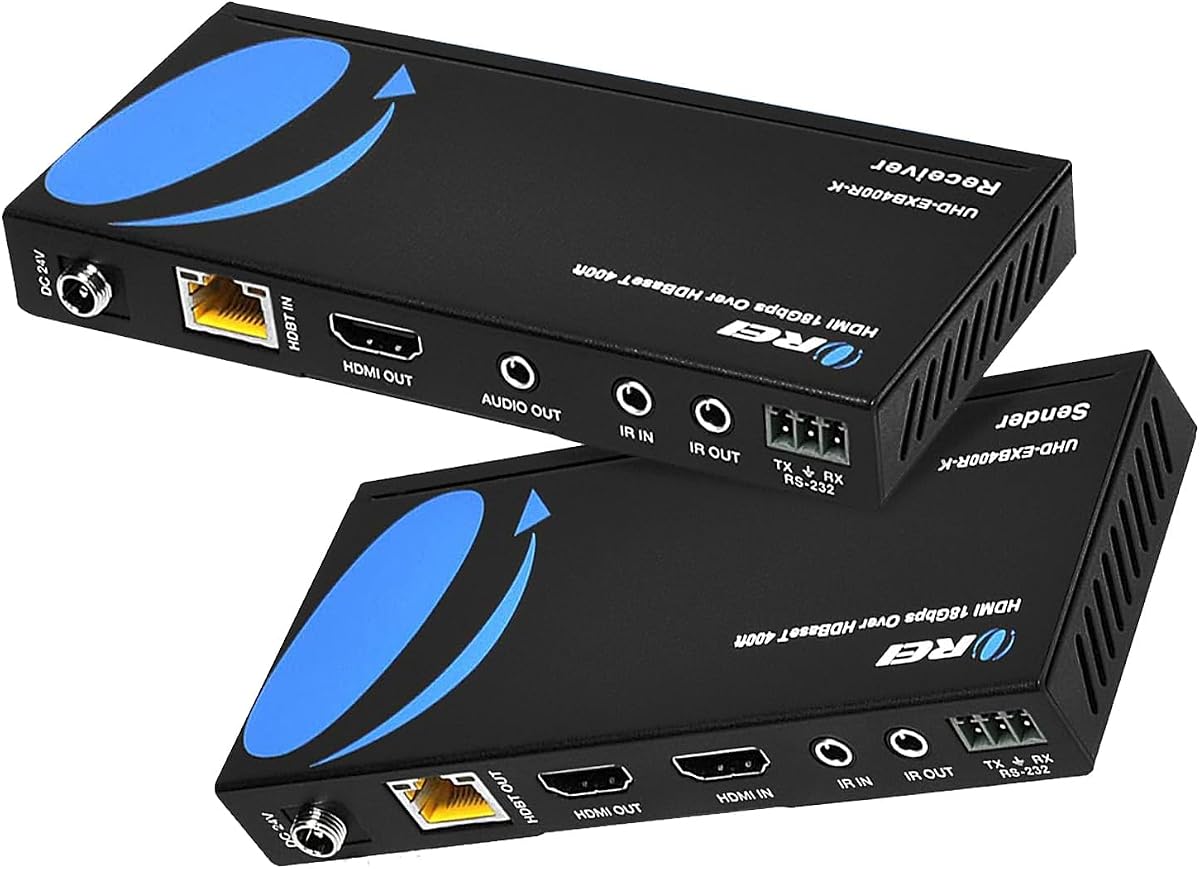
The OREI HDMI Extender HDBaseT 400ft is designed for users needing maximum distance without sacrificing quality. With support for HDBaseT technology, it ensures lossless, lag-free transmission up to 400 feet, making it ideal for large venues or complex installations.
We may earn a commission when you buy through this link, at no additional cost to you.
It supports 4K 60Hz video, HDR, and Dolby Vision, alongside RS-232 command control for advanced AV system integration. Two-way IR control enables control from both source and display sides, and the PoC feature simplifies power management significantly.
While it offers top-tier range and control, it is priced higher than basic models and requires matching OREI HDBaseT units. It is not interchangeable with other HDBaseT brands due to chipset differences, limiting third-party compatibility for advanced users.
Best for professional AV setups, digital signage, or large conference rooms requiring extended reach and control, this model delivers premium performance. It is highly recommended for installations where distance and command control are priorities.
HDBaseT technology provides zero-latency, lossless HDMI transmission over long distances using standard LAN cables.
Includes RS-232 command control and two-way IR for comprehensive device management in complex setups.
We may earn a commission when you buy through this link, at no additional cost to you.
The OREI HDMI Extender Over Cat5 165ft offers an affordable entry point for users needing 4K capability without breaking the bank. Rated 4.6 stars, it provides reliable signal extension for standard video needs at moderate distances.
We may earn a commission when you buy through this link, at no additional cost to you.
While it supports 4K resolution, it is limited to 30Hz, which is sufficient for movies but may lag for fast-action gaming. It includes a loop-out port for local monitoring and supports 1080p at 70m, ensuring stable visuals over longer cable runs.
Users should note it does not support HDMI ARC or IP/network systems, which may limit some modern setup configurations. Additionally, performance can vary depending on cable quality, so using solid copper cables is advisable for best results.
Ideal for home theaters or office presentations requiring 4K at standard refresh rates, this model is a cost-effective choice. It is recommended for users prioritizing price and basic 4K extension over high-refresh-rate needs.
Maintains stable visuals over CAT6/CAT7 cables for distances up to 70m with 1080p or 4K 30Hz.
Includes HDMI loop-out on the transmitter unit to connect a local display for easy source monitoring.
We may earn a commission when you buy through this link, at no additional cost to you.
The HDMI Extender Over Single Cat5e/6/7 Ethernet is a top budget-friendly option for users needing reliable Full HD signal extension. With a 4.9-star rating, it delivers stable, lag-free performance without requiring complex setup steps or extra hardware.
We may earn a commission when you buy through this link, at no additional cost to you.
It supports uncompressed 1080p video at 60Hz with 3D support, ideal for standard TV and monitor setups. Smart EDID copy ensures flawless handshake compatibility, while PoC technology simplifies power needs by using a single supply connected to either unit.
While the 1080p limit may not satisfy 4K users, it covers most standard needs effectively. However, note that a power adapter is not included, so users must source their own USB-to-DC cable to power the system, which can be inconvenient.
Best for classrooms, home offices, or budget-conscious AV setups, this extender offers excellent value. It is highly recommended for anyone seeking a simple, reliable solution for extending Full HD signals over Ethernet cables.
Intelligent EDID copy function reads display parameters to ensure flawless setup and avoid no signal issues.
Constructed with premium aluminum alloy and heat dissipation vents for long-term reliability and durability.
We may earn a commission when you buy through this link, at no additional cost to you.
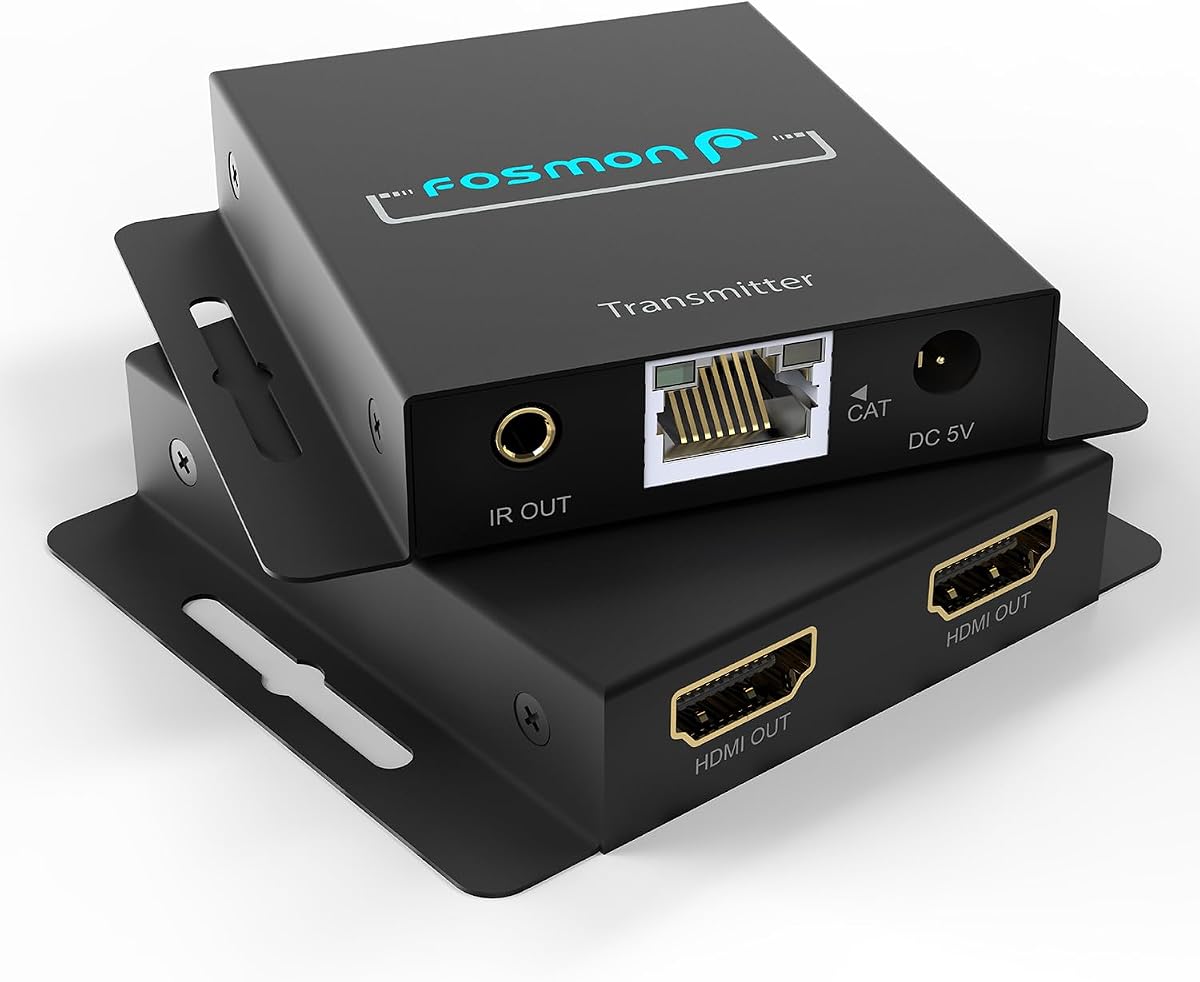
The Fosmon HDMI Extender is designed for users needing long-distance extension up to 230 feet with Cat6a or Cat7 cables. With a 4.5-star rating, it offers versatile features like loop-out and IR pass-through for comprehensive AV control.
We may earn a commission when you buy through this link, at no additional cost to you.
Supporting 1080p at 60Hz with zero loss, it ensures pristine visuals for standard presentations or media playback. The EQ button auto-adjusts cable length settings, and IR control simplifies device management for remote devices in large setups.
While the 1080p resolution may not suit 4K users, it covers most general needs well. However, optimal performance requires Cat6a or Cat7 cables for full range, so standard Cat5e may not deliver the maximum 230ft extension capability.
Ideal for gyms, offices, or classrooms needing extended range and control, this model offers a robust set of tools. It is recommended for users prioritizing distance flexibility and remote control functionality over ultra-high resolution needs.
Supports up to 230 feet with Cat6a/Cat7 cables for large room or venue installations.
Includes loop-out on both units for multi-display setups combining extender and splitter functions.
We may earn a commission when you buy through this link, at no additional cost to you.
The avedio links HDMI Extender is tailored for gamers and media users needing reliable 1080p extension. With compatibility for devices like PS5 and Fire Stick, it delivers stable performance and deep color support for vivid visuals.
We may earn a commission when you buy through this link, at no additional cost to you.
Supporting 3D and up to 36-bit deep color, it enhances media experiences despite limiting resolution to 1080p. The automatic adjustment system ensures stability across different source devices, while the sturdy metal shell minimizes EMI and RFI interference.
Users should note it works best with direct HDMI connections and may not perform well with signal converters. Additionally, while it covers 196ft on Cat6/7, Cat5e maxes out at 165ft, so cable choice impacts maximum range significantly.
Ideal for home theaters or gaming setups prioritizing stability and color depth, this model is a solid choice. It is recommended for users needing reliable PS5 or media box extension without needing 4K resolution.
Supports deep color up to 36 bits for more vibrant and realistic picture quality.
Built-in automatic adjustment works well with PCs, consoles, and media players for stable output.
We may earn a commission when you buy through this link, at no additional cost to you.
The Monoprice 4K HDMI Extender Over Ethernet is a premium choice for users seeking aesthetic appeal and reliable 4K performance. With a flawless 5.0-star rating, it delivers high-quality extension with modern features like bidirectional IR and smart EDID.
We may earn a commission when you buy through this link, at no additional cost to you.
Supporting 4K at 30Hz and 1080p at 60Hz, it offers solid resolution options for most media needs. The white finish blends well with modern decor, and features like HDMI loop out and bidirectional IR passthrough enhance setup flexibility for remote control.
While it does not support 4K 60Hz, it covers most standard viewing needs. The white casing may also show wear more than black units over time, but the build quality ensures durability and long-term reliability for professional setups.
Ideal for modern office or home theater setups prioritizing design and reliability, this model stands out. It is recommended for users needing a clean aesthetic with solid 4K 30Hz extension and advanced IR control features.
Allows remote control signals to pass both ways for flexible device management across rooms.
Ensures perfect handshake between source and display by reading and matching display parameters.
We may earn a commission when you buy through this link, at no additional cost to you.
The PWAY 4K @60Hz HDMI Over Ethernet Extender delivers uncompressed 4K Ultra HD at 60Hz for stunning picture quality. Ideal for gamers and AV enthusiasts, it offers reliable long-distance transmission up to 200 feet using standard Ethernet cables.
We may earn a commission when you buy through this link, at no additional cost to you.
It supports HDR 10 and true 4K resolution with 4:4:4 chroma, ensuring detailed visuals. The PoC function eliminates the need for outlets at the display end, and the loop-out port allows real-time monitoring for multi-display setups.
While effective for high resolution, users should note it may lack advanced management features found in premium models. Packaging is basic, including just cables and a power adapter, so additional accessories may be needed for complex installations.
Best for home theaters or gaming rooms prioritizing 4K 60Hz over 200ft, this model is a strong contender. It is recommended for users needing true 4K performance without compromising on long-distance stability and simple setup.
Delivers uncompressed 4K Ultra HD at 60Hz with HDR10 support for vivid, detailed visuals.
Requires only one power adapter at the transmitter side, simplifying installation for remote displays.
We may earn a commission when you buy through this link, at no additional cost to you.
The J-Tech Digital HDMI Extender is designed for users needing maximum range up to 400 feet over standard Ethernet cables. With 1080p support and TCP/IP conversion capabilities, it offers a unique solution for very large or complex AV installations.
We may earn a commission when you buy through this link, at no additional cost to you.
It uses M-JPEG technology to process image compression without quality loss, supporting 36-bit color for Cat7 cables. IR extension functionality ensures remote control works over long distances, making it suitable for venues where physical access to devices is difficult.
While the 400ft range is impressive, it is limited to 1080p resolution, which may not suit modern 4K setups. Additionally, its specialized nature may require more careful setup compared to standard plug-and-play extenders.
Ideal for large conference rooms or industrial setups where distance is critical, this model delivers unmatched reach. It is recommended for users prioritizing maximum transmission range over ultra-high resolution requirements for legacy systems.
Extends HDMI signals up to 120m (400ft) using single Cat5e or Cat6 Ethernet cables effectively.
Uses M-JPEG technique to process image compression without noticeable loss in quality.
We may earn a commission when you buy through this link, at no additional cost to you.
Selecting the right HDMI extender requires understanding key technical specifications that impact performance, compatibility, and ease of installation.
Check the maximum supported distance over your chosen cable type, as most extenders work up to 200 feet with Cat6 but may require Cat7 for longer ranges up to 400 feet.
Prioritize models with PoC and high-quality copper cables to ensure signal stability without degradation over your required length.
Decide if you need 1080p or 4K support, and whether 60Hz refresh rate is necessary for gaming or high-motion content versus standard 30Hz for videos.
Verify HDR support if you need enhanced color depth and contrast for modern media and gaming experiences.
Look for Power Over Cable (PoC) features to simplify installation by powering both transmitter and receiver with a single adapter at one end.
This reduces cable clutter and avoids the need for extra outlets at the display location, making setup cleaner and easier.
If your devices rely on IR remotes, choose an extender with pass-through support to control sources like consoles and media players remotely.
Two-way IR support can offer greater flexibility for advanced installations requiring control from either source or display sides.
Built-in EDID management helps the extender read display parameters to ensure seamless resolution and handshake compatibility between devices.
This feature prevents common no-signal issues and ensures the source device sends the correct video format automatically.
Consider models with HDMI loop-out ports if you need to monitor source content locally while extending the signal to a remote display.
This feature is useful for setup, testing, or multi-display configurations that require simultaneous local and remote viewing.
Higher-grade Cat6 or Cat7 solid copper cables are essential for maintaining signal integrity over longer distances and higher resolutions.
Avoid using cheap or mismatched cables as they can lead to flickering, data loss, or failure to support advertised range and resolution.
Metal housings and heat dissipation vents help protect internal components and ensure stable long-term operation without overheating.
This is especially important for installations in confined spaces or environments with limited airflow around the hardware units.
Connect the HDMI source device to the transmitter input and use the HDMI output port on the transmitter to connect to a local monitor if needed.
Plug an Ethernet cable into the transmitter and run it to the receiver unit, ensuring it is a solid Cat6 or Cat7 cable for best performance.
Provide power using the included adapter on the transmitter side only if PoC is supported, then verify both units are powered on before connecting the display.
For reliable 4K 60Hz transmission, high-quality Cat6 or Cat7 solid copper cables are recommended to maintain bandwidth and signal integrity over distances. Lower grade cables may cause flickering or reduced refresh rates depending on length.
Most HDMI extenders do not work with network switches or routers since they use a direct point-to-point connection instead of IP traffic. Ensure a direct Ethernet cable connection between transmitter and receiver units.
PoC allows the receiver unit to be powered through the Ethernet cable from the transmitter, eliminating the need for a separate power outlet at the display location. This simplifies installation and reduces cable clutter.
IR pass-through works well for remote control over long distances if the extender supports it, enabling control of source devices from the display side. However, IR signal strength may decrease over very long runs.
High-quality HDMI extenders transmit uncompressed video signals so there is no loss in image quality if proper cables and power are used. Poor cables or insufficient power can degrade performance and cause artifacts.
Many modern HDMI extenders support HDR formats like HDR10 and Dolby Vision but check the specs carefully as some budget models may not include these features for true HDR performance.
The OREI OREI, Fosmon HDMI Extender, and Monoprice 4K models offer excellent choices balancing performance, range, and features for most users.
Consider your resolution needs, distance requirements, and power options carefully to select a model that fits your specific home or office setup.
Prices and availability may vary over time, so check current listings to ensure you get the best deal when purchasing your preferred HDMI extender.