
8mm Video8 Hi8 Camcorder VCR Tape Player Vintage Camera
Playback and transfer tapes
Includes blank 8mm tape
Guaranteed working condition
This guide compares the top Hi8 and 8mm video cassette player options available for digitizing your analog tape collection into digital formats like DVD or USB
Finding the right Hi8 and 8mm video cassette player is essential for preserving your family memories captured on analog tape. These devices allow you to playback and transfer old footage to modern digital formats ensuring your cherished moments remain accessible for future generations without the need for obsolete hardware.
We have carefully reviewed ten different products ranging from budget-friendly camcorders to specialized digital converters. Each option was evaluated based on playback compatibility transfer capabilities ease of use and overall build quality to help you make an informed decision for your specific digitization needs and budget constraints.
Every pick in this list includes key features and specifications to highlight what makes it stand out in the market. Please note that product availability and pricing can change rapidly so we recommend checking the current details on the retailer site before finalizing your purchase decision.

4.0Editor score

4.7Editor score
Below is a detailed side-by-side comparison of all ten products reviewed in this guide. Each entry highlights the core specifications and features to help you quickly identify the right device for your playback and transfer requirements.


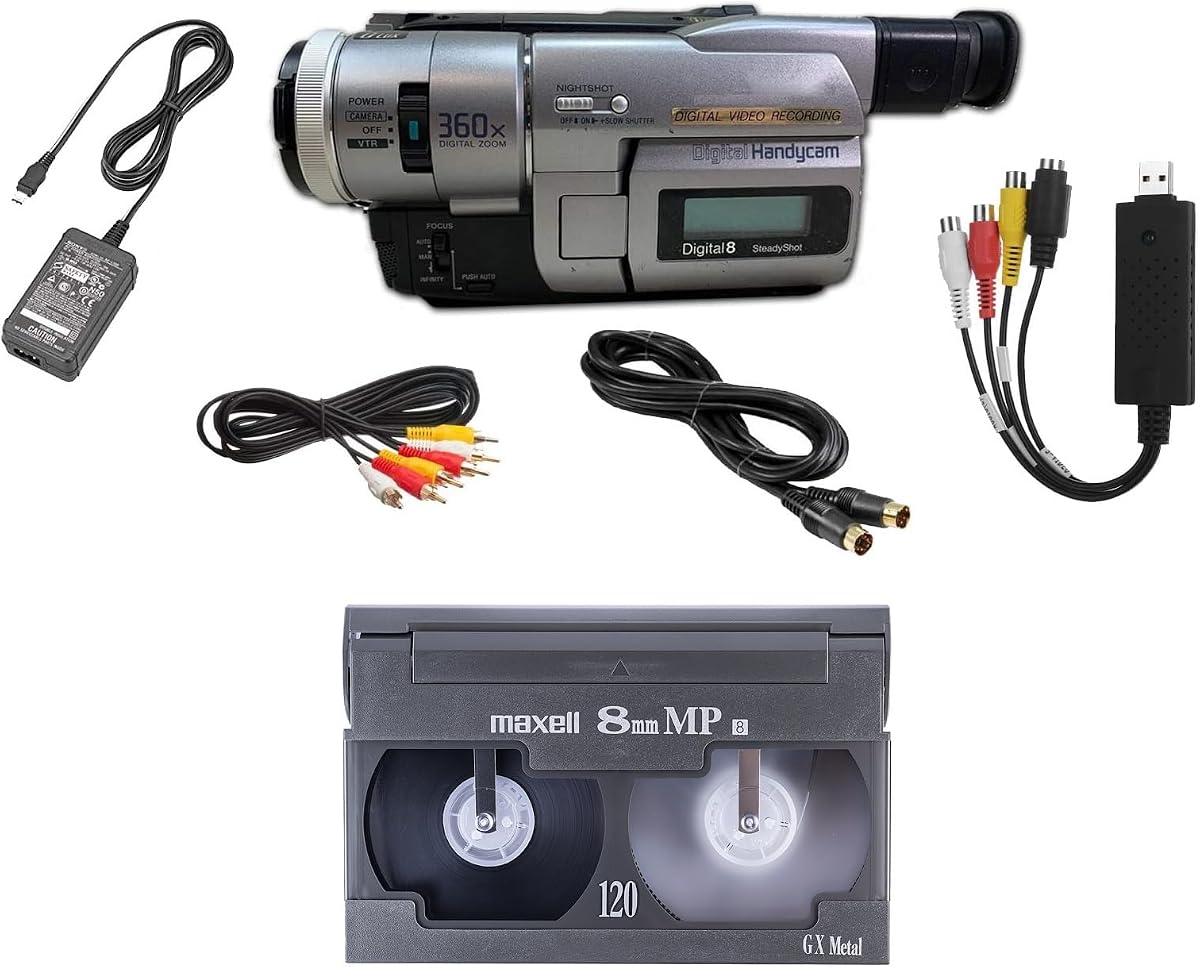

This Sony Camcorder is a robust solution for anyone looking to digitize their collection of 8mm, Video8, Hi8, and Digital8 tapes. With a solid 4.0 rating from users, it stands out as a reliable tool for preserving analog memories. The device is designed to handle playback seamlessly while offering a comprehensive USB capture device for transferring files directly to your computer or burning them to DVD.
We may earn a commission when you buy through this link, at no additional cost to you.
The key strength of this product lies in its all-in-one approach to tape transfer. It includes all necessary power supplies and cables such as AV and S-Video to ensure you can connect to both computers and televisions without buying extra parts. This compatibility extends to both Windows and Mac systems via USB, Firewire, and Thunderbolt connections making it a versatile choice for various tech setups.
While it offers excellent playback capabilities, it is important to note that it is not intended for recording new video. Additionally the device does not support PAL formats which might be a limitation for users with international tapes. These trade-offs are acceptable for those focused primarily on converting existing North American NTSC tapes to digital formats quickly.
This product is ideal for homeowners with large boxes of old family tapes who need a dependable way to get them onto modern media. If you prioritize reliability and a complete set of accessories over advanced editing features, this Camcorder is the top recommendation in our list. We suggest verifying the tape formats you have before purchasing to ensure compatibility with the supported types.
The included USB capture device allows for seamless digitization of tapes directly into digital files on your computer.
Support for Windows, Mac, Firewire, and Thunderbolt ensures it fits into almost any existing computer setup.
We may earn a commission when you buy through this link, at no additional cost to you.
For those seeking an affordable entry point into tape digitization, this 8mm Video8 Hi8 Camcorder offers a straightforward solution. Although specific user ratings are not available, the product promises a 100% working guarantee which provides peace of mind for budget-conscious buyers. It is designed to playback and transfer both 8mm and Hi8 tapes efficiently without requiring technical expertise.
We may earn a commission when you buy through this link, at no additional cost to you.
The bundle includes a USB capture device which simplifies the process of moving video files to your computer. Including a blank 8mm tape is a thoughtful touch that allows you to test the device immediately upon arrival. The aesthetic focus on a warm vintage look suggests it may also appeal to creators looking to shoot throwback style video content.
While this model lacks the brand recognition of Sony or Panasonic, its value proposition is strong for simple playback needs. The free returns policy ensures that if the unit does not meet expectations you can send it back without additional cost. This safety net makes it a low-risk purchase for those just starting their digitization journey.
Buy this if you need a cost-effective way to play old tapes and transfer them to a digital format without spending hundreds of dollars. It is best suited for casual users who need to archive a few important family videos rather than professionals requiring high-end editing tools. Check the current stock availability as budget items often move quickly.
The package includes everything needed to start transferring tapes right away including a blank tape for immediate testing.
With a 100% working guarantee and free returns, buyers can purchase with confidence even at a low price point.
We may earn a commission when you buy through this link, at no additional cost to you.
The Sony GV-D200 stands out as a premium choice with an impressive 4.7 rating from satisfied users. This ultra portable VCR allows you to record and play Digital-8 format tapes while also supporting Hi-8 and regular 8mm videocassettes. It is perfect for those who need high-quality playback in a compact form factor that can be used anywhere.
We may earn a commission when you buy through this link, at no additional cost to you.
One of its standout features is the integrated 20-segment assemble editing which allows you to edit up to 20 assembled scenes at a time directly on the device. This is rare for portable recorders and adds significant value for users who want to refine their footage before transferring. The built-in IEEE1394 FireWire iLink interface ensures fast data transfer to your computer.
While this device is a bit older, the build quality and functionality remain top-notch for analog video enthusiasts. The composite ports allow you to view tapes on any standard television making it versatile for both viewing and archiving. The price reflects its premium features and the reliability associated with the Sony brand.
Invest in this recorder if you want a high-performance portable unit that offers editing capabilities alongside playback. It is ideal for collectors or professionals who need to edit video on the go without relying on a desktop computer. Ensure your computer supports FireWire connections or you have an adapter before making the purchase.
The 20-segment assemble editing feature allows users to cut and arrange scenes directly on the recorder.
Built-in FireWire iLink provides a robust connection for transferring large video files to compatible computers.
We may earn a commission when you buy through this link, at no additional cost to you.
This Handycam CCD Camcorder is rated 4.2 and brings back the classic feel of analog video with modern connectivity. The inclusion of Nightshot technology is a standout feature that allows for recording in low light conditions which was a limitation in older camcorders. It supports playback on any TV or computer making it flexible for different viewing environments.
We may earn a commission when you buy through this link, at no additional cost to you.
The product aims to provide a nostalgic VHS effect without the need for digital filters which is unique among digital converters. It includes USB adapter and tape digitizing software to streamline the process of getting your tapes onto a hard drive. The one year warranty adds a layer of security for buyers concerned about longevity.
While the transfer capabilities are solid users should note that success may depend on the included software quality. The device allows you to shoot vintage style video directly to tape which is perfect for creators wanting authentic analog footage. This dual function of playback and recording adds versatility that some competitors lack.
Choose this camcorder if you are interested in both preserving old tapes and creating new retro-style video content. It is a balanced option for enthusiasts who value the aesthetic of analog video and need a reliable way to view old recordings. Check system requirements for the digitizing software to ensure compatibility with your computer setup.
Nightshot technology enables video recording in dimly lit environments that standard sensors cannot handle.
Shoot directly to tape for an authentic analog look that cannot be perfectly replicated by digital filters.
We may earn a commission when you buy through this link, at no additional cost to you.
The Tech Collector Transfer Bundle is designed specifically for users who want a complete package to digitize their tape collection. With a 4.0 rating it proves reliable for handling 8mm, Hi8, and Digital8 tapes. The bundle includes a camcorder and USB adapter ensuring you have all the necessary hardware to start converting immediately.
We may earn a commission when you buy through this link, at no additional cost to you.
Unlike single camcorders this kit focuses on the transfer process by including AV cables for TV playback and a capture device for computer files. The inclusion of a battery means you can move around freely without being tethered to a wall outlet during playback. This makes it easier to transfer tapes in a room far from your computer or monitor.
The device guarantees 100% working condition which is a strong promise for refurbished or third-party electronics. Users have found it effective for burning tapes to DVD or saving them as digital files. The comprehensive nature of the bundle reduces the need to hunt for extra cables or power supplies.
This bundle is perfect for someone organizing a family archive who needs a reliable workflow from tape to digital file. It is particularly useful if you have a mix of 8mm, Hi8, and Digital8 tapes that need uniform handling. Ensure your computer has sufficient storage space before beginning the transfer process.
The included battery allows for flexible setup options without needing constant access to a power outlet.
Designed to handle the full range of 8mm formats including Digital8 for broader tape collection compatibility.
We may earn a commission when you buy through this link, at no additional cost to you.
The Portta VHS to Digital Converter is highly rated at 4.5 and serves as a dedicated box for converting analog signals to digital. It is compatible with VHS, VCR, DVR, DVD, Hi8, Mini DV, and gaming consoles making it a versatile hub for retro hardware. The device records in MP4 format up to 1080P 30Hz ensuring high-quality digital copies.
We may earn a commission when you buy through this link, at no additional cost to you.
A significant advantage of this unit is that it does not require a PC software or drivers to function. You can plug in your camcorder or VCR and use the USB or SD card to store the recording directly. This simplicity is great for users who want to avoid complex software setups on their computers.
It includes a remote control and a built-in speaker with LCD preview which allows you to manage recordings easily. The device supports NTSC and PAL standards meaning it can handle tapes from various regions. However remember that it does not play tapes itself so you will need to supply the camcorder or VCR.
Choose this converter if you already own a working camcorder but need a modern way to save the footage digitally. It is ideal for users who prefer standalone devices over software-based solutions on a computer. Make sure your VCR or camcorder has the correct AV output ports to connect to this box.
The standalone design allows direct recording to USB or SD card without needing a computer connected.
Supports recording up to 1080P resolution providing clear and crisp digital copies of analog tapes.
We may earn a commission when you buy through this link, at no additional cost to you.
This Sharp 8mm Tape Player Camcorder is a budget-friendly option with a 3.9 rating that delivers basic playback functionality. It includes a USB adapter and tape digitizing software to help you convert tapes to digital files. The device is capable of shooting vintage style video directly to tape for those interested in retro aesthetics.
We may earn a commission when you buy through this link, at no additional cost to you.
The main selling point is the included software which aims to simplify the transfer process without needing third-party tools. Users can play back tapes on any TV or computer ensuring flexible viewing options. The one-year warranty and free returns provide a safety net for buyers concerned about reliability.
While it is less feature-rich than premium models it serves well for basic digitization needs. The design focuses on achieving a nostalgic VHS effect without filters which is a unique feature for creative users. This makes it a viable choice for hobbyists looking to experiment with analog video creation.
Opt for this camcorder if you are looking for an inexpensive way to play old tapes and capture the footage. It is best for simple projects where advanced editing or high-end features are not required. Always verify the software works with your operating system before purchasing.
Allows shooting of vintage style video directly to tape for authentic retro effects without digital filters.
Included USB adapter and software streamline the conversion of tapes to digital files.
We may earn a commission when you buy through this link, at no additional cost to you.
This 8mm Digital8 Hi8 Tape Player Nightshot CCD Handycam offers basic functionality at a competitive price. With a 3.3 rating it provides the essentials for playing and transferring old tapes. It includes a USB adapter and tape digitizing software to help you get your footage onto a computer easily.
We may earn a commission when you buy through this link, at no additional cost to you.
The package includes a blank tape so you can start recording or testing right away. The ability to playback on any TV or computer ensures you can view your content on different screens. The one-year warranty and free returns add reassurance for buyers of lower-cost electronics.
Users should expect standard performance suitable for archiving old family videos rather than professional work. The focus on achieving a nostalgic VHS effect makes it appealing for creative video projects. It is a simple tool for capturing analog content without complex setup procedures.
This Handycam is a good choice for those who need a straightforward way to play tapes and digitize them quickly. It is ideal for personal use and basic preservation of memories. Ensure your computer meets the requirements for the included digitizing software to avoid issues.
Includes blank tape to allow immediate testing and recording upon unboxing.
USB adapter and software included to facilitate simple tape to computer transfers.
We may earn a commission when you buy through this link, at no additional cost to you.
This 8mm Camcorder and Tape Player is designed for simple playback and transfer of old 8mm tapes. Rated at 3.6 it serves as a practical tool for digitizing family archives without complicated setups. The bundle includes battery and AV cables so you have everything needed for transfer or TV playback.
We may earn a commission when you buy through this link, at no additional cost to you.
The inclusion of an 8mm tape allows you to test the device immediately. It is guaranteed 100% working with free returns ensuring reliability for budget buyers. The device supports playback and transfer which means you can view tapes on any TV and also digitize your own content easily.
This product is well-suited for users who need a dependable machine for occasional tape viewing. The simplicity of the interface makes it accessible for non-technical users who just want to see old videos. The free returns policy is a strong benefit given the lower rating on some units.
Select this camcorder if you want a simple and reliable solution to play and digitize 8mm tapes. It is a practical choice for families looking to preserve their video history without significant investment. Check the battery life and condition of the unit upon arrival for best results.
Includes battery and cables so you can start playing tapes immediately after unboxing.
Guaranteed 100% working condition with free returns ensures a safe purchase experience.
We may earn a commission when you buy through this link, at no additional cost to you.
The Panasonic PV-8450 Video Cassette Recorder is a classic unit known for durability and reliable playback. Rated 3.9 it offers a standard VCR experience for those who prefer traditional hardware over digital bundles. While it does not include USB transfer features it is a robust option for viewing tapes on TV.
We may earn a commission when you buy through this link, at no additional cost to you.
Panasonic is a trusted brand in the electronics industry and this model is no exception. It supports various tape formats which ensures you can play your collection without issues. For users who want a physical VCR to play tapes directly on a television this model provides a straightforward solution.
Keep in mind that as a vintage model it may not have the modern features found in newer camcorders. It is best used for playback rather than digitization unless paired with a separate capture card. The condition of used units can vary so inspect carefully before finalizing your purchase.
Consider this VCR if you need a durable standalone unit for playing tapes regularly without relying on a computer. It is a solid choice for those who value brand reputation and physical hardware over digital transfer convenience. Check the listing for details on the device's condition and warranty.
Panasonic is renowned for building durable electronics that stand the test of time.
Ideal for users who prefer a traditional VCR to view tapes on a television directly.
We may earn a commission when you buy through this link, at no additional cost to you.
Selecting the right device for your 8mm and Hi8 tapes depends on your specific needs for playback, transfer, and editing. Here are the key factors to consider before making a decision.
Ensure the device supports all the tape formats you own such as 8mm, Hi8, or Digital8. Some camcorders only play specific types so check the specifications carefully to avoid purchasing a device that cannot read your tapes.
Always verify format support on the product details page to confirm it handles every tape type you have in your collection.
Decide if you need a device that includes a USB capture tool for digitizing to a computer or just playback on a TV. Products that offer both playback and transfer provide more flexibility for archiving your video content.
Choose a bundle that includes a USB adapter if your primary goal is to save your videos to digital formats like MP4 or DVD.
Some devices require specific software or drivers to transfer videos to your computer which can be complex for non-tech users. Others offer plug-and-play functionality that works without additional installation steps.
Prioritize units that offer straightforward software or standalone recording options if you want to avoid technical setup hurdles.
Well-known brands like Sony and Panasonic often offer better reliability and longevity compared to generic third-party units. Higher build quality can mean smoother playback and fewer mechanical issues over time.
Stick to trusted manufacturers when possible to ensure you get a durable device that will work consistently.
Check what connection types the device uses to link to your computer or TV. Look for USB, FireWire, S-Video, or AV connections based on the ports available on your existing equipment.
Confirm that the included cables match the ports on your TV or computer to ensure a successful transfer setup.
Used or vintage electronics can sometimes have issues so a warranty or free returns policy is crucial for protecting your investment. This is especially important for older camcorders that might have mechanical wear.
Look for sellers offering at least a one-year warranty and free returns to give yourself options if the device fails.
If you plan to shoot new video in addition to playing old tapes check if the camcorder includes recording functions and blank tapes. Some devices are playback only so this distinction matters for creators.
Pick a camcorder that supports shooting video if you want to create new retro-style footage alongside your archival work.
Consider whether you need a portable unit with battery power or a stationary VCR for home use. Portable camcorders offer flexibility but may have shorter battery life compared to wall-plugged models.
Opt for a portable model if you need to move between rooms or transfer tapes without access to power outlets.
To begin using your Hi8 or 8mm camcorder, first ensure the battery is charged or the power supply is connected. Insert the tape carefully into the slot and press play to view the footage on your TV screen if connected via AV cables.
For digitization, connect the USB capture device to your computer and the camcorder to the capture device using the provided AV or S-Video cables. Use the included software to record the video as it plays through to save it as a digital file on your hard drive.
To maintain your device, keep it stored in a cool dry place away from dust and humidity. Avoid inserting tapes that are damaged or stuck to prevent mechanical issues. Regularly clean the heads using a VCR head cleaning cassette to ensure clear playback quality.
The most reliable way is to use a camcorder that supports 8mm and Hi8 tapes combined with a USB capture device. This allows you to play the tape on the camcorder and record the signal directly to your computer as a digital file.
Not necessarily. Some players can be connected directly to a TV for viewing without a computer. However if you want to digitize the videos you will need a computer or a standalone recorder to save the files.
Yes, Hi8 tapes offer higher resolution and better video quality compared to standard 8mm tapes. Most modern camcorders in this guide support both formats so you can play either type without needing separate devices.
Most Hi8 players will play Digital8 tapes if they are labeled as compatible. Always check the product specifications for Digital8 support before purchasing to ensure your specific tapes will work.
Digitizing a tape usually takes the same amount of time as the video duration since most capture devices record in real time. A 90-minute tape will take roughly 90 minutes to transfer to your computer fully.
Some bundles include basic digitizing software but advanced editing features usually require separate software. Check the product description to see if editing tools are included or if you will need to download additional programs.
It is safer to use a dedicated VCR head cleaning cassette rather than trying to clean the heads manually. Using liquid cleaners or swabs can cause damage to the delicate head components.
You typically need AV (RCA) cables or S-Video cables to connect the camcorder to the capture device. Ensure you have the correct connectors for both your camcorder and your computer or capture box.
Choosing the right player for your Hi8 and 8mm tapes depends on whether you need simple playback or advanced digitization features. The top picks in this guide offer a range of options from affordable bundles to premium portable recorders that suit different needs.
Prioritize a device that supports all your tape formats and comes with the necessary cables for transfer. If you value ease of use look for bundles that include software or standalone recorders that require minimal setup on your computer.
Remember to check the current prices and availability on the retailer site before purchasing as these deals can change. By selecting the right tool you can preserve your precious analog memories for future generations to enjoy on modern devices.