
Canon MegaTank G3270
4.1Editor score
Wireless print copy and scan
Up to two years ink included
Single sided printing support
Finding the right printing solution for your home or office can be challenging when faced with numerous options. Ink tank printers offer a compelling alternative to traditional cartridge systems by providing significantly lower cost per page. These devices are designed to handle high volumes of printing without breaking the bank on consumables.
We have evaluated the leading models available in the market based on performance, reliability, and user feedback. Our analysis focuses on key aspects such as print speed, wireless connectivity options, and the overall value provided by the included ink supplies. This ensures you receive a comprehensive overview of what each device delivers.
Each selection in this roundup highlights specific strengths that cater to different printing needs and budgets. Whether you require fast document output or high-quality photo prints, there is a model suited for your workflow. Please note that product availability and specific configurations may change over time as manufacturers update their lines.
4.1Editor score

4.2Editor score

4.2Editor score
As an Amazon Associate we earn from qualifying purchases.
The following table provides a side-by-side comparison of all ten ink tank printers reviewed in this guide. It highlights key specifications and features to help you quickly identify the model that best fits your specific printing requirements and workspace constraints.





The Canon MegaTank G3270 stands out as a reliable option for those seeking an affordable entry into ink tank printing. With a strong user rating, this model promises consistent performance without the high ongoing costs associated with traditional cartridges. It is designed to handle the everyday printing needs of a typical household or small office environment.
We may earn a commission when you buy through this link, at no additional cost to you.
Its standout feature is the inclusion of enough ink to last up to two years right out of the box. This significantly reduces the frequency of purchasing replacement supplies and lowers the overall cost of ownership. The device supports wireless printing, scanning, and copying, making it versatile for various document types. Users appreciate the straightforward setup process and the ability to connect multiple devices easily.
While it lacks automatic duplex printing, which limits paper efficiency for double sided documents, the trade-off helps keep the initial purchase price competitive. The single sided printing is adequate for most casual users who do not have high volume duplex requirements. The small LCD display provides essential information without cluttering the design of the printer.
This printer is an excellent choice for budget conscious buyers who need dependable wireless connectivity and long lasting ink. It is ideal for families or home offices that print moderate volumes of text and graphics. By eliminating the need for expensive cartridges, the G3270 offers a practical solution for reducing printing expenses over time.
The included ink bottles provide enough capacity to print thousands of pages before needing a replacement, ensuring uninterrupted workflow for users.
Users can print directly from smartphones and tablets without cables, enhancing convenience and allowing for flexible workspace arrangements.
We may earn a commission when you buy through this link, at no additional cost to you.
The HP Smart Tank 5003 is designed for home users who require robust printing capabilities without the hassle of frequent cartridge changes. It boasts an impressive ink supply that can last up to three years, making it a strong contender for long-term value. The printer integrates modern AI capabilities to streamline the printing process and improve overall efficiency.
We may earn a commission when you buy through this link, at no additional cost to you.
One of its primary strengths is the mess-free refill system. Users can easily replenish ink by plugging bottles directly into the tank, eliminating the risk of spills or messy handling. This feature adds significant convenience, especially for those who are new to tank systems. The ability to produce borderless prints enhances its versatility for creating photos and documents with a professional finish.
While the device offers advanced features, some users may find the AI capabilities require a learning curve to utilize effectively. Additionally, occasional connectivity issues might arise, requiring troubleshooting to maintain stable wireless connections. Despite these minor drawbacks, the printer remains a solid choice for those prioritizing high-volume printing and ease of maintenance.
This model is best suited for home users who value convenience and extended ink life. It works well for families that need reliable scanning and copying functions alongside printing. The combination of high capacity ink and user-friendly refill mechanisms makes it a compelling option for reducing printing overhead.
The direct plug-in system ensures that users can refill ink without spilling, keeping the workspace clean and organized during maintenance.
With enough ink to last up to three years, this printer reduces the need for frequent replacements and lowers the cost per page significantly.
We may earn a commission when you buy through this link, at no additional cost to you.
The Epson EcoTank ET-2803 is highly rated for its innovative cartridge-free printing technology, which drastically reduces the need for expensive replacements. It offers a high yield of pages, making it ideal for users who need to print large volumes of text and graphics. The device incorporates Micro Piezo Heat-Free technology, which ensures sharp text and vibrant colors while operating quietly.
We may earn a commission when you buy through this link, at no additional cost to you.
Its stress-free printing experience is enhanced by the inclusion of up to two years of ink in the box. This allows users to print thousands of pages without immediate concern for running out. The built-in scanner and copier provide full all-in-one functionality, while wireless connectivity enables easy printing from smart devices via AirPrint or the Epson Smart Panel app.
One notable trade-off is the lack of automatic duplex printing, which requires manual intervention for double-sided documents. The control panel is basic, which might feel limiting for power users who prefer more detailed navigation. However, the core functionality remains robust and reliable for standard home and office tasks.
This printer is a top recommendation for those seeking a balance of performance, reliability, and long-term savings. It is particularly well-suited for families and small offices that prioritize environmental impact through zero cartridge waste. The ease of refilling and durable design make it a standout choice in the ink tank category.
This proprietary technology allows for consistent and sharp print output without the high heat that can cause ink evaporation or printhead damage.
By using refillable tanks, this printer helps reduce the amount of plastic waste that typically ends up in landfills, supporting environmental sustainability.
We may earn a commission when you buy through this link, at no additional cost to you.
The Canon Megatank G3290 elevates the ink tank experience with premium features like automatic two-sided printing and a large color touchscreen. It is designed for users who demand high efficiency and a more intuitive user interface. The device maintains the core benefits of the G3270 but adds significant functionality that justifies a higher price point for demanding environments.
We may earn a commission when you buy through this link, at no additional cost to you.
A key strength of this model is its ability to handle duplex printing automatically, which saves paper and time on document-heavy tasks. The 2.7-inch color LCD touchscreen provides easy navigation through menus and settings, improving the user experience compared to smaller screens. The wireless connectivity allows for seamless integration into modern home and office networks.
While the initial cost is higher than budget models, the long-term savings on ink and paper make it a worthwhile investment. The larger physical footprint may require more desk space, which could be a constraint for smaller setups. However, the enhanced features and print quality usually compensate for these minor inconveniences.
This printer is an excellent choice for users who need advanced functionality without sacrificing reliability. It suits home offices with higher printing volumes or small businesses that require professional-quality output. The combination of automation and ease of use makes it a top-tier option in its class.
This feature allows the printer to print on both sides of a page automatically, saving paper and creating professional documents with less effort.
The large color display simplifies navigation and settings adjustment, making it easier for users of all technical levels to manage their tasks.
We may earn a commission when you buy through this link, at no additional cost to you.
The Epson EcoTank ET-4800 is a robust all-in-one device that focuses on high capacity and reliability. It utilizes the same Micro Piezo Heat-Free technology found in other models, ensuring sharp text and high-quality graphics. This printer is designed for users who prioritize durability and eco-friendly printing practices over rapid output speeds.
We may earn a commission when you buy through this link, at no additional cost to you.
Its high-capacity ink tanks mean fewer interruptions for refills, which is beneficial for busy households. The zero cartridge waste feature aligns with sustainability goals, reducing the environmental impact of daily printing. The built-in scanner and copier provide a comprehensive suite of tools for managing documents efficiently. The wireless capability ensures that multiple users can access the printer from their devices.
However, users may find the print speed slower compared to competitors, which can be a bottleneck in high-demand scenarios. The setup process can also be slightly more complex due to the advanced features and calibration requirements. These factors may limit its appeal to those who prioritize speed above all else.
This printer is best suited for users who value environmental sustainability and long-term reliability. It works well for small offices that do not require high-speed document processing. The investment in a durable system often pays off through consistent performance and reduced maintenance over time.
This technology uses pressure to eject ink, which reduces the need for heat and extends the lifespan of the printhead significantly.
Refillable tanks replace disposable cartridges, helping to reduce plastic waste that would otherwise contribute to landfill volume and pollution.
We may earn a commission when you buy through this link, at no additional cost to you.
The Epson EcoTank ET-2903 stands out with its impressive speed of 11 pages per minute and a generous ink supply that can last up to three years. It is built for reliability and offers professional-grade durability with a duty cycle that exceeds many predecessor models. The printer is designed to deliver stunning photographic quality alongside sharp text, making it versatile for various media types.
We may earn a commission when you buy through this link, at no additional cost to you.
Its unique EcoFit ink bottles make refilling simple and stress-free, ensuring users can maintain the printer without mess or confusion. The built-in scanner and 1.44-inch color screen facilitate easy navigation and document management. Wireless and mobile printing capabilities allow users to print from smart devices seamlessly using AirPrint or the Epson Smart Panel app.
The initial setup process can be time-consuming as users align the print head and fill the tanks. Additionally, the initial price point is higher than basic models, though this is offset by the long-term savings on ink. Despite these minor drawbacks, the performance and features justify the investment for most home users.
This model is highly recommended for users who need reliable, fast, and cost-effective printing solutions. It suits families or small businesses that require consistent high-quality output without frequent maintenance. The combination of speed, capacity, and quality makes it a leading choice in the ink tank market.
Epson's Heat-Free technology ensures a permanent printhead that lasts the life of the printer, reducing maintenance costs and environmental impact.
Enhanced mobile printing support allows users to print from anywhere in the home, increasing flexibility and convenience for daily tasks.
We may earn a commission when you buy through this link, at no additional cost to you.
The HP Smart Tank 5003 offers a straightforward solution for home users looking to switch to a more economical printing method. With up to three years of ink included, it promises significant savings over traditional cartridge systems. The AI-capable features aim to simplify printing tasks, and the mess-free refill system ensures convenience during maintenance.
We may earn a commission when you buy through this link, at no additional cost to you.
This printer excels in borderless printing, allowing users to create photos and documents that fill the page entirely. The wireless connectivity makes it easy to print from various devices, and the overall design is compact enough for most home offices. It is a reliable choice for those who prioritize simplicity and cost efficiency over advanced automation.
However, the device may lack some of the advanced features found in higher-end models, such as faster speeds or large touchscreens. The print speed is modest, which may not be ideal for very large print jobs. Additionally, the AI features might require updates or user adjustments to function optimally.
This model is best for budget-conscious users who need a reliable all-in-one device. It suits households with moderate printing needs and those who value ease of use. The combination of long-lasting ink and simple operation makes it a solid entry-level option in the ink tank category.
The design allows users to refill ink without spilling, keeping the workspace clean and ensuring that the process is hassle-free for everyone.
Integrated AI tools help optimize print settings and troubleshoot common issues, improving the overall user experience and reliability.
We may earn a commission when you buy through this link, at no additional cost to you.
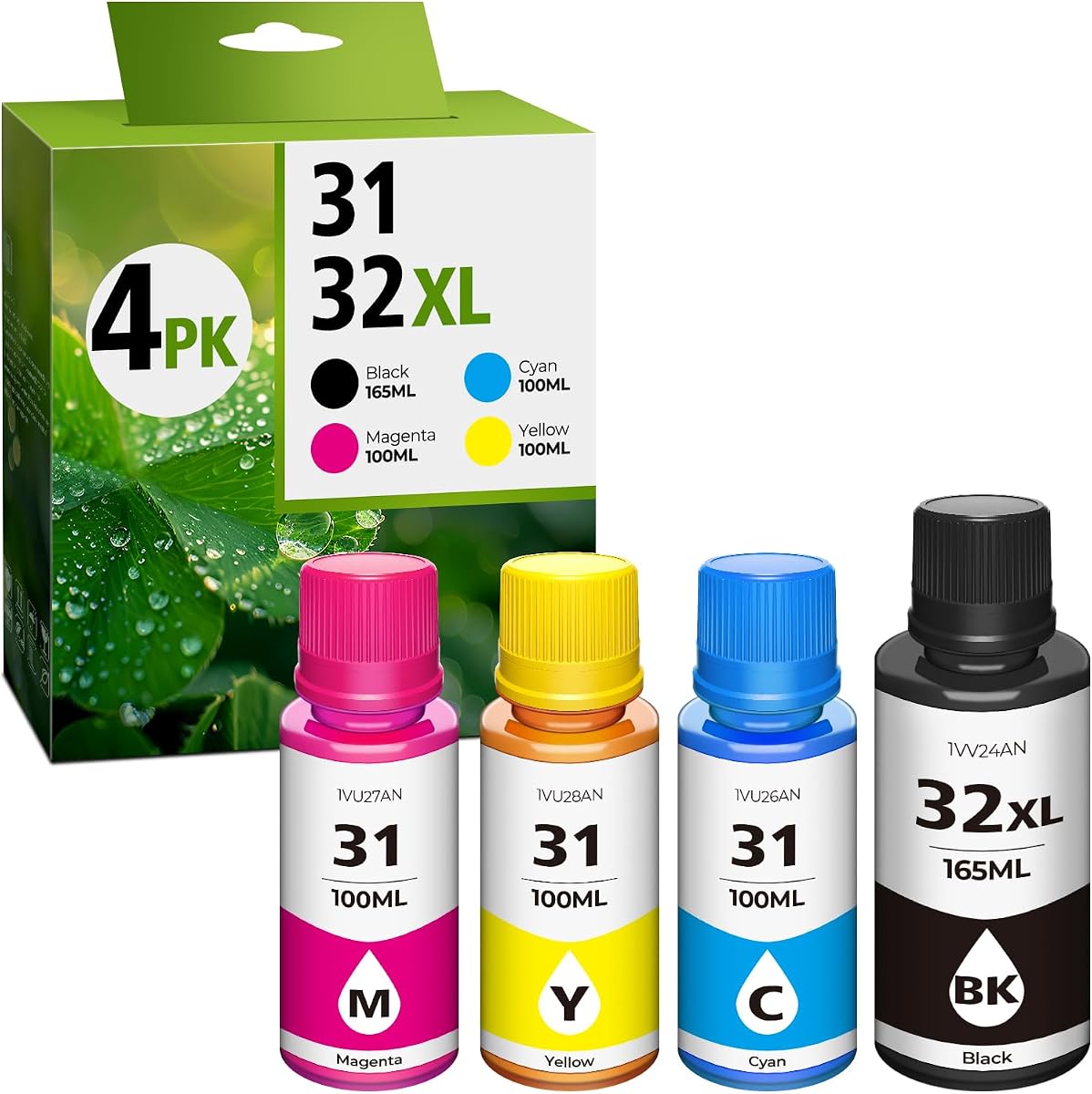
The 31 Ink 32XL Black Ink Bottle Set provides an alternative for users looking to maintain their HP Smart Tank printers without the high cost of original equipment manufacturer supplies. This set is compatible with a wide range of models and offers a high page yield, making it a practical choice for volume printing. It is designed to make refilling simple and efficient.
We may earn a commission when you buy through this link, at no additional cost to you.
These bottles offer a high yield, with each black bottle capable of printing up to 9,500 pages. This ensures that users can continue their work without frequent interruptions for refills. The bottles are designed to reduce leaks and spills, ensuring that the refilling process remains tidy. They are a cost-effective solution for keeping printers running smoothly.
Users should note that these are dye inks, which may differ in performance from pigment inks used in some OEM supplies. It is recommended to clean the printhead before refilling to prevent any issues with print quality. Mixing with OEM black pigment ink should be avoided to ensure the printer operates correctly.
This product is a strong choice for those who want to minimize printing costs without sacrificing convenience. It works well for standard text printing and general documents. The high capacity and wide compatibility make it a valuable resource for home and small business users.
Each bottle offers a significant number of pages, ensuring that users get more value for their money compared to standard cartridge replacements.
The bottles are designed with features that minimize the risk of spills, making the refilling process cleaner and easier for all users.
We may earn a commission when you buy through this link, at no additional cost to you.
The Epson EcoTank ET-2980 is designed for users who need a dependable printer with minimal maintenance. It includes enough ink to last up to three years, providing a worry-free experience for extended periods. The printer uses EcoFit bottles to simplify refilling, ensuring that users can maintain the machine without stress or mess.
We may earn a commission when you buy through this link, at no additional cost to you.
Wireless connectivity allows users to print from their smartphones and devices easily using the Epson Smart Panel app. The high capacity tanks mean fewer replacements, which saves both time and money over the long term. The overall design focuses on reliability, ensuring that the printer remains functional for daily tasks.
While it offers strong value, the lack of automatic duplex printing may require manual intervention for double-sided documents. The control panel is basic, offering essential functions without advanced customization. Despite these limitations, the printer remains a solid choice for those prioritizing cost and ease of use.
This model is ideal for home users who need consistent performance without high expenses. It suits families who want to reduce their reliance on expensive cartridges and minimize environmental waste. The combination of long-lasting ink and simple operation makes it a practical choice for most households.
The system is designed to make refilling straightforward, allowing users to focus on printing rather than maintenance tasks.
Seamless wireless support ensures that users can print from any device within range, enhancing flexibility and productivity in the home.
We may earn a commission when you buy through this link, at no additional cost to you.
The Epson EcoTank ET-2800 brings the benefits of cartridge-free printing to the home user at an accessible entry point. It features Micro Piezo Heat-Free technology, which provides sharp text and high-quality color prints while remaining reliable. The device includes enough ink to last up to two years, reducing the frequency of maintenance and supply purchases.
We may earn a commission when you buy through this link, at no additional cost to you.
Its design focuses on reliability and simplicity, allowing users to print large volumes of pages without interruption. The wireless connectivity enables easy printing from smart devices, making it convenient for various tasks. The compact design fits well in smaller spaces while still offering full functionality for printing, scanning, and copying.
Although it lacks automatic duplex printing, the manual option is available for those who need it. The feature set is basic, which may not appeal to users looking for advanced capabilities. However, for basic tasks, the printer delivers consistent results and long-term value without unnecessary complexity.
This model is perfect for users who need a dependable printer that does not break the bank. It works well for small households or students who require consistent output without high ongoing costs. The focus on reducing waste and ensuring reliability makes it a smart choice for budget-conscious buyers.
This technology ensures consistent and sharp print quality while operating quietly and efficiently without the need for heat.
Refillable tanks eliminate the need for disposable cartridges, helping users reduce environmental waste while saving on supply costs.
We may earn a commission when you buy through this link, at no additional cost to you.
Selecting the right ink tank printer involves evaluating several critical factors that impact performance, cost, and convenience.
The primary benefit of ink tank printers is the ability to print thousands of pages with a single set of ink. When choosing a model, look for the estimated page yield for both black and color prints to ensure it matches your volume needs. Some models offer up to three years of ink included, which can significantly reduce the cost of ownership over time. Check the specifications for total volume capacity to avoid frequent refills if you print large volumes regularly. This factor is crucial for users who want to minimize ongoing expenses and interruptions caused by running out of ink.
Choose a model with high capacity tanks that align with your typical monthly printing volume to maximize value.
Print quality is essential for both text documents and photos. Ink tank printers often use specialized technologies like Micro Piezo to produce sharp text and vivid colors. Look for a high resolution, typically measured in dots per inch, to ensure that graphics and images appear detailed and professional. The type of ink used, whether dye or pigment, also affects water resistance and longevity of prints. If you plan to print photos, check the printer's color accuracy and ability to handle various paper types. High-quality prints are vital for business documents and personal projects alike.
Prioritize a printer with high resolution and appropriate ink technology for your specific output requirements.
Modern users expect seamless connectivity to print from various devices. Most ink tank printers offer wireless capabilities, allowing you to print from smartphones and tablets without cables. Check for support for AirPrint for Mac users and Mopria for Android devices to ensure compatibility with your operating system. Some models may offer Ethernet or USB ports for wired connections, which can provide faster data transfer or a more stable connection in an office. Mobile printing apps often provide additional features like scanning from the device to the printer. Reliable connectivity ensures that you can print from anywhere within your network.
Ensure the printer supports the wireless protocols required by your devices for easy and convenient printing.
The ease of refilling ink is a major factor in the user experience. Look for printers with a mess-free refill system where bottles plug directly into the tanks without squeezing or tipping. This design minimizes the risk of spills and makes maintenance much easier for all users. Some models use uniquely keyed bottles to prevent mixing up colors, which simplifies the process further. Regular maintenance is also required to keep the printer working well, so check if the model includes features that help maintain the printhead. A good refill system saves time and reduces the frustration associated with managing ink supplies.
Select a printer with a user-friendly refill design to keep maintenance tasks simple and clean.
If you need to print large volumes quickly, print speed is a critical consideration. Most ink tank printers offer speeds ranging from 10 to 15 pages per minute for text. Check the duty cycle, which indicates the maximum number of pages the printer can handle per month without damage. A higher duty cycle is essential for small businesses or households with heavy printing requirements. Faster speeds reduce wait times and improve productivity, especially when printing long documents or multiple copies. Matching the speed and cycle to your needs ensures the printer will not become a bottleneck.
Choose a printer with sufficient speed and duty cycle to handle your peak printing demand.
Beyond printing, many models offer all-in-one capabilities like scanning and copying. Consider whether you need these features based on your workflow. Automatic duplex printing saves paper and time by printing on both sides of a page. Touchscreens make navigation easier compared to basic button interfaces. Voice-activated printing can be a convenient feature for quick tasks without touching a device. Evaluate which additional features will enhance your productivity and justify any potential cost increase. A feature-rich printer can streamline your document management and reduce reliance on other devices.
Assess the additional features available to ensure they provide real value for your specific use case.
To ensure the best performance, always use genuine ink bottles designed for your specific printer model. This prevents issues like clogging or poor print quality that can arise from using non-approved supplies. Follow the manufacturer's instructions for initial setup and filling the tanks to avoid air bubbles in the system. Regularly updating the printer software can also improve compatibility with new devices and features.
Regular maintenance is key to extending the life of your printer. Clean the scanner glass regularly to remove dust and ensure clear scan quality. Use the printer's cleaning utility to maintain the printhead if you notice missing lines or faded prints. Avoid turning off the printer abruptly; instead, let it complete its shutdown cycle to allow the print head to park properly.
Store your printer in a cool, dry place to protect it from extreme temperatures and humidity. This helps maintain the integrity of the ink and prevents the print head from drying out. If you do not plan to use the printer for several weeks, print a test page weekly to keep the ink flowing. Proper storage and usage habits will keep your printer running smoothly and reliably for years.
Yes, ink tank printers are generally better for high-volume printing due to their lower cost per page and longer ink supply. They eliminate the need for expensive cartridges, reducing long-term expenses significantly. However, they may have a higher upfront cost and require more space than some compact cartridge models. For users who print frequently, the savings and convenience make them a superior choice over traditional cartridge systems.
The ink in most tank printers can last between two to three years depending on the model and usage frequency. Manufacturers often include enough ink to cover thousands of pages right out of the box. This duration is significantly longer than traditional cartridges, which may run out after just a few hundred pages. The exact longevity depends on how much you print and the specific capacity of the included bottles.
Yes, many ink tank printers support borderless photo printing with high resolution capabilities. They often include specific ink colors designed to produce vibrant and accurate colors suitable for photos. However, the quality may vary by model, so check for features like photo paper support and color accuracy ratings. For best results, use the recommended paper types and settings provided in the software.
It is highly recommended to use genuine ink brands designed for your printer model to avoid damage and ensure quality. Third-party inks may save money initially but can cause clogs or void warranties if not compatible. Manufacturers design the tanks and printheads to work optimally with their specific ink formulations. Always check the compatibility list on the manufacturer's website before purchasing replacement ink.
Duplex printing allows the printer to print on both sides of the paper automatically, saving paper and reducing bulk. It is useful for those who print large documents regularly and want to reduce costs. While not strictly necessary for casual users, it adds convenience and efficiency to your workflow. Models without this feature require manual flipping for two-sided prints which can be tedious for long documents.
Most ink tank printers allow you to connect to Wi-Fi via the built-in display or the manufacturer's mobile app. You typically select the network and enter the password during the setup process. Some models also support WPS for a simpler connection by pressing a button on your router. Ensure your device is on the same network to enable wireless printing from your computer or phone.
If the printer stops printing, check the ink levels and ensure the printhead is not clogged. Restarting the printer and running a cleaning utility through the menu can resolve common issues. Verify that the printer is connected to the network and has paper loaded correctly. Consult the user manual for error codes and specific troubleshooting steps for your model.
Ink tank printers are more environmentally friendly than cartridge models because they produce less plastic waste. Refillable tanks reduce the number of disposable cartridges ending up in landfills. Some manufacturers also offer recycling programs for old ink bottles to further minimize environmental impact. Using refillable systems significantly reduces the carbon footprint associated with printing supplies.
The ink tank printers reviewed in this guide offer a wide range of options to suit different budgets and requirements. Whether you need high-speed document printing or cost-effective photo capabilities, there is a model designed for your needs. The top picks highlight the best overall performance and value for most users looking to invest in reliable printing technology.
When making your decision, prioritize factors like ink capacity, connectivity options, and print quality. These elements determine how well the printer fits into your daily workflow and long-term savings goals. Consider the specific features that matter most to you, such as duplex printing or wireless capabilities, before finalizing your choice.
Please remember to check the current availability and specifications before purchasing. Models and prices can change, and verifying the latest details ensures you select the right product. A reliable ink tank printer is a great investment for anyone looking to reduce costs and improve efficiency.