
TP-Link Ethernet Splitter 1 to 2
4.6Editor score
Compact Dual Port Design
1000Mbps High Speed
USB Powered Setup
Discover the top Internet Splitter options for expanding your network with our detailed comparison of performance, compatibility, and ease of use for all users.
Finding the right Internet Splitter can transform your home or office network by allowing multiple devices to connect to a single Ethernet port. These compact devices are essential for modern setups where wired connections are preferred for stability and speed over wireless alternatives.
We evaluated ten top-rated models based on their data transmission speeds, build quality, and overall usability. Our analysis focuses on how each unit handles Gigabit bandwidth, manages heat dissipation, and integrates seamlessly with various cable types and network environments.
Each selection below highlights unique strengths ranging from budget-friendly dual-port solutions to robust four-port expanders. Note that prices and availability can change frequently so always check the latest product listings before making your final purchasing decision.
4.6Editor score

4.7Editor score

4.5Editor score
The following table provides a side-by-side comparison of the ten leading Internet Splitter models available on the market. Each entry highlights key specifications such as port count, speed capabilities, and unique design features to help you make an informed decision.



The LIEZHUA Gigabit Ethernet Splitter provides an efficient solution for expanding a single network port into two active connections. It supports high speeds up to 1,000 Mbps and works seamlessly with various Ethernet cable standards found in modern homes.
We may earn a commission when you buy through this link, at no additional cost to you.
This device stands out due to its ability to allow two devices to transfer data simultaneously without requiring extra wiring. The built-in LED indicators help users quickly identify which connected device is currently active and transferring data reliably.
While the unit requires a separate 5V USB power source which might be inconvenient for some users the stability it offers is worth the minor setup effort. It uses a sturdy aluminum alloy casing to protect internal components and ensure long term durability.
This splitter is ideal for users who need to connect two wired devices to a single router port without buying a full switch. It is particularly useful for gamers or streamers who want a stable connection alongside another smart device.
Two devices can connect and transfer data at the same time without signal interference or connection drops.
Works effortlessly with Cat5 Cat5e Cat6 Cat7 and Cat8 cables to ensure broad compatibility across networks.
We may earn a commission when you buy through this link, at no additional cost to you.
The TP-Link TL-SG105 is a robust 5-port Gigabit Ethernet switch that offers superior scalability compared to traditional 1-to-2 splitters. It supports speeds up to 1000Mbps per port and features energy-efficient technology to reduce power consumption.
We may earn a commission when you buy through this link, at no additional cost to you.
One of its key strengths is the fanless metal design which keeps the unit quiet while maintaining stable performance even under heavy load. The shielded ports help protect against external interference ensuring reliable data transfer.
Although it comes with a price premium over basic adapters the value it provides in network capacity and reliability is significant. Users benefit from the plug-and-play setup which requires no software installation or complex configuration steps.
This switch is perfect for home offices or small businesses that need to connect multiple devices like computers printers and smart TVs reliably. The three-year warranty adds peace of mind for long term network infrastructure investments.
With five ports you can connect more devices simultaneously without sacrificing speed or stability.
The metal casing and lack of fans ensure the device runs quietly and lasts longer in demanding environments.
We may earn a commission when you buy through this link, at no additional cost to you.
The TP-Link Ethernet Splitter 1 to 2 is a cost-effective way to add a second Ethernet port when your router lacks available connections. It supports up to 1000Mbps bandwidth and works with a wide range of cable standards from Cat5 to Cat8.
We may earn a commission when you buy through this link, at no additional cost to you.
Its compact aluminum housing makes it easy to carry in a laptop bag for travel or place discreetly behind a TV. The included USB-C power cable simplifies installation since you do not need to buy additional accessories to get started.
While the device shares bandwidth between connected devices the stability it provides ensures smooth streaming and gaming experiences. TP-Link security commitment is also a strong point as it follows Secure-by-Design pledges for safer data transmission.
This model is ideal for budget-conscious users who need a simple plug-and-play solution for two devices. It balances performance and affordability well making it a reliable choice for expanding home networks without complexity.
No drivers or software are needed just connect the power and network cables to start using immediately.
TP-Link adheres to cybersecurity standards to ensure the device is built with security as a core requirement.
We may earn a commission when you buy through this link, at no additional cost to you.
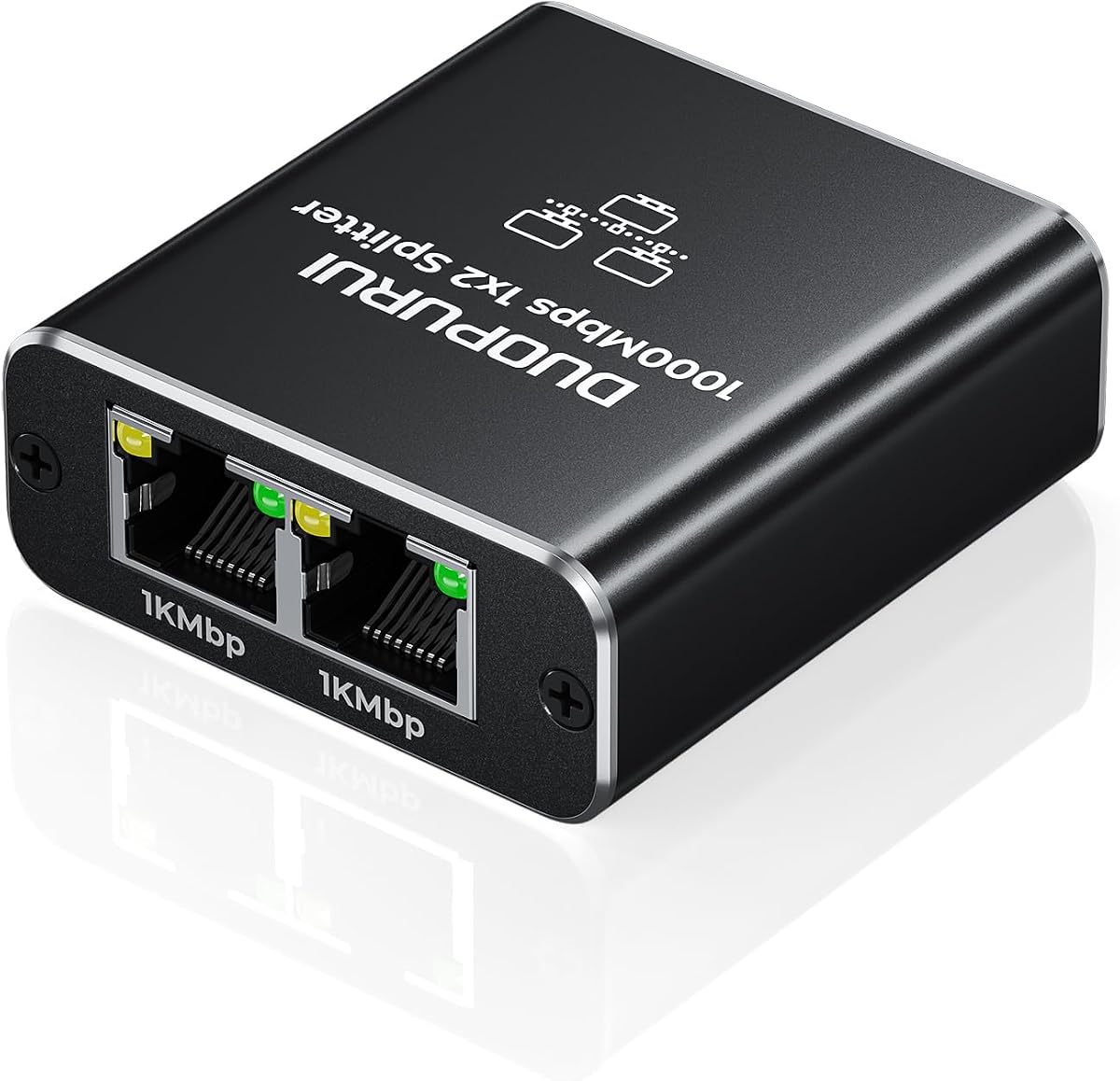
This DUOPURUI Ethernet Splitter expands one Gigabit Ethernet signal into two independent outputs allowing both devices to transfer data simultaneously. It is designed to handle high bandwidth applications such as 4K HD video streaming and large file transfers efficiently.
We may earn a commission when you buy through this link, at no additional cost to you.
The device features a rugged alloy shell that safeguards the internal high-performance circuit board from damage and interference. This build quality helps ensure stable signal transmission even in complex networking environments with many connected devices.
Installation is straightforward as the unit includes a USB power cable and requires no additional software. However users should note that it must remain connected to a power source to function which may limit placement options compared to passive units.
It is a solid choice for users who need a durable splitter for home or office use. The ability to connect two devices directly and the high-speed support make it practical for modern network needs.
The internal circuit board is optimized to prevent signal loss and ensure reliable connectivity for all ports.
Compatible with routers computers set-top boxes and game consoles for broad usage flexibility.
We may earn a commission when you buy through this link, at no additional cost to you.
This LIEZHUA model takes network expansion further by offering four Ethernet ports from a single input source. It supports fast data transfer speeds up to 1000Mbps making it suitable for streaming media gaming and other bandwidth-intensive tasks.
We may earn a commission when you buy through this link, at no additional cost to you.
The device is lightweight and portable which allows users to create network connections wherever needed. It works with Cat5 through Cat8 cables ensuring compatibility with existing network setups and new equipment alike.
Although it is more complex than a simple 1-to-2 splitter the added ports provide significant value for families or small offices. The included LAN cable helps users get started immediately without needing to buy extra accessories.
This unit is an excellent option for those who need to connect four wired devices to a single router port. Its ease of use and robust speed make it a versatile tool for home or office environments.
Connect up to four devices simultaneously without compromising on speed or reliability.
The compact size allows you to take it anywhere for flexible network expansion on the go.
We may earn a commission when you buy through this link, at no additional cost to you.
This Internet Splitter features four RJ45 output ports allowing you to expand your wired network connections significantly. It supports data transfer speeds up to 1000Mbps ensuring reliable high-speed connections for all attached devices.
We may earn a commission when you buy through this link, at no additional cost to you.
The unit comes with a USB-C power cable which simplifies the power setup process. It is designed to be plug-and-play so you do not need to install drivers or perform advanced configuration steps before using it.
It is compatible with Cat5 through Cat8 cables offering maximum flexibility in network setups. The design allows four devices to be connected simultaneously making it a great choice for setups with multiple computers or smart TVs.
This splitter is ideal for anyone needing to increase the number of wired ports without buying a full switch. Its high speed and ease of use make it a practical solution for expanding home or office networks efficiently.
Gigabit speed support ensures fast data transfer for bandwidth-heavy applications like streaming.
No configuration is required just connect the cables and power to start using immediately.
We may earn a commission when you buy through this link, at no additional cost to you.
This Ethernet Splitter offers a convenient package that includes a Cat 6 Ethernet cable for easy setup. It supports transfer speeds up to 1000Mbps and provides simultaneous internet access for two devices via its dual port design.
We may earn a commission when you buy through this link, at no additional cost to you.
The device features LED indicators that display the working status of each port making it easy to diagnose connection issues. The nickel-plated jacks are designed to maintain a stable signal and resist corrosion over time.
Users appreciate the lightweight and durable plastic casing which provides good heat dissipation during operation. The advanced chip technology inside ensures high-speed connectivity without compromising performance even in demanding environments.
It is a reliable choice for users who want a plug-and-play adapter with an included cable. The combination of speed indicators and solid build quality makes it a practical option for home office networks.
The included Cat 6 cable allows you to start using the splitter immediately after purchase.
LED indicators help you quickly see which ports are active and transmitting data.
We may earn a commission when you buy through this link, at no additional cost to you.
This mini Ethernet Splitter allows three devices to share a single Ethernet line effectively solving connection problems caused by insufficient cabling. It supports stable data transfer rates up to 1000Mbps ensuring reliable performance for multiple users.
We may earn a commission when you buy through this link, at no additional cost to you.
The lightweight and compact design fits easily into a laptop bag making it perfect for travel or flexible setups. The aluminum metal material provides durability and efficient heat dissipation to keep the device running cool.
Each cable group transmits independently without interference which ensures stable connectivity for each connected device. The included USB-C cable and LED indicators simplify setup and help you monitor which devices are active.
It is an ideal solution for users who need a third port but do not want a full switch. This model balances portability and functionality well making it suitable for home office and hotel network needs.
Connect three devices to a single Ethernet line simultaneously for flexible network expansion.
The small aluminum design allows you to carry it anywhere for instant network expansion.
We may earn a commission when you buy through this link, at no additional cost to you.
This Ethernet Splitter allows three devices to share a single Ethernet line effectively solving connection issues. It ensures stable and reliable data transfer at rates up to 1000Mbps with support for Cat5 through Cat8 cables.
We may earn a commission when you buy through this link, at no additional cost to you.
The aluminum metal material used in its construction provides durability and efficient heat dissipation for long-term reliability. It features a compact and portable design making it suitable for home office industrial and other network environments.
Plug-and-play functionality means you do not need to configure anything or reboot your computer. Simply connect the network cable and the USB power cable to start accessing the internet on multiple devices simultaneously.
It is a great option for users who need a simple way to expand their network ports without complex hardware. The combination of high speed and durable build quality makes it a strong competitor in its class.
Reliable transfer rates up to 1000Mbps ensure smooth performance for multiple connected devices.
The aluminum casing ensures the device stays cool and lasts longer under daily use.
We may earn a commission when you buy through this link, at no additional cost to you.
This UGREEN Ethernet Splitter divides one Gigabit network into two separate high-speed connections with no crosstalk between signals. It supports a maximum of 1000M Ethernet network connections ensuring lightning-fast transmission for both output signals.
We may earn a commission when you buy through this link, at no additional cost to you.
The high-quality aluminum alloy material provides protection against physical damage and helps with heat dissipation. The full metal protection for RJ45 sockets and gold-plated pin cores guarantee safer and more reliable data transfer.
Despite its premium build it remains plug-and-play with no drivers required for setup. The compact and lightweight design makes it highly portable allowing you to carry it in a laptop bag for business trips or travel.
This model is best for users who value build quality and signal integrity over cost savings. The gold-plated pins and robust casing make it a reliable choice for those needing consistent high-speed connectivity.
The gold-plated pin cores ensure high signal quality and resistance to corrosion over time.
High-quality aluminum alloy provides durability and keeps the device cool during use.
We may earn a commission when you buy through this link, at no additional cost to you.
Selecting the right Internet Splitter requires considering several factors to ensure it meets your network needs. This guide breaks down the most important aspects to help you make an informed decision.
Consider how many devices you need to connect simultaneously. Most splitters offer 1-to-2 options but some provide 1-to-3 or 1-to-4 configurations to accommodate more devices.
Choose a port count that matches your current needs without excessive unused capacity.
Ensure the splitter supports Gigabit speeds up to 1000Mbps to match modern internet plans and avoid bottlenecks. Check if the bandwidth is shared or dedicated for multiple ports.
Look for models with Gigabit support to maintain fast and reliable data transmission.
Many Internet Splitters require external USB power to function correctly. Check if the package includes the power cable and adapter before purchasing.
Confirm the power requirements match your available USB ports or power sources.
The splitter must work with your existing Ethernet cables such as Cat5 Cat6 or Cat8. Verify compatibility to avoid connection issues.
Choose a model that supports your cable type for seamless integration.
Look for durable materials like aluminum alloy or robust plastic casings that dissipate heat and protect internal components. This ensures stability and longevity.
Prioritize units with metal casings for better heat dissipation and durability.
The device should work without needing complex configuration or software installation. Plug-and-play units save time and reduce setup frustration.
Ensure the unit requires no driver installation for easy setup.
Features like LED indicators or shielded ports can improve usability and signal stability. Indicators help you quickly see which devices are active.
Look for additional features that simplify network monitoring and stability.
Opt for established brands that offer warranties and reliable customer support. This provides peace of mind if you encounter issues.
Check for warranties and support options before finalizing your purchase.
To use your Internet Splitter connect one end of an Ethernet cable to your router and the other end to the input port on the splitter. Then plug in the USB power cable to the splitter and a USB power source.
After powering up connect your devices to the output ports using separate Ethernet cables. Ensure all connections are secure and the LED indicators show the devices are active.
Keep the device in a well-ventilated area to prevent overheating and regularly check cables for any signs of wear or damage to maintain optimal performance.
Most active Internet Splitters require external USB power to function properly because they contain circuitry to manage the data signals. Always check the product specifications to confirm if a power adapter is included or needs to be purchased separately.
While a splitter allows multiple devices to connect the total bandwidth is usually shared among the connected devices. If your internet plan is fast enough this sharing should not noticeably reduce speeds for normal activities like browsing or streaming.
No a standard 1-to-2 splitter is designed to connect exactly two devices. If you need more connections you should look for a model with more output ports such as a 1-to-3 or 1-to-4 splitter.
A splitter typically divides one signal into two or more outputs and may share bandwidth whereas a switch often manages traffic more efficiently and supports dedicated full-duplex communication for each port.
Cat6 cables are generally recommended for Gigabit speeds but Cat5e Cat7 and Cat8 cables are also compatible with most splitters. Using higher category cables ensures better performance and future-proofing for your network.
Yes most modern Internet Splitters are designed to be plug-and-play requiring no software installation or complex configuration. You simply connect the power and Ethernet cables to get started immediately.
Yes Internet Splitters are compatible with gaming consoles as long as the console has an Ethernet port. They provide a stable wired connection which is beneficial for online gaming performance.
Most splitters have LED indicators that light up when connected devices are active. If the LEDs do not turn on check your power connections and ensure the Ethernet cables are properly inserted.
The ten Internet Splitter models reviewed above provide a range of options for expanding your home or office network. Whether you need a simple dual-port unit or a robust four-port expander there is a solution that fits your specific connectivity requirements.
Prioritize factors like speed compatibility and build quality when making your decision to ensure long-term reliability and performance. A well-chosen splitter can significantly enhance your network infrastructure without the need for complex setups.
Remember that prices and availability can change so always verify the latest listings before purchasing. With the right Internet Splitter you can enjoy stable and efficient wired connections for all your essential devices.