10 Best Jbod Enclosure (November 2026) Expert Guide
Written by Ethan · Updated November 2026
Finding the right Jbod Enclosure is essential for professionals needing expandable storage without complex network setups. These devices allow direct connection to your computer for reliable data access and backup workflows.
We evaluated ten leading Jbod Enclosure options based on speed, capacity, build quality, and compatibility. Each model offers unique features for different needs ranging from simple expansion to enterprise grade performance.
Every pick highlights key strengths and ideal use cases so you can decide quickly. Keep in mind that availability and pricing may shift often so verify details before purchasing your final selection.
Top 3 Picks for Best Jbod Enclosure
Best Budget
CENMATE Aluminum 4 Bay Hard Drive Enclosure with Cooling Fan for 2.5”/3.5" SATA HDD/SSD with USB A/C 3.0, Support Hot Swappable, Tool-Free HDD Enclosure, DAS(NO RAID/NAS)
As an Amazon Associate we earn from qualifying purchases.
Top 10 Best Jbod Enclosure in 2026 Compared
This side-by-side comparison highlights the core specifications and capabilities of each Jbod Enclosure model to help you identify the best fit for your storage expansion needs quickly.
The TERRAMASTER D4-320 stands out as a top choice for direct attached storage needing high-speed transfers and ease of use. It holds four drives with USB 3.2 Gen2 support for up to 10Gbps throughput which is excellent for large files.
Pros
High-speed data transmission
Tool-free drive installation
Hot swappable convenience
Effective heat dissipation
Cons
No RAID function
Limited to four bays
We may earn a commission when you buy through this link, at no additional cost to you.
Its tool-free design and hot swap capability make drive management effortless without shutting down the system. The included fan keeps temperatures low while reducing noise significantly for quiet office environments.
While it lacks RAID functionality this enclosure prioritizes simplicity and speed for independent drives. Users should note that maximum capacity is capped at four drives limiting future expansion beyond this point.
Ideal for creatives and professionals needing reliable external storage this model delivers performance and convenience. Its balanced feature set makes it a strong recommendation for most home and office setups.
High-Speed Data Transmission
USB 3.2 Gen2 allows up to 10Gbps speeds ensuring fast transfers for video and photo libraries.
Efficient Heat Management
An intelligent temperature-controlled fan and sound-absorbing panels reduce noise to under 21 dB in standby.
The CENMATE 4 Bay enclosure offers excellent value for users seeking reliable storage without breaking the bank. Its aluminum build ensures durability while supporting up to 80TB total capacity across four drives.
Pros
Affordable price point
Aluminum alloy housing
USB A and C support
Stable power supply
Cons
Fan noise around 40 dB
USB 3.0 limited to 5Gbps
We may earn a commission when you buy through this link, at no additional cost to you.
USB 3.0 connectivity provides up to 5Gbps speeds which are sufficient for most general storage needs. The inclusion of both A and C cables enhances compatibility with various computers and operating systems.
Although the fan runs continuously for cooling it may produce noticeable noise in quiet rooms. This trade-off is acceptable given the low price and effective heat dissipation during heavy use.
Best for personal backups or small business archives this model balances cost and performance well. It is a solid entry-level option for anyone starting to build an external storage system.
Reliable External Storage
Supports up to 80TB with 20TB per drive making it ideal for personal or enterprise use cases.
Wide Compatibility
Plug and play support for Windows Mac and Linux requires no drivers for quick setup and use.
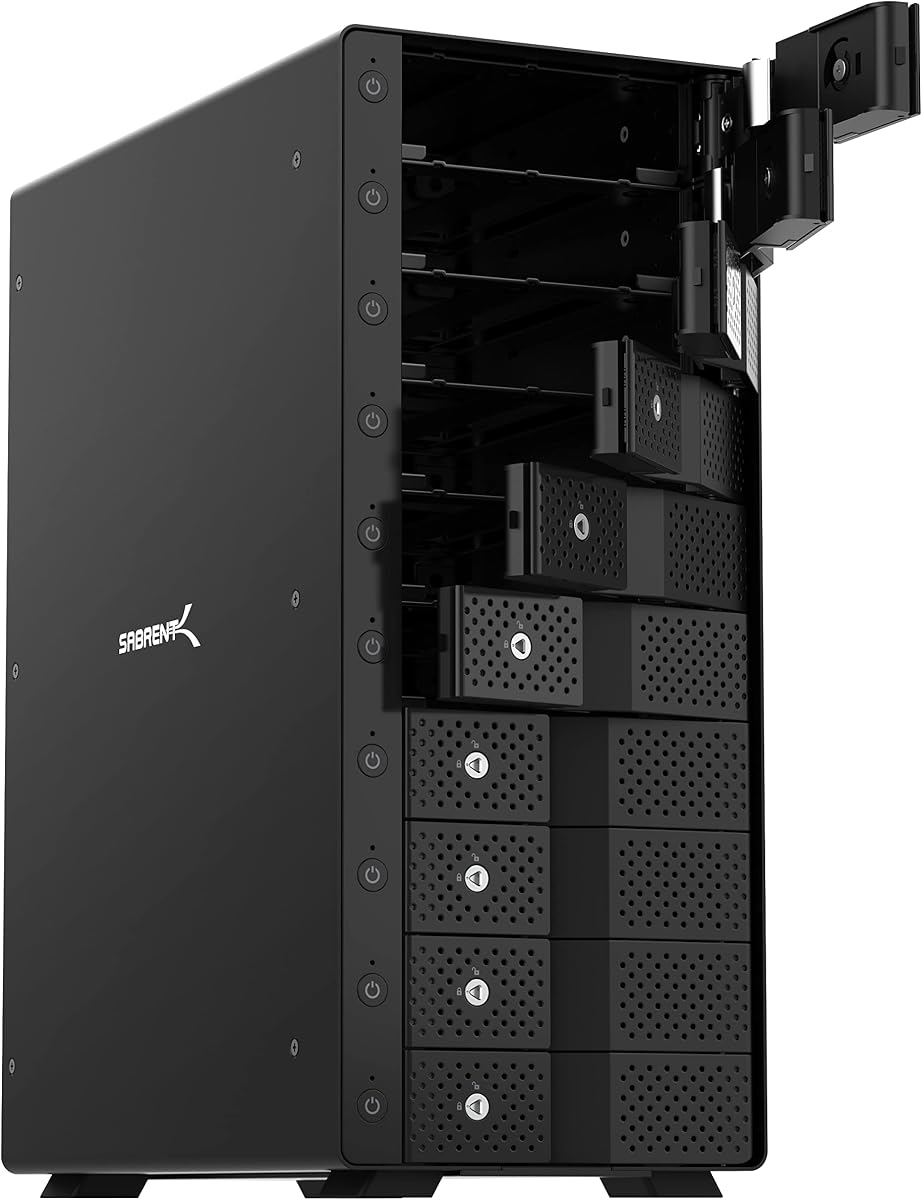
The SABRENT 10-Bay dock delivers unmatched scalability for professionals managing vast data libraries. With ten independent bays and USB-C 10Gbps speeds it handles large transfers efficiently without complex setup.
Pros
Massive 200TB capacity
10Gbps USB-C speed
Independent per-drive control
Rigid aluminum enclosure
Cons
High price tag
Large physical footprint
We may earn a commission when you buy through this link, at no additional cost to you.
Each drive has its own power switch allowing selective activation to save energy and reduce heat. The aluminum chassis and dual 120mm fans maintain stable temperatures even under sustained heavy loads.
Its tray-less design enables rapid hot-swapping but requires careful handling to avoid drive damage during removal. The included cables and Kensington slot add convenience and security for permanent setups.
Perfect for media servers and enterprise workflows this enclosure supports up to 200TB total. Its robust construction and speed make it a premium choice for power users needing maximum capacity.
Unmatched Scalability
Supports ten drives up to 20TB each for a total of 200TB allowing growth without replacing hardware.
Independent Per-Drive Control
Each bay has an ON/OFF switch and status LED enabling selective power and monitoring of individual drives.
The IO CREST 8-Bay enclosure provides a versatile solution for expanding storage with eight drive slots. Its independent switches allow powering off unused drives which conserves energy and reduces noise during idle times.
Pros
Eight drive bays
Individual power control
Steel housing durability
Smart fan function
Cons
USB 3.0 speed limit
No RAID support
We may earn a commission when you buy through this link, at no additional cost to you.
USB 3.0 connection supports up to 5Gbps transfers which are adequate for most backup and archival tasks. The steel housing ensures longevity while the smart fan adjusts speed based on thermal sensors.
While it lacks RAID capabilities users gain flexibility to mix drive sizes for various storage pools. The auto and manual fan modes provide customization for noise versus cooling priorities.
Recommended for users needing more than four drives without NAS complexity this model is reliable. Its straightforward design and capacity make it a practical choice for growing storage needs.
Independent Control Switches
Each drive has its own power switch allowing individual control over drive activity and power usage.
Smart Fan Function
Built-in thermal sensors enable automatic or manual fan speed adjustments for optimal temperature control.
The QNAP TR-004 offers hardware RAID capabilities which is rare for direct attached storage enclosures. It supports RAID 0 1 and 5 configurations providing redundancy and speed options for critical data protection.
Pros
Hardware RAID 0 1 5
Type-C connectivity
Lockable drive bays
Seamless QNAP expansion
Cons
Limited QNAP model support
Cannot install NAS apps
We may earn a commission when you buy through this link, at no additional cost to you.
USB Type-C connectivity ensures fast data transfer and compatibility with modern computers. The lockable drive bays prevent accidental ejection while enhancing security for valuable data drives.
It integrates with QNAP NAS systems as an expandable storage pool though not as a standalone NAS. Users must verify NAS model compatibility as not all units support the TR-004.
Ideal for QNAP users seeking additional secure storage this enclosure adds flexibility. Its RAID support and lockable design make it a smart choice for backup and redundancy workflows.
Hardware RAID Support
Supports RAID 0 1 5 and JBOD modes enabling data redundancy and performance tuning.
QNAP NAS Expansion
Expands QNAP NAS capacity seamlessly but requires compatible QTS versions for full functionality.
The QNAP TL-R1200C-RP is built for enterprise environments needing large scale storage expansion. Its twelve bays accommodate up to 12 drives with USB 3.2 Gen 2 speed for rapid data access.
Pros
Twelve drive bays
Redundant power supply
Rackmount ready
High speed USB-C
Cons
Requires rack infrastructure
Higher cost
We may earn a commission when you buy through this link, at no additional cost to you.
A 250W redundant power supply ensures continuous operation even if one unit fails. This feature is critical for servers and workstations where downtime can disrupt business operations.
Designed for standard rackmount setups it integrates neatly into server closets. Users should have appropriate mounting infrastructure as this model is not desktop friendly due to its size.
Best for businesses expanding QNAP NAS systems this enclosure delivers reliability and capacity. Its robust power and connectivity make it a solid investment for data centers.
Rackmount JBOD Design
Optimized for rackmount installation providing organized storage expansion for enterprise IT environments.
Redundant Power Supply
Built-in 250W redundant PSU ensures uptime during power failures or hardware faults.
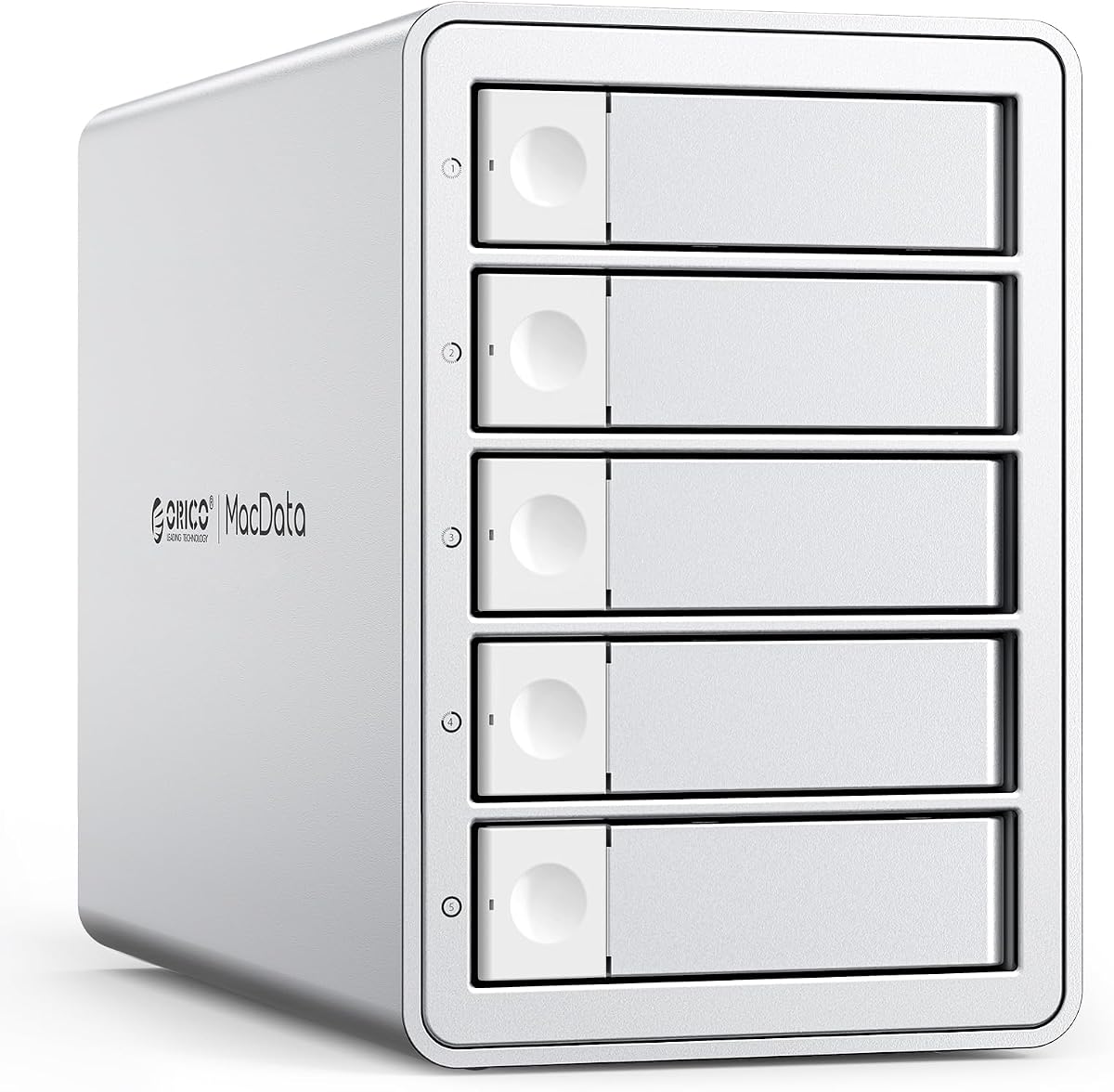
The ORICO 5 Bay RAID enclosure supports multiple RAID modes for flexible storage configurations. Users can choose from RAID 0 1 3 5 10 and JBOD to balance speed redundancy and capacity.
Pros
Eight RAID modes
150W built-in PSU
Silent cooling fan
Heavy-duty aluminum shell
Cons
Limited to 230MB/s
No USB-C port
We may earn a commission when you buy through this link, at no additional cost to you.
A 150W built-in power supply eliminates the need for external adapters ensuring stable voltage for five drives. This simplifies desk setups and reduces cable clutter significantly.
The aluminum shell and silent fan provide effective cooling even during 24/7 operation. Front and rear vents optimize airflow to prevent drive throttling under heavy data loads.
Perfect for workstations needing high capacity and RAID features this model is versatile. Its robust build and RAID options make it a reliable choice for professional content creators.
Hardware RAID Flexibility
Configurable via hardware switches for RAID 0 1 3 5 10 JBOD Clone and Clear modes.
Heavy-Duty Cooling System
Built-in 80mm silent fan and honeycomb vents dissipate heat efficiently during long sessions.
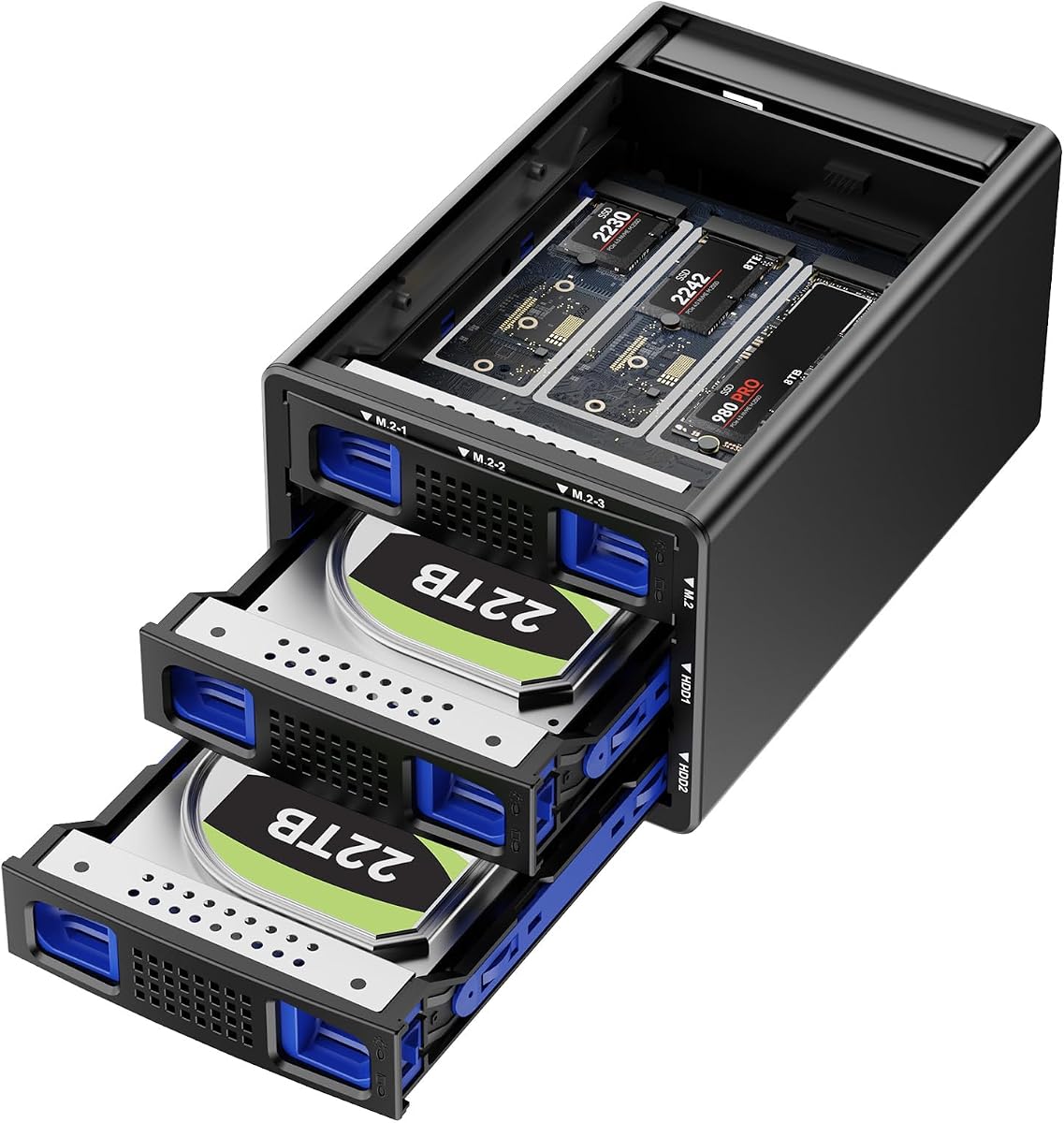
This hybrid enclosure uniquely supports both SATA drives and M.2 NVMe SSDs for combined speed and capacity. It holds two SATA drives and three NVMe drives providing 68TB total with flexible RAID modes.
Pros
SATA and NVMe support
10Gbps USB-C
Tool-free installation
Multiple RAID modes
Cons
Continuous fan operation
No Mac RAID software
We may earn a commission when you buy through this link, at no additional cost to you.
USB 3.2 Gen 2 connectivity ensures up to 10Gbps transfer speeds for high-performance tasks. The aluminum build and silent fans maintain temperatures though they run continuously for protection.
Tool-free trays simplify drive installation while hardware switches manage RAID configurations. Users should note that macOS does not support its RAID software limiting OS-specific features.
Ideal for tech enthusiasts wanting NVMe speed alongside massive HDD storage this model is innovative. Its dual drive support and speed make it a standout for hybrid storage workflows.
Innovative Hybrid Storage
Combines two SATA drives and three M.2 NVMe SSDs for 68TB total capacity and speed.
Up to 10Gbps Speed
USB 3.2 Gen 2 protocol supports full load read rates up to 300MB/s in non-RAID modes.
The ORICO 4 Bay Raid enclosure offers extensive RAID options for flexible data management. It supports eight modes including RAID 0 1 3 5 10 and JBOD to suit diverse backup and performance needs.
Pros
Eight RAID configurations
150W built-in PSU
Aluminum alloy build
Safety lock design
Cons
Limited to 235MB/s
No USB-C option
We may earn a commission when you buy through this link, at no additional cost to you.
A 150W built-in power supply ensures stability during multi-disk reads without extra adapters. The aluminum alloy housing provides durability while the silent fan cools effectively through front and rear vents.
Tray-less design with an independent safety lock prevents accidental drive ejection. This adds security during transport or frequent drive changes for active users.
Best for engineers and filmmakers needing secure external storage this model balances speed and protection. Its RAID flexibility and build quality make it a strong choice for large data projects.
Flexible RAID Expansion
Supports eight configuration modes including RAID 0 1 3 5 10 JBOD CLONE and CLEAR.
Exceptional Heat Dissipation
Aluminum enclosure with 80mm fan and vents expedites heat export for long-term stability.
The OWC Mercury Elite Pro Quad delivers robust performance for Mac and PC users alike. Its USB-C interface supports up to 10Gb/s bandwidth ensuring quick transfers for creative workflows.
Pros
USB-C 10Gb/s interface
Thunderbolt 3 compatible
Universal drive bays
Strong brand warranty
Cons
SOFTRAID not included
Lower user rating
We may earn a commission when you buy through this link, at no additional cost to you.
Four universal drive bays accept 2.5 and 3.5 inch drives providing flexibility in media choices. The enclosure works with any USB-C or Thunderbolt 3 equipped computer for wide connectivity.
SOFTRAID software is not included which may limit advanced RAID configurations for some users. However OWC provides a one-year warranty for reliability and support after purchase.
Ideal for professionals needing reliable external storage this model performs well under load. Its speed and compatibility make it a good pick for Mac users seeking expandable options.
Powerful USB-C Interface
Delivers USB 3.2 bandwidth and works with USB-C or Thunderbolt 3 Mac and Windows PCs.
Universal Drive Bays
Four bays support 2.5 and 3.5 drives for flexible drive media without adapters.
We may earn a commission when you buy through this link, at no additional cost to you.
Buying Guide – How to Choose the Best Jbod Enclosure
Selecting the right Jbod Enclosure involves evaluating capacity speed build quality and compatibility with your existing systems to ensure smooth data management.
Number of Drive Bays
The number of bays determines how many drives you can connect simultaneously. More bays offer greater expandability but increase the size and power requirements of the enclosure.
Choose at least four bays for growth but consider eight or ten if you need massive capacity upfront.
Connection Interface
USB 3.0 is common but USB 3.2 Gen 2 or Thunderbolt offers higher speeds up to 10Gbps. Ensure your computer has matching ports to maximize transfer performance.
Prioritize USB Type-C for future-proofing and broader compatibility with modern laptops and desktops.
Capacity Limits
Enclosures support varying maximum drive sizes and total capacity. Check if the enclosure handles 20TB or 30TB drives per bay to meet your long-term storage goals.
Calculate total potential storage by multiplying bays by max drive size to avoid hitting limits quickly.
Cooling System
Active cooling with fans prevents overheating during heavy use but can add noise. Look for enclosures with adjustable fan speeds or silent fans for quieter environments.
Aluminum housings help dissipate heat passively and improve durability over plastic alternatives.
RAID Capabilities
Hardware RAID offers data redundancy and speed improvements but adds complexity. If you need backups or redundancy verify if the enclosure supports RAID 1 or 5.
Simple Jbod setups are cheaper and easier but lack the protection RAID provides against drive failure.
Power Supply
Enclosures with multiple drives often need strong external or built-in power supplies. Built-in PSUs reduce cable clutter while external ones may be more replaceable.
Ensure the power rating matches your drive count to prevent instability or unexpected disconnections.
Hot Swapping Support
Hot swapping allows adding or removing drives without shutting down the system. This feature is essential for frequent backups or changing storage pools.
Verify the enclosure supports hot swaps and has physical locks to prevent accidental drive ejection.
Build Quality
Metal enclosures like aluminum provide better heat dissipation and physical protection than plastic. Look for sturdy construction that protects drives during transport or daily use.
Durable build quality extends the lifespan of both the enclosure and the internal drives.
How to Use and Care for Your Jbod Enclosure
Connect the enclosure to your computer using the included USB cable before adding drives. Ensure the power adapter is plugged in and the unit is switched on to recognize new drives immediately.
Insert drives carefully into trays or bays ensuring they are aligned correctly. Use the provided locks or trays to secure drives before powering up to prevent movement or damage.
Keep the enclosure in a well-ventilated area away from dust or direct sunlight. Clean vents regularly and avoid covering fans to maintain optimal cooling performance over time.
Frequently Asked Questions
What is a Jbod Enclosure used for?
A Jbod Enclosure allows multiple hard drives to connect to a computer via USB for expanded storage. It is ideal for backups media libraries and workflows needing accessible independent drives without RAID complexity.
Can I mix different drive sizes in a Jbod Enclosure?
Yes most Jbod enclosures support mixing different sizes and capacities across bays. This flexibility lets you add drives gradually without replacing existing hardware or starting from scratch.
Do Jbod Enclosures support RAID?
Some models include hardware RAID support but many operate in Jbod mode for independent drives. Check product specs carefully if you need redundancy or performance enhancements from RAID configurations.
How do I hot swap drives safely?
Ensure the enclosure supports hot swapping and use OS tools to safely remove drives before physical removal. Wait for indicator lights to stop before pulling drives to prevent data loss or corruption.
Will a Jbod Enclosure work with macOS?
Most Jbod enclosures work with macOS via USB Type-C or A ports. Verify compatibility with your OS version especially if using advanced features like RAID which may need specific software support.
What cables are included with Jbod Enclosures?
Many models include USB A to C and C to C cables for broad compatibility. Check product details to ensure you get the right connector type for your computer's ports.
Final Thoughts on Choosing the Best Jbod Enclosure
The TERRAMASTER D4-320 CENMATE 4 Bay and SABRENT 10-Bay lead our list for speed value and capacity respectively. Each serves distinct needs from home backups to professional media management.
Prioritize speed interface compatibility and capacity limits when selecting your Jbod Enclosure. Consider cooling and power features to ensure stability during long-term heavy use.
Prices and stock levels change regularly so verify details on product pages before buying. Choosing the right model now ensures reliable storage expansion for years to come.