
Logitech Litra Glow
4.5Editor score
TrueSoft technology
Wide flattering light
USB powered design
Adjustable mount
Streaming requires professional lighting to ensure your audience sees you clearly and without harsh shadows. A good key light for streaming provides consistent brightness adjustable color temperature and soft diffusion to flatter your complexion on camera.
We compared ten highly rated products based on brightness output color accuracy ease of control and build quality. Each item offers unique features suitable for desktop setups webcam broadcasting and professional video production environments.
Each pick highlights key strengths ideal use cases and real-world performance details. Prices change frequently so check current listings before purchasing to ensure you get the best deal available today.
4.5Editor score

4.5Editor score
4.7Editor score
As an Amazon Associate we earn from qualifying purchases.
This side by side comparison details the core specifications and capabilities of all ten selected lights to help you quickly identify the best fit for your streaming environment.


The Elgato Key Light leads our list with its powerful 2800 lumens output and professional build quality. With a 4.5 star rating users appreciate its ability to illuminate entire workspaces while maintaining soft diffused light.
We may earn a commission when you buy through this link, at no additional cost to you.
Its standout features include Wi-Fi enabled control allowing remote adjustment via the desktop app and a wide color temperature range from 2900K to 7000K. The 160 OSRAM LEDs produce minimal heat compared to traditional soft boxes ensuring long sessions remain comfortable.
While the price is higher than many competitors the performance justifies the investment for serious streamers. Some users note it requires a stable Wi-Fi network for full app functionality which may be a minor drawback in areas with weak signals.
This light is ideal for professionals seeking reliable consistent lighting that enhances on-camera presence. If you want premium control and high output without compromising color accuracy this is the top recommendation for streaming setups.
The 2800 lumens output ensures your face is well lit even in large rooms without needing additional fill lights.
OSRAM LEDs generate significantly less heat than traditional lighting which keeps your desk and surroundings cool during long broadcasts.
We may earn a commission when you buy through this link, at no additional cost to you.
The Logitech Litra Glow offers exceptional value for budget conscious creators needing reliable lighting. With a 4.5 star rating it delivers balanced full spectrum light that flatters skin tones and eliminates harsh shadows effectively.
We may earn a commission when you buy through this link, at no additional cost to you.
Its TrueSoft technology ensures cinematic color accuracy making it ideal for video conferencing and daily streaming. The frameless diffuser radiates wide soft light and the 3-way monitor mount provides precise positioning on any desk or laptop.
The main limitations are lower maximum brightness compared to studio lights and reliance on USB power. While perfect for desk setups it may struggle in very large rooms or when high intensity light is required for professional production.
This is the best choice for beginners or those with limited budgets who still want quality results. Its portable design and easy setup make it a practical solution for Zoom meetings and casual streaming without breaking the bank.
TrueSoft technology is specifically engineered to render skin tones accurately avoiding unnatural color casts common in cheap LED lights.
The adjustable 3-way mount lets you tilt rotate and raise the light to find the perfect angle for your specific webcam or monitor setup.
We may earn a commission when you buy through this link, at no additional cost to you.
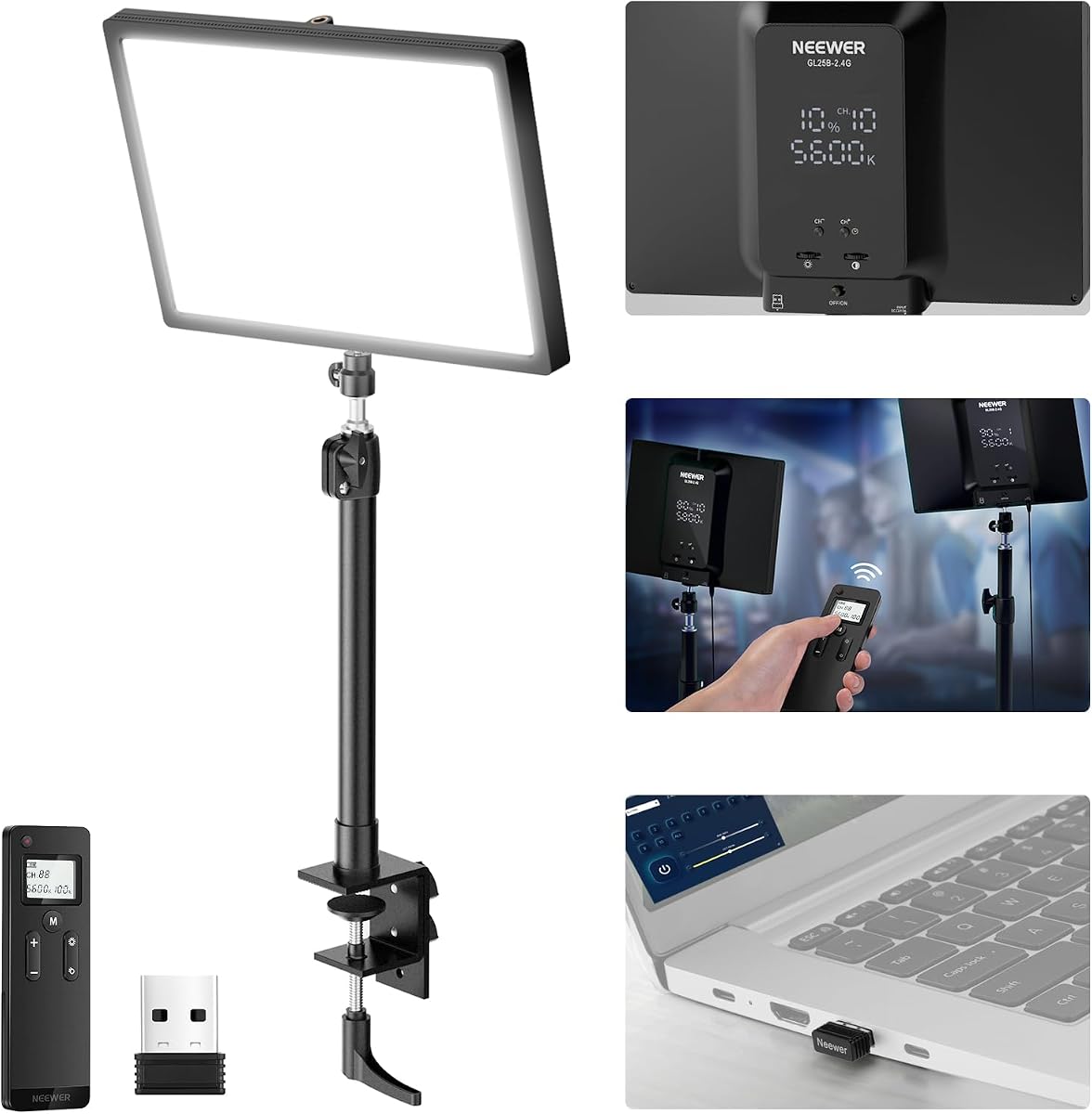
The NEEWER GL25B stands out with a 4.7 star rating offering premium features at a competitive price. Its 2300lux illuminance and CRI of 98+ ensure professional grade lighting quality suitable for detailed video work.
We may earn a commission when you buy through this link, at no additional cost to you.
The 2.4G remote and PC Mac control allow seamless adjustments without reaching for the panel. The edge emitting soft glow technology creates even diffused lighting and the fanless cooling system ensures zero noise during recordings.
The only minor drawbacks are the need for a USB USB for computer control and its slightly heavier build. However these trade-offs are acceptable given the performance and the comprehensive control options provided for advanced users.
For creators wanting high-end features without spending premium prices this light is an excellent investment. Its silent operation and accurate color rendering make it perfect for professional streaming photography and content creation.
With a CRI over 98 the light renders colors true to life which is crucial for makeup tutorials product reviews and detailed visual content.
The fanless design uses heat conduction materials to stay cool without fans ensuring no background noise interferes with audio during streams.
We may earn a commission when you buy through this link, at no additional cost to you.
The Elgato Key Light Air MK.2 offers improved brightness over its predecessor with 2100 lumens and full spectrum color control. With a 3.8 star rating it provides solid performance for those already in the Elgato ecosystem.
We may earn a commission when you buy through this link, at no additional cost to you.
Features like USB-C power and Stream Deck support allow flexible integration into existing setups. The anti-glare illumination renders color naturally on camera and the MagSafe ring enables battery power for mobile or portable streaming options.
Despite its quality the rating is lower than competitors likely due to cost and niche features. Users looking for maximum brightness per dollar might find other options better suited for pure streaming needs over integrated workflows.
This light is ideal for users who value seamless software integration and portable power options. If you use a Stream Deck or need flexible power sources this light offers unique benefits despite the higher price point.
The ability to power via USB-C laptop or MagSafe battery gives you freedom to move your streaming setup without being tethered to a wall outlet.
Support for Elgato Stream Deck allows you to automate lighting changes with a single keypress which is perfect for scene transitions during live events.
We may earn a commission when you buy through this link, at no additional cost to you.
The Weilisi Desk Ring Light is a compact solution designed for smaller workspaces and desk setups. With a 4.5 star rating it offers uniform diffused light that enhances subject features without casting distracting shadows.
We may earn a commission when you buy through this link, at no additional cost to you.
Its 360 rotating capability and telescoping stand provide flexibility to position light exactly where needed. The metal C-clamp secures it to desks up to 2.34 inches thick keeping your workspace tidy and organized.
The main limitation is the smaller panel size which may not cover large areas as effectively. Additionally the control interface is basic compared to app-based systems but it remains functional for quick adjustments.
This light suits gamers podcasters and office users needing simple reliable lighting. Its stable structure and space-saving design make it a practical choice for anyone wanting to improve webcam quality without cluttering the desk.
The C-clamp design eliminates the need for a bulky base saving valuable desk space for keyboards and other peripherals while keeping the light secure.
Rotating the light fully allows you to switch between vertical and horizontal positioning easily accommodating different camera angles and recording setups.
We may earn a commission when you buy through this link, at no additional cost to you.
The NiceVeedi 2-Pack Kit provides a complete lighting setup with two panels and stands ideal for multi-point lighting. With a 4.4 star rating it delivers stable output and precise color rendering for various recording scenarios.
We may earn a commission when you buy through this link, at no additional cost to you.
The inclusion of phone holders and 73 inch tripods makes it versatile for mobile and fixed setups. Users can adjust brightness from 10 to 100 percent and select from three color temperature settings for different moods.
The tripods are lightweight but may wobble on uneven surfaces and the power adapters are sold separately. These minor drawbacks are offset by the value of getting two lights and accessories in one package.
This kit is perfect for creators needing flexible lighting options for tutorials interviews or vlogs. The ability to set up key and fill lights quickly makes it a practical choice for content creators on a budget.
Having two separate panels allows you to set up a key light and a fill light which creates depth and professional separation in your video composition.
The included phone holders let you attach your smartphone directly to the stand enabling professional video recording without needing a separate tripod for your phone.
We may earn a commission when you buy through this link, at no additional cost to you.
The Pix 2-Pack Video Key Light earns a 4.8 star rating for its adaptability and user-friendly design. With two units included you can create a multi-light setup for balanced illumination and professional quality visuals.
We may earn a commission when you buy through this link, at no additional cost to you.
The gooseneck tubes allow precise positioning that standard mounts cannot match. An LCD display shows brightness and color temperature settings clearly ensuring you always know your current settings at a glance.
The main trade-off is lower brightness and the physical limit of gooseneck strength for heavy devices. However for desk-based streaming and close-up video work the flexibility provided is unmatched in this price range.
This kit is ideal for podcasters and streamers needing adjustable desk lighting. The dual pack offers excellent value and the detailed control options make it easy to tailor the light to your specific needs daily.
Gooseneck tubes bend and stay in place allowing you to angle the light precisely to highlight specific features or avoid lens flares during recording.
The LCD display ensures you can verify your color temperature and brightness levels instantly without guessing or needing to check an app.
We may earn a commission when you buy through this link, at no additional cost to you.
The Godox ES45 focuses on comfort with an edge-lit OLED panel that reduces eye strain during long sessions. With a 4.4 star rating it provides smooth glowing skin tones and professional on-camera presence.
We may earn a commission when you buy through this link, at no additional cost to you.
The magnetic remote controller charges automatically on the panel back so you never lose it or need batteries. The soft diffused illumination minimizes harsh highlights and the app supports multi-light control for advanced setups.
The price is higher than basic options and maximum brightness is moderate for large rooms. However the comfort features and elegant design make it a strong candidate for users prioritizing eye health and desk aesthetics.
This light is best for streamers who spend hours in front of their camera. The comfortable light quality and intuitive magnetic remote make it a premium choice for those seeking a polished professional experience.
Edge-lit LED technology creates soft glare-free light that feels more comfortable on the eyes than harsh direct LEDs during long work or gaming sessions.
The magnetic charging dock ensures the remote is always ready and charged when you need to adjust settings quickly without interrupting your content.
We may earn a commission when you buy through this link, at no additional cost to you.
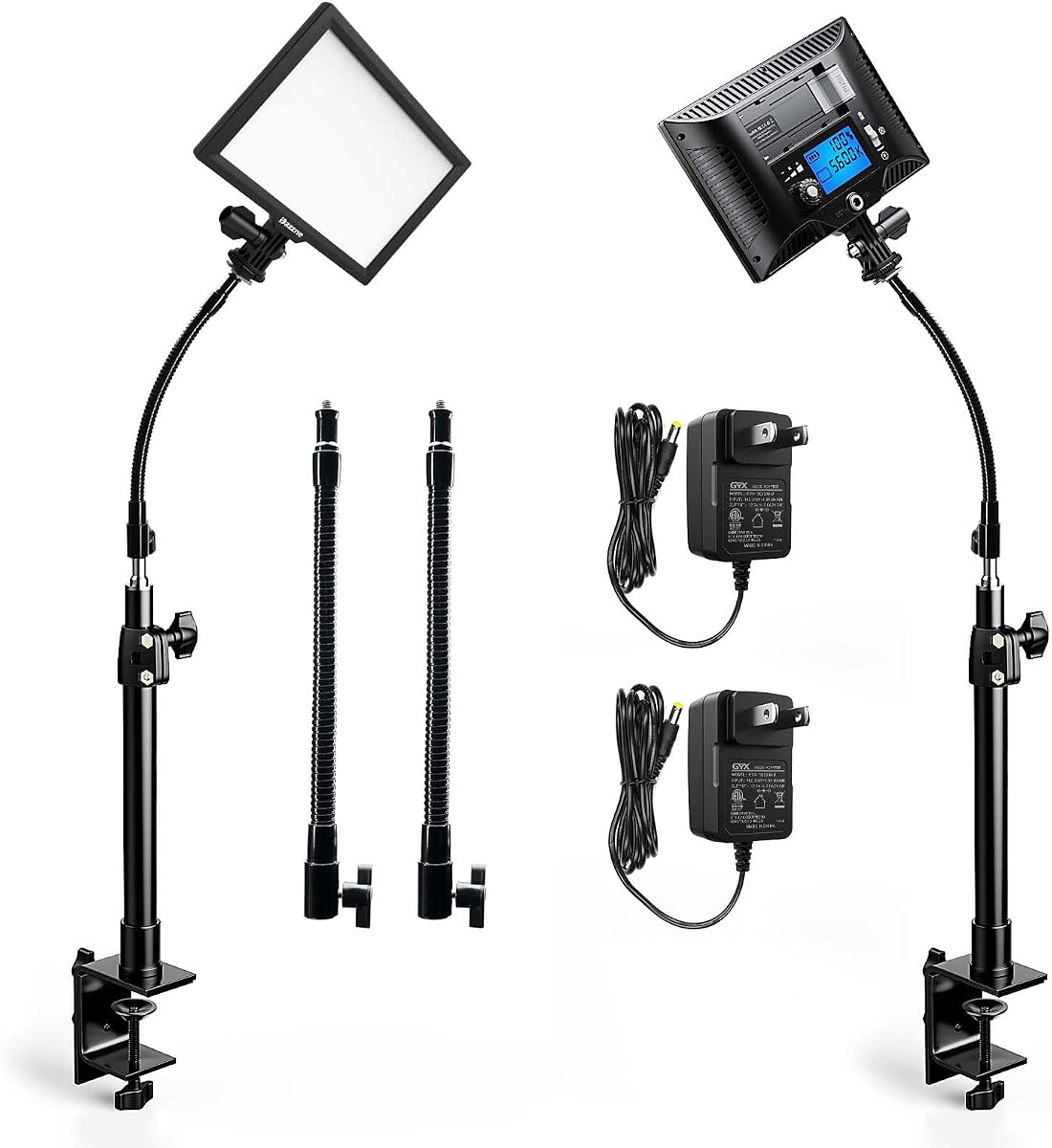
The Dazzne 2-Pack Streaming Key Light offers robust functionality with gooseneck tubes and LCD control for precision adjustments. With a 4.4 star rating it delivers soft continuous light suitable for various content creation needs.
We may earn a commission when you buy through this link, at no additional cost to you.
Each light features 118 high-quality LEDs providing balanced output and memory functions for quick recall of settings. The metal C-clamp stands provide a stable base while saving desk space for other equipment.
The lack of included batteries is a noted limitation for portable use. However for stationary setups the flexible tubes and clear displays provide excellent control making it a solid choice for consistent video quality.
This kit is ideal for podcasters and streamers needing dual lighting points. The brand focuses on photography and video quality ensuring reliable performance for creators looking to elevate their visual output.
Having two lights allows you to separate the subject from the background adding depth and making your video look more professional and less flat.
Dazzne's twenty years of focus on professional photography lights ensures that the build quality and color consistency meet industry expectations.
We may earn a commission when you buy through this link, at no additional cost to you.
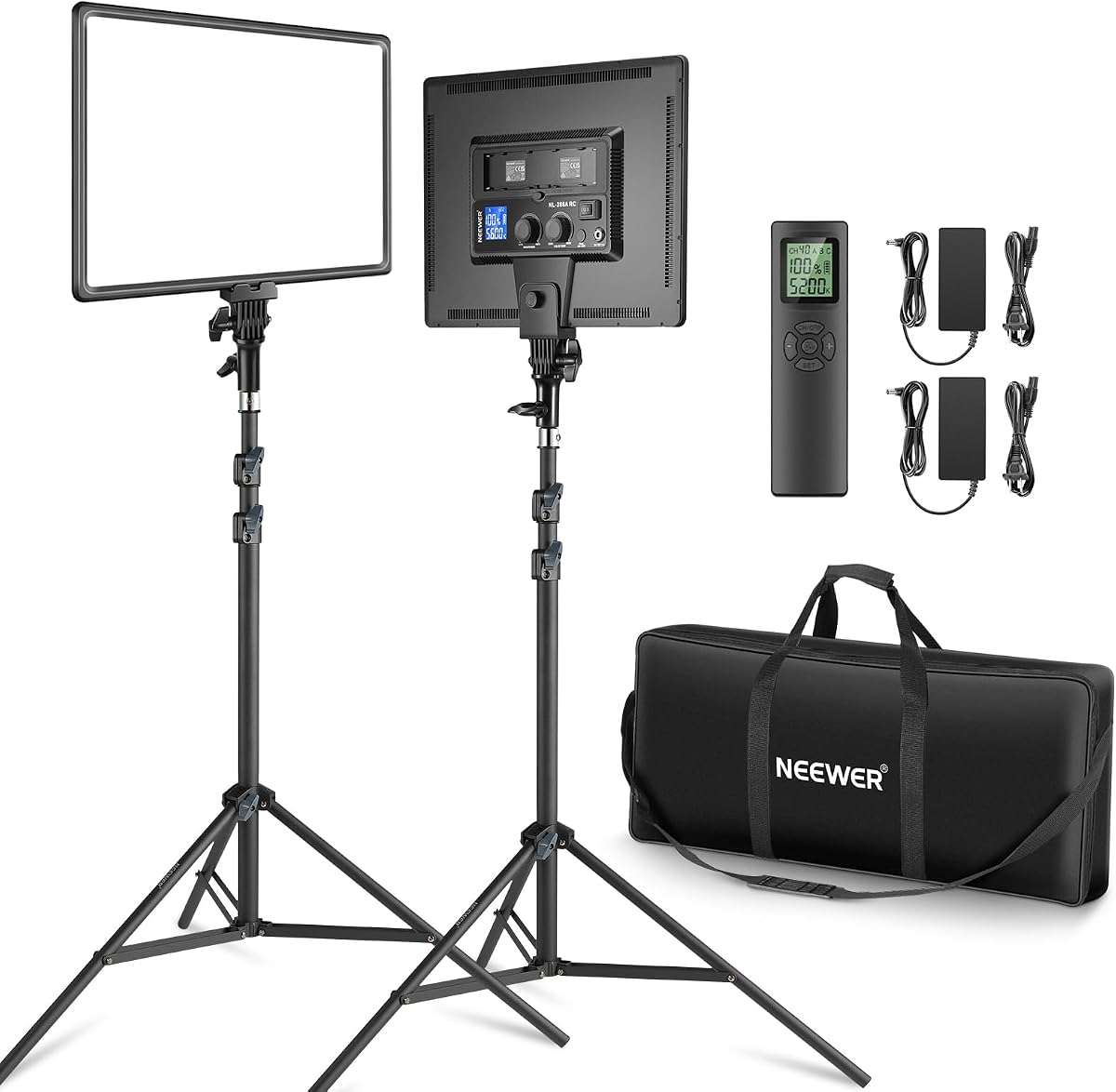
The Neewer 18" 2-Pack Kit delivers the highest brightness at 4800lux making it suitable for large studios or high-end setups. With a 4.6 star rating it provides continuous flicker-free lighting for professional photography and streaming.
We may earn a commission when you buy through this link, at no additional cost to you.
With two 45W panels and remote control over forty channels you can manage complex lighting scenarios. The ability to use NP-F batteries makes it portable for on location shoots or outdoor streaming events.
The size and weight may be challenging for small desk setups requiring tripod stands rather than clamps. However for those needing maximum output and portability this kit offers features rarely found at this price point.
This kit is best for professional studios or creators needing powerful portable lighting. The included carrying bag and battery support make it a complete solution for high-quality content production anywhere.
With 4800lux output this light provides enough intensity to overpower ambient room light ensuring consistent exposure even in challenging lighting conditions.
The option to use Sony NP-F batteries transforms these panel lights into portable studio lights perfect for field work or remote broadcasting events.
We may earn a commission when you buy through this link, at no additional cost to you.
Choosing the right key light involves evaluating brightness color accuracy control methods and build quality to fit your specific streaming needs.
Brightness determines how well your face is illuminated and whether the light can overcome ambient room darkness. Look for a light with at least 2000 lumens or 2000lux for effective streaming results.
Higher output ensures you remain visible in large rooms or during bright daytime recording sessions.
Adjustable color temperature allows you to match your lighting with your room or skin tone preferences. A range spanning 2900K to 7000K offers flexibility for warm cozy looks or cool professional tones.
Selecting a light with a wide range ensures you can adapt to different environments and video styles easily.
The CRI value measures how accurately colors appear under the light. A CRI of 95+ is recommended for streaming to ensure skin tones look natural and products appear true to life.
Higher CRI prevents unnatural hues and enhances the overall quality of your video footage significantly.
Modern lights offer physical controls touch panels app control or wireless remotes. Choose a control method that suits your workflow for easy adjustments during live sessions without interrupting the stream.
Remote or app control is particularly useful for streamers who need to change settings without reaching behind the light.
The mounting system determines where you can place the light such as clamps stands or monitor mounts. Ensure the mount is compatible with your desk thickness and offers stable support.
Stable mounting prevents unwanted movement and helps maintain consistent lighting angles during active broadcasts.
Lights that generate excessive heat can become uncomfortable over long sessions and some use fans that create noise. Fanless designs or efficient cooling systems ensure silent operation.
Selecting a light with good heat dissipation ensures comfort and protects your equipment during extended streaming hours.
If you stream from multiple locations consider the weight and power requirements of the light. USB-C or battery-powered options provide flexibility for travel and on-the-go recording.
Portable power options ensure you can maintain quality lighting even when traditional power sources are unavailable.
Durable materials and solid construction ensure the light lasts for years of regular use. Check reviews for reliability and warranty support before making a final decision.
Investing in a well-built light prevents frequent replacements and ensures consistent performance over time.
Position your key light at eye level or slightly above at a 45-degree angle to your face. This placement creates natural shadows that define your features without creating harsh dark spots.
Adjust brightness and color temperature to match your background and camera settings. Use the remote or app to fine-tune these settings for optimal skin tone rendering.
Keep the diffuser clean by wiping it gently with a dry cloth. Avoid touching LEDs directly and ensure proper ventilation to prevent heat buildup during long streaming sessions.
For most indoor streaming setups a brightness of 2000 to 3000 lumens is ideal. This level ensures your face is well-lit without being overpowering or causing eye strain.
Warm light around 3000K creates a cozy inviting atmosphere while cool light near 6000K looks more professional. Match your choice to your room decor and personal branding style.
Yes a higher CRI of 95+ ensures accurate color representation which is crucial for product reviews and makeup tutorials. It prevents skin tones from appearing unnatural or discolored.
Using multiple lights such as a key and fill light can create depth and professional separation in your video. Many top picks include packs that support multi-light setups.
Most key lights work out of the box with physical controls. Advanced models may offer apps for precise adjustments but basic functionality is always available without software.
Ensure the light has adequate ventilation and use fanless models for silent operation. Avoid covering the back vents and use the light in a well-ventilated room.
Clamp stands save desk space and are ideal for fixed setups while tripods offer portability. Choose based on whether you need flexibility or space-saving stability.
USB-C powered lights or those with battery compatibility are best for portable streaming. These options allow you to power the light from laptops or battery banks easily.
The Elgato Key Light Logitech Litra Glow and NEEWER GL25B lead our list for overall performance budget value and premium features respectively. Each offers distinct advantages depending on your setup and goals.
Prioritize brightness color accuracy and mounting options when selecting your ideal lighting. These factors directly impact the professional look and comfort of your streaming sessions.
Prices and availability may change so verify current listings before purchasing. With the right key light you can ensure your content looks polished and engaging for all viewers.