
Logitech K120
4.6Editor score
Spill-Resistant Design
Plug-and-Play USB Connection
Full-Size Standard Layout
Finding the right Keyboard for Pos System is essential for smooth retail operations. These devices must handle high-volume transactions while maintaining speed and accuracy throughout busy shifts.
We compared ten leading models based on layout design durability connectivity options and special features like integrated readers. Each option offers unique benefits for different commercial environments.
Every pick highlights key strengths and ideal use cases to help you decide. Prices fluctuate so verify current listings before purchasing your next point of sale input device today.
4.6Editor score
4.8Editor score

4.5Editor score
As an Amazon Associate we earn from qualifying purchases.
This table provides a side-by-side comparison of all ten reviewed products highlighting key specifications and core features for easy decision making across different budget levels.


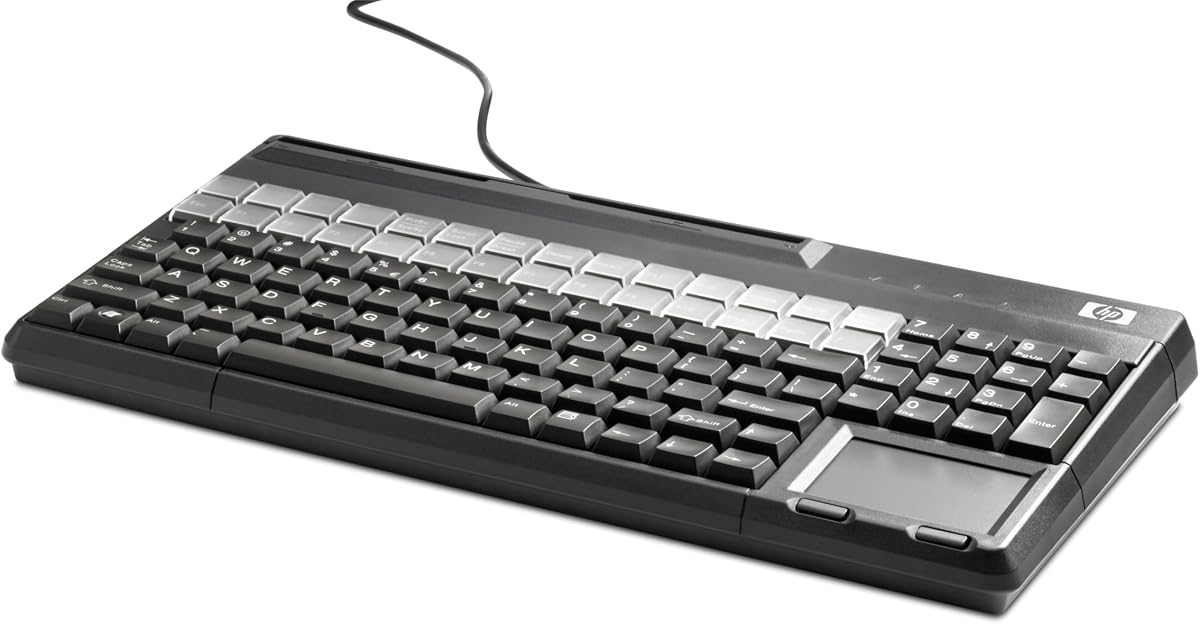
The HP POS Keyboard stands out as a top choice for retail environments needing specialized input solutions. It offers a robust 106 key layout with extensive customization options for frequent tasks.
We may earn a commission when you buy through this link, at no additional cost to you.
Its standout quality is the inclusion of 28 relegendable keys and a built-in magnetic stripe reader. This integration reduces desk clutter while ensuring efficient transaction processing.
While the price is higher than standard keyboards, the functionality justifies the cost for busy stores. Users may miss a touchpad but gain critical payment processing tools directly.
Businesses needing reliable POS entry should consider this model highly. Its combination of durability and specialized features makes it an exceptional choice for point of sale setups.
The built-in magnetic stripe reader allows cashiers to process cards quickly without reaching for external devices.
With 28 relegendable keys you can label functions for your specific inventory or POS software needs.
We may earn a commission when you buy through this link, at no additional cost to you.
The Cherry G86-62401 is an excellent option for POS setups with limited counter space. Its compact design includes an integrated touchpad eliminating the need for a separate mouse.
We may earn a commission when you buy through this link, at no additional cost to you.
Key strengths include spill resistance and a full 106 key QWERTY layout. This ensures comfort during long shifts while protecting against common kitchen or retail spills.
Users might find the customization options limited compared to other models. The touchpad is convenient but may not be as precise as a standalone mouse for complex tasks.
Small retail shops or kiosks will appreciate this space-saving solution. It offers essential functionality in a streamlined package that fits tight work areas perfectly.
Integrating the touchpad directly into the keyboard frees up valuable counter space for other essential equipment.
The spill-resistant design safeguards internal components from accidental spills common in food service environments.
We may earn a commission when you buy through this link, at no additional cost to you.
The Logitech K120 offers a practical and affordable solution for basic POS systems. It provides a full-size layout with a number pad essential for data entry tasks.
We may earn a commission when you buy through this link, at no additional cost to you.
Its main strengths are durability and ease of setup. The spill-proof design ensures longevity in busy environments while plug-and-play connectivity saves time during installation.
While it lacks specialized POS features like magnetic readers it excels in reliability. Users accustomed to standard keyboards will find the typing experience familiar and comfortable.
Businesses needing a simple dependable keyboard should consider this model first. It balances cost and performance effectively for small retail or office POS setups.
This model provides essential typing functionality at a fraction of the cost of specialized POS keyboards.
Designed for all-day use the K120 withstands continuous typing demands without performance degradation.
We may earn a commission when you buy through this link, at no additional cost to you.
The Cherry Lpos G86-71411 is designed for demanding POS environments requiring extensive customization. With 169 keys and 42 relegendable options it offers unmatched flexibility.
We may earn a commission when you buy through this link, at no additional cost to you.
Its standout feature is the combination of high key count and a built-in magnetic stripe reader. This setup streamlines complex workflows by keeping all functions accessible.
The larger footprint may be a drawback for smaller counters. Setup might also require more time due to the extensive customization options available.
Enterprise-level POS systems will benefit most from this model. Its specialized features support efficient transactions in high-volume retail settings.
With 42 relegendable keys you can tailor the keyboard to match your specific software commands exactly.
The extensive key layout ensures quick access to rare functions without navigating deep software menus.
We may earn a commission when you buy through this link, at no additional cost to you.
The Perixx PERIBOARD-513III offers a comfortable all-in-one solution for general POS tasks. It combines a full-size keyboard with an integrated touchpad and quiet scissor keys.
We may earn a commission when you buy through this link, at no additional cost to you.
Key strengths include its quiet operation and multimedia hotkeys for quick control access. The integrated touchpad saves space while providing necessary navigation capabilities.
The plastic construction may not withstand heavy industrial abuse. Users should expect standard durability rather than industrial-grade resilience.
Retail environments needing a balance of comfort and cost will find this model ideal. It offers modern features without the high price tag of specialized POS gear.
The scissor switch mechanism ensures minimal noise during typing keeping the store environment calm.
Dedicated multimedia keys provide quick access to audio or video controls for digital signage.
We may earn a commission when you buy through this link, at no additional cost to you.
The Adesso Easy Touch 630Ub is built for harsh environments where liquids are common. Its IP67 waterproof rating ensures survival even during accidental submersion.
We may earn a commission when you buy through this link, at no additional cost to you.
Key strengths include large high-contrast keys and easy cleaning capabilities. The robust construction handles rough treatment while remaining functional after spills.
The bulky size may be a constraint for smaller POS counters. Layout options are limited to standard configurations without advanced POS customization.
Restaurants or industrial settings needing reliable wet-weather performance should consider this model. It offers unmatched durability for environments requiring frequent washing.
The IP67 rating allows for easy cleaning without fear of water damaging the keyboard internals.
Large printed keys improve readability reducing typing errors in low light or busy environments.
We may earn a commission when you buy through this link, at no additional cost to you.
The Cherry Electronics G86-71401 offers extensive programmability with 127 programmable keys and 42 relegendable ones. It is designed for specialized POS workflows requiring high customization.
We may earn a commission when you buy through this link, at no additional cost to you.
Key strengths include its integration of a touchpad and professional features. The layout supports complex software functions directly on the keyboard.
Lower user ratings may indicate reliability or usability challenges. The complexity of setting up all programmable keys requires technical knowledge.
Businesses with dedicated IT support might benefit from this model. It offers deep functionality but demands careful configuration to reach its full potential.
With over 120 programmable keys you can map almost any software command directly to a physical button.
The built-in touchpad allows for cursor control without needing a separate mouse on the counter.
We may earn a commission when you buy through this link, at no additional cost to you.
The Cherry KC 1000 is a security-focused keyboard designed for smartcard transactions. It includes a PC/SC smartcard reader and secure PIN entry capabilities.
We may earn a commission when you buy through this link, at no additional cost to you.
Key strengths include FIPS 201 approval and support for ISO 7816 compliant cards. It ensures secure data handling for government or high-security business needs.
The specialized nature limits its use to smartcard transactions. Standard POS setups might not benefit from its security features.
Organizations requiring secure smartcard authentication should consider this model. It provides certified security for sensitive transactions and identity verification tasks.
The built-in smartcard reader ensures secure handling of sensitive customer data during checkout.
FIPS 201 approval ensures this device meets strict federal security standards for information protection.
We may earn a commission when you buy through this link, at no additional cost to you.
The Cherry G80-1800 is a compact mechanical keyboard built for continuous industrial use. It features MX Black switches rated for over 100 million actuations per key.
We may earn a commission when you buy through this link, at no additional cost to you.
Key strengths include its durability and dual interface support for USB and PS/2. The compact dimensions fit well in tight spaces without sacrificing key feedback.
The lack of a numeric pad may be a drawback for data entry. The mechanical feel can also be noisy compared to membrane options.
Industrial environments requiring high durability will appreciate this model. It offers reliable performance for demanding shifts where standard keyboards fail quickly.
MX Black switches provide a robust typing experience that withstands heavy daily use without failure.
Dual USB and PS/2 support ensures compatibility with a wide range of legacy and modern systems.
We may earn a commission when you buy through this link, at no additional cost to you.
The Logitech K270 provides wireless freedom for POS setups needing mobility. It features a reliable 2.4GHz connection and a 24-month battery life.
We may earn a commission when you buy through this link, at no additional cost to you.
Key strengths include spill-proof design and full-size layout with number pad. The plug-and-play receiver makes setup quick without software installation.
Wireless connections may occasionally suffer interference from other devices. Battery changes are necessary but infrequent due to the long life cycle.
Retail environments needing a flexible input solution should consider this model. It offers convenience and reliability for counters requiring clean cable management.
A reliable wireless connection allows flexible placement of the keyboard without cable constraints.
With 24 months of battery life you can operate continuously for years without frequent replacements.
We may earn a commission when you buy through this link, at no additional cost to you.
Selecting the right POS keyboard involves balancing durability layout features and connectivity to match your specific retail environment needs.
The layout and total key count determine how efficiently staff can enter data. Standard QWERTY layouts are familiar but specialized POS keyboards offer extra keys for common commands.
Look for layouts that match your POS software requirements.
POS keyboards endure heavy use and spills daily. Look for spill-resistant or waterproof designs with sturdy keys to prevent downtime from accidents.
Prioritize build quality that matches your environment's intensity.
Specialized features like magnetic stripe readers or touchpads can streamline checkout. Decide if these built-in tools are necessary for your workflow.
Features should match your specific transaction processing needs.
Connectivity affects how the keyboard interfaces with your POS system. USB is standard but wireless options offer cleaner desk setups if interference is minimal.
Ensure compatibility with your existing POS hardware.
Relegendable or programmable keys allow you to tailor the keyboard to your business. This is valuable for complex tasks reducing steps to complete sales.
Choose higher customization if you manage complex inventory or orders.
POS keyboards range from basic models to high-end specialized units. Determine how much you can spend while ensuring the keyboard meets your core requirements.
Balance cost with necessary features to avoid overbuying.
Employees type all day so comfort matters to prevent fatigue. Look for comfortable key profiles and ergonomics that reduce strain during long shifts.
Prioritize comfort to maintain staff productivity.
Reliable warranty coverage ensures you can replace faulty units quickly. Check the manufacturer's support reputation to minimize downtime.
Good support is crucial for business continuity.
Connect your keyboard to the POS system using the provided cable or wireless receiver. Ensure it is detected by the software before starting your shift.
Clean the keyboard regularly by turning it upside down to remove debris. Use a soft cloth and mild solution to wipe keys without saturating the device.
Avoid using abrasive cleaners or soaking the keyboard unless rated waterproof. Replace batteries early for wireless models to ensure continuous operation.
For small retail, the Logitech K120 or Perixx PERIBOARD-513III offer great value. They provide full layouts and durability at affordable prices suitable for low to medium volume.
Most POS keyboards work plug-and-play via USB without special software. However, programmable models may require drivers or utilities to map specific keys to your POS.
You can use a standard keyboard but it may lack specialized features like magnetic readers. Specialized POS keyboards optimize workflows for faster checkout processing.
Replace a POS keyboard when keys become unresponsive or it no longer meets software requirements. High-quality models often last five to ten years with proper care.
Wireless keyboards are reliable if interference is low and battery life is strong. Ensure the receiver connection is stable to avoid dropped inputs during transactions.
Membrane keyboards are quiet and affordable while mechanical ones offer durability and tactile feedback. Choose mechanical for high-traffic areas needing long lifespan.
Yes most spill-resistant keyboards can be wiped down easily. Waterproof models allow deeper cleaning with water for hygiene in food service environments.
Most brands offer warranties ranging from one to two years. Check the product listing to confirm warranty coverage and return policies before purchasing.
Choosing the right Keyboard for Pos System depends on your specific workflow needs and environment. The HP POS Keyboard offers specialized features for efficiency.
Prioritize durability and layout compatibility to ensure smooth operations. Consider how the keyboard integrates with your existing hardware for best results.
Always verify current prices and specifications before buying since offerings change frequently. Select a model that balances cost with the functionality your business requires today.